 Botmonster Tech
Redis Streams vs Kafka: 100K-500K ops/sec alternative

Redis Streams give you a light, self-hosted option versus Apache Kafka
for event-driven data pipelines. You get append-only log semantics, consumer groups with ack tracking, and sub-millisecond latency on a single Redis
7.4+ instance. Producers XADD events to a stream. Consumer groups read with XREADGROUP in Python via redis-py
. Manual XACK calls plus a pending entry list (PEL) give you at-least-once processing.
What follows covers stream basics, consumer groups with failure recovery, a full producer and consumer pipeline with a dead-letter queue, and the ops practices to keep Redis Streams healthy in production.
Redis Streams vs. Kafka: When the Lightweight Option Wins
Kafka is the default answer when someone says “event streaming,” and for good reason. It handles multi-datacenter replication, petabyte-scale retention, and a huge connector ecosystem via Kafka Connect . But Kafka also asks a lot of you: a minimum three-node cluster running KRaft (or the older ZooKeeper setup), JVM tuning, partition planning, and dedicated ops skill. For many teams, that is a lot of overhead when the real need is “process 50K events per second between three microservices.”
Redis Streams, introduced in Redis 5.0 and mature in Redis 7.4+, give you an append-only log with entry IDs like <millisecondsTime>-<sequenceNumber>. The model mirrors Kafka’s offset model. Producers append events, consumers read them in order, and consumer groups split the work across workers.
A single Redis instance handles roughly 100,000 to 500,000 XADD ops per second based on entry size and hardware. Kafka handles 1M+ messages per second per partition, but that number comes from a multi-broker cluster, not a single process. Benchmark results show Redis at roughly 3x higher throughput than Kafka for 100K message batches. However, Kafka’s batching and compression edge shows up at higher volumes.
Latency profiles differ too. Redis Streams give sub-millisecond median latency for XADD and XREAD. Still, tail latency can spike under memory pressure: one benchmark measured a p99 spread of 0.56ms to 810ms. Kafka’s median latency sits higher (5 to 50ms typically), but the tail is tighter, with a measured spread of 19.68ms to 265.92ms. Redis tunes for raw speed; Kafka tunes for consistency.
On storage, Redis Streams use a radix tree of macro-nodes with compact encoding for fields that repeat across entries. A stream of 10 million events with 5 fields each often takes 2 to 4 GB of RAM based on field sizes. That is fine on modern hardware. However, retention is capped by available memory, not disk.
| Feature | Redis Streams | Apache Kafka |
|---|---|---|
| Minimum infrastructure | Single Redis instance | 3-node KRaft cluster |
| Throughput (single node) | 100K-500K ops/sec | N/A (requires cluster) |
| Median latency | Sub-millisecond | 5-50ms |
| Storage | In-memory (RAM-bounded) | Disk-based (unlimited retention) |
| Consumer groups | Built-in with PEL tracking | Built-in with offset tracking |
| Multi-datacenter replication | Manual (Redis Sentinel/Cluster) | Built-in (MirrorMaker) |
| Connector ecosystem | None | Kafka Connect (hundreds of connectors) |
Pick Redis Streams when you already run Redis, throughput stays under 500K events per second, you don’t need multi-day retention, and you want to skip running a Kafka cluster. Pick Kafka when you need cross-datacenter replication, long-term retention, or the Kafka Connect ecosystem.
Valkey 8.1 (the open-source Redis fork at version 8.1.6) is a drop-in swap with the same Streams support and no licensing concerns.
Stream Fundamentals: XADD, XREAD, and Stream IDs
Before you build consumer groups, learn the three basics: adding entries, reading entries, and how stream IDs work.
XADD appends an entry to a stream:
XADD mystream * sensor temp value 22.5 unit celsiusThe * tells Redis to auto-generate the entry ID from the current timestamp plus a sequence number. The returned ID looks like 1679000000000-0: milliseconds since epoch, dash, sequence number. You can pass an explicit ID for replay, but auto-generation is the norm.
Kafka messages are opaque byte arrays. They need an outside serializer. Redis Stream entries are ordered dictionaries instead. Each entry has an ID and one or more field-value pairs with built-in structure. So you can inspect entries straight from redis-cli without a deserializer.
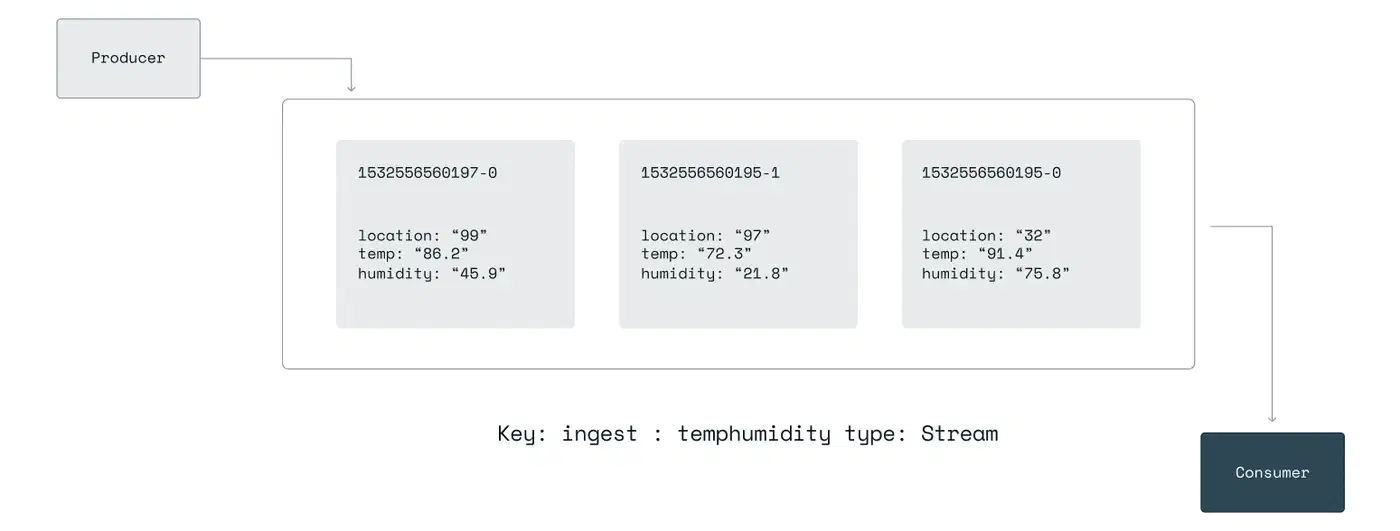
XREAD retrieves entries from one or more streams:
XREAD COUNT 10 BLOCK 5000 STREAMS mystream 0This reads up to 10 entries from ID 0 (the start of the stream). It blocks for up to 5 seconds if no entries are ready. Use $ instead of 0 to read only entries that arrive after the call.
For range queries and stream inspection:
XLEN mystream                              # total entry count
XRANGE mystream - +                        # all entries (start to end)
XRANGE mystream 1679000000000-0 + COUNT 100 # paginated from a specific ID
Trimming prevents unbounded growth:
XTRIM mystream MAXLEN ~ 1000000The ~ lets Redis trim by whole macro-nodes from the radix tree, not entry by entry. The real count may sit a bit above 1 million. You can also use MINID to trim entries older than a given timestamp-based ID.
In Python with redis-py 7.1+:
import redis

r = redis.Redis(host="localhost", port=6379, decode_responses=True)

# Produce an entry
entry_id = r.xadd("mystream", {"sensor": "temp", "value": "22.5"})
print(f"Added entry: {entry_id}")

# Read entries from the beginning
entries = r.xread({"mystream": "0-0"}, count=10, block=5000)
for stream_name, stream_entries in entries:
    for entry_id, fields in stream_entries:
        print(f"  {entry_id}: {fields}")
Consumer Groups: Distributed Processing with Acknowledgments
Consumer groups turn Redis Streams from a simple log into a real data pipeline. They give you the same shape as Kafka consumer groups. Many consumers share the work, each message goes to one consumer in the group, and unacked messages stay tracked for redelivery.
Create a consumer group:
XGROUP CREATE mystream mygroup $ MKSTREAMThe $ means start only from entries that arrive after group creation. Use 0 to process the whole stream history. MKSTREAM creates the stream if it doesn’t exist yet.
Read as a consumer within the group:
XREADGROUP GROUP mygroup consumer1 COUNT 10 BLOCK 5000 STREAMS mystream >The > is the key bit: it means “give me entries not yet sent to any consumer in this group.” Each entry goes to one consumer, and Redis spreads the load on its own.
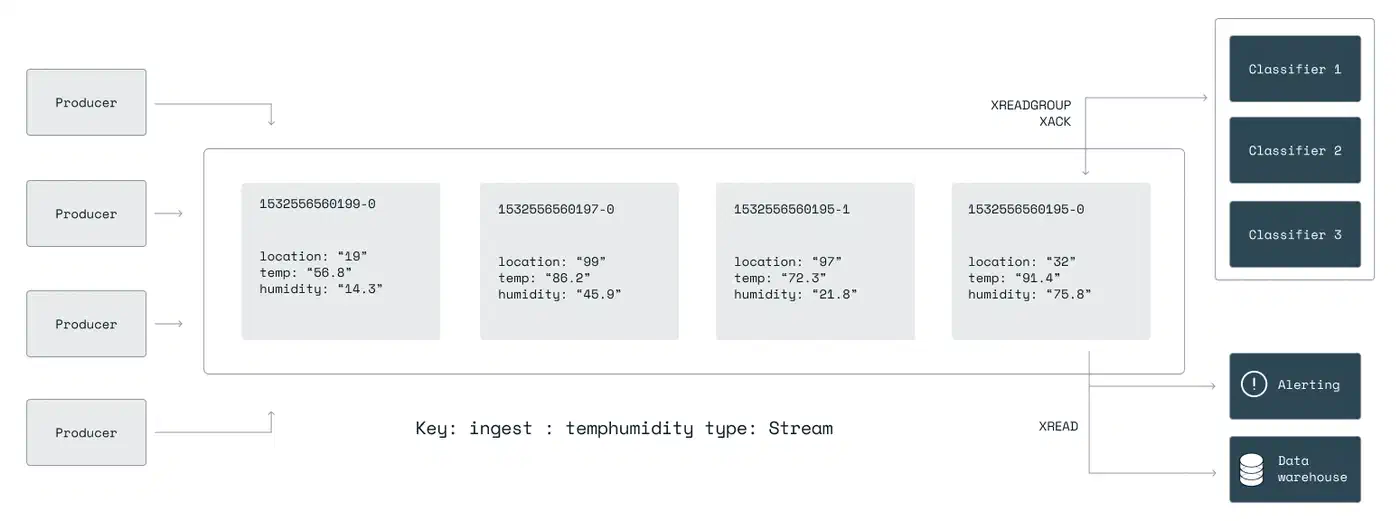
After processing an entry, acknowledge it:
XACK mystream mygroup 1679000000000-0This drops the entry from the consumer’s pending entry list (PEL). Until acked, the entry stays pending. Another consumer can claim it if the first one fails.
The PEL is the heart of reliability. Inspect it with:
XPENDING mystream mygroupThis returns the total pending count, the min and max pending entry IDs, and per-consumer counts. When a consumer crashes without acking its entries, those entries sit in the PEL waiting for recovery.
Recovery runs through XAUTOCLAIM:
XAUTOCLAIM mystream mygroup consumer2 60000 0-0This moves entries pending for more than 60 seconds (60000 ms) to consumer2. It is the Streams version of Kafka’s consumer rebalance, but explicit, not automatic. You pick when and how stale entries move.
The Python pattern for consumer group reads:
# Create the group (run once)
try:
    r.xgroup_create("mystream", "mygroup", id="$", mkstream=True)
except redis.exceptions.ResponseError as e:
    if "BUSYGROUP" not in str(e):
        raise  # group already exists, that's fine

# Read as a consumer
results = r.xreadgroup(
    "mygroup", "consumer1",
    {"mystream": ">"},
    count=10,
    block=5000
)

for stream_name, entries in results:
    for entry_id, fields in entries:
        print(f"Processing {entry_id}: {fields}")
        # ... process the entry ...
        r.xack("mystream", "mygroup", entry_id)
Building the Pipeline: Producer, Consumer, and Dead-Letter Queue
With the basics in place, here is a full pipeline: a producer, consumer workers, retry logic, and a dead-letter queue for poison messages.
The producer appends events and trims the stream as it goes:
import json
import redis

r = redis.Redis(host="localhost", port=6379, decode_responses=True)

def produce_event(event_type: str, payload: dict):
    entry_id = r.xadd(
        "events",
        {
            "type": event_type,
            "version": "1",
            "payload": json.dumps(payload),
        },
        maxlen=1_000_000,  # cap stream at ~1M entries
    )
    return entry_id

# Example: order created event
produce_event("order.created", {"order_id": "12345", "total": 99.99})
Adding a version field to every entry is a simple schema strategy. Consumers check the version and pick the right deserializer. When you need to change the payload shape, bump the version and teach consumers both old and new formats. If your producers are HTTP services, lean on type-safe payload validation
at the edge to keep bad entries out of the stream. For more formal schema work, pair Protobuf
or Avro
with a schema registry. For most Redis Streams cases the version-field method is enough.
The consumer worker runs an infinite loop with error handling:
import json
import logging
import redis

logging.basicConfig(level=logging.INFO)
logger = logging.getLogger(__name__)

r = redis.Redis(host="localhost", port=6379, decode_responses=True)

MAX_RETRIES = 3
CONSUMER_NAME = "consumer1"
GROUP_NAME = "mygroup"
STREAM_NAME = "events"

def process_entry(entry_id: str, fields: dict):
    """Your business logic here."""
    event_type = fields["type"]
    payload = json.loads(fields["payload"])
    logger.info(f"Processing {event_type}: {payload}")
    # ... actual processing ...

def move_to_dlq(entry_id: str, fields: dict, error: str):
    """Move a poison message to the dead-letter queue."""
    r.xadd("dead_letters", {
        "original_id": entry_id,
        "original_stream": STREAM_NAME,
        "type": fields.get("type", "unknown"),
        "payload": fields.get("payload", "{}"),
        "error": error,
    })
    r.xack(STREAM_NAME, GROUP_NAME, entry_id)
    r.delete(f"retries:{entry_id}")
    logger.warning(f"Moved {entry_id} to dead-letter queue: {error}")

def consumer_loop():
    # Ensure group exists
    try:
        r.xgroup_create(STREAM_NAME, GROUP_NAME, id="$", mkstream=True)
    except redis.exceptions.ResponseError:
        pass

    while True:
        results = r.xreadgroup(
            GROUP_NAME, CONSUMER_NAME,
            {STREAM_NAME: ">"},
            count=10,
            block=5000,
        )
        if not results:
            continue

        for stream_name, entries in results:
            for entry_id, fields in entries:
                # Check retry count
                retry_count = int(r.hget(f"retries:{entry_id}", "count") or 0)
                if retry_count >= MAX_RETRIES:
                    move_to_dlq(entry_id, fields, "max retries exceeded")
                    continue

                try:
                    process_entry(entry_id, fields)
                    r.xack(STREAM_NAME, GROUP_NAME, entry_id)
                    r.delete(f"retries:{entry_id}")
                except Exception as e:
                    logger.error(f"Failed to process {entry_id}: {e}")
                    r.hincrby(f"retries:{entry_id}", "count", 1)
                    # Do NOT ack - entry stays in PEL for XAUTOCLAIM

if __name__ == "__main__":
    consumer_loop()
On failure, the entry stays unacked in the PEL. A retry counter in a Redis hash tracks how many times you have tried it. After MAX_RETRIES failures, the entry moves to a dead_letters stream. From there you can inspect and replay it by hand.
Reclaiming stale entries needs a separate process (or a periodic task inside each consumer):
def reclaim_stale_entries():
    """Claim entries pending for more than 60 seconds."""
    result = r.xautoclaim(
        STREAM_NAME, GROUP_NAME, CONSUMER_NAME,
        min_idle_time=60000,  # 60 seconds
        start_id="0-0",
        count=50,
    )
    # result contains (next_start_id, claimed_entries, deleted_ids)
    if result[1]:
        logger.info(f"Reclaimed {len(result[1])} stale entries")
To scale, run many copies of the consumer worker with different names (consumer1, consumer2, consumer3) in the same group. Redis spreads entries across them on its own. If one copy dies, XAUTOCLAIM in the others picks up its pending work. To prove this failover before shipping, spin up a real Redis container in your test suite. The patterns in our guide on integration tests with Testcontainers
show how.
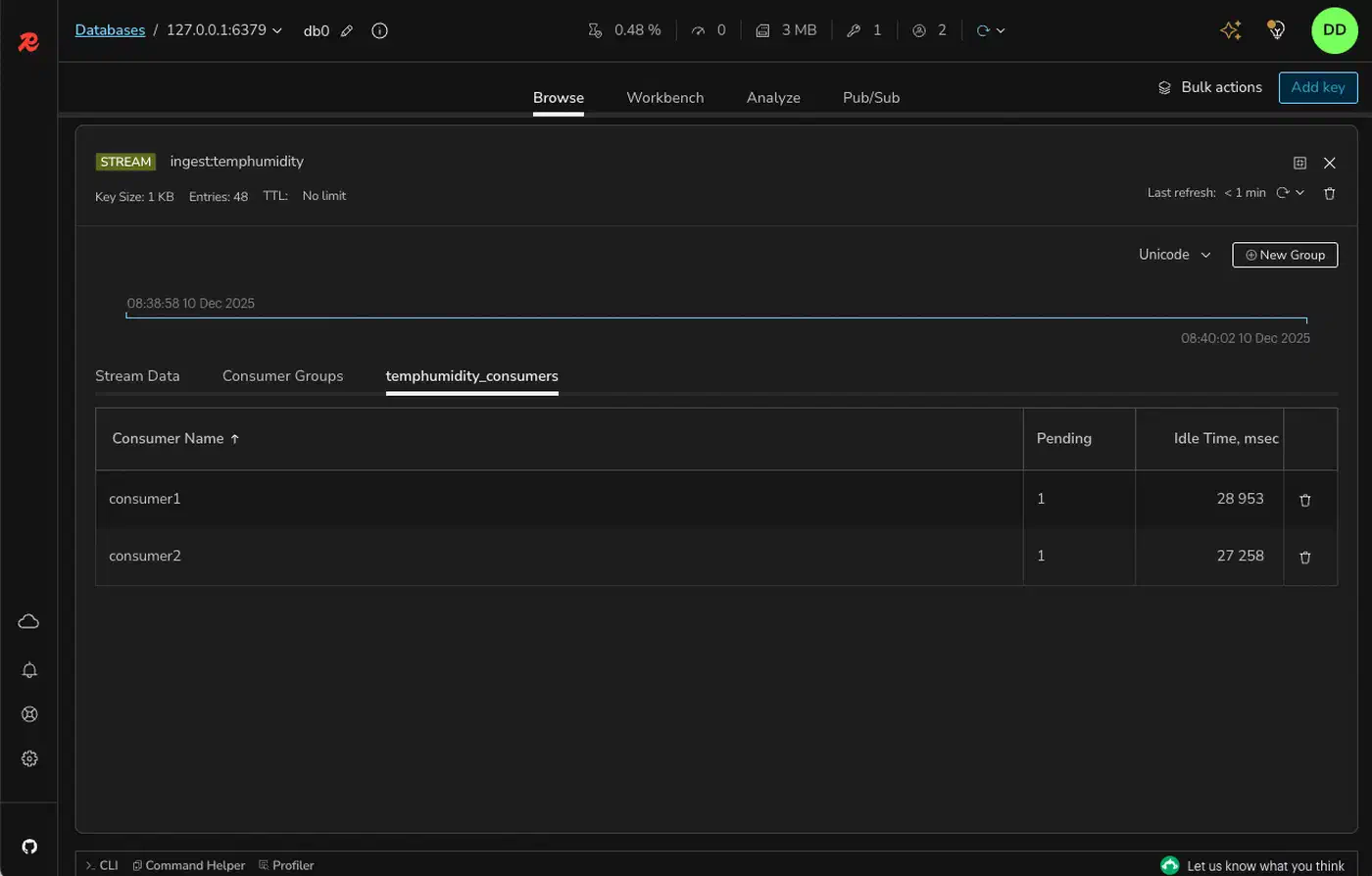
Redis Streams give you at-least-once delivery via the PEL and XACK. To get closer to exactly-once, make your consumers idempotent. Check a processed-IDs set before you process:
if r.sismember("processed", entry_id):
    r.xack(STREAM_NAME, GROUP_NAME, entry_id)
    continue
# ... process ...
r.sadd("processed", entry_id)
r.xack(STREAM_NAME, GROUP_NAME, entry_id)
Redis Pub/Sub vs. Redis Streams
Streams and Redis Pub/Sub both move messages, but they serve different goals.
Pub/Sub is fire-and-forget broadcast. Messages don’t persist. If a subscriber drops off and reconnects, every message sent during the gap is gone for good. There is no ack, no replay, and no consumer groups. Latency is very low (sub-millisecond). So Pub/Sub fits real-time notifications where message loss is fine: chat presence pings, cache invalidation signals, live dashboard pushes.
Streams persist and ack. Entries stay in the stream until you trim them. Consumers can drop off, reconnect, and pick up where they left off. The PEL keeps nothing silently dropped. The tradeoff is a bit more latency (around 1 to 2ms over Pub/Sub) and memory use for the kept entries.
| Aspect | Redis Pub/Sub | Redis Streams |
|---|---|---|
| Persistence | None (fire-and-forget) | Append-only log (until trimmed) |
| Delivery guarantee | None | At-least-once (with XACK) |
| Consumer groups | No | Yes |
| Message replay | Not possible | Read from any point in history |
| Disconnect handling | Messages lost | Resume from last position |
| Typical latency | Sub-millisecond | 1-2ms |
Use Pub/Sub for ephemeral notifications. Use Streams for anything that requires reliable processing.
Monitoring, Trimming, and Production Operations
A pipeline that runs without watching will fill memory or quietly drop events. Here are the ops practices that keep Redis Streams healthy in production.
The two key numbers are XLEN (total entries) and the pending count from XPENDING (delivered but not yet acked). If XLEN grows past your retention window, consumers are falling behind. If the pending count grows, consumers are crashing without acks.
Use XINFO to inspect stream and group state:
> XINFO STREAM mystream
 1) "length"
 2) (integer) 524387
 3) "radix-tree-keys"
 4) (integer) 1043
 5) "radix-tree-nodes"
 6) (integer) 2089
 7) "last-generated-id"
 8) "1679500000000-0"
 9) "entries-added"
10) (integer) 1250000
11) "first-entry"
12) 1) "1679400000000-0"
    2) 1) "sensor"  2) "temp"  3) "value"  4) "22.5"
13) "last-entry"
14) 1) "1679500000000-0"
    2) 1) "sensor"  2) "humidity"  3) "value"  4) "65.2"

> XINFO GROUPS mystream
1) 1) "name"           2) "mygroup"
   3) "consumers"      4) (integer) 3
   5) "pending"        6) (integer) 42
   7) "last-delivered-id"  8) "1679499990000-0"
   9) "entries-read"  10) (integer) 1249958
  11) "lag"           12) (integer) 42
The lag field in XINFO GROUPS is the gap between total entries added and entries read by the group. Alert when lag clears a threshold. Good starting points are 10,000 entries or 60 seconds of wall-clock time.
Memory needs active trimming on the Redis side. On the Python side, it is worth profiling consumer memory usage
so long-lived workers don’t leak under steady load. Run XTRIM in a cron job or a dedicated trimmer process:
# Cap at approximately 500K entries
XTRIM mystream MAXLEN ~ 500000

# Or retain exactly 24 hours of data by ID
XTRIM mystream MINID ~ 1679400000000-0
The MINID form is often more useful since it gives time-based retention no matter the throughput.
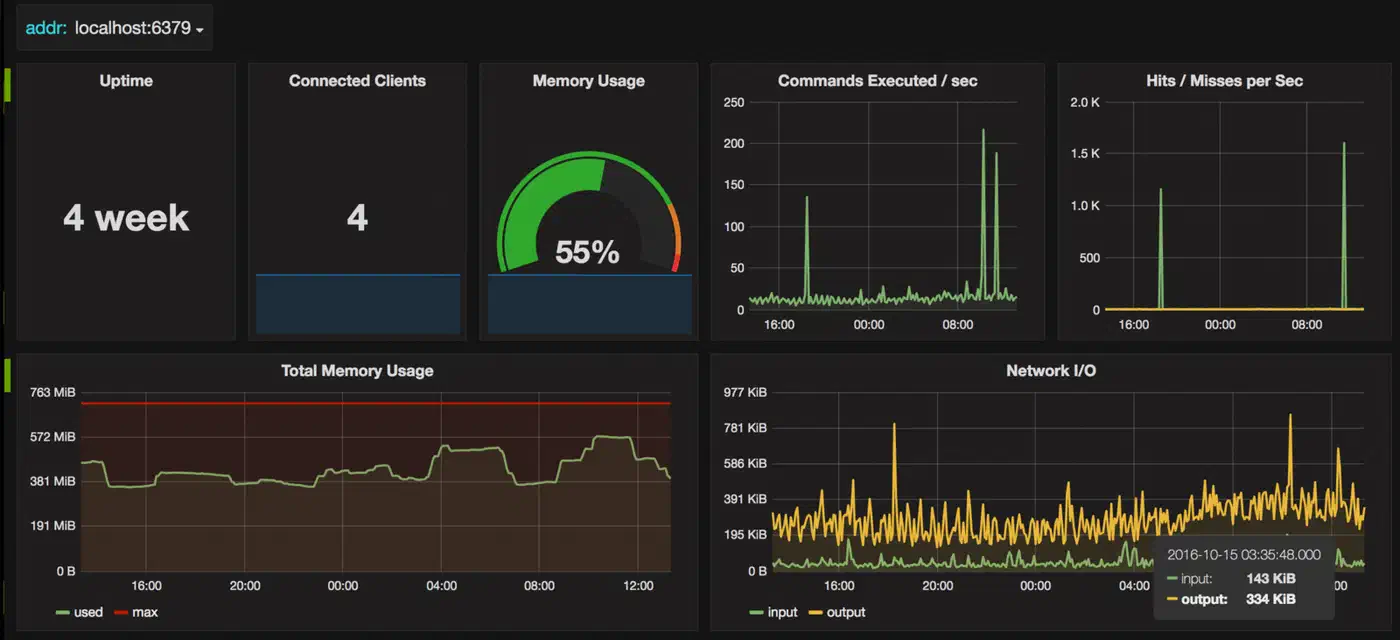
Send metrics to Prometheus
via redis_exporter
, or query INFO directly. The key fields from INFO are used_memory, connected_clients, and the stream-specific stats. Build Grafana
dashboards that show stream length over time, consumer lag, pending entry count, and memory use.
Persistence is critical for some pipelines. Redis Streams persist via RDB snapshots and AOF logs, like any other Redis data type. For pipelines where data loss is not okay, set:
appendonly yes
appendfsync everysec
This caps possible data loss to about one second of events on a crash. For stronger guarantees, use appendfsync always at the cost of write throughput.
For high availability, use Redis Sentinel (auto-failover of a single primary) or Redis Cluster (horizontal sharding). In Cluster mode, use hash tags to pin a stream and its sibling keys to the same shard:
XADD {pipeline1}:events * type order.created ...
SET {pipeline1}:retries:1679000000000-0 3
The {pipeline1} hash tag pins both keys to the same node, which lets you run multi-key ops. Watch out: too much data behind one hash tag makes a hot shard. Balance locality against even spread across the cluster.
When producers and consumers ship as containers, follow a container security checklist . Run them as non-root with minimal base images so a hacked worker can’t pivot into the Redis instance.
A well-watched Redis Streams pipeline, with steady trimming, consumer group care, and alerts on lag and pending counts, is a solid low-maintenance option versus Kafka for mid-scale event work. Start with a single Redis instance. Add Sentinel for failover. You have a production-grade pipeline running on infrastructure you probably already operate.