 Botmonster Tech
Deploy Ceph with cephadm: 3-node, 12 OSD storage cluster

Yes, you can build a self-healing, redundant distributed storage cluster using Ceph
across three Linux nodes, and it is less painful than its reputation suggests - especially with the modern cephadm deployment tool. The result gives you block storage (RBD) for VMs, a shared POSIX filesystem (CephFS) for multiple clients, and even S3-compatible object storage if you need it later. Your data survives the loss of any single node, rebalances automatically when hardware changes, and scales from a homelab experiment to petabyte-class production by adding more disks.
This guide walks through the full process: understanding Ceph’s architecture, choosing hardware, bootstrapping a cluster with cephadm, configuring storage, and keeping it all healthy. The instructions target Ceph Squid (v19.2.x) and Tentacle (v20.2.x), though the workflow applies to any recent release.
Ceph Architecture - Understanding the Components Before You Build
Ceph has several moving parts, and understanding what each daemon does before you start prevents most configuration mistakes. Every piece of data in Ceph ultimately lives as an object in RADOS (Reliable Autonomic Distributed Object Store). All higher-level services - block storage, filesystems, object gateways - are built on top of RADOS.
The core components:
- OSD (Object Storage Daemon): One OSD runs per physical disk (or partition). OSDs handle data replication, recovery, rebalancing, and periodic scrubbing. A 3-node cluster with 4 disks each gives you 12 OSDs.
- MON (Monitor): Maintains the cluster map - the OSD map, PG (Placement Group) map, CRUSH map, and monitor map. Monitors use Paxos consensus, so you need an odd number for quorum. Three monitors across three nodes is the minimum for a production-grade setup.
- MGR (Manager): Provides the monitoring dashboard, Prometheus metrics endpoint, and orchestration capabilities. Runs alongside monitors. At least two (active/standby) for high availability.
- MDS (Metadata Server): Only needed if you use CephFS. Handles POSIX filesystem metadata - directory hierarchy, permissions, file sizes. At least one active plus one standby for CephFS.
- CRUSH map: The algorithm that determines which OSDs store which data. There is no central lookup table. Clients compute placement directly, which is what makes Ceph scale linearly. You define failure domains (host, rack, datacenter) so that replicas never land on the same node.
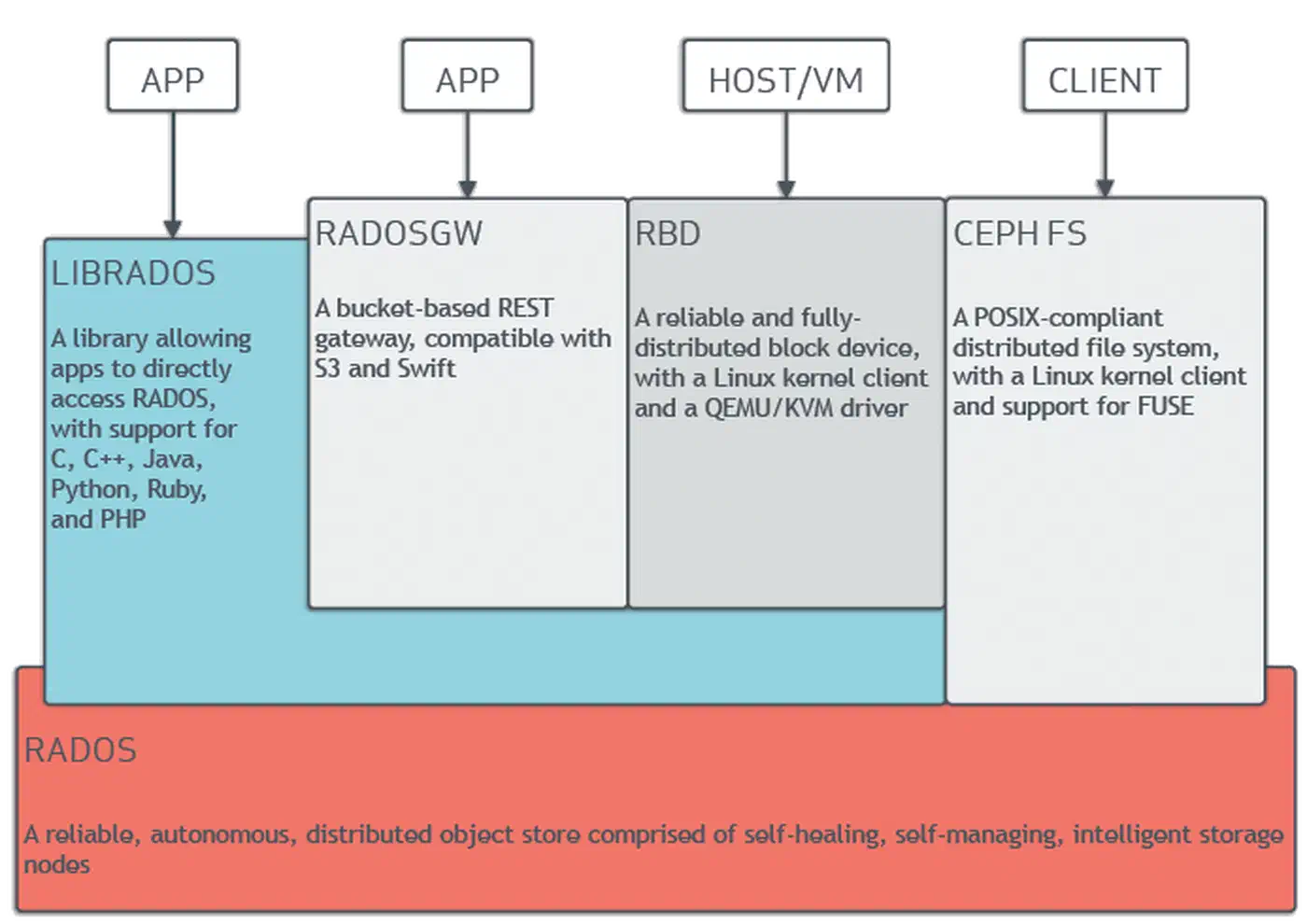
Ceph is self-managing at the data layer. When an OSD goes down, the remaining OSDs detect the failure through heartbeats, and the CRUSH algorithm recalculates placement to restore the desired replication count without manual intervention.
Hardware Requirements and Network Planning
Ceph’s performance and reliability depend heavily on hardware choices and network topology. Underpowered hardware or a flat network leads to poor performance and painful recovery times.
Minimum Homelab Specs (per node)
| Component | Minimum | Recommended |
|---|---|---|
| CPU | 4 cores | 8+ cores |
| RAM | 8 GB (2 GB base + ~1 GB per OSD) | 32 GB (~8 GB per OSD) |
| System disk | 1x SSD (OS, monitors, managers) | 1x NVMe |
| Data disks | 2-4x HDD or SSD for OSDs | 4x HDD + NVMe for WAL/DB |
| Network | 1 GbE (functional but slow) | 10 GbE or 25 GbE |
The official Ceph documentation recommends provisioning about 8 GB of RAM per BlueStore OSD (the default osd_memory_target is 4 GB, plus headroom for the OS and recovery spikes). Monitors and managers are not memory-hungry on small clusters - 64 GB total per node handles hundreds of OSDs.
Network Design
Separate the public network (client-to-cluster traffic) from the cluster network (OSD-to-OSD replication traffic). Use two NICs or VLANs. For example:
- Public network (
192.168.1.0/24): clients connect here to read and write data - Cluster network (
10.0.1.0/24): OSDs use this for replication, recovery, and scrubbing
Why does separation matter? During recovery (after a node reboot or disk failure), OSDs flood the cluster network with rebalancing traffic. Without separation, client I/O competes with recovery traffic and performance collapses.
The numbers make a strong case for 10 GbE as a baseline. Replicating 1 TB of data takes about 3 hours on 1 GbE versus 20 minutes on 10 GbE. A typical 3 TB HDD failure on 1 GbE means 9 hours of degraded performance during recovery. On 10 GbE, that drops to about 1 hour. For all-NVMe clusters, even 10 GbE becomes a bottleneck - 25 GbE or faster is recommended.
Disk Selection and BlueStore
BlueStore is Ceph’s default storage backend since the Luminous release. It writes directly to raw block devices - no filesystem required on OSD disks. This eliminates the double-write penalty that plagued the older FileStore backend.
For mixed workloads, a common pattern is:
- HDDs for bulk capacity tiers (backups, media, cold data)
- SSDs or NVMe for performance tiers (VM images, databases)
- A dedicated NVMe for WAL/DB: place BlueStore’s write-ahead log (WAL, 2-4 GB) and RocksDB metadata database (DB, minimum 30 GB or ~4% of data device capacity) on a fast NVMe drive shared across multiple HDDs. Limit to 6 OSD WAL/DB pairs per NVMe to avoid contention. If your motherboard has limited M.2 slots, PCIe bifurcation adapters can add multiple NVMe drives from a single x16 slot.
Time Synchronization
Ceph monitors require tight time synchronization (less than 0.05 seconds of skew). Install chrony on all nodes and point them at the same NTP source:
sudo apt install chrony   # Debian/Ubuntu
sudo dnf install chrony   # RHEL/Fedora
chronyc tracking           # verify sync status
Deploying Ceph with cephadm on Three Nodes
cephadm
is the modern, container-based deployment tool that replaced ceph-deploy and manual package management. It uses Podman
or Docker
to run Ceph daemons as containers, which makes deployment and upgrades much simpler than managing packages by hand.
Prerequisites on All Nodes
Before bootstrapping, prepare every node:
- Install Podman (preferred) or Docker
- Install Python 3 and
chrony - Set up passwordless SSH from the admin node (node1) to all others
- Configure hostnames and
/etc/hostsentries so all nodes can resolve each other
# /etc/hosts on all nodes
192.168.1.10  node1
192.168.1.11  node2
192.168.1.12  node3
Bootstrap the First Node
On your first node (node1), download and run cephadm:
# For RHEL/CentOS-based systems
curl --silent --remote-name --location \
  https://download.ceph.com/rpm-squid/el9/noarch/cephadm
chmod +x cephadm

# For Debian/Ubuntu
sudo apt install cephadm

# Bootstrap the cluster
sudo ./cephadm bootstrap \
  --mon-ip 192.168.1.10 \
  --cluster-network 10.0.1.0/24 \
  --initial-dashboard-admin-password=changeme
The bootstrap creates a monitor, a manager, a crash handler, and the Ceph Dashboard (web UI) on port 8443. It also generates /etc/ceph/ceph.conf and /etc/ceph/ceph.client.admin.keyring for CLI access. You can install the ceph CLI tools inside the cephadm shell or on the host:
sudo cephadm install ceph-commonAdd Remaining Nodes
# Copy the SSH public key to the other nodes
ssh-copy-id -f -i /etc/ceph/ceph.pub root@node2
ssh-copy-id -f -i /etc/ceph/ceph.pub root@node3

# Add hosts to the cluster
ceph orch host add node2 192.168.1.11 --labels _admin
ceph orch host add node3 192.168.1.12 --labels _admin
The _admin label tells cephadm to distribute the admin keyring and config to these hosts. After adding them, cephadm automatically deploys monitor, manager, and OSD containers on the new nodes.
Provision OSDs
The easiest approach lets cephadm claim any unused, unmounted disk on all nodes:
ceph orch apply osd --all-available-devicesFor more control, target specific devices:
ceph orch daemon add osd node1:/dev/sdb
ceph orch daemon add osd node2:/dev/sdb
ceph orch daemon add osd node3:/dev/sdb
Verify the OSD topology:
ceph osd treeThis shows you which OSDs are on which hosts and whether they are up and in.
Verify Cluster Health
ceph statusYou want to see HEALTH_OK with all monitors in quorum, all OSDs up/in, and PGs (Placement Groups) listed as active+clean. Check total and available storage with:
ceph dfThe Dashboard at https://node1:8443 provides a graphical overview of the same information, with real-time performance graphs and alerting.
Configuring RBD Block Storage and CephFS
With the cluster running, you need to create storage pools and access methods. RBD (RADOS Block Device) provides virtual block devices for VMs and containers, while CephFS provides a POSIX-compliant shared filesystem that multiple clients can mount simultaneously.
RBD Block Storage
Create a replicated pool and enable it for RBD:
# Create pool with 64 PGs (appropriate for a small cluster)
ceph osd pool create rbd-pool 64 64 replicated
ceph osd pool application enable rbd-pool rbd

# Create a 50 GB block device image
rbd create --size 50G --pool rbd-pool my-vm-disk

# Map it on a client machine
sudo rbd map rbd-pool/my-vm-disk
# Creates /dev/rbd0

# Format and mount
sudo mkfs.ext4 /dev/rbd0
sudo mount /dev/rbd0 /mnt/rbd
RBD images are thin-provisioned - a 50 GB image only consumes as much raw space as the data actually written to it. You also get snapshots (rbd snap create rbd-pool/my-vm-disk@snap1), clones (instant writable copies from snapshots, useful for spinning up VMs from a golden image), and live migration between pools without downtime.
CephFS Shared Filesystem
CephFS requires its own metadata and data pools, plus at least one MDS daemon (which cephadm deploys automatically):
# Create the pools
ceph osd pool create cephfs_meta 32
ceph osd pool create cephfs_data 64

# Create the filesystem
ceph fs new myfs cephfs_meta cephfs_data
Mount CephFS on client machines using the kernel driver (faster) or FUSE (more portable):
# Kernel mount
sudo mount -t ceph node1:/ /mnt/cephfs \
  -o name=admin,secret=$(ceph auth get-key client.admin)

# FUSE mount (install ceph-fuse first)
sudo ceph-fuse /mnt/cephfs
CephFS supports standard POSIX semantics (ls, chmod, chown), directory quotas, and snapshots through a hidden .snap directory. You can set per-directory storage limits:
# Set a 100 GB quota on a project directory
setfattr -n ceph.quota.max_bytes -v 107374182400 /mnt/cephfs/project-a
Erasure Coding for Cost-Efficient Storage
If raw capacity is a concern, replicated pools with a 3x replication factor consume three times the raw storage of your actual data. Erasure coding offers a middle ground.
A common profile is k=4, m=2 (4 data chunks + 2 parity chunks), which tolerates 2 simultaneous failures while using only 1.5x raw storage instead of 3x:
# Create an erasure coding profile
ceph osd erasure-code-profile set ec-42-profile k=4 m=2 \
  crush-failure-domain=host

# Create an EC pool using the profile
ceph osd pool create ec-data-pool erasure ec-42-profile
The tradeoff: erasure coded pools have higher CPU overhead (encoding/decoding) and higher latency for small random writes. They work best for large sequential workloads like backups, media storage, and data lakes. RBD on erasure coded pools requires a replicated metadata pool in front, adding some complexity.
Monitoring, Maintenance, and Surviving Node Failures
A running Ceph cluster needs ongoing attention. The good news: Ceph provides solid built-in tooling for monitoring, and it handles most failure scenarios on its own.
Essential Monitoring Commands
ceph health detail       # Explains any warnings in plain English
ceph osd df              # Per-OSD disk utilization
ceph pg stat             # Placement group health summary
ceph osd perf            # Per-OSD commit and apply latency
For integration with Prometheus and Grafana :
ceph mgr module enable prometheus
# Scrape metrics at http://node1:9283/metrics
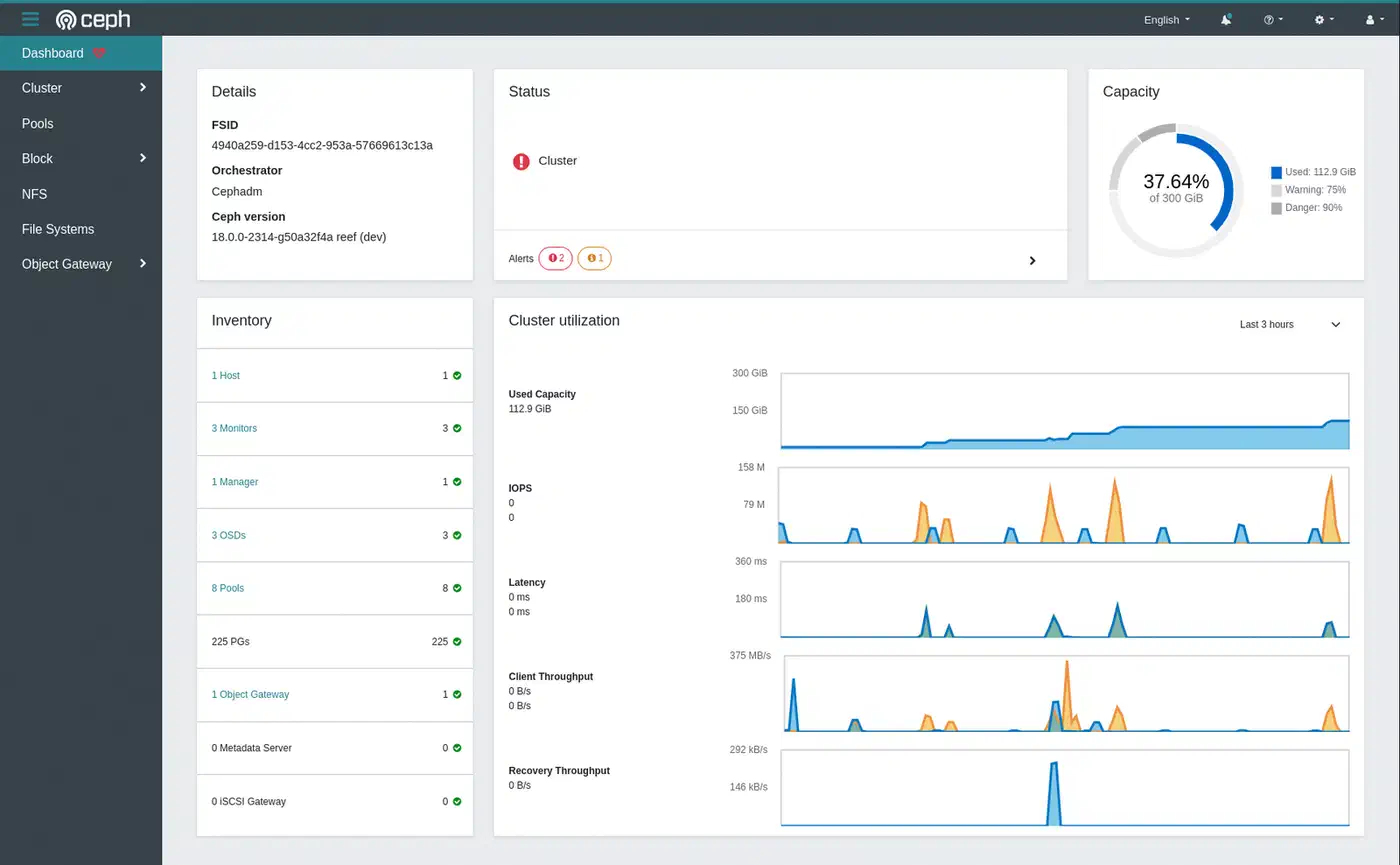
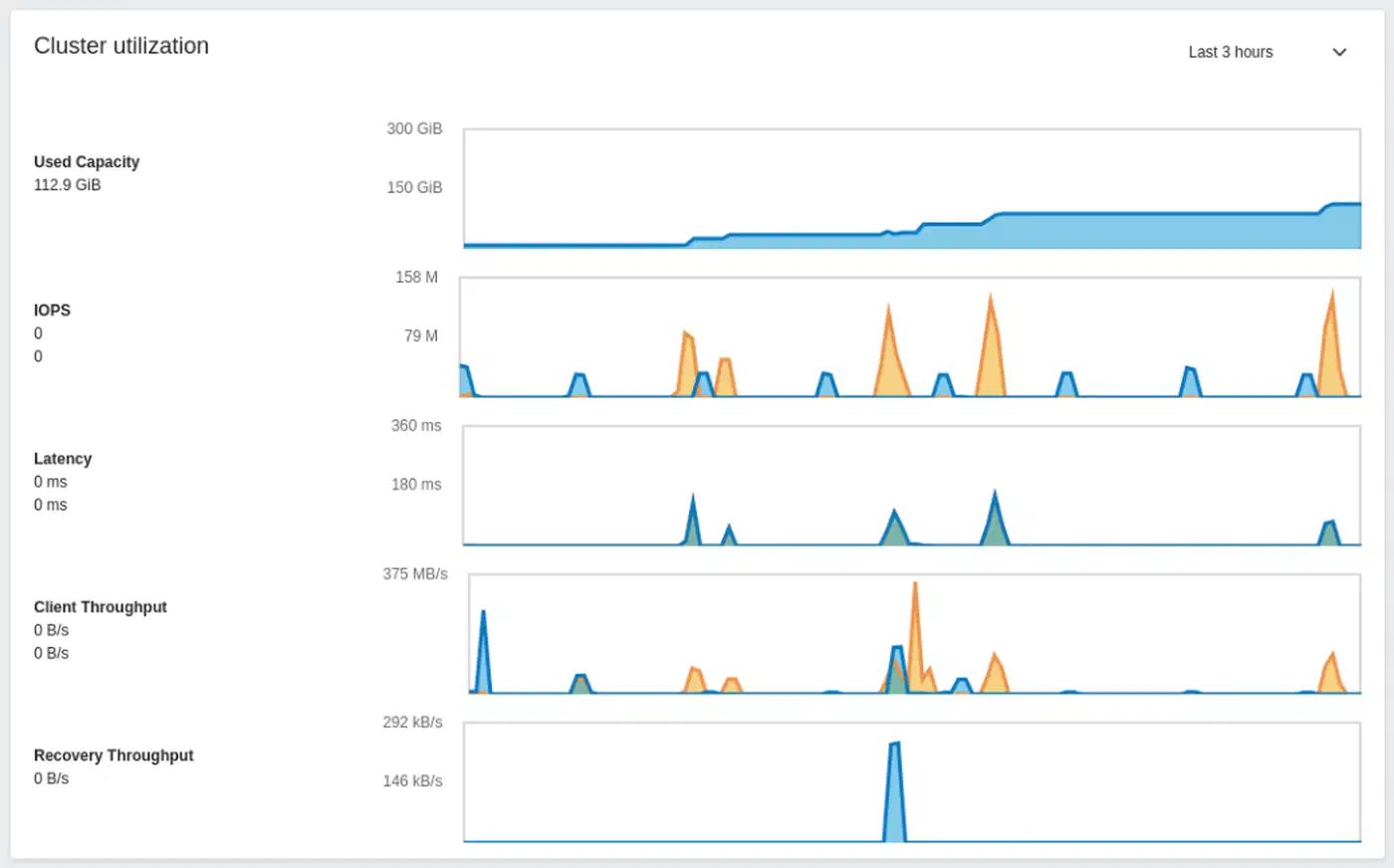
The built-in Dashboard at https://node1:8443 shows real-time cluster overview, OSD status, pool utilization, and performance graphs. It also integrates with Prometheus Alertmanager for notifications.
What Happens When a Node Dies
When a node goes offline:
- Its OSDs are marked
downafter about 5 minutes (configurable) - After 10 minutes (the
mon_osd_down_out_intervaldefault), they are markedout - Ceph begins re-replicating the data that was on those OSDs to surviving ones
- With 3x replication, the cluster remains fully available throughout this process
The entire recovery is automatic. Your job is to bring the node back or replace the failed hardware. Once the node returns, its OSDs rejoin and the cluster rebalances again.
Disk Replacement Procedure
# Mark the failed OSD out
ceph osd out osd.5

# Remove it via the orchestrator
ceph orch osd rm 5

# Physically replace the disk
# cephadm auto-provisions the new disk as a new OSD
Rolling Upgrades
cephadm handles upgrades by restarting one daemon at a time, waiting for cluster health to return to HEALTH_OK between each:
ceph orch upgrade start --ceph-version 19.2.3
ceph orch upgrade status   # Monitor progress
Capacity Planning
Ceph issues warnings at these utilization thresholds:
nearfullat 85%: a warning that the cluster is running low on spacefullat 95%: Ceph blocks all writes to prevent data loss
Plan to add OSDs before reaching 70% utilization to leave headroom for rebalancing. Use ceph df and ceph osd df regularly to track capacity trends.
Integrating Ceph with Proxmox, Kubernetes, and OpenStack
Ceph integrates natively with the major virtualization and orchestration platforms, which is part of why it has such wide adoption.
Proxmox VE has built-in Ceph support. You can deploy Ceph directly from the Proxmox web UI and use RBD pools as VM disk storage and CephFS for shared container storage - no additional software needed.
Kubernetes uses Rook as the most common Ceph operator. Rook deploys and manages Ceph inside a Kubernetes cluster, exposing RBD as persistent volumes via CSI. An alternative approach for existing Ceph clusters is to use the ceph-csi driver directly, which connects Kubernetes to an external Ceph cluster without running Ceph daemons inside Kubernetes.

OpenStack integrates with Ceph through its Cinder (block storage), Glance (image service), and Nova (compute) components. Ceph is the de facto standard backend for production OpenStack deployments.
Wrapping Up
A three-node Ceph cluster with cephadm is a realistic weekend project for anyone comfortable with Linux system administration. The initial setup - bootstrap, add nodes, provision OSDs - takes a couple of hours. The ongoing work is mostly monitoring capacity and occasionally replacing failed disks, both of which Ceph makes straightforward.
Start with replicated pools for simplicity. Add erasure coding later when you need capacity efficiency. Separate your networks from day one - it costs almost nothing upfront and saves you significant pain during recovery events. And keep an eye on that capacity: the transition from a healthy cluster to a nearfull warning happens faster than you expect when VMs and backups compete for the same pool. For single-node storage alternatives, the Btrfs versus ZFS comparison
covers how each filesystem handles checksumming, RAID, and snapshots without the distributed overhead.