 Botmonster Tech
WireGuard Site-to-Site VPN: 400-500 Mbps on Raspberry Pi

To connect two remote LANs over WireGuard
, you configure a WireGuard peer on one gateway device at each site, set AllowedIPs to include the remote site’s subnet, enable IP forwarding on both gateways, and add routing so LAN clients send cross-site traffic through the tunnel. Once configured, every device on either LAN can reach devices on the other LAN transparently - no VPN client installation on individual machines. A single UDP port open on at least one side is all you need.
What follows covers the full setup: network planning, key generation, WireGuard interface configuration on both gateways, LAN routing options, firewall hardening, and troubleshooting. The examples use two residential networks, but the same approach works for connecting a home network to a VPS, an office to a colo, or two cloud VPCs.
Site-to-Site vs. Road Warrior: Why the Architecture Differs
Most WireGuard tutorials cover the “road warrior” model: individual clients (laptops, phones) run WireGuard and tunnel their traffic to a central server. Every device needs the WireGuard app installed and its own keypair configured. That model works well for remote access , but it falls apart when you want two entire networks to talk to each other.
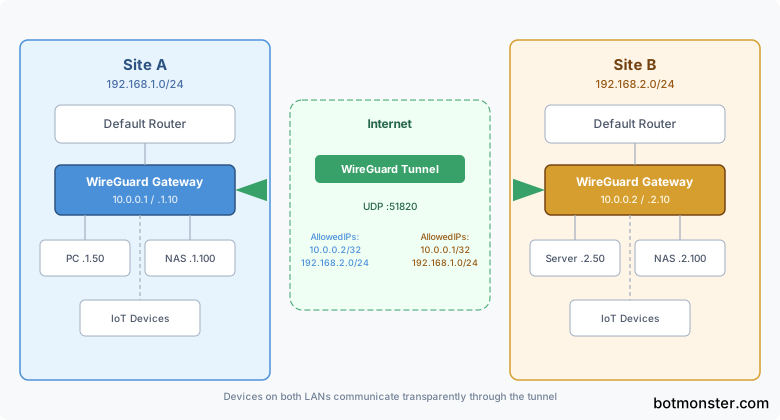
A site-to-site VPN is different. One gateway device per site runs WireGuard. All traffic between the two LANs routes through the tunnel automatically. Individual devices on either network need zero configuration - they just send packets to their default gateway, which knows how to reach the remote subnet through the tunnel.
Practical use cases for a site-to-site tunnel:
- Access a NAS or file server at a relative’s house from your home network
- Connect a home office LAN to a remote server rack or Proxmox cluster
- Extend Home Assistant ’s reach to IoT devices at a second property
- Bridge two cloud VPCs across providers without vendor lock-in
Hardware requirements are minimal. Any Linux device with WireGuard support can serve as the gateway: a Raspberry Pi 4 or 5, an old laptop, a VM, or a dedicated router running OpenWrt . WireGuard’s kernel module handles encryption with minimal CPU overhead. Benchmarks show a Pi 4 pushing around 400-500 Mbps through a WireGuard tunnel, while x86 machines with AES-NI hit wire speed up to the internet link’s capacity. At least one site needs a reachable IP - a static public IP, a dynamic DNS hostname, or a relay through a VPS.

For addressing, each site must use a different subnet. If Site A uses 192.168.1.0/24 and Site B uses 192.168.2.0/24, traffic can route cleanly. The WireGuard tunnel itself uses a separate point-to-point range, typically a /32 pair like 10.0.0.1 and 10.0.0.2. Overlapping subnets force you into NAT on the tunnel, which defeats the transparency goal.
How does this compare to Tailscale
? Tailscale can achieve similar results using --advertise-routes on nodes at each site. It handles NAT traversal and key exchange automatically, which simplifies setup. The trade-off is independence: raw WireGuard has no external dependencies, no coordination server, and no third-party account. If your two sites both have manageable network configurations (at least one with a port forward or public IP), raw WireGuard keeps things simple and fully under your control. For a full walkthrough of the Tailscale approach, see our guide on setting up Tailscale mesh networking
.
Configuring WireGuard on Both Gateways
You need to generate keys, write the WireGuard config file on each gateway, and bring the tunnel up.
Key Generation
On each gateway, generate a Curve25519 keypair:
wg genkey | tee privatekey | wg pubkey > publickeyThe private key stays on the local machine. The public key gets copied to the remote peer’s configuration. Optionally, generate a pre-shared key for post-quantum resistance:
wg genpsk > presharedkeyThis adds a 256-bit symmetric key to the Noise protocol handshake, providing defense against future quantum computers that could break Curve25519. Copy the same pre-shared key to both sides.
Site A Gateway Configuration
Create /etc/wireguard/wg0.conf on Site A’s gateway:
[Interface]
Address = 10.0.0.1/32
PrivateKey = <siteA-private-key>
ListenPort = 51820

[Peer]
PublicKey = <siteB-public-key>
PresharedKey = <preshared-key>
AllowedIPs = 10.0.0.2/32, 192.168.2.0/24
Endpoint = siteb.example.com:51820
PersistentKeepalive = 25
Site B Gateway Configuration
Create /etc/wireguard/wg0.conf on Site B’s gateway:
[Interface]
Address = 10.0.0.2/32
PrivateKey = <siteB-private-key>
ListenPort = 51820

[Peer]
PublicKey = <siteA-public-key>
PresharedKey = <preshared-key>
AllowedIPs = 10.0.0.1/32, 192.168.1.0/24
Endpoint = sitea.example.com:51820
PersistentKeepalive = 25
Understanding AllowedIPs
The AllowedIPs field does double duty. It defines which source IPs are accepted from this peer (inbound filter) and which destination IPs get routed to this peer (outgoing routing decision). Setting AllowedIPs = 10.0.0.2/32, 192.168.2.0/24 on Site A means: “accept traffic from these IPs when it arrives from Site B, and route traffic destined for these IPs through the tunnel to Site B.”
This is the core mechanism that makes site-to-site routing work without touching the system routing table manually. When the WireGuard interface comes up, it creates routes for every prefix listed in AllowedIPs.
Bring Up the Tunnel
On both gateways:
wg-quick up wg0Verify the handshake:
wg showYou should see a recent handshake timestamp and bytes transferred after pinging the remote tunnel IP:
ping 10.0.0.2   # from Site A
ping 10.0.0.1   # from Site B
Enable the tunnel at boot:
systemctl enable wg-quick@wg0Dynamic DNS for Sites Without Static IPs
If one or both sites have dynamic IPs, use a DDNS service like DuckDNS
, a Cloudflare API script, or ddclient
. Set the Endpoint to the DDNS hostname. WireGuard re-resolves the endpoint hostname on handshake failure, so DDNS changes get picked up automatically within the PersistentKeepalive interval.
Routing LAN Traffic Through the Tunnel
Getting the WireGuard tunnel up is only half the work. The tunnel endpoints can ping each other, but devices on Site A’s LAN still cannot reach devices on Site B’s LAN. The missing piece is routing: every device on each LAN needs to know that packets for the remote subnet should go through the WireGuard gateway.
There are three approaches, and which one you use depends on your network setup.
Option 1: Gateway Is Already the Default Router
If your WireGuard gateway is already the LAN’s default gateway (for example, it’s a Linux router running nftables ), no additional routing is needed. Traffic destined for the remote subnet hits the gateway, which has a WireGuard route in its table and forwards it through the tunnel.
This is the cleanest option and provides full transparency - remote IPs appear as their real addresses on both sides.
Option 2: Static Routes on the Existing Router
If your LAN’s default gateway is a separate device (a consumer router, an OPNsense box, a Unifi gateway), add a static route on that device:
- Destination:
192.168.2.0/24 - Gateway:
192.168.1.10(the WireGuard gateway’s LAN IP)
Most routers support this in their web UI under “Static Routes” or “Advanced Routing.” This tells the router: for any traffic going to Site B’s subnet, forward it to the WireGuard gateway instead of sending it out the WAN.
Option 3: MASQUERADE (NAT on the Tunnel)
If you cannot add static routes to your router - some ISP-provided routers lock this down - configure the WireGuard gateway to NAT the tunnel traffic:
iptables -t nat -A POSTROUTING -o wg0 -j MASQUERADEThis makes all tunneled traffic appear to come from the gateway’s WireGuard IP (10.0.0.1). The remote LAN sees the gateway as the source, not the individual clients. It works, but breaks true end-to-end transparency. Devices on Site B see all Site A traffic coming from a single IP, which complicates logging, access control, and bidirectional connections.
To make this persistent across reboots, add it to the WireGuard config using PostUp and PostDown:
[Interface]
Address = 10.0.0.1/32
PrivateKey = <siteA-private-key>
ListenPort = 51820
PostUp = iptables -t nat -A POSTROUTING -o wg0 -j MASQUERADE
PostDown = iptables -t nat -D POSTROUTING -o wg0 -j MASQUERADE
IP Forwarding
Regardless of which routing option you choose, both gateways must have IP forwarding enabled. Without it, the Linux kernel silently drops forwarded packets:
# Enable immediately
sysctl -w net.ipv4.ip_forward=1

# Make persistent
echo "net.ipv4.ip_forward = 1" >> /etc/sysctl.d/99-wireguard.conf
sysctl -p /etc/sysctl.d/99-wireguard.conf
Verify:
cat /proc/sys/net/ipv4/ip_forward
# Should output: 1
Firewall Forwarding Rules
If your gateways run nftables or iptables, you need rules that allow forwarding between the LAN interface and the WireGuard interface. Without these, the firewall blocks the forwarded packets even though IP forwarding is enabled.
Example nftables rules:
table inet filter {
    chain forward {
        type filter hook forward priority 0; policy drop;

        # Allow LAN to WireGuard tunnel
        iifname "eth0" oifname "wg0" accept

        # Allow established/related return traffic from tunnel
        iifname "wg0" oifname "eth0" ct state established,related accept

        # Optionally allow all traffic from the tunnel
        # iifname "wg0" oifname "eth0" accept
    }
}
The commented-out rule at the bottom would allow unrestricted access from the remote site. Whether you enable it depends on your trust model - more on that in the security section below.
Verify End-to-End Connectivity
From a client on Site A (e.g., 192.168.1.50), ping a device on Site B:
ping 192.168.2.100If it fails, use traceroute to confirm the path goes through the gateway and the tunnel. Check wg show for a recent handshake, ip route for correct routing, and tcpdump -i wg0 on the gateway to see whether packets are entering and leaving the tunnel.
Firewall, Security, and NAT Traversal
A site-to-site VPN bridges two trust zones. The WireGuard tunnel itself is secure (Curve25519, ChaCha20, Poly1305), but the question is what you allow to cross between networks once the tunnel is up.
Port Forwarding for WireGuard
Open UDP port 51820 (or your chosen port) on the gateway’s WAN-facing firewall. On a consumer router, this is a port forward from WAN UDP 51820 to the WireGuard gateway’s LAN IP. Only one side needs to be publicly reachable - the other side initiates the connection using the Endpoint and PersistentKeepalive directives.
Both Sides Behind NAT (Double NAT / CGNAT)
If neither site can accept incoming connections - common with CGNAT from mobile ISPs - neither side can initiate a handshake. Solutions:
- Run WireGuard on a cheap VPS ($3-5/month) and configure both sites as peers of the VPS in a hub-and-spoke topology. Traffic routes through the VPS, adding latency but solving the reachability problem.
- Use Tailscale or Headscale for NAT traversal via DERP relay servers and hole-punching. You can still use subnet routing to bridge the LANs.
- Get a static IP from your ISP. Many ISPs offer one for $5-10/month, which eliminates the NAT problem entirely.
Restricting Cross-Site Access
A site-to-site VPN does not have to be a full bridge. Use nftables on each gateway to restrict which services are accessible from the remote site:
table inet filter {
    chain forward {
        type filter hook forward priority 0; policy drop;

        # Allow outbound to tunnel
        iifname "eth0" oifname "wg0" accept

        # Allow only specific services from remote site
        iifname "wg0" oifname "eth0" tcp dport { 22, 80, 443, 445 } accept
        iifname "wg0" oifname "eth0" ct state established,related accept
    }
}
This allows SSH, HTTP, HTTPS, and SMB from the remote site while blocking everything else. For the HTTPS services you expose this way, you can cover every subdomain from a single cert at both sites.
DNS Across Sites
For devices on Site A to resolve hostnames on Site B’s local DNS, configure Site A’s DNS server to forward queries for the remote domain through the tunnel. With dnsmasq :
server=/site-b.lan/192.168.2.1This tells dnsmasq to send queries for *.site-b.lan to Site B’s DNS server at 192.168.2.1, which is now reachable through the WireGuard tunnel. For a private local resolver that avoids third-party DNS entirely, see how to run a fully recursive resolver on your own LAN
.
MTU Tuning
WireGuard adds overhead to every packet: 60 bytes over IPv4, 80 bytes over IPv6. If your path MTU is the standard 1500, set the WireGuard interface MTU to 1420 (safe for both IPv4 and IPv6 transport) or 1440 (if you’re certain the tunnel runs exclusively over IPv4).
For PPPoE connections where the base MTU is 1492, reduce the WireGuard MTU to 1412 (IPv4 transport) or 1392 (IPv6 transport).
Incorrect MTU causes a specific failure mode: small packets (pings, DNS queries) work fine, but large transfers (file copies, web pages with big images) stall or hang. If you see this pattern, MTU is almost certainly the problem.
Add the MTU to your WireGuard config:
[Interface]
Address = 10.0.0.1/32
PrivateKey = <key>
ListenPort = 51820
MTU = 1420
Monitoring, Keepalive, and Troubleshooting
Once the tunnel is running, you need to know when it goes down and how to diagnose problems.
PersistentKeepalive
Set PersistentKeepalive = 25 on at least the side behind NAT. This sends a keepalive packet every 25 seconds to maintain the NAT mapping. Without it, the NAT translation expires (typically after 30-120 seconds of inactivity) and the tunnel silently dies until one side re-initiates a handshake. Setting it on both sides does no harm.
Automated Monitoring
For a lightweight approach, a cron job that pings the remote tunnel IP and sends a notification on failure:
*/5 * * * * ping -c 1 -W 5 10.0.0.2 > /dev/null 2>&1 || \
    curl -s "https://gotify.example.com/message?token=XXX" \
    -F "title=WireGuard Down" -F "message=Site B unreachable"
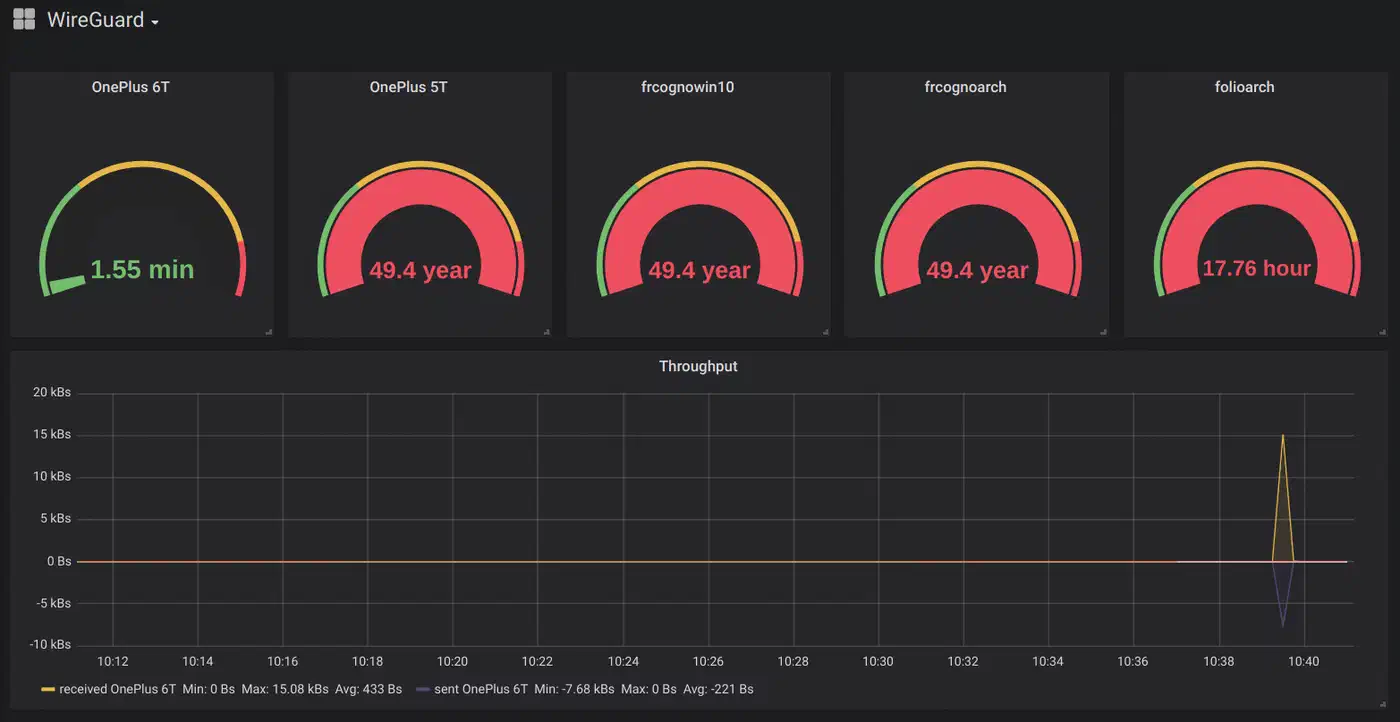
For more detailed monitoring, wireguard_exporter
for Prometheus
exposes per-peer metrics including last handshake time and bytes transferred. Set an alert when wireguard_latest_handshake_seconds > 180 - no handshake in 3 minutes means the tunnel is down.
Automatic Recovery with systemd
Create a systemd timer that restarts the WireGuard interface if the remote peer is unreachable:
*/1 * * * * ping -c 1 -W 3 10.0.0.2 || systemctl restart wg-quick@wg0WireGuard handles reconnection gracefully - restarting the interface forces a new handshake attempt. This handles cases where the remote endpoint’s IP changed via DDNS and WireGuard has not re-resolved it yet.
Common Failure: No Handshake
If wg show shows no recent handshake:
- Verify UDP 51820 is open on the receiving side:
nc -zu remote-ip 51820 - Confirm both public keys match (a single wrong character breaks everything)
- Check that
AllowedIPsis correctly set on both sides - Verify system clocks are synchronized - WireGuard rejects handshakes with more than 5 minutes of clock skew via the TAI64N timestamp
Common Failure: Tunnel IPs Work but Remote LAN Is Unreachable
If you can ping 10.0.0.2 from 10.0.0.1 but cannot reach 192.168.2.x:
- Verify IP forwarding is enabled on both gateways:
cat /proc/sys/net/ipv4/ip_forward - Check that the firewall allows forwarding between
eth0andwg0 - Confirm the remote LAN’s default gateway has a route back to your subnet, or that MASQUERADE is active on the remote WireGuard gateway
- Run
tcpdump -i wg0on the remote gateway to see if packets arrive but are not forwarded
Bandwidth Testing
Run iperf3 across the tunnel to measure throughput:
# On Site B
iperf3 -s

# On Site A
iperf3 -c 10.0.0.2
Expected results depend on the gateway hardware and internet link speed:
| Gateway Hardware | Approximate WireGuard Throughput |
|---|---|
| Raspberry Pi 4 | 400-500 Mbps |
| Raspberry Pi 5 | 700-900 Mbps |
| x86 (Intel N100) | 1+ Gbps (wire speed) |
| x86 (modern desktop) | 1+ Gbps (wire speed) |
If throughput is lower than expected, check for CPU bottlenecks with htop during the iperf3 test, and verify MTU is set correctly.
WireGuard vs. IPsec vs. OpenVPN for Site-to-Site
If you are deciding between VPN protocols for a site-to-site link, here is how the three main options compare based on available benchmark data:
| Metric | WireGuard | IPsec (strongSwan) | OpenVPN |
|---|---|---|---|
| Throughput (% of bare metal) | 92-95% | 85-90% | 70-80% |
| Added Latency | 1-3 ms | 1-3 ms | 3-8 ms |
| CPU Usage (100 Mbps load) | 2-5% | 5-10% | 10-15% |
| Config Complexity | Low (single file) | High (multiple files, certificates) | Medium (server + client configs) |
| Codebase Size | ~4,000 lines | ~400,000+ lines | ~100,000+ lines |
| NAT Traversal | Built-in (UDP) | Requires NAT-T extension | Built-in (UDP or TCP) |
| Runs in Linux Kernel | Yes (since 5.6) | Yes | No (userspace) |
WireGuard wins on throughput, CPU efficiency, and simplicity. IPsec remains the standard for enterprise environments that need interoperability with Cisco, Juniper, or Fortinet appliances, or require IKEv2 certificate-based authentication. OpenVPN’s main advantage is TCP fallback for restrictive firewalls, though this comes at a significant performance cost.
For connecting two Linux gateways you control, WireGuard is the clear choice.