 Botmonster Tech
FastAPI Webhook Bot: GitHub and Gitea Automation

You can build a bot that automatically labels issues, enforces PR naming conventions, posts review comments, and triggers custom workflows by writing a FastAPI application that receives webhook events from GitHub or Gitea , validates their signatures, and calls the respective API to take action. The same webhook handler pattern works for both platforms with minor differences in header names and payload structure, so a single codebase can serve either forge.
How Repository Webhooks Work on GitHub and Gitea
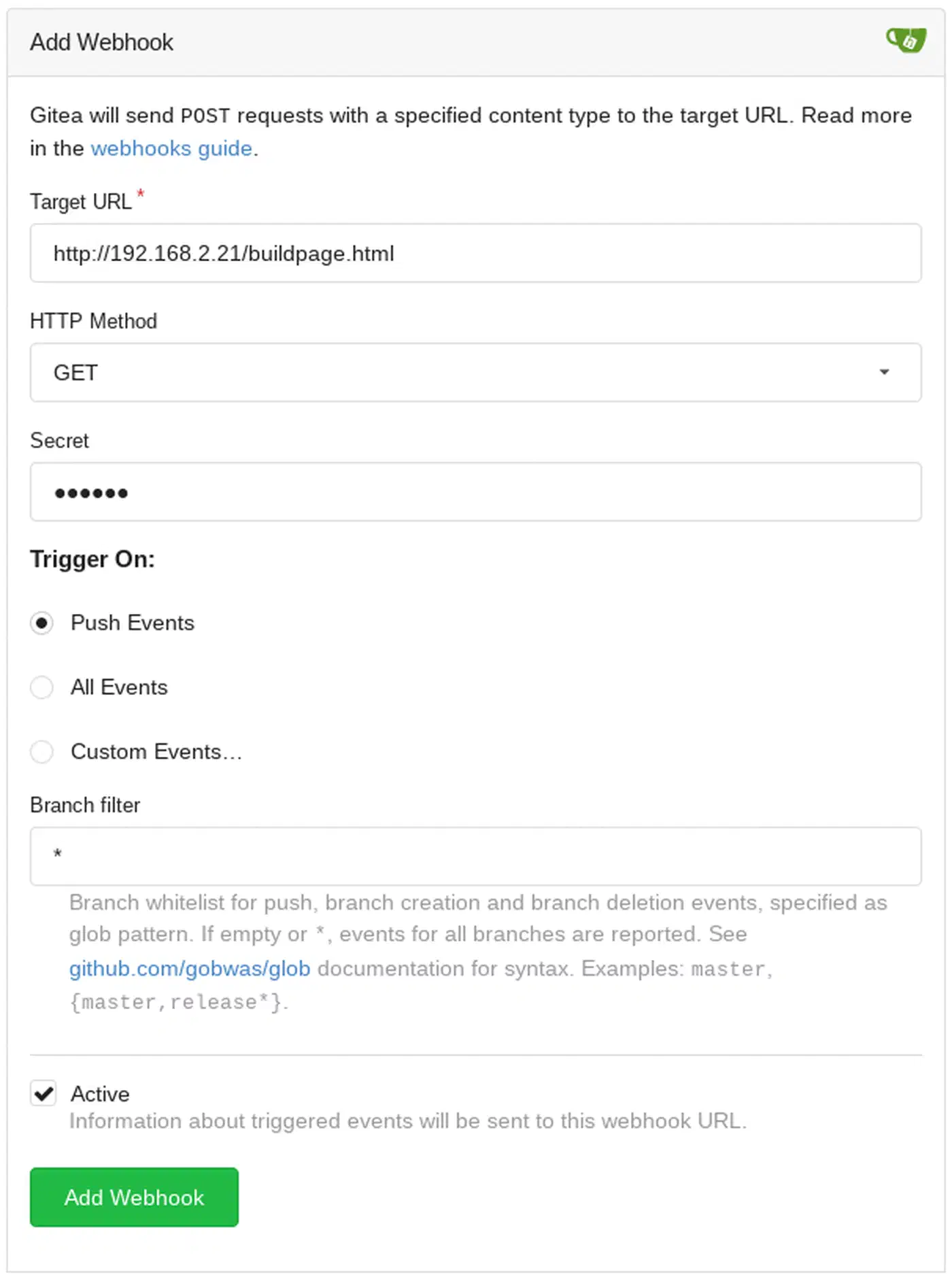
Both GitHub and Gitea let you configure webhooks at the repository, organization, or (for Gitea) system-wide level. When an event occurs - someone opens an issue, pushes a commit, creates a pull request - the platform sends an HTTP POST request to a URL you control, carrying a JSON body that describes exactly what happened.
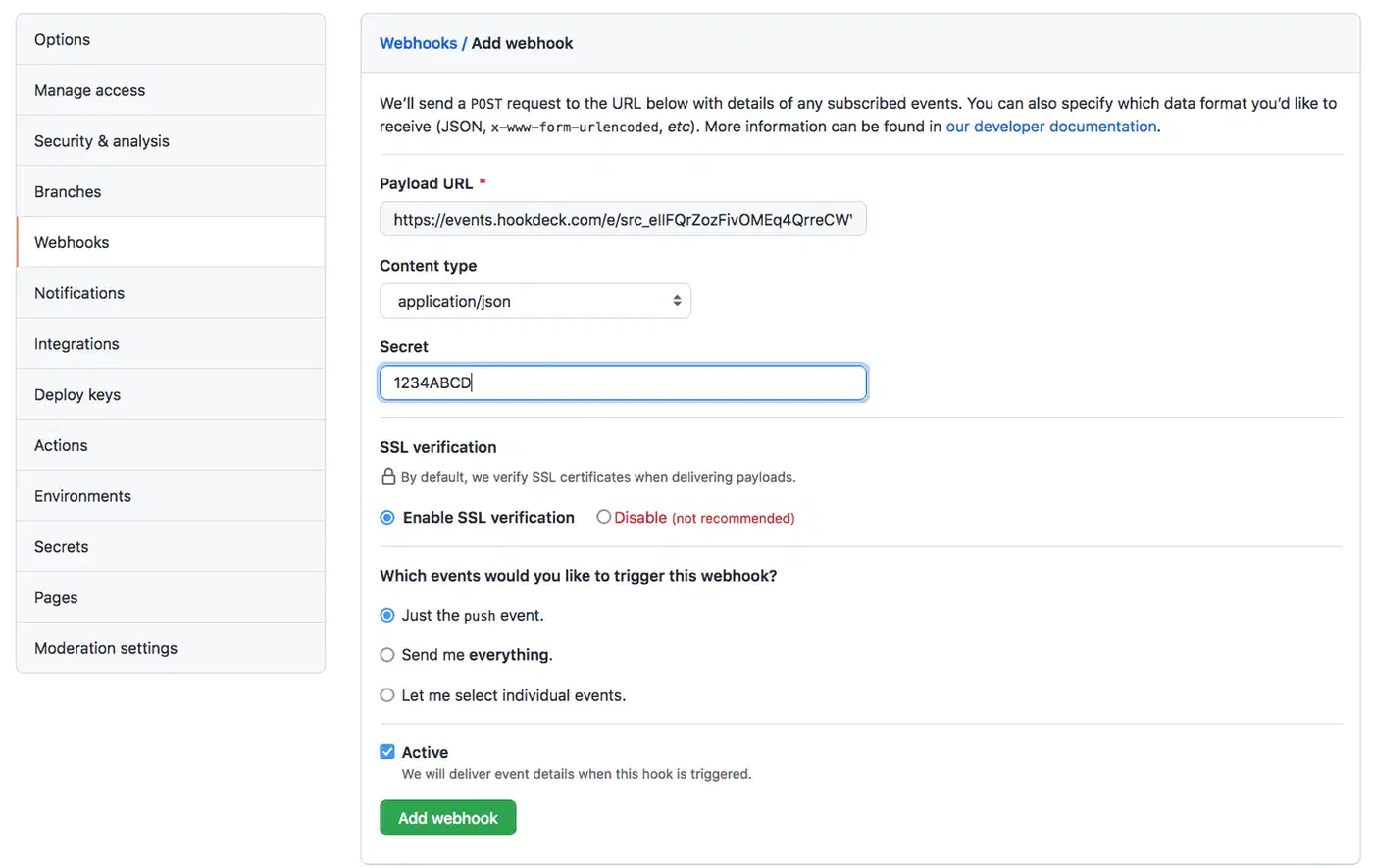
The supported event types overlap heavily between the two platforms: push, pull_request, issues, issue_comment, pull_request_review, and release all exist on both. The event type arrives in a header: X-GitHub-Event on GitHub, X-Gitea-Event on Gitea. The payload structure is largely compatible, though field nesting can differ in subtle ways that matter when you parse them programmatically.
Both platforms sign every webhook payload with HMAC-SHA256 so you can verify it actually came from the forge and was not tampered with in transit. GitHub puts the signature in the X-Hub-Signature-256 header, while Gitea uses X-Gitea-Signature. The verification logic is identical on your end: compute hmac.new(secret.encode(), body, hashlib.sha256).hexdigest() and compare the result to the value in the header.
A few operational differences are worth knowing upfront:
| Aspect | GitHub | Gitea (v1.25+) |
|---|---|---|
| Signature header | X-Hub-Signature-256 | X-Gitea-Signature |
| Event header | X-GitHub-Event | X-Gitea-Event |
| Max payload size | 25 MB | 4 MB default (configurable via MAX_SIZE in app.ini) |
| Retry behavior | 3 retries, exponential backoff | Configurable in [webhook] section of app.ini (default: 3 retries) |
| Source IPs | Published at api.github.com/meta | Your Gitea server’s IP |
| API rate limit | 5,000 req/hr (PAT), 15,000 (GitHub App) | No hard limit by default |
GitHub delivers from IP ranges published at https://api.github.com/meta (the hooks array), which matters if you want to restrict inbound traffic with firewall rules. Gitea delivers from whatever server hosts your instance, so IP filtering is straightforward.
Building the Webhook Receiver with FastAPI
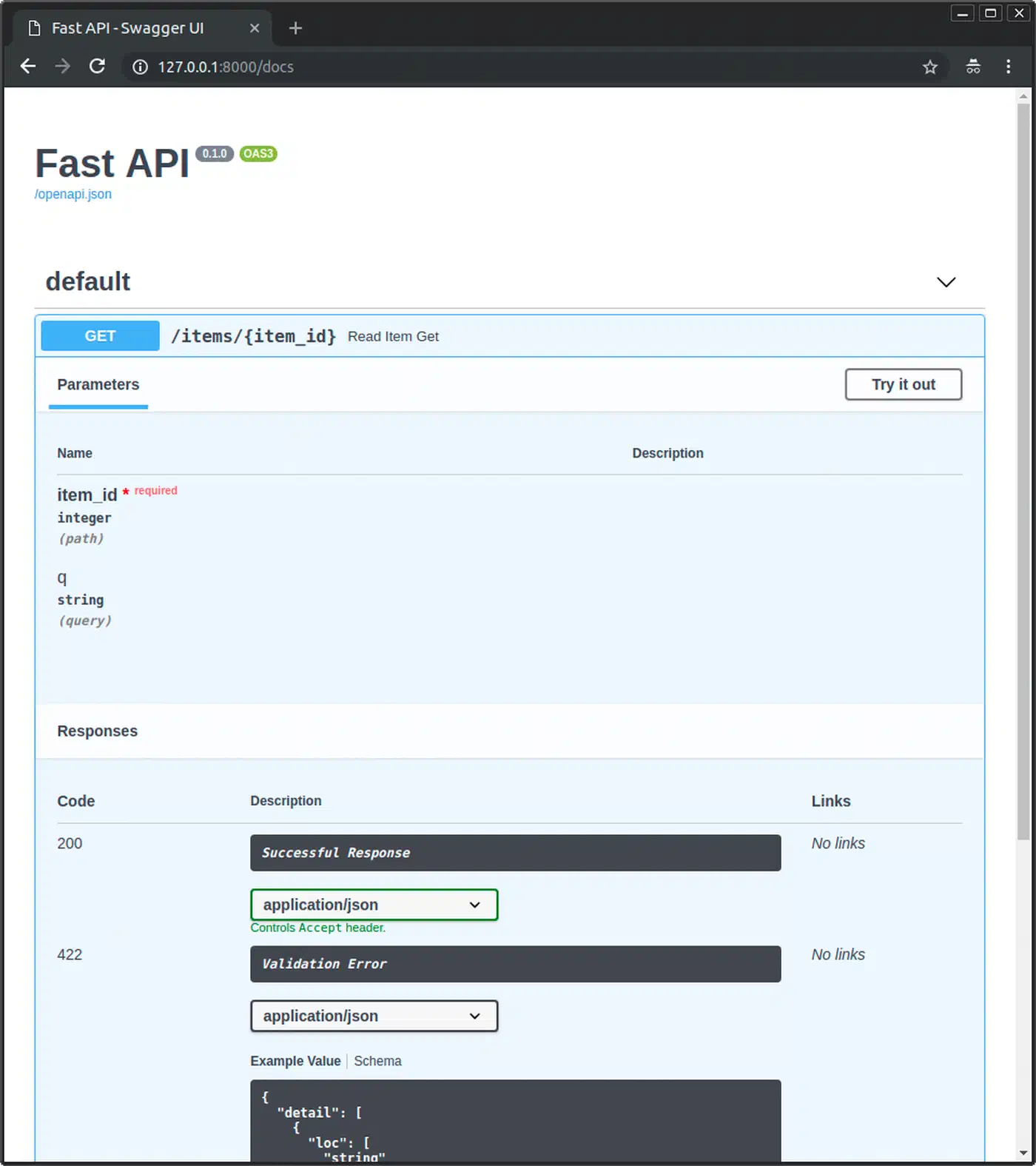
FastAPI (currently at v0.135.x) works well as a webhook receiver - it handles async request processing natively, validates payloads with Pydantic , and runs on Uvicorn with minimal overhead. Here is how to set up the project from scratch using uv :
uv init repo-bot && cd repo-bot
uv add fastapi 'uvicorn[standard]' httpx pydantic python-dotenv
The httpx
library handles async HTTP calls back to the GitHub or Gitea API. With the project scaffolded, create main.py:
import hashlib
import hmac
import json
import os

from dotenv import load_dotenv
from fastapi import FastAPI, Request, HTTPException

load_dotenv()

app = FastAPI()
WEBHOOK_SECRET = os.getenv("WEBHOOK_SECRET", "")


def verify_signature(body: bytes, signature: str, secret: str) -> bool:
    expected = hmac.new(secret.encode(), body, hashlib.sha256).hexdigest()
    # GitHub prefixes with "sha256=", Gitea sends the raw hex digest
    if signature.startswith("sha256="):
        signature = signature[7:]
    return hmac.compare_digest(expected, signature)


@app.post("/webhook")
async def webhook(request: Request):
    body = await request.body()

    # Detect platform from headers
    event_type = request.headers.get("X-GitHub-Event") or request.headers.get(
        "X-Gitea-Event"
    )
    signature = request.headers.get(
        "X-Hub-Signature-256", ""
    ) or request.headers.get("X-Gitea-Signature", "")

    if not verify_signature(body, signature, WEBHOOK_SECRET):
        raise HTTPException(status_code=403, detail="Invalid signature")

    payload = json.loads(body)
    handler = handlers.get(event_type, handle_unknown)
    return await handler(payload)
The verify_signature function uses hmac.compare_digest() instead of == to prevent timing attacks - an attacker cannot determine how many bytes of the signature matched based on response time.
The event routing pattern maps event types to handler functions using a plain dictionary:
async def handle_issues(payload: dict):
    action = payload.get("action")
    if action == "opened":
        return await auto_label_issue(payload)
    return {"status": "ignored"}

async def handle_pull_request(payload: dict):
    action = payload.get("action")
    if action in ("opened", "edited"):
        return await enforce_pr_title(payload)
    return {"status": "ignored"}

async def handle_push(payload: dict):
    return {"status": "received", "commits": len(payload.get("commits", []))}

async def handle_unknown(payload: dict):
    return {"status": "unhandled"}

handlers = {
    "issues": handle_issues,
    "pull_request": handle_pull_request,
    "push": handle_push,
}
Store secrets and API tokens in a .env file loaded by python-dotenv:
WEBHOOK_SECRET=your-webhook-secret-here
GITHUB_TOKEN=ghp_xxxxxxxxxxxxxxxxxxxx
GITEA_TOKEN=your-gitea-access-token
GITEA_URL=https://gitea.example.com
Run the development server with:
uvicorn main:app --reload --port 8000For development, you need to expose your local server to the internet so GitHub or Gitea can reach it. Cloudflare Tunnel
or ngrok
both work well for this. Once exposed, configure the webhook in your repository settings to point at https://your-tunnel-url/webhook. For a deeper look at building a persistent webhook relay with Cloudflare Tunnels and FastAPI
, including security hardening and running the relay as a service, that guide covers the infrastructure side in detail.
Practical Bot Actions: Labeling, Enforcement, and Automation
The webhook receiver is plumbing. What matters is what the bot does when events arrive. Below are several common automations with working code for each.
Auto-Labeling Issues
When a new issue is opened, scan its title and body for keywords and apply labels automatically. This saves maintainers from manual triage on active repositories:
import httpx

LABEL_KEYWORDS = {
    "bug": ["bug", "error", "crash", "broken", "fix"],
    "feature": ["feature", "enhancement", "request", "add"],
    "question": ["question", "how to", "help", "why"],
    "documentation": ["docs", "documentation", "typo", "readme"],
}

async def auto_label_issue(payload: dict):
    issue = payload["issue"]
    text = f"{issue['title']} {issue['body'] or ''}".lower()
    repo = payload["repository"]["full_name"]
    number = issue["number"]

    labels = [
        label for label, keywords in LABEL_KEYWORDS.items()
        if any(kw in text for kw in keywords)
    ]

    if labels:
        async with httpx.AsyncClient() as client:
            await client.post(
                f"https://api.github.com/repos/{repo}/issues/{number}/labels",
                json={"labels": labels},
                headers={
                    "Authorization": f"Bearer {os.getenv('GITHUB_TOKEN')}",
                    "Accept": "application/vnd.github+json",
                },
            )
    return {"status": "labeled", "labels": labels}
PR Title Enforcement
Many teams adopt Conventional Commits for PR titles to generate changelogs automatically. The bot can enforce this convention by checking the title against a regex pattern and posting a comment when it does not match:
import re

PR_TITLE_PATTERN = re.compile(
    r"^(feat|fix|docs|refactor|test|chore|ci|perf)(\(.+\))?: .{10,}$"
)

async def enforce_pr_title(payload: dict):
    pr = payload["pull_request"]
    repo = payload["repository"]["full_name"]
    title = pr["title"]
    sha = pr["head"]["sha"]

    if PR_TITLE_PATTERN.match(title):
        state = "success"
        description = "PR title follows Conventional Commits"
    else:
        state = "failure"
        description = "PR title must match: type(scope): description (min 10 chars)"
        # Post a comment explaining the expected format
        async with httpx.AsyncClient() as client:
            await client.post(
                f"https://api.github.com/repos/{repo}/issues/{pr['number']}/comments",
                json={"body": (
                    "**PR Title Check Failed**\n\n"
                    "Please format your title as: `type(scope): description`\n\n"
                    "Valid types: `feat`, `fix`, `docs`, `refactor`, `test`, "
                    "`chore`, `ci`, `perf`\n\n"
                    f"Your title: `{title}`"
                )},
                headers={
                    "Authorization": f"Bearer {os.getenv('GITHUB_TOKEN')}",
                    "Accept": "application/vnd.github+json",
                },
            )

    # Set commit status
    async with httpx.AsyncClient() as client:
        await client.post(
            f"https://api.github.com/repos/{repo}/statuses/{sha}",
            json={
                "state": state,
                "description": description,
                "context": "pr-title-check",
            },
            headers={
                "Authorization": f"Bearer {os.getenv('GITHUB_TOKEN')}",
                "Accept": "application/vnd.github+json",
            },
        )
    return {"status": state}
Stale Issue Management
For repositories that accumulate neglected issues, a scheduled task (triggered by a cron job or a webhook from a scheduler) can query for stale issues and warn about auto-closing:
from datetime import datetime, timedelta

async def mark_stale_issues(repo: str, days: int = 30):
    cutoff = (datetime.utcnow() - timedelta(days=days)).isoformat() + "Z"
    async with httpx.AsyncClient() as client:
        response = await client.get(
            f"https://api.github.com/repos/{repo}/issues",
            params={
                "state": "open",
                "sort": "updated",
                "direction": "asc",
                "per_page": 50,
            },
            headers={
                "Authorization": f"Bearer {os.getenv('GITHUB_TOKEN')}",
                "Accept": "application/vnd.github+json",
            },
        )
        issues = response.json()
        for issue in issues:
            if issue["updated_at"] < cutoff and "pull_request" not in issue:
                await client.post(
                    f"https://api.github.com/repos/{repo}/issues/{issue['number']}/labels",
                    json={"labels": ["stale"]},
                    headers={
                        "Authorization": f"Bearer {os.getenv('GITHUB_TOKEN')}",
                        "Accept": "application/vnd.github+json",
                    },
                )
Custom CI Triggers
On push events to specific branches, trigger an external CI pipeline by calling its API. This is useful when your CI system (Jenkins, Drone, Woodpecker) is not directly integrated with your forge:
async def handle_push(payload: dict):
    branch = payload["ref"].split("/")[-1]
    if branch in ("main", "staging"):
        sha = payload["after"]
        async with httpx.AsyncClient() as client:
            await client.post(
                "https://ci.example.com/api/pipelines",
                json={"branch": branch, "commit": sha},
                headers={"Authorization": "Bearer CI_TOKEN"},
            )
    return {"status": "triggered"}
If you run Gitea Actions on a self-hosted runner with GPU access, you can extend this pattern to post LLM-generated code feedback as PR comments — the approach covered in automating code reviews with local LLMs in a CI pipeline pairs naturally with the webhook handler here.
Handling GitHub and Gitea Differences in One Codebase
If you use GitHub for public projects and Gitea for private or self-hosted repositories, there is no reason to maintain two separate bots. The platform differences are small enough to hide behind a thin abstraction.
Start with a Platform enum and automatic detection:
from enum import Enum

class Platform(str, Enum):
    GITHUB = "github"
    GITEA = "gitea"

def detect_platform(headers: dict) -> Platform:
    if "X-GitHub-Event" in headers:
        return Platform.GITHUB
    elif "X-Gitea-Event" in headers:
        return Platform.GITEA
    raise ValueError("Unknown platform")
The core of this is a ForgeClient class that swaps the base URL and authentication headers depending on the platform:
class ForgeClient:
    def __init__(self, platform: Platform):
        self.platform = platform
        if platform == Platform.GITHUB:
            self.base_url = "https://api.github.com"
            self.headers = {
                "Authorization": f"Bearer {os.getenv('GITHUB_TOKEN')}",
                "Accept": "application/vnd.github+json",
            }
        else:
            gitea_url = os.getenv("GITEA_URL", "https://gitea.example.com")
            self.base_url = f"{gitea_url}/api/v1"
            self.headers = {
                "Authorization": f"token {os.getenv('GITEA_TOKEN')}",
            }

    async def add_labels(self, repo: str, issue_number: int, labels: list[str]):
        async with httpx.AsyncClient() as client:
            await client.post(
                f"{self.base_url}/repos/{repo}/issues/{issue_number}/labels",
                json={"labels": labels},
                headers=self.headers,
            )

    async def post_comment(self, repo: str, issue_number: int, body: str):
        async with httpx.AsyncClient() as client:
            await client.post(
                f"{self.base_url}/repos/{repo}/issues/{issue_number}/comments",
                json={"body": body},
                headers=self.headers,
            )

    async def set_commit_status(self, repo: str, sha: str, state: str,
                                 description: str, context: str):
        async with httpx.AsyncClient() as client:
            await client.post(
                f"{self.base_url}/repos/{repo}/statuses/{sha}",
                json={
                    "state": state,
                    "description": description,
                    "context": context,
                },
                headers=self.headers,
            )
For payload normalization, define Pydantic models that represent a unified event structure and write a mapping function:
from pydantic import BaseModel

class PullRequestEvent(BaseModel):
    number: int
    title: str
    author: str
    base_branch: str
    head_branch: str
    head_sha: str
    action: str

def normalize_pr_event(platform: Platform, payload: dict) -> PullRequestEvent:
    pr = payload["pull_request"]
    return PullRequestEvent(
        number=pr["number"],
        title=pr["title"],
        author=pr["user"]["login"],
        base_branch=pr["base"]["ref"],
        head_branch=pr["head"]["ref"],
        head_sha=pr["head"]["sha"],
        action=payload["action"],
    )
The commit status API works identically on both platforms since Gitea 1.19+, using the same endpoint path (/repos/{owner}/{repo}/statuses/{sha}) and state values (success, failure, pending). This is one of many areas where Gitea intentionally mirrors GitHub’s API to make migration easier.
Authentication is the main divergence: GitHub expects Authorization: Bearer ghp_xxxxx while Gitea (v1.22+) accepts either Authorization: token <access_token> or Authorization: Bearer <access_token>.
A Note on GitHub Apps vs Personal Access Tokens
For anything beyond a personal project bot, consider using a GitHub App instead of a personal access token. Apps are not tied to a user account, use short-lived installation tokens (limiting damage if a token leaks), offer fine-grained permissions, and get higher rate limits (up to 15,000 requests/hour on Enterprise Cloud vs. 5,000 for PATs). They also keep working when the person who created them leaves the organization.
Gitea does not have a direct equivalent of GitHub Apps, so personal access tokens remain the standard approach there. If you run a multi-platform bot, your ForgeClient can use a GitHub App installation token for GitHub and a PAT for Gitea without any changes to the handler logic.
Deploying and Monitoring the Bot
A bot that fails silently causes more confusion than having no bot. Your webhook handler deserves the same treatment as any production service: a container, structured logging, and health checks.
Docker Container
Package the bot as a single Docker container:
FROM python:3.13-slim

WORKDIR /app
COPY pyproject.toml uv.lock ./
RUN pip install uv && uv sync --no-dev
COPY . .

CMD ["uv", "run", "uvicorn", "main:app", "--host", "0.0.0.0", "--port", "8000"]
Using python:3.13-slim as the base and excluding dev dependencies keeps the image under 100 MB. For Gitea self-hosted environments
, run the bot on the same Docker network as the Gitea instance and configure the webhook URL as http://repo-bot:8000/webhook (internal Docker DNS) to avoid hairpin NAT issues.
A minimal docker-compose.yml for running alongside Gitea:
services:
  repo-bot:
    build: .
    ports:
      - "8000:8000"
    env_file: .env
    restart: unless-stopped
    healthcheck:
      test: ["CMD", "curl", "-f", "http://localhost:8000/health"]
      interval: 30s
      timeout: 5s
      retries: 3
Structured Logging
Add structlog for machine-parseable logs that make debugging production issues practical:
import structlog
import time

logger = structlog.get_logger()

@app.post("/webhook")
async def webhook(request: Request):
    start = time.monotonic()
    body = await request.body()
    event_type = request.headers.get("X-GitHub-Event") or request.headers.get(
        "X-Gitea-Event"
    )
    delivery_id = request.headers.get("X-GitHub-Delivery") or request.headers.get(
        "X-Gitea-Delivery", "unknown"
    )

    # ... signature verification and handling ...

    elapsed = (time.monotonic() - start) * 1000
    logger.info(
        "webhook_processed",
        event_type=event_type,
        delivery_id=delivery_id,
        processing_time_ms=round(elapsed, 2),
        repo=payload.get("repository", {}).get("full_name"),
    )
    return result
Ship logs to stdout for Docker log collection, or forward them to Loki or Elasticsearch if you need search and aggregation.
Health and Metrics Endpoints
Add a /health endpoint for container orchestrator liveness probes and a /metrics endpoint for Prometheus
scraping:
from collections import defaultdict

event_counts = defaultdict(int)

@app.get("/health")
async def health():
    return {"status": "ok"}

@app.get("/metrics")
async def metrics():
    lines = []
    for key, count in event_counts.items():
        lines.append(f'webhook_events_total{{event_type="{key}"}} {count}')
    return "\n".join(lines)
For deeper observability, use a library like prometheus-fastapi-instrumentator that automatically tracks request duration, status codes, and in-flight requests.
Testing Webhook Deliveries
Both platforms provide delivery logs in their webhook settings UI where you can see the request headers and full payload for every delivery. GitHub’s “Redeliver” button lets you replay a payload against your endpoint, which saves a lot of time during development.

For local testing without triggering real events, save a sample payload to a file and use curl:
# Generate HMAC signature for test payload
SIGNATURE=$(cat test-payload.json | openssl dgst -sha256 -hmac "your-secret" | cut -d' ' -f2)

curl -X POST http://localhost:8000/webhook \
  -H "Content-Type: application/json" \
  -H "X-GitHub-Event: issues" \
  -H "X-Hub-Signature-256: sha256=$SIGNATURE" \
  -d @test-payload.json
This approach lets you build a library of test payloads for each event type and run them in CI to catch regressions before deploying.
A webhook bot takes maybe an afternoon to build and removes hours of repetitive triage each week. The pattern stays the same across every automation you add: receive a POST, verify the signature, route by event type, call the API. Whether you run GitHub, Gitea, or both, the code differences fit behind a thin abstraction layer. Auto-labeling issues is a good first automation to wire up, and from there you can add PR enforcement, stale issue management, or whatever else your team keeps doing by hand.