 Botmonster Tech
Amnezia builds your own VPN and hides that it is one

Amnezia is a self hosted VPN client that installs its own server. You give the app a server address and an SSH login, and it deploys the VPN containers for you. It then offers protocols built to look like ordinary traffic, so a network that blocks VPNs has nothing obvious to block.
Key Takeaways
- Amnezia installs the VPN server for you over SSH, from the app.
- Its protocols are built to look like ordinary web traffic.
- Split tunnelling sends only chosen sites or apps through the VPN.
- It runs on Windows, macOS, Linux, Android, and iPhone.
- The project ships mirror links because its own site gets blocked.
What a self hosted VPN client does that a subscription does not
A commercial VPN puts your traffic on a shared address owned by a company. You’re trusting that firm’s promise not to keep logs. A self-hosted VPN puts your traffic on an address you rent yourself. The only parties watching both ends are you and your hosting provider.
The usual barrier is setup. Installing WireGuard by hand means keys, config files, and firewall rules. There are many small ways to get it wrong.
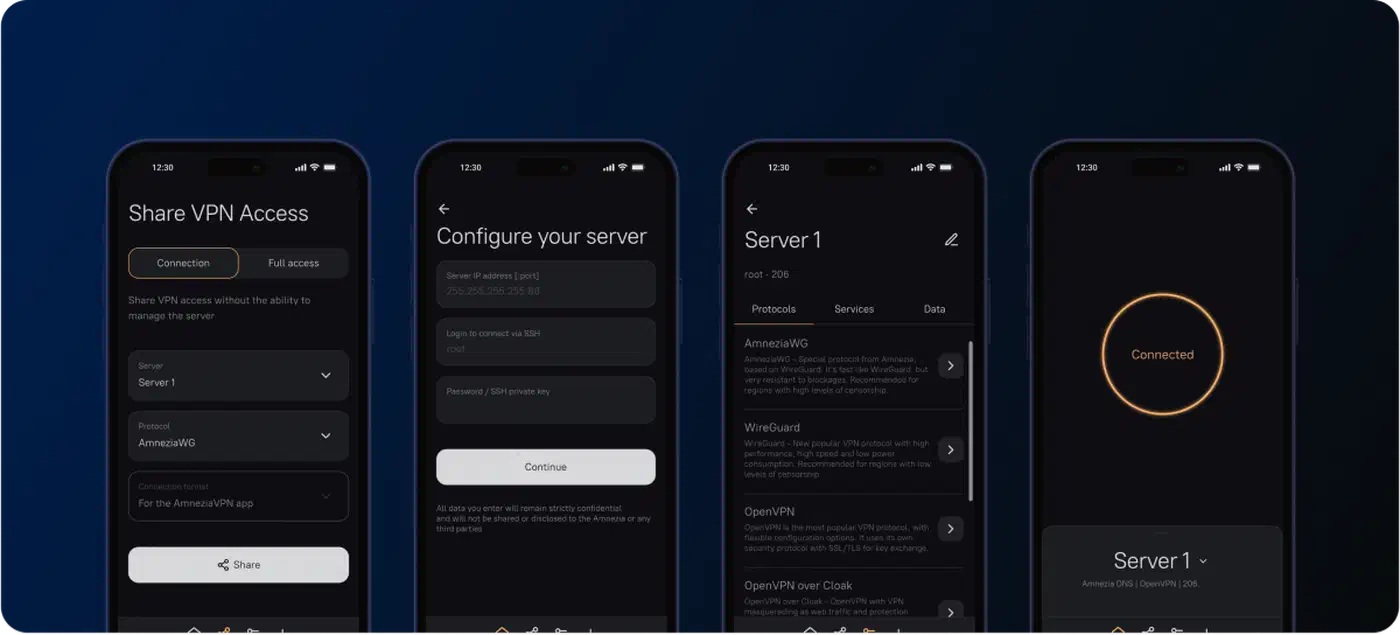
Amnezia removes that barrier by doing the install itself. The client opens an SSH session to your server and deploys the VPN as Docker containers. You never write a config file.
| Option | Who runs the server | Setup effort | Your exit address |
|---|---|---|---|
| Amnezia self-hosted | you | the app installs it over SSH | yours alone |
| WireGuard by hand | you | keys, config files, firewall rules | yours alone |
| A paid VPN subscription | the provider | install an app, sign in | shared with other customers |
Self-hosting still has real costs. An address used by one person stands out more than a shared one. Whoever watches it sees a single user with a steady pattern. You’re also the operator, so nobody else patches that box or notices when it falls over.
It suits people who already pay for a small server and want to pick their own exit point, plus anyone whose network blocks the big commercial brands by name.
The protocols built to look like something else
Amnezia offers the plain protocols first. OpenVPN, WireGuard, and IKEv2 are fast, well understood, and easy for a filtering system to recognise.
The problem is recognition. A network that blocks VPNs can leave the encryption alone, spot the handshake, and drop the connection.
So the Amnezia README lists four masking options alongside the classics, each built to hide that handshake.
| Protocol | What it looks like on the wire | When to pick it |
|---|---|---|
| WireGuard / OpenVPN / IKEv2 | an obvious VPN | nothing is filtering you |
| AmneziaWG | randomised UDP, or QUIC and DNS | WireGuard is being blocked by signature |
| OpenVPN over Cloak | an ordinary encrypted web session | deep inspection is active |
| OpenVPN over Shadowsocks | generic encrypted traffic | the older, widely deployed fallback |
| XRay | varies by transport | aggressive, adaptive filtering |
The XRay row covers more ground than it looks. Xray-core is the engine behind VLESS Reality, which borrows a real site’s TLS handshake instead of scrambling packets. Whether that beats Hysteria 2 on QUIC comes down to one thing: whether your network passes UDP.
AmneziaWG leaves WireGuard’s crypto untouched and changes only the shape of the packets. The security case for WireGuard therefore still holds. The documented settings scramble packet headers, pad messages with up to 64 random bytes, and send junk packets before the handshake. Newer versions can also dress the tunnel up as QUIC or DNS.
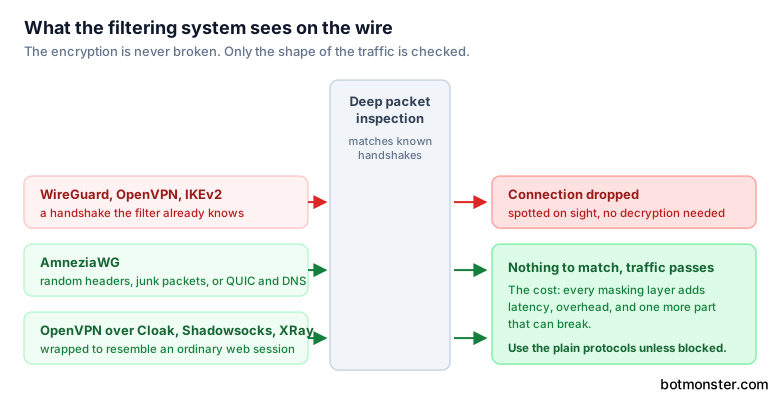
Disguise costs you something. Every masking layer slows the traffic down and adds another moving part that can break. The project publishes no per-protocol speed figures, so you will have to measure the overhead on your own server. Use the plain protocols unless something is actually blocking you.
AmneziaWG also runs on Keenetic router firmware. That puts the masked tunnel on the router instead of on every device.
How to set up your own Amnezia VPN server from the app
Get a plain server first
Any small virtual server with a public address will do. Note the address, the SSH username, and the password or key. The server needs nothing installed on it beforehand.
Install the client
Download it for Windows, macOS, Linux, Android, or iPhone from the project site or the releases page. If the main site is blocked where you are, use the mirror link the project publishes.
Enter the server details
In the app, add a server using the address and your SSH login. The client connects, then installs the VPN containers itself.
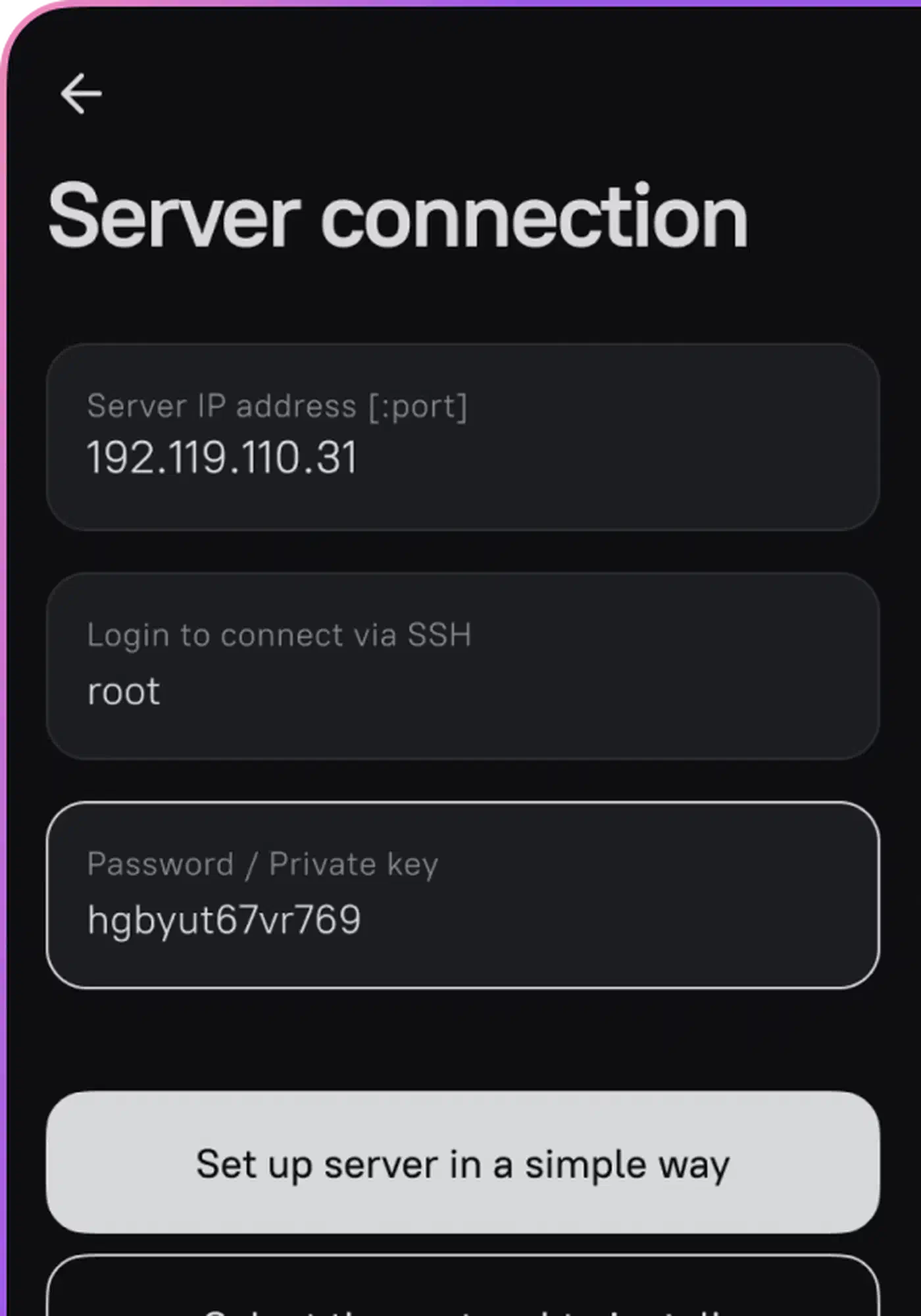
Once the tunnel is up, confirm it actually moved you. Load a public address checker before connecting and again after, and the two readings should differ. Image: Amnezia
Pick a protocol for your situation
Use the table above. Plain WireGuard or OpenVPN where nothing is filtered, AmneziaWG or Cloak or XRay where VPN traffic is actively blocked.
Connect and confirm
Connect, then check that your visible address has changed and that traffic is flowing. Do this before you rely on the tunnel for anything sensitive.
Turn on split tunnelling if you want it
Add the sites that should go through the VPN, or on Android and desktop, the apps. Everything else keeps using your normal connection, which saves bandwidth and avoids breaking local services.
Share access if others need it
The server you just built can hand out configurations for other people’s devices. That is the usual reason people run their own server in the first place.
Who needs traffic masking, and who does not
Most readers don’t need any of this. On an ordinary home connection, plain WireGuard is faster and simpler.
The people who do need it sit on networks that block VPN protocols outright. That might be a national filter, an office firewall, or a campus network that drops anything it cannot inspect.
You can see that audience in the project’s own support channels, which run in English, Russian, Farsi, and Burmese. The README ships a mirror link, because the project’s own website is blocked in some regions. The r/AmneziaVPN subreddit carries the same mix of users.
The tool promises no anonymity. A VPN moves the point where your traffic enters the internet. Your identity survives that move, and any account you log into names you regardless of the tunnel.
On a hostile network, read the benefit narrowly. Masking raises the cost of blocking you while leaving you just as easy to name. The person running that network may well spot the attempt.
What nearly six years of work bought
The project has been in development since 2020, written in C++ with Qt. The client is now on the 5.x release line, and one codebase builds for Windows, macOS, Linux, Android, and iPhone.
The building blocks are all well known, and none of the crypto is home-grown: OpenSSL, OpenVPN, WireGuard, libssh, and Xray-core. Split tunnelling covers sites on every platform and apps on Android and desktop, which is finer control than most clients bother with.
The open queue is large, at roughly 970 open issues and pull requests. A cross-platform client fighting five operating systems and an adversarial network tends to look like that.
The client has been through three penetration tests by 7ASecurity, paid for by the Open Technology Fund. The reported findings were fixed on retest. The licence is GPL-3.0, so anyone can inspect, fork, and rebuild the client. That is the least you should expect from software people use to reach the open internet.
Before you trust it in a high-risk setting, check which product you’re on. Amnezia sells a paid premium plan alongside the self-hosted path, and the two are different. Self-hosted mode keeps your server login on your device. Managed mode runs on the company’s own servers. Read the documentation so you know which one you have.
The install also deploys containers rather than hardening the server. You still have to lock down SSH, keep the host patched, and watch for trouble.