 Botmonster Tech
Batch Migrate GitHub to Gitea with migtea

To batch migrate GitHub to Gitea, migtea gets you past one small limit: Gitea’s built-in migrator moves exactly one repository per submission. migtea is an open-source terminal tool I built that moves your whole account in one pass, wikis, LFS, and issues included. Here is how it works, screen by screen.
Everything here was tested against Gitea 1.26.4, gh 2.96.0, tea 0.12.0, and uv 0.11.2.
Key Takeaways
- Gitea’s migrator moves one repo per submission and has no batch mode.
- One migration carries code, wiki, LFS, issues, and pull requests.
uvx migteabatch-migrates every repo with nothing to install.- Preflight, diff, tick, confirm: four screens from zero to migrated.
gh auth tokenlets Gitea clone private repos and dodge rate limits.
Why won’t Gitea migrate all your GitHub repos at once?
Gitea has a built-in migration page, but it moves only one repository at a time. You paste one GitHub URL and a token, click Migrate, and wait. The repo arrives complete, with its wiki, LFS objects, and issues. Then you start over with the next one. For a hundred repos, that is a hundred rounds of the same form. migtea does them all in one go.
Batch migrate every repo at once with migtea
migtea (migrate to Gitea) is a Textual terminal UI that drives the official gh and tea CLIs. It runs with nothing to install:
uvx migteauvx fetches migtea from PyPI and runs it in one step. pip install migtea works too if you prefer. From launch to a migrated account, there are four screens.
Prerequisites
migtea does not bundle or install anything itself; it drives the tools already on your PATH, installed the official way:
- uv to run
uvx migtea(orpip install migtea). - gh, GitHub’s official command-line tool, logged in with
gh auth login. - tea, the official CLI maintained by the Gitea project, with a login added via
tea login add. git, only if you use the reverse Gitea to GitHub direction.
Stage one: preflight
migtea will not start comparing anything until your tools are ready. The first screen confirms that gh and tea are installed and logged in. If a check fails, it prints the exact official command to fix it and waits for you to press r to re-check. It never pipes a script into your shell and never installs anything itself.
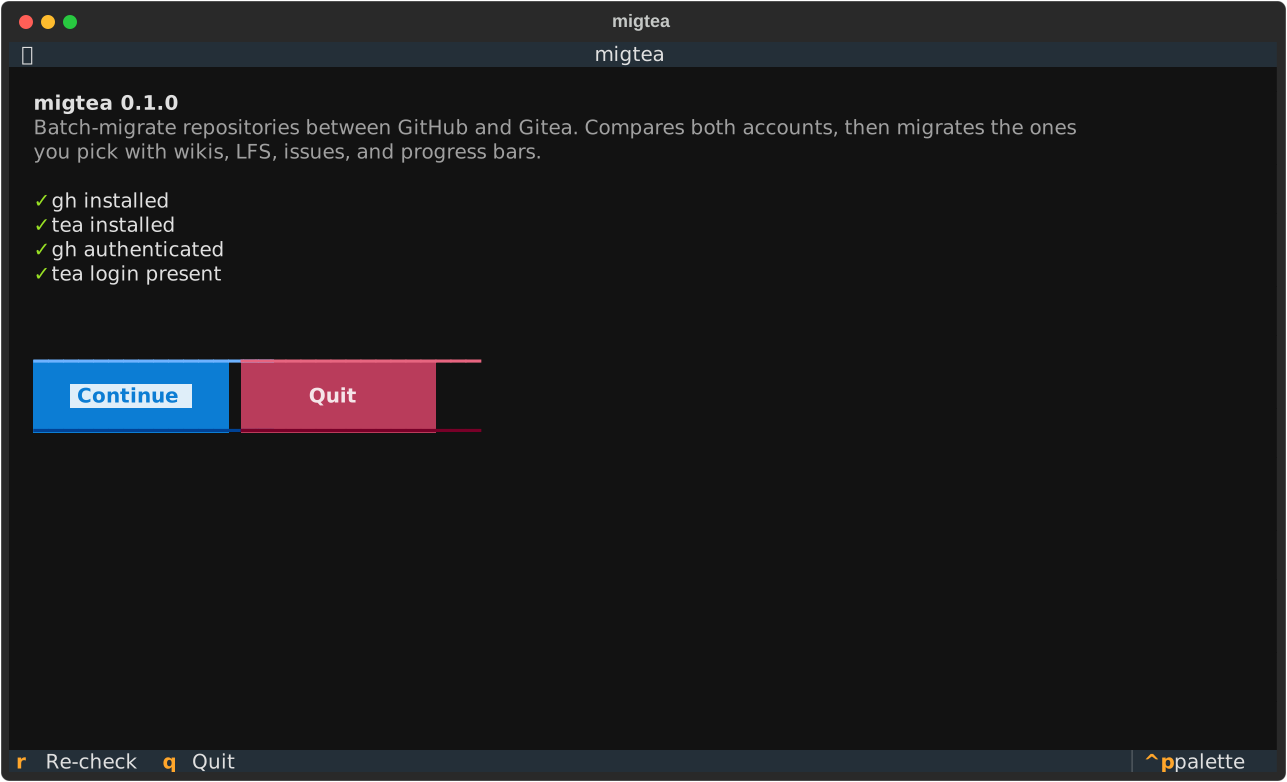
gh and tea are installed and both are authenticated before anything runs.Stage two: compare and select
Once the checks pass, migtea inventories both accounts and buckets every GitHub repository into “missing on Gitea” or “already there”. The select screen is one row per repo with its visibility, size, and last push. Missing repos are selectable; repos that already exist on your instance are dimmed and cannot be ticked, so a second run only ever offers what is still absent. Once the repos land, the same tea credentials drive a FastAPI bot on Gitea webhooks.
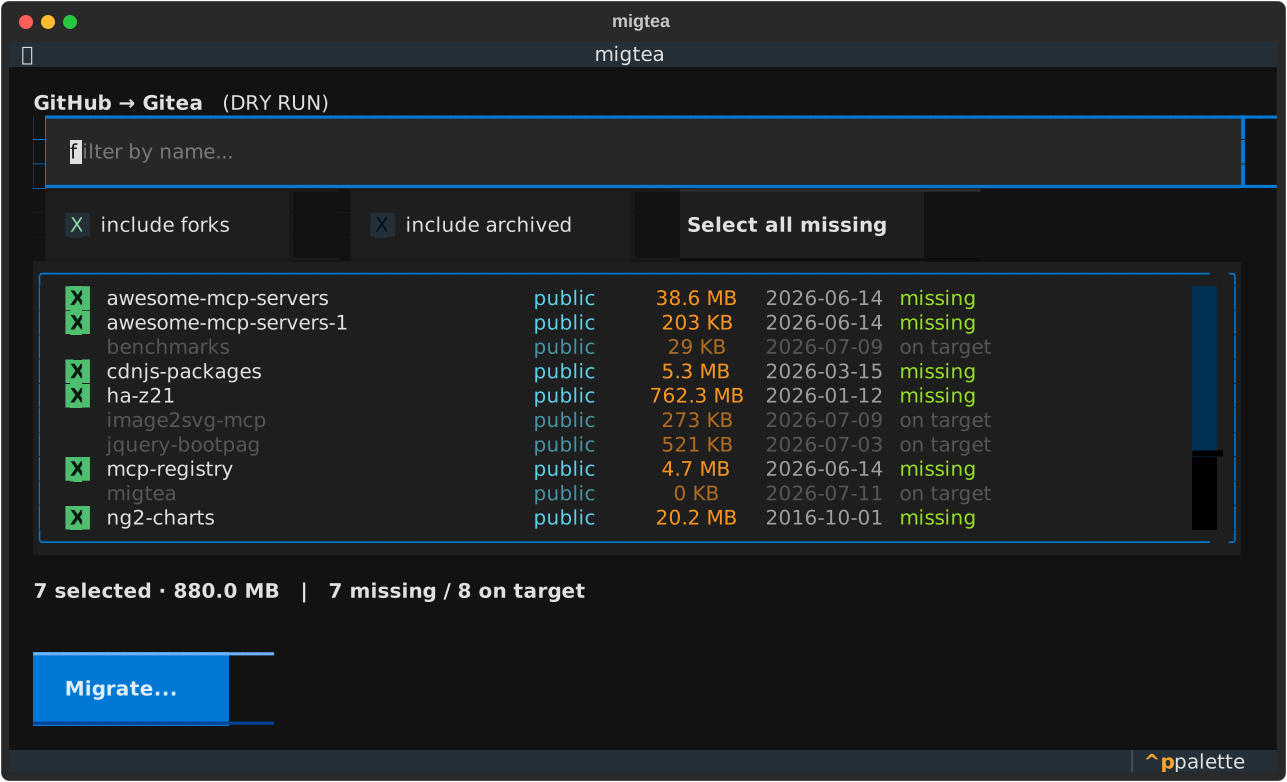
You filter by name, toggle forks and archived repos in or out (both are excluded by default because they are usually noise), or hit “Select all missing”. A running footer totals the size of everything you have picked. On my own account this surfaced seven repositories not yet on my Gitea box, 880 MB in total.
Stage three: confirm
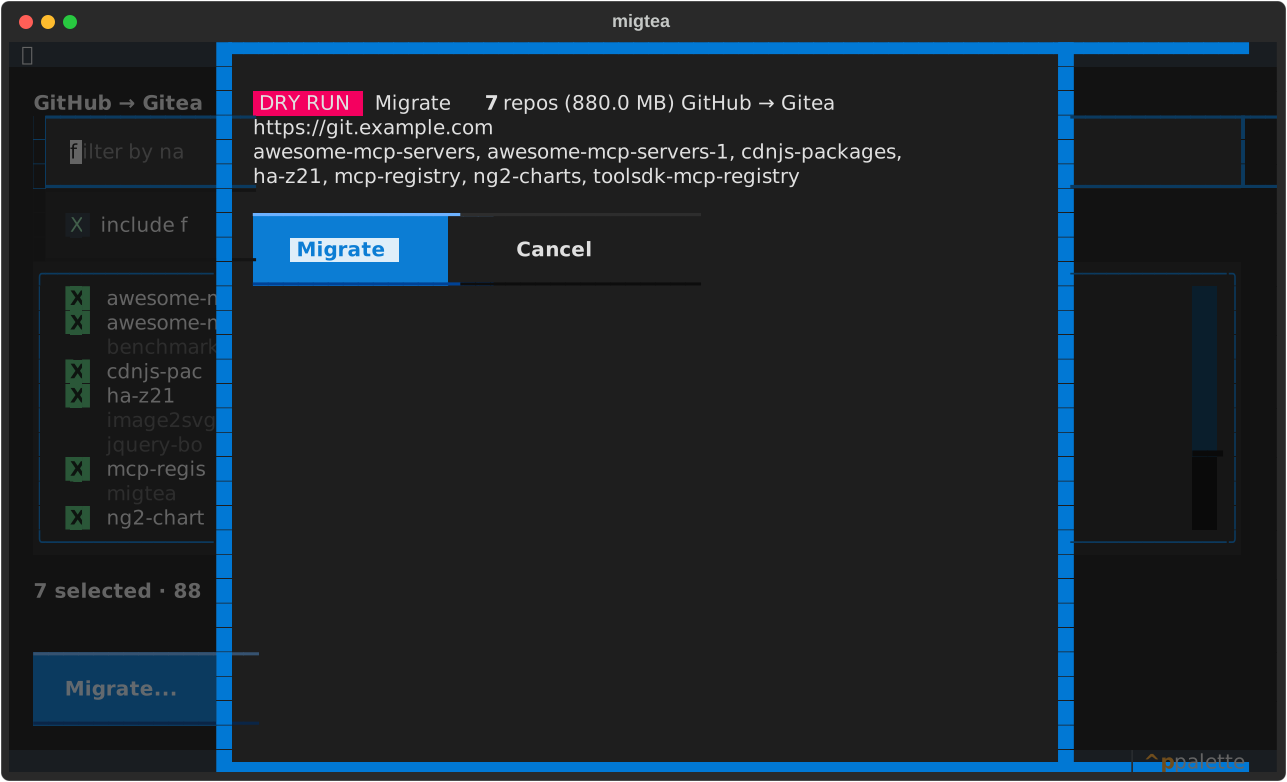
Before anything moves, migtea shows a summary: how many repositories, the total size, and the target instance URL. Nothing migrates by accident, and you know exactly how much you are about to pull through your Gitea server.
Stage four: migrate
Confirm, and migtea calls the migrate API once per repository with wiki and LFS enabled. A per-repo bar shows the current job, a size-weighted total bar tracks the whole batch, and a log pane streams the result of each repo as it lands. As a real test, I migrated migtea’s own repository to my Gitea instance in about four seconds. A fresh clone confirmed the code and default branch arrived intact.
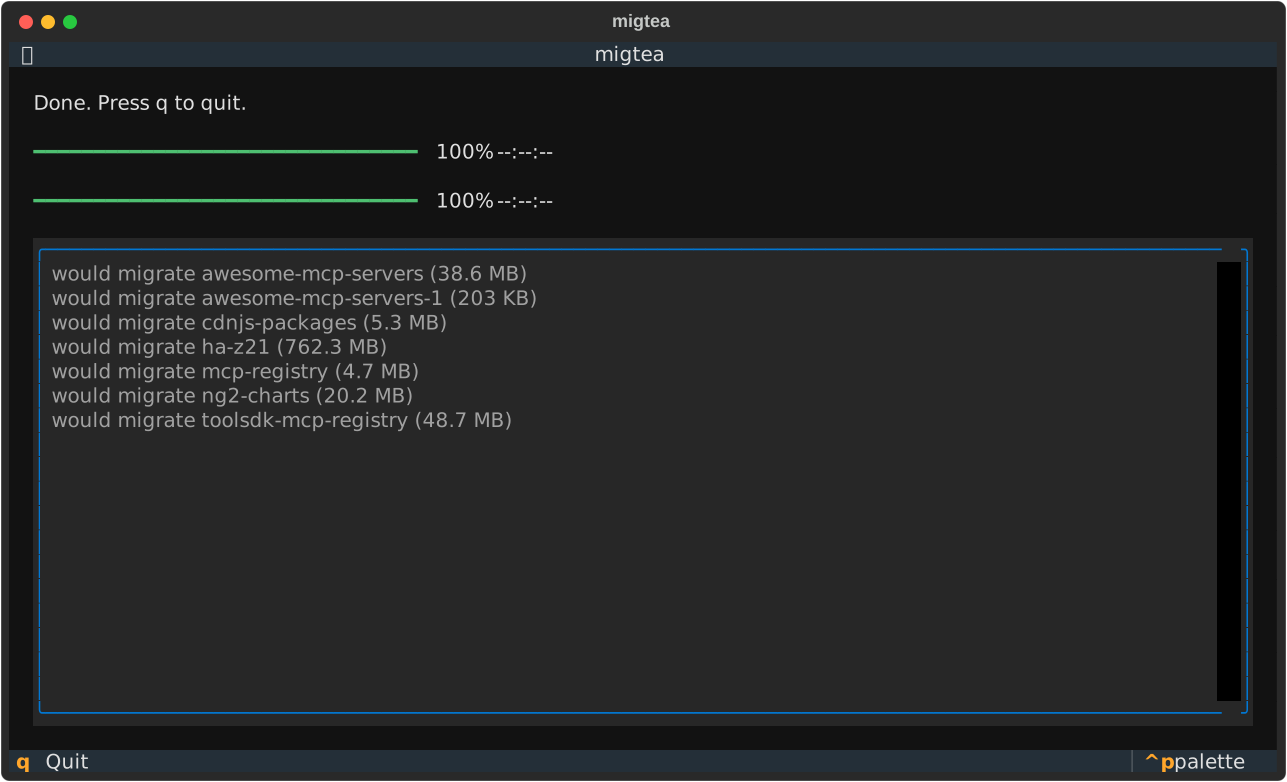
migtea is bidirectional. GitHub to Gitea is the default. To reverse it, pass --direction gitea-to-github or press d, which mirrors your Gitea repos back up to GitHub over your existing SSH setup. There is also a --dry-run flag that walks the entire flow but swaps the real migration for an existence check, so you can rehearse a large move safely first.
What it runs under the hood
migtea has no hidden client and no stored tokens. It inventories GitHub with gh repo list --json, inventories your instance with tea repos list, diffs the two by name, and calls tea repos migrate --service github once per ticked repo with wiki, LFS, issues, labels, milestones, releases, and pull requests enabled. The only token it ever touches is gh auth token, handed to tea in memory so Gitea can clone private repositories without hitting rate limits. Auth stays inside the official CLIs where it belongs.
What transfers to Gitea
The biggest fear in any batch move is silent data loss. Here is the precise matrix for a GitHub to Gitea migration through the migrate API:
| Item | Transfers? | How |
|---|---|---|
| Source code, branches, tags | Yes | Always |
| Wiki | Yes | wiki: true flag |
| Git LFS objects | Yes | lfs: true flag |
| Issues, labels, milestones | Yes | Optional flags, on by default in migtea |
| Releases and pull requests | Yes | Optional flags, on by default in migtea |
| GitHub Actions run history | No | Not part of the migration |
| Projects, Discussions, stars | No | GitHub-only features |
| Webhooks, branch protection | No | Recreate on Gitea after the move |
Detecting whether a repo uses LFS from the GitHub side is unreliable, so migtea always requests lfs: true. It is a harmless no-op for repos without any large files.
Edge cases migtea already handles
Moving one repo hides the failure modes that only show up at repo forty. These are the ones a batch run hits:
- Name collisions. A Gitea repo with the same name but different content is reported as already existing and is never overwritten. Rename it on the Gitea side first if you want a clean re-migration.
- Rate limits. Accounts with hundreds of repositories can hit GitHub’s API ceiling. Passing the
gh auth tokenraises Gitea’s pull limit and is the difference between a smooth run and a stall halfway through. - Forks and archived repos. These are usually clutter in a migration, so migtea excludes them by default behind toggles you can flip back on.
- Re-runs are safe. Already-migrated repositories land in the “exists on Gitea” bucket and drop out of the selectable set, so running the tool a second time only offers what is still missing.
If you are moving an entire organization with teams and per-repo permissions, note that the migrate API copies repositories, not permission structures. Plan to recreate teams and access rules on Gitea separately.
Alternatives to migtea
- Gitea’s web migrator. The migration form is the right choice when you have two or three repositories and nothing else set up. Same engine, one form per repo.
- Script it yourself. The tea CLI exposes the same engine:
tea repos migrate --service github --clone-url <url> --name <repo> --owner <you> --auth-token "$(gh auth token)" --wiki --lfs --issues, one invocation per repository. Loop it and you have rebuilt migtea’s core, minus the diffing, selection UI, and progress. - Pull mirrors. If GitHub should stay the source of truth, set the mirror flag instead of migrating. Gitea then refreshes the copy on an interval.
- Bare mirror push.
git clone --mirrorplusgit push --mirrormoves branches and tags but drops wikis, LFS objects, and issues, and round-trips everything through your laptop. There is a more basic problem too: git cannot list your hundred repositories, and it cannot create a single one on the target, because every push needs a repo that already exists. Listing and creating repos is API work, and that is exactly why migtea builds onghandteainstead of bare git.
Why migtea is the best tool for the job
A hundred-repo migration fails in the boring places: a logged-out CLI at repo zero, a name collision at repo forty, a rate limit at repo eighty. migtea is built around exactly those places. The preflight catches a dead login before anything moves. The diff makes every re-run idempotent, and the confirmation screen shows the total size before you pull it through your server. Full-fidelity flags are on by default, and auth never leaves the official gh and tea CLIs. uvx leaves nothing installed behind. Run it once and your account lives on your own hardware.
Once your code is on Gitea, the natural next steps are self-hosting Gitea properly with CI/CD and mirroring, wiring up Gitea Actions for your pipelines, and browsing and cloning your new repos from the terminal.
FAQ
How do I migrate repositories from GitHub to Gitea?
Gitea’s built-in migrator handles one repo per submission, so for a whole account the fastest route is migtea: run uvx migtea, tick the repos that are missing on your instance, and confirm. It moves code, wikis, LFS, issues, and pull requests in a single batch, which makes it a solid tool for both one-off moves and full-account migrations.
Do I need to install migtea before running it?
No. migtea is published on PyPI, so uvx migtea fetches and runs it in one command. uv is the only prerequisite.
Does migtea work for private GitHub repositories?
Yes. migtea passes the token from gh auth token to Gitea’s migrate API, which uses it to clone private repos over HTTPS.
Does migtea move issues and pull requests too, or just the code?
Yes. The migrate API can copy issues, labels, milestones, releases, and pull requests, and migtea enables all of them by default for a full-fidelity move.
Can I keep the Gitea copies in sync with GitHub after a migtea migration?
Not with a one-time migration. For continuous sync, use a mirror instead, which creates a pull mirror that Gitea refreshes on an interval.
Is it safe to run migtea twice?
Yes. Repositories that already exist on Gitea show up in the “exists” bucket and cannot be selected, so a re-run only offers what is still missing.