 Botmonster Tech
Write your own Linux kernel scheduler in eBPF with sched_ext


sched_ext (SCX) is a Linux kernel framework that lets you implement CPU schedulers in eBPF and hot-swap them at runtime without rebooting or recompiling the kernel. It merged into mainline in Linux 6.12 and matured through 7.0, which tightened its interaction with the default EEVDF class. On any distro shipping a kernel with CONFIG_SCHED_CLASS_EXT=y, loading a new scheduler takes a single command, for example sudo scx_loader --start scx_lavd, and you confirm it is active by reading /sys/kernel/sched_ext/root/ops.
The rest of this post covers why sched_ext exists, how to enable it on a stock distro kernel, which reference schedulers are worth running today, and what authoring your own scheduler actually looks like.
What sched_ext Is and How It Differs From CFS and EEVDF
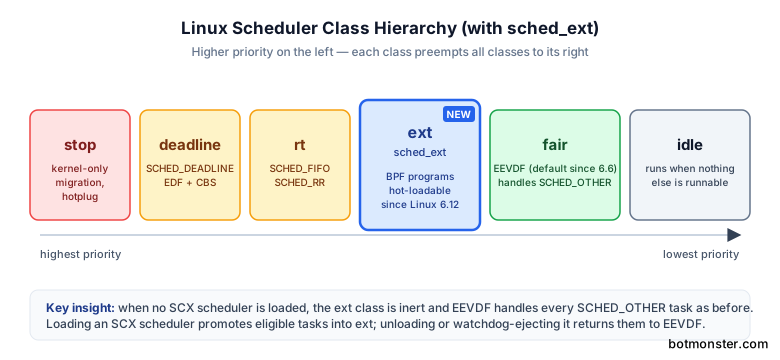
The Linux scheduler history is short. CFS (Completely Fair Scheduler) ruled fair-class scheduling from 2007 until EEVDF (Earliest Eligible Virtual Deadline First) replaced it as the default in Linux 6.6. sched_ext landed alongside EEVDF in 6.12 as a new top-priority scheduler class rather than a CFS replacement. The class hierarchy now looks like this, from highest to lowest priority:
stop > deadline > rt > ext (SCX) > fair (EEVDF) > idleIn plain terms, an SCX scheduler can preempt fair-class tasks but still defers to real-time threads. When no SCX scheduler is loaded, the class is inert and EEVDF handles every normal task as before. When you load one, eligible tasks migrate into the SCX class and your BPF program decides their fate.
The implementation language is the part that makes sched_ext feel different from every previous attempt at a pluggable scheduler. Your scheduler is a set of verified BPF programs
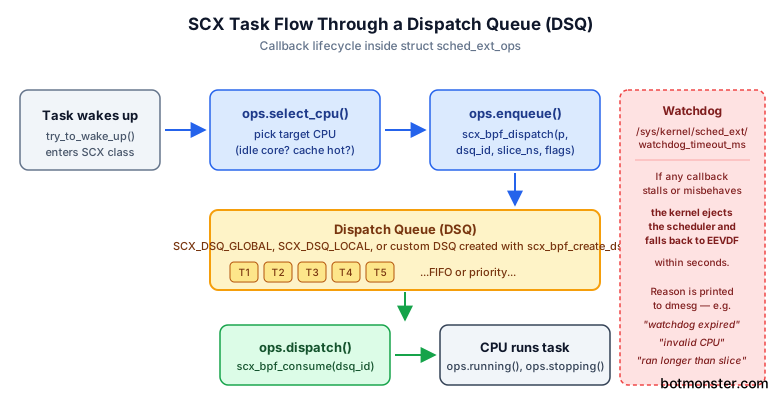
attached to callbacks in struct sched_ext_ops: select_cpu, enqueue, dispatch, runnable, running, stopping, quiescent, init_task, exit_task, tick, and a handful of others. Because the BPF verifier proves that your program halts, stays within memory bounds, and respects helper signatures before it ever runs, you iterate on a scheduler about as quickly as you would iterate on a userspace daemon.
The safety rails let you experiment on a real machine without turning it into a brick. The kernel ships a watchdog that automatically ejects a misbehaving scheduler within a few seconds and falls back to EEVDF, so a stuck or crashing scheduler freezes nothing permanently. You read /sys/kernel/sched_ext/state to check whether a scheduler is enabled, disabled, or being ejected, and the kernel log explains the reason in plain English when things go wrong.
The hot-loading design is what makes SCX practical for day-to-day use. You can stop scx_lavd and start scx_rustland on a running workstation without dropping SSH sessions or killing your desktop environment. That alone changes the economics of shipping workload-specific schedulers. Upstream CFS and EEVDF are, by necessity, general-purpose compromises. Gaming, build farms, latency-sensitive services, and machine learning training all have different scheduling needs, and sched_ext lets each of those ship as an out-of-tree artifact without forking the kernel.
The canonical references are the upstream sched_ext development tree at git.kernel.org/pub/scm/linux/kernel/git/tj/sched_ext.git
and the in-tree documentation under Documentation/scheduler/sched-ext.rst on kernel.org
. If you only read one thing before continuing, read the in-tree docs. They are short, accurate, and updated with each release.
Enabling sched_ext in Your Kernel Config
Not every distro kernel ships with SCX enabled yet, so the first practical step is verifying support. Two commands cover the common cases:
# Running kernel with /proc/config.gz exposed (Arch, CachyOS, Gentoo)
zgrep CONFIG_SCHED_CLASS_EXT /proc/config.gz

# Running kernel with /boot/config-$(uname -r) (Fedora, Debian, Ubuntu)
grep CONFIG_SCHED_CLASS_EXT /boot/config-$(uname -r)
A CONFIG_SCHED_CLASS_EXT=y in the output means your kernel can load SCX schedulers. The minimum kernel is 6.12 for the merged API, but 7.0 or newer is strongly recommended because of the EEVDF interaction fixes and the stabilized scx_bpf_* kfunc surface. Linux 7.1 added SCX_ENQ_IMMED for tighter control over when a task lands on a CPU, and schedulers written against 7.x kfuncs will refuse to load on 6.12.
If you build your own kernel, the minimum config is:
CONFIG_BPF_SYSCALL=y
CONFIG_BPF_JIT=y
CONFIG_SCHED_CLASS_EXT=y
CONFIG_DEBUG_INFO_BTF=y
CONFIG_DEBUG_INFO_BTF=y matters more than it looks. Without BTF, CO-RE relocations cannot resolve against your running kernel and every BPF scheduler will fail to load with an unhelpful “relocation failed” message in dmesg.
Distro status in 2026 is broadly good. Mainline Fedora, Arch, CachyOS, NixOS unstable, and openSUSE Tumbleweed ship SCX-enabled kernels by default. Debian stable still needs the backports kernel or a self-build. Ubuntu 26.04 LTS ships SCX in its HWE kernel but not the GA kernel, so a fresh install from the server ISO may need apt install --install-recommends linux-generic-hwe-26.04.
Userspace prerequisites are modest: libbpf 1.5 or newer, clang 18 or newer, and bpftool for inspecting loaded programs. On Fedora that is dnf install libbpf-devel clang bpftool, on Arch it is pacman -S libbpf clang bpf. Once those are in place, you can confirm a scheduler is attached by reading two sysfs files:
cat /sys/kernel/sched_ext/root/ops     # prints e.g. "lavd"
cat /sys/kernel/sched_ext/enable_seq   # increments every time a scheduler loads
Rolling back works the same way in reverse: sudo scx_loader --stop cleanly detaches the current scheduler, or you can kill the scheduler process directly and let the watchdog eject it. Either way the system returns to EEVDF within a second.
The scx Tools Ecosystem and scx_rust
Most users will never write a scheduler from scratch. They will run one of the reference schedulers from the sched-ext/scx repository
, which packages every production and experimental scheduler under a single build system. The repository splits into two lanes: scheds/c/ for minimal demos like scx_simple and scx_central, and scheds/rust/ for richer schedulers like scx_lavd, scx_rustland, scx_layered, scx_bpfland, scx_flash, and scx_p2dq. Rust is not the only escape from C down here, and Zig 1.0 covers the same systems ground
with a smaller runtime.
The Rust side
is where the interesting work happens. A shared scx_utils crate provides topology discovery, cgroup walking, per-CPU statistics, and the CO-RE loader glue that every scheduler needs. Rust schedulers can therefore focus on policy instead of plumbing. scx_loader is the systemd-friendly daemon that supervises a running scheduler, restarts it if it crashes, and exposes a D-Bus interface used by distro GUIs like the CachyOS tray applet.
After cargo build --release, you end up with a set of binaries, each documented in the repo README:
| Scheduler | Best for | Key idea |
|---|---|---|
| scx_simple | Learning | Single global FIFO dispatch queue |
| scx_lavd | Gaming, latency-sensitive | Latency-Aware Virtual Deadline |
| scx_rustland | Interactive desktops | Decisions in a userspace Rust daemon |
| scx_bpfland | Low-overhead desktops | Topology-aware per-domain balancing |
| scx_layered | Servers, cgroup policy | TOML-declared layers |
| scx_flash | Multimedia, audio | Earliest Deadline First with latency weights |
| scx_p2dq | Experimental | Pick-2 load balancing, energy-aware |
| scx_nest | Laptops, power | Packs work onto a subset of cores |
| scx_central | Research | Single dispatcher CPU pattern |
| scx_rusty | Servers | Load balancing with greedy idle selection |
If your distro package lags upstream, which happens often because SCX moves quickly, build from source directly:
git clone https://github.com/sched-ext/scx.git
cd scx
meson setup build
meson compile -C build
sudo meson install -C build
That produces a full SCX install under /usr/local, including scx_loader and the systemd units. Every Rust SCX scheduler also ships with a --stats 1s flag that prints per-CPU dispatch counters. A/B comparing schedulers on your own workload using those counters is far more informative than chasing synthetic benchmarks.
Running scx_lavd for Gaming and scx_rustland for Interactive Work
The two schedulers most desktop users actually care about are scx_lavd and scx_rustland. Both target the same problem of Linux feeling laggy under mixed workloads, but they approach it from opposite sides of the kernel-user boundary.
scx_lavd (Latency-Aware Virtual Deadline) was built for the Steam Deck and gaming desktops . It prioritizes threads that recently ran short CPU bursts and that communicate over pipes or futexes, which describes a game loop plus its audio and render threads. Benchmarks published by Valve and reproduced by Phoronix show scx_lavd consistently hitting higher frame rates than EEVDF with fewer stutters and slightly lower power draw on typical AAA titles. Meta engineers later deployed the same scheduler across production messaging backends, and that unexpected carry-over suggests the underlying latency heuristics generalize well beyond gaming.

Starting scx_lavd one-shot for a quick A/B test against EEVDF:
sudo scx_lavd --slice-us 3000 --performanceThat runs in the foreground until Ctrl-C. For persistence across logout and auto-restart on crash, use the loader:
sudo scx_loader --start scx_lavdscx_rustland takes a different approach. It moves the actual scheduling decisions to a userspace Rust daemon and uses the BPF layer purely as a dispatcher. The overhead is higher because every scheduling decision crosses the kernel-user boundary, but the upside is aggressive anti-starvation for your focused window and the ability to iterate on scheduling policy in normal Rust without touching BPF. If your daily driver is a development workstation running Firefox, a JetBrains IDE, and a dozen containers at once, scx_rustland is usually the better fit.
scx_bpfland, scx_nest, and scx_layered round out the desktop-ish lineup. bpfland is a lower-overhead cousin of rustland with similar interactivity goals but a pure in-kernel implementation. nest focuses on packing work onto a subset of cores for power savings, which is valuable on laptops. scx_layered lets you write declarative cgroup-based policies in TOML, which is how you express “give my game 70% of the CPU and cap all systemd services at 20%” without writing any BPF code yourself.
CachyOS ships the scx-scheds package in its default repo, defaults the gaming ISO to scx_bpfland, and exposes a tray applet that calls scx_loader under the hood. The 2026 SteamOS releases on Steam Deck OLED and the next-generation hardware use scx_lavd as the out-of-box scheduler during gameplay and fall back to EEVDF on the desktop. You can verify this on a running Deck by opening a terminal and running cat /sys/kernel/sched_ext/root/ops while a game is active; the output switches from empty to lavd the moment the game launches.
Stopping a scheduler is the reverse of starting one: sudo scx_loader --stop cleanly detaches and returns to EEVDF, and a directly-started scx_lavd can be stopped with a plain Ctrl-C.
Writing Your Own Minimal Scheduler With scx_simple
A good way to understand SCX is to read scx_simple. It lives in scheds/c/scx_simple.bpf.c and clocks in under 200 lines of BPF C. The entire scheduler is a single global FIFO dispatch queue with optional weighted vtime ordering, and that is enough to boot Linux.
The core callbacks you implement are:
select_cpu(p, prev_cpu, wake_flags)picks a target CPU at wakeup. Most schedulers return an idle core if one exists, else the previous CPU to preserve cache locality.enqueue(p, enq_flags)pushes the task onto a dispatch queue. This is where policy lives.dispatch(cpu, prev)pulls from a dispatch queue onto a CPU when it needs work.init()andexit()are lifecycle hooks for setting up maps and tearing them down.
Dispatch queues (DSQs) are the primitive that keeps SCX approachable. A DSQ is a FIFO or priority queue identified by a 64-bit ID, and most schedulers amount to a creative arrangement of two kfuncs:
scx_bpf_dispatch(p, dsq_id, slice_ns, enq_flags);  // push
scx_bpf_consume(dsq_id);                            // pop
scx_simple creates one global DSQ, pushes every runnable task to it, and every idle CPU consumes the head. Fairness comes from the BPF verifier refusing to let you starve a task, plus the watchdog that ejects you if you manage to starve one anyway.
The userspace loader side is a short Rust or C program that uses libbpf to open the skeleton, attach it to struct_ops, and then block on a signalfd so Ctrl-C triggers a clean detach. The Rust schedulers in the scx repo share this loader via the scx_utils crate, so a new Rust scheduler is typically a single main.rs with your policy plus a bpf.c file with your callbacks.
Building and loading your own scheduler looks like this for the C path:
clang -target bpf -O2 -g -c scx_mine.bpf.c -o scx_mine.bpf.o
./scx_mine    # loader that opens the skeleton and attaches
For the Rust path, dropping a new directory under scheds/rust/ and letting cargo handle the rest is usually faster. The existing schedulers work well as copy-paste templates.
Watching it run uses the same tooling you already have:
sudo bpftool prog show | grep scx
cat /sys/kernel/sched_ext/root/ops
The first confirms your BPF program is actually attached. The second shows the ops struct name you chose in the BPF code. If either is empty, your loader failed and dmesg will tell you why.
Debugging is where the watchdog pays dividends. The timeout lives at /sys/kernel/sched_ext/watchdog_timeout_ms (default 30 seconds) and a stuck scheduler gets force-ejected rather than hanging the box. dmesg prints a clear reason for the ejection, typically “watchdog expired”, “BPF program returned invalid CPU”, or “task ran longer than slice”, that points you at the faulty callback. Bring the timeout down to a few seconds during active development and back up for production use.
Where you go after scx_simple depends on your interest. scheds/c/scx_central.bpf.c shows a single-CPU dispatcher pattern where one CPU makes every scheduling decision, which is useful for understanding the SCX primitives in isolation. scheds/rust/scx_layered shows how to build cgroup-aware policy in user space on top of the same kernel primitives, and it is the template to copy if you want to ship something for your own server fleet. The kernel’s own Documentation/scheduler/sched-ext.rst
remains the authoritative reference for every callback and kfunc signature.
Scheduling used to live behind a mainline patch review cycle. With sched_ext, an afternoon of reading scx_simple and an evening of tweaking dispatch queues is enough to produce a scheduler that behaves differently from EEVDF on your workload, measure the result with --stats 1s, and either ship it or delete it without rebooting.