 Botmonster Tech
Turso puts SQLite reads under a millisecond, anywhere in the world


Turso is a distributed SQLite service built on libSQL , an open-source fork of SQLite. It adds embedded replicas: local SQLite files that sync from a primary database in the cloud. Reads happen at local-disk speed, under 200 nanoseconds in benchmarks. Writes go to one primary region. You get sub-millisecond reads and read-your-writes consistency for less than a managed Postgres bill. You install the client SDK, point it at a Turso URL and a local file path, and your app reads from a replica that stays in sync on its own.
That mix of local-speed reads and managed global replication is why Turso fits edge deployments, serverless functions , and read-heavy workloads where latency hurts.
What libSQL Adds to SQLite
SQLite’s project does not take outside contributions. The team at ChiselStrike (now Turso) forked SQLite to build libSQL. The fork keeps full SQLite file-format compatibility while adding the parts you need to run SQLite as a networked, replicated database.
An existing .sqlite3 file can become a libSQL database with zero migration. The format is the same. What libSQL adds on top:
- libSQL ships
libsql-server(once calledsqld), a server binary that exposes your SQLite database over HTTP and WebSocket with JWT auth. - A replication protocol keeps read replicas in sync with a primary, including embedded replicas that live inside your app process.
- You can extend SQL with user-defined functions written in any language that compiles to WebAssembly.
- An async design built on Linux
io_uringhandles concurrent writes without the old SQLite single-writer bottleneck.
The license is MIT. You can self-host the full stack without Turso’s managed service. The libsql-server Docker image lives at ghcr.io/tursodatabase/libsql-server:latest.
How SQLite-in-Production Options Compare
The “SQLite in production” space now has a few real players. Here is how they stack up:
| Feature | libSQL/Turso | LiteFS | Cloudflare D1 | Plain SQLite |
|---|---|---|---|---|
| Replication model | Primary + embedded/remote replicas via HTTP protocol | Filesystem-level WAL interception via FUSE | Automatic edge read replicas within Cloudflare network | None (single file) |
| Write model | Single primary region, SDK routes writes automatically | Single primary node, proxy for writes from replicas | Single primary region, writes route through Workers binding | Single process writer |
| Embedded replicas | Yes - local SQLite file synced from cloud primary | No - replicas are separate nodes | No - queries go through Workers runtime | N/A |
| Runtime flexibility | Any runtime (Node, Python, Rust, Go, edge, browser via WASM) | Fly.io only (FUSE dependency) | Cloudflare Workers only | Any |
| Self-hostable | Yes (MIT license) | Yes (Apache 2.0) | No | Yes (public domain) |
| Managed service cost | Free tier: 500M reads/mo, paid from $4.99/mo | LiteFS Cloud was sunset Oct 2024 | Free tier: 5M reads/day, paid via Workers plan | $0 |
LiteFS earns a note. Fly.io put it on the back burner. LiteFS Cloud, the managed backup layer, shut down in October 2024. LiteFS itself still works for Fly.io deploys, but no one is shipping new code on it, and it stays pre-1.0.
Setting Up a Turso Database
Getting set up takes about five minutes with a free-tier account.
Install the CLI:
curl -sSfL https://get.tur.so/install.sh | bashCreate a database in a primary region close to your write workload:
turso db create my-appGet your connection credentials:
turso db show my-app          # shows the libsql:// connection URL
turso db tokens create my-app  # generates an auth token
Run interactive queries or import a schema:
turso db shell my-app                    # interactive SQL shell
turso db shell my-app < schema.sql       # import migrations
Free Tier Limits
The free tier is enough for most side projects and early-stage apps:
| Resource | Free Tier | Developer ($4.99/mo) | Scaler ($24.92/mo) |
|---|---|---|---|
| Databases | 100 | Unlimited (500 active) | Unlimited (2,500 active) |
| Storage | 5 GB | 9 GB | 24 GB |
| Row reads/month | 500 million | 2.5 billion | 100 billion |
| Row writes/month | 10 million | 25 million | 100 million |
| Point-in-time restore | 1 day | 10 days | 30 days |
The free plan needs no credit card. Paid plans bill overages per unit, for example $1 per billion extra row reads on the Developer plan.
Embedded Replicas in Practice
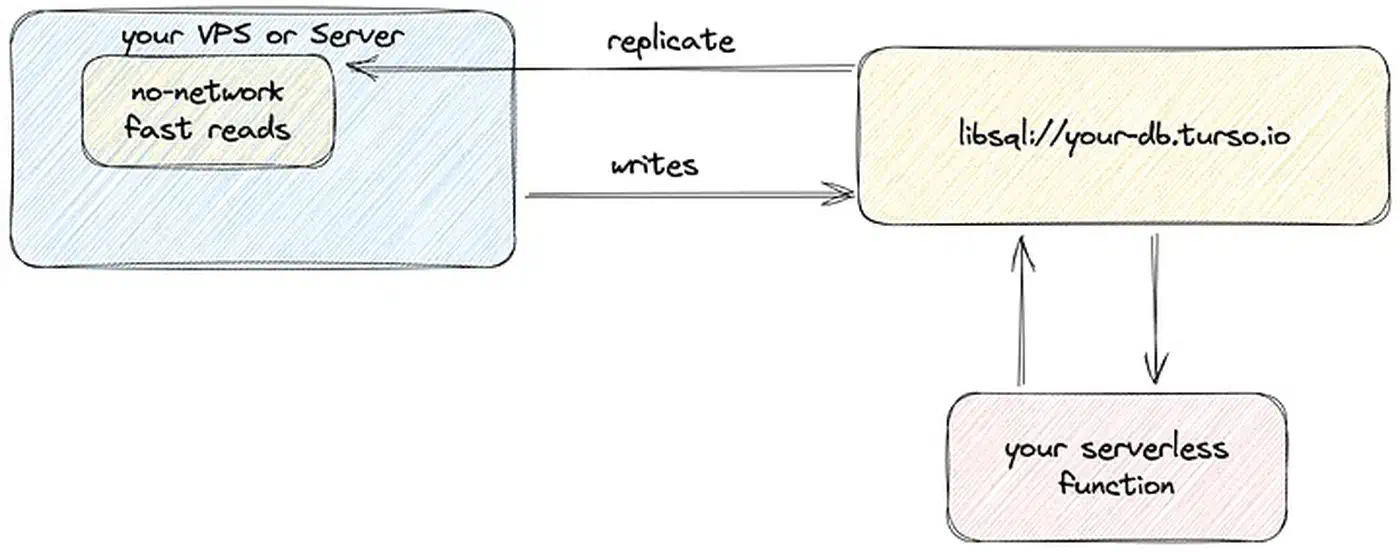
Embedded replicas are Turso’s headline feature, and the main reason to pick it over rivals. The idea is simple: your app keeps a local SQLite file with a full copy of the database. That file stays in sync with the cloud primary via libSQL’s replication protocol. Reads hit the local file at disk speed. Writes go to the primary, then come back to the local copy.
Node.js / TypeScript Setup
The @libsql/client SDK behaves the same across every JavaScript runtime, so your runtime choice
stays open no matter which one you run.
Install the SDK:
npm install @libsql/clientConfigure the client with both a local file path and a remote sync URL:
import { createClient } from "@libsql/client";

const client = createClient({
  url: "file:local.db",
  syncUrl: "libsql://my-app-myorg.turso.io",
  authToken: process.env.TURSO_AUTH_TOKEN,
  syncInterval: 60, // sync every 60 seconds
});
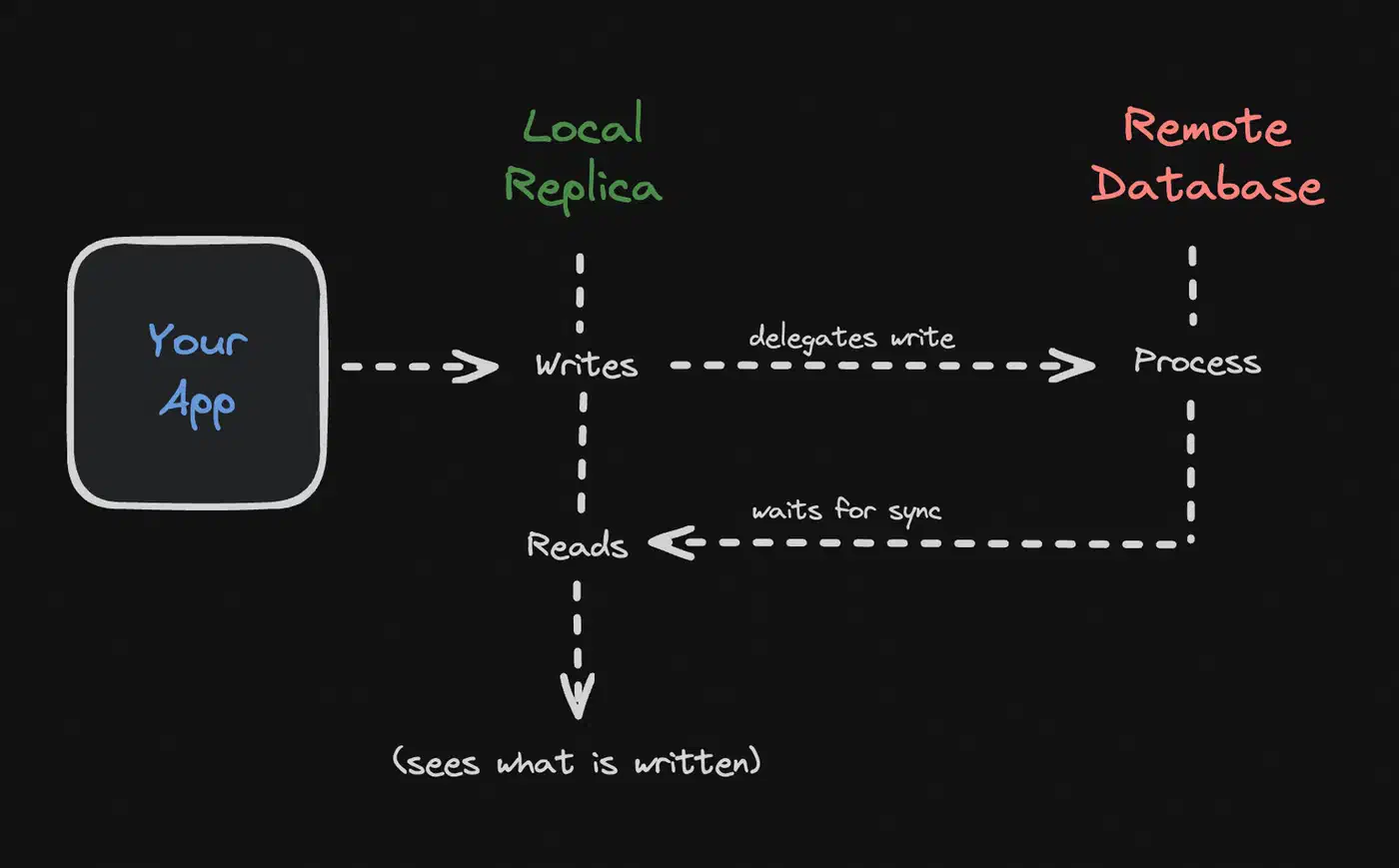
The url parameter points to a local SQLite file. The syncUrl points to your Turso database. Reads hit local.db directly, with no network round trip. Writes go to the primary at syncUrl, then sync back.
You can also trigger a manual sync:
await client.sync();The client gives you read-your-writes consistency. When you run a write, it blocks until the write has synced back to your local copy. Your next read then sees the data you just wrote. That cuts out most of the consistency headaches you’d expect from a replicated system.
Drizzle ORM Integration
Drizzle ORM
has first-class Turso support through drizzle-orm/libsql:
npm install drizzle-orm @libsql/client
npm install -D drizzle-kit
import { drizzle } from "drizzle-orm/libsql";
import { createClient } from "@libsql/client";
const client = createClient({
url: "file:local.db",
syncUrl: "libsql://my-app-myorg.turso.io",
authToken: process.env.TURSO_AUTH_TOKEN,
});
const db = drizzle(client);Your Drizzle config file needs the turso dialect:
// drizzle.config.ts
export default {
  dialect: "turso",
  schema: "./src/db/schema.ts",
  out: "./drizzle",
  dbCredentials: {
    url: process.env.TURSO_DATABASE_URL!,
    authToken: process.env.TURSO_AUTH_TOKEN!,
  },
};
From there, drizzle-kit push applies schema changes right away. Or use drizzle-kit generate and drizzle-kit migrate for versioned migration files. For a side-by-side look at how Drizzle stacks up against Prisma
, read our full breakdown.
Python Setup
The Python SDK works the same way:
import libsql_experimental as libsql

client = libsql.connect(
    "local.db",
    sync_url="libsql://my-app-myorg.turso.io",
    auth_token="your-token-here",
)
client.sync()

result = client.execute("SELECT * FROM users LIMIT 10")
Handling Sync Failures
When your app loses network access, embedded replicas keep serving reads from the local file. Writes fail because they need to reach the primary. When the network comes back, call client.sync() to catch up. There is no conflict resolution to do for reads: the local file is a consistent snapshot that gets updated when sync resumes.
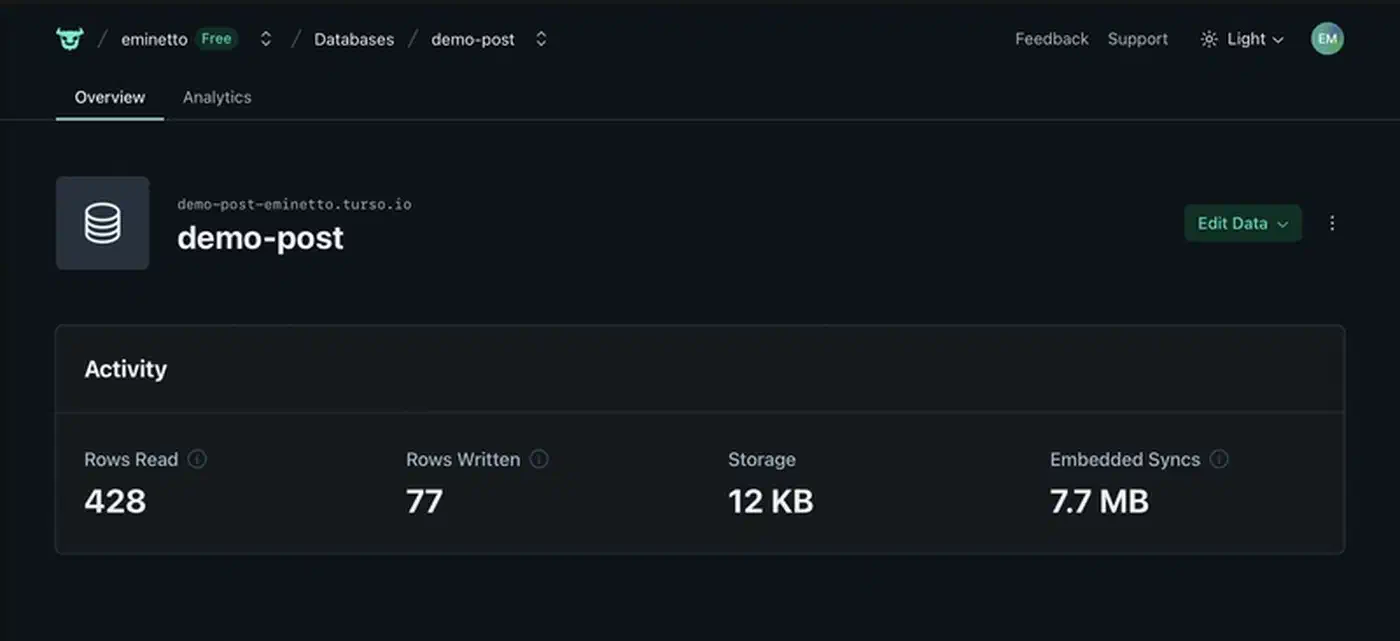
To watch sync health, track the time since the last good sync call and alert if it goes past your limit. Turso’s dashboard shows sync lag, query latency, and row read counts per database.
Multi-Region Writes and Conflict Handling
Embedded replicas solve read latency. Write latency is a separate problem.
Turso uses a single-primary model. One region takes all writes. Replicas everywhere else serve reads. A write from a far-off region costs one network round trip to the primary. If your primary is in us-east and a user writes from Tokyo, that write takes the US-Tokyo round trip time, often 150 to 200 ms.
Database groups let you sort databases by region. Within a group, all databases share the same primary. You can make separate groups for workloads with different primary regions. One group with a European primary for GDPR-sensitive data, another with a US primary for everything else.
Conflict resolution is last-write-wins at the row level. If two clients write to the same row from different regions before sync finishes, the later write by timestamp wins. For most apps this is fine. If you need stronger guarantees, serialize writes through a single app instance, or do conflict detection in your own code.
Database branching is useful for development workflows:
turso db create staging --from-db productionThat creates a copy-on-write branch of your production database. Preview environments, feature branches, and integration tests can each get their own database, the same git-style branching Neon brings to Postgres . Each one starts as a snapshot of production data.
Cost Comparison With Alternatives
For a concrete check, picture a SaaS app with 1 million reads per day, 100,000 writes per day, 10 GB of data, and users spread around the globe.
| Service | Monthly Cost (est.) | Read Model | Write Model | Notes |
|---|---|---|---|---|
| Turso (Developer) | ~$5 | Local embedded replica | Single primary region | 30M reads/day fits within 2.5B/mo limit |
| Neon Postgres | ~$19-25 | Network query to nearest region | Single primary | Autoscaling compute, but every read is a network hop |
| Supabase Postgres | ~$25 | Network query | Single primary | Includes auth, storage, edge functions in the price |
| Cloudflare D1 | ~$5 | Edge read replicas | Single primary | Tied to Cloudflare Workers runtime |
| DynamoDB On-Demand | ~$35-50 | Global tables available | Multi-region writes possible | Per-request pricing adds up on read-heavy workloads |
| Self-hosted libSQL | $0 + server cost | Local or remote replicas | You manage primary | Full control, you operate the replication topology |
The money case for Turso is strongest when your workload is read-heavy and your users are spread out. The embedded replica model takes read latency off the table. The free tier covers 500 million row reads per month, which is enough for many production apps.
What you give up versus Postgres: the deep pool of extensions, tooling, and ops know-how. Postgres has partial indexes, materialized views, full-text search with ranking, and decades of battle-tested tooling. libSQL supports most SQLite features, including GENERATED columns and JSON functions, but the ecosystem around it is younger. When you need real ranked search anyway, a dedicated engine fits better than the database: pairing Meilisearch with HTMX
gives typo-tolerant results without bolting search onto your edge replica.
Self-Hosting libSQL
If you want the protocol and replication without the managed service, run libsql-server yourself.
The Docker image is on GitHub Container Registry:
docker run -p 8080:8080 -d \
  -v ./data:/var/lib/sqld \
  ghcr.io/tursodatabase/libsql-server:latest
Port 8080 serves the HTTP API. Data persists in the mounted volume at /var/lib/sqld. For auth, pass a JWT public key via an env variable:
docker run -p 8080:8080 -d \
  -v ./data:/var/lib/sqld \
  -e SQLD_AUTH_JWT_KEY_FILE=/var/lib/sqld/jwt.pem \
  ghcr.io/tursodatabase/libsql-server:latest
A docker-compose.yml for a primary with exposed HTTP and gRPC ports:
services:
  libsql:
    image: ghcr.io/tursodatabase/libsql-server:latest
    ports:
      - "8080:8080"
      - "5001:5001"
    volumes:
      - ./data/libsql:/var/lib/sqld
The self-hosted path trades ops ease for lower cost and full control. You handle backups, replication setup, and upgrades on your own.
Backup and Recovery
Turso handles backups for you. Every COMMIT creates a backup point. Point-in-time recovery lets you roll your database back to any moment within your plan’s retention window:
- Free plan: 1 day retention
- Developer plan: 10 days
- Scaler plan: 30 days
- Pro plan: 90 days
Backups are stored on AWS S3 and S3 Express. To grab a snapshot for local use, branch a database and export it:
turso db create backup-copy --from-db productionSince the format under the hood is SQLite, any branch can be downloaded and opened with the standard sqlite3 tools. That makes Turso one of the few managed databases where your data is never locked into a closed format.
When to Choose Turso
Turso fits best when your app reads far more than it writes, your users are spread across regions, and you want the ease of SQLite’s single-file model without giving up replication. No other managed database today offers embedded replicas that sync from a cloud primary with this little setup.
If you need multi-region writes with strong consistency, Turso is not the right fit. If you need the Postgres extension pool, full-text search with ranking, or complex query planning, stick with Postgres. But for apps where reads dominate and latency is the pain point, think SaaS dashboards, content platforms, mobile backends, AI agent datastores, Turso is hard to beat on both price and read speed.