 Botmonster Tech
Drizzle ORM vs Prisma: which TypeScript database toolkit should you pick?

Drizzle ORM is the better pick for edge and serverless work in 2026. It ships a 7.4 kB gzipped runtime with zero binary dependencies. Prisma is the stronger choice for teams that want a higher-level query API, a polished data browser, and a growing cloud platform. The right answer turns on where your code runs and how your team thinks about SQL.
That one-paragraph summary covers the call for most people. The reasoning behind it is the rest of this post. The two tools follow different beliefs about how TypeScript apps should talk to databases. Those differences show up in every part of the workflow, from writing queries to shipping on Cloudflare Workers.
Two Philosophies: SQL-First vs Schema-First
Drizzle takes a SQL-first approach. You define tables in TypeScript using functions that map straight to SQL DDL. A users table in Drizzle looks almost the same as the CREATE TABLE you’d write by hand. Queries follow the same rule. db.select().from(users).where(eq(users.id, 1)) reads like SQL with type hints bolted on.
Prisma takes the opposite path. You write a .prisma schema file in Prisma’s own DSL, and a code generator builds a TypeScript client from it. Queries use a higher-level API, like prisma.user.findUnique({ where: { id: 1 } }), that hides the SQL on purpose.
This split has real effects beyond syntax taste. Drizzle exposes PostgreSQL JSONB operators, GENERATED ALWAYS AS columns, and partial indexes right in its TypeScript API. Prisma hides database-specific features behind preview flags. That means you sometimes wait for the Prisma team to support something your database already does. On the team side, devs who think in SQL pick up Drizzle in an afternoon. Devs who prefer objects and method chains find Prisma more natural.
Migration workflows split too. Drizzle Kit writes plain SQL migration files that you can edit before you commit. Prisma Migrate builds migrations from schema diffs on its own. That is faster for simple changes, but harder to tune for things like CREATE INDEX CONCURRENTLY.
Query Syntax and Type Safety Compared
Both Drizzle and Prisma advertise “end-to-end type safety,” but they deliver it differently.
Drizzle queries look like a SQL builder with full type inference:
const result = await db
  .select({ id: users.id, name: users.name })
  .from(users)
  .leftJoin(posts, eq(posts.authorId, users.id))
  .where(eq(users.active, true));
The return type is inferred for you. result is typed as an array with id, name, and the nullable joined posts columns. Partial selects narrow the type to only the columns you asked for.
Prisma queries use a generated client with a nested object API:
const result = await prisma.user.findMany({
  where: { active: true },
  select: { id: true, name: true },
  include: { posts: true },
});
Prisma’s style is more declarative. You don’t name leftJoin by hand. You use include to pull in related data, and Prisma picks the join strategy for you.
JOIN handling is where the split shows up most. Drizzle gives you innerJoin, leftJoin, rightJoin, and fullJoin as named methods. You control the join type and the conditions. Prisma uses include and nested select objects. That is simpler for basic relations, but it can build odd query plans for complex joins.
Both tools have escape hatches for raw SQL. Drizzle’s sql`...` tagged template lets you write raw SQL fragments that stay type-safe when you compose them into larger queries. Prisma offers $queryRaw and $executeRaw for raw SQL. Those return untyped results unless you cast them by hand.
Drizzle’s relational query API, now at v2, also gives you db.query.users.findMany(). The shape looks a lot like Prisma’s nested queries. You can use with to pull in related data, filter across relations, and paginate nested results. That closed one of Prisma’s old edges. Teams no longer need to pick between SQL-style and relation-style queries, since Drizzle ships both.
| Feature | Drizzle ORM | Prisma |
|---|---|---|
| Query style | SQL builder + relational API | Generated client with object API |
| Partial selects | Inferred from .select() columns | Inferred from select object |
| JOINs | Explicit leftJoin, innerJoin, etc. | Implicit via include / nested select |
| Raw SQL | sql`...` template (composable, typed) | $queryRaw (untyped by default) |
| Relation queries | db.query.*.findMany({ with: ... }) | prisma.*.findMany({ include: ... }) |
| Validation integration | Built-in drizzle-zod, drizzle-valibot | Community prisma-zod-generator |
Migrations, Studio, and Developer Experience
Day-to-day workflow often counts for more than the feature list when you pick an ORM. So what does it look like to add a column, inspect data, and debug a slow query with each tool?
Migrations
Drizzle Kit writes SQL migration files from your schema changes. Run drizzle-kit generate and you get a .sql file you can read, edit, and commit. Run drizzle-kit migrate to apply it. Since the migration is plain SQL, you can drop in CREATE INDEX CONCURRENTLY or wrap things in transactions the way your DBA wants. The trade-off: you have to review each migration file.
Prisma Migrate spots schema diffs on its own. Run prisma migrate dev and it builds and applies migrations in one step. That is faster for routine changes like adding a nullable column. The cost is less control over the SQL it emits. Complex migrations (data backfills, concurrent index creation) still need hand edits to Prisma’s generated files in many cases.
Schema introspection works both ways. If you have an existing database, drizzle-kit pull builds TypeScript table defs from it. prisma db pull writes a .prisma schema file. Both tools handle the “brownfield” case where you add an ORM to an old project.
Studio and IDE Tooling
Drizzle Studio and Prisma Studio both ship a local web UI for browsing tables, filtering rows, and editing data. Prisma Studio has been around longer and feels more polished. It supports inline edits, filter autocomplete, and a cleaner layout. Drizzle Studio is catching up and now ships light and dark themes. Even so, it is still less rich for deep data digs.
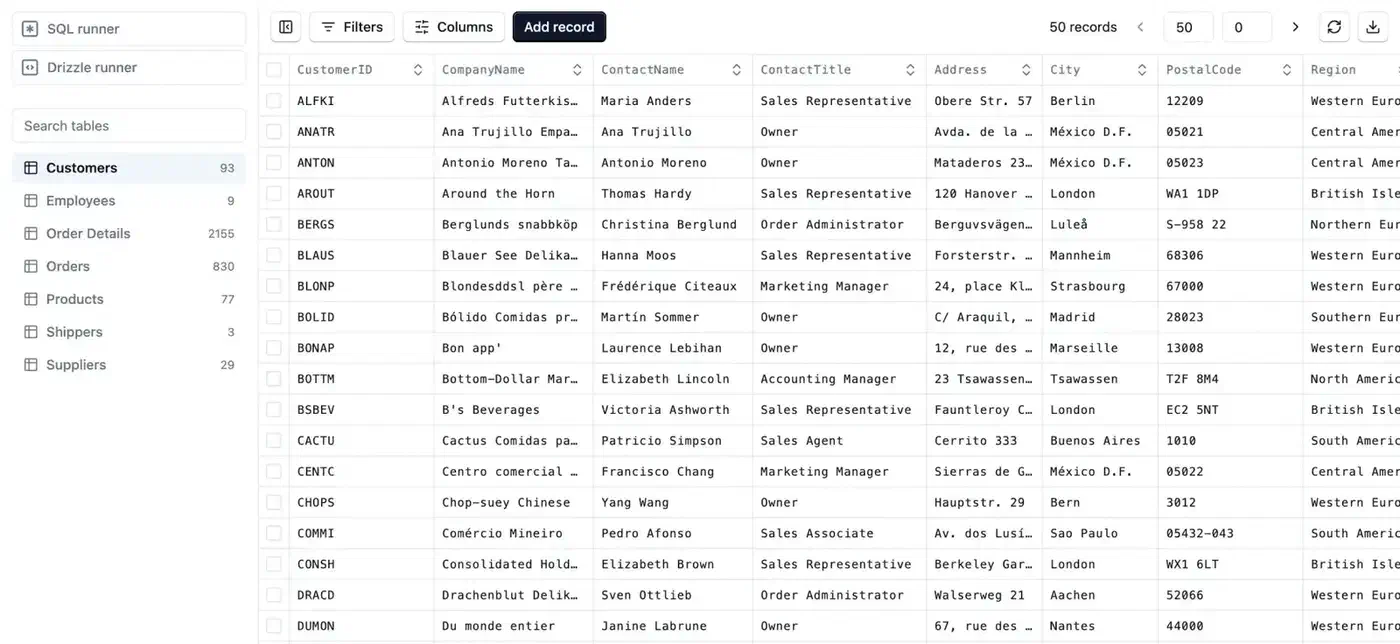
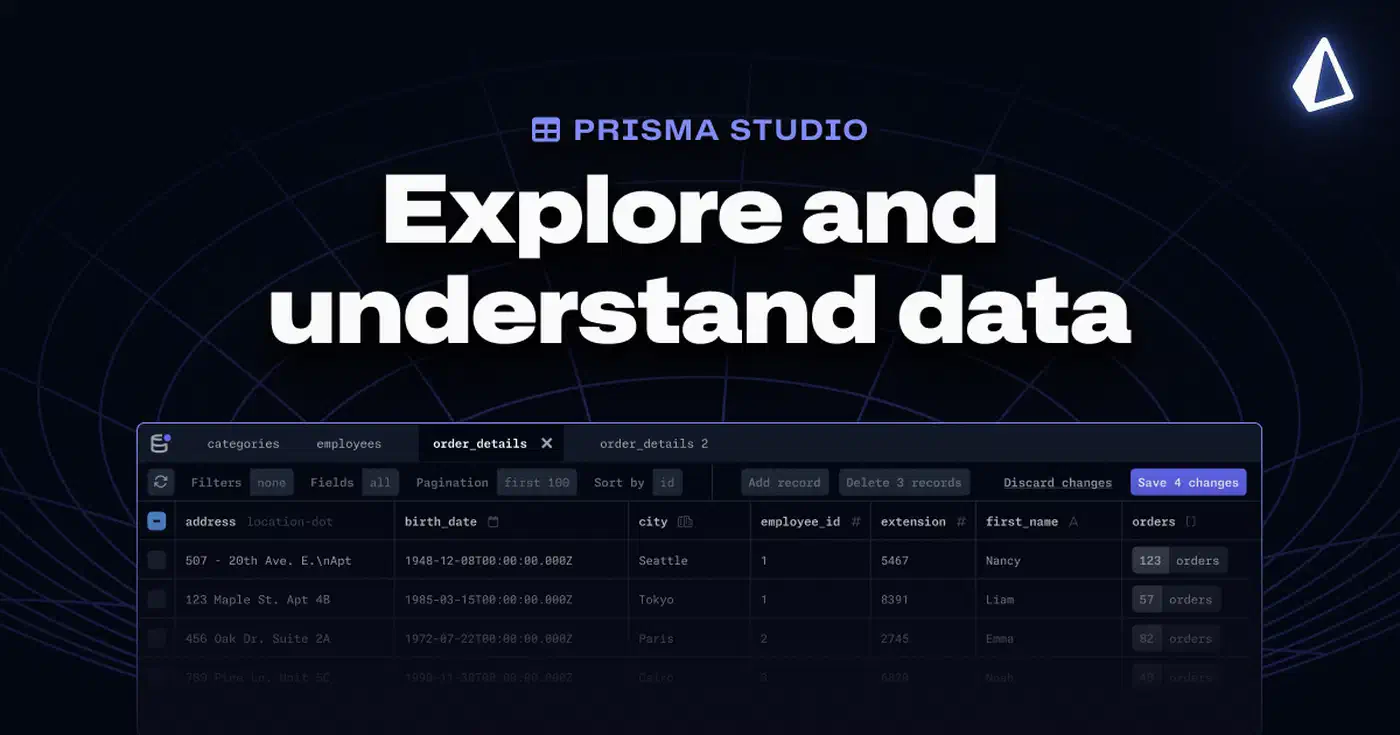
IDE support takes different paths. Prisma ships a VS Code extension with syntax highlighting, formatting, and jump-to-definition for .prisma schema files. Drizzle doesn’t need one. Since your schema is just TypeScript, any editor with TS support gives you autocomplete, type checks, and refactor tools out of the box.
Seeding
Drizzle recently added Drizzle Seed, a built-in tool for making realistic test data from your schema. Prisma’s seeding leans on a prisma/seed.ts script that you write yourself, though the community has built libraries like prisma-faker to help.
Edge Runtime Support and Bundle Size
Bundle size is the biggest split for serverless and edge work in 2026. It is the main reason teams are switching from Prisma to Drizzle.
Drizzle’s runtime weighs about 7.4 kB gzipped. It is pure TypeScript with zero binary deps. It runs natively on Cloudflare Workers , Vercel Edge Functions, Deno Deploy, Bun, Expo, and every other JS runtime, with no adapters or proxies. That is what makes it the usual pick for querying a serverless SQLite database from inside a Worker. That portability only pays off once you have settled the runtime question for your backend.
Prisma’s edge story was painful until recently. Before Prisma 7 (shipped November 2025), the ORM had a Rust-based query engine that weighed about 30 MB. That made edge deploy a non-starter. You either hit the bundle limit on Cloudflare Workers or paid multi-second cold starts on AWS Lambda.
Prisma 7 changed the picture. The Rust engine was swapped for a TypeScript/WebAssembly query compiler that weighs about 1.6 MB, or 600 kB gzipped. That is an 85-90% drop from the old engine. The cross-language serialization tax between JS and Rust is gone. Prisma also claims up to 3.4x faster queries for large result sets versus Prisma 6.

Still, the size gap remains substantial:
| Metric | Drizzle ORM | Prisma 7 |
|---|---|---|
| Bundle size (gzipped) | ~7.4 kB | ~600 kB |
| Binary dependencies | None | WASM query compiler |
| Cold start (Cloudflare Workers) | ~50-100 ms | ~80-150 ms (estimated) |
| Cold start (AWS Lambda, Node.js 22) | ~50-100 ms | ~80-150 ms |
| Edge runtime support | Native, no adapters | Native since v7 (previously required Accelerate proxy) |
Driver support is broadly the same. Drizzle works with postgres.js, node-postgres, mysql2, @libsql/client, @planetscale/database, and many others as peer deps. Prisma has moved to the same model with driver adapters, which are now stable in Prisma 7 for PostgreSQL and MySQL.
On Cloudflare Workers, where you pay per request and for CPU time, a 50 ms cold start gap adds up at scale. On AWS Lambda, the smaller bundle also means faster deploys and less storage cost. For apps that handle millions of requests per month, Drizzle’s slim runtime turns straight into a lower compute bill.
Supported Databases
Both tools cover the big relational databases. Their coverage splits at the edges.
| Database | Drizzle ORM | Prisma |
|---|---|---|
| PostgreSQL | Full support | Full support |
| MySQL | Full support | Full support |
| SQLite | Full support | Full support |
| SQL Server / MSSQL | Supported (added in v1.0 beta) | Full support |
| MongoDB | Not supported | Full support |
| CockroachDB | Supported | Full support |
| MariaDB | Via MySQL driver | Supported |
| PlanetScale | Native driver | Via MySQL driver adapter |
| Turso / LibSQL | Native driver | Via driver adapter |
| Neon | Native driver | Via driver adapter |
| Cloudflare D1 | Native driver | Not supported |
| SingleStore | Supported | Not supported |
The biggest gap: Prisma supports MongoDB, Drizzle does not. If your project runs on MongoDB, that ends the call. On the flip side, Drizzle has native drivers for serverless database hosts like PlanetScale, Turso, Neon, and Cloudflare D1 , with no adapter layer in the way.
Community and Ecosystem
Prisma has about 40,000 GitHub stars and 7.8 million weekly npm downloads. Drizzle has about 33,800 stars and 4.2 million weekly downloads, with its download count having doubled over the past year. The gap is closing fast.
One big shift: PlanetScale bought the Drizzle core team in March 2026. That gives the project a corporate sponsor and long-term funding. Astro DB is built on Drizzle. Frameworks like Better Auth and many SaaS starter kits now ship first-class Drizzle adapters.
Prisma’s ecosystem is broader and more mature. The Prisma Data Platform sells paid services like Prisma Accelerate (global caching and connection pooling) and Prisma Pulse (real-time database change events). The VS Code extension, Prisma Studio, and the docs are all well-kept. Community packages like prisma-zod-generator and hundreds of tutorials cover almost every use case.
Drizzle’s ecosystem is smaller, but it is growing fast. Validation schemas now ship in the core package (drizzle-zod, drizzle-valibot, drizzle-typebox), which trims third-party deps. Drizzle Seed and Drizzle Studio are first-party tools that fill gaps the community used to cover.
Pricing is worth a look too. Drizzle is MIT-licensed and fully open source with no paid tier. Prisma ORM is also open source (Apache 2.0), but Prisma’s cloud services add costs. Prisma Postgres starts free (100,000 ops/month). Paid plans run $10/month (Starter, 1M ops), $49/month (Pro, 10M ops), and $129/month (Business, 50M ops). Overages range from $0.008 to $0.001 per 1,000 ops depending on the plan. Those costs are opt-in. You can use Prisma ORM with no Prisma cloud services at all.
When to Pick Each Tool
Rather than “it depends,” here is a concrete decision frame.

Pick Drizzle if you ship to edge runtimes (Cloudflare Workers, Vercel Edge, Deno Deploy) where bundle size is a hard cap. Pick it if your team is at home with SQL and likes query builders over hidden APIs. Pick it if you need direct access to features like PostgreSQL JSONB, partial indexes, or row-level security. Pick it if you want a fully open-source tool with no paid service in the loop.
Pick Prisma if your team likes a higher-level, more declarative query API. Pick it if you want the most polished data browser and IDE tooling. Pick it if you rely on Prisma’s cloud services (Accelerate for caching, Pulse for real-time events). Pick it if your project runs on MongoDB. Pick it if you run long-lived Node.js processes where cold start time is not a worry.
You can also use both in the same monorepo if you are migrating step by step. Teams have run Prisma for old services while shipping new edge microservices on Drizzle. Both tools can point at the same PostgreSQL database with no conflict.
And if your schema is stable and your team writes SQL well, look at raw SQL via postgres.js or Knex
. Adding an ORM brings extra moving parts that not every project needs.
Bottom Line
Drizzle and Prisma are both production-ready TypeScript ORMs with active dev work and growing user bases. The call comes down to two questions: where does your code run, and how does your team like to write queries?
For edge and serverless work, Drizzle’s 7.4 kB footprint and native runtime fit make it the practical default. For teams that prize dev tooling, a visual data browser, and a gentler ramp for folks who don’t write SQL daily, Prisma 7’s new engine has closed the speed gap enough to stay a strong pick. Either one slots behind the React framework you pick , so choose the ORM for how your data layer runs, not for the frontend.
Both projects are healthy, well-funded, and getting better fast. You won’t regret either pick. The TypeScript ORM space is in a much better place than it was two years ago.