 Botmonster Tech
WebMCP runs on my blog while Apple fights the whole idea

WebMCP turns a web page into a set of browser tools for AI agents, registered with one call to document.modelContext.registerTool. Chrome runs it as an origin trial today and plans to switch it on for every Chrome user in version 157, due November 2026. Apple formally opposes it, Shopify already ships it across its storefronts, and botmonster.com now runs seven of these tools.
Key Takeaways
- A page can hand AI agents named tools instead of making them click buttons.
- Chrome plans to switch it on for every user in version 157, due November 2026.
- Apple opposes WebMCP outright, so this is not a settled standard.
- Shopify ships it first-party across its storefronts, Reebok included.
- Agents send inputs your buttons never could, which is how they find crashes.
What is WebMCP?
WebMCP is a browser API that lets a page register callable tools for AI agents in that browser. You give each tool a name, a plain-English description, and a JSON Schema for its arguments. An agent in the tab reads that list, picks one, and calls it.
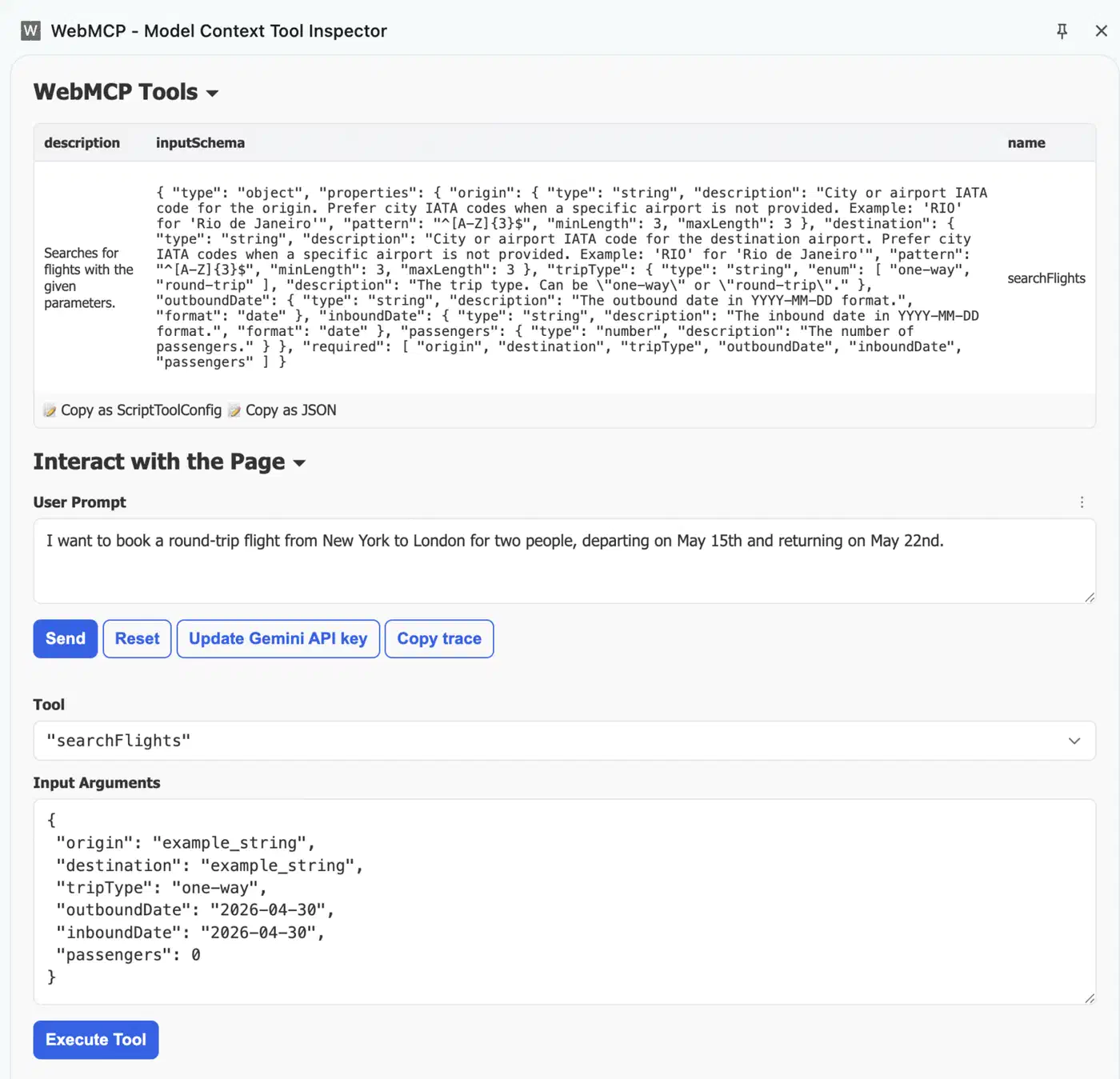
A page using WebMCP behaves like a Model Context Protocol server. Its tools live in your page’s JavaScript rather than on a backend. The WebMCP specification says so in its own introduction.
Mozilla’s reviewer objects that the spec never requires MCP as the wire format.
The name is misleading, focusing on how tools are exposed rather than the capability granted and confusing developers that (reasonably) assume the MCP spec is involved in any way. There is no MCP here.
The editors are Brandon Walderman at Microsoft, plus Khushal Sagar and Dominic Farolino at Google, so both companies are behind it. Still, the standing is thinner than the momentum suggests. WebMCP is a Community Group draft inside the W3C Web Machine Learning group, not a W3C Standards Track document. A charter proposal to make it a Working Group item is open and unmerged.
How WebMCP works in the browser
Agents already have two ways to drive a page, and WebMCP is a third. The crude way is to look: screenshot the page, guess which pixels to hit, fake a click, screenshot again to see what happened. It is slow, it eats up tokens, and one CSS change breaks it.
Serious tooling stopped doing that. Chrome DevTools MCP and Playwright MCP read the accessibility tree instead, the same structure a screen reader uses. The agent gets a text outline of the page with a stable handle on every control, so it addresses a button by role and label rather than by coordinates. Nothing here depends on pixels, so a restyle does not break it.
That second lane is the real rival here. It is also the best argument against WebMCP. The page tree is already there, it works, and it helps the people who need it.
Where it stops is capability. The page tree lists the controls a page draws. It cannot say that this page will vectorize an image locally in WebAssembly and hand back an SVG document, because no button expresses that. WebMCP does say it. The page announces its tools up front, and the agent calls one with typed arguments and gets a structured result back.
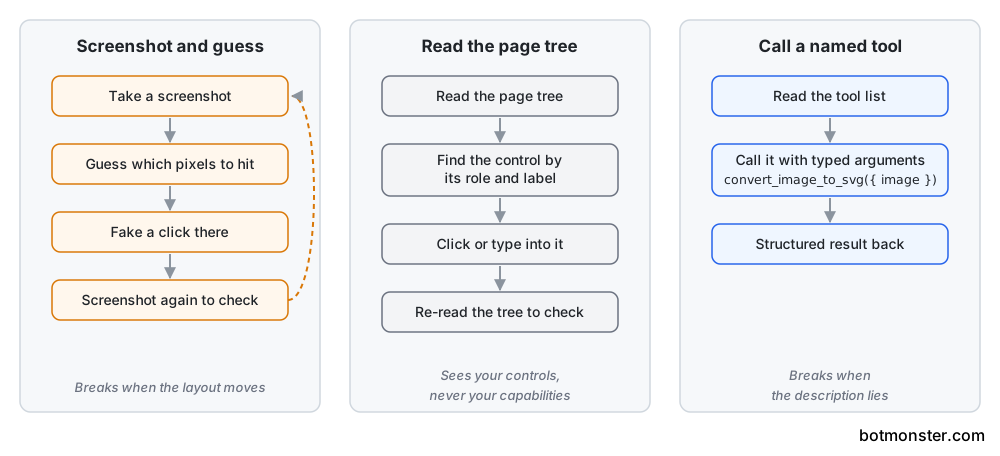
One Show HN demo claims roughly 90% fewer tokens by routing a DevTools automation server through WebMCP tools rather than the page tree. Nobody has audited that, but the shapes are lopsided: the tree for a busy page runs to thousands of nodes, while a tool schema is a few hundred bytes of JSON.
The other structural difference is where the tool lives.
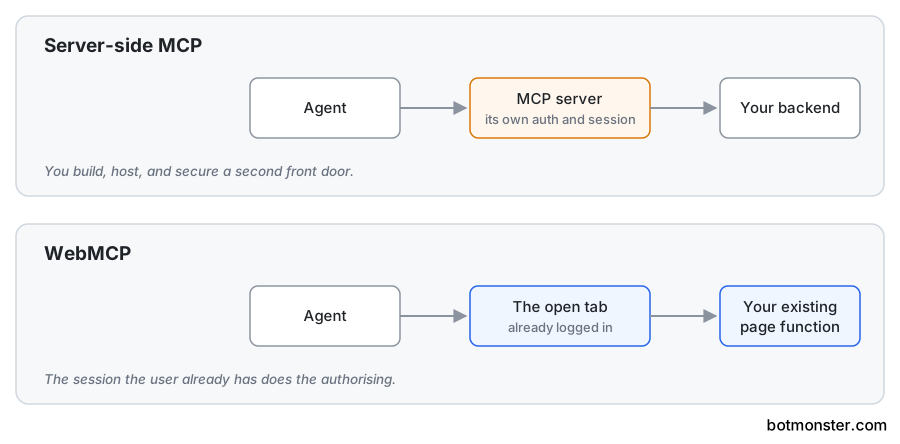
A WebMCP tool lives in the tab. It exists while the page is open and vanishes the moment you leave. A server-side tool is the opposite. A frame from another site cannot add tools of its own. It needs your page to say it may.
| Approach | Who holds the session | Where the code runs | What breaks it | Setup cost |
|---|---|---|---|---|
| WebMCP | the tab the user already opened | your page’s JavaScript | a vague tool description | one function call plus a trial token |
| Server-side MCP | the MCP server, separately | your backend | auth drifting out of sync | a whole service to build and host |
| Page-tree agent | the tab the user already opened | nowhere, it drives your UI | a control with no accessible name | none for you, and it works today |
| Screenshot agent | the agent’s own browser | nowhere, it guesses at your UI | any layout change | none for you, plenty for the agent |
There is also a declarative option: toolname and tooldescription attributes on an ordinary form. Dominic Farolino reported Google’s own trial telemetry to the W3C TAG. It counts about 172 million imperative registrations against roughly 20,000 declarative ones. That is a ratio near 8,600 to 1.
How do I add WebMCP to my website?
You need Chrome 149 or newer for the origin trial. Chrome 146 or newer is enough to test behind the flag. The whole API is one function call, so a working tool fits in twenty lines and needs no build step.
Turn on the Chrome flag
Open chrome://flags/#enable-webmcp-testing, set it to Enabled, and restart the browser. Then confirm the API exists from the DevTools console.
!!document.modelContextThat must return true before anything else is worth trying.
Write the tool registration
Give the tool a name, a description, a JSON Schema for its inputs, and an async function. Feature-detect first, so the page still runs in every other browser.
const mc = document.modelContext;
if (mc) {
  await mc.registerTool({
    name: 'get_order_status',
    description: 'Look up the status of an order by its order number.',
    inputSchema: {
      type: 'object',
      properties: {
        order: { type: 'string', description: 'Order number, e.g. A-10422' },
      },
      required: ['order'],
    },
    execute: async ({ order }) => {
      const res = await fetch(`/api/orders/${encodeURIComponent(order)}`);
      if (!res.ok) throw new Error(`Unknown order ${order}`);
      return JSON.stringify(await res.json());
    },
  });
}
The namespace moved to Document, and Chrome’s imperative API docs mark navigator.modelContext deprecated in Chrome 150. The old provideContext() and clearContext() calls were deleted from the spec too. Any sample still using them is stale.
Return shape is the one place to expect churn. The spec IDL says the execute callback returns Promise<any>. The explainer shows an MCP-style array of content objects. Chrome’s docs show a plain string. Live sites do both, and issue #86 is still open. Pick one shape and document it. It will probably change.
Describe the tool the way you would brief a new hire
Write the description and every schema field as plain sentences. The agent picks tools by reading this text and nothing else. A vague description means your tool never gets picked, or gets picked for the wrong job.
Test it in DevTools
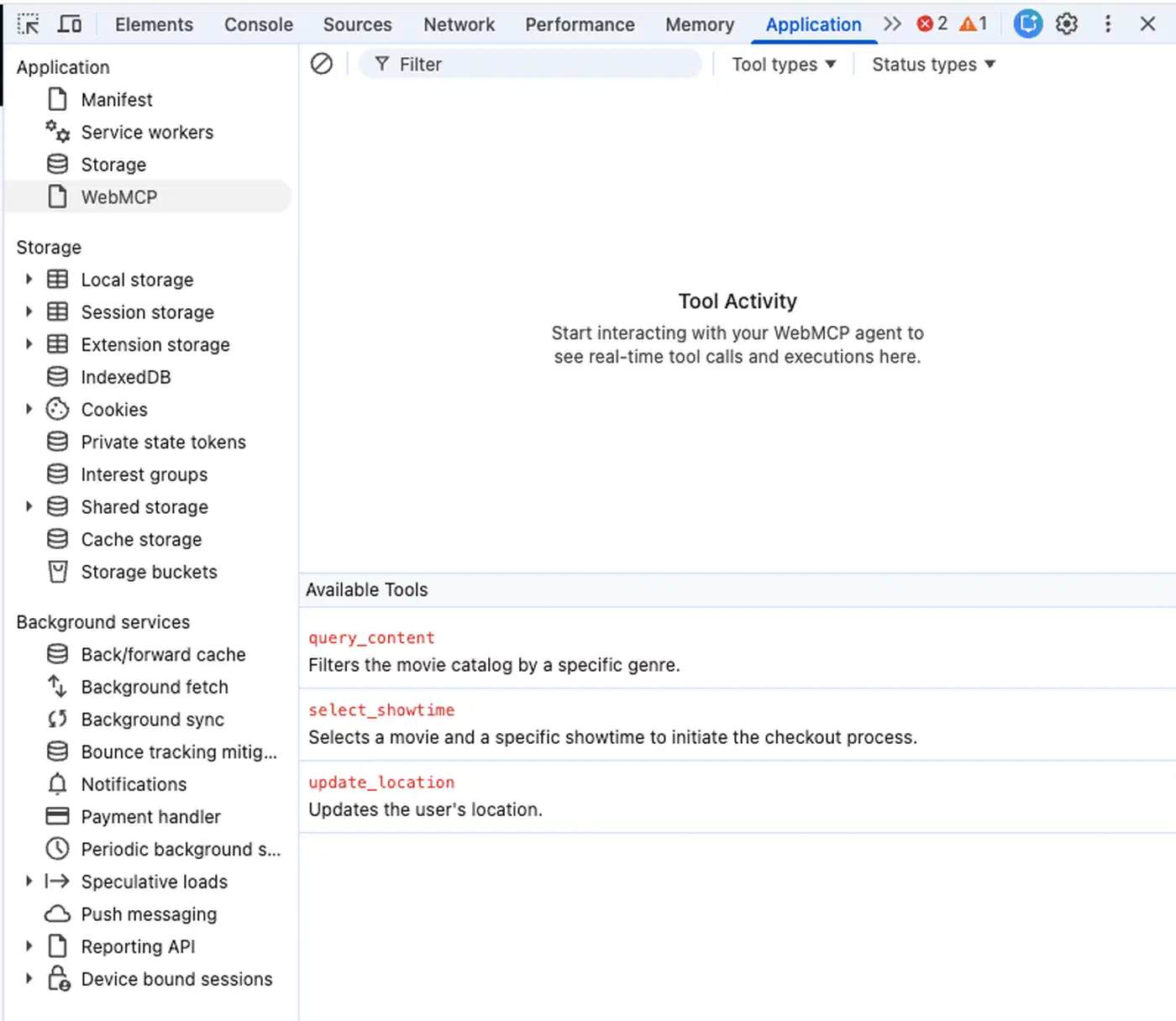
Open the Application panel and find the WebMCP pane, added in Chrome 149. Your tool should show up under Available Tools. The Run tool button calls it with arguments you type, so you skip the agent’s decision logic.
Get an origin trial token for real visitors
Register your origin at Chrome’s origin trials console. You get back a long token string. Paste it into the head of your page:
<meta http-equiv="origin-trial" content="PASTE_YOUR_TOKEN_HERE">Without that tag, your registration is dead code for anyone who has not hand-enabled the flag.
Unregister when the tool stops making sense
Pass an AbortController signal at registration and call abort() to remove the tool later. That helps when a tool only makes sense in one state, such as a wizard step or a logged-in view.
Handle a hostile caller
Assume every argument is hostile and out of range. Check inputs and reject values your buttons could never produce. Then confirm the tool returns a readable error instead of taking the page down.
The seven WebMCP tools on botmonster.com
Five tools register on every page. get_site_capabilities is the front door. An agent landing anywhere on botmonster.com gets a plain-text menu of what is on offer, converter page included. list_blog_posts returns the published archive newest-first as structured data, with title, URL, date, category, and tags. It takes an optional category and keyword. So an agent can answer “what has botmonster.com written about Gitea” without crawling a single page.
Three share tools open a pre-filled composer for whatever page the reader is on: share_on_x, share_on_linkedin, and share_on_bluesky. The agent writes the post text for X and Bluesky. If the browser blocks the popup, the tool hands back the ready-made share link instead of just failing.
Two more tools register on the image to SVG converter. convert_image_to_svg takes a raster image as a data URI, plus optional tracing parameters, and returns a full SVG document as text. get_svg_result returns whatever the page converted last, for when a human loaded the image by hand.

The conversion runs on the visitor’s own machine in WebAssembly. Nothing uploads to a server, and there is no API key. The agent gets back a real computed artifact instead of a link elsewhere, which is rare. Browse the tools listed in the webmcp.com directory and most turn out to be navigation and marketing helpers: jump to pricing, open the contact form, search the docs.
Exposing tools to an agent is a fuzzing exercise. Your buttons only let through what a human can produce by clicking. A JSON Schema lets through anything that fits the type, including a transparent one-pixel image that makes a tracer divide by an empty list. Every limit the interface used to enforce for free is now yours to set on purpose.
Today these tools only appear for Chrome users on the origin trial, or with the testing flag switched on. That audience is small now and gets a lot bigger when Chrome 157 lands.
Is WebMCP actually going to happen?
Apple has filed a formal oppose position. In Apple’s view WebMCP is unsafe, it leaks data, the design is wrong, and it is being built in the wrong group. But the charge that stings most is that the whole thing is a copy. Agents can already drive a site through the page tree. That works today, with none of this.
An agent acting on a user’s behalf is, in effect, assistive technology: it should operate a site as the user would, and the site should not single it out for different treatment. WebMCP does the opposite, making “an agent is driving” an observable fact.
Apple’s sharpest point is that WebMCP breaks easily. A schema fixes the shape of an input. It says nothing about what the input means. The agent still has to work that out from your text. So the weak spot just moves out of the page and into the words you write about your tools. Google’s own editor admits where the pushback has landed.
not basing the proposal entirely on more UI semantics has been the primary source of TAG pushback we’ve received.
Mozilla sits at neutral, with one sharp warning. A bad site can list tools that do not match what a person sees on the page. It might do that to trap bots, to slip hidden orders to the agent, or to grab what the agent types.
A team in Taiwan published WebMCP Tool Surface Poisoning. They showed that an outside script can add fake tools while the page is open. It can also reword yours. The AbortSignal you use to drop a tool cleanly turns out to be a handy weapon too. Earlence Fernandes built a working attack across sites and wrote up why it breaks the wall between them. He notes the limit himself: his target was a test add-on, not a real agent.
It is easy to undercount how many sites use this. Most of them call registerTool only after checking that the browser has the feature. So a crawler reading plain HTML sees nothing, and so does a crawler in Chrome without the flag. Shopify ships its own set of ten tools across stores like Reebok and Alo Yoga, and that shows up in no download chart and no app store. Google can see the real numbers through the trial. It has published tool counts, not site counts.
Timing is the last thing to weigh, and it cuts the other way. Chrome’s own status page lists Chrome 157 as the ship milestone on desktop, Android, and WebView. That milestone lands around November 2026. It switches the feature on for every Chrome user. The trial is just the bridge until then, and once 157 lands you can drop the token.
Ship targets do slip, so treat 157 as a plan rather than a date. The open question is not whether Chrome turns this on. It is whether Chrome ends up being the only browser that does.
WebMCP is worth an afternoon if your page already does something worth calling, like a converter or a search index. It does not justify a rewrite or a new backend. Sites whose whole offer is navigation and marketing copy should wait. Agents can already read those pages fine by looking.