 Botmonster Tech
Generate conventional commits locally with Ollama and Git hooks

You can wire a local LLM into your Git workflow to write conventional commit messages from staged diffs. The trick is a prepare-commit-msg Git hook. The hook runs git diff --cached and sends the output to Ollama. Ollama runs a model like Llama 4 Scout on a consumer GPU or Qwen3, then writes the message into the commit file for you to review. The whole setup is about 30 lines of shell or Python. It costs nothing to run, keeps your code local, and follows the Conventional Commits format. That beats the “fix stuff” messages most of us write when we just want to move on.
Why Auto-Generated Commit Messages Actually Matter
Good commit messages are the most undervalued form of documentation in any codebase. Comments go stale. Wiki pages get forgotten. README files drift out of sync with reality. But a commit message is tied to the exact code it describes. It cannot go stale, because it points to one fixed snapshot in time.
Developers know how to write good commit messages. After 30 minutes spent debugging a race condition in the login flow, you know exactly what you changed and why. You also want to move on. So instead of writing “fix(auth): prevent race condition in token refresh by adding mutex lock on session store,” you type git commit -m "fix auth bug" and carry on. The knowledge about that fix now lives only in your head. It will be gone within a week.
AI generation fixes this. The LLM reads the diff and writes a structured message describing what changed. You review it, adjust if needed, and confirm. That review takes maybe five seconds, not the 30 seconds of writing you were trying to skip. The friction drops enough that good messages become the default.
The Conventional Commits format structures messages as type(scope): description. An example is feat(auth): add JWT refresh token rotation. This format has real benefits beyond readability. It powers auto-generated changelogs with tools like release-please or standard-version. It also supports version-bump decisions and makes git log --grep useful for finding specific changes.
On teams, consistency helps too. Five developers write commit messages in five styles. One capitalizes, another does not. One writes full sentences, another writes fragments. AI generation makes the format the same across the whole team. Yet every developer keeps full editorial control through the review step. The same LLM-on-diff trick also scales to automated code reviews in CI pipelines for teams that want a pre-reviewer on every pull request.
One thing to stress: never set this up to auto-commit without human confirmation. The generated message is a draft. The developer should check it for accuracy and add context the diff cannot show. That context is mostly the “why” behind a change, which no diff analysis can reliably pull out.
Setting Up the Git Hook with Ollama
The prepare-commit-msg hook is the cleanest place to plug this in. Git calls it after it creates the commit message file but before it opens your editor. The script gets the message file path as $1 and can write whatever it wants into that file. When you run git commit, your editor opens with the AI-generated message already filled in. You edit, save, and close. Or you abort if the message is wrong.
Prerequisites
You need Ollama installed and running. If you do not have it yet, install it from ollama.com and pull a capable model:
ollama serve &
ollama pull llama4-scout:17b
If you have limited VRAM, Qwen3 8B works well at this task and runs on 8GB cards:
ollama pull qwen3:8bIf you have a 24GB-class card and want a stronger coder, Alibaba’s Qwen3.6-35B-A3B, the 24GB-class upgrade pick, is the model to reach for. It uses 3B parameters per token and scores 73.4 on SWE-bench Verified.
Bash Implementation
Create the hook file at .git/hooks/prepare-commit-msg:
#!/usr/bin/env bash
set -euo pipefail

COMMIT_MSG_FILE="$1"
COMMIT_SOURCE="${2:-}"

# Skip for merge commits, amends, and squashes
if [ -n "$COMMIT_SOURCE" ]; then
    exit 0
fi

# Capture the staged diff
STAT=$(git diff --cached --stat)
DIFF=$(git diff --cached | head -c 12000)

if [ -z "$DIFF" ]; then
    exit 0
fi

PROMPT="You are a git commit message generator. Given a diff, write a commit message following the Conventional Commits specification.

Format: type(scope): description

[optional body]

Types: feat, fix, refactor, docs, style, test, chore, perf, ci, build.
The scope is the area of the codebase affected.
The description must be imperative mood, lowercase, no period, under 72 characters.
Only include a body for non-trivial changes. The body should explain WHY, not WHAT.

Files changed:
$STAT

Diff:
$DIFF"

RESPONSE=$(curl -s --max-time 15 http://localhost:11434/api/generate \
    -d "$(jq -n --arg model "llama4-scout" --arg prompt "$PROMPT" \
    '{model: $model, prompt: $prompt, stream: false}')" \
    | jq -r '.response // empty')

if [ -n "$RESPONSE" ]; then
    echo "$RESPONSE" > "$COMMIT_MSG_FILE"
fi
Make it executable:
chmod +x .git/hooks/prepare-commit-msgPython Implementation
For better error handling and diff truncation logic, a Python version is more practical. It goes in the same file, just with a Python shebang:
#!/usr/bin/env python3
import subprocess
import json
import sys
import urllib.request

COMMIT_MSG_FILE = sys.argv[1]
COMMIT_SOURCE = sys.argv[2] if len(sys.argv) > 2 else ""

# Skip merge commits and amends
if COMMIT_SOURCE:
    sys.exit(0)

# Capture staged diff
stat = subprocess.run(
    ["git", "diff", "--cached", "--stat"],
    capture_output=True, text=True
).stdout

diff = subprocess.run(
    ["git", "diff", "--cached"],
    capture_output=True, text=True
).stdout

if not diff.strip():
    sys.exit(0)

# Truncate diff to ~3000 tokens (roughly 12000 chars)
MAX_DIFF_CHARS = 12000
if len(diff) > MAX_DIFF_CHARS:
    diff = diff[:MAX_DIFF_CHARS] + "\n... (diff truncated)"

prompt = f"""You are a git commit message generator. Given a diff, write a commit message following the Conventional Commits specification.

Format: type(scope): description

[optional body]

Types: feat, fix, refactor, docs, style, test, chore, perf, ci, build.
The scope is the area of the codebase affected.
The description must be imperative mood, lowercase, no period, under 72 characters.
Only include a body for non-trivial changes. The body explains WHY, not WHAT.

Files changed:
{stat}

Diff:
{diff}"""

payload = json.dumps({
    "model": "llama4-scout",
    "prompt": prompt,
    "stream": False
}).encode()

try:
    req = urllib.request.Request(
        "http://localhost:11434/api/generate",
        data=payload,
        headers={"Content-Type": "application/json"}
    )
    with urllib.request.urlopen(req, timeout=15) as resp:
        result = json.loads(resp.read())
        message = result.get("response", "").strip()
        if message:
            with open(COMMIT_MSG_FILE, "w") as f:
                f.write(message)
except Exception:
    # Fail silently - let the developer write manually
    pass
Diff Truncation Strategy
Large diffs are the main snag. A 500-line refactor makes a diff that blows past most models’ useful context window. Even when it fits, the model tends to lose focus on the changes that count. The approach above cuts the raw diff to about 12,000 characters (roughly 3,000 tokens). But it always keeps the full --stat output. The stat summary gives the model a full picture of which files changed and by how much, even when the detailed diff is cut short. So a commit touching 20 files still gets an accurate scope, even though the model only sees the first few files in detail.
Team-Wide Deployment
The hook lives inside .git/hooks/. That folder is local to each clone and not tracked by Git. To ship it team-wide, set up a shared hooks directory:
git config core.hooksPath .githooksThen commit a .githooks/prepare-commit-msg file to your repository. Every team member who clones the repo and sets the config gets the hook on its own. The hook travels with the repository whether it lives on GitHub or a Gitea instance you migrated your repositories to. For projects that already use pre-commit or Husky (npm), you can wire the hook in through those frameworks instead.
Crafting the Prompt for High-Quality Messages
The prompt you send to the LLM counts for more than which model you pick. A vague prompt like “write a commit message for this diff” gives you vague messages, no matter the model size. The prompt template shown above works. But a few specific tweaks are worth knowing.
System Prompt Structure
The key instructions in the prompt are:
- Imperative mood (“add feature” not “added feature” or “adding feature”). This matches Git’s own style, like
Merge branchandRevert commit. - A 72-character subject line limit. This long-standing Git rule keeps messages tidy in
git log --oneline, GitHub’s commit list, and email patches. - Body explains why, not what. The diff already shows what changed, so the body should capture motivation, tradeoffs, or context that would be lost.
Including Stat Output First
Structuring the prompt as stat-then-diff makes a measurable difference. The stat output acts as a table of contents:
 src/auth/token.py    | 45 +++++++++++----
 src/auth/session.py  |  8 +--
 tests/test_token.py  | 32 ++++++++++
 3 files changed, 67 insertions(+), 18 deletions(-)
The model reads this and grasps the scope at once: auth-related changes with new tests. When it then hits the detailed diff, it has context for reading each hunk. Without the stat, models often fixate on the first file they see and ignore the rest.
Few-Shot Examples
Adding two or three example diff-to-message pairs in the prompt sharply improves consistency. For instance:
Example:
Diff: Modified src/api/routes.py to add /health endpoint returning 200 OK
Message: feat(api): add health check endpoint for load balancer probes
This shows the model your preferred level of detail. Without examples, some models write messages that are too wordy while others are too terse.
Handling Different Commit Types
The hook’s $2 argument tells you the commit source. An empty value means a normal commit. The value merge means Git is making a merge commit with its own default message. The value commit means --amend or -c was used. The value squash comes from squash merges. For merge commits, skip AI generation: Git’s default merge message names the branches and is already useful. For amends, you may want to re-run generation on the new diff, or you may want to keep the original message.
Multi-Line Body Logic
Not every commit needs a body paragraph. A one-line fix for a typo in a config file needs nothing beyond fix(config): correct database host typo. But a 50-line refactor that changes the error handling approach gains from a body that explains why the old way fell short.
A simple rule of thumb: if the diff is under 10 lines, ask for a subject-only message. If it is over 20 lines, tell the model to add a body. The prompt can carry this logic:
The diff is {line_count} lines. {"Include a 1-2 sentence body explaining the motivation." if line_count > 20 else "Subject line only, no body needed."}Language Specificity
Tell the model, in plain words, to name specific functions, files, and config keys in the message. Without that, models drift toward generic lines like “update authentication logic” when “add rate limiting to JWT refresh endpoint in token.py” would be far more useful. The line “be specific about what changed: name functions, files, config keys; avoid vague phrases like ‘update code’ or ‘fix bug’” costs a few tokens in the prompt but pays for itself in every message.
Advanced Features
The basic hook covers most of what you need. But a few add-ons can make it work much better.
Multiple Message Options
Instead of generating one message, generate three with a temperature of 0.7 for variety. Write them into the commit message file as Git comments:
# Option 1: feat(auth): add JWT refresh token rotation
# Option 2: feat(auth): implement automatic token refresh with rotation
# Option 3: feat(security): add rotating refresh tokens to prevent replay attacks
The developer uncomments the option they like and edits as needed. Git strips lines that start with #, so only the uncommented line becomes the real message.
Branch-Aware Context
Parse the current branch name and include it in the prompt:
BRANCH=$(git branch --show-current)
# Adds to prompt: "The current branch is feature/JIRA-1234-user-auth"
If the branch follows a naming pattern like feature/JIRA-1234-user-auth, the model can cite the ticket number and feature area in the message. This helps most on teams that tie branches to issue trackers.
Filtering Noise from Diffs
Some files add noise without useful signal. Lock files (package-lock.json, poetry.lock), generated code, and framework migration files tend to bloat the diff without helping the model grasp the intent. Filter them out:
DIFF=$(git diff --cached -- . ':!package-lock.json' ':!*.lock' ':!*.generated.*')This keeps the diff focused on the actual code changes you made.
Interactive Refinement
After the first draft, you may want to give the model more direction. One approach: in the commit-msg hook (which runs after you save the editor), check for a special marker like # REFINE: mention the security implications. If found, re-run the LLM with the original diff plus the extra instruction, then reopen the editor. This takes more work to build, but it creates a back-and-forth editing flow.
Performance and Reliability
The hook should never block your workflow. Set a timeout of 10-15 seconds on the HTTP request to Ollama. If the model is slow or Ollama is not running, fail silently and let the developer write the message by hand. A commit should never fail because an AI service is down.
For a snappier feel, you can use Ollama’s streaming API and write tokens to a temp file as they arrive. But for a commit message this is usually not needed. The full draft finishes in 2 to 5 seconds for most models on modern hardware.
Alternative Approaches and Existing Tools
Building your own hook gives you the most control. But several existing tools offer this feature out of the box.
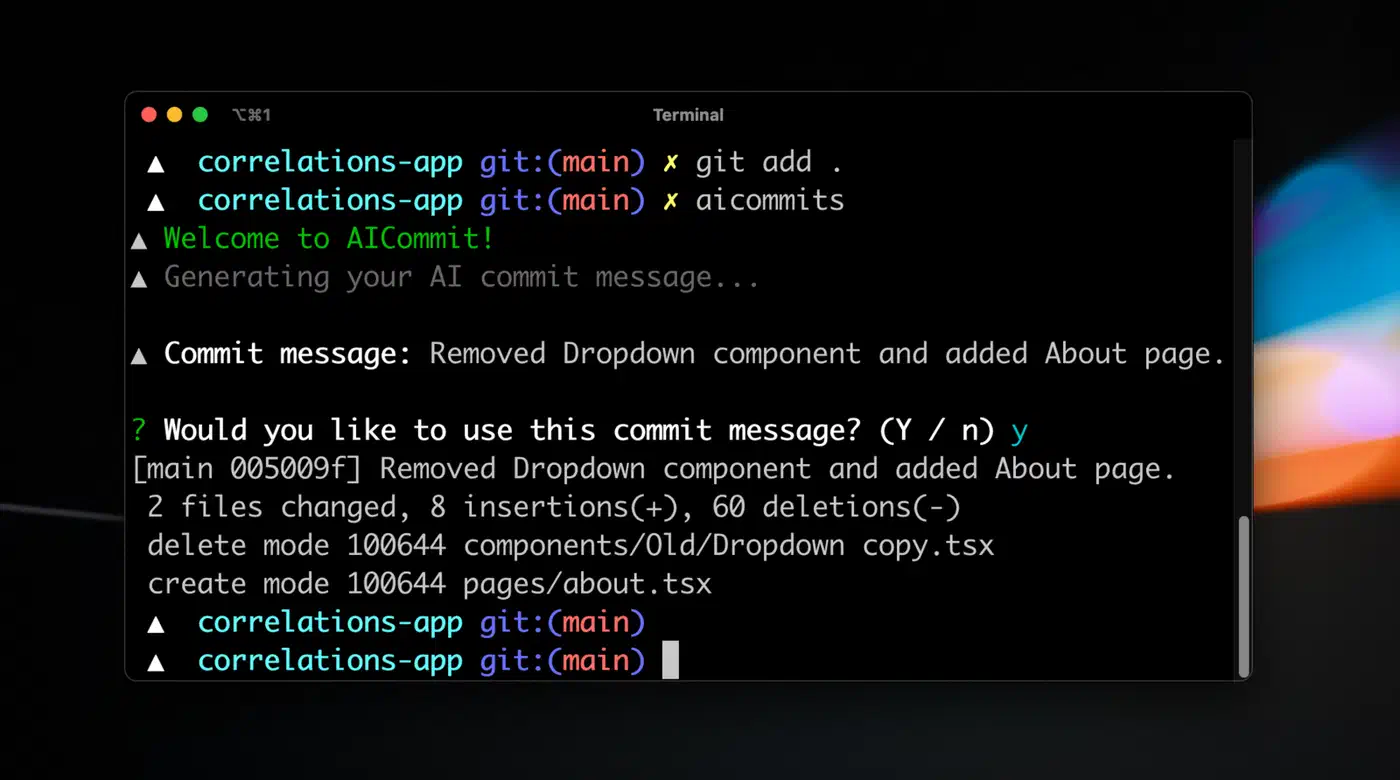
aicommits is an npm package that uses OpenAI’s API or local Ollama to write messages. Running npx aicommits stages and commits in one step. It is the fastest way to start, but you can tune it less than a DIY hook.
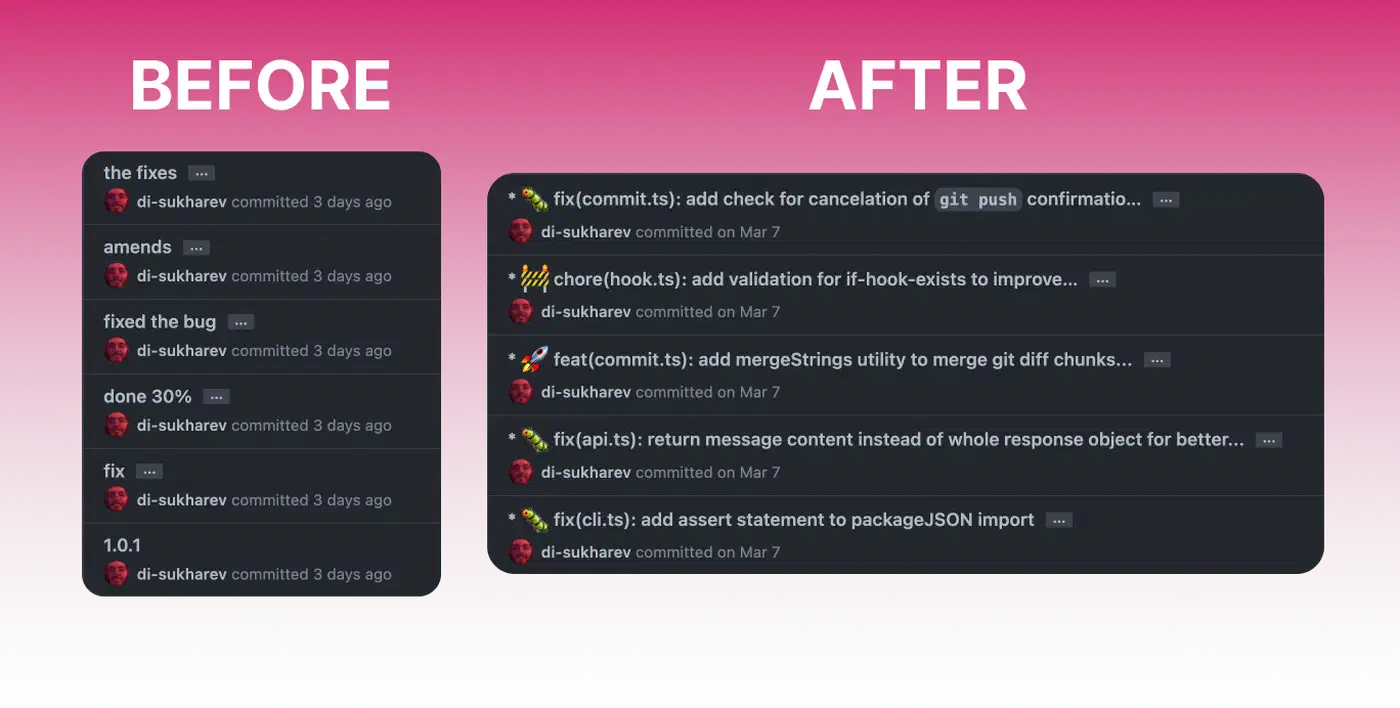
opencommit (the oco command) supports many AI providers, among them OpenAI, Anthropic, Ollama, and Azure. It has more features than aicommits, like emoji support and conventional commits enforcement.
Commitizen gives you an interactive commit flow that walks you through type, scope, and description fields. Several community plugins add AI pre-filling to this flow. If your team already uses Commitizen, bolting AI generation on top is easy.
Both Claude Code and Cursor write commit messages from their UIs. If you already use one of these tools, their built-in generation works well. But it ties you to that one editor.
The DIY approach has clear wins. It needs nothing beyond Ollama and a shell script. There are no cloud API calls and no subscription costs. You get full control over the prompt, and it works in any terminal, editor, or IDE. You know every line of the code, so you can debug and change it freely.
My advice: start with the DIY hook to learn the mechanics and tune the prompt to your taste. If you later want a more polished CLI, switch to aicommits or opencommit. If you already work inside Claude Code, Cursor, or OpenAI Codex CLI, their built-in generation is handy enough that a separate tool may be overkill. Whichever path you take, the goal is the same: get into the habit of generating and reviewing, not typing commit messages from scratch under time pressure.