 Botmonster Tech
Claude Agent SDK: build custom AI agents without reinventing the orchestration layer
The Claude Agent SDK is the Claude Code engine stripped down to a library. Same agent loop, same built-in tools, same context handling, but you call it from your own Python or TypeScript code instead of the CLI. If you’ve used Claude Code to read files, run shell commands, search codebases, and edit code, the SDK points that same machinery at any problem you want. No human needs to sit in the loop.
Anthropic renamed it from “Claude Code SDK” in late 2025 to signal broader scope. This is a general agent runtime, not just a wrapper around a coding tool. The stable version on PyPI is claude-agent-sdk v0.1.56 (April 2026). The TypeScript package on npm is @anthropic-ai/agent-sdk v0.2.71. The SDK handles what most teams rebuild every time: the think-act-observe loop, tool calls with error recovery, context window limits with auto compaction, streaming responses, and permission checks. The same permission model is what makes Claude moving your mouse tolerable rather than alarming.
Getting a working agent up takes under 20 lines of Python. Install the package. Import the client. Call query() with a prompt and a list of allowed tools. Then loop over the streaming response. The official quickstart walks through exactly this.
The Four Core Primitives
The SDK is built around four pieces you can mix and match: tools, hooks, MCP servers, and subagents.
Tools are functions your agent can call. The SDK ships with the same set Claude Code uses: Read, Edit, Write, Bash, Glob (file pattern search), Grep (content search), WebSearch, and WebFetch. The allowedTools parameter sets which ones are on. Custom tools are Python or TypeScript functions you write and register with the SDK. They run as in-process MCP servers, so you skip the cost of spawning a second process. A custom tool is just a function with a schema that Claude can find and call. That is how one agent wraps a Python geometry kernel and turns a plain-language part request into a machinable STEP file.
Hooks are callbacks that fire at set points in the agent loop. The set is PreToolUse (before a tool runs, good for checks, logs, or blocks), PostToolUse (after a tool returns, good for cleanup or audit), UserPromptSubmit, Stop, SubagentStop, SubagentStart, PreCompact (before context compaction), Notification, and PermissionRequest. Hooks let you add guardrails without touching agent logic. A PreToolUse hook can block shell commands that match risky patterns. A PostToolUse hook can scrub secrets from tool output. A PermissionRequest hook can enforce approval flows for certain actions. These hooks matter because AI coding agents act as insider threats, and prompt injection through tool output is one of the hardest attacks to stop.
MCP servers plug in outside tools through the Model Context Protocol open standard. The Claude Agent SDK has the deepest MCP support of any agent framework today. Add a Playwright server and your agent can browse the web. Add a GitHub server and it can manage repos. Add a Slack server and it can post messages. Config is declarative. You write no glue code.
Subagents are child agents the main agent spawns for focused jobs. Each one gets its own system prompt, tool list, context window, and permission set. A code-review agent might spawn a doc-reviewer subagent with only Read and Grep, plus a security-scanner subagent with Bash and Grep. Each one hands back structured results to the parent. Multi-agent systems work this way without the cost of running them as separate processes.
From query() to a Working Agent
The easiest entry point is query(). It’s an async generator that streams messages as Claude works. Pass a prompt and an allowedTools list, loop over the output, and you have a working agent in a dozen lines. Here is a small TypeScript example from Nader Dabit’s guide:
import { query } from "@anthropic-ai/claude-agent-sdk";

async function main() {
  for await (const message of query({
    prompt: "What files are in this directory?",
    options: {
      model: "opus",
      allowedTools: ["Glob", "Read"],
      maxTurns: 250
    }
  })) {
    if (message.type === "assistant") {
      for (const block of message.message.content) {
        if ("text" in block) {
          console.log(block.text);
        }
      }
    }
  }
}

main();
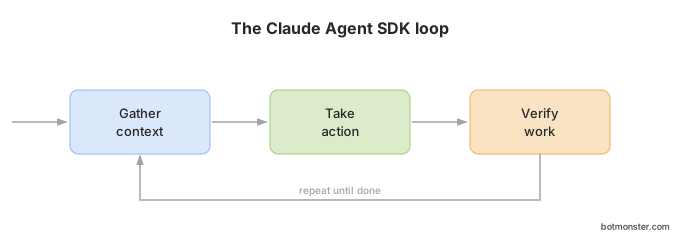
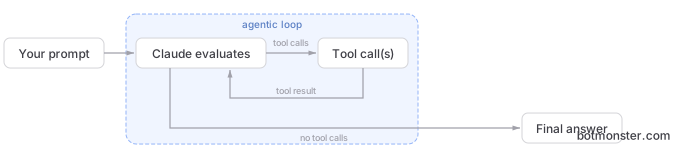
Claude will use the Glob tool to list files and report back. The query() function runs the whole agent loop: it calls Claude, runs tools, feeds results back, and repeats until the task ends.
For anything past a toy example, you’ll want structured output and custom tools. Structured output via JSON Schema pins Claude’s final response to a set shape. That is key for agents that feed results into other systems: CI pipelines, dashboards, notification services. Free-form text breaks those. Define the schema, pass it to the SDK, and the output fits.
Permission modes set what the agent can do on its own. You can limit file writes to set folders, ask for approval on shell commands, block network access, or run in bypassPermissions mode for trusted setups. Permissions are the safety layer that lets you ship agents to production without a human watching every step.
A practical code review agent built with the SDK might look like this:
import { query } from "@anthropic-ai/claude-agent-sdk";

async function reviewCode(directory: string) {
  for await (const message of query({
    prompt: `Review the code in ${directory} for bugs,
             security vulnerabilities, and performance issues.
             Be specific about file names and line numbers.`,
    options: {
      model: "opus",
      allowedTools: ["Read", "Glob", "Grep"],
      permissionMode: "bypassPermissions",
      maxTurns: 250
    }
  })) {
    if (message.type === "assistant") {
      for (const block of message.message.content) {
        if ("text" in block) console.log(block.text);
      }
    }
    if (message.type === "result") {
      console.log(`Review complete. Cost: $${message.total_cost_usd.toFixed(4)}`);
    }
  }
}

reviewCode(".");
This agent reads files, searches code, and writes analysis. It uses Claude Code’s own built-in tools. You didn’t have to write file reading, grep, or the agent loop yourself.
Agent Framework Comparison
The Claude Agent SDK sits next to several rival frameworks. Here is how it stacks up against the main ones in early 2026:
| Feature | Claude Agent SDK | LangGraph | CrewAI | OpenAI Agents SDK | AutoGen |
|---|---|---|---|---|---|
| Built-in tools | Yes (Read, Edit, Bash, Grep, etc.) | No (bring your own) | No (bring your own) | No (bring your own) | No (bring your own) |
| MCP support | Deep native integration | Via LangChain adapters | Limited | No | No |
| Streaming | Native async generator | Via callbacks | Limited | Via streaming API | Via callbacks |
| Subagents | Native with isolated contexts | Via graph nodes | Role-based crews | Via handoffs | Group chat pattern |
| Hook system | Full lifecycle hooks | Graph interrupts | Process callbacks | Guardrails API | Event handlers |
| Python SDK | Yes | Yes | Yes | Yes | Yes |
| TypeScript SDK | Yes | Yes (JS) | No | Yes | No |
| Model support | Claude only | Multi-model | Multi-model | OpenAI only | Multi-model |
| Orchestration model | Tool-use chains | Directed graphs | Role-based crews | Explicit handoffs | Conversational |
The trade-off: Claude Agent SDK and OpenAI Agents SDK give you the deepest fit with their own model line, but you’re stuck with one vendor. LangGraph and CrewAI work across vendors, but you have to build your own tools. AutoGen kicked off multi-agent chat, but it has been folded into the Microsoft Agent Framework. It’s now in maintenance mode and gets only bug fixes and security patches. For a ready-made terminal agent rather than an SDK, Codex CLI, OpenAI’s Rust-based terminal coder, works as an MCP server other orchestrators can drive.
Speaking of the Microsoft Agent Framework: since January 2026, Claude agents share the same BaseAgent interface as every other agent type in the framework. You can mix Claude agents with Azure OpenAI, OpenAI, GitHub Copilot, and others in sequential, concurrent, handoff, and group chat flows. So you can build vendor-neutral pipelines that route tasks to different models based on cost, speed, or skill, with no code changes.
Ecosystem and Production Patterns
The ecosystem around the Claude Agent SDK has grown fast in early 2026. A few updates worth knowing:
Promptfoo now supports Claude Agent SDK agents for eval and benchmarking. You can test agents against different prompts, tool setups, and model versions. For production work where you need to measure agent behavior and catch regressions, this fills a real gap.
LangGraph paired with the Claude Agent SDK gives you a different shape of multi-agent system. LangGraph runs graph-based workflows with clear state machines, branching, and checkpoints. The Claude Agent SDK runs the agent inside each graph node. The pairing combines LangGraph’s strict control flow with Claude’s open reasoning.
Frontend Masters has a workshop on September 29, 2026: “Building Custom Agents with Claude Code SDK” taught by Lydia Hallie from Anthropic’s Claude Code team. It covers context APIs, deeper permission settings, and the tool ecosystem. If you want the theory behind these patterns, the free agent textbook covers planning, memory, and evals in far more depth than any workshop slot allows.
The wider community ships fast too. A handful of self-evolving skills and multi-session add-ons plug straight into the same agent runtime.
For production, the common pattern looks like this: put the agent in a container with its MCP server config. Use hooks for visibility by logging every tool call and result. Add circuit breakers in PreToolUse hooks for cost control. Run output checks in a PostToolUse hook to catch bad responses before they hit other systems. Cost control is not optional once you switch the underlying model to Opus: the dominant theme in Opus 4.7 user reactions was token burn on long agentic runs, which is exactly the failure mode PreToolUse circuit breakers exist to catch. Error handling has a key design choice. If a handler throws an unhandled exception, the agent loop stops cold. If it catches the error and returns is_error: True, Claude sees the error as data and can retry or try a new path. In production, always catch and return. Never throw.
When to Use the Agent SDK vs Claude Code vs the Raw API
The pick between the Agent SDK, Claude Code, and the raw Anthropic API comes down to two things: how much freedom the agent needs, and whether a human is in the loop.
The raw Anthropic API (the anthropic Python/TypeScript package) fits when you need a single model call with tool use: chat, classification, extraction, summary. The API is stateless and gives you full control. The cost is that you must build the agent loop yourself if you want one.
Claude Code (the CLI) fits hands-on dev work: writing code, debugging, refactoring, poking around a codebase. Claude Code is the agent. You are the human giving direction.
The Claude Agent SDK is for agents that run on their own or with light oversight: CI/CD bots, code review automation, data pipelines, monitors, support agents. Use it for any workflow where the agent runs without a person steering it. Reach for the SDK when you need custom tools that go beyond Claude Code’s built-in set, hooks for guardrails and visibility, or a setup of many focused subagents.
On cost, the Agent SDK uses the same model API as Claude Code, so per-token prices are the same. The SDK adds no markup. The split is in infrastructure. You handle your own hosting, scaling, and monitoring rather than leaning on Anthropic’s Claude Code runtime.
A good way to start: prototype the agent in Claude Code first. Tune the prompts, find the right tool set, and test the flow by hand. Then port the working pattern to the Agent SDK for production. That keeps you from over-building the SDK side before the core behavior is sound.
Error Handling and Resilience
Production agents must handle failures with care. Tool failures, context overflow, rate limits, and network errors all need their own fix.
For tool failures, the SDK splits flaky errors from hard ones. A PreToolUse hook can act as a circuit breaker. If a tool fails over and over, block more calls and let Claude adapt. A PostToolUse hook can check results and flag bad ones before they spread.
Context overflow kicks off auto compaction. The SDK’s PreCompact hook fires first. That gives you a chance to log what is about to shrink or to add a summary. For long-running agents, this is where you save key state.
Rate limit handling uses standard exponential backoff with jitter. The right timeout depends on the use case. Use 60-90 seconds for chat. Use 120-300 seconds for background jobs. Use 120-180 seconds per turn for agent loops with tool use.
The rule: catch errors in hooks and return them as data (is_error: True) instead of throwing. That keeps the agent loop alive and lets Claude pick how to recover.