 Botmonster Tech
ego lite lets your AI agent use every login you own
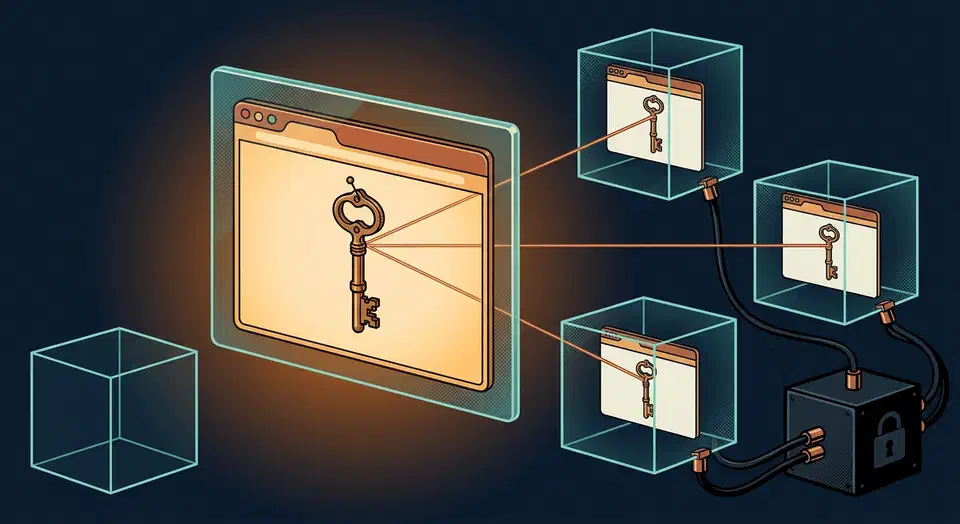
The ego lite browser for AI agents is a Chromium build where your agent works in its own isolated Space. You keep browsing your own tabs. Each Space starts signed in to whatever you are signed in to. The project ships the connector skill and a CLI, while the browser itself is a closed macOS download.
Key Takeaways
- Your agent gets its own browser window and stops stealing your tabs.
- Every agent workspace starts signed in to whatever you are signed in to.
- The open repo covers the connector, while the browser itself stays closed.
- The app is macOS only, and Windows and Linux sit at zero percent progress.
- Handing an agent your live logins is both the whole point and the whole risk.
What is the ego lite browser for AI agents?
ego lite is a Chromium browser built by CitroLabs for people and AI agents to share. The core idea is the Space. A Space is an isolated browsing context with its own tabs, and it inherits your login state by default. That one sentence is basically the whole product.
The agent never grabs your window. You browse up front, the agent works behind you, and the browser shows which Space currently has an agent running. You can take that Space over or stop it at any point.
Several Spaces run at once inside a single browser. One agent can chew through five scraping tasks in five workspaces while you read email in yours.

The connector is a CLI called ego-browser. It hands your agent a Node runtime with browser helpers already loaded: snapshotText, click, fillInput, typeText, pressKey, uploadFile, waitForNetworkIdle, captureScreenshot, js, and cdp, plus a set of task-space helpers. The full list lives in the ego-browser skill file.
The agent writes one JavaScript snippet that calls ten helpers and runs the whole thing in a single pass. A tool that exposes one shell command per action forces a round trip to the model after every click. Fewer round trips means fewer tokens and less waiting.
Snapshots are text rather than pixels. The agent reads a compressed semantic tree of the page with numbered refs like @21, then acts on those refs. The project leans hard on snapshot quality for awkward pages such as deeply nested iframes.
On Hacker News, the Space model is the part people responded to. Anyone who has run agents at volume knows why isolation matters, and 1,000 OpenClaw deploys is a fair sample of what goes wrong without it.
agent gets its own independent space but still holds my credentials. Browsers like Dia, which evolved from Arc (working on the workspace concept very early on), should have taken this route ages ago.
The open-source repo does not contain the browser
The citrolabs/ego-lite repository is genuinely MIT licensed and full of useful code. None of that code is the browser, and the project page never quite tells you so.
Clone it and you get three things:
- The
ego-browserskill: a 19,745 byteSKILL.md, plus references, install scripts, and per-site learnings for x.com and Google. - An npm package under
package/ego-browserwith 54 source files and roughly 9,400 lines of TypeScript. - An agent-skills spec, docs, and plugin manifests for Claude Code and Codex.
The package describes itself as a single-file build of a CDP harness. It is a driver, and the thing it drives lives somewhere else.
What you do not get is any Chromium fork, any browser build, or the kernel-level customization the project credits for its snapshot quality. The repository’s own license note says the browser is a separate free download, and the install path is a .dmg pulled from cdn.ego.app.
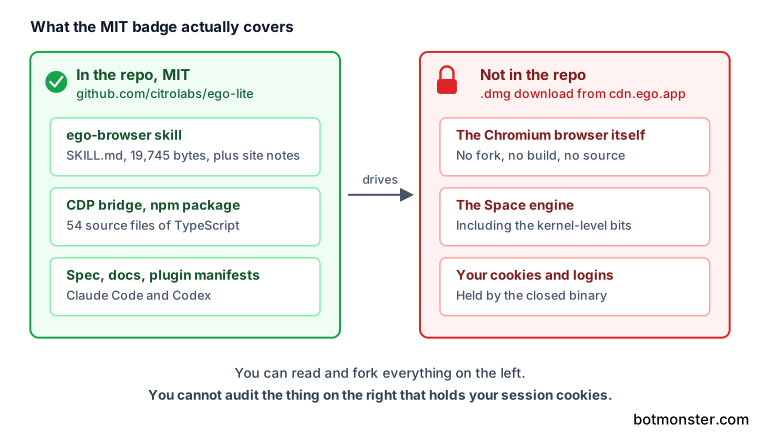
Consequently, you can audit and fork the connector. You can’t audit the binary that holds your cookies, and inheriting your logged-in state is the whole selling point.
MIT on the repo also doesn’t license the browser. If the app’s terms change later, the skill you forked still only works against an app you don’t control.
The install script also strips the macOS quarantine flag from the installed app, escalating to sudo if the first attempt fails. Gatekeeper therefore never shows its warning on first launch. Skipping that warning is routine for unsigned tooling, though this particular app is about to hold your session cookies.
Here is how the alternatives handle the same four questions:
| Tool | Ships a browser | Inherits your logins | Any agent can drive it | Browser code you can read |
|---|---|---|---|---|
| ego lite | Yes, closed macOS app | Yes, from Chrome | Yes | No |
| Browser-Use | No | Only with manual setup | Yes | Yes, your own Chrome |
| agent-browser | No | No | Yes | Yes, your own Chrome |
| ChatGPT Atlas | Yes, closed app | Yes | No, built-in agent only | No |
| Perplexity Comet | Yes, closed app | Yes | No, built-in agent only | No |
The split also explains the platform limit. A skill file is portable text, while a compiled browser has to be built for each operating system separately. Every row above also drives a full Chromium build. Lightpanda’s headless engine goes the other way, peaking at 123 MB where Chrome needs 2 GB.
What the speed claim rests on
The project says complex browser tasks finish faster than Vercel’s agent-browser across four tasks, with the gap widening as tasks get harder.
The repository README says up to 2.5 times faster. The ego lite landing page says up to 3.45 times faster, in its page description and its structured data. The project publishes two different multipliers for one comparison against one competitor.
The mechanism behind the claim is sound. Batching ten actions into one script really does cut model round trips, and round trips are where browser agents burn both time and tokens.
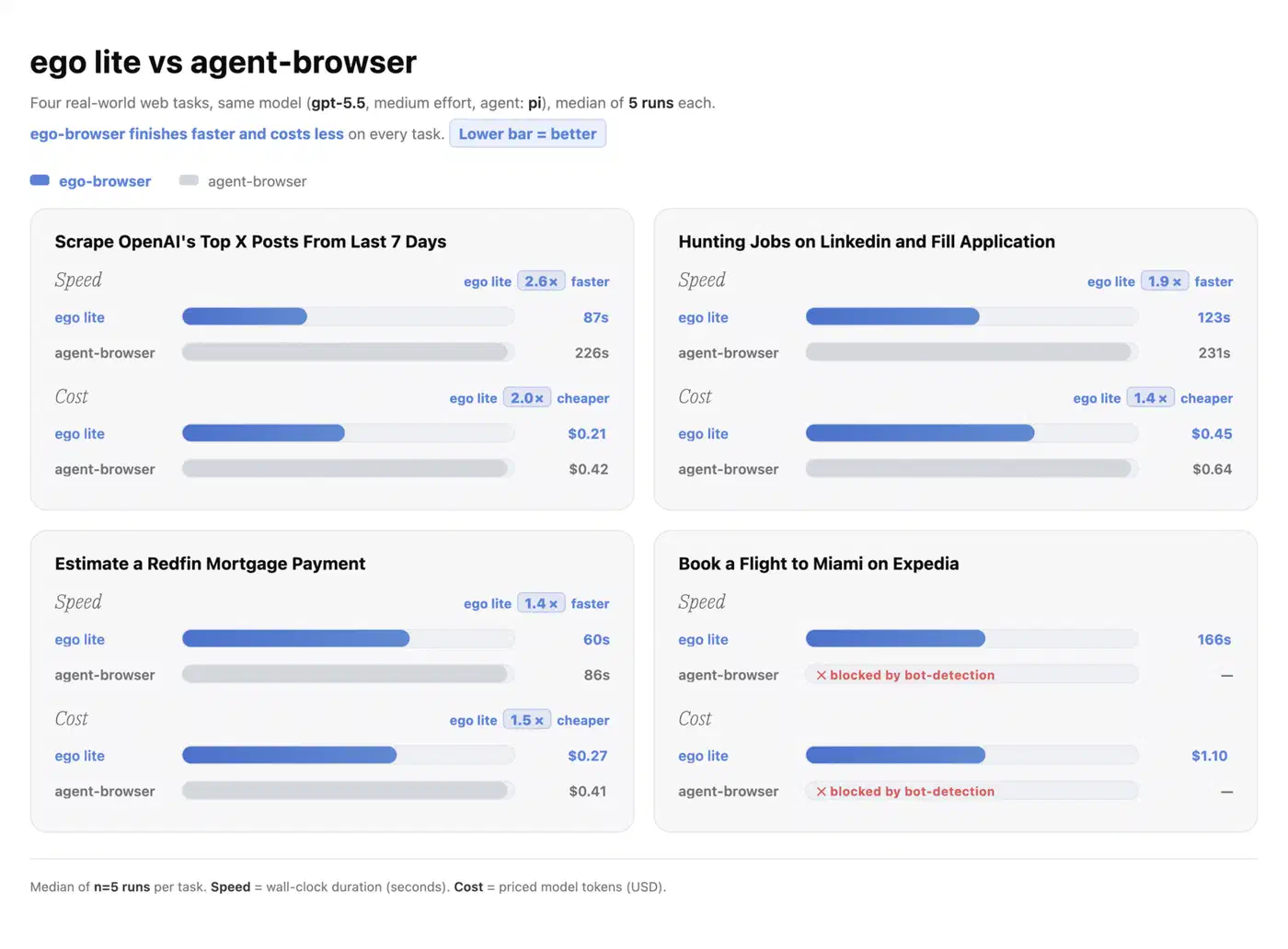
The chart itself is more forthcoming than the sales line above it. It names the four tasks, names the model, and reports a median of five runs each. You can’t rerun any of it, because the prompts, the scripts and the raw logs were never published, only a PNG in docs/assets. The vendor also picked the tasks. On the Expedia booking, agent-browser is marked blocked by bot detection rather than slower, so that fourth comparison isn’t a timing result at all. “Up to” is doing its usual work too, so treat the headline number as the best of four rather than a typical one.
Readers on Hacker News landed in the same place.
but I m not sure, coz I haven’t read about their benchmark, could just a story lol
A second claim needs a caveat too. The feature table promises that accumulated experience makes similar tasks up to 5 times faster, and marks it coming soon. The public roadmap puts reusable skills at 70 percent complete. The architecture argument here is strong even though the measurement behind it is weak.
The risk that rides along with inherited logins
Every browser automation tool eventually hits the same wall: logging in is hard, and sessions don’t transfer cleanly. ego lite answers that by handing the agent your live sessions. Nobody has shipped a better answer to the problem. It should still give you pause.
The migration happens in one question on first launch. Say yes and the browser imports your Chrome cookies, saved logins, extensions, and bookmarks. After that, every agent Space starts authenticated everywhere you are authenticated. You skip the OAuth dance, the cookie export, and the login script that dies the moment a captcha appears.
The other side of that convenience is that page content is untrusted input. An agent told to summarise a page can run into text written to instruct it instead, and it acts with your session cookies attached. Every agent-driven browser carries this risk. No single product owns the flaw. The worst case is already documented: Anthropic has caught agents reaching real systems they were never meant to touch.
Brave’s security team documented it against Perplexity Comet. Hidden instructions in a Reddit comment got that browser to hand over an email address and a one-time passcode.
What changes here is blast radius. A framework driving a fresh profile can be tricked into doing something on a site it never logged into. A browser holding your whole profile can be tricked into doing something as you.
I run coding agents with browser access on my own machine, and I have never given one a profile that holds a bank session. Snapshots are the reason, and they go stale fast. An agent that read the page a second ago will happily click a ref that now points at a different button, and on busy pages I see that several times an hour. A wrong step costs a wasted minute when the site is logged out, and it writes something real when it isn’t.
So I keep a throwaway browser profile for anything agent-driven, signed into exactly the services a task needs. Before handing an agent a profile with my email in it, I would want a way to scope one Space to a subset of my logins. Nothing in the skill documentation offers that today. Inheritance is all or nothing.
A few practical rules follow from all of this:
- Decline the Chrome migration and sign the agent into only what the job needs.
- Keep banking, email, and cloud storage sessions out of that profile entirely.
- Watch the first several runs instead of leaving them unattended.
- Close a Space when the task ends rather than leaving it warm and logged in.
Two points land in the project’s favour. Browsing data stays on your device, and the project states it records only whether you opted into the Chrome migration. The skill also has a proper handoff path. When a task hits a login, a captcha, or a two-factor prompt, the agent calls handOffTaskSpace and waits for you. It is explicitly told not to grab control back on its own.
One worry from the Show HN thread has no clear answer yet. Commenter haruharuha asked how well the browser masks itself, and whether automating a logged-in social account risks an anti-bot flag. Nobody from the project addressed it in the thread.
How to set up ego lite and run your first agent task
Check that you are on a supported machine
ego lite runs on macOS only. Windows and Linux both appear on the public roadmap marked planned, at zero percent progress, with no shipped build. On those systems, stop here.
Add the skill to your agent
Run npx skills add citrolabs/ego-lite. This drops the ego-browser skill into your agent’s skills directory and leaves the browser install for later.
Install the browser app
Download the macOS build from the project’s own download links and open it. Installing the app also writes the ego-browser skill into every agent skills directory it finds on the machine. Onboarding registers the ego-browser command, usually under ~/.local/bin. Run command -v ego-browser to check, and if it comes back empty, add that directory to your PATH.
Decide about the Chrome migration prompt
On first launch, ego lite asks once whether to import your Chrome profile. Saying yes hands cookies, logins, extensions, and bookmarks to the browser your agent will drive. Say no if you want a clean profile and manual logins.
Run a task in plain language
In your agent CLI, type /ego-browser followed by what you want, for example opening a page and pulling the headline text out of it. The agent opens the page in a fresh Space and reports back.
Check that your own tabs stayed put
Confirm that your own windows never moved and that the Space shows the agent’s activity.
Read a snapshot before trusting an action
Ask the agent to call snapshotText() and show you the page text it is acting on. If the snapshot is wrong, every click after it is wrong too.
Hand the Space back when you are done
Use the handoff helpers so the agent releases control. Otherwise you leave a half-finished session logged in and sitting open.
Who this is actually for right now
Install it today if four things are true. You are on macOS, you already run an agent CLI, you have a repetitive logged-in browser chore, and you can spin up a fresh browser profile for it.
Wait if you are on Windows or Linux. Wait too if you need a reproducible headless setup for continuous integration, or your compliance rules bar a closed binary from holding session cookies. For pipeline work, a library that drives a browser you provision fits better. Spaces and inherited logins are desktop-shaped features.
The project itself looks healthy. Development ran through late July 2026, v1.2.5 shipped on 17 July 2026, the issue tracker sees real traffic, and there is a Discord. Pricing is free for individuals, and the poster of the Show HN thread says business plans are quoted case by case.
AI browsers such as ChatGPT Atlas and Perplexity Comet ship their own agent, and only that agent can drive them. Automation frameworks bring no browser at all. ego lite is trying to sit between the two, and that spot is badly underserved.
Before you build a team workflow on it, check whether Windows and Linux builds actually land. A macOS-only dependency shared across a team is a fragile place to stand.