 Botmonster Tech
Lightpanda is a headless browser that fits in 123 MB

Lightpanda is a headless browser for AI agents, built from scratch instead of forked from Chromium. It runs JavaScript through V8 and builds a real DOM, but it ships no graphical renderer at all. The project’s own crawler benchmark puts its peak memory at 123 MB where headless Chrome climbed to 2 GB.
Key Takeaways
- Lightpanda peaked at 123 MB where headless Chrome needed 2 GB.
- The whole browser was written from scratch, with no Chromium code inside.
- Existing Puppeteer scripts connect by changing one address.
- It records an agent session as a script that replays with no model.
- Some sites still break, because the browser is in beta.
Why a headless browser for AI agents is a different problem
Plain HTTP requests stopped being enough a long time ago. Single-page apps, infinite scroll, instant search, and framework-rendered markup all need a real JavaScript engine before any useful text exists on the page.
Running full Chrome on a server works, but it doesn’t scale cheaply. Chrome is heavy on RAM and CPU, awkward to package, and painful once you want hundreds of instances doing short jobs.
Lightpanda bets on a narrower definition of the job. A headless browser needs a DOM and a JavaScript engine. A scraper never reads the pixels, so the painting engine, the compositor, the font rasterizer, and the GPU path can all go.
The obvious objection came up on the Show HN thread when the project first surfaced.
Why didn’t you just fork Chromium and strip out the renderer? This is guaranteed to bitrot when the web standards change unless you keep up with it forever and have perpetual funding. Yes, modifying Chromium is hard, but this seems harder.
Blink’s layout, style, and paint code is threaded through the same object graph as the DOM, so there is no module to pull out.
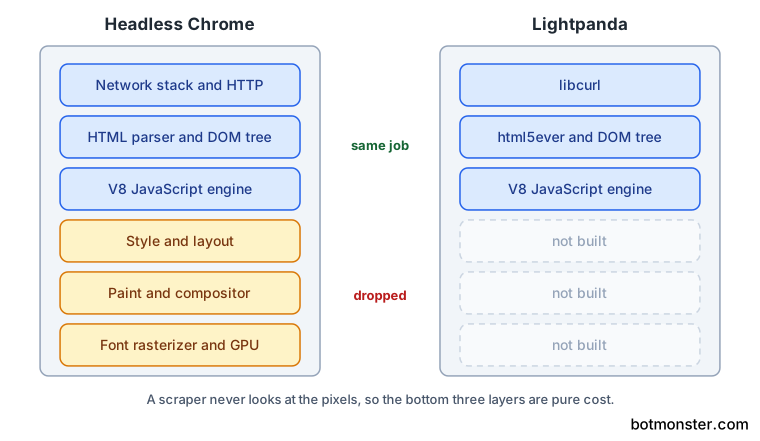
Still, the objection points at a real cost. Writing a browser from scratch means building hundreds of web APIs, and the project’s own README admits as much: coverage will grow over time.
Agent and scraper workloads make that trade easier to justify. They want many short sessions, isolated from each other, started and torn down fast. That profile is exactly where Chrome’s fixed startup cost hurts most.
The numbers, and how to read them
The headline numbers come from the project’s crawler benchmark, which pulls 933 real pages over the network from an AWS EC2 box. The full published methodology table shows a lot more than the two-row summary in the README.
| Setup | Duration | Peak memory |
|---|---|---|
| Lightpanda, 1 process | 51.7s | 27.2 MB |
| Headless Chrome, 1 tab | 1m 22.8s | 1.3 GB |
| Lightpanda, 25 processes | 4.8s | 123 MB |
| Headless Chrome, 25 tabs | 46.7s | 2.0 GB |
| Lightpanda, 100 processes | 5.2s | 410 MB |
| Headless Chrome, 100 tabs | 1m 9.4s | 4.2 GB |
The 123 MB against 2 GB figure comes from the 25-way run, where 25 separate Lightpanda processes face 25 Chrome tabs. The single-process comparison is far less dramatic: 51.7 seconds against 82.8 seconds is about 1.6 times faster, nowhere near the 9x headline.
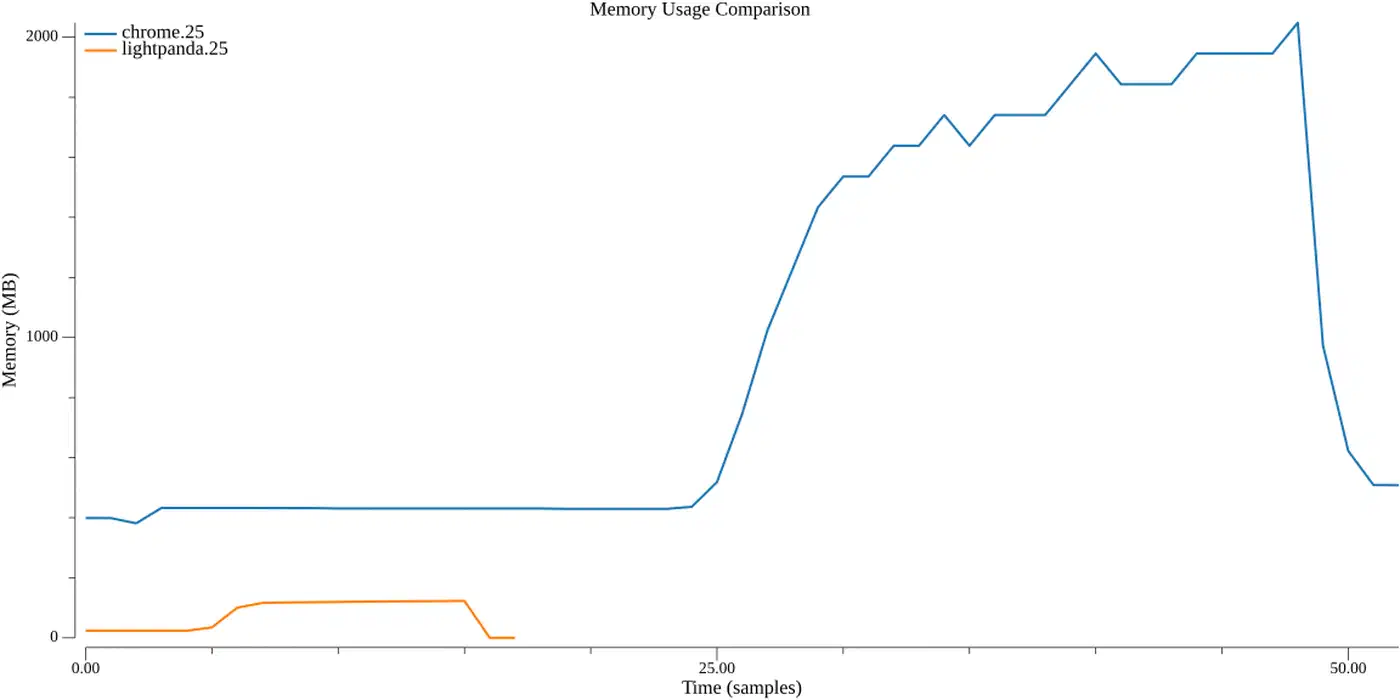
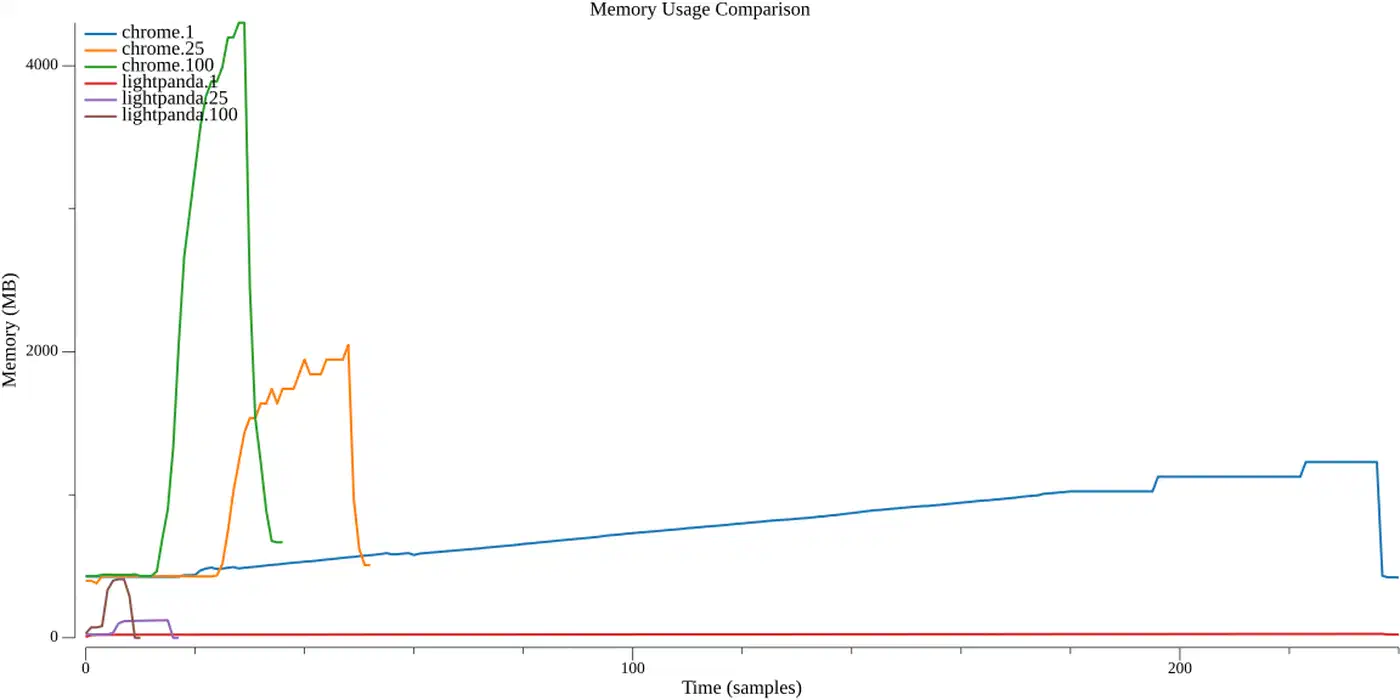
Most of the advantage comes from how cheap concurrency is here. Chrome barely improves past 5 tabs and gets worse at 100, while Lightpanda keeps scaling until the network becomes the limit.
Lightpanda cannot open multiple tabs, so the benchmark starts one browser process per worker, each on its own port. That’s a real constraint when you plan capacity: concurrency means processes, and each one carries its own memory.
A second benchmark on a local e-commerce demo page removes the network noise entirely. Over 100 page loads, Lightpanda averaged 16 ms per run and peaked at 21.2 MB. Chrome averaged 185 ms and peaked at 402 MB.
The numbers cover navigation, DOM building, and script execution only, since there is no renderer to produce a screenshot or a PDF.
Two small slips sit in the published material. The README labels the crawler results “100 pages”, while the methodology page shows every run crawled the same 933 URLs. The two pages also disagree on whether the test box was an m5.large or an m5.xlarge.
Compatibility, and the parts that are missing
The project ships a status checklist and leaves the unticked boxes on show. Working today: HTTP loading through libcurl, HTML parsing through html5ever , a DOM tree, JavaScript through V8 , DOM APIs, XHR and Fetch, clicks, form input, cookies, custom headers, proxy support, and network interception.
CORS is the notable unticked box, tracked as issue #2015 . Lightpanda calls itself beta and work in progress, says many sites now work, and warns that you may still hit errors or crashes.
Run your actual target URLs through lightpanda fetch --dump html and diff the output against what Chrome gives you. A benchmark on a demo site tells you nothing about the checkout page you care about.
Three packaging details catch people out:
- The Linux release binaries link against glibc. On Alpine or any other musl-based image they die with a confusing
cannot execute: required file not found. Use a Debian or Ubuntu base image instead. - There’s no native Windows build. WSL is the supported path, and it forwards
localhost:9222for you, so your automation client can sit on either side of the line. - Usage telemetry is on by default. Set
LIGHTPANDA_DISABLE_TELEMETRY=trueto turn it off.
Playwright
connects too, through chromium.connectOverCDP, and the Playwright docs page
shows the pattern. However, Playwright sniffs for browser features and picks different code paths based on what it finds. Those guesses about Chrome internals are the thing most likely to break. Puppeteer
is the safer bet in production.
How to run Lightpanda and point Puppeteer at it
Install a build
Use brew install lightpanda-io/browser/lightpanda on macOS or Linux, or yay -S lightpanda-nightly-bin on Arch. There are also official Docker images
for amd64 and arm64. Windows users install it inside WSL.
Verify the binary runs
Run ./lightpanda version before anything else, especially if you downloaded a release artifact directly rather than through a package manager.
Dump one page
Run ./lightpanda fetch --obey-robots --dump html <url>. Swap in --dump markdown when you want readable text instead of markup, which is usually what an agent wants to read.
Tune the wait if the page loads late
Four flags control how long the browser waits before it dumps: --wait-until, --wait-ms, --wait-selector, and --wait-script. Reach for --wait-selector first, since waiting on a specific element is more reliable than waiting on a timer.
Start the protocol server
Run ./lightpanda serve --obey-robots --host 127.0.0.1 --port 9222. That opens a Chrome DevTools Protocol endpoint on the usual debugging port.
Connect your existing script
In Puppeteer, replace the launch call with puppeteer.connect({ browserWSEndpoint: "ws://127.0.0.1:9222" }). Everything after that line stays as it was.
Add it to an agent as an MCP server
Register lightpanda mcp in your MCP configuration for stdio, or run lightpanda mcp --port 9223 to serve several agents over HTTP. The MCP server guide
covers both transports, and there is a ready-made agent skill
as well.
Turn off telemetry if you want to
Set LIGHTPANDA_DISABLE_TELEMETRY=true in the environment. There’s a matching LIGHTPANDA_DISABLE_CORE_DUMP variable that turns off crash core dumps.
Agent mode and the recorded script
lightpanda agent drops you into a REPL. You describe a task in plain English, and the browser navigates, clicks, fills forms, and pulls out structured data on its own. Slash commands like /goto and /click drive the same underlying tools directly when you want precision.
Because the agent runs inside the browser process, every tool call is a direct function call instead of a protocol round trip. The memory and speed advantage therefore survives the agent loop. That stops being true once you bolt an external agent onto a CDP socket.
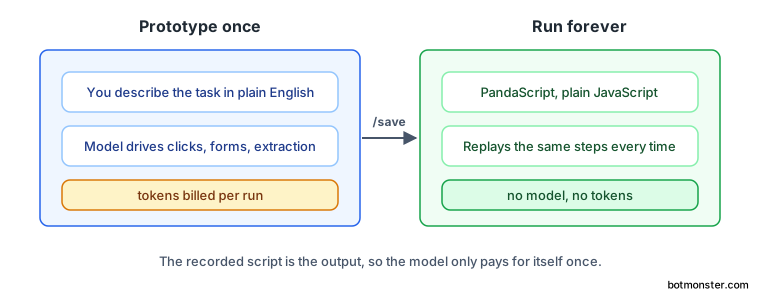
Type /save script.js and you get a PandaScript: plain JavaScript over a small set of native browser primitives, replayable with lightpanda agent script.js.
That splits prototyping from production. You pay a model to work out the flow once, then replay the saved script forever with no tokens burned per run. Model support covers Anthropic, OpenAI, Gemini, Google Vertex AI, Hugging Face, Mistral, and local models through Ollama, and --no-llm gives you the bare REPL. The agent documentation
has the full command reference.
Over HTTP, the MCP server gives each connection its own browsing session: its own page, cookies, and memory. Parallel agents stop overwriting each other’s state. Two agents can also share one session on purpose by sending the same Mcp-Session-Id header, which is what you want when several of them work one page together. A fresh session is the safe default; tools like ego lite hand the agent your real logins
instead, which is faster and a much bigger blast radius.
Should it replace Chrome in your scraper?
It depends on the workload.
| Situation | Better fit |
|---|---|
| Many short sessions, memory is your scaling limit | Lightpanda |
| You only need markup, text, or extracted data | Lightpanda |
| Screenshots, PDF rendering, visual regression tests | Headless Chrome |
| Browser extensions or exact rendering fidelity | Headless Chrome |
| Sites with aggressive bot detection | Headless Chrome |
That last row is the one people underestimate, and it came up in the same Hacker News thread.
It may work for some scraping use cases but I think that if the site uses any kind of bot blocking this is not going to cut it.
A browser with a partial web API surface is easier to fingerprint than a real Chrome build, so anti-bot systems have more to notice. Sites you don’t control are the riskiest place to start.
Licensing is AGPL-3.0, which is a real problem if you plan to ship the browser inside a product. Contributors also have to sign a CLA. Nightly builds are the main way to get it, so pin an image digest in production rather than tracking a moving nightly tag.
Maturity is the other open question. Lightpanda is written in Zig 0.15.2, carries roughly 78 open issues, and gets commits daily. It’s been in the works since 2023, which is a long runway for something still labelled beta.
The migration cost is the strongest argument in its favour. One endpoint change in a Puppeteer script is cheap enough to test both. Run Lightpanda alongside Chrome, send it the pages it handles cleanly, and fall back to Chrome for the rest.