 Botmonster Tech
Promptfoo: catch LLM regressions before production

Promptfoo is an open-source CLI tool that runs your test cases against one or more LLM providers at once. You write a YAML file with prompts, test cases, and checks, then run promptfoo eval to get a report with pass/fail rates, regressions, and side-by-side comparisons. It scores results three ways: simple text checks, LLM-as-judge grading, or your own scoring code. The point is to catch prompt regressions, broken model upgrades, and quality drops before users see them.
If you’ve spent any time building on top of large language models, you’ve felt the pain. You tweak a prompt to fix one edge case, and days later a user reports that the change broke something else. Manual spot-checks don’t scale. Promptfoo gives you a repeatable way to test that your LLM features still work across the full range of inputs you care about.
Why You Need Automated LLM Evaluation
LLM outputs are not stable, and the input space is huge. A typical LLM pipeline handles hundreds of input patterns, yet most teams test three to five examples by hand and call it done. That gives you maybe 5% coverage of your real-world cases.
Prompt regression is the most common failure. Say you tweak your system prompt to fix a tricky edge case where users were getting wordy answers to simple questions. Without realizing it, you break code formatting, or you give the model a fresh tendency to hallucinate citations. With no test suite running across dozens of cases, you won’t notice until users complain, and by then you’ve lost trust that is hard to win back.
Model upgrades carry the same risk. Switching from GPT-4o to GPT-4o-mini, or from Claude 3.5 to Claude 4, changes output behavior in ways you can’t predict. The new model might score better on average but worse on the inputs you care about. A test suite tells you what changed, which cases got better, which got worse, and by how much, before you switch.
Cost-quality trade-offs pay off fast too. Run the same suite against GPT-4o ($2.50/MTok input), Claude 4 Sonnet ($3/MTok), and Llama 4 Scout via Ollama ($0). You see in numbers how much quality you give up by going cheaper. Without numbers, you pick by gut, but with them, you have a real quality score per provider on your use case. Worth adding a non-LLM row to that table where the task is a judgment rather than a piece of writing, since a decision-only model costs $0.042 per million tokens and returns nothing to grade for style.
For regulated work in healthcare or finance, there’s also the audit angle. Auditors and regulators now expect a paper trail for AI outputs. Promptfoo writes timestamped reports you can keep as artifacts: what was tested, when, and what passed.
The feedback loop is what makes this stick in daily work. When you can see which test cases fail after a prompt change, you know where to focus your prompt-engineering effort. Instead of guessing in the dark and iterating blindly, each change runs against your full suite.
Installing Promptfoo and Understanding the Configuration
Promptfoo is distributed as an npm package. Install it globally with:
npm install -g promptfooYou need version 0.100 or later. If you don’t want a global install, run it directly with npx promptfoo@latest eval. There’s also a Python package via pip install promptfoo if that fits your stack better.
To scaffold a new project, run:
promptfoo initThis creates a promptfooconfig.yaml template with sample prompts and tests. The config file has three main sections: prompts, providers, and tests.
The prompts section lists the prompt templates you want to test. You can point to outside files with file://prompt.txt or write inline strings with {{variable}} template syntax for dynamic inputs. List several prompt versions if you like. Promptfoo tests every prompt against every provider against every test case, so you get a full comparison matrix.
The providers section names the LLM APIs to test. A typical config looks like this:
providers:
  - openai:gpt-4o
  - anthropic:claude-4-sonnet
  - ollama:llama4-scout
Every provider runs against every prompt and every test case. You write the tests once and they run on all providers.
The tests section is where you write each test case. Each test has vars (the inputs that get filled into your prompt), assert (the rules the output must pass), and an optional description for a clear label.
Here’s a small but complete config example:
prompts:
  - file://system_prompt.txt

providers:
  - openai:gpt-4o
  - anthropic:claude-4-sonnet

tests:
  - description: "Basic greeting"
    vars:
      user_input: "Hello, how are you?"
    assert:
      - type: contains
        value: "hello"
      - type: not-contains
        value: "I'm an AI"

  - description: "JSON output format"
    vars:
      user_input: "List three colors as JSON"
    assert:
      - type: is-json
      - type: javascript
        value: "JSON.parse(output).length === 3"
For API keys, drop a .env file in your project folder with OPENAI_API_KEY, ANTHROPIC_API_KEY, or whatever your providers need. Promptfoo picks them up on its own. For Ollama, set OLLAMA_BASE_URL=http://localhost:11434.
Writing Effective Test Cases and Assertions
The value of your test suite comes down to how well you write the test cases and the checks. Promptfoo gives you a few kinds of checks, each one suited to a different job.
Deterministic checks are the foundation. They run fast, cost nothing because there are no API calls, and give the same result every time:
contains- checks that the output has a given substringnot-contains- checks that a substring is absentregex- matches a regex patternequals- exact string matchis-json- checks that the output is valid JSONis-valid-openai-function-call- checks function call format
Use these wherever you can, because they run instantly, cost nothing, and give the same result every time. For checking that a summary prompt names key facts, or that a code prompt returns valid JSON, this is all you need.
Similarity checks handle the case where exact wording doesn’t matter but meaning does. similar(expected, threshold) runs cosine similarity between the output and your expected text. levenshtein(expected, maxDistance) uses edit distance for text that should be near-identical with small tweaks. These work well for open-ended questions with several valid phrasings.
The llm-rubric check is the most flexible. It sends the output to a grading LLM along with your rubric, and the grader returns pass or fail with a reason. For example:
assert:
  - type: llm-rubric
    value: "The response should be professional in tone, include at least 2 specific examples, and not exceed 200 words"
This works well for fuzzy quality traits like tone, completeness, and helpfulness, which are hard to pin down with strict rules. The trade-off is cost (each check is an API call to the grader model) and a little randomness in the grade. The same idea, grading writing on named qualities, is how StoryScope detects AI fiction by its narrative choices instead of its style.
Custom scoring gives you full control in code. Write JavaScript inline or point to a Python file:
assert:
  - type: javascript
    value: "output.split('\\n').length <= 10"
  - type: python
    value: "file://custom_scorer.py"
Use these for app-specific logic: checking that the SQL is valid, that a reply stays under a word limit, or that the entities you pull out match a known schema.
For a real suite, aim for 50 to 100 test cases across a few groups: happy-path inputs that should just work, edge cases that have bitten you before, adversarial inputs that probe your safety guardrails, and format checks. Fill in the description field on each test so you can scan results fast. You can also set weight on checks to show how much each one counts, so that a factual error (weight: 5) outranks a small formatting issue (weight: 1).
Running Evaluations and Interpreting Results
Running an evaluation is a single command:
promptfoo evalThis runs every test case against every provider. Add --no-cache to force fresh API calls if you suspect stale results. Use -j 5 to set how many calls run in parallel if you need to stay under rate limits (the default is 4 at a time).
To view results interactively, run:
promptfoo viewThis opens a local web UI at localhost:15500 with a table that shows pass/fail per test case per provider.
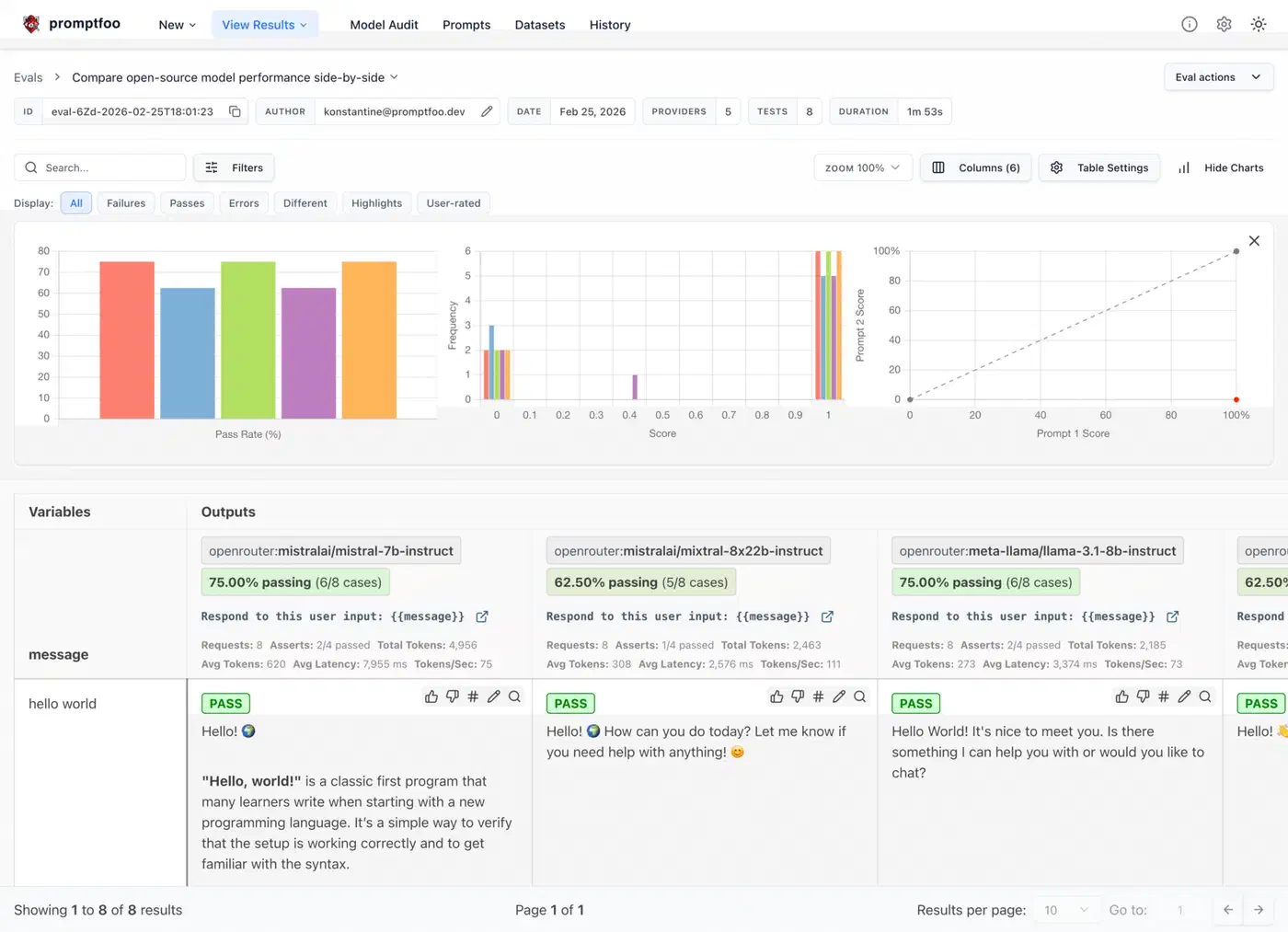
For programmatic access, export the results to JSON:
promptfoo eval -o results.jsonOr print a summary table right in the terminal with promptfoo eval --table.
Regression checks are one of the best features for daily work. Save a baseline after a good run:
promptfoo eval -o baseline.jsonThen after a prompt change or a model switch, run a diff:
promptfoo eval --compare baseline.jsonThis shows which cases went pass-to-fail (regressions) and which went fail-to-pass (wins). You get a clear read on whether your change was net positive or net negative.
Promptfoo also tracks tokens and an estimated cost per provider on every run. Use this to work out cost-per-test-case and scale it up to production volume. It’s a key number when you weigh a $2.50/MTok provider against a $0.15/MTok one.
For CI, add the eval to your GitHub Actions workflow (or your CI of choice):
promptfoo eval --ci --fail-on-error-rate 0.1This returns exit code 1 if the pass rate drops below your set limit (10% failure rate in this example). It blocks merges that would hurt quality.
promptfoo share to upload results to Promptfoo’s hosted viewer. You get a shareable URL for team review and no one else has to run the eval locally.
Advanced Patterns - Red Teaming, Model Comparison, and RAG Evaluation
Beyond basic prompt tests, Promptfoo handles a few more setups worth knowing.
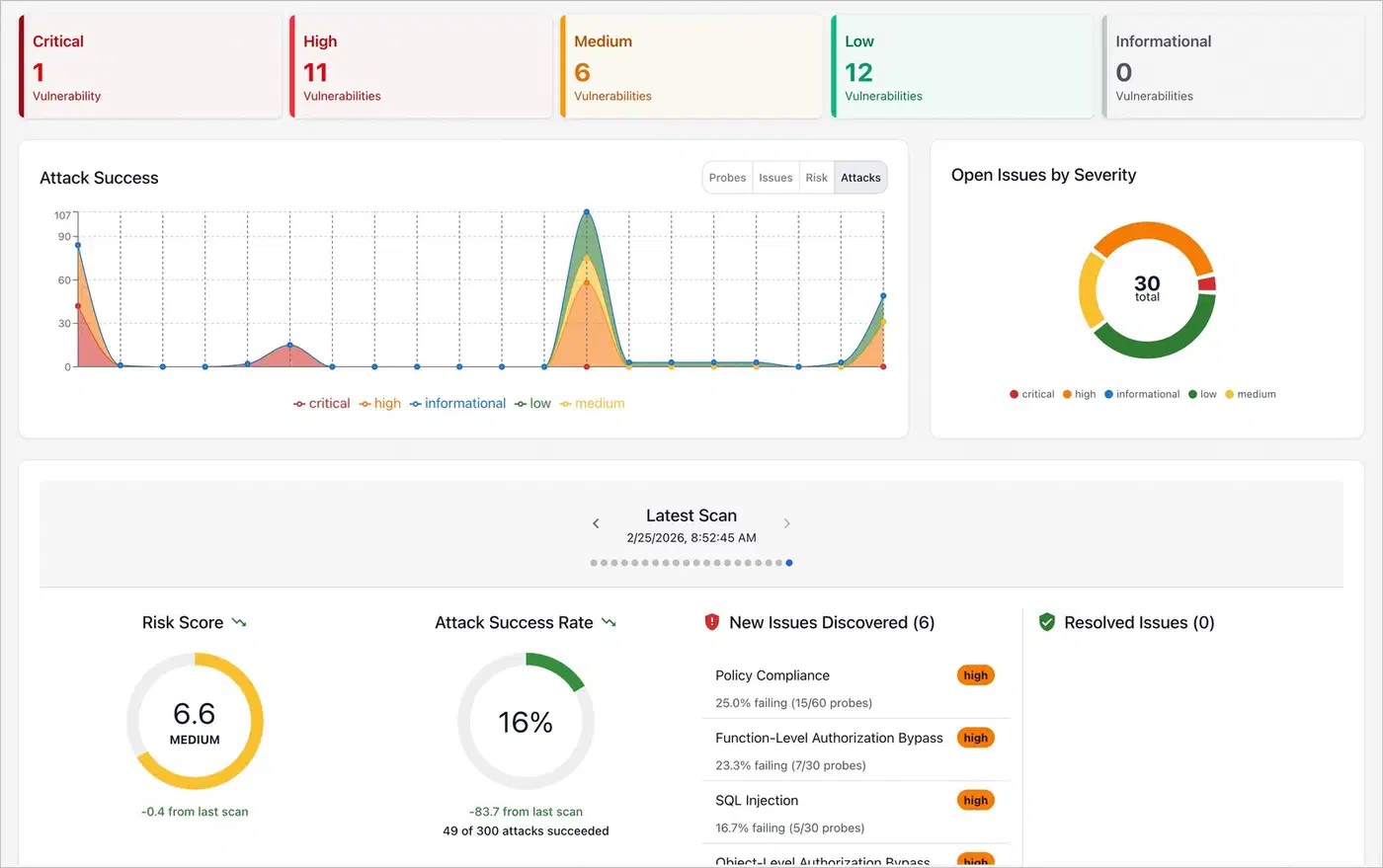
Red teaming is built in. Run promptfoo generate redteam and it builds adversarial test cases shaped to your prompt, including prompt injections, jailbreak tries, PII extraction probes, and other attack vectors. This is faster than writing them by hand, and it covers attack patterns you might miss on your own. Run the new tests to check that your safety guardrails hold.
For model comparison, list three to five providers and run your full suite (ideally 100+ cases) against all of them. Sort the results view by overall score to pick the best model for your job. This turns model choice from a vibe (“GPT-4o feels better”) into a number: “GPT-4o scores 94% on our suite, Claude 4 Sonnet 91%, Llama 4 Scout 82% but free to run.” Numbers like that make procurement and design choices easy to defend. For coding-heavy suites, Alibaba’s Qwen3.6-35B-A3B as a benchmark contender is worth slotting into the lineup. It scores 73.4 on SWE-bench Verified using only 3B active parameters per token.
RAG pipeline eval reaches past the LLM to your full retrieval-augmented setup. Write tests with known answers and expected source docs. Then check answer quality with llm-rubric and retrieval quality with contains on the retrieved context. This catches issues at every stage: bad retrieval, context window overflow, and answer hallucinations.
A/B prompt testing lets you compare prompt versions on the same tests. List several versions of your system prompt as separate files in the prompts section. Promptfoo then shows which one scores highest overall and per test group.
To test your whole app pipeline and not just the raw LLM call, custom providers let you wrap your full system:
providers:
  - type: python
    config:
      file: "custom_provider.py"
Your custom provider can hit your retrieval system, run post-processing, apply your formatting rules, and return the final output users would see. You test the real system, not the LLM in a vacuum.
Scheduled evals are a smart move for production monitoring. Run promptfoo eval on a daily cron against your live prompts to catch model-side drift. Providers do quietly update their models, and this can shift behavior with no change on your end. Set up webhook alerts on score drops so you catch these before users do.
Getting Started with Your First Evaluation
If you already have an LLM app, the fastest way to get value from Promptfoo is simple: pick the five failure modes your users have reported most, write a test case for each one with the right checks, and run the eval. You’ll see right away whether your prompt and model handle those cases. From there, grow the suite a bit at a time, adding a few tests every time you hit a new edge case or bug report. Within a few weeks you’ll have a solid suite that gives you real confidence when you change things.
The YAML is easy to read, the CLI works well, and most test cases take a minute or two to write. Once a suite is in place, prompt changes and model upgrades stop being scary, because you have a safety net that catches regressions before they hit production.