 Botmonster Tech
PageIndex searches long PDFs with no vector database

Vectorless RAG skips embeddings completely. PageIndex turns a long PDF into a table-of-contents tree with page ranges and section summaries. A model then searches that tree the way a person flips to a chapter. Mafin2.5, a financial question-answering system its makers built on PageIndex, reports 98.7 percent on FinanceBench, a benchmark of questions over financial filings.
Key Takeaways
- PageIndex pulls answers from long documents with no embeddings and no vector database.
- It builds a table of contents with page numbers, then the model walks it.
- Every answer points at a real section and page you can open and check.
- Sections follow the document’s own structure instead of fixed-size chunks.
- Each query spends model calls, so you swap a database bill for a token bill.
What vectorless RAG means
Standard RAG works in four moves. You split a document into chunks and embed each one. You store the vectors. Then you embed the question and return the nearest chunks. Nearly every RAG stack in production works this way, even the ones with an agent in the loop.
PageIndex’s case against it is that similarity and relevance are different things. Nearest-neighbour search finds text that reads like the question, and that text often has no answer in it.
The project README names two failure modes. Something relevant gets missed because it’s worded differently, or something close comes back that’s beside the point. In legal and financial writing, two paragraphs can look almost the same to an embedding model while saying opposite things about who is liable.
The vectorless pipeline replaces the whole chain. It first builds an index of the document’s structure. A model then reads that index and picks the section that answers the question, with no similarity math anywhere in the loop.
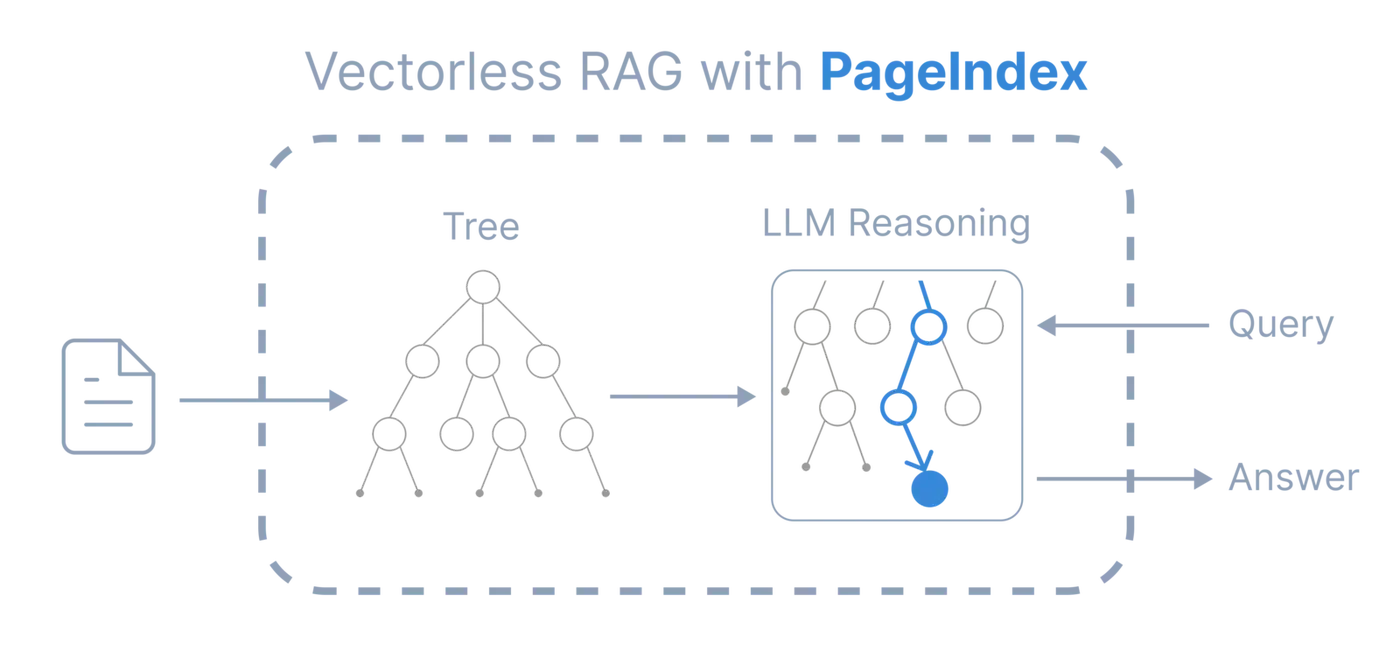
Going vectorless removes chunk size tuning, overlap tuning, the choice of embedding model, the re-embedding job after a model upgrade, and the vector store itself. In their place you get one indexing pass per document, and model calls on every retrieval.
How the tree is built and searched
Step one builds a tree index, a table of contents written for a model to read.
The default indexer, PageIndex Flash, reads the outline straight from the PDF’s own layout: its bookmarks, headings and page numbers. No model is involved in finding the structure. The index model only writes a short summary of each section once it has been located.
Flash refuses a PDF it can’t outline and points you to standard mode. There the model scans the first 20 pages for a contents page and builds the tree from it. When a document has no contents page, the model writes the outline itself from the page text, then checks that each section’s page numbers are right.
Either way, sections come from the document itself, so a table stays attached to its heading and a clause stays inside its section instead of being split at a token count.
Each node carries a title, a node id, start and end page indices, a summary, and any nested children.
{
  "title": "Financial Stability",
  "node_id": "0006",
  "start_index": 21,
  "end_index": 22,
  "summary": "The Federal Reserve ...",
  "nodes": [
    {
      "title": "Monitoring Financial Vulnerabilities",
      "node_id": "0007",
      "start_index": 22,
      "end_index": 28,
      "summary": "The Federal Reserve's monitoring ..."
    }
  ]
}
Step two is the search itself. The model reads node summaries, decides whether a branch is worth opening for this particular question, and descends into the promising one. It repeats until it reaches the section that holds the answer.
The project says the design was inspired by AlphaGo. Like a game engine weighing moves, the model searches a structured space and makes a judgment call at every node. That judgment can fold in chat history and the user’s role, because nothing has been squeezed into a fixed-length vector beforehand.
The page indices make every answer traceable back to a page a person can open and check, which is something an embedding score cannot do. If you write your own search loop, make each step return a node id that exists in the tree. Pinning a model to a fixed set of legal answers is exactly what constrained generation does.
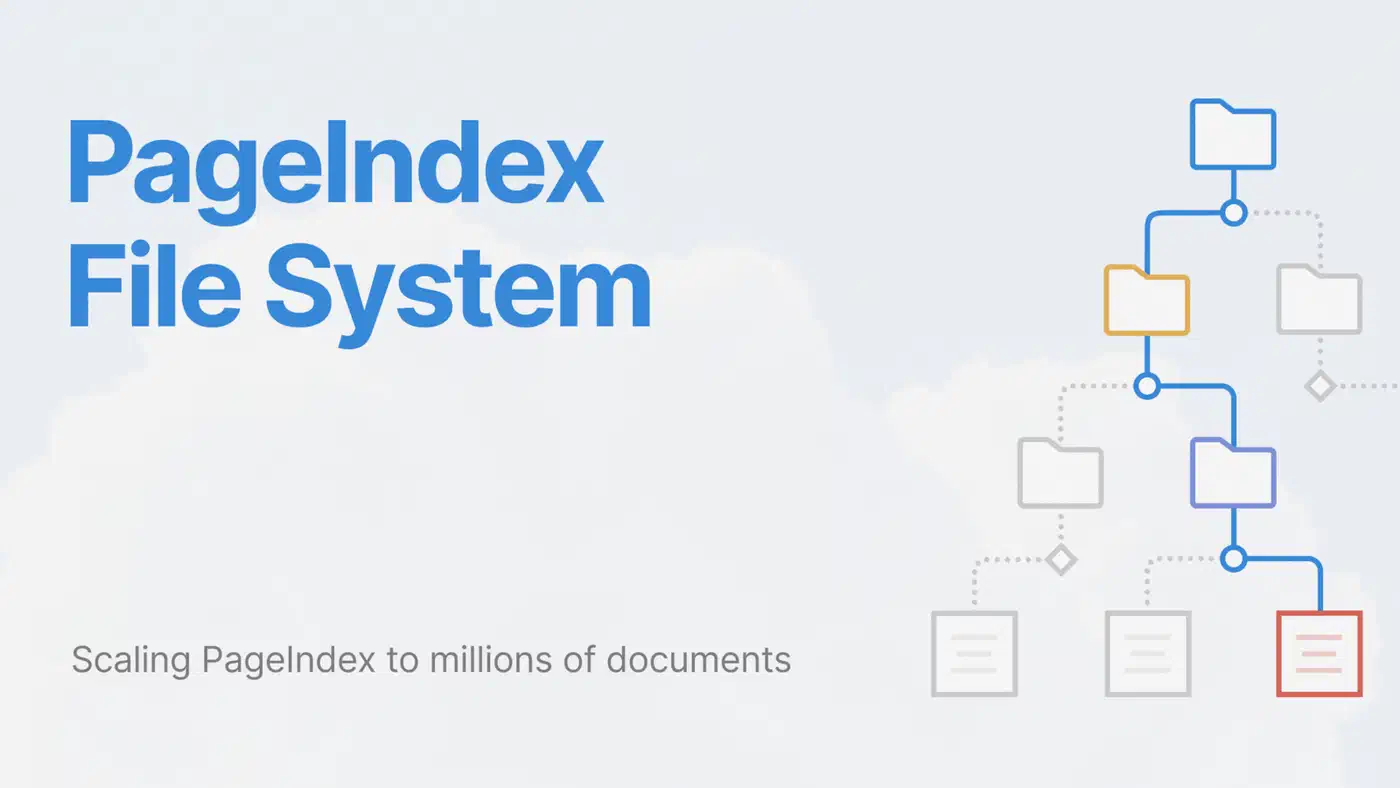
The idea scales past one document, because a folder hierarchy is already a tree. The PageIndex File System layer walks a folder tree first, then drops into one file. It ships only in the hosted Cloud service.
What the FinanceBench score covers
The headline number, 98.7 percent accuracy on FinanceBench, belongs to Mafin2.5. That’s Vectify’s financial question-answering system built on PageIndex, so it measures the method, not the open-source package on its own. The full results are in the Mafin2.5-FinanceBench repository. The score was an identical 98.7 percent with GPT-4o and with DeepSeek v3 underneath. That points at the retrieval method doing the work.
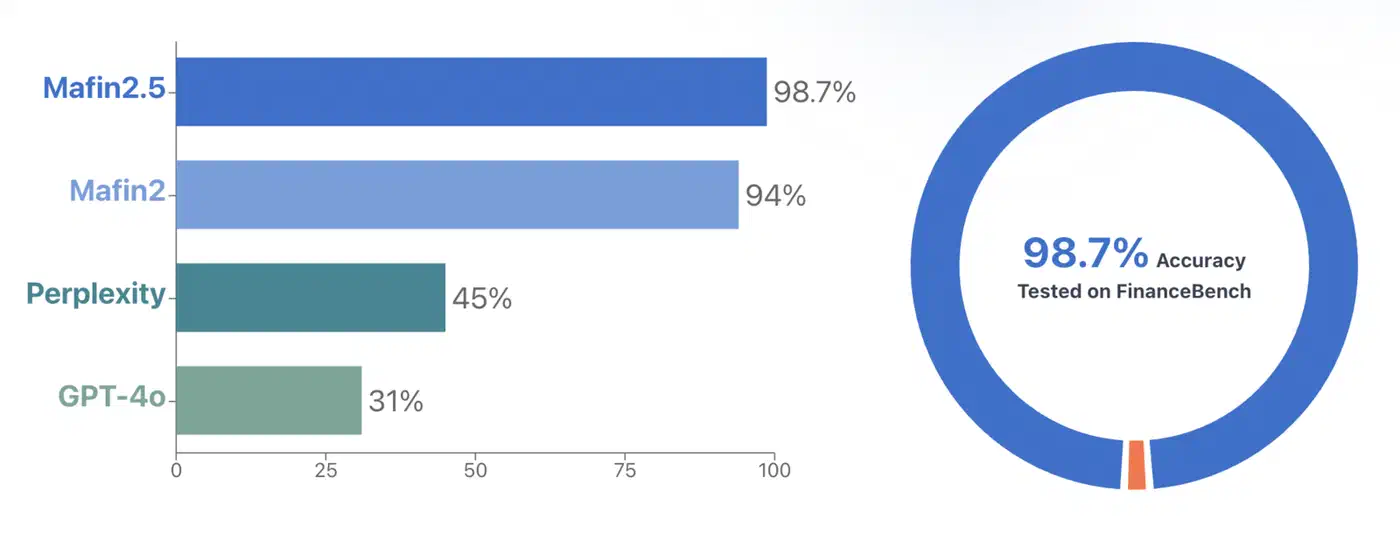
Per the same repository, the Perplexity score and the 31 percent for GPT-4o with web search each covered only two thirds of the benchmark’s questions. Mafin2.5 answered all of them.
FinanceBench asks questions over long, formal filings. That is close to the worst case for chunk-and-embed retrieval, and close to the best case here. Filings have real structure, steady headings, and answers that live in a named section.
The project’s own team ran the benchmark, so it is not an independent result. It also says nothing about loose prose, documents with no usable headings, or answers scattered across a dozen places. For the open-source package itself, the team publishes a separate PageIndex-OSS-Benchmark: 62 lookup questions over 34 PDFs, run locally with no OCR. Read the FinanceBench number as the narrower claim it is: structure-aware retrieval wins on structured documents, and that is still worth having.
What it costs to run
Dropping the vector database swaps one bill for another. In return there’s no vector database to operate and no embedding pipeline to maintain. Nothing needs re-embedding when you swap models.
Indexing is cheap and paid once per document. The project measures about $0.001 per page with its default index model, so a 1,000-page textbook costs a little over a dollar. Its test documents, from 9 to 1,098 pages, indexed in 13 seconds to 4.5 minutes. Query volume never touches that cost.
Retrieval is model work, and you pay it on every query. Tree navigation is several model calls in a row, which is slower than a similarity lookup by a wide margin. PageIndex co-author Mingtian Zhang put the trade-off plainly in the Show HN thread.
When the tree is large, however, this approach may be slower than the vector-based method since it prioritizes accuracy. If you prioritize speed over accuracy, then I guess you should use Vector DB.
For many teams the option PageIndex competes with is pasting the whole PDF into the model. Against that, the tree gets cheaper as documents grow, because it reads only the sections its search reaches. The project measures native PDF input at 2.1 times the cost per question at 52 pages and 16.6 times at 420 pages. At 805 pages the PDF no longer fits in the context window at all.
Low query volume over long, well-structured documents favours the tree. High query volume over short documents pushes the other way. Contract review and filing analysis land on the tree side of that line, and a public search box lands on the vector side.
| Approach | Indexing | Work per query | Traceability |
|---|---|---|---|
| PageIndex | Layout parse plus summaries, about $0.001 per page | Several model calls | Page and section references |
| Vector RAG | Embedding pass per chunk | Millisecond lookup | Chunk ids, plus any metadata you stored |
| Agentic RAG over a vector store | Embedding pass per chunk | Lookups plus model calls | Same as vector RAG |
Where the open-source version falls short
The local package handles text-based PDFs only. Scanned and image-heavy documents need the hosted Cloud service, which adds OCR and image understanding. Local citations point at pages, while Cloud cites blocks within a page. The File System layer, folders, and the MCP server are Cloud-only too.
That leaves three deployment paths: run the open-source SDK locally, use PageIndex Cloud through its API or MCP server, or ask for a dedicated VPC or on-premises install. The repository is MIT licensed and written in Python. The SDK is at version 0.2.21 on PyPI, with a new release roughly every week and about 115 open issues.
How to index and query a PDF with PageIndex
Start with the SDK, then check the tree it built before you trust its answers.
Install the SDK
Run pip install -U pageindex. Local mode indexes, retrieves and answers entirely on your machine with your own model key.
Set a model key
Export your provider key, for example OPENAI_API_KEY. Model names follow LiteLLM, so other providers work as provider/model and you’re not tied to one vendor.
Index a PDF and ask a question
from pageindex import PageIndexClient

client = PageIndexClient(
    index="gpt-5.6-luna",
    chat="gpt-5.6-sol",
)
doc_id = client.submit_document("report.pdf")["doc_id"]

answer = client.chat("What was the 2023 operating margin?", doc_id=doc_id)
print(answer)
The project’s advice is a basic model for index, since it only writes summaries, and the best model you can afford for chat, since that one does the searching.
Inspect the tree before trusting it
A bad tree makes every answer after it wrong. Clone the repository, run pip3 install --upgrade -r requirements.txt, then python3 run_pageindex.py --pdf_path /path/to/your/document.pdf. The tree lands as JSON under ./results/. Open it and check that the sections match the document.
Switch to standard mode if Flash gives up
Rerun with --mode standard when Flash rejects a PDF or misses sections. In that mode --toc-check-pages sets how many pages get scanned for a contents page, 20 by default, and --index-model picks the model doing the work.
Plug it into an agent
For multi-step questions, the agent integration guide drops PageIndex tools into the OpenAI Agents SDK, the Claude Agent SDK, or another framework. The model can then navigate, read, and refine before it answers.
When the tree beats the vector store
Pick PageIndex when the documents are long, structured and text-based, the questions are few, and every answer has to cite a page. Keep the vector store when queries run in the thousands per hour or each one has a tight latency budget. For scanned archives, the tree still works, but only through the hosted service.