 Botmonster Tech
Gemini CLI is dead: migrating to Antigravity CLI in 2026

Google shut down Gemini CLI on June 18, 2026, pushing free, Pro, and Ultra users onto the closed-source, Go-based Antigravity CLI. You can keep the open-source Gemini CLI running with a paid API key, but its separate quota pool is gone. Enterprise and Code Assist Standard licenses still work unchanged.
Key Takeaways
- Gemini CLI stopped serving free, Pro, and Ultra accounts on June 18, 2026.
- Its replacement, Antigravity CLI, is a closed-source Go binary, not open TypeScript.
- You can still run Gemini CLI by feeding it a paid Gemini API key.
- The catch: agy shares one usage pool, so quotas drain much faster.
- Enterprise and Code Assist Standard licenses keep working unchanged.
What happened to Gemini CLI?
On June 18, 2026, Gemini CLI and the Gemini Code Assist IDE extensions stopped serving requests for free, Google AI Pro, and Ultra personal accounts. The Google Developers Blog announcement confirmed the cutoff and named the replacement: Antigravity CLI, run with the command agy.
Not everyone lost access. Gemini Code Assist Standard and Enterprise licenses keep working, and so do paid Gemini API keys. So the split is clean: personal subscription tiers got cut, while paid org seats and metered API access stayed live. If you are on free, Pro, or Ultra, you are in the affected bucket.
Google framed the change as a workflow upgrade. The announcement said developer workflows “outgrew those early days of 2025” and now “require multiple agents communicating with each other to split up the work and solve complex problems.” The company wanted terminal tools to “share a unified backend with the rest of your workflow.”
The shutoff was telegraphed for over a month. Still, several paying users report a hard, mid-session cutoff rather than a graceful warning. The author of a 361-vote thread on r/GoogleGeminiAI described the exact moment it hit.
A hard 403, mid-session, while the tool was actively reading my files and writing code: “You do not have a valid license of this product.”
Others pushed back on the outrage. The change had been on the record for weeks, and at least one commenter said the warnings were easy to find.
Gemini CLI was being replaced with Antigravity CLI. This has been well known and warned about for over a month.
Both reactions are fair. The deadline was public, yet a mid-session 403 on a paid account is still a rough way to learn about it.
Gemini CLI vs Antigravity CLI: what actually changed
The two tools share a name family and a backend, but they are different beasts under the hood. The original Gemini CLI was open TypeScript with a large public contributor base. Antigravity CLI is a single Go binary that Google ships closed. Here is the side-by-side.
| Trait | Gemini CLI | Antigravity CLI (agy) |
|---|---|---|
| Language | TypeScript | Go |
| License | Apache 2.0 (open) | Closed-source binary |
| Architecture | Single-agent | Async multi-agent |
| Community | ~105k GitHub stars, ~6,000 merged PRs | Near-empty contributor list |
| Free-tier access | Cut off June 18, 2026 | Preview rate limits, shared pool |
| MCP support | Yes | Yes (added after launch) |
The honest engineering case for the swap is real. Go gives agy faster cold starts and ships as one static binary with no runtime to install. The The New Stack writeup frames the move as Google trading an open ecosystem for a tighter, faster product.
There is also a governance story here. Roughly 6,000 contributors signed a contributor license agreement to land pull requests on an Apache 2.0 project. That work now underpins a closed successor. The The Register report covers the open-to-closed shift and the developer frustration it caused. About 6,000 community PRs went into a tool that no longer ships as open source.
MCP support was the loudest launch complaint, and it has since been resolved. At launch, one user called agy “straight-up broken and missing basic features like MCP use.” Current install docs now show MCP servers working, with config at ~/.gemini/antigravity-cli/mcp_config.json. So treat the MCP gap as an early-days problem, not the state today.
The fork option is technically alive but limited. The last Apache 2.0 commit is still public on the gemini-cli repository, and at least one community archive fork exists. The catch: without a Google backend, a fork is just source code. You would need independent access to a compatible model to make it run.
How do I keep using Gemini CLI after June 18?
You can keep the discontinued Gemini CLI running by feeding it a paid Gemini API key instead of the retired personal-account login. Generate a key in Google AI Studio, then point your existing Gemini CLI install at it. The binary itself never stopped working; only the free login backend went away.
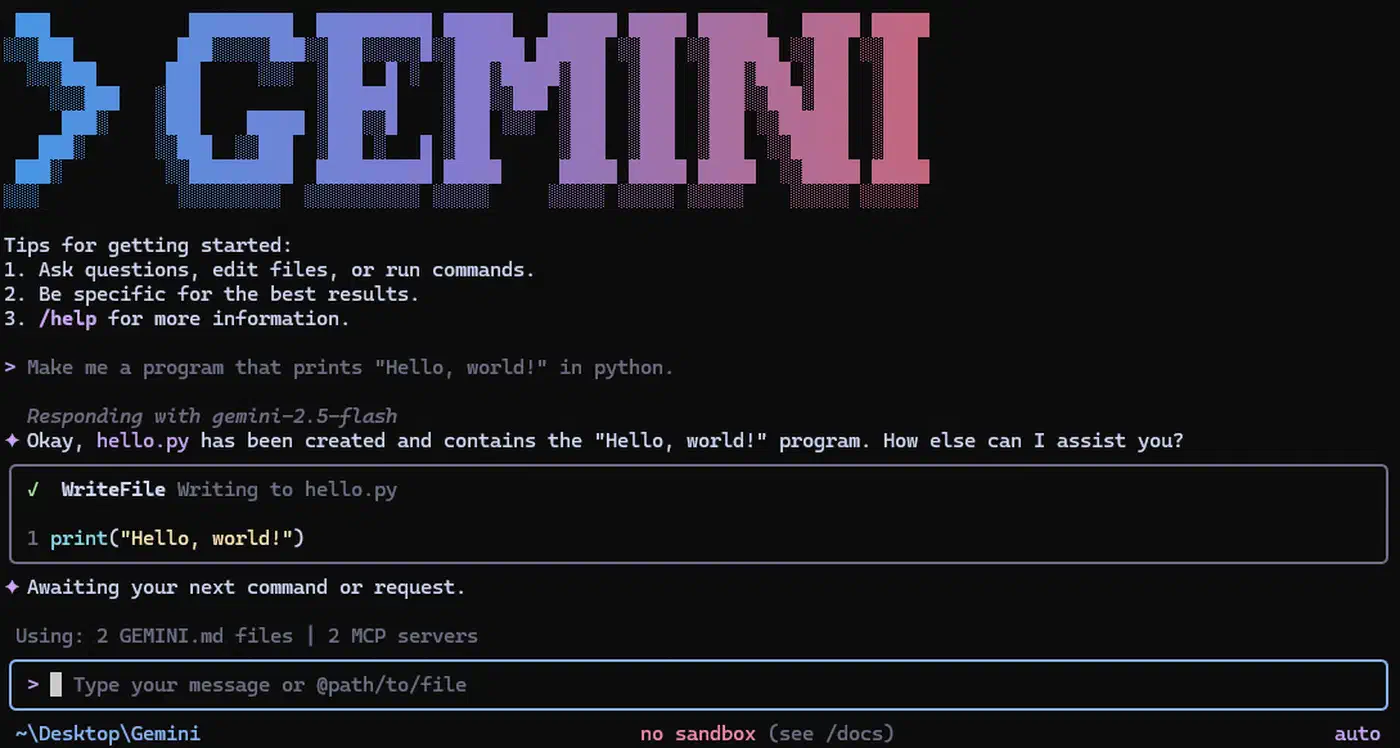
It runs against the Gemini 3.5 Flash preview model, and the same trick works for Gemini Code Assist. A hands-on report in the r/google_antigravity discussion confirmed the path, with u/Future-Log6621’s comment noting it “works great with Gemini Flash 3 preview model.”
There is a real trade-off. API-key usage is metered and billed per token, so heavy agentic loops can cost more than the old flat subscription. Therefore, set your Vertex or API rate budget and watch spend before you turn loose a long-running agent.
The upside is continuity. This keeps your existing custom layers, hooks, and scripts that were built on Gemini CLI running without a rewrite. Tooling kept in a plain skills folder survives a vendor switch better than tooling welded to one CLI. If you have tooling built on the old CLI, the API-key fallback saves you a migration.
Installing and living with Antigravity CLI (agy)
The official replacement installs in minutes and authenticates through your browser. On Linux and macOS, the install command auto-detects your OS and CPU architecture. Google AI Pro is enough to start the interactive CLI, with no separate API key needed.
How To Migrate From Gemini CLI to Antigravity CLI
Confirm whether you are affected
Check your tier. Free, Google AI Pro, and Ultra personal accounts lost access on June 18, 2026. Gemini Code Assist Standard and Enterprise licenses, plus paid API keys, still work.
Keep Gemini CLI alive with an API key
Generate a Gemini API key in Google AI Studio and point your existing Gemini CLI at it. It keeps running against the Gemini 3.5 Flash preview model.
Install Antigravity CLI (agy)
Run curl -fsSL https://antigravity.google/cli/install.sh | bash. The script auto-detects your OS and CPU architecture and downloads the right binary.
Authenticate agy
Run agy once. On a local machine it opens your browser for Google Sign-In. Over SSH it prints an authorization URL to open in a local browser.
Understand the unified quota
Note that agy draws from a single shared weekly pool. The separate Gemini CLI limit bucket is gone, so plan usage accordingly.
(Optional) Bridge agy as a subagent
Route bulk, token-heavy work to agy from Claude Code via a community plugin. Watch for headless timeouts and check Google’s terms of service first.
The big behavioral change is the unified weekly usage pool. Gemini CLI used to have a separate limit bucket, so workflows that lean hard on agy now drain one shared quota much faster than the old split setup. The OP of the discontinuation thread put the change plainly.
This means we can only use the Antigravity usage limit
Hands-on verdicts are genuinely split. On the praise side, u/romhacks wrote that “Antigravity CLI is much better, having used both” in an 18-vote comment. On the other side, u/Eveerjr called it “dogshit, full of bugs, missing features and closed source” in a 15-vote comment. The MCP-missing complaint from u/OrinZ in a 10-vote comment reflects the launch state, not today. Read each as one Reddit cohort, not a universal verdict.
One workflow has caught on: running agy headless as an executor inside Claude Code. The idea is to route bulk scaffolding, test generation, and search to Gemini while Claude does the design and review. The author of a bridge thread on r/google_antigravity posted self-reported cost numbers from the pattern.
Measured on a large ADK multi-agent build: -27% vs Claude Opus solo@high, -64% vs Opus solo@max, at equal quality.
Treat those deltas as the plugin author’s own A/B numbers, not an independent benchmark. The bridge also has rough edges. Some users report agy “times out or runs forever” headless, like u/ph7891’s note. One commenter raised a terms-of-service question about the pattern, and another flagged weak web-research quality. So test it on a throwaway task before you wire it into real work.
Should you migrate, fall back, or jump ship?
There is no single right move. The best path depends on your tier, your tolerance for closed software, and how much custom tooling you built on the old CLI. Three options cover most readers.
- Path A, stay: install
agy, accept the unified quota and closed source, and get the multi-agent orchestration plus a faster Go binary. - Path B, fall back: keep Gemini CLI on a paid API key to preserve your custom tooling. This is the best fit if you have scripts built on the old CLI.
- Path C, leave: move to a competitor. Reddit defectors most often name Codex with GPT-5.5 for dev work and Perplexity for search.
If a light memory footprint drives the pick, the 27.8 MB claim for the jcode agent only holds with a default feature turned off.
The defector path is loud in the community. In a 91-vote r/GeminiAI thread about Google’s product churn, the author named a clear replacement.
For dev related purposes, I just use Codex with gpt 5.5, it’s easily the best In the market.
If you are weighing a full switch, the model-agnostic verdict on OpenCode, Claude Code, and Cursor and our best AI coding agents roundup map the current field.
There is also a trust angle worth weighing. A tool with about 105k stars got retired roughly a year after launch, which feeds a broader wariness about what else Google might kill. Consequently, think hard before you rebuild deep workflows on agy. The practical effect of a second shutoff would land on you, not Google.
For most personal users, Path A is the easiest move, and agy is fast once you accept the quota math. But if your day depends on scripts and hooks you wrote yourself, Path B keeps them alive for the price of a metered API key. Pick based on what breaks if the tool changes again.