 Botmonster Tech
Matt Pocock's 22 small skills beat one big framework

Matt Pocock’s 22 small skills are plain Markdown instruction files for coding agents like Claude Code and Codex. Each skill does one job, reads in two minutes, and refuses to own your process. The opposite bet also exists: Hallmark spends 67 KB of design rules in a single skill.
Key Takeaways
- Each file is a plain Markdown SKILL.md with no runtime behind it.
- The skills stay small and editable instead of running your whole process.
- A grilling session makes the agent interview you before it writes code.
- A shared CONTEXT.md vocabulary cuts agent waffle and saves thinking tokens.
- Pick the plugin to subscribe, or copy the files to hack on them.
What is mattpocock/skills and who built it?
mattpocock/skills
is a library of Markdown files. Each file is a SKILL.md that a coding agent loads when you invoke it. There is no runtime behind it, and no state machine to debug. Markdown is the format agents read best, which is why pulling a reference page into a skill usually means running it through a converter that strips the page furniture
first.
The author is Matt Pocock , known for Total TypeScript and the AI Hero newsletter. The README puts that newsletter at about 60,000 subscribers, which is his own figure rather than an audited one. The repo carries an MIT license and its first commit landed in February 2026.
Four contributors maintain it, against 240 open issues and 67 discussions. The repo is small in code and large in reach, which is what you would expect from a library made entirely of instruction files.
The first line of the repo sets the tone. These are the skills the author uses every day for real engineering, and he draws the line against vibe coding in the same breath. Single-purpose skills like a diagram builder for your codebase fit the same mould.
The 22 skills, grouped by who invokes them
The README reference section splits every skill on one axis: who can call it. User-invoked skills run only when you type them, and their job is to orchestrate. The agent can also reach for model-invoked skills when the task fits. Those hold the reusable discipline.
One hard rule keeps the set flat. A user-invoked skill may call model-invoked skills, but never another user-invoked one. So you never end up with an interview nested inside another interview.
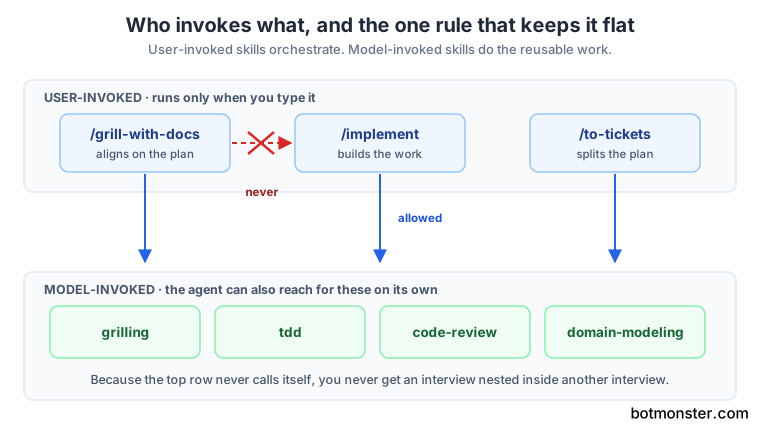
Seventeen skills sit in the engineering bucket.
| Skill | Invoked by | What it does |
|---|---|---|
ask-matt | You | Routes you to the right skill for your situation |
grill-with-docs | You | Grilling session that also builds your domain model and ADRs |
triage | You | Moves issues through a state machine of triage roles |
improve-codebase-architecture | You | Scans for refactors and shows them as an HTML report |
setup-matt-pocock-skills | You | One-time repo config for tracker, labels, and docs |
to-spec | You | Turns the current conversation into a published spec |
to-tickets | You | Splits a plan into tracer-bullet tickets with blocking edges |
implement | You | Builds the work, driving TDD and closing with code review |
wayfinder | You | Maps work too big for one session as investigation tickets |
prototype | Agent | Builds a throwaway prototype to answer a design question |
diagnosing-bugs | Agent | Reproduce, minimise, hypothesise, instrument, fix, regression-test |
research | Agent | Investigates a question and saves cited findings to the repo |
tdd | Agent | Red-green-refactor, one vertical slice at a time |
domain-modeling | Agent | Challenges terms against the glossary and updates CONTEXT.md |
codebase-design | Agent | Vocabulary for deep modules behind small interfaces |
code-review | Agent | Reviews the diff on two axes, standards and spec |
resolving-merge-conflicts | Agent | Works a merge or rebase hunk by hunk, never aborting |
The remaining five are general workflow tools with no code assumptions.
| Skill | Invoked by | What it does |
|---|---|---|
grill-me | You | Interviews you about a plan until every branch is resolved |
handoff | You | Compacts the session into a handoff doc for another agent |
teach | You | Teaches you a concept across sessions in a stateful workspace |
writing-great-skills | You | Reference for writing skills that behave predictably |
grilling | Agent | The reusable interview loop behind both grill commands |
The four failure modes Matt Pocock’s 22 small skills target
The README section on why the skills exist names four failures and pairs each with a fix.
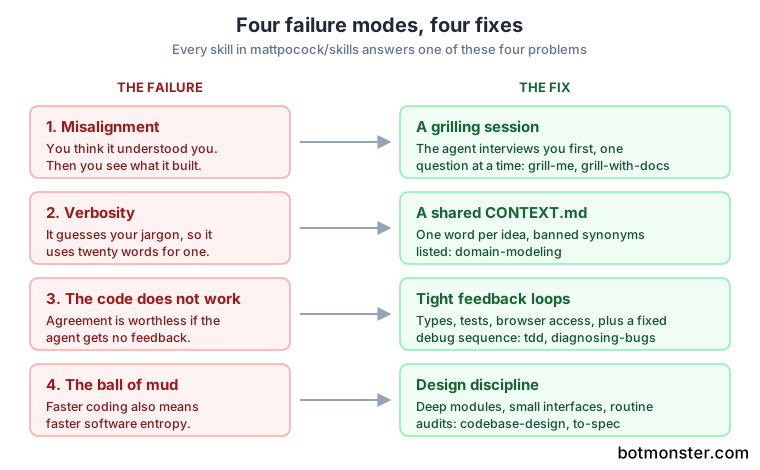
Misalignment
You think the agent understood you. Then you see what it built. The fix is a grilling session, where the agent interviews you in detail before writing a line.
Two commands cover it. /grill-me handles non-code work, and /grill-with-docs does the same for code while writing documentation as it goes. The README calls these the most popular skills in the repo.
The underlying grilling instruction
is short. It tells the agent to ask one question at a time, wait for the answer, and only then move to the next branch of the decision tree, on the grounds that a wall of questions is bewildering. The agent looks up facts in the filesystem instead of asking you. Only the decisions stay with you.
Verbosity
An agent dropped into an unfamiliar project has to guess the jargon. So it uses twenty words where one would do. Matt’s answer is CONTEXT.md, a shared-language document that decodes project terms.
The README’s example is blunt. Before the shared language, a sentence reads “a lesson inside a section of a course is made real (i.e. given a spot in the file system).” After, the same idea is “the materialization cascade.”
The CONTEXT.md from Matt’s course-video-manager repo
is public and lists each term with a definition and an _Avoid_ line of banned synonyms. “Section” is defined, and Module, Chapter, and Unit are ruled out. The banned-synonym list is what stops the agent from inventing a third word for something you already named.
The repo claims three knock-on effects: consistent naming across variables, functions, and files, easier navigation for the agent, and fewer tokens spent thinking. The author rates it the single best technique he ships, and offers no evidence beyond try it yourself. Somebody did put a number on the same idea: a skill that makes the agent talk like a caveman was benchmarked for the tokens it actually saves.
The code does not work
Alignment gets you nowhere if the agent has no feedback on what it produced. The fix is the usual feedback loops: static types, browser access, and automated tests.
The repo splits that job across two skills. The tdd skill pushes a red-green-refactor loop and tells the agent what separates a good test from a bad one. The diagnosing-bugs skill wraps debugging into a fixed sequence of reproduce, minimise, hypothesise, instrument, fix, and regression-test.
The ball of mud
Agents speed up coding, so they also speed up software entropy. Codebases get complex faster than a human team can manage.
Several skills carry the design discipline. to-spec quizzes you about which modules a change touches. codebase-design pushes deep modules behind small interfaces. improve-codebase-architecture scans an existing codebase and reports deepening opportunities in a self-contained HTML file with before-and-after diagrams. Matt suggests running it every few days.
Matt states the reading list openly. Small deliberate steps come from The Pragmatic Programmer, and ubiquitous language from Eric Evans. Kent Beck contributes the habit of investing in design daily, and John Ousterhout the case for deep modules.
What I hit in daily use
I run Claude Code every day across a content repo and a couple of Python side projects. Of the four failures, misalignment is the one that costs me real time, and it’s almost never the agent’s fault. I ask for a change in one sentence, the agent picks a reasonable reading, and the reading is not mine.
A grilling session fixes that, and the cost is real. The interview adds several minutes before any code appears, and the questions are pointed enough that you can’t answer them on autopilot. On a one-line fix I still skip it. On anything touching more than two files I have stopped skipping it, because the rework used to cost more than the interview.
The CONTEXT.md idea took longer to land for me. A content repo has less domain jargon than a course manager, so my first attempt was thin and did nothing. What helped was listing the words I had been using loosely for the same thing. Then I picked one and banned the rest, exactly as the course-video-manager file does. That part is free and works with no other skill installed.
Plugin or copy, two install paths with different philosophies
The README offers two routes and says plainly that they are not interchangeable conveniences.
| Claude Code plugin | skills.sh file copy | |
|---|---|---|
| Command | claude plugins install mattpocock-skills | npx skills@latest add mattpocock/skills |
| Works with | Claude Code | Claude Code, Codex, other Agent Skills harnesses |
| What lands | Read-only managed bundle | Ordinary files inside your repo |
| Updates | Automatic when Matt ships | Manual, via npx skills update |
| Can you edit it | No | Yes |
| Best for | Staying current with zero effort | Adapting the skills to your stack |
The plugin lives in Claude Code’s official marketplace
, so nothing needs adding first. You can also run /plugin install mattpocock-skills from inside a session.
The copy path runs through skills.sh . The installer asks which skills to take and which agents to install them on, then writes plain files you own. Nothing changes behind your back.
The trade is control against currency. Read-only means you can’t patch a skill that misbehaves on your stack. Editable means you inherit the maintenance and can drift from upstream.
Watch out for one thing: installing both paths leaves you with every skill twice, and your agent will show duplicate slash commands.
A native Codex plugin is on the roadmap. The repo’s own ADR 0002 explains the delay. Claude Code’s manifest accepts an array of skill paths, so the promoted set can be listed one by one. Codex accepts a single path string, which would drag in the deprecated and personal buckets too. The repo documents that decision with the same ADR practice it recommends to you.
How to install the skills and configure a repo
Pick one install path
Choose the managed Claude Code plugin if you want automatic updates. Choose the file copy if you want to edit the skills. Installing both leaves you with every skill twice.
Install the Claude Code plugin
Run claude plugins install mattpocock-skills in a terminal, or /plugin install mattpocock-skills from inside a session. It sits in the official marketplace, so there is no marketplace to add first.
Or copy editable skill files
Run npx skills@latest add mattpocock/skills on any agent, including Codex. Select the skills you want, and confirm setup-matt-pocock-skills is one of them.
Run the setup skill once per repo
In your agent, run /setup-matt-pocock-skills from the repository root before using any other engineering skill.
Answer the three setup questions
Pick an issue tracker (GitHub, Linear, or local files). List the labels you apply when triaging tickets. Name the folder where generated docs should live.
Start a change with a grilling session
Run /grill-me for non-code work or /grill-with-docs for code. Let the agent interrogate you until the plan has no open branches.
Turn the aligned plan into work
Run /to-spec to write the spec, /to-tickets to split it into tracer-bullet tickets, then /implement to build it with /tdd at the agreed seams.
Keep the skills current
The plugin updates itself when Matt ships. For copied files, pull changes on your own schedule with npx skills update.
Skills versus GSD, BMAD, and Spec-Kit
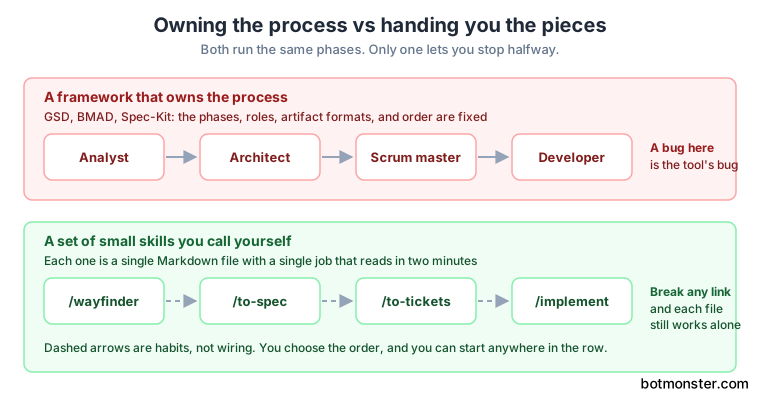
The repo opens by naming three rivals and rejecting them. GSD, BMAD, and Spec-Kit all try to help by owning the process, and the charge against them is that owning the process takes your control away and buries any bug inside machinery you did not write.
Owning the process has a concrete meaning. A framework defines the phases, the agent roles, the artifact formats, and the order they run in. When a run goes wrong, you debug the framework’s state machine before you get anywhere near your project.
The skills repo makes a different bet. Each skill is one Markdown file with one job. You invoke them in whatever order suits the work, and you can read a whole skill in a couple of minutes.
The honest counterpoint is that composable pieces put the sequencing burden on you. BMAD-METHOD and GitHub Spec Kit exist because plenty of teams want rails. This repo assumes you already know how to run a project and want tools rather than a manager.
One part of the repo does impose a process. The wayfinder, to-spec, to-tickets, implement chain is a pipeline, and implement closes out with code-review before committing. The difference is that breaking the chain at any link doesn’t break the tool.
The README also claims model portability, on the grounds that these are plain instructions rather than tuned prompts or code. That is a real advantage over framework-bound approaches. No published evidence backs it yet, so treat it as untested.
What is still unverified
Nobody has published a measurement of a grilling session against going straight to code on one identical task. The interview costs minutes and tokens up front, and the claimed saving is rework you never do. That trade is plausible and, so far, unmeasured. The second open question is what an update does to copied files, asked and unanswered in issue 196 . Commit your edits and read the diff before you accept one.
Who should actually install these skills
| Reader | Verdict | Why |
|---|---|---|
| Daily Claude Code or Codex user who feels misalignment | Strong fit | Structure without adopting a framework |
| Team with a jargon-heavy domain | Strong fit | CONTEXT.md and domain-modeling pay off alone |
| Anyone hoping for automation | Weak fit | Every headline skill asks you more questions |
| Team that wants defined roles and phases | Weak fit | GSD, BMAD, or Spec-Kit give you the rails |
| Casual prototyping and weekend scripts | Weak fit | TDD plus a two-axis review is overkill |
The strongest single entry point is /grill-with-docs. Run it before your next real change and ignore the other 21 skills until each one earns a place.
The weak-fit rows are not criticism. The README says outright that this targets real engineering rather than vibe coding, so a weekend script is out of scope by design.
A cheap way to decide: install the copy path on one repo, take three skills (grill-with-docs, tdd, code-review), and run them for a week. These are instruction files, so the only cost is tokens and time, and deleting them undoes everything.