 Botmonster Tech
How to Run SQLite on the Edge in Serverless and CDN Environments

SQLite can now run at the edge - inside Cloudflare Workers via D1, on Fly.io via LiteFS replicated volumes, and in any V8 isolate through embedded WASM builds. This gives you sub-millisecond read queries by placing your database physically close to your users on a global CDN. The key innovations that made this practical are LiteFS for transparent SQLite replication across distributed nodes, Cloudflare D1 as a managed edge SQLite service, Turso with its libSQL fork adding server mode and built-in replication, and Litestream for continuous WAL-based streaming to S3. Combined with SQLite’s zero-dependency, single-file architecture, you get a relational database that deploys as part of your application binary, needs no connection pooling, and handles thousands of reads per second per node with microsecond-level latency.
Why SQLite Is Having a Renaissance at the Edge
For years, most developers treated SQLite as a “toy database” fit for mobile apps and prototypes. That has changed. Edge computing, embedded runtimes, and a new generation of replication tools have turned SQLite into a production database for read-heavy workloads.
The core problem is architectural. Edge computing pushes code into V8 isolates or lightweight VMs running at hundreds of global points of presence - Cloudflare operates over 330 locations, Fly.io covers 35+ regions. But traditional databases like PostgreSQL still run in a single region, adding 50 to 200 milliseconds of latency to every query. That round-trip penalty defeats the entire purpose of running code at the edge.
SQLite sidesteps this because it is an in-process library rather than a client-server database. Every query runs in the same process as your application code, so there are no network round-trips, no TCP overhead, and no connection limits to worry about. The entire database is a single file that can be replicated and cached alongside your application.
What changed between 2024 and 2026 was the tooling. LiteFS, built by Fly.io, enabled transparent read replication across nodes. Cloudflare shipped D1 as a managed edge SQLite service. Turso launched libSQL , a SQLite fork (now evolving into a full Rust-based rewrite) with server mode and built-in replication. Litestream matured to version 0.5 with efficient point-in-time recovery and S3 streaming. Together, these tools solved the distribution problem that kept SQLite confined to single-machine deployments.
The numbers back this up. Benchmarks show SQLite read queries completing in roughly 20 microseconds for simple SELECT operations in-process, while the same query against PostgreSQL in another region takes 30 to 80 milliseconds. That is a 100x to 400x improvement for simple reads. Even within the same region, SQLite’s in-process architecture wins on raw latency - one benchmark measured SQLite at approximately 20,600 nanoseconds per SELECT versus PostgreSQL at roughly 597,000 nanoseconds per SELECT.
The tradeoff is writes. SQLite at the edge excels for read-heavy workloads like content sites, APIs, and dashboards where the read-to-write ratio is 100:1 or higher. Writes must go to a single primary node and propagate to replicas. Write-heavy applications - social media feeds, real-time collaboration, chat systems - still need PostgreSQL or a purpose-built distributed database.
SQLite does have practical limits at the edge that you should know before committing. The theoretical maximum database size is 281 TB, but the practical limit per edge replica is 1 to 10 GB due to deployment and replication overhead. Write concurrency is limited to one writer at a time, though WAL (Write-Ahead Log) mode allows readers to proceed concurrently with a single writer.
Cloudflare D1 - Managed SQLite at the Edge
D1 is Cloudflare’s serverless SQLite database that runs alongside Workers at every edge location. It is the lowest-friction path to edge SQLite - Cloudflare handles replication, storage, and global distribution while you interact with a familiar SQL interface.
Setting up D1 takes a few commands. Create the database with wrangler d1 create my-blog-db, then bind it to your Worker in wrangler.toml:
[[d1_databases]]
binding = "DB"
database_name = "my-blog-db"
database_id = "your-database-id"
Querying from a Worker is straightforward:
const { results } = await env.DB.prepare(
  'SELECT title, slug FROM posts WHERE published = 1 ORDER BY date DESC LIMIT 10'
).all();
Always use parameterized queries with .bind() to prevent SQL injection. For schema changes, D1 supports migration files via wrangler d1 migrations create my-blog-db "add_tags_column", which generates a SQL file you apply with wrangler d1 migrations apply. No ORM required - just raw SQL.
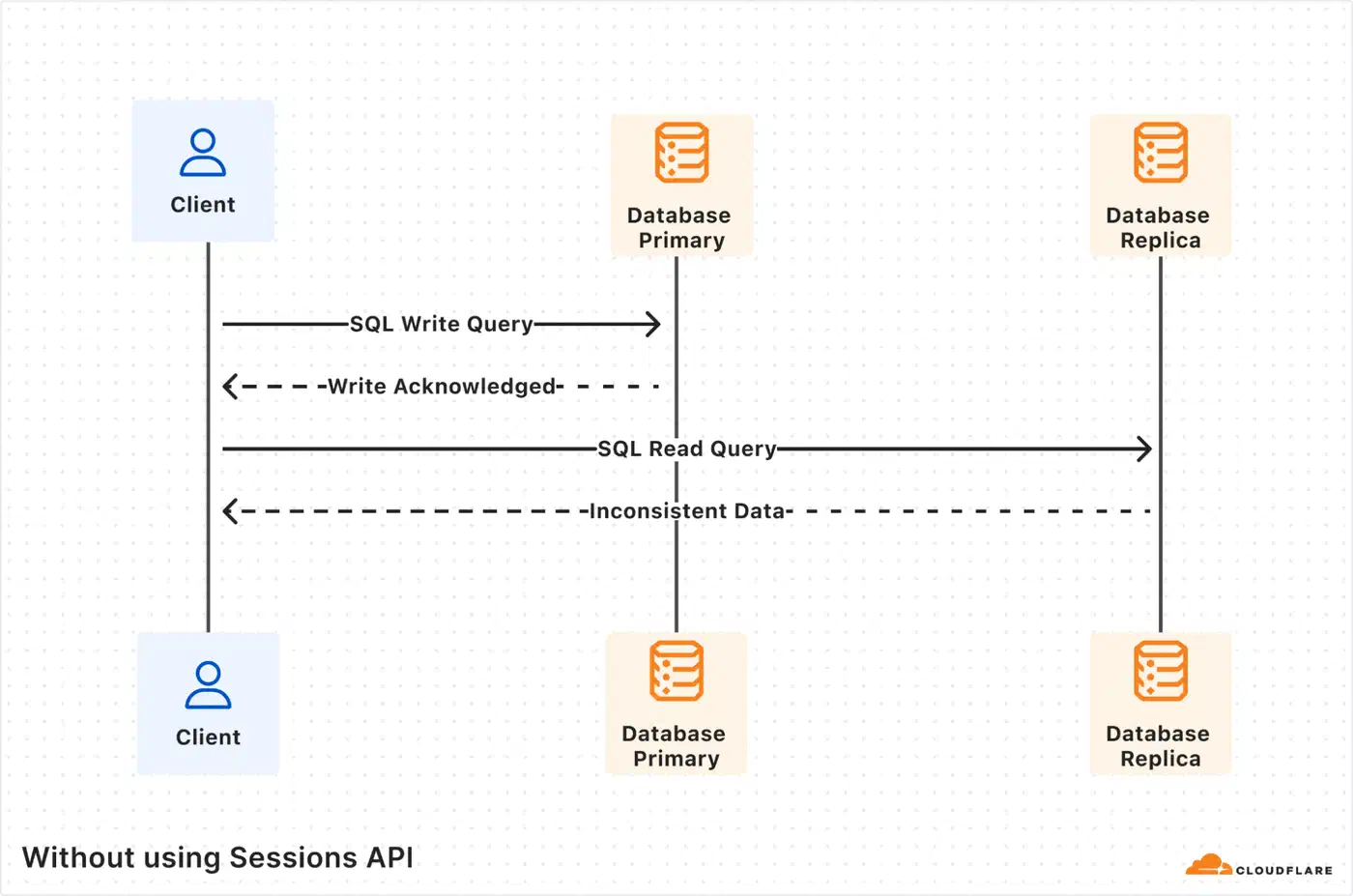
D1 has specific limits to plan around. As of 2026, each database is capped at 10 GB with support for up to 50,000 databases per account. The design philosophy is horizontal scale-out across many smaller databases - per-user, per-tenant, or per-entity - rather than a single monolithic database. Reads are globally distributed through automatic read replicas, but writes route to a single primary with eventual consistency on reads after writes, typically propagating in under 100 milliseconds.
D1 includes built-in backups through Time Travel, which provides point-in-time recovery, letting you restore a database to any minute within the last 30 days. This is built into the platform with no additional configuration.
On cost, D1 is much cheaper than running a PostgreSQL RDS instance around the clock. The pricing model charges $0.001 per million rows read and $1.00 per million rows written, with storage at $0.75 per GB per month. There are no data transfer or egress charges for data accessed from D1, and read replicas cost nothing extra. The free tier includes 5 million reads per day and 100,000 writes per day, which is enough for many production sites.
| Feature | Cloudflare D1 | Managed PostgreSQL (e.g., RDS) |
|---|---|---|
| Max DB size | 10 GB per database | Terabytes |
| Read latency (edge) | Sub-millisecond | 30-80ms cross-region |
| Write model | Single primary, global reads | Single primary or multi-region |
| Connection pooling | Not needed | Required (PgBouncer, etc.) |
| Free tier | 5M reads/day, 100K writes/day | None (pay per hour) |
| Backup | Time Travel (30-day PITR) | Snapshots, WAL archival |
Fly.io and LiteFS - SQLite Replication for Self-Hosted Apps
If you want edge SQLite without a fully managed service, Fly.io’s LiteFS provides transparent FUSE-based replication across global regions. Your application reads and writes to SQLite normally, completely unaware that replication is happening underneath.
LiteFS works by intercepting SQLite’s file I/O through a FUSE filesystem. It captures Write-Ahead Log changes and replicates them from a primary node to read replicas across Fly.io regions. Your application code does not change at all - it just reads and writes a local SQLite file like normal.

To set it up, add LiteFS to your Dockerfile:
FROM flyio/litefs:0.5 AS litefsConfigure litefs.yml with your primary region, mount point, and upstream lease endpoint, then point your SQLite connection to /litefs/data/my.db. For write operations, LiteFS detects them and transparently forwards to the primary node. For explicit control, you can use the fly-replay response header to redirect write requests to the primary region.
Multi-region deployment is a single command:
fly scale count 3 --region ord,ams,nrtThis deploys replicas in Chicago, Amsterdam, and Tokyo. LiteFS replicates changes within 50 to 200 milliseconds. Readers in each region hit their local replica with microsecond-level latency.
One important caveat: LiteFS is stable and running in production, but it remains in a pre-1.0 beta state. LiteFS Cloud, the managed backup service, was sunset in October 2024, and Fly.io has deprioritized active development of LiteFS itself. It still works and is usable, but for new projects starting in 2026, Turso or D1 offer a more actively maintained path. If you are already running on Fly.io and comfortable with the operational responsibility, LiteFS remains a solid choice.
For monitoring, Fly.io’s Prometheus metrics expose litefs_tx_count, litefs_lag_seconds, and litefs_db_size_bytes. Set alerts on replication lag exceeding one second.
Litestream as a Simpler Alternative
If you are not on Fly.io or want a lighter approach, Litestream continuously streams WAL changes to S3 or compatible object storage. The setup is a single command:
litestream replicate /data/my.db s3://my-bucket/my.dbLitestream v0.5 dropped the CGO dependency in favor of modernc.org/sqlite and added support for NATS JetStream as a replica target alongside S3. It enables efficient point-in-time recovery and manual replica setup. The tradeoff versus LiteFS is that Litestream handles backup and restore but does not provide automatic multi-node read replication - you would need to build that layer yourself.
Turso and libSQL - SQLite Rebuilt for the Network
Turso started with libSQL, an open-source fork of SQLite that added server mode, an HTTP/WebSocket API, and built-in replication. The project has since evolved significantly - Turso is now building a complete Rust-based reimplementation of SQLite that goes beyond what a fork can offer, including concurrent writes and bidirectional sync with offline support.
What libSQL and the new Turso engine add to standard SQLite is substantial: a server mode that listens on a port for client connections, an HTTP API, embedded replicas that sync a local SQLite file from a remote primary, a native replication protocol, and built-in vector search without extensions.
Setting up Turso is quick:
turso db create my-blog
turso db tokens create my-blog
Connect with the @libsql/client npm package using the connection URL libsql://my-blog-<org>.turso.io.
The most useful feature for edge deployments is embedded replicas. You create a client that maintains a local SQLite file synchronized from the Turso primary:
import { createClient } from '@libsql/client';

const db = createClient({
  url: 'file:local-replica.db',
  syncUrl: 'libsql://my-blog-org.turso.io',
  authToken: process.env.TURSO_AUTH_TOKEN,
});

await db.sync();
Reads hit the local file with microsecond latency. Writes go to the remote primary and sync back. This pattern works on Cloudflare Workers, Fly.io, or any other deployment target, giving you edge-local reads with centralized writes without vendor lock-in to a specific edge platform.
Turso’s free tier includes 5 GB total storage, 100 databases, and 500 million row reads per month. The Pro tier at $29/month is comparable in cost to a small managed PostgreSQL instance but serves edge reads globally.
| Platform | Managed | Vendor Lock-in | Replication | Best For |
|---|---|---|---|---|
| Cloudflare D1 | Fully managed | Cloudflare Workers only | Automatic, global | Workers-native apps |
| LiteFS (Fly.io) | Self-managed | Fly.io (practical) | FUSE-based, transparent | Existing Fly.io apps |
| Turso/libSQL | Managed or self-hosted | None (runs anywhere) | Embedded replicas | Multi-platform apps |
| Litestream | Self-managed | None | S3 backup, no multi-node | Disaster recovery |
SQLite Extensions at the Edge
Edge SQLite is not limited to basic relational queries. A growing set of extensions adds capabilities that previously required separate services.
sqlite-vec brings vector search directly into SQLite with zero dependencies. Written in C and MIT/Apache-2.0 dual licensed, it supports K-Nearest Neighbor search with SIMD-accelerated distance metrics including L2 (Euclidean), cosine similarity, and Hamming distance for bit vectors. This makes it possible to run RAG (Retrieval-Augmented Generation) workflows or similarity search at the edge without a separate vector database. Turso’s libSQL has native vector search built in, eliminating the need for the extension entirely.
The JSON1 extension (bundled with SQLite since version 3.38.0) enables document-style data storage and querying. You can store JSON blobs and query into them with functions like json_extract(), making SQLite viable for semi-structured data that would otherwise push you toward MongoDB or a JSONB column in PostgreSQL.
For browser-based deployments, SQLite compiled to WASM opens another category of edge use. The official SQLite WASM build, sql.js , and wa-sqlite each bring SQLite into the browser. The official SQLite WASM build supports the Origin Private File System (OPFS) for persistent storage, while wa-sqlite offers pluggable storage backends including IndexedDB. Notion famously adopted WASM SQLite to speed up their browser application, using OPFS SyncAccessHandle Pool VFS to cache data locally and eliminate repeated API calls during navigation.
When to Use Edge SQLite and When to Stay with PostgreSQL
Edge SQLite is not going to replace PostgreSQL everywhere, and it does not need to. The decision depends on your workload.
Edge SQLite makes sense when your read-to-write ratio is 100:1 or higher, your total database size is under 10 GB, global read latency matters (content sites, product catalogs, read-heavy APIs), and you want minimal operational overhead. It works best for applications where data changes infrequently but gets read from many geographic locations.
Stay with PostgreSQL or MySQL when you need concurrent writers, complex multi-table transactions, JSONB with advanced indexing and full-text search at scale, or your dataset exceeds 10 GB and grows continuously. Real-time collaborative applications, social platforms, and transactional systems with high write volumes are not good candidates for edge SQLite.
A hybrid approach works well too. Use PostgreSQL as the source of truth and replicate a read-optimized subset into edge SQLite for low-latency reads. Many production systems use this architecture for user profiles, feature flags, configuration, and content delivery. The PostgreSQL database handles writes and complex queries centrally, while edge SQLite replicas serve the hot read path.
The migration path from development to production edge SQLite is smooth. SQLite is already the default development database for Django, Rails, Laravel, and most frameworks. You can validate your schema locally and deploy directly to D1 or Turso without schema changes - the SQL dialect is nearly identical.
When modeling data for edge SQLite, denormalize aggressively. Joins are cheap in SQLite (it is all local I/O), but replication operates at the database level, not the table level. Use INTEGER PRIMARY KEY for auto-increment (it maps to SQLite’s rowid), and prefer TEXT over VARCHAR since SQLite is dynamically typed and the distinction carries no performance difference.
Several large companies already run SQLite in production at scale. Expensify scaled SQLite to 4 million queries per second on a single server, processing billions of dollars in transactions through their Bedrock distributed transaction layer built on top of SQLite. Notion uses WASM SQLite in the browser to cache data locally and speed up page navigation. Tailscale uses SQLite for control plane state management. All three are core infrastructure decisions at companies serving millions of users, not side projects or experiments.
Backup, Recovery, and Operational Considerations
Running SQLite at the edge shifts operational concerns around rather than removing them. Each platform handles backup and disaster recovery differently.
Cloudflare D1 provides Time Travel out of the box - 30-day point-in-time recovery with no configuration. This is the simplest operational story. LiteFS on Fly.io requires you to configure your own backup strategy since LiteFS Cloud was deprecated. Pairing LiteFS with Litestream for S3 backups is a common pattern. Turso handles backups as part of its managed service, with point-in-time recovery available on paid plans.
Write conflict handling varies by platform. D1 routes all writes to a single primary, so conflicts do not arise - only write ordering and eventual consistency on reads. LiteFS forwards writes to the primary node transparently, achieving the same single-writer model. Turso supports the same pattern with embedded replicas, where writes go to the remote primary and sync back. None of these platforms provide true multi-writer conflict resolution - if your application needs that, you are looking at CRDTs or a distributed database like CockroachDB.
Schema migrations across distributed SQLite replicas require care. D1’s migration tooling applies changes to the primary, which then propagate. With LiteFS or Turso, run migrations against the primary and let replication distribute the schema changes. The key rule is to never run migrations on a replica - always target the primary.
Connection pooling, one of the more annoying parts of running PostgreSQL in production, is a non-issue with SQLite. There is no pool to tune, no PgBouncer to configure, no connection limit to hit. The database is in-process. This alone cuts operational work noticeably, especially in serverless environments where connection exhaustion is a constant headache with traditional databases.
The SQLite edge ecosystem in 2026 is mature enough for production read-heavy workloads. D1 is the easiest path if you are already on Cloudflare. Turso offers the most flexibility across platforms. LiteFS is a solid self-hosted option for Fly.io users willing to manage their own infrastructure. And Litestream provides a safety net regardless of which platform you choose. Pick based on your deployment target, your tolerance for managed versus self-hosted, and whether you need multi-platform portability.