 Botmonster Tech
Btrfs vs ZFS: which filesystem protects your data better?

ZFS gives you stronger data integrity. Its RAIDZ layouts are battle-tested, it checksums data end to end, and it has a proven record on NAS systems. Btrfs is the better pick for single-disk desktops and laptops. It ties tightly into the Linux kernel, compresses data on the fly, and rolls back from snapshots. You get that protection without the RAM cost ZFS demands. The right answer depends on your hardware, your workload, and how many disks you have.
Both filesystems are a big step up from ext4 and XFS when it comes to catching silent corruption. But they come from very different roots. ZFS was born in Sun Microsystems’ enterprise storage division and still carries that DNA. Btrfs was built from scratch as a Linux-native answer to the same problems. That heritage shows up in every design choice, from memory needs to RAID layouts.
Data Integrity Features Head to Head
Both Btrfs and ZFS checksum every data block and metadata block by default. This is the single most important feature that sets them apart from ext4 and XFS. They can detect silent data corruption, also called bit rot, that older filesystems are blind to. If a cosmic ray flips a bit on your drive, or a cheap SATA cable corrupts a transfer, these filesystems will catch it.
ZFS uses SHA-256 checksums by default. Optional Blake3 arrived in OpenZFS 2.3 and newer. Btrfs uses CRC32C, which is faster but weaker as a cryptographic hash. For data integrity, both detect corruption just fine. You are not trying to stop an attacker from forging data blocks. You are catching random bit flips.
Self-healing is where the two start to diverge. ZFS repairs corrupted blocks on its own when you use any redundant vdev layout: mirror, RAIDZ1, RAIDZ2, or RAIDZ3. It reads the correct copy from a healthy disk and rewrites the bad one. Btrfs does the same with its RAID1 and RAID10 profiles. But its RAID5/6 code is still unreliable in 2026 and cannot be trusted to self-heal.
A scrub tells the filesystem to verify every block against its stored checksum. Both ZFS and Btrfs support scrubs, and you should run them often. Monthly is the minimum on any storage you care about. On Btrfs, the scrub, balance, and snapshot schedule is worth setting up as timers so you never think about it again. Running a scrub is simple on both:
# ZFS scrub
sudo zpool scrub mypool

# Btrfs scrub
sudo btrfs scrub start /mnt/data
The key difference shows up on a single-disk Btrfs setup. A scrub can detect corruption there, but it cannot repair it, because there is no second copy to pull from. ZFS offers a workaround with the copies=2 property. It stores duplicate copies of your data on the same vdev:
zfs set copies=2 mypool/important-dataBtrfs has a similar idea. On single disks it stores metadata in the dup profile by default. That gives you some protection for the filesystem structure itself, though not for the actual file data.
Both filesystems support send/receive for incremental snapshot replication to remote systems. This is the base for solid off-site backup strategies, and it works well on both sides in practice.
RAID and Multi-Disk Configurations
Multi-disk redundancy is where ZFS and Btrfs diverge most sharply. It is also the main reason ZFS dominates the NAS space.
ZFS RAIDZ1, RAIDZ2, and RAIDZ3 are rock-solid. Enterprise shops have trusted them for well over a decade. RAIDZ2, with dual parity, is the standard pick for pools of 4 to 8 drives. RAIDZ3, with triple parity, makes sense for larger arrays. On those, the odds of two or more disks failing during a rebuild stop being small. One long-requested feature is RAIDZ expansion, the ability to add a single disk to an existing RAIDZ vdev. It landed in OpenZFS 2.3 and is stable in the 2.4 release:
# Expand an existing RAIDZ1 vdev by attaching a new disk
zpool attach mypool raidz1-0 /dev/sdg
Btrfs RAID1 and RAID10 profiles are stable and ready for production. RAID1C3 and RAID1C4, meaning 3-copy and 4-copy mirroring, arrived in kernel 5.5 and work well. They are useful for metadata redundancy on larger arrays.
There is one hard limit to flag. Btrfs RAID5/6 still carries the write hole bug and is not safe for production data. The Linux kernel wiki still lists it as unstable. That has been true for years. If you need parity-based redundancy, ZFS is your only real option between these two.
ZFS lets you mix vdev types in a single pool. You can pair mirrored vdevs for your data, a striped vdev for L2ARC read cache, and a fast SSD for the ZFS Intent Log (ZIL). This fine control is powerful for tuning NAS performance:
# Create a pool with mirrored data vdevs, a log device, and a cache device
zpool create mypool \
  mirror /dev/sda /dev/sdb \
  mirror /dev/sdc /dev/sdd \
  log /dev/nvme0n1p1 \
  cache /dev/nvme0n1p2
ZFS also supports special allocation classes. You can place metadata and small files on a fast SSD vdev while bulk data stays on spinning rust. Btrfs has no equal feature.
On the flexibility side, Btrfs handles mixed disk sizes more gracefully. You can add and remove single devices, then rebalance data across them:
# Add a new device to a Btrfs filesystem
sudo btrfs device add /dev/sde /mnt/data

# Rebalance to spread data across all devices
sudo btrfs balance start -dconvert=raid1 -mconvert=raid1 /mnt/data
This is genuinely useful in a home server, where you collect drives of different sizes over time.
Snapshot and Backup Workflows
Snapshots are one of the biggest practical wins of both filesystems. For many users, they are the main reason to move away from ext4.
Both create instant, space-efficient snapshots using copy-on-write. A snapshot uses almost no space at first. It only grows as the live data drifts from the snapshot point. Creating one takes milliseconds, no matter how much data the filesystem holds.
# ZFS snapshot
zfs snapshot mypool/data@backup-2026-03-28

# Btrfs snapshot (read-only)
btrfs subvolume snapshot -r /mnt/data /mnt/data/.snapshots/backup-2026-03-28
One notable difference stands out. ZFS keeps its point-in-time copies read-only by default. You can clone them into writable datasets, but the snapshot itself cannot change. Btrfs snapshots are writable subvolumes by default. You need the -r flag to create a read-only snapshot, which is what you want for backups.
For automated snapshot management, the tooling on both sides is mature. On the ZFS side, sanoid and its companion tool syncoid are the gold standard. Sanoid creates and prunes snapshots based on retention policies. Syncoid handles replication:
# Replicate a dataset to a remote host with syncoid
syncoid --recursive mypool/data backup-host:backup-pool/data
On the Btrfs side, snapper (originally from openSUSE) and btrbk fill the same role. Btrbk is particularly good for backup workflows:
# btrbk.conf example
volume /mnt/data
  subvolume home
    snapshot_dir .snapshots
    target send-receive /mnt/backup/home
  snapshot_preserve_min   2d
  snapshot_preserve       14d
  target_preserve_min     2d
  target_preserve         30d 6m
Where Btrfs really shines is desktop integration. It hooks into GRUB and systemd-boot for boot-time snapshot selection. You can roll back a failed system upgrade by picking an earlier snapshot from the boot menu. openSUSE Tumbleweed has run this smoothly for years, and Fedora uses the same trick. ZFS boot environments work on FreeBSD and Ubuntu, but they need more manual setup or tools like zsys.
For NAS backups, ZFS replication with syncoid over SSH is hard to beat. It gives you resumable, encrypted, compressed incremental replication with little setup. The --raw flag keeps native ZFS encryption intact. Your data stays encrypted in transit and at rest on the backup target:
# Encrypted, compressed, resumable send
syncoid --sendoptions="w" --compress=lz4 mypool/data remote:backup/data
Performance, RAM, and System Requirements
ZFS’s advanced features come with real resource demands, and you need to budget for them.
The ARC (Adaptive Replacement Cache) is ZFS’s in-memory read cache. It is aggressive about using free RAM. The common rule of thumb is 1 GB of RAM per 1 TB of storage, plus a base of about 8 GB for the operating system and the filesystem. So a 20 TB NAS should have 28 GB or more of RAM. The ARC is technically reclaimable, since the kernel can take it back under memory pressure. But in practice, a system that constantly fights for memory between the ARC and your apps feels sluggish.
You can cap the ARC if needed:
# Limit ARC to 8 GB in /etc/modprobe.d/zfs.conf
options zfs zfs_arc_max=8589934592
Btrfs has no special RAM needs beyond the standard Linux page cache. It runs well on systems with as little as 2-4 GB of RAM. That makes it the obvious pick for lightweight systems, embedded devices, or virtual machines where memory is tight.
Transparent compression is on both and worth enabling for most workloads. ZFS supports LZ4 (default, very fast), Zstd (tunable levels 1-19), and Gzip. Btrfs supports LZO, Zlib, and Zstd (levels 1-15). On both, Zstd at a moderate level hits the sweet spot of compression ratio versus CPU cost:
# Enable Zstd compression on ZFS
zfs set compression=zstd-3 mypool/data

# Enable Zstd compression on Btrfs (mount option)
sudo mount -o compress=zstd:3 /dev/sda1 /mnt/data
Expect compression ratios of 1.5-3x on typical data like text files, logs, and source code. Binary data and already-compressed media files will see almost no gain.
For sequential write speed, the two are roughly even once you measure real-world SSD throughput on Linux. ZFS has a slight edge on RAIDZ thanks to dynamic stripe width. Btrfs tends to be faster on single-disk setups because it carries less overhead.
A word on deduplication. ZFS supports inline dedup, but it is very RAM-hungry. The dedup table (DDT) needs roughly 5 GB of RAM per TB of deduplicated data. Unless you have a specific workload with lots of repeated data and RAM to spare, leave it off. Btrfs has no inline dedup. But offline tools like duperemove and bees can reclaim space from duplicate blocks after the fact. That is a more practical route for most users.
One final point to weigh. ZFS needs the kernel module built via DKMS on most distributions. Ubuntu ships it pre-built, which saves hassle. But on Fedora or Arch you face DKMS builds after every kernel update. Btrfs is built straight into the mainline Linux kernel. There is zero install effort, guaranteed compatibility, and no waiting for module rebuilds before you can reboot. bcachefs went the other way in 2026, leaving the mainline kernel and picking up the same DKMS tax.
Desktop vs NAS: Which Filesystem for Which Workload
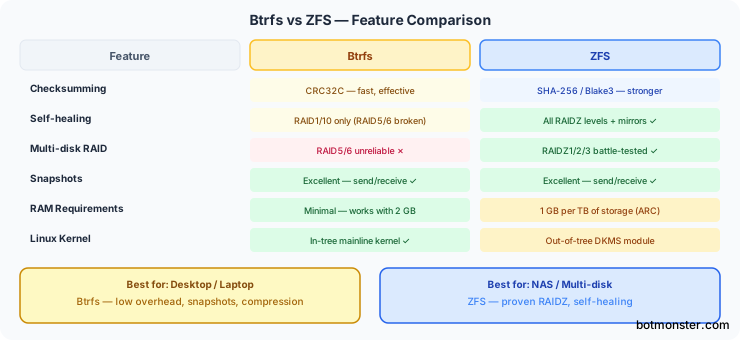
The right filesystem depends on what you are protecting. A laptop’s root partition is a very different job from a multi-disk storage server.
On a desktop or laptop with a single SSD, Btrfs is the clear winner. It is the default filesystem on Fedora and openSUSE Tumbleweed, and Ubuntu’s installer offers it as a first-class option. Snapshots make rollback after updates painless, compression saves SSD space, and there is zero RAM overhead. Set up snapper, enable Zstd compression in your fstab, and you are done.
For a NAS with 4 or more drives, ZFS is the safer choice. RAIDZ2 gives you two-disk fault tolerance, and the self-healing scrub guards against silent corruption across large pools. Pair it with ECC RAM if your budget allows, set up sanoid for automated snapshots, and schedule monthly scrubs. If you are still picking the hardware, our DIY NAS hardware comparison covers the two main platforms in 2026.
If you have a home server with just 2 drives, either filesystem works well in a mirror. A ZFS mirror and a Btrfs RAID1 both give you redundancy and checksumming. Pick whichever you are more at ease managing. If you already run Ubuntu, ZFS is easy to set up. If you are on Fedora, Btrfs is already there.
A desktop with external backup drives is a great case for running both. Use Btrfs on the root filesystem for snapshots and system rollback. Use ZFS on the backup pool for top data integrity. Both coexist fine on the same machine.
Proxmox VE users should lean toward ZFS. Proxmox supports it natively for both the root filesystem and VM storage, with a strong management GUI in the web interface. Btrfs support exists in Proxmox, but it is less mature and lacks the same GUI integration.
For container storage with Docker or Podman, both offer native storage drivers. ZFS is a bit more mature for container workloads. Btrfs still works well for rootless Podman on desktop systems.
| Use Case | Recommended FS | Why |
|---|---|---|
| Single-disk desktop | Btrfs | Kernel-native, low overhead, great snapshots |
| NAS (4+ drives) | ZFS | RAIDZ2, self-healing, proven reliability |
| 2-drive mirror | Either | Both are solid in mirror mode |
| Proxmox VM storage | ZFS | Native support, GUI management |
| Laptop with limited RAM | Btrfs | No ARC overhead, works with 2-4 GB |
Neither filesystem wins across the board. ZFS is the conservative, battle-hardened choice for multi-disk storage where data loss is not an option. Btrfs is the practical, lightweight choice for Linux desktops and single-disk systems. There, kernel integration and low resource use count for more than parity RAID. Pick the one that fits your hardware, and sleep well knowing your data is truly protected.