 Botmonster Tech
Just vs Make vs Task: picking the right command runner


Just is the best general command runner for most new projects in 2026. It has Make-like syntax without the tab headaches. It works across Linux, macOS, and Windows. It stays out of your way as a command runner, not a build system. Task wins if your team prefers YAML and you want built-in file watching. Make is still right when you have real file-based compile dependencies or a Makefile that works fine.
Below: what each tool does well, where each falls short, and how to migrate.
Where Make Shows Its Age
Make was built in 1976 to compile C programs. It tracks file timestamps, figures out what needs rebuilding, and runs the smallest set of commands to bring targets up to date. For that job, it still works. The catch: most developers now use Make as a glorified script launcher. They run linters, deploy containers, format code. None of that involves file dependencies.
Several pain points keep surfacing:
- Tab-significant syntax is the most common beginner error. Use spaces instead of a tab and you get the baffling “missing separator. Stop.” message. Decades of tooling haven’t fixed this. The behavior is baked into the format.
- Each line in a Make recipe runs in a separate subshell. Setting a variable on line 1 has no effect on line 2. You must chain with
&&or use.ONESHELL, a GNU extension that BSD Make lacks. - A Makefile that works on Linux may silently break on macOS. Apple ships BSD Make. Conditional syntax, pattern rules, and even
$(shell ...)behave differently across POSIX, GNU, and BSD. - Make ships with dozens of built-in suffix rules for compiling
.c,.f, and.pfiles. These fire when you create targets that happen to match a known suffix pattern. - Any target that doesn’t map to a real file needs a
.PHONYdeclaration. Otherwise Make will skip it if a file with that name exists. Every project grows a longer.PHONYline at the top.
Make still earns its keep on C/C++ projects with real compile graphs, kernel builds, and legacy codebases where switching tools is pure churn with no payoff.
Just: Clean Syntax, Zero Opinions on Build Systems
Just (v1.48.x) is written in Rust and calls itself “a command runner, not a build system.” It skips file-dependency tracking on purpose. Every recipe runs every time you invoke it. That’s exactly what you want for tasks like deploy, lint, or test.
Installation
Just is available through most package managers:
# macOS / Linux (Homebrew)
brew install just

# Rust toolchain
cargo install just

# Arch Linux
pacman -S just

# Prebuilt binaries for every platform
# https://github.com/casey/just/releases
A Minimal Justfile
# Set the shell for all recipes
set shell := ["bash", "-cu"]

project := "myapp"

# Run the default recipe
default: build

# Compile the project
build:
    cargo build --release

# Run tests with optional filter
test filter="":
    cargo test {{filter}}

# Deploy to a target environment
deploy env="staging": build test
    ./scripts/deploy.sh --env {{env}}

# Remove build artifacts
clean:
    rm -rf target/
Spaces work fine for indentation. No tab requirement. Variables use {{name}} interpolation. Recipes can take parameters with default values, like test filter="". Dependencies are listed after the colon: deploy env="staging": build test runs build and test before deploy.
What Makes Just Worth Using
Running just --list prints every recipe with its description, taken from the comment above each recipe. It replaces the ad-hoc make help trick that every Makefile reinvents.
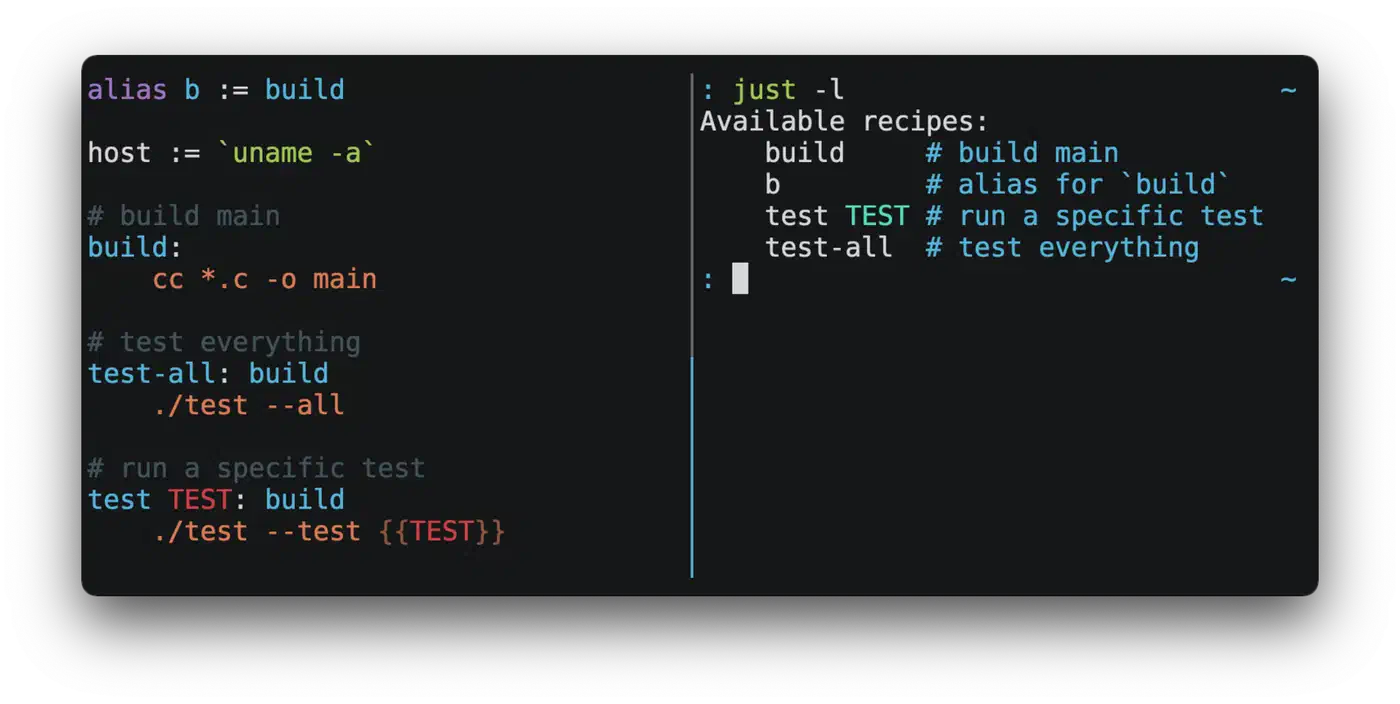
Shell handling is where Just pulls ahead of Make. You can pin the shell globally with set shell. You can set a Windows shell with set windows-shell := ["pwsh.exe", "-c"]. Single recipes can also use shebangs to run Python, Node, Ruby, or any other interpreter.
For debugging, just --dry-run shows what would run without running it. just --evaluate prints all variable values. Prefix a recipe with [confirm] and Just adds a yes/no prompt before the command runs.
Error messages are colored and Rust-style. They point right at the line and column of the syntax error. Shell completions ship for bash, zsh, fish, PowerShell, and elvish, with dynamic recipe name completion. The colored output renders cleanly even when you pick a Rust-based terminal built for speed , so recipe runs stay readable under fast scrolling output.
Limitations
Just has no file-watching feature. To rerun recipes on file changes, pair it with an outside tool like watchexec
: watchexec -e rs -- just test. It also has no idea of source/target freshness. Every run starts from scratch.
Task: YAML Workflows With Built-in File Watching
Task (v3.49.1) is written in Go and ships as a single binary with no runtime deps. Just uses a custom DSL inspired by Make. Task uses YAML, which some teams love and others find too verbose for simple scripts.
Installation
# macOS / Linux (Homebrew)
brew install go-task

# Snap
snap install task --classic

# Windows (Scoop / Chocolatey)
scoop install task
choco install go-task

# Shell script
sh -c "$(curl --location https://taskfile.dev/install.sh)" -- -d -b ~/.local/bin
A Minimal Taskfile.yml
version: '3'

vars:
  PROJECT: myapp

tasks:
  default:
    cmds:
      - task: build

  build:
    desc: Compile the project
    cmds:
      - cargo build --release
    sources:
      - src/**/*.rs
      - Cargo.toml
    generates:
      - target/release/{{.PROJECT}}

  test:
    desc: Run tests
    deps: [build]
    cmds:
      - cargo test {{.CLI_ARGS}}

  deploy:
    desc: Deploy to target environment
    deps: [build, test]
    cmds:
      - ./scripts/deploy.sh --env {{.ENV | default "staging"}}

  clean:
    desc: Remove build artifacts
    cmds:
      - rm -rf target/
What Makes Task Worth Using
The headline feature is built-in file watching. Run task --watch build and Task reruns the build task whenever source files change. No outside tool needed.
Task also tracks source and target freshness through the sources: and generates: fields. When inputs haven’t changed, Task skips the task. Unlike Make’s timestamp approach, Task uses checksums stored in a .task directory, which sidesteps clock-skew problems.
Dependencies listed in deps: run in parallel by default. For monorepos, includes: lets you split a large Taskfile across files so each package owns its own tasks. Variables use {{.NAME}} with Go template functions for string work, conditionals, and defaults. Running task --dry previews commands without running them.
Limitations
YAML gets verbose for simple tasks. A three-line Just recipe can balloon to eight lines in a Taskfile. The Go template syntax {{.NAME}} is also less intuitive than Just’s {{name}} if you don’t know Go’s text/template package.
Feature Comparison
| Feature | Make | Just | Task |
|---|---|---|---|
| Config format | Makefile (custom DSL) | justfile (custom DSL) | Taskfile.yml (YAML) |
| Written in | C | Rust | Go |
| Variable syntax | $(NAME) | {{name}} | {{.NAME}} |
| File watching | None | None (use watchexec) | Built-in (--watch) |
| Dependency tracking | Timestamps | None (always runs) | Checksums |
| Shell handling | $SHELL or /bin/sh | Configurable per-recipe or globally | sh/bash by default |
| Parallelism | -j N | Recipe-level (--parallel flag) | Dep-level (parallel by default) |
| Windows native | Requires MSYS/WSL | Native | Native |
| Tab requirement | Yes | No | No (YAML) |
| Recipe parameters | Awkward (make FOO=bar) | First-class (just deploy env=prod) | Via CLI_ARGS or vars |
| Auto-listing | No (make help is DIY) | just --list | task --list |
| Dry run | -n (partial) | --dry-run | --dry |
| Shell completions | Basic | Full (dynamic recipe names) | Full |
| VS Code extension | Built-in (Makefile Tools by Microsoft) | Community extensions (syntax highlighting) | Community extensions |
Migration Examples
Here is a typical Makefile and its equivalent in both Just and Task.
Starting Point: Makefile
.PHONY: build test lint fmt clean run

APP := myapp

build:
	go build -o bin/$(APP) ./cmd/$(APP)

test: build
	go test ./...

lint:
	golangci-lint run

fmt:
	gofmt -w .

clean:
	rm -rf bin/

run: build
	./bin/$(APP)
Justfile Port
app := "myapp"

default: build

build:
    go build -o bin/{{app}} ./cmd/{{app}}

test: build
    go test ./...

lint:
    golangci-lint run

fmt:
    gofmt -w .

clean:
    rm -rf bin/

run: build
    ./bin/{{app}}
No .PHONY lines needed. Spaces instead of tabs. Variables use {{app}} instead of $(APP). Otherwise the structure maps almost one to one.
Taskfile.yml Port
version: '3'

vars:
  APP: myapp

tasks:
  build:
    desc: Build the application
    cmds:
      - go build -o bin/{{.APP}} ./cmd/{{.APP}}
    sources:
      - cmd/**/*.go
      - internal/**/*.go
      - go.mod
    generates:
      - bin/{{.APP}}

  test:
    desc: Run tests
    deps: [build]
    cmds:
      - go test ./...

  lint:
    desc: Run linter
    cmds:
      - golangci-lint run

  fmt:
    desc: Format code
    cmds:
      - gofmt -w .

  clean:
    desc: Clean build artifacts
    cmds:
      - rm -rf bin/

  run:
    desc: Run the application
    deps: [build]
    cmds:
      - ./bin/{{.APP}}
More verbose, but you gain sources:/generates: tracking and desc: fields that show up in task --list.
Environment Variables
Each tool handles environment variables differently:
# Just: export attribute on recipes
[export]
deploy:
    echo $DATABASE_URL
# Task: env field per task
tasks:
deploy:
env:
DATABASE_URL: "postgres://localhost/mydb"
cmds:
- echo $DATABASE_URL# Make: export directive
export DATABASE_URL := postgres://localhost/mydb
deploy:
echo $$DATABASE_URL
CI Integration
Both Just and Task work in CI pipelines with minimal setup:
# GitHub Actions / Gitea Actions
- name: Install Just
  uses: extractions/setup-just@v2

- name: Run tests
  run: just test
# For Task
- name: Install Task
uses: arduino/setup-task@v2
- name: Run tests
run: task testOther Contenders Worth Knowing
Mask
defines tasks in a standard Markdown file, maskfile.md. Headings become commands. Code blocks become scripts. The docs-first approach is appealing, but mask has a smaller community and fewer features than Just or Task. It supports many script languages per task and nested subcommands, but lacks file watching and dependency tracking.
Mise
started as a tool version manager that replaces asdf. It now ships a built-in task runner
. Tasks live in mise.toml or as standalone shell scripts. Mise gained monorepo task support in late 2025 and includes file watching via mise watch. If you already use Mise for managing tool versions
, its task runner may remove the need for a separate tool.
Debugging Tips
When recipes produce unexpected results, all three tools offer inspection modes.
In Just, just --evaluate prints all variable values. just --dry-run (or -n) shows every command that would run without running it. For verbose output, add set -x to your recipe or use just --verbose.
Task’s equivalent is task --dry to preview commands and task --list-all to show every task, even ones without descriptions. Add task --verbose or -v for detailed output.
Make’s -n flag does a dry run. Running make -p dumps the full rule database, built-in rules and all. Prepare for several thousand lines of output.
Which Tool Should You Pick

Make earns its place on C/C++ projects with real compile dependency graphs. It also earns it on any project where a working Makefile exists and nobody is complaining. Timestamp-based rebuild logic is Make’s core strength: use it for what it was built for.
Just is the best fit when you want the shortest path from “I have a bunch of shell commands” to “my team can run them reliably.” The syntax is close enough to Make that the learning curve is nearly flat. The cross-platform shell config means your justfile works the same on a colleague’s Windows box as on your Linux CI server. Pair it with watchexec if you need file watching.
Task fits best in YAML-heavy stacks like Kubernetes, GitHub Actions, and Ansible. It also fits when you need built-in file watching for dev workflows, or when checksum-based dependency tracking is important for your build pipeline. The YAML verbosity is a real trade-off. It pays off in bigger projects where includes: and structured config keep things tidy.
For most teams starting a new project today, Just lands right between Make’s power and Task’s features. Install it, write a justfile, and move on to the real work. For recurring background jobs that need scheduling rather than manual runs, let systemd run them on a clock instead. They handle timed execution with logging and dependency control that none of these command runners offer.