 Botmonster Tech
Boot signed Linux with no bootloader config: unified kernel images and systemd-boot

A Unified Kernel Image is a single PE-format EFI binary that bundles the kernel, initrd, kernel command line, OS release metadata, and an optional splash into one file that UEFI can execute directly and Secure Boot can sign as a whole. On a 2026 Arch, Fedora, or Debian system the canonical toolchain is ukify from systemd 256+ to assemble the image, sbctl to enroll Secure Boot keys and sign it, and systemd-boot to auto-discover the signed .efi from /boot/EFI/Linux/. The result is one signed file per kernel that replaces a mutable loader/entries/*.conf, a GRUB installation, and separately signed vmlinuz and initrd files.
What a UKI Actually Is and Why loader/entries Is on Its Way Out
The old model: a bootloader reads a config, finds a kernel and initrd on disk, loads them, passes a command line. The new model: UEFI executes a single signed PE binary that contains everything. That binary is a standard Authenticode-signable Windows PE/COFF executable with named sections carrying Linux payloads - .linux for the kernel, .initrd for the initramfs, .cmdline for the boot arguments, .osrel for os-release contents, .uname for the kernel version string, .splash for a BGRT-compatible boot logo, .dtb for an optional device tree, and .pcrsig for TPM2 PCR signatures. Because every one of those sections sits inside the same PE file, a single signature over the whole binary covers the kernel, the initrd, and the command line in one shot.
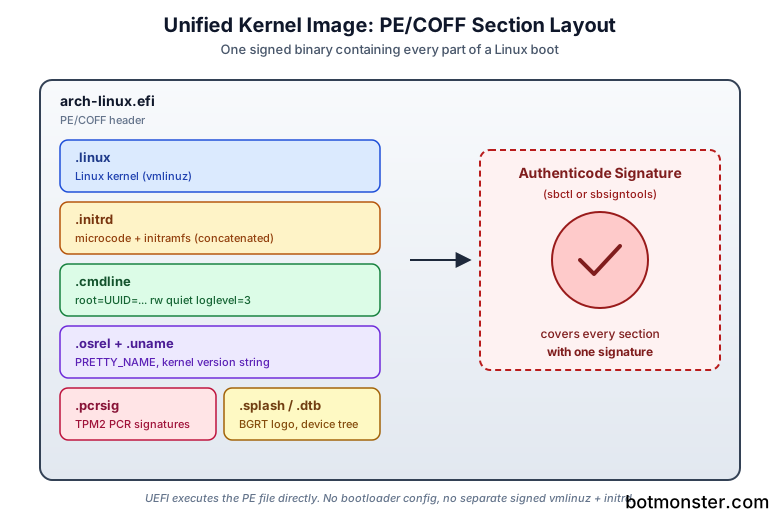
Signing vmlinuz alone was never enough on a Secure Boot system. An unsigned initrd is a trivial attack surface: swap it out, boot into a shell hook, read the LUKS passphrase prompt off the screen. UKIs close that gap by pulling the initrd inside the signed envelope. The kernel command line gets the same treatment, so init=/bin/bash tricks at the firmware menu stop working because the options live inside the signed image rather than a text file on disk.
This is why the Boot Loader Specification’s Type 1 text entries in /boot/loader/entries/*.conf are now a legacy path on modern distros. systemd-boot still reads them, but it prefers Type 2 entries found at $BOOT/EFI/Linux/*.efi, and Fedora, Arch, openSUSE MicroOS, Debian sid, and Ubuntu 26.04 all default new installations to the UKI layout. The KERNEL_INSTALL_LAYOUT=uki setting in /etc/kernel/install.conf is what flips kernel-install into UKI mode so every RPM or pacman kernel upgrade produces a signed image instead of a split kernel+initrd pair.
UKIs also pair cleanly with measured boot. The .pcrsig section lets systemd-stub extend TPM2 PCRs predictably, so systemd-cryptenroll --tpm2-device=auto --tpm2-pcrs=11 can bind a LUKS unlock to the specific PCR value that only your signed UKI will produce. If someone swaps the kernel for an unsigned one, PCR 11 changes and the TPM refuses to release the key, so the disk stays encrypted. That payoff is usually the reason people go through this setup at all. Dual-booting with Windows keeps working too: systemd-boot continues to enumerate Windows Boot Manager alongside auto-discovered UKIs, and Microsoft’s chain is never touched.
Building a UKI with ukify
ukify is the systemd-shipped tool that assembles a UKI from its parts. The minimal invocation is one line:
ukify build \
  --linux /boot/vmlinuz-linux \
  --initrd /boot/initramfs-linux.img \
  --output /boot/EFI/Linux/arch-linux.efi
That produces an unsigned but immediately bootable UKI. On a system with Secure Boot disabled you can reboot into it right now. Adding the command line is the next natural step - otherwise the kernel will not find your root filesystem:
ukify build \
  --linux /boot/vmlinuz-linux \
  --initrd /boot/intel-ucode.img \
  --initrd /boot/initramfs-linux.img \
  --cmdline "rw quiet loglevel=3 root=UUID=0a4b... rootflags=subvol=@" \
  --os-release @/etc/os-release \
  --output /boot/EFI/Linux/arch-linux.efi
Notice the two --initrd flags. ukify concatenates them in order into the single .initrd PE section, which is exactly what the kernel’s early-init code expects for microcode loading. Skip the intel-ucode.img or amd-ucode.img line and you lose early microcode updates, which matters for Zen 4/5 and Meteor Lake errata that only get patched during the first few hundred instructions of kernel boot.
Embedding a splash is a one-line addition: --splash /usr/share/systemd/bootctl/splash-arch.bmp. Firmware is picky about the format here - the BMP has to be uncompressed, bottom-up row order, 24-bit color. GIMP and ImageMagick can both produce compliant files with the right export flags. For ARM and embedded work, --devicetree /usr/lib/linux/dtbs/rockchip/rk3588-rock-5b.dtb bakes a DTB into the UKI so a single file boots a Rock 5B or a Raspberry Pi CM5 without a separate .dtb loose on the ESP.
CLI flags are fine for one-off experiments, but production workflows drive ukify from config files. /etc/kernel/uki.conf and /etc/kernel/cmdline let ukify pick up defaults automatically, which is how kernel-install and distro hooks run it non-interactively during package upgrades. Before signing anything, sanity-check what you built:
ukify inspect /boot/EFI/Linux/arch-linux.efiThat dumps every PE section with its size and offset, prints the embedded cmdline and kernel version, and flags mismatches between the .uname string and the actual kernel binary. Running it once after every manual build catches typos in the command line before they turn into an unbootable signed image. One version gotcha to note: anything older than systemd 254 shipped ukify as a Python script at /usr/lib/systemd/ukify, while 256+ installs it as a first-class binary at /usr/bin/ukify. The CLI is compatible, but the path in automation scripts may need updating on older LTS images.
Signing with sbctl for Secure Boot
A UKI still has to be signed with keys that UEFI trusts, which on most hardware means replacing the factory keys with ones you own. sbctl is the easiest path because it handles key generation, MOK-free enrollment, and idempotent signing of every file on the ESP. No shim, no mokutil steps, no separate DER-format certificate wrangling.
The lifecycle starts in firmware setup. Reboot, go to the Secure Boot menu, and put the system into Setup Mode - usually a “clear keys” or “delete PK” option. The system stays in Setup Mode until someone enrolls a new Platform Key, which is where sbctl comes in:
sbctl create-keys
sbctl enroll-keys -m
sbctl status
create-keys populates /var/lib/sbctl/keys/{PK,KEK,db} with a generated GUID and private keys you control. enroll-keys -m writes those into the firmware’s EFI variables, and the -m flag preserves Microsoft’s KEK and db entries so Windows, firmware updates via fwupd, and signed OPROMs on GPUs continue to verify. Leave -m off only if you have a specific reason to lock Microsoft out - most laptops have GPU or NIC OPROMs signed by Microsoft’s UEFI CA, and booting without them enrolled leads to silent hardware failures. sbctl status then confirms Setup Mode is off, Secure Boot is reporting as enabled, and the enrolled vendor matches your local key set.
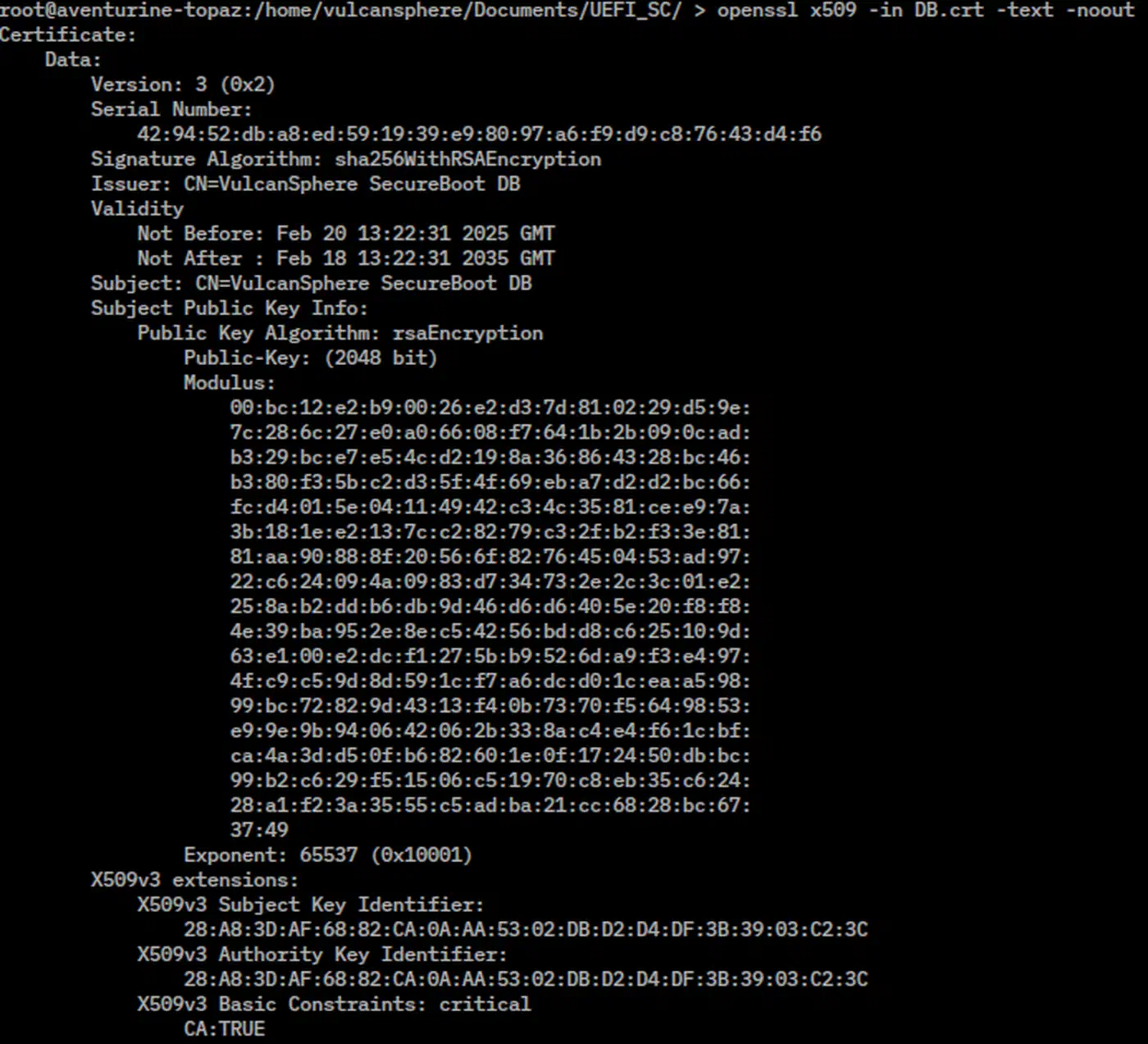
Signing the UKI itself is one command:
sbctl sign -s /boot/EFI/Linux/arch-linux.efiThe -s flag records the path in sbctl’s state database. Future sbctl sign-all invocations automatically re-sign every tracked file, which is how the pacman and DNF hooks work under the hood. Run sbctl verify before any reboot into Secure Boot enforcing mode - it walks the ESP and reports any binary that is unsigned or signed by a key not in db. A single unsigned file will produce a black screen at the next reboot.
For CI pipelines and reproducible builds where a state directory is inconvenient, sbsigntools gives lower-level control:
sbsign --key /var/lib/sbctl/keys/db/db.key \
       --cert /var/lib/sbctl/keys/db/db.pem \
       --output arch-linux.efi.signed arch-linux.efi
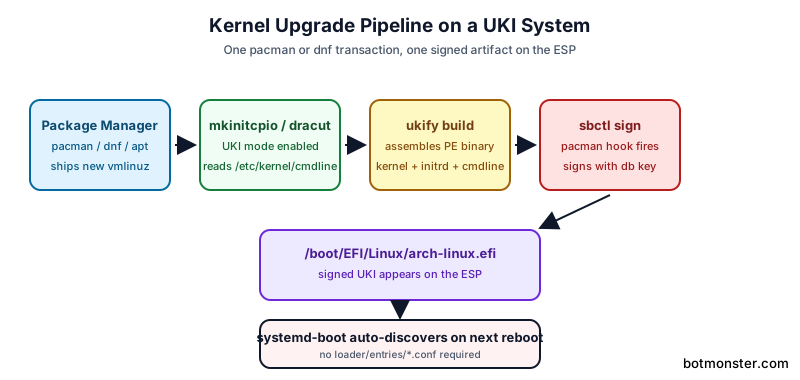
On Arch, sbctl installs /usr/share/libalpm/hooks/zz-sbctl.hook so every pacman transaction that touches a kernel, the bootloader, or systemd-stub re-signs the affected file in the same transaction. Fedora wires the equivalent through kernel-install plugins. A common failure mode for new UKI users is forgetting to install these hooks before enrolling keys, then pushing a kernel update that produces an unsigned image and a bricked Secure Boot state. Install the hook first, enroll keys second. Also back up /var/lib/sbctl/keys somewhere offline - if the keys are lost and the firmware is locked to them, recovery means clearing Secure Boot keys from the UEFI setup screen and re-enrolling from scratch. For a broader security baseline beyond the boot chain, this walkthrough of post-install server lockdown steps covers SSH lockdown, nftables, and kernel parameter tuning.
Dropping Signed UKIs into systemd-boot
Once a signed .efi exists, systemd-boot does the rest. There is no config file to edit, no bootctl update dance beyond the initial install, and no kernel parameters to wire up by hand. Install systemd-boot once:
bootctl installThat writes systemd-bootx64.efi to the ESP and registers a UEFI boot entry via efibootmgr behind the scenes. After this, the bootloader binary is not touched again unless bootctl update gets run after a systemd upgrade. Auto-discovery kicks in immediately: any file matching /boot/EFI/Linux/*.efi (or /efi/EFI/Linux/*.efi on the xbootldr layout) is enumerated as a Type 2 boot entry, sorted by version string extracted from the .osrel and .uname sections.
Naming the images matters for how the menu looks. A directory with arch-linux.efi, arch-linux-lts.efi, and arch-linux-zen.efi shows up as three entries in sorted order, with the pretty name from PRETTY_NAME in the embedded os-release. No loader config required, no title field to forget. The one config file that still matters is /boot/loader/loader.conf:
default   arch-linux.efi
timeout   3
console-mode max
editor    no
Set editor no. With UKIs the cmdline lives inside the signed binary, but leaving the systemd-boot editor enabled lets a local attacker override it at the menu, which defeats half the point of signing. The other three options are aesthetic: pick a default, a timeout, and a console resolution.
A handful of commands cover day-to-day inspection:
| Command | What it shows |
|---|---|
bootctl status | Firmware info, loader version, secure boot state, current and default entries |
bootctl list | Every discovered entry with source path and title |
sbctl verify | Which ESP files are signed and by which key |
ukify inspect <file> | PE section layout, embedded cmdline, kernel version |
The xbootldr layout is something UKI users run into fast because ESP size limits bite hard. A single UKI with a full-featured initrd easily runs 80-150 MB. Three kernel variants plus fallbacks on a 100 MB factory ESP is impossible. The fix is the UAPI discoverable partitions spec: mount a small ESP at /efi (just systemd-boot itself) and a larger xbootldr partition at /boot for the UKIs. systemd-boot discovers both automatically as long as they live on the same disk. This same property makes UKIs a good fit for immutable distros like Fedora Silverblue, openSUSE MicroOS, and Vanilla OS, where one atomic artifact per deployment turns rollback into a file copy.
Wiring Into mkinitcpio and dracut
Nobody wants to run ukify build by hand after every kernel upgrade. Both mkinitcpio and dracut grew first-class UKI modes in 2024 that are stable in 2026, so the package manager handles everything. Which of the two you should run is its own comparison.
On Arch, the switch is a one-time edit of /etc/mkinitcpio.d/linux.preset:
ALL_config="/etc/mkinitcpio.conf"
ALL_kver="/boot/vmlinuz-linux"
ALL_microcode=(/boot/*-ucode.img)

PRESETS=('default' 'fallback')

default_uki="/boot/EFI/Linux/arch-linux.efi"
#default_image="/boot/initramfs-linux.img"

fallback_uki="/boot/EFI/Linux/arch-linux-fallback.efi"
fallback_options="-S autodetect"
Comment out the default_image and fallback_image lines so mkinitcpio stops producing bare initrds, uncomment the _uki lines, and make sure ALL_microcode points at whatever *-ucode.img files exist on the system. Running mkinitcpio -P now calls into ukify internally, reads cmdline from /etc/kernel/cmdline, and produces a signed-ready UKI in one step. The sbctl pacman hook then signs it on the same transaction.
Fedora and RHEL use dracut’s UKI mode through kernel-install:
# /etc/dracut.conf.d/uki.conf
uki_generator=ukify
uki=yes
Combined with KERNEL_INSTALL_LAYOUT=uki in /etc/kernel/install.conf, every kernel RPM update calls dracut, which emits the UKI, and the Fedora signing plugin signs it. Debian and Ubuntu in 2026 ship the systemd-ukify package and support the kernel-install layout switch for the same experience, with update-initramfs stepping aside on new installations.
For multiple kernels, use separate preset files: /etc/mkinitcpio.d/linux.preset, linux-lts.preset, and linux-zen.preset each produce their own UKI. systemd-boot sorts by kernel version and picks the newest as default, with no manual config. For whole-image builds, mkosi (also from the systemd project) assembles entire UKIs for disk images in a single step, which is how Fedora IoT and systemd-sysext images are produced in 2026.
When a UKI fails to boot, the process is predictable. Pick the fallback entry at the systemd-boot menu, boot into a working userspace, and run ukify inspect on the broken image:
ukify inspect /boot/EFI/Linux/arch-linux.efi | grep -A1 cmdline
sbctl verify /boot/EFI/Linux/arch-linux.efi
journalctl -b -1 -p warning
That sequence surfaces the three usual suspects: a wrong root=UUID= in the embedded cmdline, a missing or expired signature, and a kernel module that failed to load during the failed boot. Fix the cause, rebuild the UKI, sign it, and reboot. If the boot itself completes but services are slow to start, you can profile your boot sequence and surface the bottleneck in seconds. The signed self-contained boot artifact has more moving parts than GRUB plus a vmlinuz, but every part is inspectable, reproducible, and leaves a clear audit trail of what got signed and when. For a Secure Boot machine that holds LUKS keys in its TPM, the extra setup pays for itself the first time someone with physical access tries to tamper with the initrd.