 Botmonster Tech
Bun vs Deno vs Node.js: which JavaScript runtime actually wins in 2026?

Which JavaScript runtime wins in 2026:
- Node.js is still the safe default for production work that needs maximum ecosystem compatibility.
- Bun has the fastest startup, installs, and test runner, and is the best fit for new projects that prioritize developer experience.
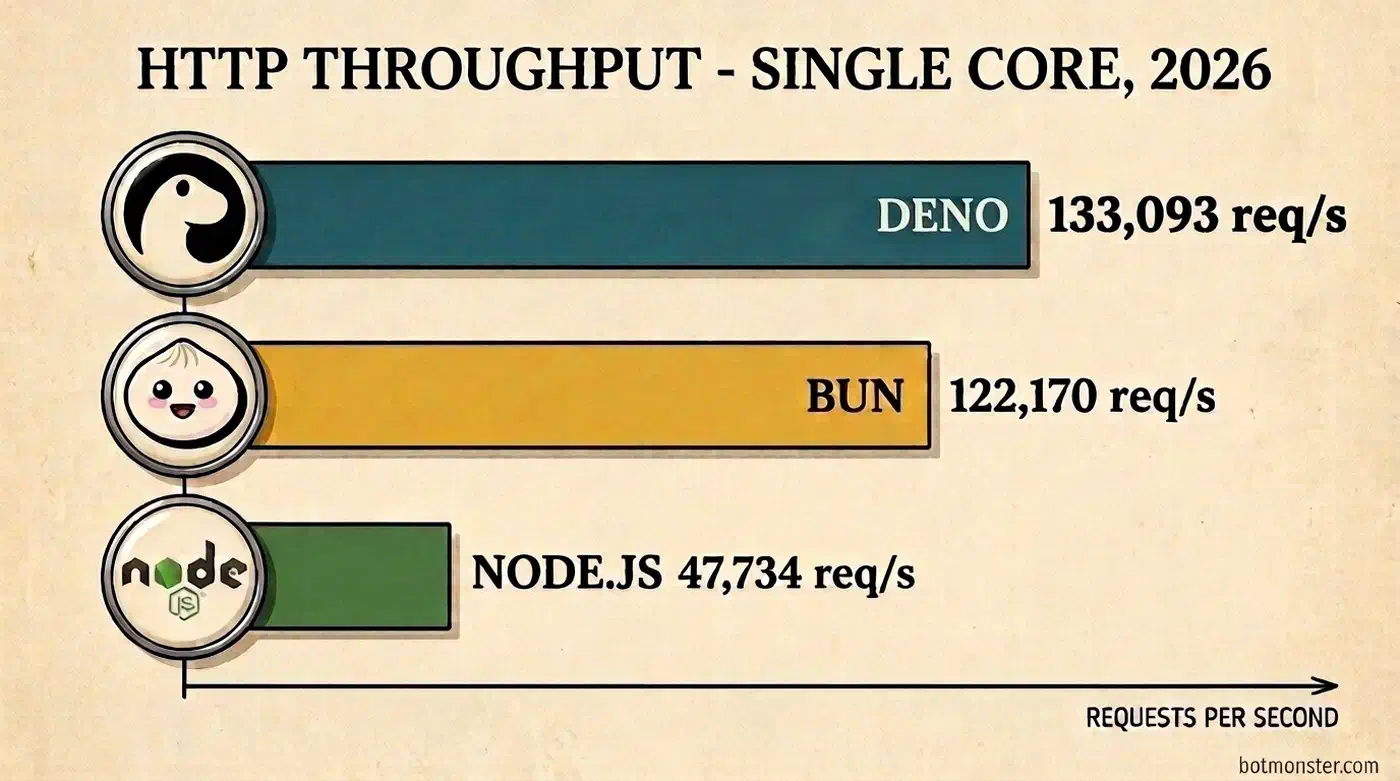
- Deno is the most secure by default and the best TypeScript-first experience. Since the 2.9 release, it’s also the fastest at raw HTTP throughput on my test bench.
All three are production-ready in 2026, so the decision should come down to your constraints rather than benchmark headlines.
If you want the longer version, read on. One thing before you do: I didn’t copy the benchmark numbers below from other posts. I ran all three runtimes on the same machine and caught my own load generator lying to me halfway through. Several numbers you’ve probably seen elsewhere didn’t survive the re-measurement.
Performance Benchmarks: I Ran Them Instead of Quoting Them
Benchmarks are where the runtime debates get loud. The numbers that circulate, including the table I almost published here, are usually stitched together from different people’s tests, on different hardware, from different years. The ratios between the rows were never measured on the same machine, so comparing them is meaningless. Instead of recycling them, I benchmarked all three runtimes myself on one box: a 12-core Linux desktop (kernel 6.17) running Node.js 24.18.0 (the newest LTS), Bun 1.3.14, and Deno 2.9.1, all current as I write this. The HTTP test is a minimal JSON endpoint with per-request JSON.stringify and no framework. The server is pinned to a single core and loaded over 200 keep-alive connections for 15 seconds after a warmup pass. Every number was measured twice and the passes agreed within 2%. Every script, server file, and raw result lives in a benchmarks Github repo
, so you can check my work or rerun it on your own hardware.
| What I measured | Bun 1.3.14 | Deno 2.9.1 | Node.js 24.18.0 |
|---|---|---|---|
| HTTP throughput (JSON endpoint, single core) | 122,170 req/s | 133,093 req/s | 47,734 req/s |
| Process cold start (median of 15 runs) | 11 ms | 14 ms | 21 ms |
| Cold-cache install, 585 packages | 5.8 s | 6.0 s* | 11.8 s (npm) |
| Warm-cache install, same project | 0.17 s | 0.12 s* | 2.0 s (npm) |
| 200 trivial tests across 20 files, native runner | 0.02 s | 1.04 s | 0.14 s |
JSON.parse on a 3.3 MB payload | 11.9 ms | 12.1 ms | 14.3 ms |
JSON.stringify on the same payload | 5.5 ms | 6.5 ms | 13.6 ms |
| Idle memory, plain HTTP server | 36 MB | 51 MB | 49 MB |
Green marks the best result in each row, red the worst. * Deno links packages from a global cache instead of materializing the full node_modules tree, so its install does less disk work than npm or bun.
The mistake I made first
My first throughput run put Bun at 65,600 requests per second and Deno at 65,500. Two runtimes, two different engines, two completely different HTTP stacks, separated by 0.15%. Numbers that identical are not a result. They are a symptom.
The load generator I reached for first was autocannon, which is itself a Node.js program. It tops out around 65,000 requests per second on my machine, so every server faster than that got clamped to the same ceiling. I was benchmarking my benchmark tool. The tell came when I pointed two autocannon processes at the same single-core Bun server. Together they pulled 115,000 req/s out of a server that had just “measured” 65,000. After switching to oha , a load generator written in Rust, both fast runtimes nearly doubled. Node barely moved, because Node really was the bottleneck in its own test. The run.sh in the companion repo now performs this as an automatic sanity check: after measuring, it points two parallel clients at the same server and warns you if their combined total beats a single client by more than 15%.
I mention this because plenty of published runtime benchmarks are built exactly this way: a JavaScript load tester, client and server sharing a machine, no sanity check. Four smells worth checking before you trust anyone’s chart, including mine:
- Two very different systems landing on nearly identical numbers. The harness is probably the ceiling.
- A load generator written in the same language as the thing being benchmarked.
- No runtime versions listed. Deno 1.x and Node 18 numbers still circulate as if they were current.
- A table whose rows come from different sources and different hardware.
What holds up and what doesn’t
The ranking you see everywhere, Bun first, Deno second, Node third, did not even survive the measurement. On current versions, Deno took the throughput lead: 133,000 requests per second to Bun’s 122,000. I can put a number on how fast that lead moved, because earlier the same day, on the same machine, Deno 2.7.4 measured 103,000 req/s. Two minor releases bought Deno roughly 30% more throughput and first place.

The most-quoted throughput figures give Bun a 3.7x lead over Node and put Deno at barely half of Bun. Measured today, the fast pair sit at 2.6x and 2.8x over Node, and the runtime supposedly at “barely half” is the one in front. Old numbers keep getting recycled as if nothing changed, and every repost drifts further from the runtimes people actually download.
Cold start kept the cited ordering but not the cited scale. The commonly quoted range for Node is 60 to 120 ms, with Deno at 40 to 60 ms. Measured today: Bun 11 ms, Deno 14 ms, Node 21 ms. Every runtime starts three to six times faster than the numbers people keep repeating, and the gaps between them are a few milliseconds, not the chasm the old figures suggest.
Then there is the famous claim that installing 1,847 dependencies takes bun 47 seconds and npm 28 minutes. My cold-cache npm run installed 585 packages in 11.8 seconds. Scale that linearly to 1,847 packages and you land under 40 seconds, right in the range that story credits to bun. Bun’s honest advantage on my machine was about 2x with a cold cache and 12x with a warm one, and Deno matched it almost exactly. Those are genuinely good reasons to switch. They’re not 35x, and any npm run that takes 28 minutes had something else wrong: no lockfile, a disabled cache, native compiles, or a broken network.
Two smaller corrections to claims I had drafted in this very post before measuring. Bun doesn’t parse JSON two to three times faster than Node; on a 3.3 MB payload it parsed about 16% faster. The real gap is in JSON.stringify, where Bun beat Node by 2.5x, and since an API server spends its life serializing responses, that is the more useful headline anyway. And Deno’s test runner, often described as 2 to 3x faster than Jest, was slower than Jest on my suite of 200 trivial tests (1.04 s vs 0.81 s) because its per-file isolate setup dominates when the tests themselves are cheap. Bun ran the same 200 tests in 0.02 seconds.
Benchmark posts tend to bury the same limit my numbers carry: production workloads are almost never CPU-bound on JSON and hello-world routing. Real APIs spend most of their time waiting for databases, calling other services, and running business logic. Add a real database query and a templated response to the route and the raw-throughput gap compresses, because the runtime stops being the bottleneck. I didn’t benchmark that path here, so treat the 2.6-2.8x lead as a ceiling on synthetic work rather than a production figure.
Where the benchmark gap translates into money is serverless and edge environments. Published AWS Lambda measurements put real cold starts around 156 ms for Bun, 190 ms for Deno, and 245 ms for Node. I couldn’t replicate those locally, so treat them as cited rather than verified. A 90 ms cut in cold start directly trims your billed duration on every cold invocation. At scale that becomes a real line item.
The io_uring myth
One more claim needed checking, because I had repeated it in an early draft of this very article: that Bun is fast because it uses io_uring, the modern Linux I/O interface, while Node is stuck on the older epoll. The line appears in countless runtime comparisons. strace settles it in two minutes by counting the syscalls each runtime actually makes:
strace -f -e trace=io_uring_setup,io_uring_enter,epoll_wait,epoll_pwait2 node server-node.js| Syscalls observed | Bun 1.3.14 | Deno 2.9.1 | Node.js 24.18.0 |
|---|---|---|---|
| Socket polling, 5 HTTP requests served | epoll_pwait2 x42 | epoll_wait x19 | epoll_wait x30 |
io_uring calls during file reads and writes | 0 | 0 | rings set up and used, on by default |
The result is backwards from the claim. Bun made zero io_uring syscalls in either test; its HTTP stack polls sockets with epoll_pwait2, the newest epoll variant, but epoll all the same. Deno’s event loop is epoll too. The only runtime of the three that uses io_uring today is Node. libuv gained io_uring support for file operations in 2023, Node switched it off by default in February 2024
after a security hole (CVE-2024-22017), and once libuv fixed that, it came back. In Node 24 it’s on by default.
strace only proves what happened on this one workload, so I went into the source too, in case io_uring was hiding behind a code path my test never triggered. It isn’t there. Bun’s event loop runs on uSockets
, whose Linux backend is compiled with LIBUS_USE_EPOLL; the io_uring backend flag never gets set, and the only io_uring references in the entire Bun repo are a Windows-only libuv compatibility constant and a literal // TODO: linux io_uring in the package installer. Deno pulls in tokio and mio with no io_uring crate anywhere, and its default reactor polls on epoll. Node is the lone exception, and its bundled libuv says so in its own changelog: “always use io_uring for epoll batching.” One nuance for the curious: libuv’s more aggressive SQPOLL ring has been opt-in since version 1.49, but the ordinary io_uring path stays on, which is why the ring shows up unprompted in the trace.
None of this changes the benchmark results. Bun’s speed is real; it comes from JavaScriptCore and a lean C networking stack, not from a kernel interface it doesn’t use. But it shows how runtime folklore outlives the code it describes. The io_uring line traces back to Bun’s early days around 2021, still gets reprinted in 2026, and the runtime shipping io_uring today is the one the claim was aimed against.
Run it yourself
Everything lives in the companion benchmarks repo
. It holds the three five-line servers (server-node.js
, server-bun.js
, server-deno.js
) returning JSON.stringify({ hello: "world" }), plus the cold-start bench, the JSON bench, and the install project. The run.sh
script installs the exact pinned runtime versions into a local directory (no sudo, nothing touches your system) and walks you through all six stages on any Ubuntu box:
git clone https://github.com/botmonster/benchmarks.git
cd benchmarks/bun-vs-deno-vs-nodejs
./run.sh          # add --latest to pit the newest versions against this article
The core of it is two commands. Pin the server and the load generator to different cores so they don’t fight for CPU. Then check that the load generator isn’t the bottleneck before believing anything it tells you:
taskset -c 0 node server-node.js
taskset -c 2-11 oha -z 15s -c 200 http://localhost:3001/
If two parallel load generators pull meaningfully more total throughput than one, your client was saturating, and every number you collected before that is a measurement of the client. The script runs that check for you automatically.
Architecture and Engine Differences
The three runtimes look interchangeable from the outside, but under the hood they make very different engineering bets. Those bets explain almost every number in the table above.
Node.js runs on Google’s V8 engine , the same engine that powers Chrome, glued to libuv (a C library for asynchronous I/O) through a layer of C++. It’s the original runtime and it has run in production at every scale you can imagine. It also benefits from a huge collection of native C++ addons via N-API. If a library exists in JavaScript, odds are it works on Node first.
Deno also uses V8, but the host runtime around it is written in Rust
instead of C++. Deno was built by Ryan Dahl, the original author of Node, specifically to fix the design decisions he later regretted: implicit access to the filesystem and network, the awkward CommonJS module system, and the absence of a built-in toolchain. The headline difference is that Deno runs in a sandbox. A script can’t read files, hit the network, or read environment variables unless you grant it permission with explicit --allow-read, --allow-net, or --allow-env flags.
Node has since grown a permission model of its own, so the sandbox is no longer something only Deno offers. Launch Node with --permission and filesystem, network, child-process, worker, and native-addon access are all denied until you grant them with flags like --allow-fs-read and --allow-net. That model reached stable status in Node 22.13. What separates the two now is the default posture: Deno denies everything unless you opt in, Node allows everything unless you remember to turn the model on, and most projects never do. Deno’s system is also broader, gating environment-variable reads and letting you scope grants to specific paths and hosts, which Node’s model doesn’t fully match yet. Secure-by-default versus secure-if-you-remember is a real distinction. It’s just narrower than it was two years ago, and any comparison that claims Node has no sandbox at all is describing Node 18, not Node 24.
Bun takes a different path. It uses JavaScriptCore
, the engine from Safari, and wraps it in a runtime written in Zig
. Its HTTP server is built on uSockets
, a lean C networking library. You’ll often read that Bun is fast because it uses io_uring while Node is stuck on epoll; I checked that claim with strace, and it didn’t survive either (more on that above). Bun is distributed as a single binary that replaces node, npm, npx, and jest all at once.
Two architectural details explain most of the benchmarks above. First, JavaScriptCore starts faster than V8. It leans on a quick interpreter before JIT compilation kicks in, while V8 front-loads more compilation work to optimize long-running processes. Second, Deno’s Rust host layer sits on hyper , a heavily optimized HTTP stack, and since Deno 2.9 that work shows in the throughput numbers.
TypeScript Support
TypeScript is the default language for serious JavaScript projects in 2026, and each runtime handles it differently.
Node.js historically required a build step. You would run tsc, tsx, ts-node, or esbuild to transpile your .ts files before execution. That changed in Node.js 22, which added the experimental --experimental-strip-types flag. Node.js 22.18 turned type stripping on by default and dropped the experimental warning, and Node.js 24.12 marked it stable
. On the Node 24 LTS line you’re comparing here, a .ts file runs with no flag at all. Node only strips the type annotations at runtime, though. It does no type checking. You still need a separate tsc --noEmit run for real type safety, and you can’t use TypeScript features that require code generation like enums or namespaces.
Deno runs .ts files with zero configuration. It also type-checks as part of deno check or whenever you ask for it. Deno will read a tsconfig.json if one exists, but it doesn’t require one. Recent Deno releases include a new experimental type checker called tsgo that is written in Go and is much faster than the original TypeScript compiler.
Bun runs .ts and .tsx files too, stripping the type annotations on the fly with its own native transpiler, not with the JavaScriptCore engine that later executes the result. Like Node, Bun doesn’t type-check at runtime, so you should still run tsc --noEmit in CI. The convenient part about Bun is that .tsx files just work without any configuration, which is handy for full-stack projects that share TypeScript code between a React frontend and a backend.
The takeaway: Deno and Bun have eliminated the build step for TypeScript entirely. Node.js has caught up on the basics, but the implementation feels bolted on, and you still need external tooling for any real type checking.
Ecosystem and Package Compatibility
The npm registry is the main reason Node.js won’t be displaced any time soon. There are millions of packages, and most of them assume they are running on Node. If you want to keep that ecosystem close to home, you can self-host a private npm registry alongside a PyPI mirror in under 30 minutes.

Bun has reached about 95% compatibility with the npm ecosystem in 2026. It reads package.json, supports node_modules, and runs the vast majority of packages without modification. The remaining 5% is mostly native C++ addons. Some popular packages like sharp
and node-canvas have rough edges on Bun depending on the platform. A handful of obscure libraries that poke at internal Node APIs still break. Compatibility has improved a lot over the last year, but if your project depends on something exotic, test it before committing.
Deno reached its current level of npm compatibility with the 2.0 release and has continued to refine it. You can import any npm package using the npm: specifier, like import express from "npm:express". Deno also has its own module registry at deno.land/x
and supports JSR, the JavaScript Registry. Since Deno 2.6, @types/node declarations come bundled by default. That fixes the most common type-hint friction when calling Node APIs from Deno.
The mainstream web frameworks (Express, Fastify, Hono ) and TypeScript ORMs (the two leading query builders , with the older TypeORM now in maintenance mode) run on all three runtimes. Bun also has a fast-rising native framework of its own in Elysia , which leans on Bun for end-to-end type safety and speed. Prisma is the clearest ecosystem win: Prisma 7 replaced its Rust query engine with a TypeScript-native one in late 2025, and that is what let it run cleanly on Bun 1.2+ and Deno 2 without the old engine-binary friction. If you want a framework designed specifically to run the same codebase on all three, take a look at Hono, the 14KB web framework built on Web Standards . Where things get murky is the large opinionated meta-frameworks. Next.js still leads, and Remix has since folded into React Router’s framework mode ; on either, compatibility on Bun and Deno depends on the version and the features you use. If you’re building on a meta-framework, check its compatibility matrix before switching runtimes. Our guide to self-hosting Next.js and Astro breaks down how each meta-framework deploys off Vercel.
Built-in Tooling Comparison
A big draw of both Bun and Deno is that they bundle tooling that previously required four separate packages and a config file each.
| Tool | Node.js | Deno | Bun |
|---|---|---|---|
| Package manager | npm / pnpm / yarn | deno add | bun install |
| Test runner | node --test (stable) | deno test | bun test |
| Bundler | none built-in | deno bundle | bun build |
| Formatter / Linter | none (Prettier, ESLint) | deno fmt, deno lint | none (use external) |
.env loading | --env-file, process.loadEnvFile() | --env-file flag | built-in |
| Single-file binary | SEA (experimental) | deno compile | bun build --compile |
| Native TypeScript | partial (strip-types) | yes, with type checking | yes, transpile only |
Deno has the most complete built-in toolchain. If you value having a single source of truth for formatting, linting, testing, and TypeScript, Deno is hard to beat. Bun is fastest for the specific tasks it bundles (bun install, bun test, bun build), and it has the advantage of being a drop-in node replacement. Node.js still requires the most external tooling, but the gap has narrowed with the addition of native TypeScript support, the test runner, and the --env-file flag.
The single-binary story is now a three-way tie on capability, with the gap moved to maturity. deno compile produces a standalone executable that bundles your whole application and the Deno runtime into one file, and bun build --compile does exactly the same on Bun. Both have shipped for years, and both cross-compile: you can build a Linux, macOS, or Windows binary from a single machine by passing --target. Node caught up too. Single Executable Applications (SEA) have shipped since Node 18 and are still marked experimental in Node 24, and the flow is more manual than the other two: you bundle your code, write a config file, generate a blob with node --experimental-sea-config, then inject that blob into a copy of the node binary with postject. So for handing someone a CLI without asking them to install a runtime, Deno and Bun are the smooth paths today and Node is the workable-but-clunky one. The “Bun doesn’t do this yet” line you still see around is simply out of date.
Which Runtime Should You Actually Choose?
Here are concrete recommendations for the most common situations.
Pick Node.js when you need maximum ecosystem compatibility, when your team is already experienced with it, when you depend on native C++ addons, or when you’re maintaining an existing project. The hiring pool for Node developers is also much larger than for Bun or Deno, a real constraint for any team that plans to grow. Node.js 24 LTS is the current recommended version for new production projects.
Pick Bun when you’re starting a new project and want the fastest local development experience, when you’re deploying serverless functions where cold start time maps directly to billing, or when you want a single tool that handles install, test, build, and run. The bun install command alone is reason enough to try it on a side project.
Pick Deno when secure-by-default sandboxing is a hard requirement and you’d rather not rely on every developer remembering to switch Node’s opt-in permission model on, when you want the best built-in TypeScript and tooling experience, when raw HTTP throughput is the number you optimize for, or when you’re building for Deno Deploy
, the official edge platform. Deno is also a strong fit for CLI tools because of deno compile and the permission system.
For specific workload types, the picks tend to cluster:
- Serverless and edge: Bun for cold start, Deno for Deno Deploy and built-in security
- Enterprise APIs: Node.js for ecosystem, stability, and hiring, or Deno for security, throughput, and a TypeScript-first workflow
- Side projects and scripts: Bun for speed and simplicity, or Deno for built-in tooling and no
node_modulesdirectory - CLI tools: Deno, because
deno compileproduces a single binary - Full-stack TypeScript: Bun, because
.tsxworks out of the box, or Deno for zero-config TypeScript
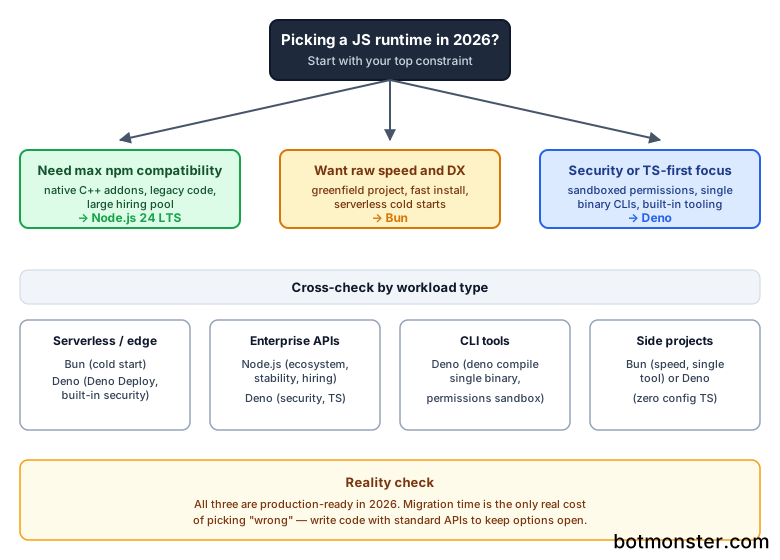
The honest read in 2026 is that all three runtimes are excellent. The “wrong” choice mostly costs you migration time later, not project success. If you can’t decide, default to Node.js for production systems where stability and hiring dominate the decision. Pick Bun for greenfield projects where you want to feel the speed difference. Deno deserves a serious look if you’re building anything where the secure-by-default permission model would actually get used rather than turned off on day one.
Whichever runtime you pick, write your code so it’s easy to swap. Stick to standard APIs (Web Fetch, Web Streams, standard ESM imports), avoid runtime-specific globals where you can, and keep your I/O behind a thin abstraction layer. The runtime wars in 2026 are friendly enough that you can change your mind in six months without burning the project down.