 Botmonster Tech
Hono: the 14KB web framework that runs everywhere

This post is open for corrections. Highlight any line of text to challenge it or ask for a clearer explanation and leave a comment.
Hono is a ~14KB TypeScript web framework that runs on every modern JavaScript runtime with the same API. Write your routes once and ship to Bun, Deno, Cloudflare Workers, Node.js, AWS Lambda, Vercel Edge, Fastly Compute, or Netlify. No code changes needed. Hono builds on Web Standard APIs (Request, Response, fetch), which makes it small, fast, and far lighter than Express. It ships with middleware, validation, RPC, and streaming.
Why Hono Exists: The Runtime Portability Problem
Between 2023 and 2025, the JavaScript runtime scene split apart. Node.js stopped being the default. Bun showed up with its speed claims. Deno grew into a production-ready platform. Which of the three wins on speed comes down to benchmarks on one machine, not marketing. Edge runtimes like Cloudflare Workers, Vercel Edge Functions, and Fastly Compute opened up a new class of deployment targets. Each runtime had slightly different APIs. Each spawned its own micro-framework: itty-router for Cloudflare Workers, Oak for Deno, and various adapters for Lambda.
Express, the default for Node.js coders since 2010, couldn’t follow them. Express leans on Node’s built-in http module and its in-house req/res objects. These don’t exist on edge runtimes, which use the Web Standard Request/Response API instead. Fastify hits the same wall. It’s a Node-native framework that can’t run on Cloudflare Workers or Deno without heavy rework.
Hono’s creator, Yusuke Wada, built the framework around one rule: base everything on Request and Response. If a runtime supports the Fetch API, Hono runs on it. The router takes a Request and gives back a Response. That’s the same shape Cloudflare Workers, Deno, and Bun all expose natively. Node.js gets support through the @hono/node-server adapter, which bridges Node’s http module to the Web Standard API.

Web Standards also explain Hono’s speed. Its RegExpRouter rolls route patterns into a single regex at startup. Route matching happens in one regex test, not a loop over a list. On Cloudflare Workers, Hono handles over 400,000 ops per second. That’s about twice the throughput of itty-router. On Deno, it hits 136,000 requests per second against Oak’s 43,000.
| Framework | Runtime | Requests/sec | Notes |
|---|---|---|---|
| Hono | Cloudflare Workers | ~402,800 ops/s | RegExpRouter |
| itty-router | Cloudflare Workers | ~212,600 ops/s | - |
| Hono | Deno | ~136,100 req/s | v3.0 benchmark |
| Oak | Deno | ~43,300 req/s | v10.5 |
| Hono | Bun | ~62,000 req/s | - |
| Elysia | Bun | ~71,000 req/s | Bun-native |
| Fastify | Node.js | ~15,000 req/s | - |
| Express | Node.js | ~8,000-10,000 req/s | - |
Elysia beats Hono on Bun because it’s built only for that runtime and uses Bun-specific tricks. Hono trades some raw speed on any one runtime for running on all of them with the same code.
Building Your First Hono API
The quickest way to start is with Bun. One command scaffolds a project:
bun create hono my-api
cd my-api
bun install
The generated src/index.ts looks like this:
import { Hono } from 'hono'

const app = new Hono()

app.get('/', (c) => {
  return c.text('Hello Hono!')
})

export default app
The c parameter is Hono’s Context object. It wraps the incoming request and gives you helpers for building responses:
// Path parameters
app.get('/users/:id', (c) => {
  const id = c.req.param('id')
  return c.json({ id })
})

// Query strings
app.get('/search', (c) => {
  const q = c.req.query('q')
  return c.json({ query: q })
})

// Request bodies
app.post('/users', async (c) => {
  const body = await c.req.json()
  return c.json(body, 201)
})
For bigger apps, you can split routes into separate files and mount them:
// routes/users.ts
import { Hono } from 'hono'
const users = new Hono()
users.get('/', (c) => c.json([]))
users.get('/:id', (c) => c.json({ id: c.req.param('id') }))
export default users

// src/index.ts
import users from './routes/users'
app.route('/users', users)
Run the dev server with hot reload:
bun run --hot src/index.tsMiddleware, Validation, and RPC
Hono ships with built-in middleware that covers most production needs without extra packages:
logger: request and response loggingcors: Cross-Origin Resource Sharing headersjwtandbearerAuth: token-based authcache: HTTP caching headerscompress: gzip and brotli compressionsecureHeaders: security headers (HSTS, CSP, etc.)csrf: CSRF protectionbasicAuth: HTTP Basic Authentication
Adding middleware to your app:
import { Hono } from 'hono'
import { logger } from 'hono/logger'
import { cors } from 'hono/cors'

const app = new Hono()
app.use('*', logger())
app.use('/api/*', cors())
Custom middleware uses the same (c, next) pattern as Express and Koa:
app.use('*', async (c, next) => {
  const start = Date.now()
  await next()
  const ms = Date.now() - start
  c.header('X-Response-Time', `${ms}ms`)
})
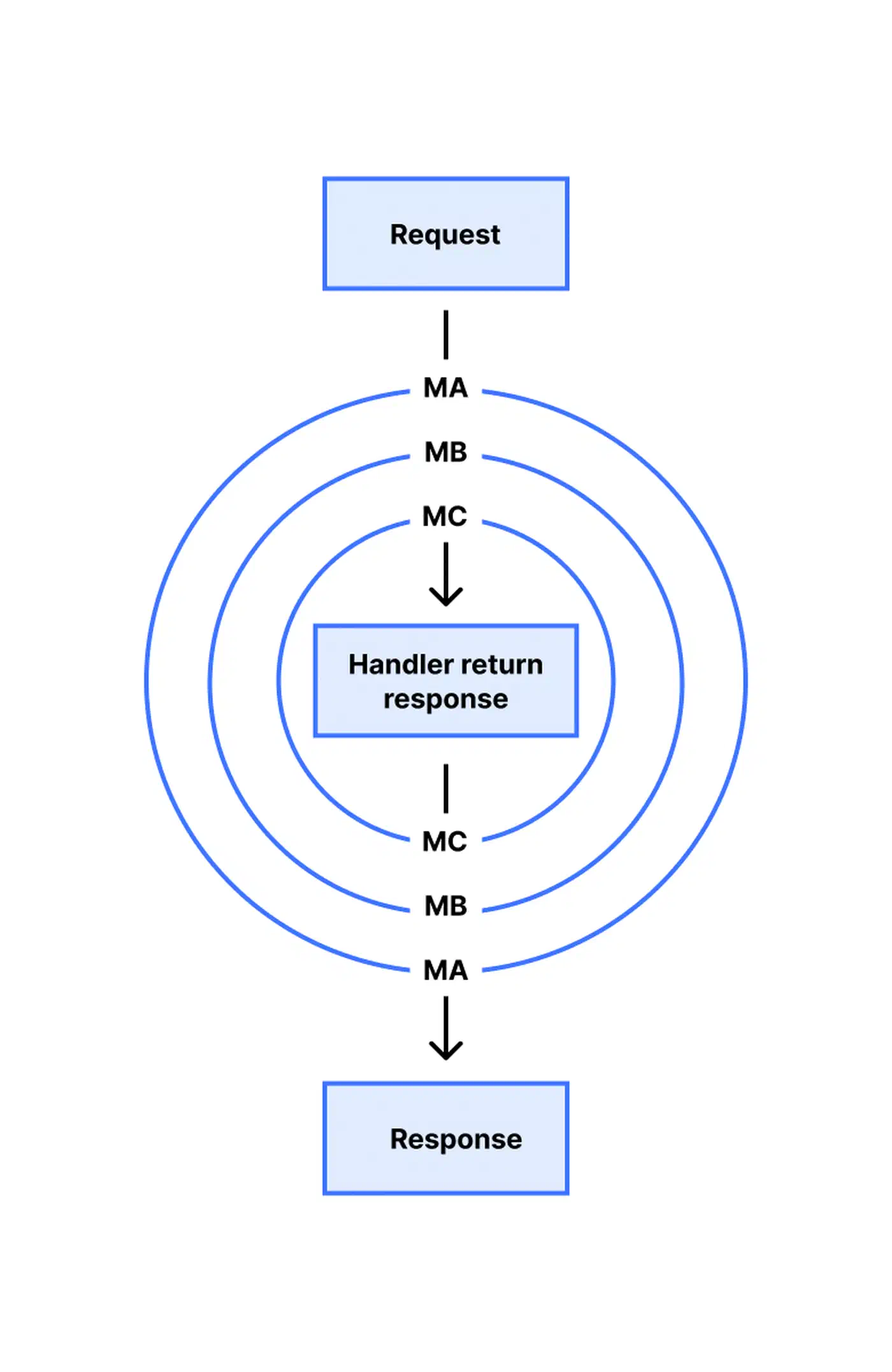
Hono’s middleware runs in an onion model. Each layer wraps the next one, running code before await next() on the way in and after it on the way out. The diagram below shows a request passing through three layers (MA, MB, MC) before it hits the handler, then unwinding back through each layer in reverse order.
Request Validation with Zod
The @hono/zod-validator package wires Zod schemas straight into route handlers. If the request doesn’t fit the schema, Hono sends back a 400 before your handler runs:
import { zValidator } from '@hono/zod-validator'
import { z } from 'zod'

const createUserSchema = z.object({
  name: z.string().min(1),
  email: z.string().email(),
})

app.post('/users', zValidator('json', createUserSchema), (c) => {
  const user = c.req.valid('json') // fully typed
  return c.json(user, 201)
})
TypeScript knows the exact shape of user because zValidator feeds Zod’s output type into the handler’s generic. No manual type casts needed.
End-to-End Type Safety with Hono RPC
Hono’s RPC feature builds a typed client from your server routes. Your frontend calls API endpoints as if they were local functions, with full TypeScript inference across the wire:
// server
const routes = app
  .get('/users', (c) => c.json([{ id: 1, name: 'Alice' }]))
  .get('/users/:id', (c) => c.json({ id: c.req.param('id') }))

export type AppType = typeof routes

// client
import { hc } from 'hono/client'
import type { AppType } from './server'

const client = hc<AppType>('http://localhost:3000')
const res = await client.users.$get()
const users = await res.json() // typed as { id: number; name: string }[]
No code generation step. No OpenAPI spec to keep up to date. The types flow straight from server to client through TypeScript.
Streaming Responses
Hono supports streaming through stream() and streamSSE() from hono/streaming. That’s handy for piping LLM output to a browser:
import { streamSSE } from 'hono/streaming'

app.get('/chat', (c) => {
  return streamSSE(c, async (stream) => {
    for await (const chunk of upstreamLLMResponse) {
      await stream.writeSSE({
        data: JSON.stringify(chunk),
        event: 'message',
      })
    }
  })
})
For two-way traffic, Hono also supports WebSockets natively. If you need a real-time chat over WebSockets as a reference, that pattern maps directly onto Hono’s handler model.
Deploying the Same Code to Every Runtime
One source file runs on four different runtimes. Only the entry point changes.

Bun is the simplest case. Bun reads export default app and serves it directly:
// src/index.ts
import { Hono } from 'hono'
const app = new Hono()
app.get('/', (c) => c.json({ runtime: 'bun' }))
export default app
bun run src/index.tsNode.js needs the @hono/node-server adapter:
import { serve } from '@hono/node-server'
import { Hono } from 'hono'
const app = new Hono()
app.get('/', (c) => c.json({ runtime: 'node' }))
serve({ fetch: app.fetch, port: 3000 })
Deno asks you to import from JSR and call Deno.serve:
import { Hono } from 'jsr:@hono/hono'
const app = new Hono()
app.get('/', (c) => c.json({ runtime: 'deno' }))
Deno.serve(app.fetch)
Cloudflare Workers uses the same export default app pattern, with a wrangler.toml for config:
import { Hono } from 'hono'

type Bindings = {
  DB: D1Database
  CACHE: KVNamespace
}

const app = new Hono<{ Bindings: Bindings }>()
app.get('/', (c) => c.json({ runtime: 'cloudflare' }))
export default app
npx wrangler deployThe routes, middleware, and business logic stay the same. Only the entry point adapter changes. Cloudflare Workers adds the Bindings type parameter, so the Cloudflare D1 database on c.env.DB and the KV cache on c.env.CACHE are fully typed. The request context also carries Cloudflare’s edge headers, so the same setup can power a what-is-my-IP Worker that reads the visitor’s address in a few lines.
AWS Lambda works through the @hono/aws-lambda adapter:
import { handle } from '@hono/aws-lambda'
export const handler = handle(app)
Two lines. The adapter wraps Hono’s fetch handler to speak API Gateway’s event shape.
Production Patterns
JWT Authentication
Pair Hono’s jwt middleware with Zod validation for a clean auth pipeline:
import { jwt } from 'hono/jwt'

app.use('/api/*', jwt({ secret: env.JWT_SECRET }))

app.get('/api/me', (c) => {
  const payload = c.get('jwtPayload')
  return c.json({ user: payload.sub })
})
Error Handling
Hono gives you app.onError and app.notFound for steady error responses across the whole API:
app.onError((err, c) => {
  console.error(err)
  return c.json({ error: 'Internal Server Error' }, 500)
})

app.notFound((c) => {
  return c.json({ error: 'Not Found' }, 404)
})
Hono’s JSX Renderer
Hono ships a built-in JSX engine (hono/jsx) that renders on the server. Unlike React’s JSX, there’s no hydration step and no client-side JS bundle. It pairs well with HTMX-powered apps where the server returns HTML fragments:
import { Hono } from 'hono'
import { jsxRenderer } from 'hono/jsx-renderer'

const app = new Hono()

app.get('/', (c) => {
  return c.html(
    <html>
      <body>
        <h1>Hello from Hono JSX</h1>
        <button hx-get="/clicked" hx-swap="outerHTML">
          Click me
        </button>
      </body>
    </html>
  )
})
For full-stack apps, HonoX layers on this JSX engine to add file-based routing and island architecture. If you need the full client ecosystem instead, the heavier React meta-frameworks ship routing and server components out of the box. For a closer look at the frontend side, our guide shows how to build reactive UIs without a build step.
Migrating from Express
For teams weighing a move from Express to Hono, the port is mostly mechanical. Express and Hono share the same model of routes and middleware. The API surface differs in a few spots:
| Express | Hono | Notes |
|---|---|---|
req.params.id | c.req.param('id') | Method instead of property |
req.query.q | c.req.query('q') | Method instead of property |
req.body | await c.req.json() | Async, no body-parser needed |
res.json(data) | c.json(data) | Single context object |
res.status(201).json(data) | c.json(data, 201) | Status as second arg |
app.use(cors()) | app.use('*', cors()) | Path required |
The biggest gap: Express middleware mutates req and res. Hono middleware uses c.set() and c.get() to pass data between handlers. That plays much better with TypeScript’s type system.
Upgrading from Hono v3 to v4
If you’re already on Hono v3, the move to v4 brings a few breaking changes worth a look:
c.stream()andc.streamText()moved tohono/streamingas standalone functionsstream()andstreamText()c.reqis now aHonoRequestwrapper. Grab the rawRequestviac.req.raw- The Validator Middleware API changed.
@hono/zod-validatoris the recommended swap FCtype inhono/jsxno longer passeschildrenon its own. UsePropsWithChildreninstead- Serve Static Middleware was replaced by runtime-specific adapters
The full migration guide lives on Hono’s GitHub repo.
Who’s Using Hono in Production
Hono has crossed 25,000 GitHub stars and runs in a growing list of production services:
- Cloudflare picked Hono as the recommended framework for Workers, ending the need for itty-router
- Nodecraft runs its billing portal and internal services on Hono with Cloudflare Workers
- SonicJS, an edge-native headless CMS built on Hono, D1, and R2, hits sub-100ms response times
- The honojs/examples repo holds reference setups for various deployment targets
Hono isn’t the fastest framework on any single runtime. Elysia wins on Bun. Fastify is tuned hard for Node.js. What Hono gives you is one codebase that deploys to whichever runtime fits your stack. That portability keeps getting more useful as the JavaScript world splits further across runtimes.