 Botmonster Tech
HTTP/3 is faster, but not on every network you test

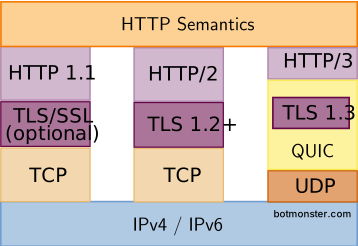
HTTP/3 runs on top of QUIC, a UDP-based transport. It folds TCP and TLS 1.3 into one handshake, stops TCP head-of-line blocking between streams, rides through network changes with connection migration, and adds 0-RTT session resumption. The fastest way to ship it in 2026: put Cloudflare in front of your origin and flip the HTTP/3 toggle. Or use Caddy, which turns on HTTP/3 over UDP 443 the moment you have a TLS certificate. On Nginx 1.25+ it is a few directives in the server block, documented at nginx.org. For protocol depth, read quicwg.org and Daniel Stenberg’s free book at http3-explained.haxx.se.
What QUIC solves over TCP+TLS
Most developers have heard “HTTP/3 is faster” without knowing why. The reasons sit in the transport design, so there is no HTTP/2 setting that gets you the same behavior.
The clearest one is TCP head-of-line blocking across streams. HTTP/2 ran many streams over one TCP connection. A single dropped packet stalled every stream behind it, because TCP has to deliver bytes in order. QUIC moves stream framing below the loss-recovery layer, so a lost packet only blocks its own stream while the rest keep flowing.
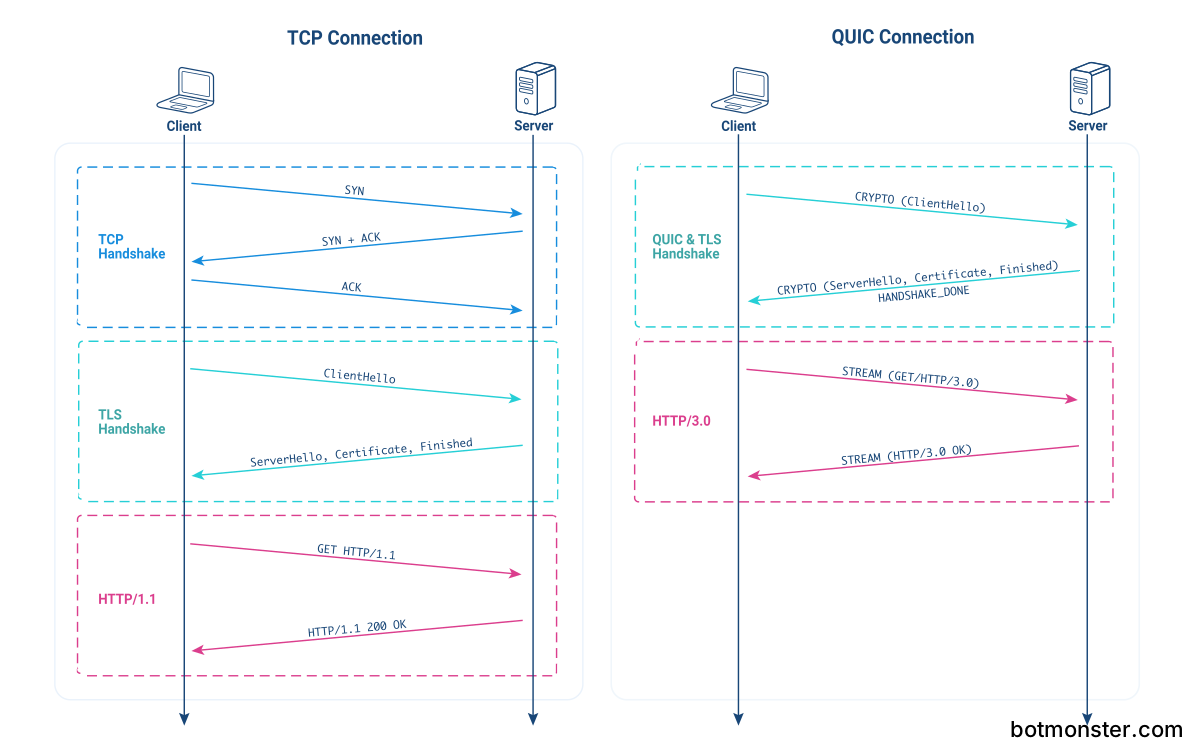
The transport and crypto handshakes are combined too. TCP needs a SYN, SYN-ACK, ACK round trip before TLS 1.3 can even start its own handshake, while QUIC bundles transport setup and TLS 1.3 key exchange into a single 1-RTT handshake. On a typical mobile RTT of 100 ms, that saves roughly one full round trip on every cold connection.
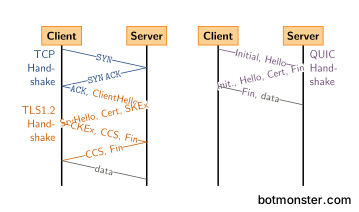
Connection migration sounds exotic, and every phone hits it daily. QUIC names a connection by a Connection ID, not by the source IP, source port, destination IP, destination port four-tuple. When your phone jumps from Wi-Fi to 5G on the way out the door, the TCP session dies and the browser has to redo TLS from scratch. QUIC keeps the same session and the same keys.
0-RTT resumption lets returning clients send data in the first UDP packet. The client replays a cached session ticket, which saves another round trip. The trade is a replay-attack exposure, and it only touches non-idempotent requests. The 0-RTT section below covers it.
Lower down, QUIC encrypts almost the whole packet, headers included. That defeats the middlebox ossification that killed TCP Fast Open in the wild. ACK frames carry up to 256 ACK ranges plus an explicit ACK delay, so congestion controllers like BBRv3 and CUBIC read burst loss better. Daniel Stenberg’s HTTP/3 explained is still the clearest free walkthrough of these parts, and you never have to open an RFC.
Enabling HTTP/3 in Nginx 1.25+
Nginx mainline 1.25 was the first release with QUIC and HTTP/3 out of beta, landing in May 2023. The 1.26 stable branch shipped in April 2024. Later 1.29.x mainline builds added GSO gains, steadier 0-RTT, and rate limits on stateless reset. On Debian or Ubuntu, take the nginx package from nginx.org rather than the distro’s nginx-core. The distro build often leaves out --with-http_v3_module.
Verify the build flag before anything else:
nginx -V 2>&1 | tr ' ' '\n' | grep http_v3If that prints --with-http_v3_module, you can set up the server block. The minimal setup runs QUIC on UDP 443 next to TCP 443 for HTTP/2 fallback:
server {
    listen 443 quic reuseport;
    listen 443 ssl;
    http2 on;
    http3 on;

    ssl_certificate     /etc/letsencrypt/live/example.com/fullchain.pem;
    ssl_certificate_key /etc/letsencrypt/live/example.com/privkey.pem;
    ssl_protocols       TLSv1.3;

    add_header Alt-Svc 'h3=":443"; ma=86400';
}
A few details trip up first-time deployments. The Alt-Svc header is how browsers learn the origin speaks HTTP/3. Without it, Chrome and Firefox keep using HTTP/2 even when the server is ready on UDP. The reuseport flag must appear on exactly one listen quic directive per worker pool. Get that wrong and Nginx either fails to start or drops packets without an error when workers restart. UDP 443 also has to be open on every firewall in the path: host rules in ufw or nftables, cloud security groups on AWS, Hetzner, GCP, and any load balancer in front. That silent UDP drop is the top reason HTTP/3 “does not work” after a clean config.
If you end TLS on an upstream proxy or CDN, you do not need QUIC on the origin. Run HTTP/1.1 or HTTP/2 from the CDN to origin, and let the edge speak HTTP/3 to the client. That last hop is where packet loss lives anyway.
For tuning, quic_gso on; turns on UDP_SEGMENT batch sending on Linux 5.15+ and cuts the per-packet syscall cost on busy servers. quic_retry on; turns on address validation tokens, which blunts the amplification-attack risk on open servers. The full directive reference covers http3_max_concurrent_streams, http3_stream_buffer_size, and other knobs. Touch them only after you have a measured baseline.
Caddy and Cloudflare: the one-click paths
If you do not want to touch Nginx, Caddy and Cloudflare each turn HTTP/3 into a single toggle. Pick them for hobby projects and small production sites. They also win whenever your time spent tuning Nginx costs more than the small gain a hand-tuned stack buys.
Caddy turns on HTTP/3 for any site with a valid TLS certificate. It has been on by default since Caddy 2.6. Here is the whole Caddyfile for HTTP/1.1, HTTP/2, and HTTP/3 with automatic Let’s Encrypt:
example.com {
    root * /var/www/example
    file_server
}
There is no protocols block or listen directive to add. Caddy writes the Alt-Svc header itself from the default protocol list of h1 h2 h3. To switch HTTP/3 off for debugging, add a global servers block with protocols h1 h2.
Cloudflare puts HTTP/3 behind a toggle under Network in the dashboard, and it has been on by default for free plans since 2023. With Cloudflare in front, the edge ends the HTTP/3 connection, handles connection migration for mobile clients, and gives you QUIC’s loss recovery on the last mile. Your origin stays untouched. Fastly and Bunny CDN also end HTTP/3 at the edge. Check that your edge is set up before you benchmark, or you will measure HTTP/2 and call it HTTP/3. The same edge can reach an origin that never opens an inbound port if you route traffic through a Cloudflare Tunnel, which keeps the connection outbound-only from your server.
HTTP/3 at the CDN speeds up the browser-to-edge hop only, and server-to-CDN latency stays where it was. That is fine: the browser-to-edge hop is where the lossy mobile network lives, and where QUIC wins the most.
Measuring real performance
You cannot claim a gain you did not measure, and HTTP/3 wins are easy to miss on a wired LAN. A repeatable setup uses WebPageTest, Chrome DevTools, and a network shaping profile that mimics a lossy mobile link.
First, confirm your requests really use HTTP/3. The Network panel in Chrome DevTools carries a protocol column that shows h3 or h2. Right-click the column headers to turn it on. Chrome’s chrome://net-export/ saves a full netlog that replays in netlog-viewer.appspot.com, showing every QUIC stream, packet loss event, and congestion window change.
For synthetic benchmarking, WebPageTest lets you pick a test location with a real 4G or LTE profile. A fair mobile baseline is 170 ms RTT and 1% packet loss. Run the test 9 times. Take the median for Time to First Byte and for the time your main content takes to render, because single runs swing too much to average. Then A/B two hostnames on the same origin, one with Alt-Svc set and one without. That leaves the transport protocol as the only variable.
The numbers depend a lot on your network. Data from Cloudflare, Wix, and independent academic measurement points to one steady pattern:
| Condition | TTFB change | LCP change | Notes |
|---|---|---|---|
| Wired, under 0.1% loss | 0 to -5 ms | within noise | QUIC gains invisible |
| Home Wi-Fi, 1% loss | -25 to -50 ms | -5 to -10% | Noticeable, not dramatic |
| 4G, 170 ms RTT, 1-2% loss | -100 to -200 ms | -10 to -20% | Where QUIC earns its keep |
| Lossy mobile, 5% loss | -300 to -500 ms | -20 to -30% | Recovery wins dominate |
| 5G, low loss | -50 to -120 ms | -5 to -15% | Handshake savings dominate |
The Cloudflare measurement data reports a median TTFB of 176 ms against 201 ms on HTTP/2 across a mixed client base, which tracks the middle row of the table. Wix’s own numbers show 33% faster connection setup and 20% better LCP at the 75th percentile, worth more than 500 ms of LCP at the tail. The “QUIC is not Quick Enough over Fast Internet” paper confirms the flip side: on wired links with under 1% loss, QUIC can be slower per request because of userspace overhead.
For repeatable command-line measurement, quiche-client from Cloudflare scripts handshake timing without a browser. h2load from the nghttp2 project supports HTTP/3 when built with ngtcp2 1.16.0+, nghttp3 1.12.0+, and OpenSSL 3.5.0+. Use it for capacity planning under load, not for page-load timing.
0-RTT session resumption and its tradeoffs
0-RTT saves a full round trip on returning connections. The cost is a replay-attack exposure your app has to handle. The client caches a session ticket from an earlier connection. It then replays that ticket, along with request data, in the first UDP packet of the next connection.
The replay exposure: an attacker who captures a 0-RTT packet can send it again later, so the server handles the same request twice. That is safe for GET /article/123 because the response is the same either way. It is dangerous for POST /transfer?amount=100. RFC 9001 is explicit that 0-RTT MUST only carry requests you are willing to see replayed. In practice that means idempotent HTTP methods and cache-friendly URLs.
In Nginx, turn on 0-RTT with ssl_early_data on; inside the server block. Also set proxy_set_header Early-Data $ssl_early_data; on any proxy_pass. Your upstream app can then read the header and refuse early data on sensitive endpoints. Caddy takes 0-RTT whenever the client asks for it, with no config flag. Like Nginx, it passes an Early-Data: 1 header to upstreams.
Session tickets are tied to a server-side key that rotates. On a fleet, set ssl_session_ticket_key across all nodes so any of them can decrypt the same ticket. If you skip that, resumption drops back to 1-RTT and you lose the gain without any error message. Track 0-RTT uptake in access logs by counting requests where $ssl_early_data = 1. On a content site where more than 40% of users return, expect 10-25% of connections to use 0-RTT in steady state.
When HTTP/3 disappoints
For many workloads the upgrade buys single-digit milliseconds, which sits inside measurement noise. Here are the cases where staying on HTTP/2 is the right call, or where the switch hurts:
On a wired LAN with sub-millisecond RTT and near-zero packet loss, TCP already works fine. QUIC’s handshake savings are tiny there, and the extra UDP work makes CPU-bound servers slower per request. The arxiv paper linked earlier measured QUIC losing to HTTP/2 by 10-20% throughput on 1 Gbps wired links, all from per-packet userspace overhead.
For small static payloads served from a CDN edge a few milliseconds from the client, the TTFB floor is so low that saving one handshake RTT stays below what a visitor can perceive, even though a benchmark still records it.
High-throughput servers pay a CPU cost, because QUIC does more work in userspace than kernel TCP. On 10 Gbps+ servers you may see measurable CPU overhead until Nginx picks up GSO and GRO kernel offloads. quic_gso on; on Linux 5.15+ closes most of the gap, and the Linux 6.x kernel work on SO_ZEROCOPY for UDP helps further, but the stack is still catching up to decades of TCP tuning.
Some corporate networks, airline Wi-Fi, and older home routers drop or throttle UDP 443 outright. Browsers fall back to HTTP/2 after a timeout, and the fallback itself adds delay on first load. If your audience skews toward hotel Wi-Fi and company VPNs, measure the fallback rate before you call HTTP/3 a win.
Connection migration breaks behind load balancers and stateful firewalls that do not know QUIC Connection IDs, because the middlebox rehashes by the four-tuple. Check your load balancer docs before you turn on edge-to-origin HTTP/3. HAProxy 2.9+ supports QUIC with the bind quic4@:443 ssl crt /etc/haproxy/certs/foo.com/cert.pem alpn h3 syntax. Envoy has had stable HTTP/3 since 1.29, and AWS ALB added HTTP/3 in 2024. Anything older can break migration with no error surfaced anywhere.
Observability gaps: your tcpdump workflows and flame graphs for TCP retransmits no longer apply. To debug QUIC you need qlog files and tools like qvis, and that is a real learning curve for SREs. After an incident, a QUIC packet capture is harder to read than a TCP one because the payload is encrypted to the endpoint keys.
For most production deployments, turn HTTP/3 on at the edge and leave the origin alone. Mobile-heavy audiences and global traffic gain the most. Typical web apps get a modest lift, easy to measure if you test on realistic networks. Traffic inside a single datacenter, to clients on fiber with near-zero loss, will not see a gain worth the extra work. It may even lose a few percent of throughput under full load. Pick your targets based on where your users really are.