 Botmonster Tech
Fine-tuning Gemma 4 with Unsloth on a single GPU: a practical guide

Google’s Gemma 4 family covers the 2.3B E2B, 4.5B E4B, 26B MoE, and 31B dense variants. It delivers strong open-weight performance across text, vision, and audio. But general-purpose models still struggle with narrow tasks. You often need a fixed output format, special terms, or facts that weren’t in the training data. Fine-tuning fixes this. Unsloth makes it work on a single consumer GPU. Its custom CUDA kernels cut VRAM by up to 60% and double training speed next to a standard Hugging Face plus PEFT setup. The same Unsloth path fine-tunes Chinese-lab coding models like Qwen and GLM.
Here is the short version. Install Unsloth, load a Gemma 4 model with 4-bit QLoRA, prep your dataset in Alpaca or ChatML format, and train with SFTTrainer from Hugging Face TRL. The E4B fits on a free Colab T4 (16 GB). The 31B fits on an RTX 4090 (24 GB). Training 1,000 examples takes 15 to 40 minutes, based on model size. When you’re done, export to GGUF and serve through Ollama or llama.cpp.
Why Fine-Tune Instead of Prompt Engineering
Prompt engineering and RAG work well for many tasks, but they hit limits. Every few-shot example eats into your context window. Retrieval adds latency and more moving parts. Fine-tuning bakes domain knowledge into the model weights themselves. That brings three wins:
- No token budget spent on context: The model already knows your domain. Prompts stay short and inference stays fast.
- More consistent outputs: A fine-tuned model gives you reliable formatting and word choice. You don’t need fragile system prompts.
- Lower inference cost: A fine-tuned E4B (4.5B parameters) can match a prompted 31B model on your task. It does so at a fraction of the compute cost.
Common use cases include support bots trained on company docs, medical assistants tied to clinical guidelines, code assistants that know internal APIs, and content tools that match a set editorial voice. The same idea reaches past text. The Kronos financial forecasting model fine-tunes a time-series transformer to predict price candles for one market. Basal’s 31B decision model is a LoRA fine-tune of Gemma 4 31B that answers with option probabilities instead of text.
That said, try prompting and RAG first. Fine-tuning makes sense when you need the model to learn patterns, not just look up facts.
Hardware Requirements and VRAM Budget
Fine-tuning needs more memory than inference. You have to store optimizer states, gradients, and activations next to the model weights. QLoRA is the practical approach for single-GPU setups. It quantizes the base model to 4-bit NormalFloat (NF4) and trains LoRA adapters in 16-bit.
| Model | QLoRA VRAM | LoRA VRAM | Full Fine-Tune |
|---|---|---|---|
| E2B (2.3B) | ~6 GB | ~10 GB | ~16 GB |
| E4B (4.5B) | ~10 GB | ~18 GB | ~32 GB |
| 26B MoE (A4B) | ~18 GB | ~48 GB | Impractical |
| 31B Dense | ~22 GB | ~60 GB | ~80 GB+ |
The biggest factor here is Unsloth’s use_gradient_checkpointing="unsloth" flag. Standard gradient checkpointing trades compute for memory. It recomputes activations during the backward pass. Unsloth’s version uses smarter recompute patterns. They cut VRAM by roughly 60% next to plain gradient checkpointing.
Practical GPU recommendations:
- Free Colab T4 (16 GB): E4B with QLoRA fits with ease. E2B runs with room to spare.
- RTX 4090 (24 GB): 31B with QLoRA at batch size 1 to 2 and gradient checkpointing. The 26B MoE at ~18 GB leaves headroom for batch size 2.
- Cloud options: RunPod offers RTX 4090 instances at $0.59/hr. Vast.ai prices start around $0.29/hr. A full run on 1,000 examples costs under $1.
Start with E4B to test your pipeline and check your dataset. Scale to 31B once your hyperparameters are dialed in.
Dataset Preparation
Your dataset is the most important variable. 500 well-curated examples beat 10,000 sloppy ones.
Format Options
Unsloth supports several dataset formats through the Hugging Face ecosystem:
- Alpaca format:
{"instruction": "...", "input": "...", "output": "..."}. Good for single-turn instruction following. - ChatML / Messages format:
{"messages": [{"role": "user", "content": "..."}, {"role": "model", "content": "..."}]}. This is the native format for Gemma 4’s chat template. - ShareGPT format: Multi-turn chats with alternating human and assistant turns.
For Gemma 4, the messages format is the best pick. It matches the model’s chat template directly.
Dataset Size Guidelines
| Task Type | Minimum Examples | Typical Range |
|---|---|---|
| Style/tone adaptation | 100-500 | 200-1,000 |
| Classification or extraction | 500-2,000 | 1,000-5,000 |
| Domain knowledge injection | 1,000-5,000 | 5,000-50,000 |
| Complex reasoning | 5,000+ | 10,000-50,000 |
Common Pitfalls
- Too few examples: The model memorizes instead of generalizing. If you have under 200 examples, try data augmentation or synthetic data.
- Mixed formatting: Mixed instruction styles in one dataset confuse the model. Keep your templates uniform.
- Label noise: One contradictory example can undo the benefit of dozens of good ones. Deduplicate and verify.
- Missing holdout set: Always reserve 10 to 20% of your data for validation. Without it, you can’t catch overfitting.
Multimodal Datasets
Unsloth supports vision fine-tuning for the E2B and E4B models. For image tasks like document sorting or visual QA, add image paths to your dataset entries next to the text.
Training Configuration
Bad hyperparameters can hurt a model rather than help it. The defaults below come from many Gemma 4 fine-tuning runs. They make solid starting points.
LoRA Settings
model = FastModel.get_peft_model(
    model,
    r=16,              # LoRA rank: controls trainable parameters. Range: 8-64
    lora_alpha=16,     # Scaling factor. Common rule: alpha = rank
    lora_dropout=0,    # Unsloth recommends 0 for most fine-tunes
    target_modules=[
        "q_proj", "k_proj", "v_proj", "o_proj",  # Attention projections
        "gate_proj", "up_proj", "down_proj",       # Feed-forward layers
    ],
)
Higher rank means more trainable parameters and more room to adapt, but also more VRAM. Rank 16 is a solid default. Bump it to 32 or 64 if your domain is far from the pretraining data. If you set lora_alpha equal to r, the effective learning rate stays the same. Setting alpha = 2 * r makes the adapter’s influence stronger.
Training Hyperparameters
from trl import SFTTrainer, SFTConfig

trainer = SFTTrainer(
    model=model,
    tokenizer=tokenizer,
    train_dataset=dataset,
    args=SFTConfig(
        per_device_train_batch_size=2,
        gradient_accumulation_steps=4,
        warmup_ratio=0.05,
        num_train_epochs=1,
        learning_rate=2e-4,
        fp16=not torch.cuda.is_bf16_supported(),
        bf16=torch.cuda.is_bf16_supported(),
        output_dir="outputs",
        gradient_checkpointing="unsloth",
    ),
)
Key choices:
- Learning rate:
2e-4for QLoRA is the standard start. Drop to1e-4for the 31B model. - Batch size: 2 for 31B on 24 GB VRAM, 4 to 8 for E4B on 16 GB. Use
gradient_accumulation_stepsto fake larger effective batches (batch_size * accumulation = effective batch). - Epochs: 1 to 3. More epochs risk overfitting, above all on small datasets. Watch validation loss.
- Max sequence length: Start at 2048. Raise it if your training examples are longer, but longer sequences eat more VRAM.
- Scheduler: Cosine with warmup is standard and works well. A warmup ratio of 0.03 to 0.1 stops early instability.
MoE-Specific Considerations
For the 26B MoE model, target the attention projections and the shared expert FFN layers. Avoid fine-tuning the routing network unless you have 50,000+ examples. Bad router weight updates can hurt the model’s ability to pick the right experts.
Running the Training Loop
Here is the full workflow you’d follow in a Jupyter notebook or Python script.
Installation
pip install unslothThis pulls in the deps you need, like bitsandbytes, PEFT, and TRL. Make sure your CUDA toolkit version matches your PyTorch install.
Loading the Model
from unsloth import FastModel

model, tokenizer = FastModel.from_pretrained(
    "unsloth/gemma-4-31B-it-bnb-4bit",  # Pre-quantized 4-bit model
    max_seq_length=2048,
    load_in_4bit=True,
)
Unsloth ships pre-quantized model variants on Hugging Face (unsloth/gemma-4-E4B-it-bnb-4bit, unsloth/gemma-4-31B-it-bnb-4bit, and more). They skip the quantization step and load faster.
Training
trainer.train()Monitor the loss curve during training.
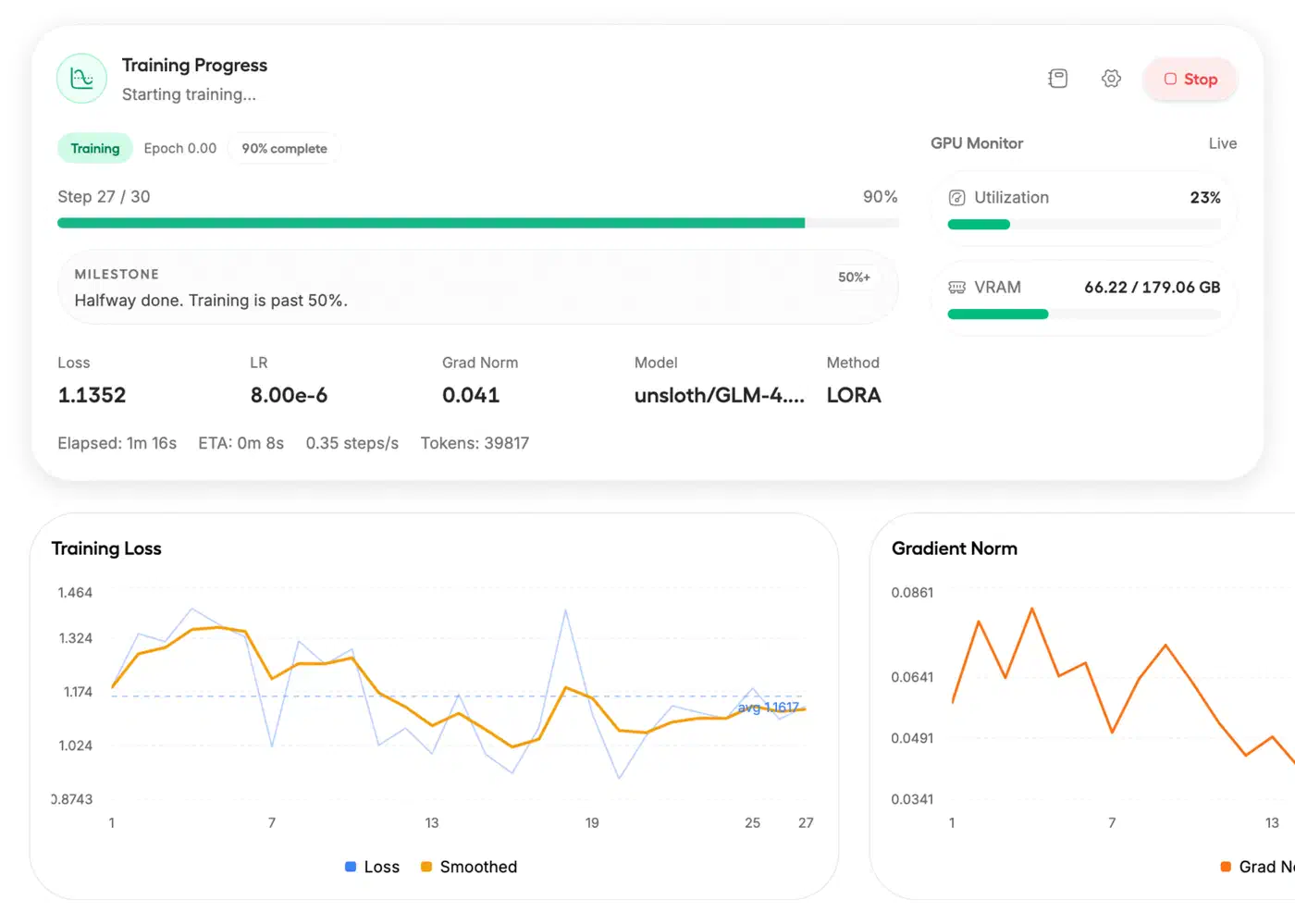
For small datasets (under 2,000 examples), expect the training loss to settle within 100 to 500 steps. If the loss flattens early, your learning rate may be too low. If it spikes, it’s too high.
Typical training times:
- E4B QLoRA on T4 with 1,000 examples: 15 to 20 minutes
- 31B QLoRA on RTX 4090 with 1,000 examples: 25 to 40 minutes
Early Launch Caveats (Now Resolved)
When Gemma 4 first launched, older Hugging Face Transformers builds didn’t know the gemma4 architecture. PEFT also couldn’t handle Gemma4ClippableLinear layers. Current releases fix both issues. If you hit them, update your packages: pip install -U transformers peft trl unsloth.
Evaluation and Export
Testing Your Fine-Tuned Model
Before deploying, check three things:
- Validation loss: Compare train loss against validation loss. If validation loss climbs while training loss drops, you’re overfitting. Cut epochs or add more training data.
- Held-out examples: Run inference on examples the model hasn’t seen. Compare against ground truth with your metrics (accuracy, F1, BLEU, or whatever fits your task).
- Edge cases: Test tricky inputs, boundary conditions, and the domain questions the base model got wrong. This is where fine-tuning should show the biggest gain.
Preventing Catastrophic Forgetting
A common worry with fine-tuning is that the model loses general skills as it gains domain-specific ones. LoRA softens this, since the base weights stay frozen. But it doesn’t remove the risk. Practical defenses:
- Keep epochs low (1 to 3).
- Use a moderate learning rate. Don’t go above
5e-4. - Add a small share of general-purpose examples to your training data to keep broad skills.
- Test general knowledge and reasoning after fine-tuning, not just domain results.
Exporting to GGUF
Once you’re happy with the eval results, export to GGUF format to deploy with Ollama or llama.cpp:
model.save_pretrained_gguf(
    "gemma4-finetuned",
    tokenizer,
    quantization_method="q4_k_m",  # Good balance of quality and size
)
Available quantization options:
| Method | Quality | File Size | Use Case |
|---|---|---|---|
q4_k_m | Good | Smallest | Recommended default |
q8_0 | Higher | Medium | When quality matters more |
f16 | Full | Largest | Reference/debugging |
Deployment Options
For local serving, the quickest route is Ollama, though picking the right runtime depends on your speed and scale needs. Create a Modelfile that points to your GGUF and run ollama create my-model -f Modelfile. Or use llama.cpp for a direct HTTP API with ./llama-server -m gemma4-finetuned-q4_k_m.gguf --port 8080. For production serving at scale, vLLM can load the LoRA adapter on top of the base model without merging weights. That keeps your deployment flexible. You can also share your work on Hugging Face Hub with model.push_to_hub("your-org/gemma4-finetuned").
If you want one self-contained model file rather than a base plus adapter pair, merge first with model.merge_and_unload() before you export to GGUF.
Alternatives to Unsloth
Unsloth is the fastest option for single-GPU fine-tuning, but other tools have their own strengths.
The standard Hugging Face TRL plus PEFT stack uses more VRAM. But it has broader community support and docs. Google Vertex AI offers managed cloud fine-tuning where you don’t run GPUs. The trade-off is less control and higher prices. Axolotl uses YAML config and handles more complex training setups. Its learning curve is steeper.
Also worth a look: Unsloth Studio adds a no-code web UI for local fine-tuning.
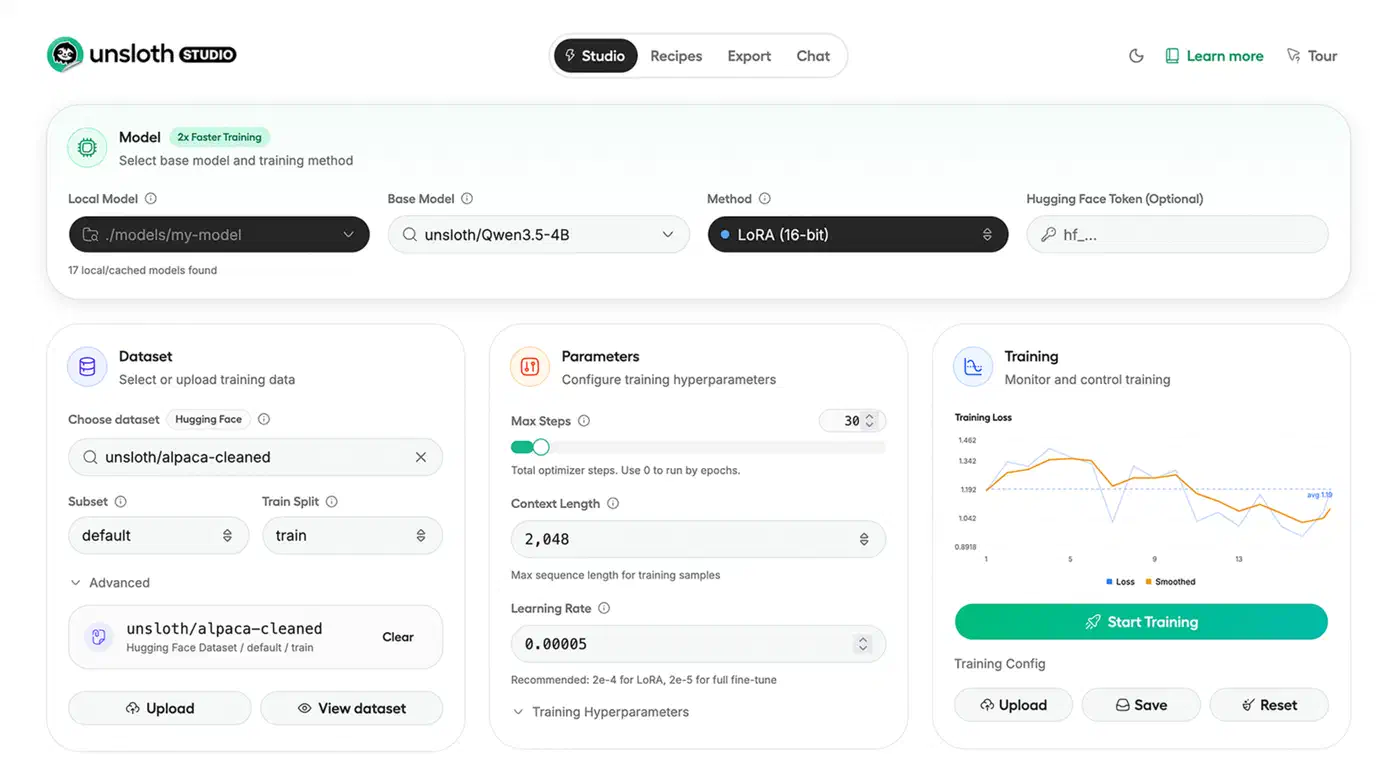
You upload a dataset, pick a model, and train in a browser. It has built-in loss monitoring and model comparison. Good option if you’d rather not write training scripts.
For multi-GPU setups, DeepSpeed or FSDP with the standard Hugging Face stack is the proven approach. Unsloth Studio is adding multi-GPU support too.
Quick Reference
| Step | Command / Setting |
|---|---|
| Install | pip install unsloth |
| Load model | FastModel.from_pretrained("unsloth/gemma-4-E4B-it-bnb-4bit", load_in_4bit=True) |
| Add LoRA | FastModel.get_peft_model(model, r=16, lora_alpha=16) |
| Train | SFTTrainer(..., args=SFTConfig(gradient_checkpointing="unsloth")) |
| Export GGUF | model.save_pretrained_gguf("output", tokenizer, quantization_method="q4_k_m") |
| Deploy | ollama create my-model -f Modelfile |
The full workflow runs from pip install to a deployed GGUF model. It fits in under 50 lines of Python and takes under an hour on consumer hardware. Start with E4B and a small dataset to check your approach, then scale up.