 Botmonster Tech
Reverse Engineer Anything lets your AI agent read any app

Reverse Engineer Anything (REA) lets your AI agent read any app without its source code. It drives Ghidra, Hopper or IDA and attaches evidence to every answer. It rebuilt a 1996 game function byte for byte. But in one test on a simple app, an agent using only screenshots did almost as well. It also can’t get past CAPTCHAs.
Key Takeaways
- REA lets your coding agent take apart an app without its source code.
- REA rebuilt a 1996 game function that matches the original byte for byte.
- On a simple app, a plain agent with screenshots did almost as well as REA.
- REA doesn’t solve CAPTCHAs, whatever the viral demos claim.
- Under the hood, REA hands the hard work to established tools like Ghidra.
What is Reverse Engineer Anything?
Reverse Engineer Anything is an MCP server. MCP (Model Context Protocol) is the standard way a coding agent calls outside tools. REA plugs into Claude Code, Codex, Cursor, Gemini CLI, Grok Build and any other client that runs local MCP servers. It gives the agent tools to inspect compiled programs, Electron apps, .NET code, Android apps and websites. You can also run the same tools from a terminal with the rea command.
The workflow goes like this: you see a feature in someone else’s app, ask your agent how it works, get the evidence, then build your own version. The project ships as the rea-agents package on npm, with guides and case studies on rea.tools.
A popular tool attracts copycats. REA asks users to download only from the official repo, the website or the npm package, because forks with similar names and copied READMEs exist. Check the source before you run npx on anything.
How REA drives Ghidra, Hopper and IDA for your agent
For native code, REA drives a decompiler: Hopper, Ghidra or IDA. A decompiler turns machine code back into readable, C-like code. Setup can install Hopper once you approve it. Ghidra and IDA must already be on the machine. GNU objdump and Rizin also work for quick offline checks.
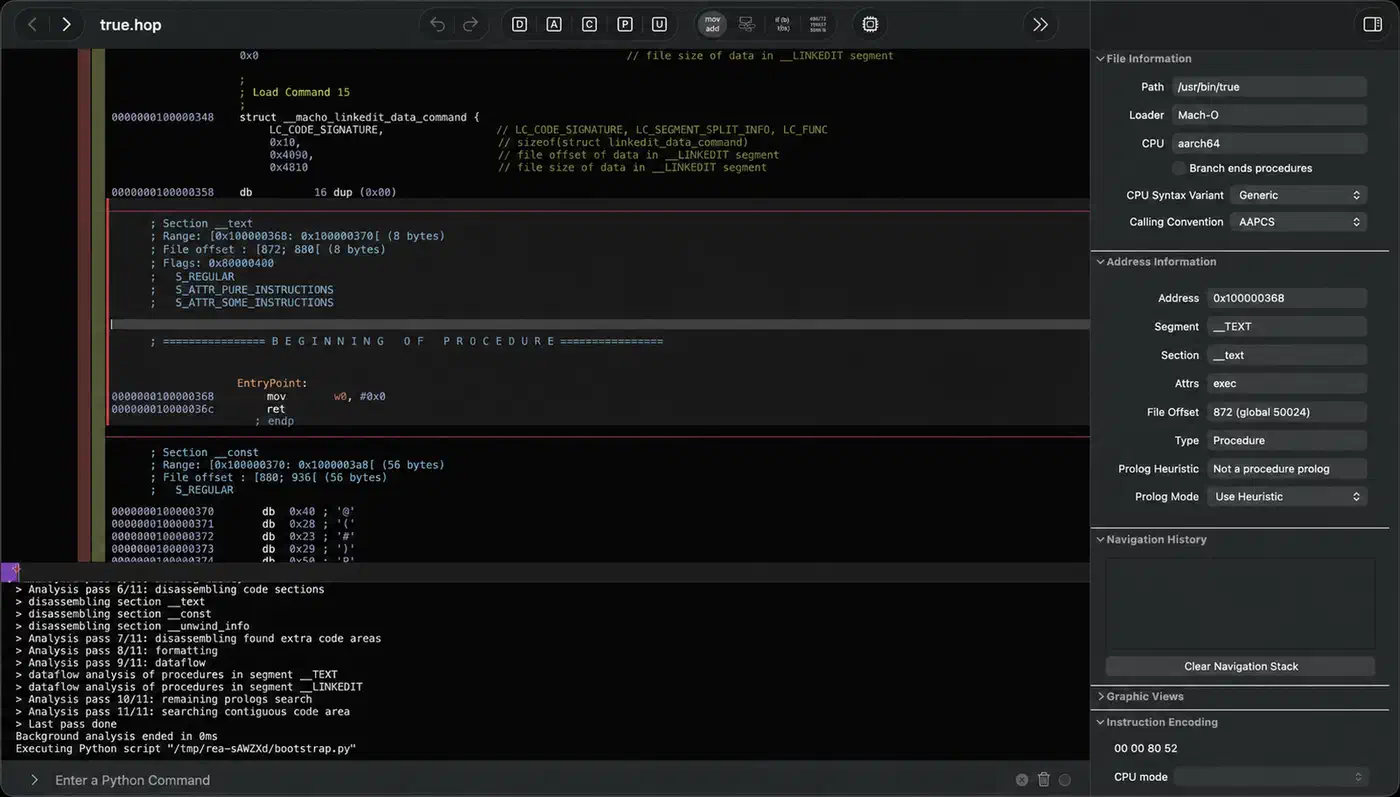
The loop has three parts. First, the agent asks a question about a function. Then REA runs the analysis and returns pseudocode, assembly, strings, symbols and call references, plus the “unknowns” it couldn’t resolve. Finally, the agent asks follow-up questions or writes code.
Setup is one command:
npx rea-agents setupIt asks which agents to configure, shows the config changes, backs up the old files and waits for approval. Restart the agent afterwards. REA needs Node.js 22.23.4 or later on the 22 line, 24.22.1 or later on the 24 line, or 26.12.1 and up. On Linux, Ghidra and JavaScript analysis also need a procps-style ps on the path.
A few settings help in practice:
- Context cost: tool schemas are compact by default to save agent context. Set
REA_MCP_INPUT_SCHEMA_PROFILE=fullto get the full field guidance back. - Big binaries: raise the startup deadline with
REA_GHIDRA_STARTUP_TIMEOUT_MSorREA_HOPPER_STARTUP_TIMEOUT_MS. - Approvals: REA doesn’t ask before each operation, and some tools run the target program. Approval rules live in your agent client, so set them there.
The analysis runs on your machine, but every result goes to your agent’s model provider under that provider’s data policy. If you analyse a client’s binary, the model vendor sees the findings.
What REA can take apart
The “anything” in the name is a stretch, but not a big one. REA covers more than 30 kinds of target, and most of them need no extra tool at all:
| Target | You get | Extra tool |
|---|---|---|
| Native binaries | Pseudocode | Hopper/Ghidra/IDA |
| Electron apps | Modules, IPC | |
| .NET assemblies | CIL code | |
| Android APKs | Java methods | JADX |
| Websites | Network calls | Chrome |
| HAR captures | Requests | |
| Firmware | Extracted regions | Binwalk |
| Go, Rust binaries | Dependencies | |
| AI model files | Tensor metadata | |
| Unity games | Type names |
Static JavaScript and .NET analysis read the files without running the app. Runtime capture is different: it runs the target with your user permissions, so treat an unknown program like any other untrusted download.
REA also reads Ethereum smart-contract bytecode, Erlang BEAM files, CUDA GPU kernels, logic-analyser recordings and Godot game archives. Through Ghidra, it even handles 16-bit DOS programs.
The DX-Ball rebuild: what agent-driven reverse engineering produced
The best evidence that REA works is a DX-Ball case study. DX-Ball 1.07 is a 1996 Windows breakout game. The question was narrow: how does a brick’s screen position become a left or right sound pan?
The first decompiler view was wrong. It showed the function taking no input at all. So the agent read the raw instructions and found a stack value loaded with FILD. Then it followed the caller, which computes the brick position as 20 + 30 × tile_x.
Next, the agent read the constants straight out of the binary. The code multiplies by 1.5625, subtracts 500.0 and scales by a stored pan value that starts at 1.0. From that, it wrote a six-line C function.
3,205 test cases compared the C version with the original x86 code, and every one matched. The tests covered every position from 0 to 640 at five pan scales. Compiled with the original Visual C++ 4.0 compiler, the C function came out as the same 63 bytes.
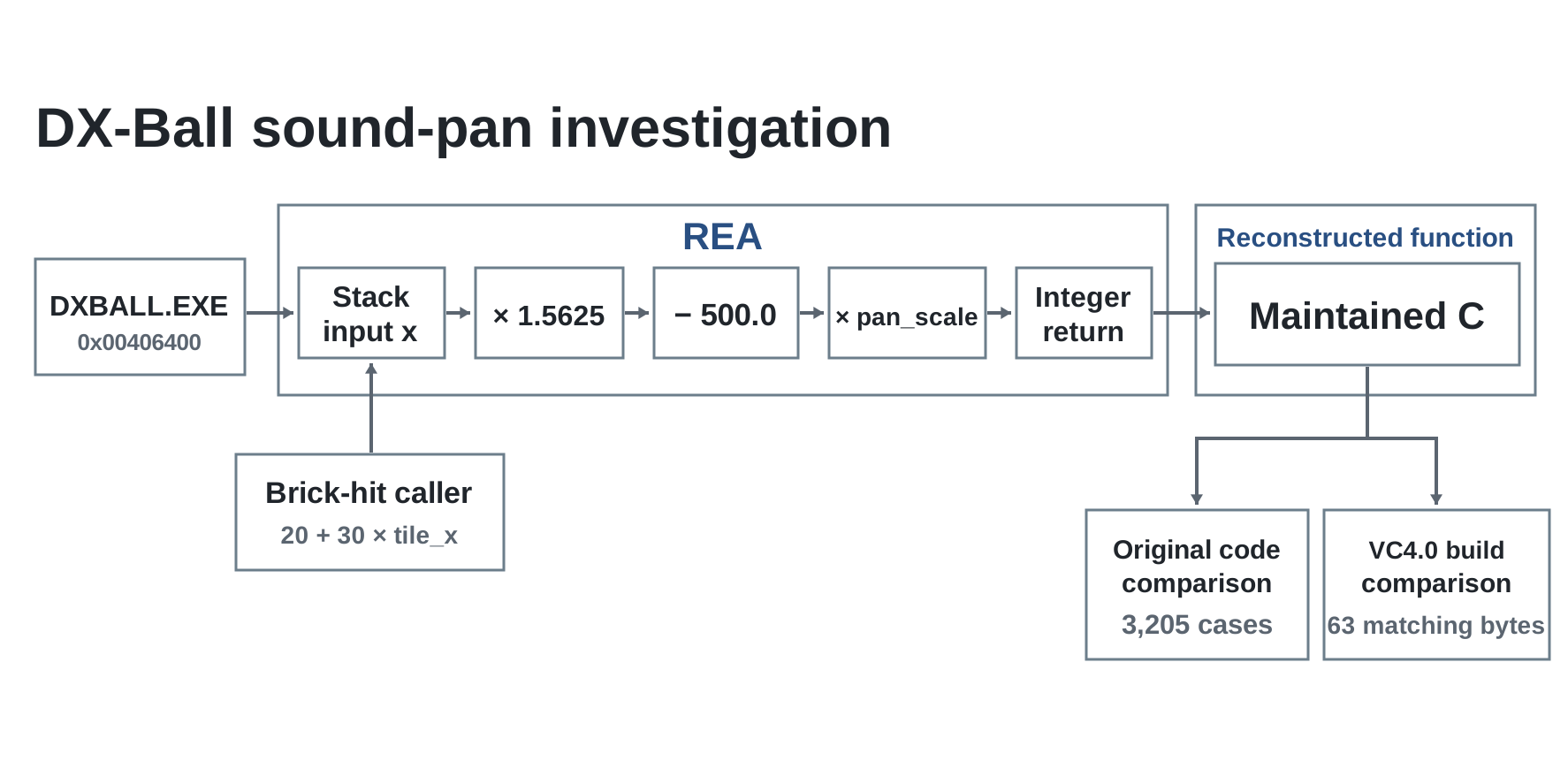
The wider reconstruction project had 55 C functions at that checkpoint. It ran 45,380 comparisons against the original code, and 33 of those functions compiled to identical bytes. The project has gaps:
- It was checked against one game version only.
- The sound backend isn’t hooked up yet.
- The playable game still lacks ball physics and power-ups.
Other REA showcases follow the same pattern. One traces how Notion copies rich text through Electron’s preload and IPC layers. Another recovers the bullet-ring maths from the PC-98 game TH04, and a third finds how the Aegis authenticator builds its six-digit login codes.
A skilled human with Ghidra could do all of this. Still, the agent did the dull parts: reading constants, chasing callers and writing the test harness. And it kept the evidence attached at every step.
Does REA beat a plain AI agent?
One independent test says not by much, at least on a simple app. MindStudio had a coding agent rebuild Apple’s Preview app twice. One build used REA. The other worked only from screenshots and the model’s own reasoning.
Both builds worked, with zoom, drawing, annotation, rotation and save. The REA build matched the original’s layout and features more closely. However, the plain build finished first. The REA version also felt laggier, partly because both builds ran on one machine at once. No timings were published.
REA is a connector, not a new reverse engineering technology
Preview is simple and well documented, and models already know how photo viewers work. The gap may grow on complex software.
REA’s edge appears where the model has nothing to go on, such as a stripped native binary, an undocumented file format or a 30-year-old game. In practice, if you can describe the feature from screenshots, you probably don’t need REA. If the answer is buried in machine code, you do.
Can REA bypass CAPTCHAs?
No. REA’s web tools only observe a page. Through a Chrome-family browser, they report page structure, scripts, network calls and screenshots. Nothing in REA solves CAPTCHAs or hides automation from bot detection.
Even so, REA’s name has become the hook for viral “scrape any site” demos on big retail and ticketing sites. The stealth in those demos comes from browser-automation libraries such as SeleniumBase, whose CDP mode is built to slip past anti-bot checks. That library existed long before REA.
REA rules this use out in writing. Its responsible-use disclaimer refuses help with bypassing bot protection or access controls on systems you aren’t allowed to test. It also refuses DRM and licence-check removal, game cheats and copying proprietary code. Scraping past a CAPTCHA usually breaks a site’s terms too, and services like Cloudflare Turnstile, DataDome and hCaptcha treat it as abuse.
Who should install REA
- Install it now if you already reverse engineer native code, mod or preserve old games, audit Electron or Android apps, or need to read an undocumented file format. The agent handles the grunt work and keeps the evidence attached.
- Try it with care if you want to study a competitor’s feature. Legal limits depend on your country and the app’s licence. In the EU, for instance, decompiling is allowed mainly for interoperability. Your findings also go to your model provider.
- Skip it if your target is a web app you can screenshot or a well-known desktop app. A plain agent gets close enough there.
Expect churn either way. New releases land every few days, setup changes between versions, and the bug-report rule starts with “update first”. Pin a version for anything you script.
On cost, REA is free and MIT-licensed, and Ghidra is free too. A Hopper personal licence costs about $99 with a year of updates, and IDA Pro costs a lot more. On a long binary investigation, though, the agent’s model usage is the bigger bill. Every function it reads adds pseudocode and assembly to the context.