 Botmonster Tech
DuckDB is absurdly good at crunching gigabytes with no database server

This post is open for corrections. Highlight any line of text to challenge it or ask for a clearer explanation and leave a comment.
DuckDB crunches gigabytes of CSV and Parquet with no database server, no import step, and no waiting around. You aim a SELECT straight at a file on disk and it answers. On 41 million rows of raw NYC taxi data, I clocked a full group-by aggregation in 20ms and a two-table join in another 20ms, read straight off Parquet with nothing loaded, copied, or indexed first. That is a multi-gigabyte analytical query returning before you lift your finger off Enter key! Every number in this post comes from a benchmark you can run yourself; the scripts and raw results live in a GitHub repo.
That speed is not a trick. DuckDB is an embedded, in-process SQL engine that reads CSV, Parquet, JSON, and Arrow files directly, storing data in columns and scanning it in vectorized batches with CPU SIMD, so a query touches only the columns it needs and rips through millions of rows per core. It reads Parquet about 14x faster than the same data as CSV, and it does not fall over when the data outgrows RAM: capped at a 2GB memory limit, it sorted all 41 million rows by spilling 8.8GB to disk and still finished in six seconds. It is MIT-licensed (v1.5.4 is the current release, with a v1.4.x LTS line beside it) and runs everywhere you already work: Python, Node, Rust, Go, Java, or a single CLI binary. That open license is worth checking before you commit to any tool; the database client Chat2DB went source-available at version 5.3.0.
My own performance benchmarks
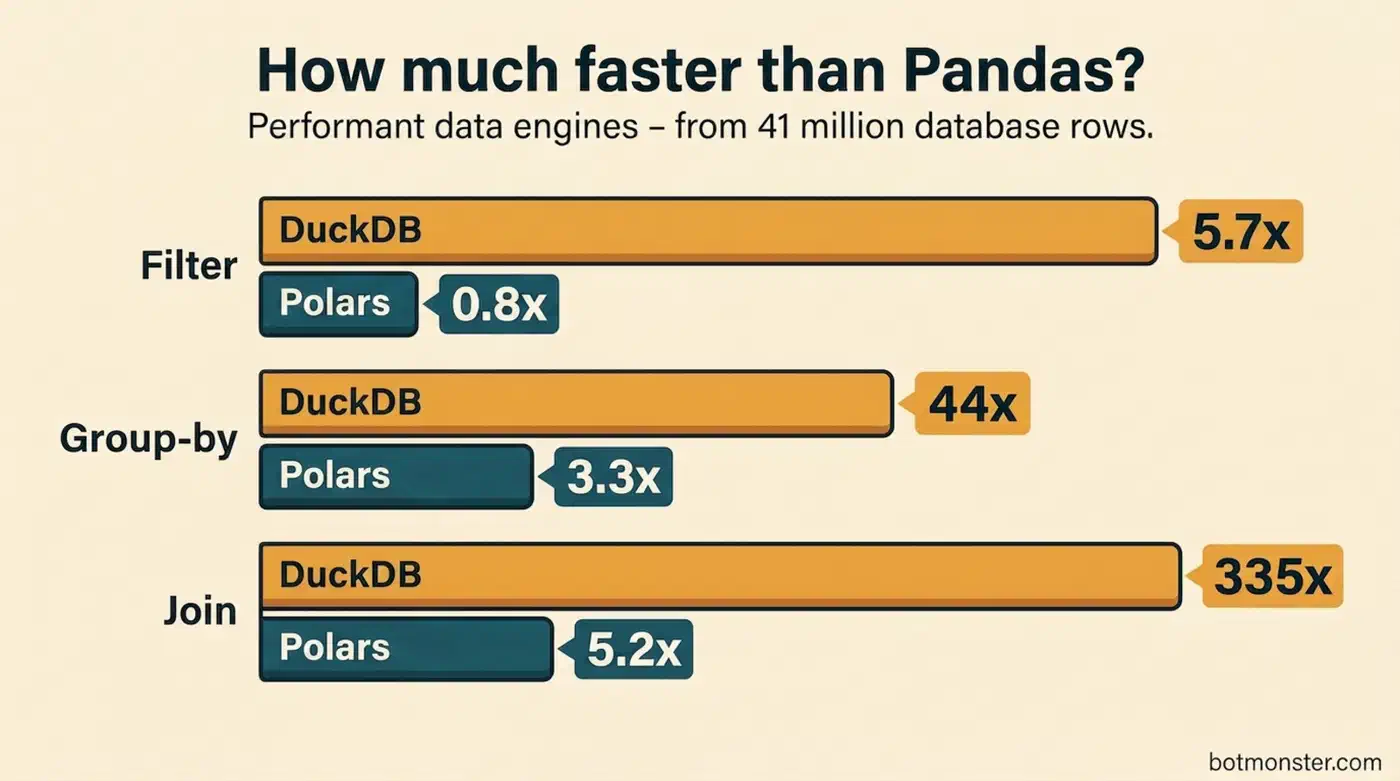
How does DuckDB stack up to other tools developers reach for? I measured all three on the same 41-million-row NYC taxi dataset, median of 5 runs, each engine’s data loaded in memory first:
| Operation (41M rows) | Pandas | DuckDB | Polars |
|---|---|---|---|
| Filter | 127ms | 23ms | 157ms |
| Group-by aggregation | 893ms | 20ms | 272ms |
| Join (trips + zones) | 6795ms | 20ms | 1316ms |
On a 24-thread machine, DuckDB was fastest on every operation, roughly 45x faster than Pandas on the group-by and over 300x on the join, where Pandas materializes the whole merged frame. Polars leads many pure in-memory DataFrame benchmarks and stayed well ahead of Pandas, but DuckDB’s multithreaded columnar engine took the top spot here. DuckDB’s other edge: it speaks SQL and can query files on disk, on S3, or over HTTP without loading them into a DataFrame first. If you already know SQL, the learning curve is about zero.
Compared to ClickHouse local mode and Apache DataFusion, DuckDB trades raw speed on some queries for much simpler setup and broader language support. DataFusion wins on some Parquet-heavy benchmarks (it topped the ClickBench single-node Parquet rankings, though ClickHouse leads the overall single-node board with DuckDB second), but it needs Rust and ships with fewer batteries included. ClickHouse local gives you the full ClickHouse SQL dialect without a server, but it’s a 200MB+ binary next to DuckDB’s small footprint.
What DuckDB Is and Why It Differs From SQLite
Developers hearing “embedded database” usually think of SQLite. That comparison is roughly right: both run in-process, both need zero config. However, the execution models are opposites, and that gap explains why DuckDB handles analytics so much better.
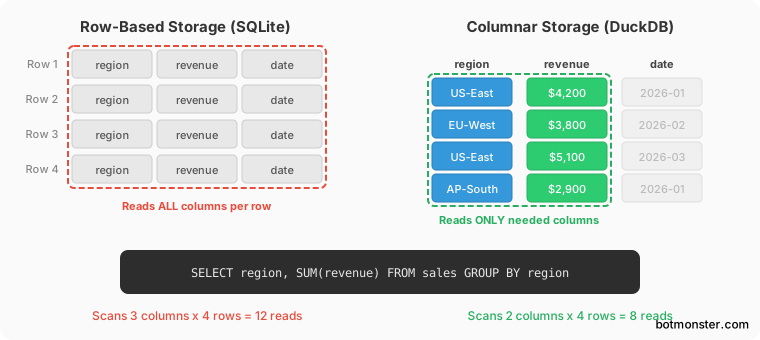
SQLite is an OLTP database. It stores data row by row. It is great at transactional patterns: insert a row, look up a row by primary key, update a field. DuckDB is an OLAP database. It stores data in columns and is built for scans, aggregations, and joins across millions or billions of rows.
Run SELECT region, SUM(revenue) FROM sales GROUP BY region. SQLite reads every column of every row even though it only needs two. DuckDB reads only the region and revenue columns, skips row groups that don’t match, and processes the data in vectorized batches with CPU SIMD where available.
The sweet spot is datasets from roughly 100MB to hundreds of GB. Too big for Pandas to be pleasant, too small to justify Postgres, ClickHouse, or Spark. On a laptop with 16GB of RAM, DuckDB can handle datasets much larger than memory because the engine spills intermediate results to disk on its own. When I capped memory_limit at 2GB and fully sorted 41 million rows, DuckDB spilled 8.8GB to disk and still finished the sort in about 6 seconds.
Installing DuckDB and Running Your First Query
Install takes seconds in any environment:
# CLI on macOS - Homebrew
brew install duckdb

# CLI on Linux - grab the binary from https://duckdb.org/install/

# Python
pip install duckdb

# Node.js (the current official "Neo" client)
npm install @duckdb/node-api

# Rust
cargo add duckdb --features bundled

# Go (official driver, moved from marcboeker/go-duckdb)
go get github.com/duckdb/duckdb-go/v2
After install, run duckdb for an in-memory session, or duckdb my.db to save data to a file.
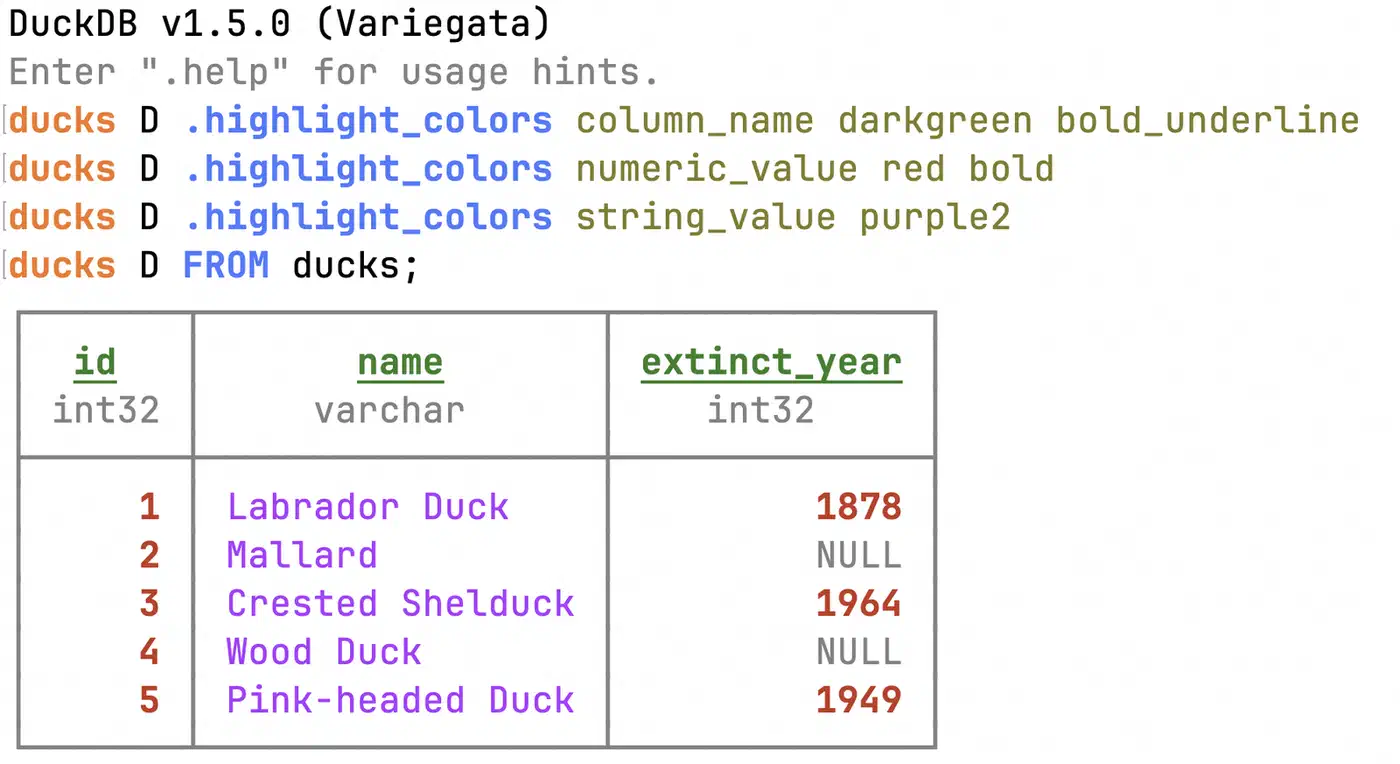
.tables lists all tables. .schema tablename shows a table’s structure. .mode changes output format (box, csv, json, markdown).
A quick sanity check:
SELECT 42 AS answer;Creating a table from inline data:
CREATE TABLE orders AS
SELECT * FROM (VALUES
    (1, 'Alice', 250.00),
    (2, 'Bob', 175.50),
    (3, 'Carol', 320.00)
) t(id, customer, amount);
On machines with little RAM, set a memory limit so DuckDB does not eat too much:
SET memory_limit = '4GB';
SET threads = 4;
A useful tip: set the memory limit to about 50% of total RAM. That leaves room for the OS and other apps. The buffer manager stays inside this limit, but some operations (like hash tables for big joins) can spike past it for a moment.
Querying CSV, Parquet, and JSON Files Directly
This is the feature that sold me on DuckDB. No import step, no schema, no CREATE TABLE followed by COPY. You write SQL that points at a file path, and DuckDB works out the rest.
CSV files get auto delimiter detection and type inference:
SELECT * FROM 'sales.csv';

-- For messy CSVs, take control:
SELECT * FROM read_csv('sales.csv',
    header = true,
    delim = ';',
    dateformat = '%d/%m/%Y'
);
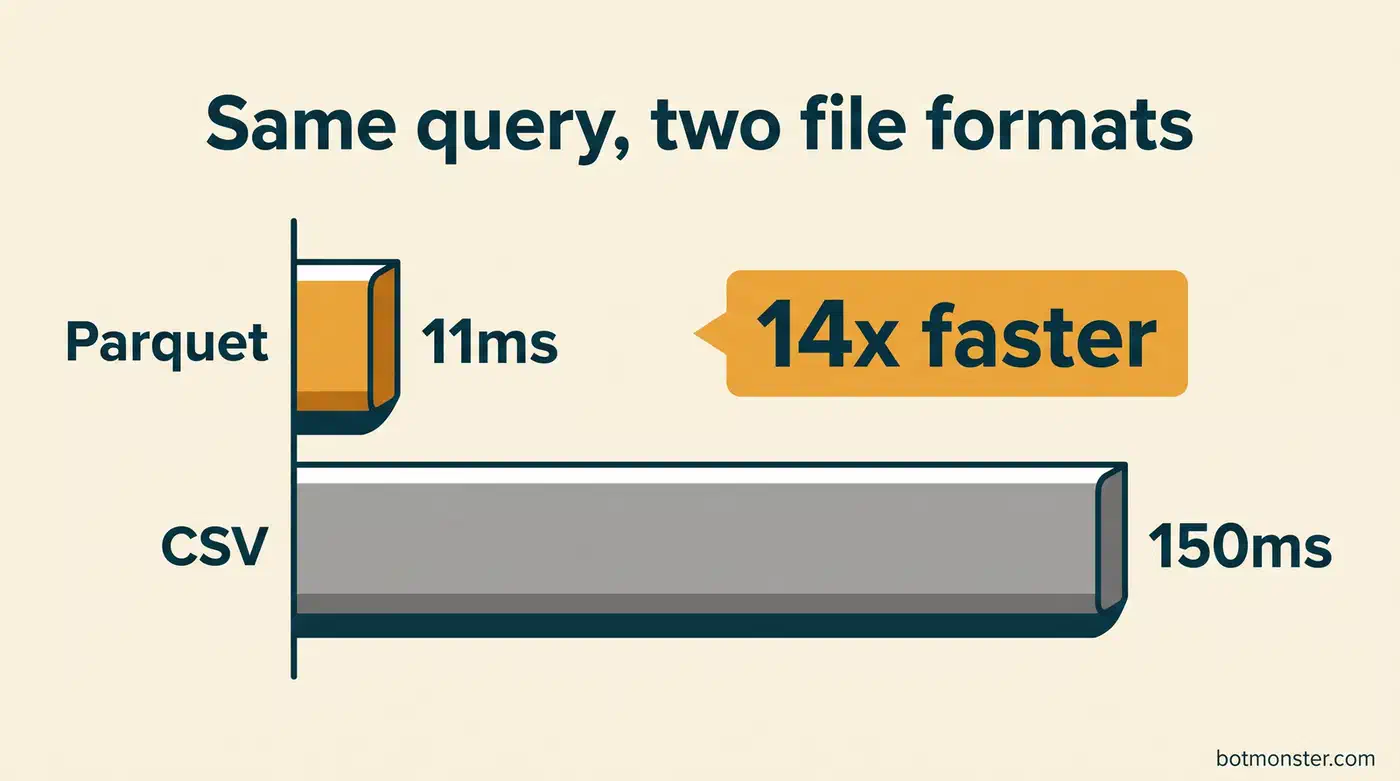
Parquet is where DuckDB shines. Parquet stores data in columns with min/max stats per row group, so DuckDB can skip whole chunks that don’t match your WHERE clause:
SELECT customer_id, SUM(amount)
FROM 'transactions.parquet'
WHERE transaction_date >= '2026-01-01'
GROUP BY customer_id
ORDER BY SUM(amount) DESC
LIMIT 20;
In my tests, the same selective query ran 14x faster against a Parquet file than against a CSV copy of the identical data (11ms vs 150ms), purely from column pruning and row-group skipping.
JSON and JSONL (newline-delimited JSON) files work with auto schema detection:
SELECT * FROM read_json_auto('server-logs.jsonl');Glob patterns let you query whole directories at once. DuckDB scans matching files in parallel:
SELECT * FROM 'data/2026/*.parquet';
SELECT * FROM 'logs/**/*.csv';
Writing results back to files works the same way:
COPY (
    SELECT region, SUM(revenue) AS total
    FROM 'raw_sales/*.csv'
    GROUP BY region
) TO 'summary.parquet' (FORMAT PARQUET, COMPRESSION ZSTD);
More formats are available via extensions. INSTALL spatial adds support for shapefiles and GeoJSON. INSTALL excel handles .xlsx files. The built-in GEOMETRY type (new in v1.5) folds spatial data into the core engine.
Python, Node, and CLI Workflows
In practice, most people use DuckDB from a host language, not the standalone CLI. The Python client is the most mature.
Python
import duckdb

# Query a file and get a Pandas DataFrame
df = duckdb.sql("SELECT * FROM 'events.parquet' WHERE status = 'error'").df()

# Or get a Polars DataFrame
pl_df = duckdb.sql("SELECT * FROM 'events.parquet'").pl()

# Or a PyArrow table for zero-copy interop
arrow_table = duckdb.sql("SELECT * FROM 'events.parquet'").arrow()
The zero-copy Arrow interop is a bigger deal than it sounds. When you call .df() or .pl(), DuckDB shares Arrow memory buffers with Pandas and Polars directly. No serialization round-trip. A 500MB query result lands in a Pandas DataFrame in milliseconds.
In Jupyter notebooks, DuckDB works as a drop-in for Pandas groupby on datasets too big for memory. Write SQL in a cell, get back a DataFrame, then plot and analyze as usual. When you wrap DuckDB queries in your own Python transform functions, property-based testing finds edge cases automatically by checking those transforms against round-trip and invariant rules. If you prefer natural language over SQL, see how Claude Code handles large CSV datasets through prompts and produces complete analytical reports.
Node.js
The @duckdb/node-api package runs async queries with full prepared statement support:
import { DuckDBInstance } from '@duckdb/node-api';

const instance = await DuckDBInstance.create();
const conn = await instance.connect();
const result = await conn.run(
    "SELECT * FROM 'access-logs.csv' WHERE status >= 500"
);
CLI Pipelines
DuckDB drops into Unix shell pipelines. Feed CSV data through stdin:
cat server.log | duckdb -c "SELECT status, COUNT(*)
    FROM read_csv('/dev/stdin', columns={'ip': 'VARCHAR', 'status': 'INT', 'path': 'VARCHAR'})
    GROUP BY status"
Load SQL scripts with the .read dot command. Pass values in through environment variables for repeatable analysis scripts. Because the CLI takes a one-line -c query, it slots neatly into the shell loops that command-line AI assistants run, letting an agent draft the SQL and read back the result in one step. Those terminal-native agents are shifting fast, with Gemini CLI’s replacement leading the reshuffle toward standalone coding CLIs.
Joining Remote Files From S3, HTTP, and Hugging Face
DuckDB’s file-querying reach extends to remote storage. Install the httpfs extension (bundled with most builds since v1.0):
INSTALL httpfs;
LOAD httpfs;
Now you can query Parquet files on S3 as if they were local:
SELECT *
FROM 's3://my-analytics-bucket/events/year=2026/month=03/*.parquet'
WHERE event_type = 'purchase';
DuckDB reads credentials from ~/.aws/credentials or environment variables. For partitioned datasets, it prunes partitions: if your query filters on year=2026, DuckDB skips the directories for other years.
A handy pattern is joining local data with remote data in one query:
SELECT l.customer_id, l.name, r.total_purchases
FROM 'local_customers.csv' l
JOIN 's3://bucket/purchases.parquet' r
    ON l.customer_id = r.customer_id;
Hugging Face datasets are reachable via the hf:// URI scheme. You can explore ML datasets without downloading them first:
SELECT * FROM 'hf://datasets/openai/gsm8k/main/test.parquet' LIMIT 10;One thing to watch out for: DuckDB pushes down filters to cut bytes read from remote storage. Yet every query still racks up egress costs on cloud storage. For repeated analysis on the same remote dataset, download it locally first.
Extensions Worth Knowing
DuckDB’s extension system goes well beyond file reading. Some of the most useful:
| Extension | What it does | Install command |
|---|---|---|
httpfs | Read from HTTP, S3, GCS, R2 | INSTALL httpfs |
postgres | Query Postgres tables directly | INSTALL postgres |
sqlite | Query SQLite databases in place | INSTALL sqlite |
fts | Full-text search indexes | INSTALL fts |
spatial | Geospatial functions and types | INSTALL spatial |
excel | Read and write .xlsx files | INSTALL excel |
icu | Unicode collation and time zones | INSTALL icu |
json | Advanced JSON functions | INSTALL json |
The postgres extension is the one I reach for most. It lets DuckDB act as a query accelerator for an existing Postgres database. DuckDB reads directly from Postgres tables, runs the analytical query in its own columnar engine, and returns results without an export or a replica. If you have an OLTP Postgres and need to run heavy aggregate reports, this keeps the load off your production database.
INSTALL postgres;
LOAD postgres;
ATTACH 'postgresql://user:pass@host:5432/mydb' AS pg (TYPE POSTGRES);
SELECT category, AVG(price), COUNT(*)
FROM pg.products
GROUP BY category;
Performance Tuning and Troubleshooting
A few settings worth knowing for big datasets:
DuckDB auto-detects CPU cores. On shared machines, cut threads so you don’t starve other processes:
SET threads = 4;For long queries, turn on the built-in progress bar:
PRAGMA enable_progress_bar;Use EXPLAIN ANALYZE to see where time is spent in a query:
EXPLAIN ANALYZE SELECT region, SUM(amount) FROM 'big_sales.parquet' GROUP BY region;Common Pitfalls
Hash joins on two large tables can blow past available memory. The fix sounds odd: set memory_limit to roughly 50% of your RAM (e.g., SET memory_limit = '8GB' on a 16GB machine). That leaves headroom for ops that skip the buffer manager. You can also try SET preserve_insertion_order = false so the engine picks the order that uses the least memory.
Another common snag is CSV schema inference. DuckDB samples the first rows of a CSV to guess types. If your CSV has nulls in the first thousand rows of a numeric column, DuckDB may pick VARCHAR. Fix this by setting types directly:
SELECT * FROM read_csv('messy.csv', types = {'price': 'DOUBLE', 'quantity': 'INTEGER'});If INSTALL httpfs (or any extension) fails, check that your DuckDB version matches the extension repo. Running FORCE INSTALL httpfs pulls the extension again for your current version.
When to Consider MotherDuck
MotherDuck is the hosted cloud version of DuckDB, founded by ex-BigQuery engineers and built in close partnership with DuckDB Labs, the company behind the engine. It adds collaboration, shared databases, and managed storage on top of the same engine.
Its main selling point is hybrid execution. Your local DuckDB connects to MotherDuck and can query local and cloud tables in the same SQL statement. You prototype on your laptop, then push queries and datasets to shared cloud storage when teammates need access.
Pricing changed in early 2026. The old $25/month Lite plan was dropped, replaced by a free tier with limited compute and a Business plan at $250/month. For solo developers, the free tier often covers occasional cloud queries. The upgrade pays off when a team needs shared access to datasets, or when your data lives in cloud storage and repeated egress costs add up.
For most solo analytics work, local DuckDB is plenty. MotherDuck steps in when shared work and persistent cloud storage matter.
When a Python step in the pipeline gets slow, you can rewrite hot paths in Rust and keep DuckDB for the queries.