 Botmonster Tech
Run your own throwaway email on Cloudflare for free

This post is open for corrections. Highlight any line of text to challenge it or ask for a clearer explanation and leave a comment.
A self-hosted disposable inbox can cost nothing, because this project never runs a mail server. Cloudflare Email Routing takes the message, a Worker parses it, and Cloudflare’s D1 database stores it. You bring a domain and nothing else.
Key Takeaways
- You get throwaway addresses on your own domain for no monthly cost.
- Nothing runs on a machine you look after, because Cloudflare runs it all.
- Each address can carry its own password, so the link is not the only key.
- The free database stops at 500 MB, and mail stops arriving when it fills.
- IMAP and SMTP need a small Python service you host somewhere else.
Why run a self-hosted disposable inbox
People reach for a throwaway address to survive a one-time signup, a download stuck behind an email wall, or a newsletter nobody asked for.
Public throwaway services solve that badly. The addresses are shared, so anyone who guesses the name reads your mail, including the password reset you forgot you triggered. Those domains also sit on every blocklist worth having, so the signup you needed the address for rejects it outright.
Running your own instance fixes that. It doesn’t change what a disposable address is, though. Anything you might need to recover later belongs in a real mailbox.
| What you want | Shared public service | Your own instance |
|---|---|---|
| Address privacy | Anyone who guesses the name reads it | Only you, plus a per-address password |
| Signup acceptance | Domain is widely blocklisted | Your own domain, no blocklist entry |
| Who reads the mail | The operator | You |
| Attachments | Usually stripped or missing | Stored and viewable |
| Monthly cost | Free, paid in data | Free, paid in a domain you already own |
How it fits inside Cloudflare’s free tier
cloudflare_temp_email runs without an SMTP daemon, a virtual machine, or a database server of your own. Four managed Cloudflare pieces do the whole job.
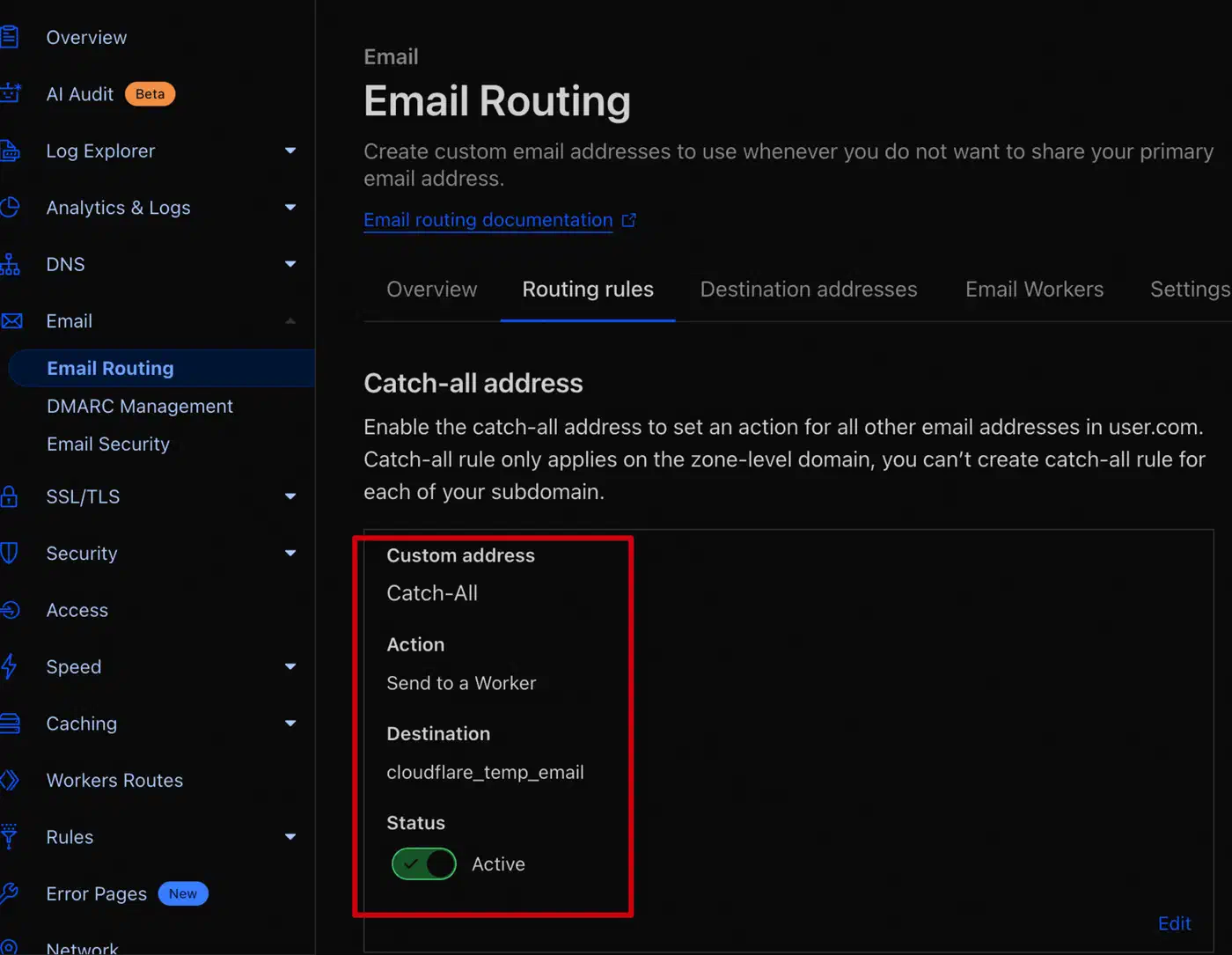
Cloudflare Email Routing does the receiving. You point a catch-all rule at your Worker. Cloudflare accepts the message at the edge, then hands it over. Nothing on your side ever listens on port 25.
The Worker parses the message and writes it into D1, Cloudflare’s SQLite service. The web interface is a static Vue site on Cloudflare Pages. That same Worker doubles as its API.
The Rust parser is an opt-in build
Rust WebAssembly mail parsing is the project’s headline feature, but you don’t get it by default.
The mail-parser-wasm-worker guide treats it as an opt-in. You deploy the worker-with-wasm-mail-parser.zip artifact instead of the plain worker.js. From the command line, you add the package and uncomment a block in worker/src/common.ts.
The reason to bother is CPU time. Cloudflare’s Workers limits give the free plan 10 ms of CPU time per request. Cloudflare’s own Email Routing limits page warns that complex email handlers can blow past that budget and fail. The logs then show an EXCEEDED_CPU error.
A Rust parser compiled to WebAssembly fits inside 10 ms with far more room to spare than a JavaScript MIME parser. Each message is one small event writing one small record, so the free tier covers the workload as long as parsing stays cheap.
How to deploy a temporary email service on Cloudflare
The steps below follow the project’s quick start guide. Read it alongside this, because the exact dashboard labels move around.
Get a domain onto Cloudflare
You need a domain whose nameservers point at Cloudflare. There is no workaround here, since mail reception depends entirely on Email Routing.
Enable Email Routing
Turn on Email Routing for the domain and let Cloudflare add its email DNS records. You also need at least one verified destination address before you can bind anything. Subdomains don’t inherit this. If you want mail at mail.example.com, enable routing on that subdomain separately.
Create the database
Create a D1 database in the dashboard. Then run the repository’s db/schema.sql in the D1 console. You can also skip that step, because the admin console’s quick setup has an initialise button once the site is up.
Deploy the Worker
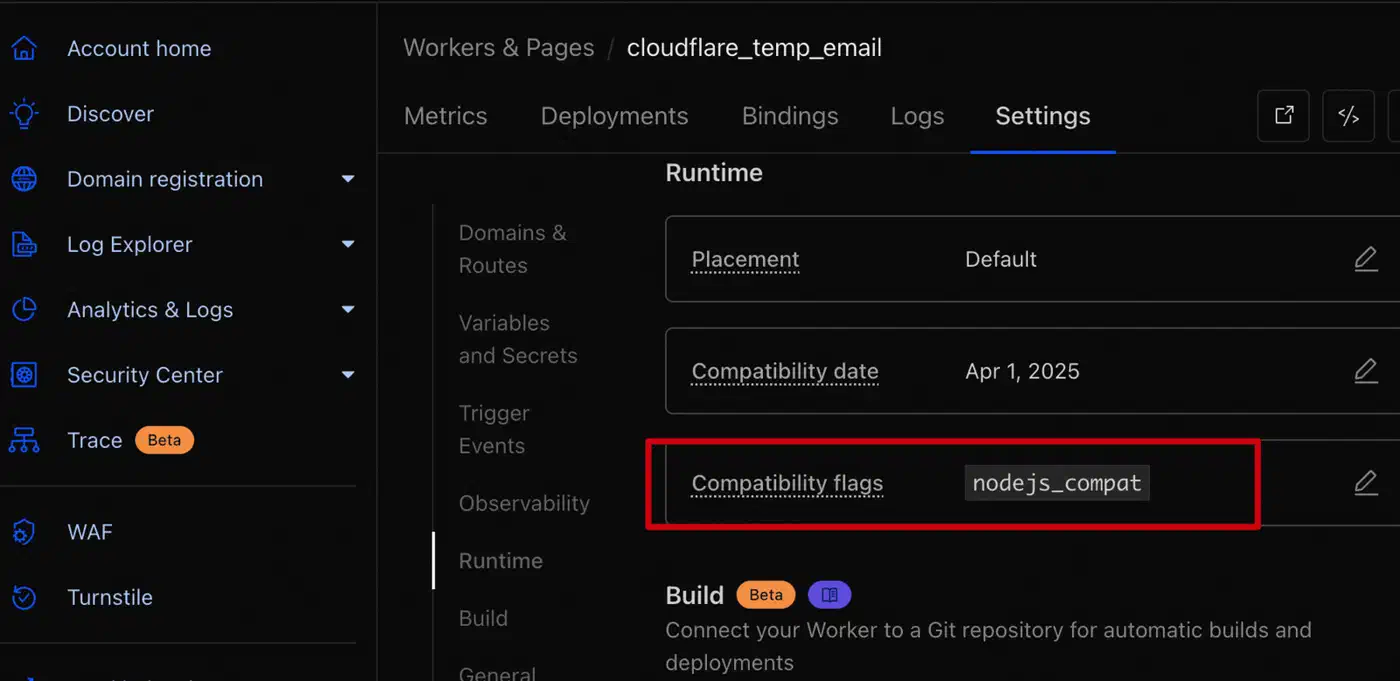
Create the Worker first. Then open its runtime settings and add the nodejs_compat flag before you upload any code. Skipping this is the most common failure, and it shows up as No such module "path" or a bare Network Error. Upload worker.js from the releases page and bind the D1 database. Then return to Email Routing and point the catch-all rule at this Worker.
Deploy the frontend
The web interface is a static bundle on Cloudflare Pages. Give it your Worker’s root API URL, starting with https:// and with no trailing slash. In the advanced options, set not-found handling to single-page application. Otherwise /admin will 404 on refresh.
Set the admin password and the address rules
Configure ADMIN_PASSWORDS, a random JWT_SECRET, and your DOMAINS list as Worker variables.
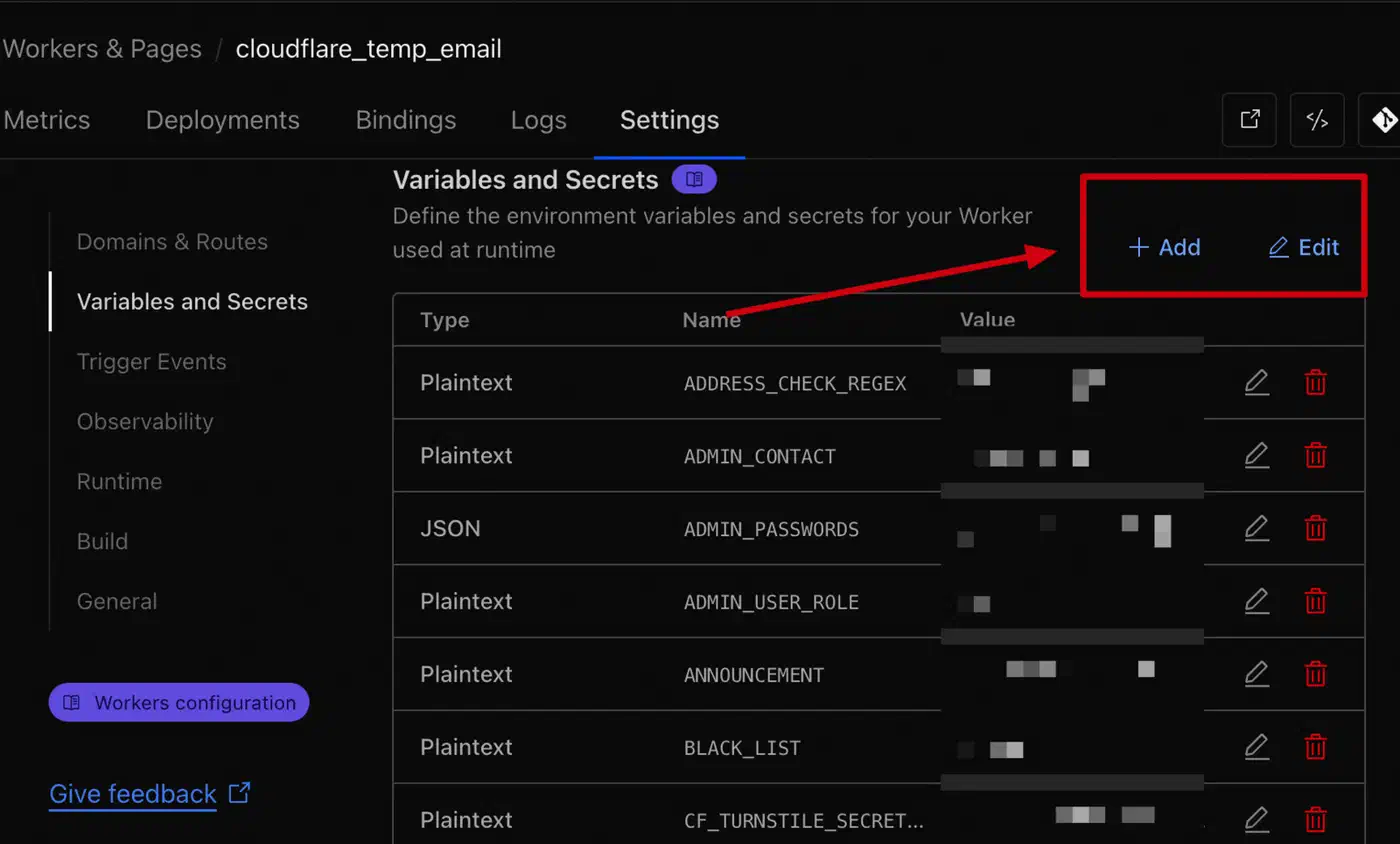
Decide who may create addresses while the site is still unreachable. Leaving ENABLE_USER_CREATE_EMAIL unset keeps address creation closed, and PASSWORDS puts the whole site behind a shared password.
Send yourself a test message
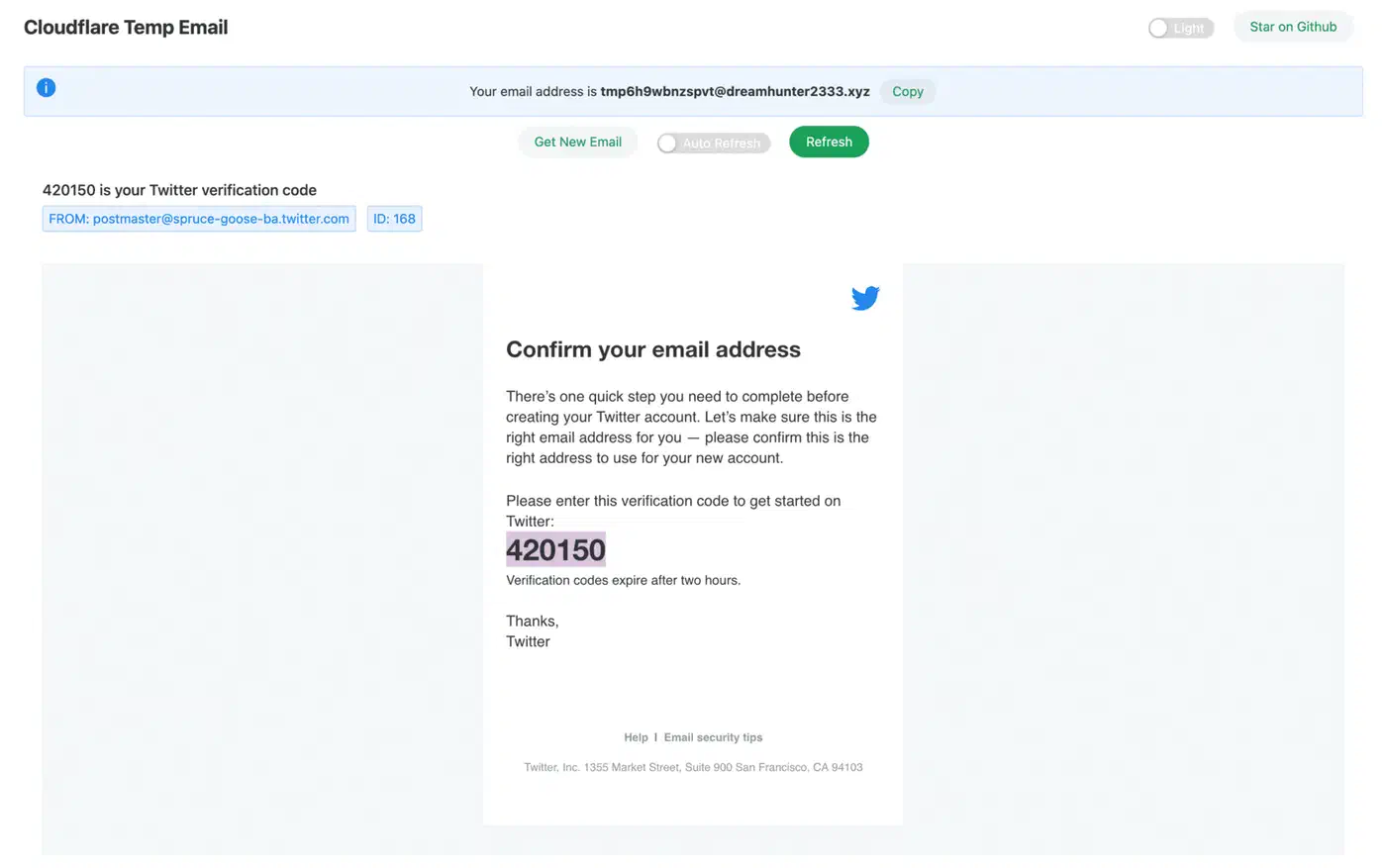
Create an address and email it from a normal mailbox. Confirm the message arrives with its attachment intact. If nothing lands, the catch-all rule is the first thing to check.
Add the extras only if you need them
IMAP and SMTP access, the Telegram bot, and the agent skill are optional layers over the same mailbox. You don’t need any of them to read mail in a browser.
The features beyond a web inbox
Per-address passwords are the security setting worth turning on first. Set ENABLE_ADDRESS_PASSWORD and every new address gets its own generated password. Knowing the name is no longer enough to read the mail.
Attachments are stored and viewable. You can push them to S3 or R2 instead of the database. Plenty of minimal clones skip attachments, which is a shame, because a download link is half the reason people use throwaway mail.
An AI extraction feature built on Workers AI also pulls verification codes and magic links out of a message. You never have to open the mail itself.
IMAP and SMTP are the one part Cloudflare does not run
The IMAP and SMTP support comes from a separate Python proxy you host yourself. The Worker plays no part in it. The SMTP and IMAP proxy guide ships a Docker Compose file. That container serves SMTP on port 8025 and IMAP on port 11143, then talks to your Worker over HTTP.
The project’s FAQ is blunt about the confusion. Address passwords turn on password login for the web API and give you no IMAP service at all. So if a normal mail client is the point, budget for one small always-on container.
The agent skill, and where it stops
The repository ships a cf-temp-mail-agent-mail skill so a coding agent can read a mailbox directly. It uses two server-parsed endpoints, /api/parsed_mails and /api/parsed_mail/:id. Both return decoded subject, text, and HTML instead of raw RFC822. The agent keeps the address token in ~/.cf-temp-mail/credentials.json and refreshes it on a 401.
The agent documentation names the limitation itself. A human has to create the mailbox in a browser first, because address creation can require a Turnstile captcha that an agent can’t solve. Attachment bytes are missing from the parsed responses too, so an agent that needs the file must fetch the raw source.
A Telegram bot handles notifications, which is the practical way to notice a message arriving. For phones there is CloudMail, a community Android client built on React Native. It’s a third-party project with no official support behind it.
The limits and the responsibilities
| Free-tier limit | Value |
|---|---|
| Worker requests | 100,000 per day |
| Worker CPU time | 10 ms per request |
| D1 size per database | 500 MB |
| D1 storage per account | 5 GB |
| D1 rows read and written | 5 million read, 100,000 written per day |
| Inbound message size | 25 MiB |
| Routing rules per domain | 200 |
| Verified destination addresses | 200 per account |
Those numbers come from Cloudflare’s D1 limits and D1 pricing pages, plus the two limits pages above.
The 500 MB database cap is the one that bites, because raw messages are stored as rows. The project’s common issues page describes the symptom exactly. Mail stops arriving, then deleting a few old messages makes it work again. The Worker log shows D1_ERROR: Exceeded maximum DB size. The fix is automatic cleanup in the admin console, plus a cron trigger on the Worker. Without the trigger, the cleanup setting sits there and never runs.
Sending is harder than receiving. Cloudflare handles reception for you, while delivering mail from a fresh domain runs into every spam heuristic there is. The project’s send configuration guide recommends Cloudflare’s send_email binding. Sends to verified destination addresses stay free, and the paid Workers plan adds 3,000 messages a month before per-message pricing starts. Resend and your own SMTP credentials are the other two channels.
Then there is the abuse question, which the project raises itself. The README states plainly that it is for learning and personal use. Users are responsible for keeping their own use lawful. An open instance where anyone can mint an address is a public service, and it will draw the traffic public services draw. Keep address creation behind a password, or keep the whole thing private to you and people you know.
Everything also sits on one vendor. If Cloudflare changes its free tier or its Email Routing behaviour, your inbox changes with it.
On maturity: the repository has been going since 2023 and is MIT licensed TypeScript. It sits past 11,000 stars, with roughly 20 open issues and a v1.10.0 release. Documentation is written Chinese-first, with English and Japanese versions that trail slightly. The English pages are good enough to deploy from, though a few dashboard screenshots still carry Chinese labels.