 Botmonster Tech
Podman vs Docker for self-hosting, measured on my machine

This post is open for corrections. Highlight any line of text to challenge it or ask for a clearer explanation and leave a comment.
Podman vs Docker is a closer race than most guides admit, but for self-hosting on Linux, Podman is the better default. It has no daemon, runs rootless out of the box, and its Quadlet files turn each container into a normal systemd service. I measured both on my own machine, and startup speed came out as a tie.
Key Takeaways
- Podman is the better self-hosting default; Docker still wins on Compose compatibility.
- Container startup speed is a tie: 352 vs 342 ms in my tests.
- Rootless Podman with pasta beat Docker’s bridge on every download throughput run.
- Docker’s idle daemons hold 144 MB of RAM; Podman uses none between runs.
- Quadlet runs containers as plain systemd services, with automatic image updates built in.
I say that as someone whose own stack still runs on Docker. Some popular claims checked out in my tests. Rootless Podman with pasta networking beat Docker’s bridge on download speed in every run, and no Podman daemon holds memory between deployments. Others didn’t: “Podman starts containers about 50 ms faster” was a tie.
The Podman vs Docker for self-hosting question comes up every few weeks on r/selfhosted. Neither tool wins every container use case. Both run the same OCI images, and the container itself runs the same way under each. The real differences are in the architecture around the container: how it gets launched, managed, secured and integrated with the rest of your system. Docker is the safer pick if your workflow leans on Docker Compose plugins, Docker Desktop’s GUI, or tools that expect the Docker socket.
Podman vs Docker at a glance
This table sums up architecture, security, speed and Kubernetes support in one place. The measured rows come from my own tests, described in the next section. The rest come from the Docker and Podman docs linked further down.
| Docker Engine 29.x | Podman 4.9 / 5.x | |
|---|---|---|
| Architecture | Client talks to a root daemon (dockerd + containerd) | Daemonless: each container is a child process |
| Security model | Root daemon; a container escape lands as root | User namespaces; an escape lands as your user |
| Default privileges | Rootful daemon; rootless mode is opt-in | Rootless by default for normal users |
| Idle memory (measured) | 144 MB for dockerd + containerd | 0 MB, no daemon exists |
| Warm start (measured) | 352 ms ± 12 | 342 ms ± 31 |
| Published-port download (measured) | 21-52 Gbit/s, rootful bridge | 60-65 Gbit/s, rootless pasta |
| Rootless networking | gvisor-tap-vsock by default since 29.5 | pasta by default in 5.x |
| systemd integration | Daemon restart policies, or units you write by hand | Quadlet .container files |
| Compose | Compose v2, the reference build | podman compose wrapper |
| Desktop GUI | Docker Desktop, paid for larger companies | Podman Desktop, free and open source |
| Kubernetes integration | No native pods | Pods plus Kubernetes YAML via podman kube |
Popular claims vs what I measured
All numbers come from my own machine: a Ryzen 9 5900X with 64 GB of RAM on kernel 6.17, running Linux Mint 22.3 (Ubuntu 24.04 base). Docker Engine 29.5 runs as root, the standard install. Podman 4.9.3 is what apt ships on Ubuntu 24.04-based distros, and I ran it rootless, as a self-hoster gets it by default. Nothing else was running, and the Docker daemon was freshly restarted. Startup times come from hyperfine over 20 runs with images pre-pulled. Throughput comes from iperf3 against a published container port, the same path your reverse proxy serves on.
| Measurement | Docker 29.5 (rootful) | Podman 4.9 (rootless) |
|---|---|---|
| Idle daemon memory | 144 MB (dockerd + containerd) | 0 MB, no daemon exists |
Start alpine true, warm image | 352 ms ± 12 | 342 ms ± 31 |
| Published-port download | 21-52 Gbit/s, unstable | 60-65 Gbit/s (pasta), ~59 (slirp4netns) |
| Published-port upload | 53.8 Gbit/s | 56.2 (pasta), 54.9 (slirp4netns) |
| Idle nginx:alpine memory | 20.1 MB + 4.0 MB shim | 15.3 MB + 2.5 MB conmon + network process |
Most Podman vs Docker pages repeat the same few speed claims, and the AI answers in search lift theirs from Uptrace’s comparison. Against my numbers they fared like this:
| Popular claim | What I measured |
|---|---|
| “Docker is 10-15% faster for individual operations” (Uptrace) | Warm start was a tie: 352 vs 342 ms, inside the noise |
| “Podman uses 60-70% less memory when idle” (Uptrace) | The real gap is a fixed 144 MB Docker daemon against 0 MB for Podman |
| “Podman starts containers about 50 ms faster” | Did not reproduce; the 10 ms gap is smaller than the spread |
| “Rootless networking costs you throughput” | Rootless Podman with pasta was the fastest and steadiest result |
| “Podman starts up to 30% faster in cold CI” | Not tested here; all my runs used pre-pulled images |
Startup is a tie: Docker’s daemon round-trip costs nothing measurable on a warm image. Rootless networking is no longer a handicap either. Podman with pasta ran at 60 to 65 Gbit/s on every download run, while Docker’s bridge swung between 21 and 52 Gbit/s. Pasta has a cost, though: each rootless Podman container carries its own 29 MB network process. The slirp4netns option needs only 3.6 MB, and Docker’s per-container shim takes 4 MB. Containers in a pod share one network process, which spreads that cost.
The 144 MB daemon number is the floor, taken right after a restart with zero containers.
Daemon vs daemonless architecture
The core of the Podman vs Docker split is the daemon. Docker uses a client-server architecture: dockerd is a background daemon process that listens on /var/run/docker.sock. Every docker command talks to that daemon, and the daemon manages every container.
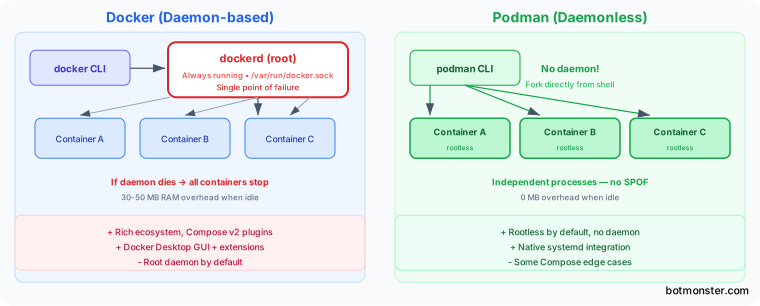
Podman’s architecture has no daemon. podman run forks a process straight from your shell and starts the container with the OCI runtime, crun on most distros. The container process becomes a child of your session, with no middleman. One crashed Podman container does not touch the others. The Docker daemon also uses memory whether or not containers run, and a daemon restart touches every container unless you set live-restore. On a 2 GB VPS with a handful of services, a 144 MB daemon is not academic.
A rootless container process can’t create real network devices, since that needs root, so a helper process carries its traffic. pasta, the successor to slirp4netns, is that helper. It takes raw packets from the container and passes the data on through ordinary host sockets, which is why it loses so little speed. Podman 5.x uses pasta by default. On the 4.9 release in Ubuntu 24.04, pick it per container with --network pasta.
Docker has a rootless mode too, which runs the Docker daemon as your user, but you have to opt in. Since Docker 29.5 its default rootless network driver is gvisor-tap-vsock, and slirp4netns is no longer installed by Docker’s packages, per the Docker 29 release notes. The same notes show Docker’s rootless layer working with the pasta driver too.
Quadlet runs self-hosted services as systemd units
systemd integration is where Podman pulls ahead on a home server, and it follows straight from the daemonless architecture. The reason is Quadlet, built in since Podman 4.4. You write a short .container file, and systemd manages the service. Here is a Caddy reverse proxy:
# ~/.config/containers/systemd/caddy.container
[Container]
Image=docker.io/library/caddy:2-alpine
PublishPort=80:80
PublishPort=443:443
Volume=caddy-data.volume:/data
Volume=caddy-config.volume:/config
Volume=%h/Caddyfile:/etc/caddy/Caddyfile:ro,Z
AutoUpdate=registry

[Service]
Restart=always

[Install]
WantedBy=default.target
Drop that file in place and run systemctl --user daemon-reload. Now the container works like any other service: journalctl for logs, systemctl for start and stop, and After= and Requires= for ordering.
Older guides still recommend podman generate systemd. That command has been deprecated since Podman 4.7, so start with Quadlet instead. Docker has no equal to Quadlet. You can write systemd units that call docker run, but then systemd and the Docker daemon both manage the same container.
Docker Compose and tooling compatibility
For years, Compose was the biggest practical gap between Podman and Docker, since Compose was built to talk to the Docker daemon. The gap has narrowed, but for many self-hosters it still decides the question.
Podman ships podman compose, which hands off to an external Compose tool: the docker compose v2 binary or podman-compose, a Python rewrite. Most docker-compose.yml files work without changes. That covers services, volumes, networks, ports and environment variables. A stack like a Plausible Analytics deployment, with Postgres and ClickHouse behind it, runs the same way under either tool. Docker Compose v2 is still the reference build. Features like watch and profiles behave most reliably on Docker itself.
The bridge between the two is the Podman API socket, which speaks the Docker REST API:
systemctl --user enable --now podman.socket
export DOCKER_HOST=unix:///run/user/$(id -u)/podman/podman.sock
With this socket running, most tools that expect /var/run/docker.sock work with Podman. That includes VS Code Dev Containers, Testcontainers, and the runners behind a self-hosted Gitea instance. Some need an extra variable or a config tweak, but the integration is good enough for daily use.
Moving a Docker Compose stack to Podman
This is the path I plan to take for my own stack. Each step keeps the old setup working until the new one proves itself.
Step 1: install Podman and check the version
On Ubuntu or Mint, sudo apt install podman and then podman --version. A 4.9 release needs --network pasta for the fast rootless networking. Fedora and Ubuntu 26.04 ship Podman 5.x, where pasta is already the default.
Step 2: run the compose file you already have
Enable podman.socket as shown above, export DOCKER_HOST, and run docker compose up -d from the project folder. The Docker Compose binary now drives Podman. If a service fails here, it will fail in Quadlet too, so fix it first.
Step 3: turn one service into a Quadlet file
Pick a simple service and write it as a .container file in ~/.config/containers/systemd/, like the Caddy example. Named volumes become .volume files, and shared networks become .network files. Stop the compose copy and start the systemd one.
Step 4: replace Watchtower with podman auto-update
Add AutoUpdate=registry to each [Container] section, then run systemctl --user enable --now podman-auto-update.timer. The podman auto-update docs say the timer fires daily at midnight. If a unit fails to restart on the new image, Podman rolls back to the old one by default.
Step 5: keep rootless services running after logout
User services stop when your last session ends, unless lingering is on. Run sudo loginctl enable-linger $USER once. The Docker rootless docs use the same command so rootless dockerd starts at boot.
Step 6: point dashboard tools at the Podman socket
Tools such as Portainer that mount /var/run/docker.sock can mount /run/user/<uid>/podman/podman.sock in its place. That integration replaces the Docker daemon socket with the Podman API process. Test each tool, since not every Docker API call has a Podman match.
Self-hosting problems when you switch
These are the problems people report most when they move a home server from Docker to Podman.
Docker bypasses UFW, rootless Podman does not
The Docker firewall docs say published ports skip ufw: Docker routes traffic in the nat table, “effectively ignoring your firewall configuration.” Rootless Podman can’t write firewall rules at all, since that needs root. Its ports are opened by a normal user process, so your host firewall still applies. Rootful Podman writes its own rules, so test its security before you trust UFW.
Ports below 1024
The kernel keeps ports under 1024 for root, per the ip_unprivileged_port_start sysctl, whose default is 1024. A rootless Caddy on 80 and 443 needs sudo sysctl net.ipv4.ip_unprivileged_port_start=80. Add it to /etc/sysctl.d/ to keep it after a reboot.
GPU passthrough with CDI
Podman’s GPU integration uses the Container Device Interface for NVIDIA cards. The NVIDIA toolkit docs generate the spec with sudo nvidia-ctk cdi generate --output=/var/run/cdi/nvidia.yaml. Then pass --device nvidia.com/gpu=all to podman run.
Postgres and bind-mount permissions
Rootless containers map their users to a range of host IDs, so a Postgres data folder can end up owned by a strange UID. Add :U to the volume and Podman chowns it to match the container user. For dev work, --userns=keep-id maps your own UID into the container instead, so files in bind mounts stay yours.
Short image names
podman pull nginx may stop and ask which registry you mean. The registries.conf docs explain the unqualified-search-registries list behind that prompt. They also warn that short names can be spoofed. Write full names like docker.io/library/nginx in every Quadlet and compose file.
Security and rootless isolation
Security is the most common reason to pick Podman. The security problem with the default Docker setup is the daemon: it runs as root, and containers run as root inside by default. Anyone who can reach the Docker socket can control the daemon, which makes that socket as sensitive as a root shell. If an attacker breaks out of a Docker container, they land on the host as root. Docker’s rootless mode reduces this risk, but you have to turn it on.
Podman’s security architecture flips the model. Run a container as a normal user, and Podman maps container root to your unprivileged host UID with user namespaces. A container escape gets only your user’s access, not root. For a box open to the internet through a reverse proxy, that secure default is worth more than any speed number. The mapping needs ranges in /etc/subuid and /etc/subgid. Most distros add them when you create a user, so check there first if rootless Podman throws permission errors.
SELinux and AppArmor security policies apply to Podman containers on their own, on Fedora and Ubuntu. Docker integrates with them too. But a common Docker forum fix is “just run with --privileged”, which strips those protections away. Both tools also support seccomp profiles, dropped capabilities and read-only root filesystems, so the security gap lies in the defaults. A hardened container image cuts the risk further under either tool.
Secrets work two ways. At runtime, podman secret create db_pass - stores a value and podman run --secret db_pass mounts it at /run/secrets/db_pass. In Quadlet, the Secret= key does the same. At build time, podman build --secret id=...,src=... exposes a file to RUN --mount=type=secret without baking it into the image.
Kubernetes pods and YAML export
For anyone eyeing Kubernetes later, Podman has a native pod concept that Docker lacks. This Kubernetes integration is one of Podman’s clearest wins. A Podman pod groups containers that share a network, like a Kubernetes pod:
podman pod create --name my-app -p 8080:80
podman run --pod my-app -d nginx
podman kube generate my-app > my-app.yaml
podman kube play my-app.yaml
podman kube generate writes Kubernetes YAML from a running pod, and podman kube play deploys a pod from Kubernetes YAML. Docker has no built-in Kubernetes export. Older guides and some AI answers still use the old podman generate kube name. The same YAML can then go to a real Kubernetes cluster, so Podman is a fair first step for container workloads that will move there later.
Performance, builds and image storage
In practice, Podman and Docker run containers at the same speed, daemon or no daemon. Both use OCI runtimes and stack image layers with the kernel’s OverlayFS. My startup test backs that up: 352 vs 342 ms, a gap inside the noise. Speed is not a reason to switch.
Image pulls go through different code. Podman, Buildah and Skopeo share the containers/image library. Docker does not use it. Since Docker 29.0, fresh installs keep images in the containerd image store instead, per the same Docker 29 release notes. Podman also stores images per user in ~/.local/share/containers/. If several users pull the same image, Podman keeps duplicate copies. On a server with one service account, the cost is small.
On the build side, Docker uses BuildKit, and Podman uses Buildah. Both read the same Dockerfile syntax. Cache mounts (RUN --mount=type=cache) are not a Podman 5 feature: Buildah added them in v1.24 in January 2022, per its changelog. The Podman 4.9 in Ubuntu 24.04 already has them. For normal multi-stage builds, both tools perform about the same.
| Feature | Docker Engine 29.x | Podman 4.9/5.x |
|---|---|---|
| Image store | containerd image store (fresh installs) | containers/storage, per user |
| Build engine | BuildKit | Buildah |
| Rootless networking | gvisor-tap-vsock default, pasta supported | pasta (default in 5.x) |
| Cache mounts | Yes | Yes (Buildah 1.24+) |
Can Podman replace Docker for self-hosting?
For most home servers, yes. After these tests, I plan to switch my own stack the next time I rebuild it.
Choose Podman if:
- You run a home server or VPS where services should survive reboots and update themselves. Quadlet plus
podman auto-updateis the most Linux-native way to run them, and anything that is not a container can run as a unit file you write by hand. - You want the security of rootless containers without extra setup, on a box exposed to the internet. In my tests you give up no throughput for it.
- You run RHEL or CentOS Stream, where Podman has the best integration. Red Hat does not support Docker on RHEL 10 and points users to Podman.
- You will deploy to Kubernetes later and want pod-native workflows with Kubernetes YAML.
- Security comes first, and you want rootless containers with no root daemon to protect.
Choose Docker if:
- Your stack is a pile of
docker-compose.ymlfiles that works, and you want every README, Portainer guide and forum answer to apply as written. - Containers are also your day job, and your pipelines, Docker Desktop extensions or Docker Swarm setup expect the Docker daemon socket.
The hybrid approach works too, and it is how I ran these tests. Both tools live on one system with separate storage and separate sockets. Set alias docker=podman in your shell while you move scripts over.
What each distro ships in October 2026:
| Distro | Podman | Docker |
|---|---|---|
| Ubuntu 24.04 and Mint 22 | 4.9.3, rootless default slirp4netns | docker.io, or Docker’s own repo |
| Ubuntu 26.04 LTS | 5.7.0 in universe | docker.io 29.1.3 in universe |
| Fedora 43 | 5.8.8 | moby-engine 29.8.2 |
| RHEL 10 | Included, the supported engine | Not supported |
Fedora does package Docker, as moby-engine, so you can run either there. If your distro favors one tool, start there unless you have a clear reason not to. If a working Docker setup is not causing problems, there is no urgent reason to move.
Podman vs Docker FAQ
Can I replace Docker with Podman?
For most self-hosted stacks, yes. The CLI matches, the container images are the same, and the Podman socket covers most Docker API tools. Follow the migration steps and test one service at a time.
Why are people moving away from Docker?
The common reasons are security worries about the root daemon, the Docker Desktop license (free only for companies under 250 employees and $10 million in revenue), and Podman’s tighter systemd and Kubernetes integration. Speed is not one of them, as my tests show, and the container itself runs the same either way.
Does Podman have a GUI?
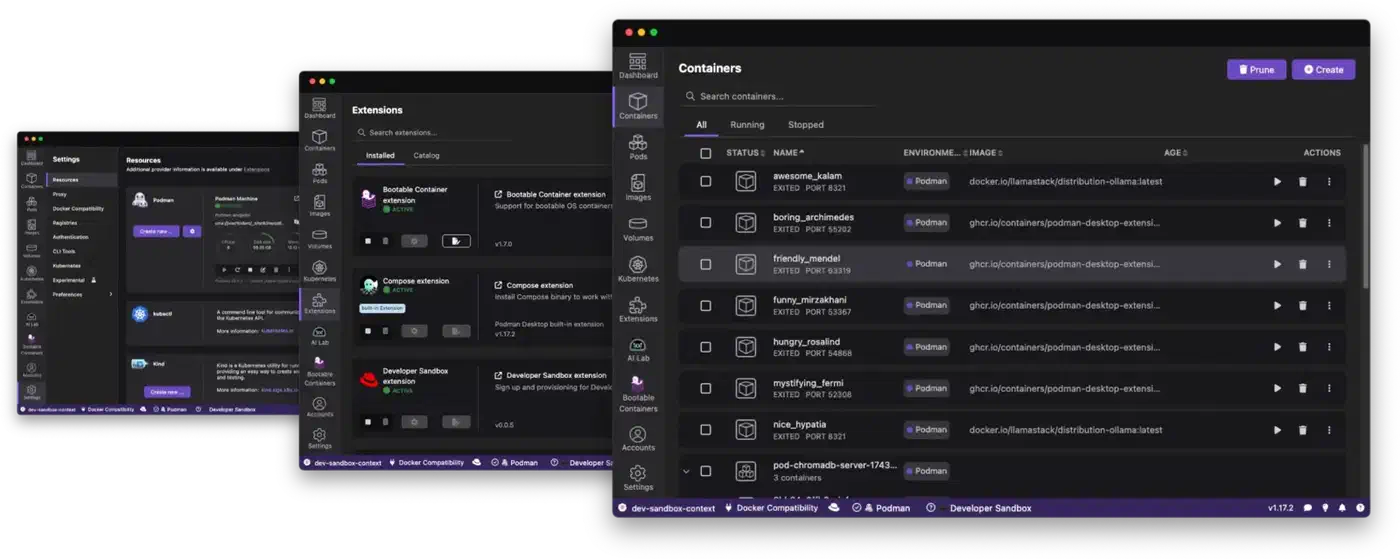
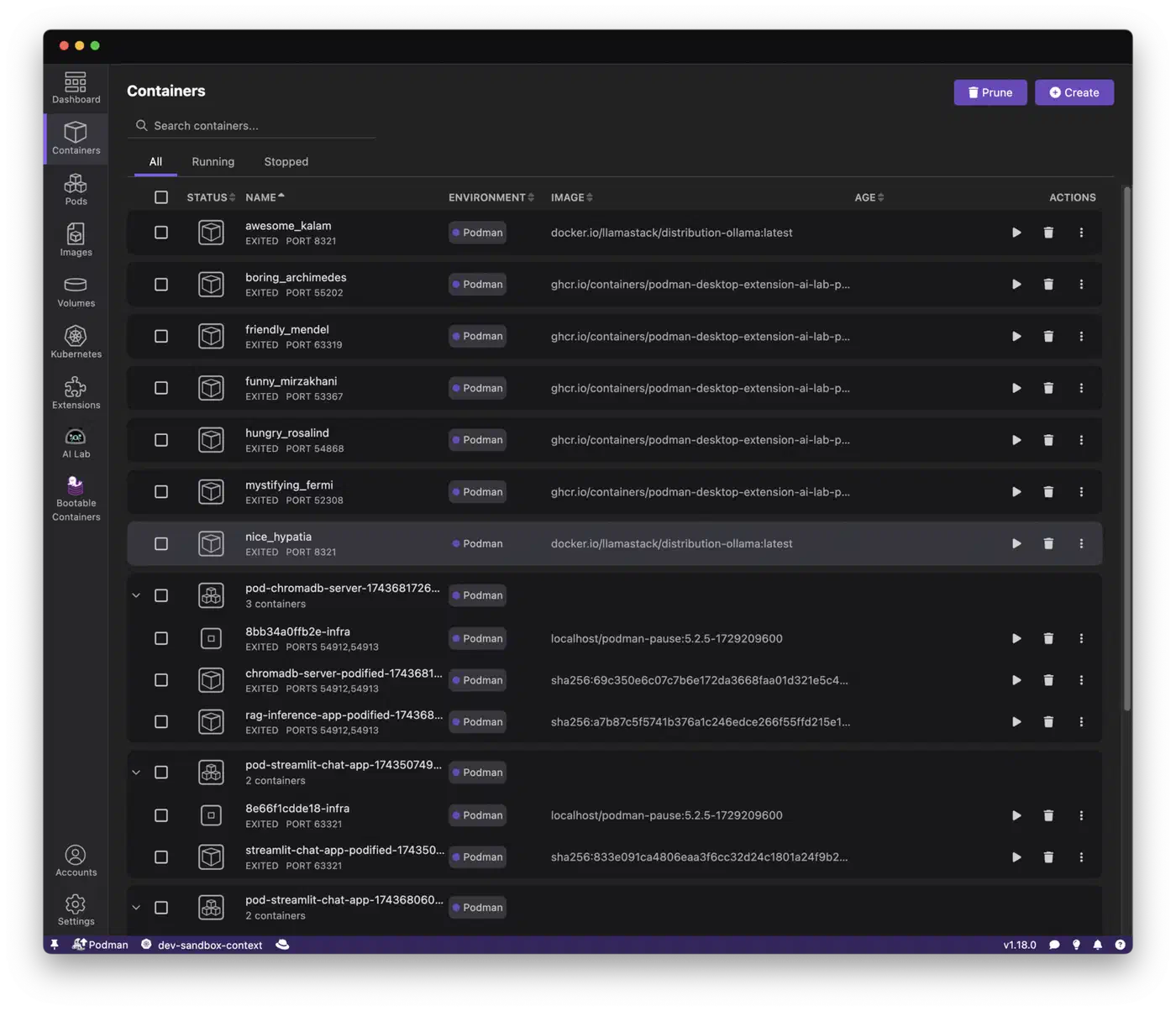
Yes. Podman Desktop gives you a GUI for containers, images, pods and Kubernetes, plus an extension catalog. Docker Desktop still has the larger extension library and smoother integration with Docker’s own tools.
Is Podman more secure than Docker?
By default, yes. Rootless Podman has no root daemon and no root socket, so a container escape lands as your own user. Docker can match much of that security with rootless mode, but you have to set it up yourself.
Is Podman better than Kubernetes?
They do different jobs. Podman runs containers and pods on one host. Kubernetes schedules containers across a cluster of machines and restarts them when a node fails. Many people learn the Kubernetes pod model on Podman first. Podman’s kube play and kube generate let you move between the two with the same YAML.
Which is faster, Podman or Docker?
Neither, for running a container. Warm startup was 352 ms on Docker and 342 ms on Podman, a tie. Rootless Podman with pasta did beat rootful Docker on published-port download speed, 60-65 against 21-52 Gbit/s.