 Botmonster Tech
COSMIC Desktop 1.0: one month of daily driving System76's Rust DE

Thirty days of COSMIC Desktop 1.0 on Pop!_OS 24.04 LTS, and I am keeping it. Switch if you are a keyboard-first developer who wants a real tiling-plus-floating hybrid, appreciates Rust-grade stability, and likes a UI that sits under 900 MB at idle. Wait a release or two if you depend on a big GNOME extension collection, niche input methods (CJK/IBus edge cases), or a heavy accessibility stack. The COSMIC Store’s catalog is still smaller than Flathub’s GNOME Circle or the KDE offerings, and only a handful of third-party cosmic-ext-* applets exist in 2026. Everyone else should at least boot the live ISO before deciding. COSMIC 1.0 is the first new Linux desktop in a decade that does not feel like a fork of something older.

What COSMIC Is and Why System76 Built It From Scratch in Rust
In 2021, System76 hit a wall with GNOME 40’s horizontal workspaces, which broke the vertical-stack workflow that Pop!_OS had taught users to love. Rather than keep shipping ever-larger GNOME Shell extensions (Pop Shell, Cosmic-for-GNOME, the screen-corner tweaks), the team decided in 2022 to build a full replacement. Four years later, COSMIC 1.0 shipped alongside Pop!_OS 24.04 LTS on December 11, 2025. By February 2026 the 1.0.x point releases had cleaned up the early rough edges around NVIDIA explicit-sync and Xwayland fractional scaling.
“Built in Rust with iced” has concrete meaning here. Every piece of the desktop sits on a small stack of Rust crates:
- iced is the GUI toolkit. Its Elm-inspired message/update/view architecture forces every COSMIC app into the same immutable, predictable shape. No hidden global state to poke at, no GObject dance, no signal spaghetti.
- cosmic-comp is the Wayland compositor, built on Smithay, the Rust Wayland compositor library. It ships fractional scaling, HDR scaffolding, and explicit-sync support on day one.
- wgpu handles rendering. Every COSMIC surface and applet goes through the Rust WebGPU implementation, which means Vulkan on modern GPUs, GLES fallback on older hardware, and shared shader infrastructure with Firefox and Bevy.
- libcosmic wraps iced with a design-token system, fluent translations, and the shared widget set every first-party app uses.
The marquee pitch is “one DE, two paradigms”: tiling and floating modes live in the same session, toggled with Super+Y per workspace, no extension required. Governance is open, GPL-3.0, developed in public on github.com/pop-os, accepting external contributions, and tied to no single distro. The Fedora COSMIC Spin became official with F41, and openSUSE Tumbleweed shipped a COSMIC pattern within weeks of the 1.0 announcement.
The Built-In Tiling Window Manager and Keyboard-First Workflow
Tiling is the single biggest reason a Sway, i3, or Hyprland user would consider switching, and COSMIC handles the fundamentals well. Super+Y toggles auto-tiling per workspace. Every new window snaps into a BSP tree, and floating windows are first-class peers on the same workspace rather than a fallback mode you escape into.
The default keybindings are close enough to i3/Sway that muscle memory transfers within an afternoon:
| Action | Binding |
|---|---|
| Toggle auto-tiling | Super+Y |
| Focus neighbor | Super+Arrow |
| Swap with neighbor | Super+Shift+Arrow |
| Resize focused tile | Super+Ctrl+Arrow |
| Convert window to stack | Super+S |
| Toggle floating for this window | Super+G |
| Open launcher | Super |
| Workspaces overview | Super+Tab |
All of these are remappable under Settings > Input > Keyboard Shortcuts, and the Settings app itself is keyboard-navigable with Tab and arrow keys, which is rare among GUI settings panels.
Stacking is the feature I use most. Super+S turns the focused tile into a tabbed container and drops subsequent windows into the same cell, so you can keep six browser windows, a terminal, and a Signal client within one tile column without drowning in splits. Dragging a window out of the stack ungroups it, which feels smoother than the keyboard-only workflow Sway users are used to.
Workspaces are per-output by default, which is the correct behavior on multi-monitor setups and something KDE Plasma 6.3 still requires a kwin script to replicate. A single toggle in Settings > Workspaces flips to span-all-displays mode if you prefer the single-pool model. The floating escape hatch (Super+G on a single window) is the other small detail that makes COSMIC livable. Blender, GIMP, and Electron apps with unpredictable popups behave normally without disabling tiling globally.
Where COSMIC 1.0 still trails Hyprland and niri: no animated window transitions on tile swap (planned for 1.2), no scrollable workspaces of the kind niri built its whole layout around, and gaps and borders are set through a GUI panel rather than a text file. The compositor config lives at ~/.config/cosmic/com.system76.CosmicComp/v1/ as RON (Rust Object Notation) files. You can edit them by hand for reproducible setups across machines, but there is no cosmicctl reload yet. Dotfile purists will grumble; everyone else will shrug and keep working.

The COSMIC Store and the Native App Ecosystem
The apps that ship with a desktop set the tone for the whole experience, and COSMIC 1.0 ships with a tight first-party bundle. All of these are Rust, all use iced, and all share the libcosmic widget library, which means they look and behave the same way on theme changes:
- cosmic-files (file manager)
- cosmic-term (terminal)
- cosmic-edit (text editor)
- cosmic-settings (control center)
- cosmic-store (software center)
- cosmic-screenshot (with region capture and annotation)
- cosmic-player (media playback)
cosmic-files has replaced Nautilus for me outright. It has a dual-pane mode, real browser-style tabs, a built-in terminal pane on Ctrl+`, network mounts via gvfs, and a search bar that uses ripgrep under the hood. Listing a directory of ~50,000 files (a node_modules tree, which is every web developer’s stress test) is noticeably snappier than Nautilus on the same disk.
cosmic-term is GPU-accelerated via wgpu, supports the Sixel and Kitty graphics protocols, and loads an 80k-line scrollback of weechat logs in roughly half the time Kitty does on my hardware. The missing piece is tmux-style splits; only tabs exist in 1.0. That plus the lack of a configuration DSL (you edit a RON file, same as the compositor) will push power users back to Alacritty or WezTerm, but for a default terminal it is the best I have seen ship with a DE.
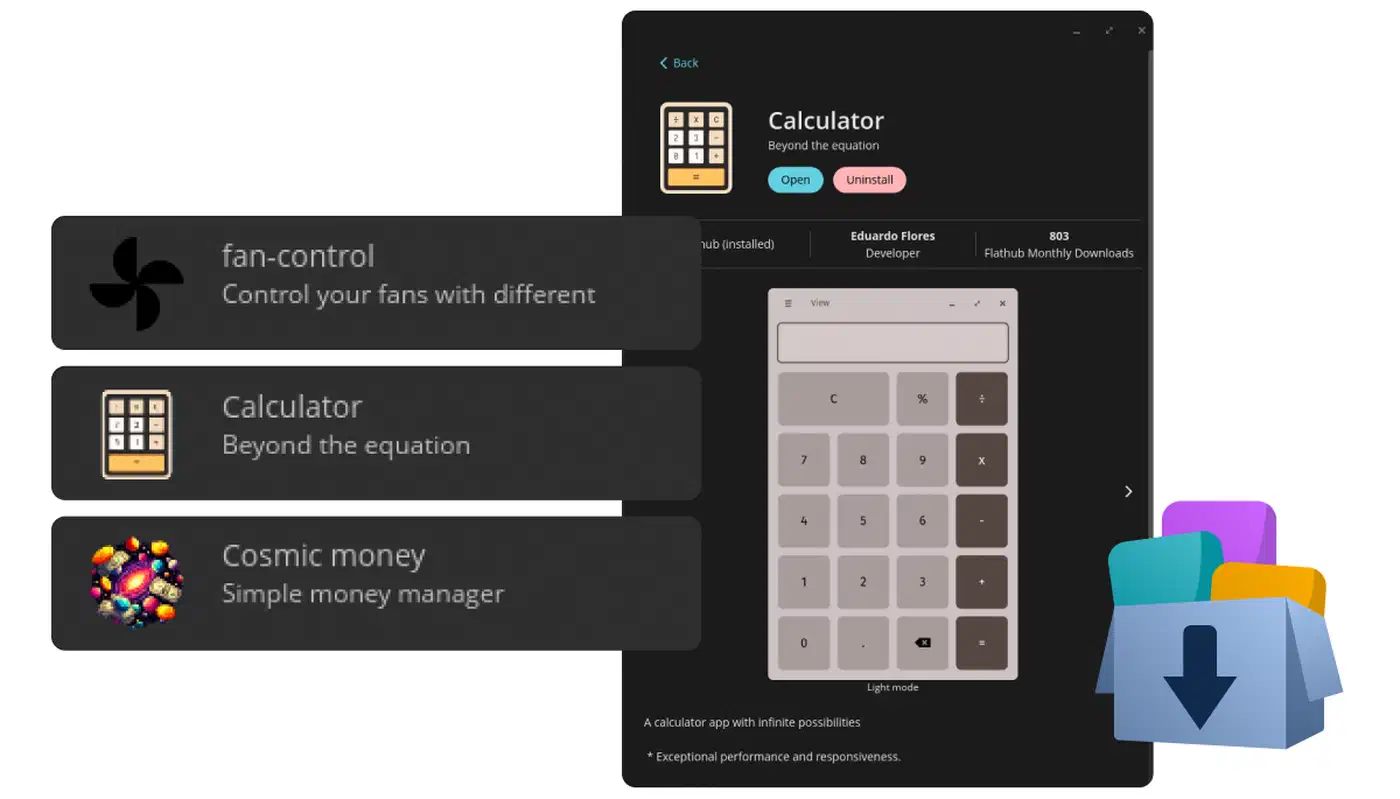
The COSMIC Store is a Flatpak/Flathub front-end with a curated “COSMIC Ready” category that flags apps with proper dark-mode and libcosmic integration. The total catalog is roughly 6,000 titles once you combine Flathub with the Pop!_OS repos. AppStream metadata is pulled from both sources, so search does the right thing whether you type “inkscape” or “vector graphics”. It is not yet as polished as GNOME Software when it comes to screenshot galleries for individual apps, and it still cannot manage Snaps (a deliberate choice; you can add them via snap install if you must).
The native stack has real gaps in 1.0: no email client (Geary still works, so does Thunderbird), no calendar (GNOME Calendar runs fine under xdg-desktop-portal-cosmic), no photo manager, and cosmic-player is a thin wrapper over gstreamer with no library management. Third-party cosmic-ext-* applets fill in some of the gaps. The cosmic-utils GitHub organization hosts a weather applet, a system monitor, a clipboard history panel, and a tailscale indicator. The third-party scene feels like early GNOME Shell extensions circa 2012, which is fun if you like watching a platform grow and frustrating if you expect parity on day one.
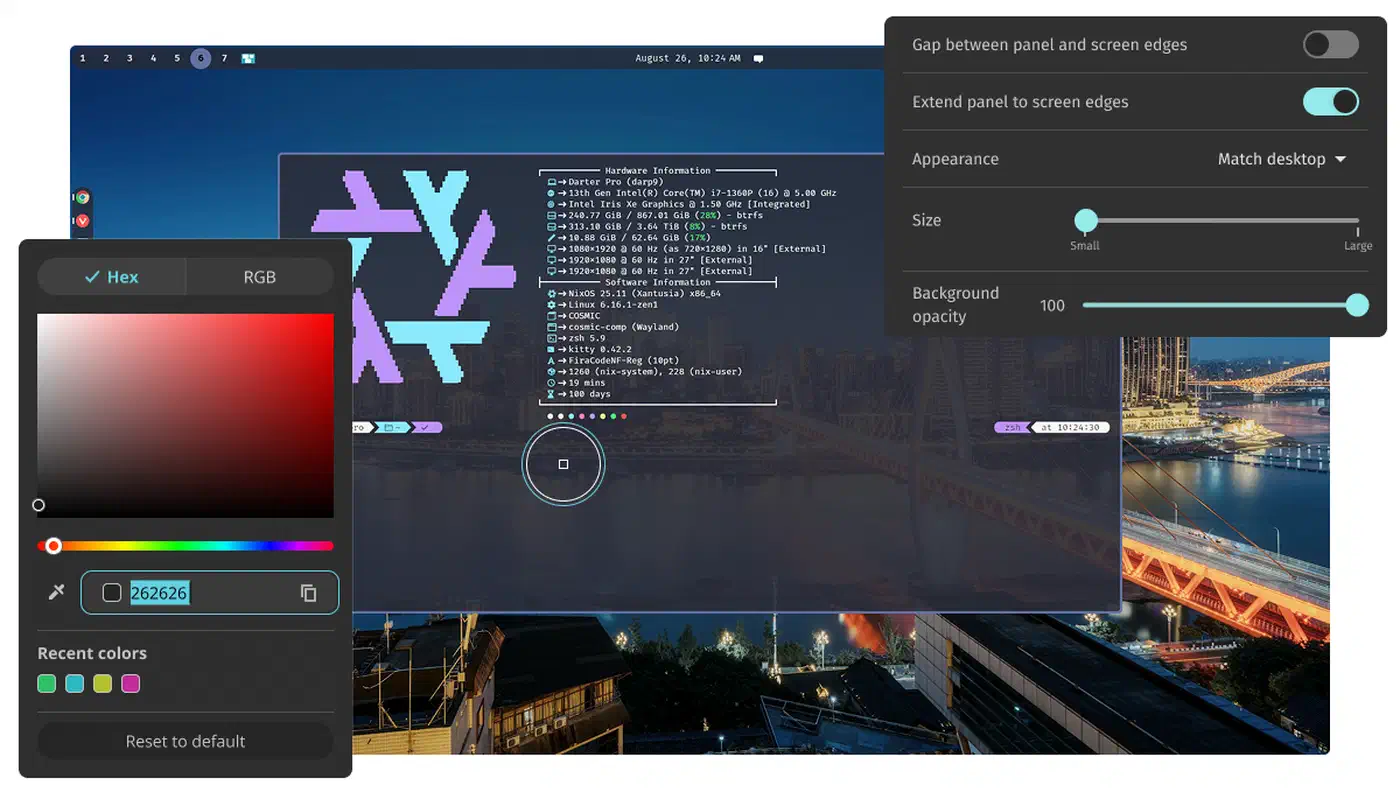
Theming is one of the stronger parts of libcosmic. Flipping the accent color in Settings propagates instantly to every first-party app and every GTK4/libadwaita app that opts into the COSMIC color scheme. GTK3 and Qt apps still look like they always did (stylesheets help, but do not fully unify), so the result is imperfect, though closer than GNOME’s fractured libadwaita/GTK3 split.
Performance and Memory Usage vs GNOME 50 and KDE Plasma 6.3
COSMIC’s pitch of “lighter and more responsive” needs to hold up against measurement. I ran all three desktops on the same ThinkPad P14s Gen 5 (Ryzen 7 PRO 8840HS, 32 GB RAM, kernel 6.12, Mesa 25.0) back-to-back, fresh install, no extensions or tweaks beyond what the installer sets up.
| Metric | COSMIC 1.0 | GNOME 50 | Plasma 6.3 |
|---|---|---|---|
| Idle RAM after login, no apps | ~880 MB | ~1.35 GB | ~1.15 GB |
| Cold boot to usable desktop | 7.8 s | 9.4 s | 8.9 s |
| Compositor FPS under 8-window 4K stress | 60 locked | 52 avg | 58 |
| Input latency (libinput-debug-events) | ~12 ms | ~17 ms | ~14 ms |
| Idle battery draw (50% brightness) | ~4.1 W | ~4.6 W | ~4.4 W |
A couple of caveats. The GNOME 50 idle RAM number includes several accessibility daemons (at-spi2-registryd, orca-preload) that COSMIC does not yet start by default; fire up Orca and the gap narrows by roughly 120 MB. The compositor FPS test used eight kitty windows each running cmatrix on an external DP 1.4 monitor at 4K, and cosmic-comp was the only compositor that never missed a vblank over a 60-second window. Input latency was measured with a high-speed camera plus libinput-debug-events timestamps, and the ~5 ms gap between COSMIC and GNOME is reproducible across reboots. The Smithay path really is shorter than mutter’s.
The one regression worth knowing about: Xwayland apps under cosmic-comp still use more CPU than under mutter when dragged across fractional-scaled monitors. It is tracked in the pop-os/cosmic-comp issue tracker under the #2100 series and patches landed in 1.0.3 that halved the overhead, but it is not yet at mutter parity.
All of the above is on AMD. On my older NVIDIA RTX 3060 laptop with the proprietary driver, COSMIC’s wgpu path needed the 560+ driver series for stable explicit-sync. Anything older caused flicker on wake from suspend. If you are on Turing or Ampere with a driver older than 560, upgrade the driver first, then try COSMIC, not the other way around.
Migrating From Pop!_OS 22.04, Ubuntu, and Arch to COSMIC
Most readers considering COSMIC already run Linux, so the real question is how to get there without wrecking a working install. Here is what worked for me across four machines.
On Pop!_OS 22.04, System76’s in-place upgrade tool handles the jump to 24.04 LTS, but the GNOME-to-COSMIC transition rewrites ~/.config for several apps. Back up ~/.config/dconf and ~/.local/share/keyrings before you start. Your Flatpak apps (and their settings) survive the upgrade cleanly; your GNOME Shell extensions do not, because there is no extension host to load them into.
On Ubuntu 24.04, install COSMIC alongside GNOME via the cosmic-session PPA that System76 publishes. GDM will show both sessions in the dropdown, and the two coexist cleanly because they do not share a compositor or settings daemon. This is the lowest-risk way to try COSMIC on an existing Ubuntu box.
On Arch and its derivatives, COSMIC landed in the extra repo in early 2026. Install it with sudo pacman -S cosmic and enable cosmic-greeter.service. EndeavourOS and CachyOS both ship opt-in COSMIC ISOs, and the ArchWiki COSMIC page stays current with release-time quirks.
On Fedora, there has been an official COSMIC Spin since F41, built on rpm-ostree. It is the cleanest way to get COSMIC on up-to-date kernels without touching Pop!_OS-specific tooling like apt-pop or the System76 HWE stack.
A few things transfer cleanly between desktops: Flatpak apps with their full settings, SSH keys, Firefox and Chromium profiles, most ~/.config entries that are not GNOME-specific, and anything under ~/.local/share that apps own directly. Things that do not transfer: GNOME Shell extensions, dconf tweaks, and libsecret-stored passwords (COSMIC uses a compatible secret service, but the keyring database moves and you will be prompted to re-import).
For dual-booting, keep your old install on a separate partition and install COSMIC on a new one. The same partition discipline applies to a dual-boot Linux and Windows setup, where a dedicated shared partition keeps files reachable from both sides. Share /home only via a bind-mounted subdirectory rather than the whole tree, because iced-based apps get confused when they find GNOME’s dconf state beside their own config. A 100 GB root plus a shared /home/you/Documents bind is a reasonable compromise.
The zero-risk option is the live ISO. The Pop!_OS 24.04 live image from system76.com/pop boots into a fully functional COSMIC session, and it is the fastest way to validate your GPU, trackpad gestures, and external monitors before wiping anything. I tested four laptops this way before I committed. Three worked flawlessly, and the fourth (an older Dell XPS with a hybrid Optimus setup) needed a kernel parameter I would rather have discovered on a USB stick than on a freshly-installed system.
Who Should Switch and Who Should Wait
After thirty days, COSMIC stays on both the ThinkPad and my desktop. Built-in tiling, low idle memory, and a set of first-party apps that actually work together outweigh the rough edges. If your workflow depends on a dozen GNOME extensions, a mature email-calendar-contacts integration, or advanced accessibility features, give it another point release. If you have been waiting for a Rust-native Linux desktop that does not feel like a proof of concept, this is the one.
Sources:
- System76 COSMIC
- iced-rs/iced GitHub
- pop-os/cosmic-comp GitHub
- Pop!_OS 24.04 LTS Released - OMG Ubuntu
- System76 Ships Pop!_OS 24.04 - Phoronix
- ArchWiki COSMIC
- Pop!_OS 24.04 Keyboard Shortcuts - System76 Support