 Botmonster Tech
Dynamic electricity pricing automations in Home Assistant with Tibber and Nordpool

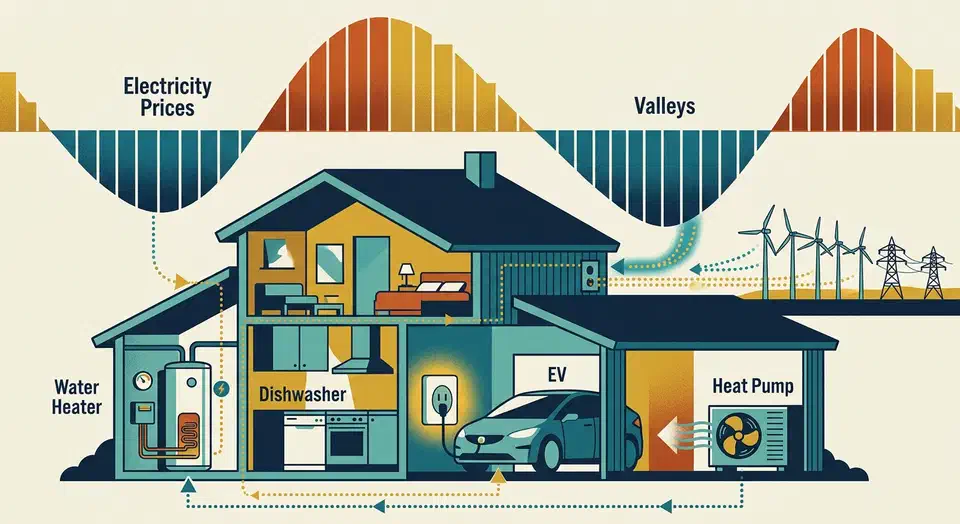
Home Assistant pulls hourly spot prices through the Tibber integration or the Nordpool HACS add-on. It then schedules EV chargers, water heaters, heat pumps, and dishwashers during the cheapest hours. On a 2026 Nordic tariff with 3-8x daily price swings, shifting 10-15 kWh of flexible load each day cuts the bill by 20-40% with no comfort cost.
Why Dynamic Pricing Pays Off in 2026
The Nordpool day-ahead auction closes around noon CET. By 13:00, prices for all 24 hours of the next day are out for every bidding zone. That window is exactly what Home Assistant needs: a once-a-day drop of 24 hourly prices that your automations can plan against overnight.
After the 2022-2024 energy crisis, hourly metering became the rule across Norway, Sweden, Finland, and Denmark. Most grid operators now pass the raw spot price straight through to anyone on a variable-rate contract. That share has grown from a niche to the default for anyone with an EV or heat pump.
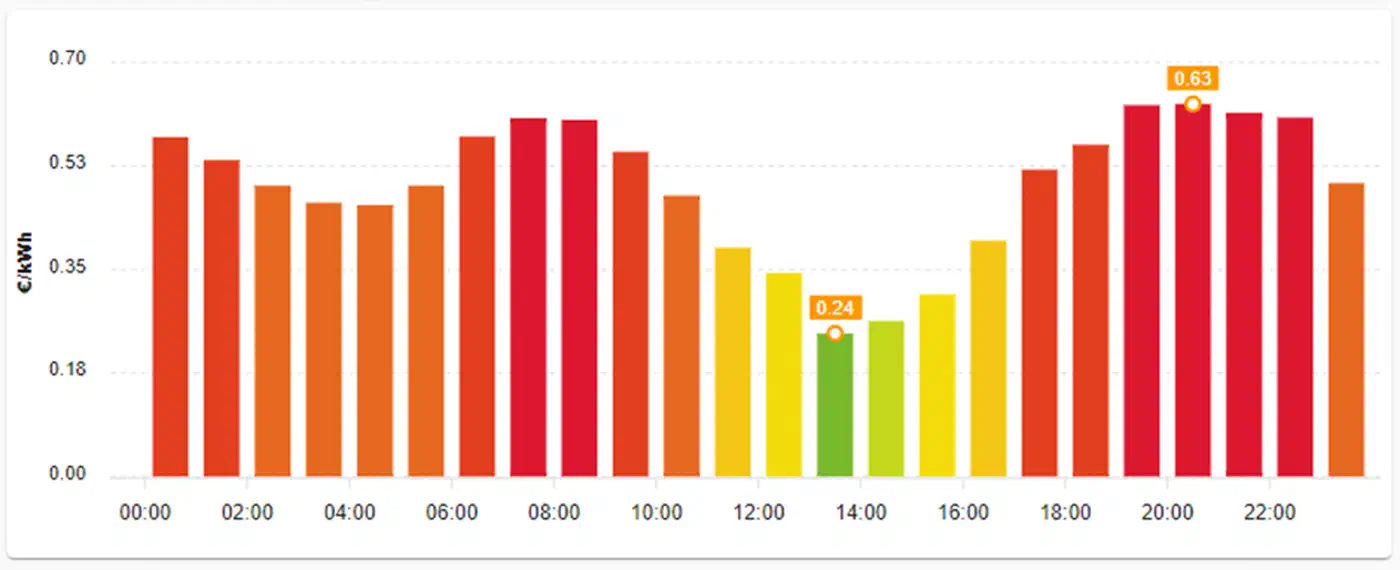
A Norwegian NO1 (Oslo) day in early 2026 often runs from 0.15 NOK/kWh at 03:00 to 2.80 NOK/kWh at 08:00. That is roughly an 18x swing inside the same 24 hours, driven only by demand and wind forecasts.
Loads in a typical home split into “shiftable” and “fixed.” Dishwashers, washing machines, dryers, EV chargers, water heaters, pool pumps, vent units, and inverter heat pumps are shiftable. An automated garden watering cycle belongs in the same group. The work they do does not need to happen at a set clock time. Lighting, cooking, fridges, and computers are fixed. Automations target the first group only and leave the second group alone.
One twist on top of raw energy pricing: many Norwegian and Swedish grid operators also bill a capacity fee. The fee is based on your monthly peak kW draw (“effekttariff” in Norway, “effektabonnemang” in Sweden). So even in a cheap hour, do not stack three heavy loads at once. You can cheap-charge your way into a higher capacity tier. Good automations respect both axes.
Tibber vs Nordpool vs Entsoe: Which Data Source?
The choice of data source is the first real call. Three options cover almost every European setup.
| Source | Access | Markup visible | Countries | Contract required |
|---|---|---|---|---|
| Tibber | Core HA integration | Yes (retailer price) | NO, SE, FI, DE, NL | Yes |
| Nordpool | HACS custom component | No (raw wholesale) | Nordics + Baltics + DE-LU, AT, BE, FR, NL | No |
| Entsoe | HACS custom component | No (raw wholesale) | All EU + UK | Free API key |
Tibber is the easy path if you already have a contract. The integration ships with core Home Assistant and gives you a ready-made price level tag. Nordpool via HACS pulls wholesale data straight from the source and works with no retailer tie. Entsoe fills the gap for markets Nordpool does not cover well, such as Poland, Spain, Italy, or Ireland. You sign up on the Entsoe Transparency Platform and ask for a REST API key by email.
Installing the Tibber Integration
For Tibber customers, setup takes three minutes. It follows the same four-step path on every Home Assistant build since 2024.
Add hourly spot pricing to Home Assistant via Tibber
Generate a Tibber access token
Visit developer.tibber.com/settings/accesstoken while logged in to your Tibber account and create a personal access token; copy it to the clipboard.
Open Home Assistant integrations
In Home Assistant, go to Settings, then Devices & Services, then click Add Integration in the bottom-right corner.
Add the Tibber integration
Search for Tibber in the integration list, select it, and paste the access token when prompted to authenticate the connection.
Verify the price sensor appears
Confirm a sensor.electricity_price_<home_name> entity now exists in Developer Tools > States, with a level attribute and today / tomorrow price arrays populated.
The integration creates a sensor named after your home, often sensor.electricity_price_<home_name>. Its state is the current hour’s price. The sensor also carries a useful set of attributes: today, tomorrow, max, min, average. If your retailer contract supports it, you also get a level bucket with the values VERY_CHEAP, CHEAP, NORMAL, EXPENSIVE, or VERY_EXPENSIVE.
The level attribute is the best part of the Tibber integration. It saves you from writing any template code. A state-trigger automation with to: 'VERY_CHEAP' runs your dishwasher each time the current hour drops into Tibber’s cheapest bucket. No templates, no sorting, no math. The downside: buckets are relative to the day. A “VERY_CHEAP” hour on a costly day can still cost more than a “NORMAL” hour on a cheap day. For fixed thresholds, you need templates.
If you own a Tibber Pulse, you also get a sensor.power_<home_name> entity. It updates every two seconds with live whole-house use
. That feeds straight into the Home Assistant Energy Dashboard. Peak-avoidance logic gets easy: you can read current kW draw in real time before you start another load.
Tomorrow’s prices show up in the integration around 13:00 CET, just after Nordpool publishes. Overnight automations should gate on tomorrow’s data being present before they plan the 24-48 hour window. More on that below.
Installing the Nordpool Custom Component via HACS
If you are not a Tibber customer, or you want raw wholesale prices with no retailer markup, the Nordpool HACS add-on is the answer. It covers the Nordic and Baltic core (NO1-NO5, SE1-SE4, DK1, DK2, FI, EE, LV, LT). It also covers several Western European markets (DE-LU, AT, BE, FR, NL).
Install HACS first if you have not yet. Then open HACS, pick Integrations, hit the download arrow, search for “Nordpool,” download, and restart Home Assistant. Finish by going to Settings, then Devices & Services, then Add Integration, and picking Nordpool.
The config flow asks for your bidding zone. It also offers options for currency, VAT, decimal precision, and, most of all, extra costs. The extra-cost field takes a Jinja template. So you can add grid fees, energy taxes (elafgift in Denmark, energiskatt in Sweden), and VAT on top of raw spot prices. Your automations will then see the true all-in price, not just the wholesale one.
The resulting sensor, sensor.nord_pool_<area>, exposes a rich attribute dump:
todayandtomorrow: simple lists of 24 hourly pricesraw_todayandraw_tomorrow: lists of dicts withstart,end, andvalue, perfect for iterationaverage,peak,off_peak_1,off_peak_2,min,max,mean: summary statisticscurrent_price,low_price,price_percent_to_average: instant-comparison fieldstomorrow_valid: a boolean that tells you whether tomorrow’s auction data has arrived
The tomorrow_valid boolean is the gate for every overnight plan. Without it, an automation firing at 13:30 can find tomorrow empty and plan against a null list. A simple wait_template until it turns true, then run the planner. That is enough.
Building Automations: Cheapest N Hours, Threshold, and Sliding Window
Three patterns cover almost every real household need. All three reduce to boolean sensors that regular automations can reference. For trickier logic, such as resetting the window at midnight, coordinating many devices, or calling outside APIs, reach for AppDaemon . It lets you write the same logic as Python classes that run next to Home Assistant.
Pattern 1: Cheapest N hours
A template binary sensor returns on when the current hour is in the N cheapest hours of today. Typical values: N=4 for EV charging on a 7 kW wallbox, N=2 for a dishwasher, N=6 for water-heater preheat on a large tank.
template:
  - binary_sensor:
      - name: "Cheapest 4 Hours Now"
        state: >-
          {% set prices = state_attr('sensor.nord_pool_no1', 'raw_today') %}
          {% if prices %}
            {% set sorted_prices = prices | sort(attribute='value') %}
            {% set cheapest = sorted_prices[:4] | map(attribute='start') | list %}
            {% set now_iso = now().replace(minute=0, second=0, microsecond=0).isoformat() %}
            {{ now_iso in (cheapest | map('as_datetime') | map('isoformat') | list) }}
          {% else %}
            false
          {% endif %}
Pattern 2: Absolute threshold
Trigger when current_price drops below a fixed value, rank aside. This is the pattern for chase loads on windy nights when Nordic prices go negative.
automation:
  - alias: "Top up EV when power is near free"
    trigger:
      - platform: numeric_state
        entity_id: sensor.nord_pool_no1
        below: 0.10
    condition:
      - condition: numeric_state
        entity_id: sensor.ev_state_of_charge
        below: 100
    action:
      - service: easee.set_circuit_dynamic_limit
        data:
          current: 32
Pattern 3: Next cheapest hour in a rolling window
A sensor that always points to the cheapest hour in the next 6, 12, or 24 hours. It is great for delay-start gear that needs a set kick-off time, not a boolean “run now” flag. Once tomorrow_valid flips true after 14:00 CET, the same sensor can plan across a full 48-hour window.
Every automation also needs guard checks. Add a battery state-of-charge gate for EVs so a full car does not wake up. Add a tank temp check for water heaters so a hot tank does not reheat. Add total-power checks so three loads do not stack into the same cheap hour and push you into a higher monthly capacity tier.
A daily 23:00 summary push that lists tomorrow’s four cheapest hours and which loads are queued goes a long way. It builds household trust that the system is doing real work, not just flipping relays at random. On the dashboard side, you can flash a tile only during one specific pricing window , showing a “cheap power now” prompt that nudges anyone home to start a heavy load.
Real Recipes: EV, Water Heater, Heat Pump, Dishwasher
Four loads drive most of the savings in a typical Nordic home. Here is how each one turns into an automation.
EV charging
With a smart wallbox such as Easee
, Zaptec
, go-e
, or the Tesla Wall Connector, the simple version starts charging when cheapest_now == on and charge is below your target. It stops when the target is hit or the hour drops out of the top N.
A 70 kWh car that needs 40 kWh overnight on a 7 kW charger takes about six hours. So set N to at least 6 to make sure the car finishes. For EVs that must be ready by a set leave time, work out the hours needed to reach target. Then always include the cheapest hours inside that window, not just the cheapest hours of the day. Real-world savings on overnight home charging versus plugging in at 18:00 land in the 60-70% range across the winter half of the year.

Water heater
The Norwegian varmtvannsbereder gives you two options. Either schedule a daily reheat during the three cheapest hours. Or use a Shelly Plus 1PM smart relay to cut power during costly hours and let the tank coast on its thermal mass.
A 300-litre tank coasts through a four-hour peak with less than 5 degrees of drop, which sits below the shower-comfort line. Watch the heating-element wattage when you size the relay. Never cut power to a tank with an electronic control board without checking the manual first.
Heat pump load shifting
Modern inverter heat pumps such as the Mitsubishi Ecodan, Daikin Altherma, or Panasonic Aquarea do not like being hard-cycled. Doing so voids warranties and shortens compressor life.
What does work: raise the setpoint by 2 degrees during cheap hours to pre-charge the house. Then drop it by 1 degree during costly hours and use the building itself as a thermal battery. That tactic is gentler on the compressor and is usually invisible to anyone in the house. The Home Assistant climate.set_temperature service against the heat pump’s modbus or Melcloud integration is all you need.
Dishwasher and washing machine
Either a factory “delay start” feature or a smart plug that can safely cut power will do. Check the manual before using a plug. Some machines lose their program on a power cut. A few high-end units throw an error that needs a service visit to clear. The Shelly Plus 1PM works well for plug-based dishwashers that can take a cut. The safer route is to load the machine, press “delay start 6 hours,” and let the built-in timer shift the run.
A utility_meter helper tracks kWh used in CHEAP hours versus EXPENSIVE hours. Multiply by your local spread and you get real monthly savings, not theoretical ones. Homes with one or two EVs and a heat pump on a 2026 Nordic tariff often log 400-900 NOK per month of avoided cost. Most of that comes from the car and the hot-water tank, not the small appliances.
A Note on Home Batteries and Solar
If a home battery is in the mix, like a Huawei LUNA2000, Sonnen, Tesla Powerwall, or a DIY LiFePO4 setup, the same price signal can charge it from the grid in the cheapest hours and drain it during the most costly ones.
Before you turn on pure grid-to-battery arbitrage, check your retailer contract. Some Nordic suppliers ban arbitrage on variable-rate tariffs. A few grid operators will reclass you as a producer if you push power back to the grid above a set limit.
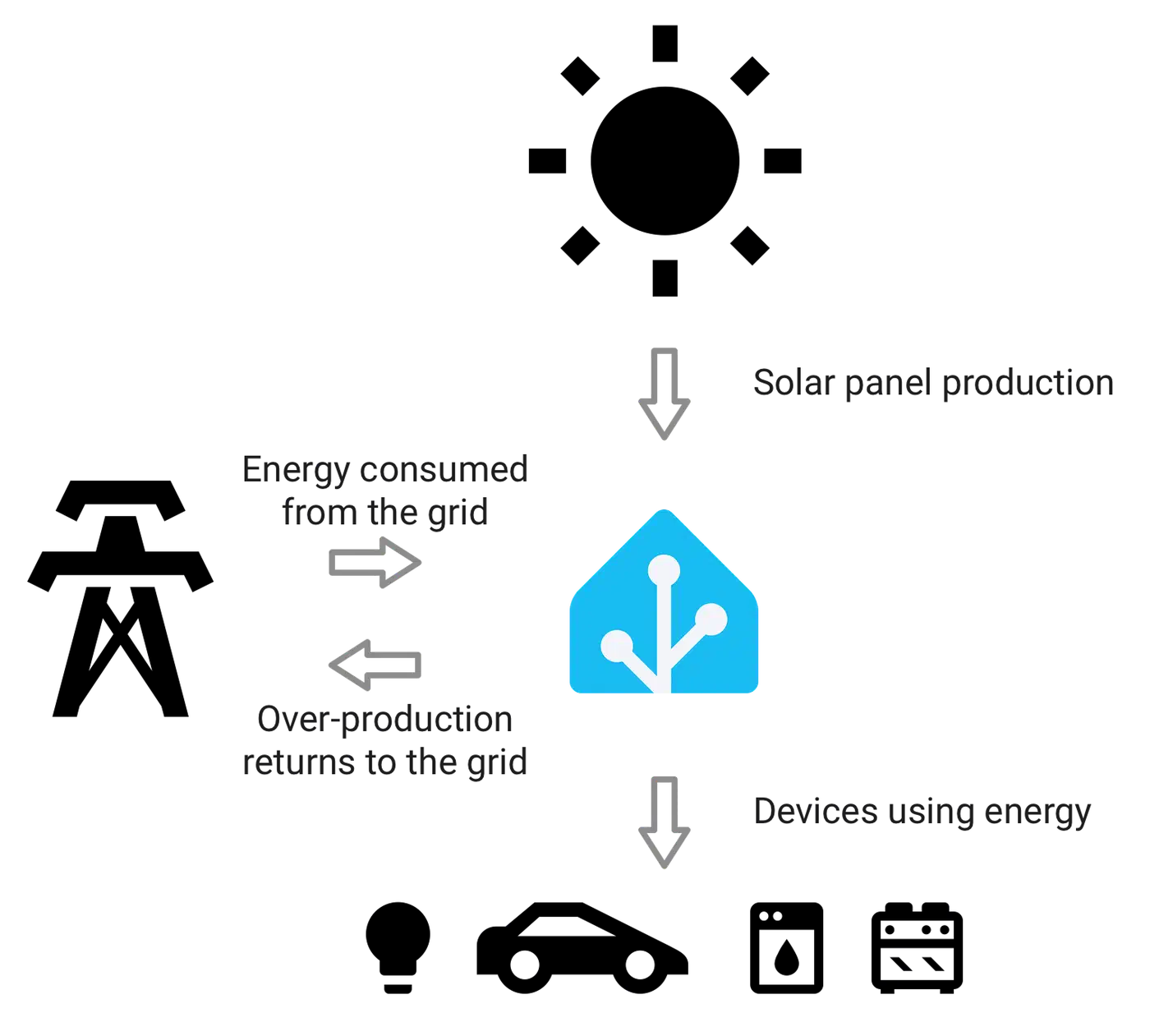
Solar PV changes the picture too. A sane priority order for a hybrid home is: use solar in the house first, charge the battery from solar excess second, charge the EV from solar excess third, and pull from the grid only when the spot price is below your threshold and no renewable is on tap. Home Assistant’s built-in tool for reconciling solar generation against battery charge and grid draw handles the books once Tibber or Nordpool is feeding live prices into it.
Dynamic pricing in Home Assistant rewards patience. The first week is for getting the sensors right and watching the dashboard behave. The second is for tuning N values and thresholds against your own loads. A month in, the system fades into the background. The bill drops without you needing to think about it.