 Botmonster Tech
Impeccable names the 59 tells of AI-made web design

This post is open for corrections. Highlight any line of text to challenge it or ask for a clearer explanation and leave a comment.
Impeccable design detector rules turn “this looks AI-generated” into a list you can check. The project names 59 anti-patterns, including side-tab accent borders and overused fonts, and runs them with no model and no API key. I scanned its own test suite: 41 rules fire on source files, 50 on a browser render.
Key Takeaways
- The look of AI-made design now has 59 named rules you can check.
- A free command-line scanner flags most of them with no AI model.
- Scanning source files caught 41 rules, a real browser render caught 50.
- The project’s own homepage failed its own scanner 223 times.
- You can waive a rule per file when the brand really does use Inter.
Every model learned frontend design from the same pile of SaaS templates. So they all reach for the same handful of moves: Inter for the type, a purple-to-blue gradient on the headline, a rounded-square icon above every section, cards nested inside cards. Impeccable, by Paul Bakaus, is an Apache 2.0 project that writes those moves down as rule ids and ships a scanner that finds them.
The 59 Impeccable design detector rules, grouped
The registry splits into two halves. There are 32 slop rules, which flag moves that read as machine-made, and 27 quality rules, which flag things that were defects long before anyone typed a prompt.
| Group | Count | Rule ids |
|---|---|---|
| Colour and glow | 8 | ai-color-palette, cream-palette, gradient-text, dark-glow, radial-halo, radial-spotlight-glow, repeating-stripes-gradient, codex-grid-background |
| Cards and borders | 6 | side-tab, border-accent-on-rounded, nested-cards, gpt-thin-border-wide-shadow, edge-flush-cards, clipped-overflow-container |
| Typography | 12 | overused-font, flat-type-hierarchy, italic-serif-display, oversized-h1, extreme-negative-tracking, wide-tracking, all-caps-body, tight-leading, justified-text, tiny-text, undersized-ui-text, line-length |
| Layout and spacing | 6 | monotonous-spacing, cramped-padding, body-text-viewport-edge, text-overflow, text-occlusion, first-viewport-column-overflow |
| Headings | 3 | skipped-heading, heading-rhythm, repeated-container-text |
| Motion | 6 | bounce-easing, layout-transition, marquee, pulsing-dot, blinking-cursor, image-hover-transform |
| Composition | 5 | icon-tile-stack, hero-eyebrow-chip, kicker-above-heading, numbered-section-labels, shape-assembled-illustration |
| Copy | 4 | em-dash-overuse, theater-slop-phrase, marketing-buzzword, aphoristic-cadence |
| Contrast | 2 | low-contrast, gray-on-color |
| Breakage | 3 | broken-image, script-error, content-hidden-at-rest |
| Design system | 4 | design-system-color, design-system-font, design-system-font-size, design-system-radius |
side-tab, the thick accent stripe down one edge of a card, is the one the registry calls the most recognisable tell of AI-generated interfaces. icon-tile-stack catches the rounded square that sits above every heading, and gpt-thin-border-wide-shadow catches a hairline border paired with a wide, diffuse shadow that the project describes as a recurring generated-UI signature.
A design linter that reads your writing rhythm sounds like scope creep, but the same model wrote the layout and the words, so the tells travel together. marketing-buzzword is a literal blocklist of about 30 phrases: “best-in-class”, “world-class”, “enterprise-grade”, “next-generation”, “cutting-edge”, “revolutionize”. I fed it a paragraph of deliberately awful SaaS copy and it counted six hits in one pass.
aphoristic-cadence is stricter. It hunts the “Not a tool. A language.” shape and the short-rebuttal shape, and it needs three of them in one file before it says anything. That threshold keeps it quiet on prose that uses the trick once on purpose.
What no model and no API key really buys you
The pitch is that these rules are deterministic, and that part holds up. All 59 are plain code.
little known fact: impeccable has a cli that detects ai slop in milliseconds without any token burn
A scan of the project’s own 101-file fixture folder finished in 0.67 seconds on my machine, and a full render-based scan of a live homepage took about 5 seconds. Any competing check that calls a model costs money and latency on every run.
However, “deterministic” and “you can run it on your source tree” are two different claims. The CLI has two modes. Point it at files and it does static HTML and CSS analysis. Give it a URL and it drives a real Chrome through Puppeteer. So I ran the project’s own 57 HTML fixtures through both modes and compared which rule ids fired.
| Pass | Distinct rules fired |
|---|---|
Source files (detect tests/fixtures/) | 41 |
Real browser render (same files over file://) | 50 |
Ten rules fired only after a real render: blinking-cursor, body-text-viewport-edge, content-hidden-at-rest, edge-flush-cards, first-viewport-column-overflow, heading-rhythm, line-length, script-error, text-occlusion, and text-overflow. You cannot tell from source code whether one block of text sits on top of another, or whether a script throws on load.
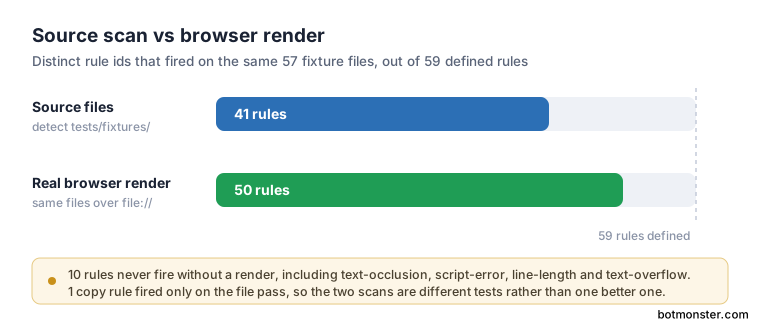
The gap is not one-way, either. On a single fixture file, the source pass caught a marketing-buzzword hit that the browser pass missed, because the browser reads rendered text while the file pass reads everything in the file. So a source scan and a URL scan are two different tests, and running only the source scan gives you about four fifths of the tool.
The design linter’s own homepage fails 223 times
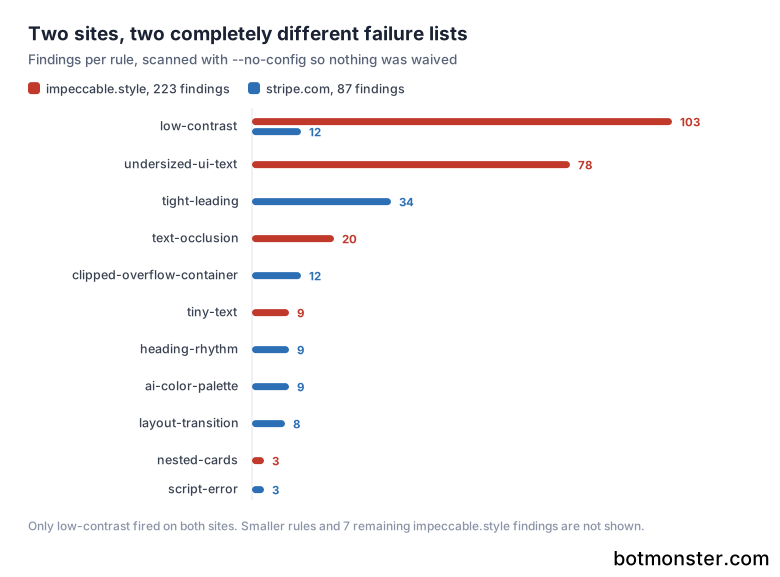
I pointed the detector at impeccable.style, the project’s own site, with project config disabled so nothing was waived. It returned 223 findings, including one side-tab.
| Rule | Findings on impeccable.style |
|---|---|
low-contrast | 103 |
undersized-ui-text | 78 |
text-occlusion | 20 |
tiny-text | 9 |
nested-cards | 3 |
gpt-thin-border-wide-shadow | 3 |
| everything else | 7 |
The site animates content in on scroll, so most of those contrast failures are cream-on-cream text the scanner caught mid-reveal. Still, 78 pieces of functional text under the 11-pixel floor is a real finding on a site that exists to sell design rigour.
As a control, I ran the same scan against stripe.com, a site nobody would call machine-made. It returned 87 findings: 34 tight-leading, 12 low-contrast, 12 clipped-overflow-container, 9 heading-rhythm, 9 ai-color-palette, 8 layout-transition, and 3 script-error. Every real site fails some of these, so a raw count proves nothing until you have read the findings.
The skill, the 23 commands, and the design hook
Most people will meet Impeccable as an agent skill rather than a CLI. Setup is one command, /impeccable init, which asks whether the surface is brand or product, then writes PRODUCT.md and offers DESIGN.md so later commands know the audience, voice, colours, type, and anti-references.
The 23 commands cover a whole design pass. shape and craft plan and build, critique and audit review, polish finishes. Then come the modifiers: bolder, quieter, distill, colorize, typeset, layout, animate, delight, and overdrive.
harden gets less use than it deserves: it covers error states, translation, text overflow, and edge cases. onboard builds first-run flows and empty states, and clarify rewrites interface copy that nobody can parse. There is also /impeccable live, a visual variant mode that iterates on elements in the browser, and /impeccable pin audit, which promotes a command you lean on into a top-level /audit shortcut.
The hook is the piece that changes behaviour without you asking. On Claude Code, GitHub Copilot, Codex, Cursor, and Grok Build, npx impeccable install writes a provider-native hook manifest that runs the detector on direct UI file edits. Cursor blocks a bad proposed write before it lands, while the others report findings after the edit. Thirteen tools are supported in total, Mistral Vibe among them.
The tool also leaves working files under .impeccable/. The README hands you a marker-wrapped .gitignore block plus the short list of files that should stay tracked, including config.json, design.json, and the critique markdown. Impeccable started from Anthropic’s frontend-design skill and grew from there.
Scan a site for AI design tells with the Impeccable CLI
Run the detector against a directory, an HTML file, or a live URL, then decide which findings are real and waive the rest.
Scan a directory first
Run npx impeccable detect src/ from the project root. No install, no API key, and no configuration are needed for a first look.
Scan the built output too
Run npx impeccable detect index.html on a built page. Source files and built output fail different rules, especially anything about spacing and contrast.
Scan the live site
Run npx impeccable detect https://example.com. This path drives a real Chrome, the only mode where the ten render-only rules fire.
Get machine-readable output
Run npx impeccable detect --json . when you want to gate a pipeline on the result or diff findings between commits.
Read the findings before fixing anything
Rules like overused-font and cream-palette are judgement calls in some brands. Separate the real tells from the deliberate choices before you touch code.
Waive what is genuinely intentional
Run npx impeccable ignores add-value overused-font Inter --reason "Brand font" for a project-wide waiver. For a one-file exception, add an inline <!-- impeccable-disable overused-font: exported brand doc --> comment instead.
Re-scan and compare
Run the same detect command again. Confirm the count dropped for the reasons you intended, and check that no file dropped out of the scan by accident.
Wire it into the agent
Run npx impeccable install to add the skill and the provider-native hook. The detector then runs on UI file edits instead of only when you remember.
Should you lint design at all?
The obvious objection is that design is taste, and taste cannot be linted. Bakaus makes the point himself, and more bluntly than his critics do.
You can’t bottle taste. It’s personal, contextual, and always moving; try to mass-produce it and you get algorithmic Uniqlo.
The objection holds in places. overused-font firing on Inter is fine when Inter is the brand face, and cream-palette is fine on a bakery site. A rule that flags a deliberate choice is noise, and enough noise gets the tool switched off.
The tool survives the objection anyway, because most of the list is not taste. Line length, contrast, touch target size, skipped heading levels, text overflow, and broken images are correctness. The waiver design carries the rest: a project ignore for a value you chose on purpose, or an inline comment scoped to one file, means the exception travels with its reason.
Put the CLI in continuous integration for the correctness rules, where 0.67 seconds costs you nothing, and reach for the skill’s critique when you want an opinion. Treat the taste rules as prompts for a decision you then make yourself.
Two caveats before you trust a green run. detect reads .impeccable/config.json unless you pass --no-config, so a clean scan on a teammate’s machine might just be their ignore list. And passing all 59 rules gives you a page with no tells, which is not the same as a page with a point of view. Deciding the point of view is a different job for a different tool. Hallmark hands the agent 67 KB of design rules before any code exists, so the choices get made up front rather than caught afterwards.