 Botmonster Tech
JavaScript's Temporal API kills Date and date-fns for good

This post is open for corrections. Highlight any line of text to challenge it or ask for a clearer explanation and leave a comment.
JavaScript’s Date object has been broken since 1995. It changes in place, it mixes up instants with wall-clock time, and it knows no timezone but the one your machine runs in. So you pull in date-fns, dayjs, or Moment just to add a day. The Temporal API fixes all of it with immutable, timezone-aware types like Temporal.PlainDate, Temporal.ZonedDateTime, and Temporal.Duration. Temporal ships natively in Firefox stable (since 139) and Chrome 144, and Safari keeps it behind a flag. Everywhere else runs it through @js-temporal/polyfill. You can finally delete your date library.
Why Temporal Exists: The Date Object’s Original Sins
It helps to understand why Date is unfixable. Even battle-tested tools like Moment built their entire API around its flaws, and those flaws show up in real code every week.
Date is mutable. Run date.setMonth(date.getMonth() + 1) on January 31 and you silently land on March 3, with the original object gone. Temporal types are immutable. Arithmetic returns a new instance and leaves the old one alone.
The object mashes two different concepts into one. A Date is both an instant (a Unix millisecond timestamp) and a wall-clock reading, with no way to say “March 15 at 9 AM in Tokyo” and keep that meaning once you serialize it. First-class timezone support is missing too. toLocaleString takes a zone for display only, and you cannot store one or compute with one. That is why every timezone-aware app bolts on date-fns-tz or Luxon.
Parsing is famously unsafe. new Date("2026-03-15") reads as UTC, while new Date("2026-03-15 00:00") reads as local time, so one space changes the instant. And month numbers start at zero while day numbers start at one, a thirty-year-old quirk that still causes off-by-one bugs.
The Five Core Temporal Types and When to Use Each
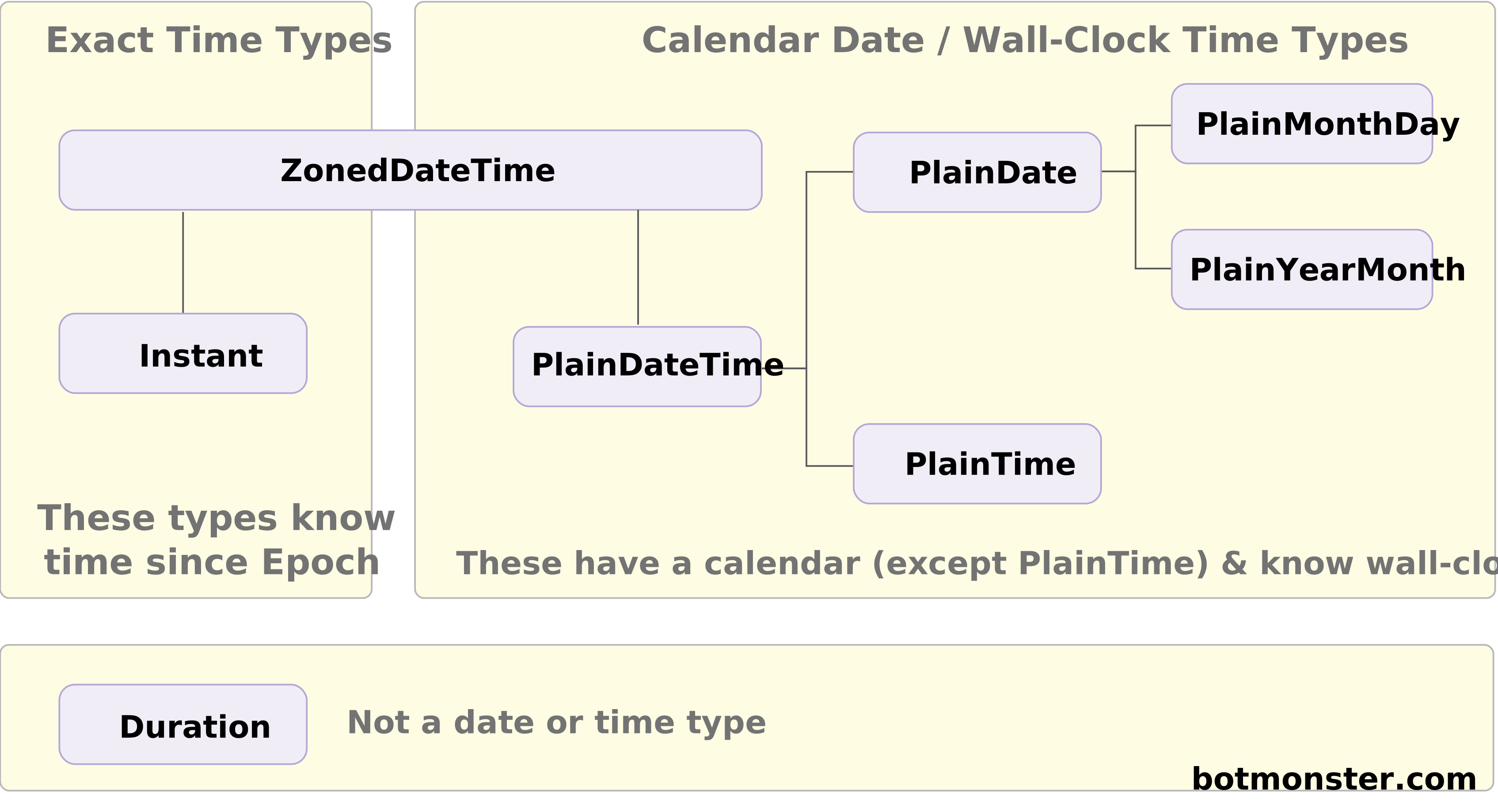
Temporal swaps one overloaded type for several precise ones. Picking the right type is the core skill for a migration, so use the table below to choose.
| Type | Represents | Use for |
|---|---|---|
Temporal.Instant | Unix nanosecond timestamp | Log entries, event ordering, “when did this happen” |
Temporal.PlainDate | Calendar date, no time, no zone | Birthdays, anniversaries, contract effective dates |
Temporal.PlainTime | Wall-clock time, no date, no zone | Store opening hours, alarm times, daily schedules |
Temporal.PlainDateTime | Date and time, no zone | Local-time values where the zone is implied by context |
Temporal.ZonedDateTime | Date, time, IANA timezone | Meetings, reminders, scheduling across zones |
Temporal.Duration | Elapsed time (years, months, …, nanoseconds) | Arithmetic results, reminders, timeout values |
Temporal.PlainYearMonth / PlainMonthDay | Partial dates | “March 2026”, “December 25th” |
Use Temporal.PlainDate when 9 AM in Tokyo and 9 AM in New York count as the same day for you. A birthday is the classic example, since the person turns 30 on the same calendar date no matter where they fly that morning. Use Temporal.ZonedDateTime when DST or cross-zone scheduling is in play, which is almost always. Reach for Temporal.PlainDateTime rarely, only when the zone is clear from context, such as “show this in the reader’s own zone.” The full type reference lives at developer.mozilla.org/docs/Web/JavaScript/Reference/Global_Objects/Temporal.
Timezone-Aware Arithmetic with ZonedDateTime
The worst date bugs come from DST shifts, from cross-zone scheduling, and from the gap between “24 hours later” and “tomorrow at the same wall-clock time.” Temporal makes each of those a choice you spell out.
new Date(d.getTime() + 24 * 60 * 60 * 1000) adds 86,400 seconds, which on a DST “spring forward” day lands you at 1 AM the next morning instead of midnight. With ZonedDateTime, .add({ days: 1 }) and .add({ hours: 24 }) are deliberately different operations. Days follow the calendar; hours follow elapsed time.
import { Temporal } from '@js-temporal/polyfill';

const start = Temporal.ZonedDateTime.from('2026-03-08T00:00[America/New_York]');

start.add({ hours: 24 }).toString();
// 2026-03-09T01:00:00-04:00[America/New_York]

start.add({ days: 1 }).toString();
// 2026-03-09T00:00:00-04:00[America/New_York]
DST gaps and overlaps get first-class handling too. When 2:30 AM does not exist on a spring-forward day, or happens twice on a fall-back day, Temporal forces you to specify a disambiguation option of compatible, earlier, later, or reject, instead of guessing on your behalf.
Getting “next Tuesday at 9 AM in Berlin, wherever the server sits” takes one line with .with({ ... }) and .toZonedDateTimeISO("Europe/Berlin"). For a gap between zones, zdt1.until(zdt2, { largestUnit: "days" }) hands back a Temporal.Duration counted in calendar days instead of raw milliseconds. Conversions are explicit and lossless. .toInstant() drops the wall-clock frame, .withTimeZone("Asia/Tokyo") keeps the same instant in a new zone, and .toPlainDate() pulls out just the calendar date.
Here is the same “schedule a reminder 30 days from now in the user’s timezone” task written three ways:
// Raw Date: broken across DST, ignores user timezone
const reminder = new Date(Date.now() + 30 * 86400000);

// date-fns + date-fns-tz: correct, but two packages and a dance
import { addDays } from 'date-fns';
import { utcToZonedTime } from 'date-fns-tz';
const reminder = utcToZonedTime(addDays(new Date(), 30), userZone);

// Temporal: one call, DST-safe by construction
const reminder = Temporal.Now
  .zonedDateTimeISO(userZone)
  .add({ days: 30 });
Parsing, Formatting, and Interop with Date and ISO 8601
Migrations don’t happen overnight. Most codebases will run Temporal at the edges and Date in the middle for a long time. The bridges between them count almost as much as the new types.
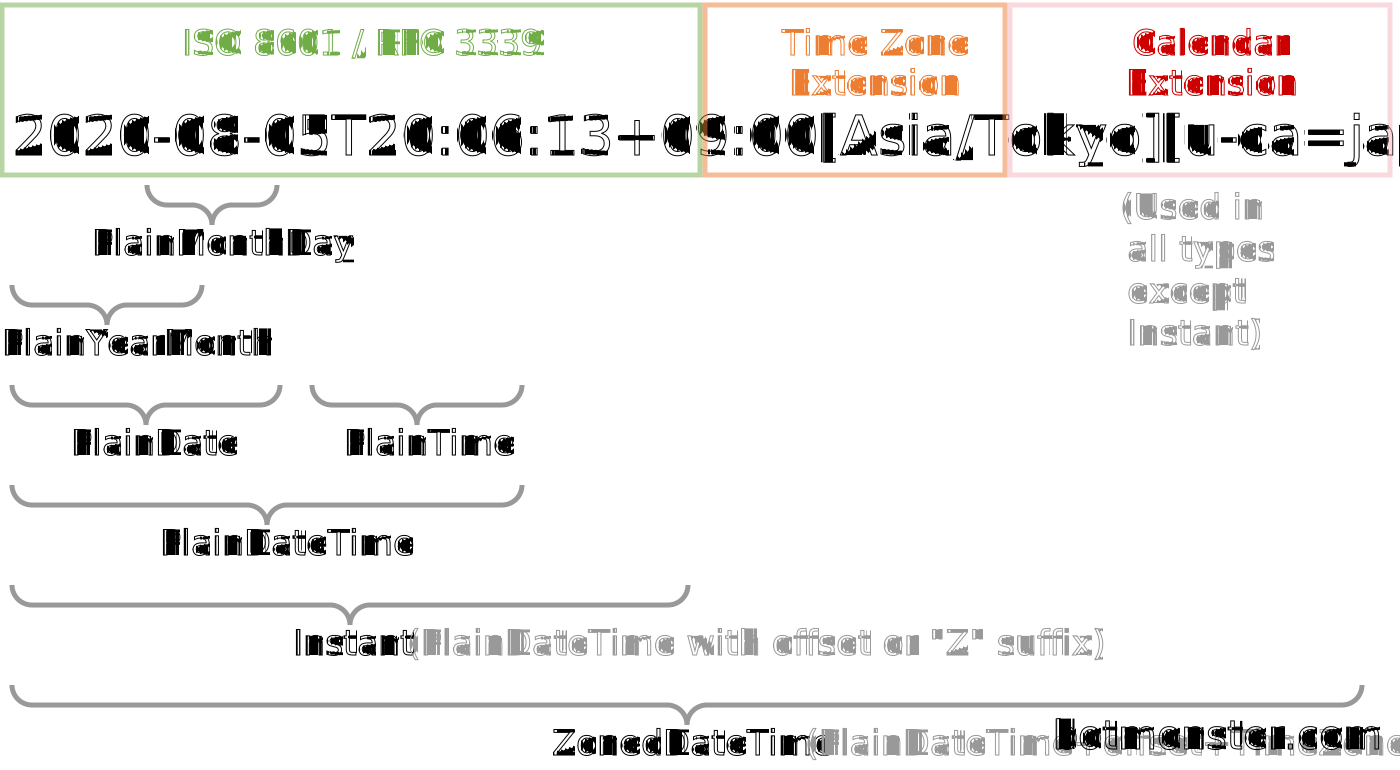
Temporal accepts one string format on input: ISO 8601, which kills the new Date("03/15/2026") guessing game at the door. Each type has a static from method, so you write Temporal.PlainDate.from("2026-03-15") or Temporal.ZonedDateTime.from("2026-03-15T09:00[America/New_York]"). Round trips hold up because .toString() always gives back a parseable ISO 8601 string. It can tag on the calendar and timezone in square brackets. Those tags are a Temporal extension, and old parsers skip them harmlessly.
Interop with Date goes both ways. The proposal adds Date.prototype.toTemporalInstant(), so legacyDate.toTemporalInstant() gives you an Instant, and new Date(instant.epochMilliseconds) gets you back. Formatting still goes through Intl.DateTimeFormat, which has been updated to accept Temporal types directly. The .toJSDate() shim is gone: pass a ZonedDateTime to formatter.format() and you get the localized string back.
The Temporal.Now namespace takes over from Date.now() with one helper per type: Temporal.Now.instant(), Temporal.Now.zonedDateTimeISO("America/New_York"), Temporal.Now.plainDateISO(). Each hands back the right type. That stops the old bug of passing a raw millisecond number where a Date was wanted.
Each type has a toJSON() method, so JSON output is an ISO 8601 string. To read it back, pass a reviver to JSON.parse that spots your date-shaped strings and calls the right .from(). Nothing in the string marks it as Temporal, so document your schema and stay consistent.
Temporal also builds in non-Gregorian calendars: hebrew, islamic-umalqura, japanese, persian, chinese, indian, buddhist, and more. Date could never touch these without ECMA-402 gymnastics.
Migrating from date-fns, dayjs, or Moment
Most readers aren’t starting fresh. They have a date library to pull out. The table below maps the three most common ones to Temporal, and a safe order for the work follows it.
| Task | Date | date-fns | Moment | Temporal |
|---|---|---|---|---|
| Add 30 days | new Date(d.getTime() + 30*86400000) (wrong across DST) | addDays(d, 30) | m.add(30, 'days') | zdt.add({ days: 30 }) |
| Parse ISO string | new Date(str) (ambiguous) | parseISO(str) | moment(str) | Temporal.PlainDate.from(str) |
| Format for display | d.toLocaleString(...) | format(d, 'yyyy-MM-dd') | m.format('YYYY-MM-DD') | Intl.DateTimeFormat(loc).format(zdt) |
| Difference in days | manual ms math | differenceInDays(a, b) | a.diff(b, 'days') | a.until(b, { largestUnit: 'days' }) |
| Start of month | manual | startOfMonth(d) | m.startOf('month') | pd.with({ day: 1 }) |
| Comparison | a > b (ok) | isAfter(a, b) | a.isAfter(b) | Temporal.ZonedDateTime.compare(a, b) > 0 |
| “Now” in a zone | n/a | via date-fns-tz | moment().tz('Asia/Tokyo') | Temporal.Now.zonedDateTimeISO('Asia/Tokyo') |
| Duration object | n/a | n/a | moment.duration(...) | Temporal.Duration.from(...) |
| Relative “3 days ago” | n/a | formatDistance(a, b) | m.fromNow() | Intl.RelativeTimeFormat + Duration |
Polyfill strategy
Install the polyfill with npm install @js-temporal/polyfill and import Temporal from it. Then feature-detect, so a native implementation wins whenever one is available:
import { Temporal as Polyfilled } from '@js-temporal/polyfill';
export const Temporal = globalThis.Temporal ?? Polyfilled;
Bundle size is the main tradeoff. @js-temporal/polyfill weighs about 52 KB gzipped. The other option, temporal-polyfill by FullCalendar, drops that to around 20 KB gzipped. A browser with native support costs nothing at all, which is why the feature check is worth wiring up.
Browser and runtime support in 2026
Firefox shipped Temporal in stable release 139 in May 2025. Chrome 144 shipped full support in early 2026, per Socket’s writeup. Safari hides it under Develop > Experimental Features > Temporal API, and Node.js 24 needs the --js-temporal flag, with native support due in a later release. Bun and Deno both have it as of their 2026 releases. For the full adoption status check caniuse.com/temporal. Plan to ship the polyfill for at least another year for Safari and older Node.
Suggested migration order
Start with Temporal.Now, swapping out every Date.now() and new Date() that grabs the current moment. Next, fix parsing at your API boundaries, so inbound strings land as PlainDate or ZonedDateTime right away. Internal arithmetic comes third, because that is where DST bugs hide and where the upgrade pays for itself. Formatting comes last, since it touches every component in your UI. You want the rest of the stack solid before you touch rendering. The same boundary-first order helps when switching TypeScript data-access layers, where the sequence shapes type safety at every layer.
Bundle-size win at the finish line
Dropping Moment alone saves 60 KB minified, while dayjs is around 7 KB and date-fns runs from 10 to 30 KB depending on tree-shaking. Once all your target runtimes have native Temporal, you are at zero. It ships with the language, so there is nothing left to version or audit. In the polyfill era you swap one dependency for another of much the same size, and you still get a far better API and a clear path to delete it. If you are auditing your JavaScript toolchain too, the Biome vs ESLint comparison covers another dependency that often ships next to date libraries in a project scaffold.
Testing and mocking
Jest fake timers still work. jest.useFakeTimers() and jest.setSystemTime() both hold, because Temporal.Now reads the same clock that Date.now() does. For stricter control, stub Temporal.Now.zonedDateTimeISO with jest.spyOn(Temporal.Now, 'zonedDateTimeISO') and return a fixed ZonedDateTime for the whole test.
Temporal is a full replacement for Date. It was designed by people who spent a decade watching every way the old object breaks. Start with new code, migrate the hottest paths next, and let the old library fall out of your package.json when the last import goes.