 Botmonster Tech
Palmier Pro lets your AI agent cut video on your Mac

Palmier Pro is an open source video editor for Mac that runs a local MCP server while the app is open. Your coding agent, Claude Code, Codex, or Cursor, then drives the timeline directly. It exposes 47 tools, including clip trimming and silence removal. The editor is free; generating video costs money.
Key Takeaways
- Your coding agent can edit the timeline while the app is open in front of you.
- The editor is free with no login, like CapCut or Premiere.
- Generating video and images costs money and needs an account.
- It only runs on Apple Silicon Macs with macOS 26.
- The project is four months old, so treat it as an early build.
What an open source video editor for Mac gains from an agent
Most AI video tools work in one shot. You write a prompt, a model hands back a file, and if it lands 80% right you start over from the prompt. Nothing in the middle is yours to adjust.
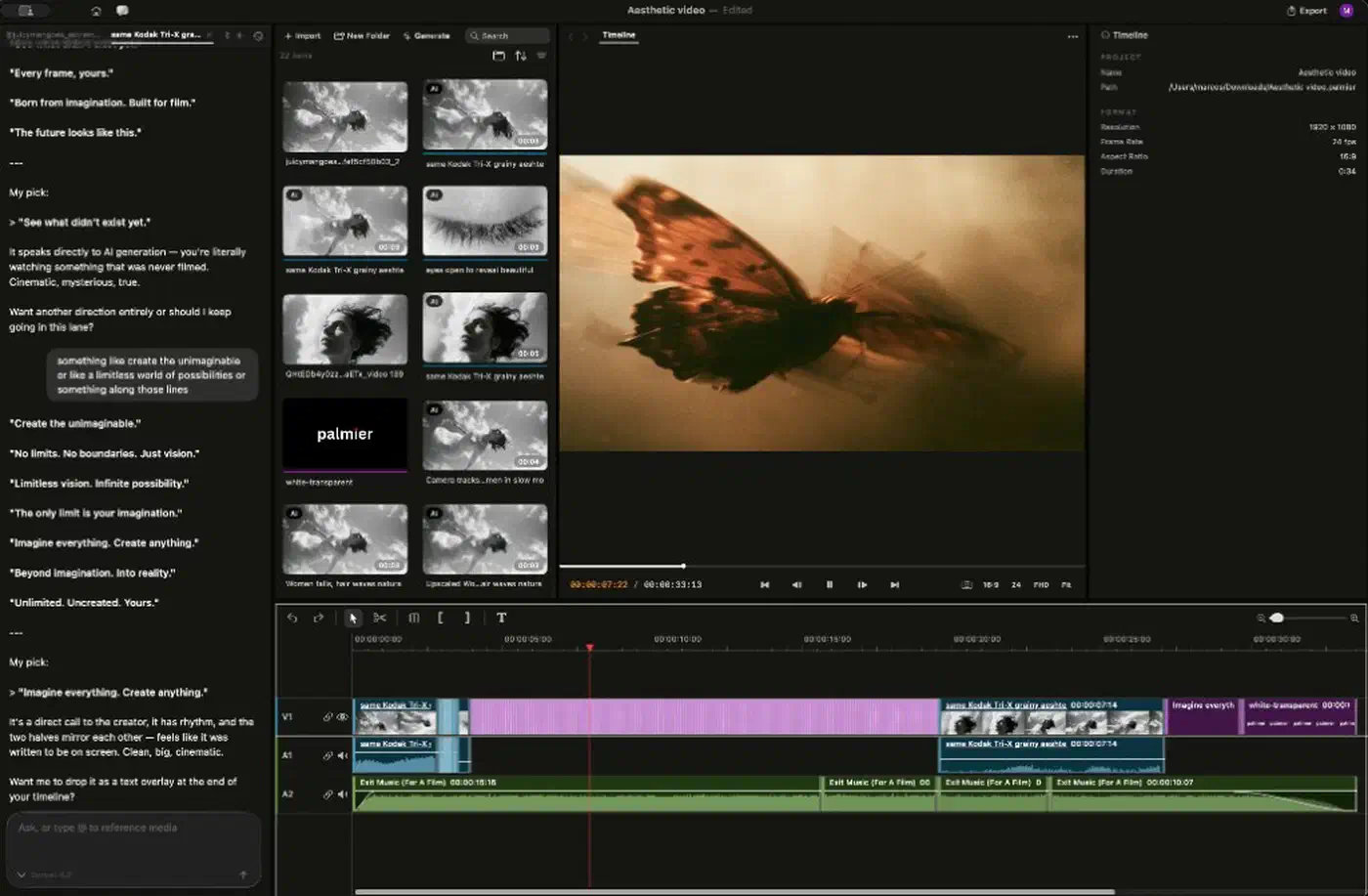
Palmier Pro flips that. The agent operates the editor you already have. It reads your project, adds clips, sets in and out points, and shuffles tracks while you watch the timeline move.
The failure mode becomes an undo instead of a re-render. A wrong cut costs you one keystroke, and you keep everything else you had already fixed.
That suits the tedious jobs best. Cutting every silence out of a talking-head take is an hour by hand. So is topping and tailing 40 clips, or applying one trim across a whole track.
The interface you already know survives, too. The project names Premiere Pro as its reference point. You get a timeline and a preview window, and the agent sits in a side panel.
The 47 tools behind the curtain
The agent calls named functions, and the tool definitions file lists 47 of them. The names tell you how granular the control gets:
| Area | Sample tools |
|---|---|
| Timeline edits | add_clips, split_clips, move_clips, ripple_delete_ranges, undo |
| Audio and speech | get_transcript, remove_words, remove_silence, detect_beats, denoise_audio |
| Text and look | add_captions, add_texts, apply_color, apply_effect, set_keyframes |
| Media handling | import_media, search_media, capture_frame, organize_media |
| Output | export_project, manage_exports, set_project_settings |
Notice remove_words. The agent pulls the transcript, deletes the phrase you name, and ripples the timeline to close the gap. That is a five-minute job by hand on a long take.
Your project is not trapped in the app
Video renders to H.264, H.265, or ProRes at up to 4K. Beyond that, the same export tool writes XMEML for Premiere Pro and FCPXML for DaVinci Resolve or Final Cut Pro.
Text, transforms, crop, opacity, and keyframes travel in the FCPXML, so an edit that starts in Palmier Pro can finish somewhere grown-up.
What is actually open source and what you pay for
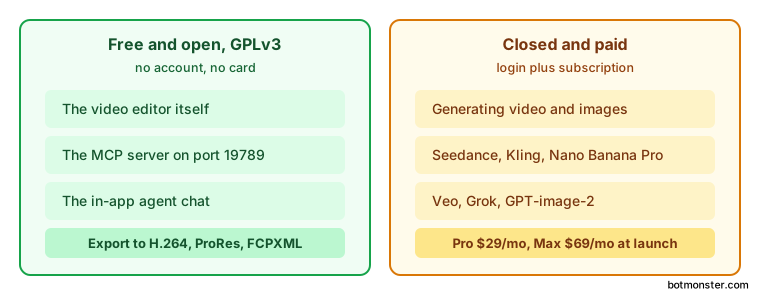
This is an open-core product, and the split is clear. The editor, the MCP server, and the agent chat are all open under GPLv3. Only the generative AI processing is closed.
The practical version: you can download the app, skip the signup, connect Claude Code, and edit all day for nothing. Generating video or images is what needs a login and a card.
Palmier’s pricing page puts the Pro plan at $29 a month at launch pricing, rising to $49 later, for 5,000 credits. Max is $69 a month, later $99, for 12,000 credits. The company reckons 5,000 credits buys roughly 333 images or three to seven minutes of generated video.
Credits burn only on generation, so editing and exporting never touch them.
GPLv3 on the editor half means you can fork it and change it. Anything you ship on top carries the same licence. That is your only real guarantee, because the free half lasts exactly as long as the company’s appetite for maintaining it. Palmier is a Y Combinator S24 company, which is the familiar shape: free tool, paid model service bolted on.
The paid side calls out current generative systems by name. The project FAQ lists Seedance, Kling, Nano Banana Pro, GPT-image-2, Veo, and Grok. All of them run from inside the timeline.
How to connect Claude Code to the Palmier Pro timeline
Install the app
Download PalmierPro.dmg from the latest release and drag it into Applications. You need macOS 26 Tahoe on Apple Silicon. There is no Intel build.
Open a project
Launch the app, create a project, and drag in a few clips. The MCP server only runs while the app is open, so leave the window up. The TradingView MCP for Claude has the same rule, because it drives the running TradingView Desktop app.
Register the server with Claude Code
Run claude mcp add --transport http palmier-pro http://127.0.0.1:19789/mcp in a terminal. For Codex, the command is codex mcp add palmier-pro --url http://127.0.0.1:19789/mcp. Both are listed in the README’s MCP section.
Or install into Cursor from the app
Open Help, then MCP Instructions, then Install in Cursor. That writes the entry into ~/.cursor/mcp.json for you. The same menu drops a one-click extension into Claude Desktop.
Make the first edit
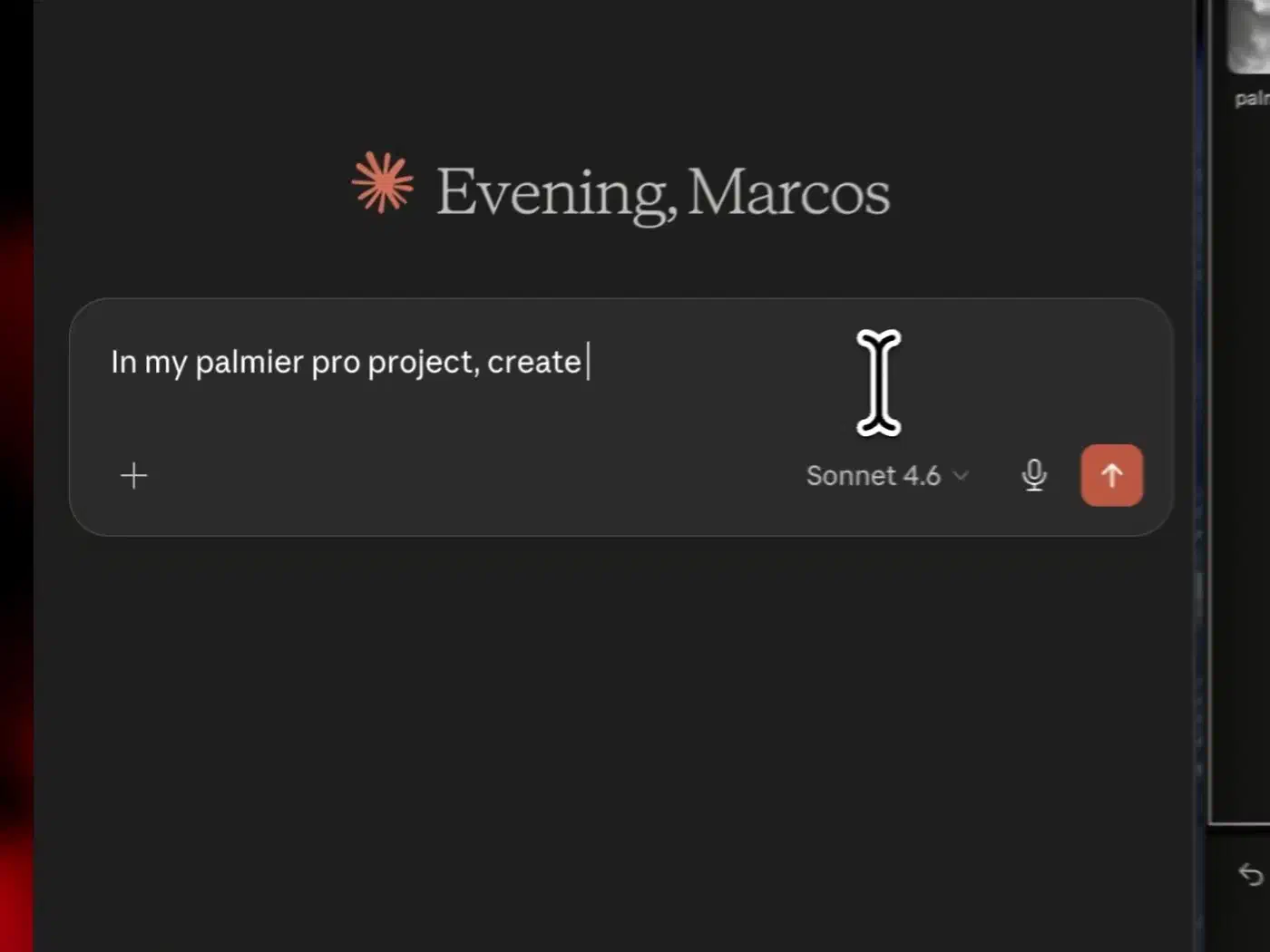
Ask for something small and checkable. Trim the first two seconds off every clip on track one, for example, then watch the timeline redraw.
Verify and undo
Confirm the result in the editor, and reach for the app’s own undo if the agent misread you. The agent only ever changes the project timeline, so your source footage stays untouched.
What the open port exposes on your machine
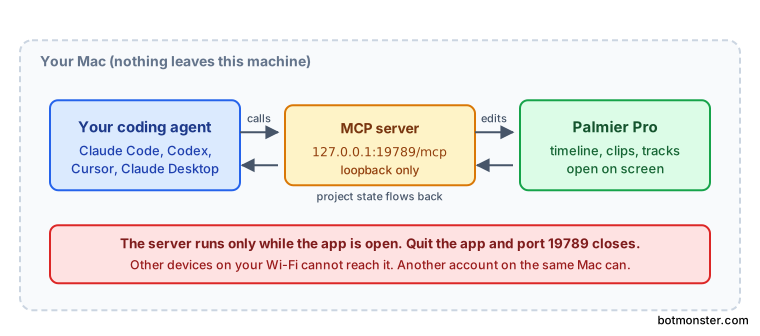
The HTTP server source binds to IPv4 loopback only, with a comment saying the server is never reachable from the LAN.
Anyone else on your Wi-Fi cannot reach port 19789. Another account on the same Mac still could, though, so shared machines deserve a thought. The server also stops the moment you quit the app.
The platform wall, and who it locks out
macOS 26 Tahoe is the floor, on Apple Silicon only. There is no Intel, Windows, or Linux build, and none has been announced.
Swift is the reason. The app was written from scratch against native macOS frameworks, with no web view wrapping it. You get hardware video decoding, smooth scrubbing, and none of the Electron memory tax. You also get a wall that most readers cannot climb.
If you are locked out, the pattern still travels even though the app does not. An editor that speaks MCP is a template any project on any platform can copy. Desktop apps are picking it up fast: Voicebox does the same thing for cloned speech, letting an agent talk back in a voice you recorded.
| Editor | Platforms | Price | Agent control |
|---|---|---|---|
| Palmier Pro | macOS 26, Apple Silicon | Free editor, $29/mo generation | MCP server, 47 tools |
| DaVinci Resolve | macOS, Windows, Linux | Free tier, $295 Studio | None |
| CapCut | macOS, Windows, web, mobile | Free tier, subscription | None |
| Premiere Pro | macOS, Windows | Subscription | None |
Resolve runs everywhere and does vastly more. It also has no agent interface at all, which is the trade on the table.
How mature is this project?
The repository is about four months old. Version 0.6.16 is the current release, still on major version zero, and releases have been landing every few days.
The issue queue is the number to watch: 38 closed against 51 open. Bug reports are arriving faster than fixes ship.
The FAQ is blunt about the gaps. Transitions, masking, and graphics do not exist yet. The team calls the app bare-bones without its AI features and says open sourcing it was a way to close the gap with community help. A README in 15 languages says more about growth ambition than about stability.
Keep your source footage outside the app’s project directory and export often. Don’t put a paid client deadline behind a version zero editor.
The narrow case it earns today is bulk edits on personal footage. It is also the clearest working example yet of an app handing an agent real controls. That alone is worth a look, even if you never cut a frame in it.