 Botmonster Tech
This $1,500 quiet desktop runs 70B models at 35 dBA

A quiet desktop for local AI inference costs under $1,500. Pair an AMD Ryzen 7 7800X3D with an RTX 5070 Ti and 16 GB of VRAM, then drop it in a sound-dampened case with Noctua fans. It runs 70B models at 4-bit and stays under 35 dBA, about as loud as a whisper. Idle drops below 28 dBA.
Key Takeaways
- A whisper-quiet desktop for local AI costs about $1,500 in parts.
- It runs the big open models on your own machine, fully offline.
- Renting cloud GPUs costs more than this whole build in four months.
- Tuning fans and voltage cuts noise more than spending extra money.
- Power adds about $10 a month with heavy daily use.
If you rent cloud GPUs often, run the numbers. An A100 on AWS runs about $3.50 an hour. Four hours a day is $420 a month. This $1,500 build pays for itself in under four months . After that your inference is free, minus about $10 a month in power. The same math drives the cloud-side debate, where redditors rate GPT-5.6-Sol the cheaper coder against pricier rivals.
Why build a dedicated machine instead of renting cloud GPUs
Cost is the obvious reason to build your own. There are others.
Your data never leaves your machine, including your code, your documents, your medical records, and your client chats. There are no terms of service and no logging by outside providers, unlike the cheap resellers that sell your prompts on. For sensitive work, that alone justifies the build.
There is also no network round trip. Local models respond in milliseconds. Autocomplete-style coding assistants and conversational interfaces feel noticeably snappier when the model runs on hardware next to you.
Then there is noise. This machine sits on or next to your desk. A server blower card at 50+ dBA makes focused work hard. So the goal here is under 30 dBA at idle, as quiet as a library, and under 40 dBA at full GPU load, about the level of a calm office chat. Hitting that depends more on careful part picks and tuning than on how much you spend.
A build like this handles the usual jobs: Ollama for chat models, ComfyUI for image generation, whisper.cpp for speech to text, and local RAG pipelines for document search. It also has room to run LangGraph or CrewAI agents on a local model, so multi-step tool calls work with no cloud key.
The parts list
Every part here balances AI speed, noise, and price. The total comes to about $1,490 at 2026 street prices.
| Component | Pick | Price | Why This One |
|---|---|---|---|
| CPU | AMD Ryzen 7 7800X3D | ~$300 | 8 cores, 105W TDP, strong single-thread for model loading. The 3D V-Cache helps with large context windows. |
| GPU | NVIDIA RTX 5070 Ti 16 GB | ~$750 | 16 GB VRAM runs 70B Q4 models. Triple-fan aftermarket cards (ASUS TUF, MSI Gaming) run quieter than the reference design. |
| Motherboard | ASUS TUF GAMING B850-PLUS WIFI | ~$200 | WiFi 7, PCIe 5.0 x16 for GPU, PCIe 5.0 M.2 slot. |
| RAM | 64 GB DDR5-5600 (2x32 GB) | ~$120 | 64 GB is the practical minimum. Models partially offload to system RAM when VRAM fills up. |
| Storage | 1 TB PCIe Gen4 NVMe | ~$70 | Gen4 is sufficient because model loading is sequential rather than random I/O bound. |
| PSU | Corsair RM850x | ~$120 | 80 Plus Gold, fully modular, zero-RPM fan mode under ~40% load. 850W gives headroom for GPU transients. |
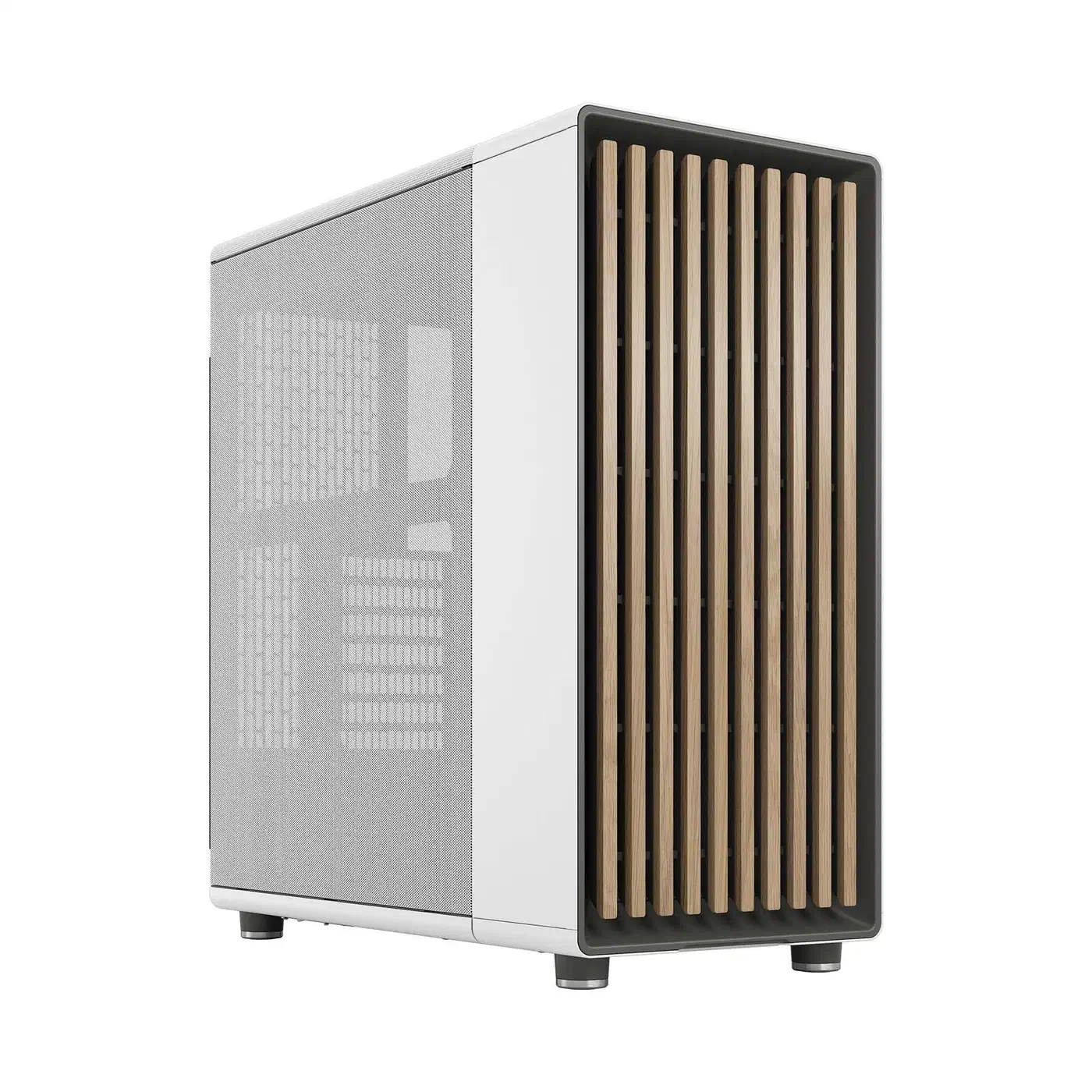
| Case | Fractal Design North | ~$130 | Sound-dampened panels, mesh front with noise-absorbing material, excellent cable management. |
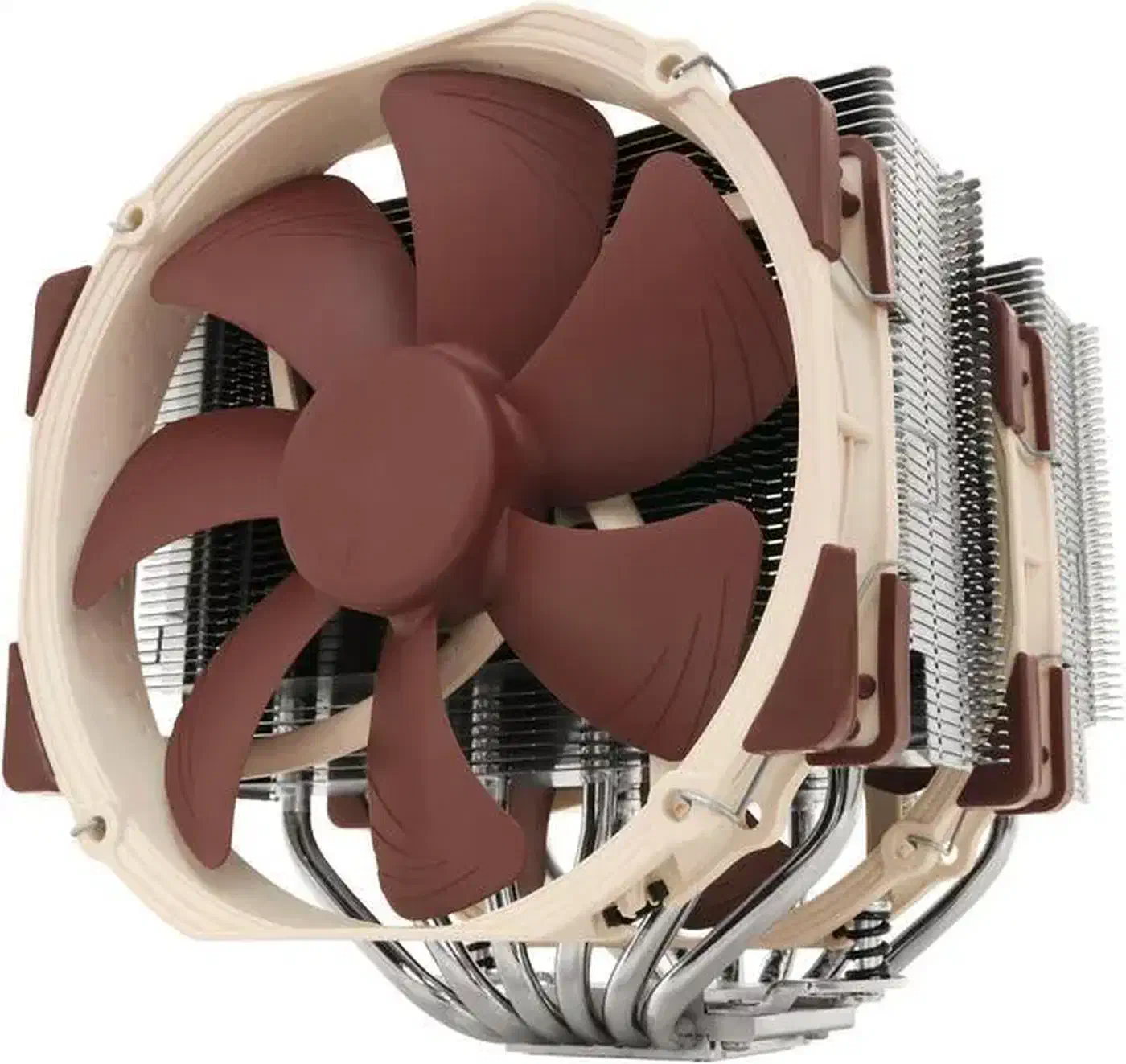
| CPU Cooler | Noctua NH-D15S | ~$100 | The benchmark reference for silent air cooling. Handles 105W TDP while staying under 25 dBA with the Low Noise Adapter. |
| Total | ~$1,490 |
Pricing note: The RTX 5070 Ti lists at $749. Street prices peaked near $1,220 in 2025 when supply ran short. They have since settled around $850 for aftermarket cards, and some models hit list price. If you find one at $750, buy it.
CPU alternative
You may want to run two models at once, say one for chat while another handles embeddings. The AMD Ryzen 9 9900X (~$400) gives you 12 cores instead of 8. The extra $100 is worth it for that kind of parallel work.
GPU alternatives and the value argument
The 5070 Ti fills a specific slot in NVIDIA’s lineup. Here is how it stacks up for inference.
| GPU | VRAM | 8B Model (tok/s) | 14B Model (tok/s) | Street Price | $/tok (8B) |
|---|---|---|---|---|---|
| RTX 5070 Ti | 16 GB | 87.5 | 58.0 | ~$750-850 | $8.19 |
| RTX 5080 | 16 GB | 94.1 | 64.0 | ~$999 | $12.84 |
| RTX 4090 | 24 GB | 104.3 | 69.1 | ~$2,574 | $24.68 |
| RTX 5090 | 32 GB | 145.3 | 102.7 | ~$2,499 | $17.19 |
Data sourced from Hardware Corner’s GPU ranking for LLMs .
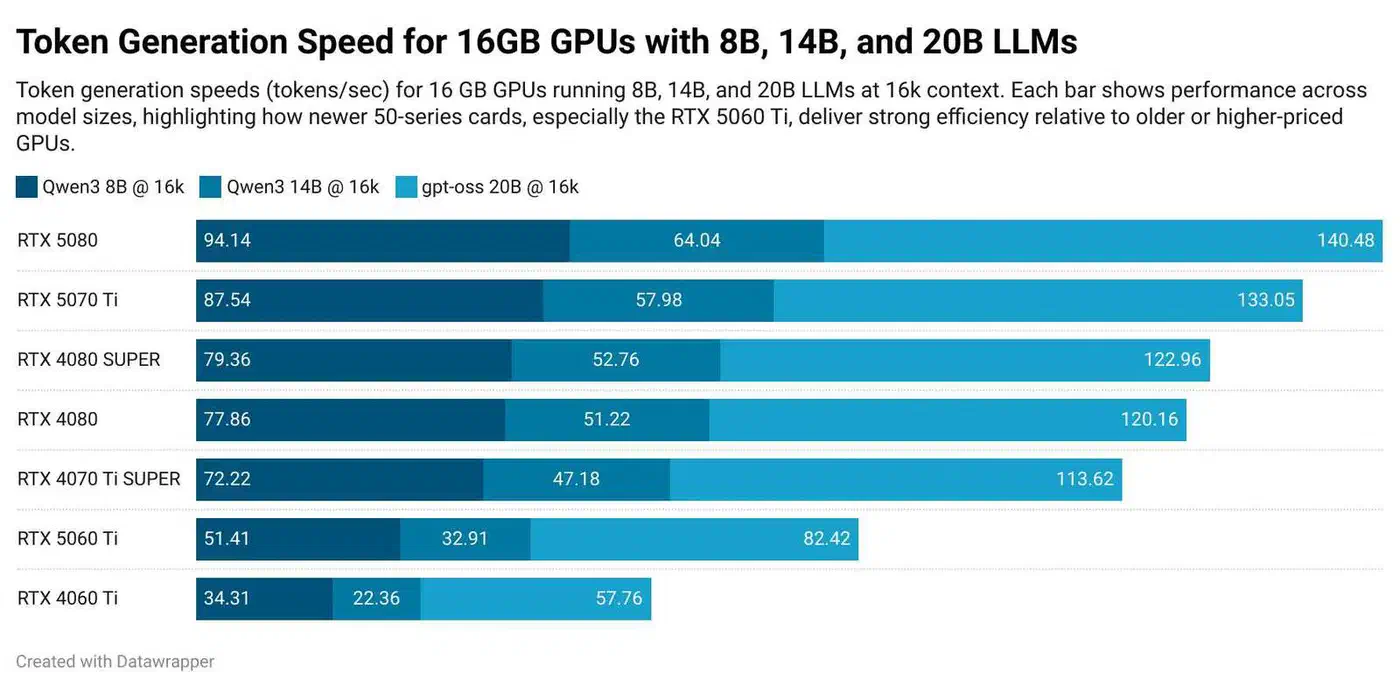
The RTX 5080 carries the same 16 GB of VRAM as the 5070 Ti for $250 more. Its 8% speed gain does not earn that premium, since VRAM sets the limit on which models you can run. The RTX 4090 has 24 GB, which helps with 70B models at higher quality, but it costs 3x as much. The RTX 5090 is the fastest of the four at $2,499, and far outside a $1,500 build. For a full breakdown of how the RTX 5080 and 5090 compare on real inference work, see our RTX 5080 vs. 5090 GPU comparison for local AI .
The AMD alternative: RX 7900 XTX
The AMD Radeon RX 7900 XTX deserves a mention. It has 24 GB of VRAM and sells for about $850, far below the RTX 4090. ROCm support has improved a lot through 2025 and into 2026. Ollama, llama.cpp, and PyTorch all work on supported AMD cards. Community tests put the 7900 XTX at 85-90% of RTX 4090 throughput at the same VRAM.
ROCm is still behind CUDA on software, though. Some tools need extra setup, and some models need workarounds. Fixing problems often means digging through GitHub issues instead of following a clear guide. If you enjoy that kind of tinkering, the 7900 XTX gives you more VRAM per dollar than any NVIDIA card at this price. If you want it all to work on the first try, stick with NVIDIA.
Noise tuning that gets you to library silence
Quiet parts get you about halfway, and tuning them gets you the rest of the way.
BIOS fan curves
Set the CPU fan to 30% below 60C, then ramp it to 70% at 80C. Never let it hit 100%. The Noctua NH-D15S at 30% is all but silent. Even at 70% the NF-A15 fan stays under 25 dBA, because the bundled Low Noise Adapter caps it at 1200 RPM.
GPU fan curve
Use GreenWithEnvy
on Linux, or nvidia-settings if you prefer. Set zero-RPM mode below 50C and start the fans at 30% at 55C. Modern triple-fan cards hold inference loads at 30-40% fan speed with no throttling. The GPU settles around 65-70C under sustained work, well inside its safe range.
GPU undervolting
After fan curves, undervolting cuts more noise than any other single tweak. Drop the core voltage by 50-100 mV with nvidia-smi and temperatures fall 5-10C. Inference barely notices, since it does not push the GPU as hard as gaming does. Cooler chips mean slower fans, and slower fans mean less noise. A 75 mV undervolt usually costs under 2% on token generation benchmarks.
Case fan configuration
Put two 140 mm intake fans in front and one 140 mm exhaust in the rear. Noctua NF-A14 PWM fans at 600 RPM are near silent and still move enough air to keep case pressure positive. The mesh front of the Fractal Design North, with sound-absorbing material behind it, suits this kind of low-RPM setup.
Why the PSU fan stays off
Cheap power supplies spin their fans constantly, even at low loads. The Corsair RM850x has a zero-RPM mode that keeps the fan completely off under roughly 40% load, or about 340W. This build idles near 65W and draws about 350W under full GPU inference. So the PSU fan only spins during the heaviest workloads, which takes out a noise source that runs constantly in most builds.
Measuring your results
Download a dB meter app on your phone and measure from your sitting position, roughly 60 cm from the case. You do not need a calibrated reading. Comparing relative numbers before and after tuning is enough. Aim for under 28 dBA at idle and under 36 dBA during sustained GPU inference.
Software setup for local AI on Linux
Install Ubuntu 24.04 LTS or Fedora 41. Both have solid NVIDIA driver support out of the box.
NVIDIA drivers and CUDA
# Ubuntu
sudo apt install nvidia-driver-570
nvidia-smi  # verify installation

# Install CUDA toolkit from NVIDIA's official repo
wget https://developer.download.nvidia.com/compute/cuda/repos/ubuntu2404/x86_64/cuda-keyring_1.1-1_all.deb
sudo dpkg -i cuda-keyring_1.1-1_all.deb
sudo apt update && sudo apt install cuda-toolkit
Ollama (LLM inference)
Ollama is the fastest path from zero to running models locally .
curl -fsSL https://ollama.com/install.sh | sh
ollama run llama3.1:70b-q4_K_M
The 70B model at Q4_K_M quantization fits in 16 GB of VRAM, and it types fast enough for real chat. On a tighter VRAM budget, the same Ollama setup handles squeezing Gemma 4 26B into a low-VRAM build once you accept some layer offloading. Sparse coding models stretch this build further still. Qwen3.6-35B-A3B runs 3B active parameters per token, so a Q4 quantization runs at small-model speed while carrying 35B total weights. Qwen is one rung of the 2026 Chinese coding-model lineup, and the same VRAM math decides which rungs a box like this can hold. To pick a daily driver, our side-by-side test of the leading 2026 open models lines up VRAM needs and speed against benchmark scores.
ComfyUI (image generation)
Clone the ComfyUI repository, install it in a Python virtual environment, then launch the web interface. SDXL models produce 1024x1024 images in about 4-5 seconds on the RTX 5070 Ti.
Open WebUI
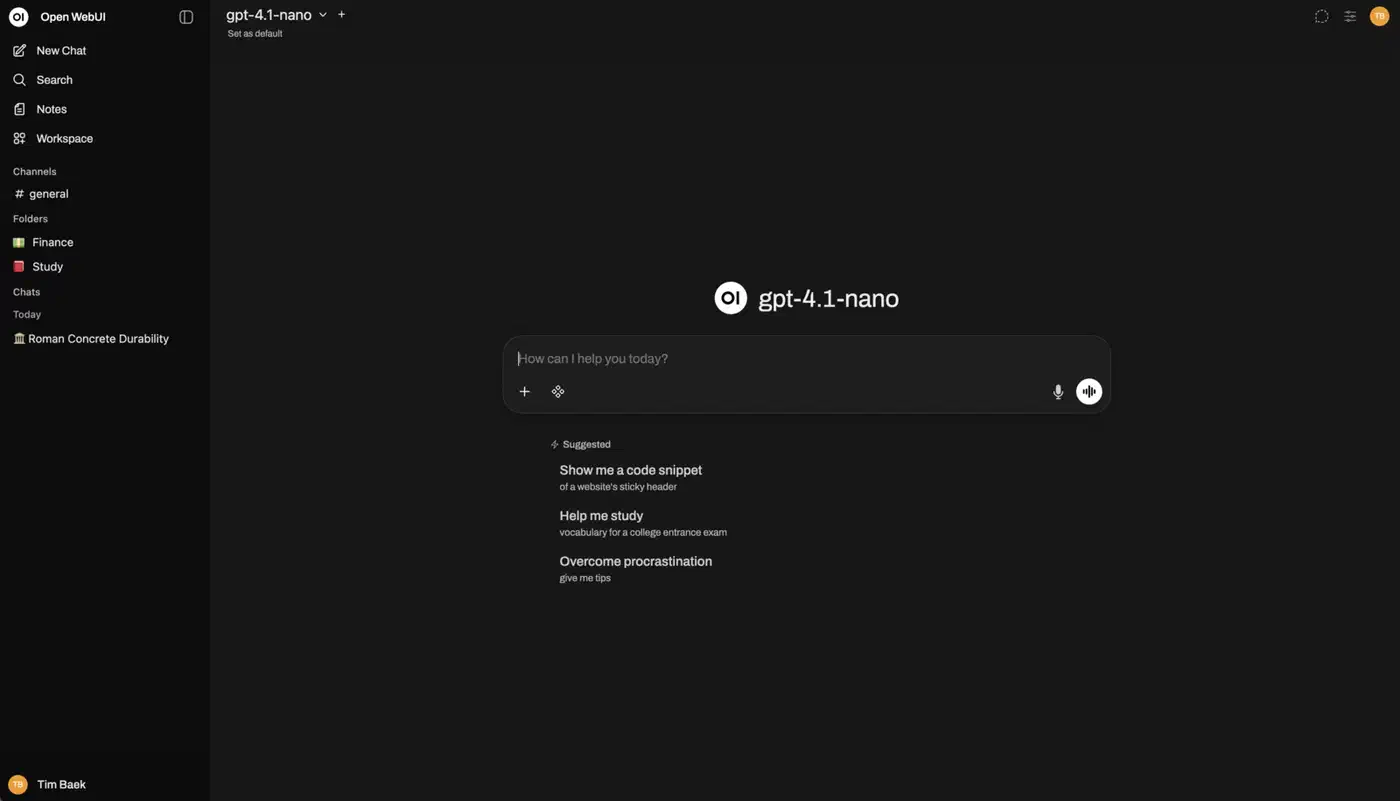
Open WebUI runs in a Docker container. It provides a ChatGPT-style interface for your Ollama models. Handy when several people in your household or office share the same local models.
whisper.cpp (transcription)
Compile whisper.cpp from source with CUDA support for GPU-accelerated transcription. The large-v3 model turns speech into text at roughly 10x real-time speed on this hardware.
API server mode
Both vLLM and llama.cpp can serve an OpenAI-compatible API. Any tool that speaks that format then works with your local models, including coding assistants, automation scripts, and RAG frameworks. Picking one comes down to the speed versus setup tradeoff each runtime makes . Ollama gives up a little throughput for a one-line install, while vLLM wins under concurrent load.
Benchmarks: what this build actually delivers
All numbers come from the RTX 5070 Ti 16 GB with the Ryzen 7 7800X3D and 64 GB of DDR5-5600, on Ubuntu 24.04 LTS.
| Workload | Model / Config | Performance |
|---|---|---|
| LLM chat | Llama 3.1 70B Q4_K_M (Ollama) | ~25-30 tok/s |
| LLM chat | Llama 3.1 8B Q4 (Ollama) | ~80-100 tok/s |
| Image gen | SDXL 1024x1024, 30 steps | ~4-5 sec/image |
| Image gen | FLUX.1 Dev 1024x1024 | ~8-12 sec/image |
| Transcription | Whisper large-v3 | ~10x real-time |
| Embeddings | nomic-embed-text (Ollama) | ~500 docs/sec |
Power draw: About 65W at idle and 350W under full GPU load. At average US electricity rates, that works out to roughly $8-12 a month if you run models several hours a day.
Noise levels: Under 28 dBA at idle, with the PSU and GPU fans off and the CPU fan at its floor. Around 35 dBA during sustained GPU inference with the fan curves above. A typical quiet room sits at 30-35 dBA.
Upgrade path
Models keep growing, so 16 GB of VRAM will run short one day. When it does, you swap the GPU and keep the rest. The 850W PSU, B850 motherboard, and case all take higher-end cards. A future RTX 6070 Ti or RTX 6080 with more VRAM drops right in. The GPU does the heavy lifting, so the CPU, RAM, storage, and cooling stay fine for years.
If you want more VRAM from the start and can stretch the budget, a used RTX 4090 (24 GB) runs $1,200-1,400. It pushes the total build past $2,000, and its older Lovelace architecture is less power-efficient than Blackwell.
Some models need 100GB or more of memory, like MiniMax M2.7, a 230B mixture-of-experts model that wants about 96GB at Q2. This build cannot reach that. A Mac Studio with 128GB of unified memory, or a Strix Halo box, is a different class.
Is it worth building in 2026
For under $1,500 this desktop runs 70B parameter models, makes high-resolution images, and transcribes audio in real time. It stays quiet enough to sit on your desk while you work. The RTX 5070 Ti’s 16 GB of VRAM, Noctua cooling, and the sound-dampened Fractal case hold noise under 35 dBA even during sustained inference. Cloud GPUs still win for the odd heavy training job. For daily inference and experimenting, though, owning the hardware pays for itself within a few months and is far nicer to sit next to.