 Botmonster Tech
wigolo gives your coding agent web search with no API key

This post is open for corrections. Highlight any line of text to challenge it or ask for a clearer explanation and leave a comment.
wigolo is a local web search MCP server for coding agents. It does search, fetch, crawl, and extract with no API key and no per-query bill. What makes it interesting is the result shape: each hit comes back with a verbatim excerpt pinned to byte offsets in the source, a citation id, and a score you can inspect.
Key Takeaways
- Your coding agent gets web search without an API key or a metered bill.
- Results come back with exact quotes and a pointer to where they sit.
- Everything it fetches is cached locally, so asking again is instant and free.
- One call can fan out many queries across many engines at once.
- The core tools are keyless, but writing a finished answer still needs a model.
Why a coding agent needs its own web layer
Most coding agents ship with one search tool. It takes one query and returns a list of snippets. For a single lookup, that’s fine.
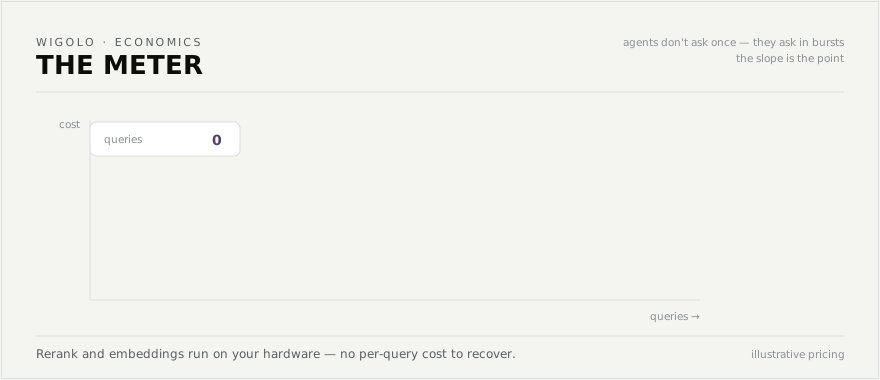
Real research breaks the pattern. An agent that needs six angles on a question runs six serial round trips, and each one burns a full turn. On top of that, metered search APIs charge per query, and agents ask in bursts. An exploratory session can cost more than the work it produced.
Every query also goes to a third party, including the ones about your own codebase and your employer’s unreleased product.
When a fetch hits a bot wall, most tools hand back the challenge page as if it were real content, and the agent reads it as real.
A dedicated web layer addresses all of that. wigolo speaks the Model Context Protocol straight to your agent, fans many queries out in a single call, and labels every failure it hits.
What a local web search MCP server actually returns
A person can skim snippets and click through, but an agent needs something it can quote and defend.
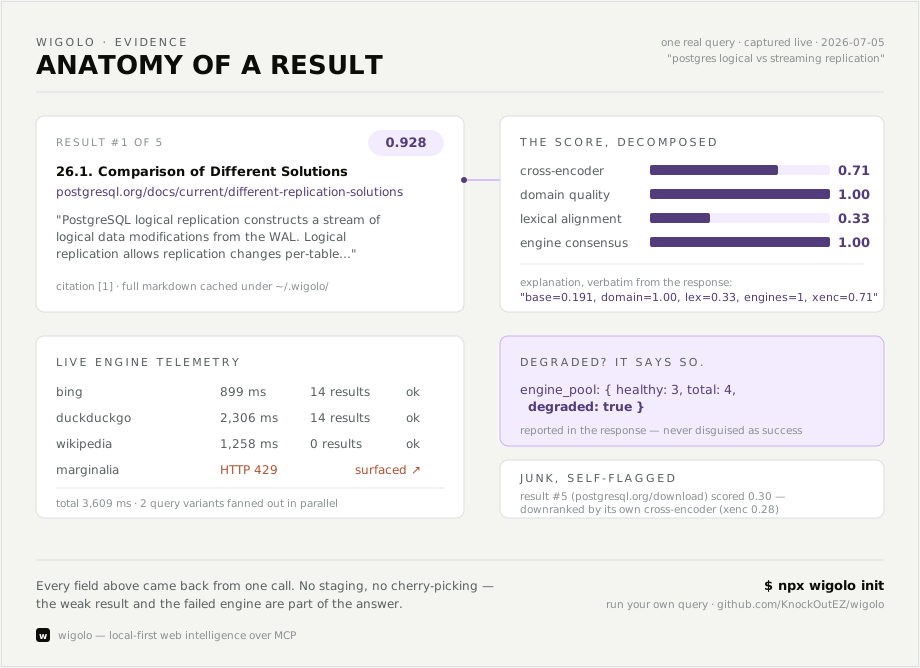
So every wigolo result carries a verbatim excerpt of the source text. The excerpt comes with a source span, meaning the exact start and end offsets in the page it came from. That gives the agent provenance it can verify.
The score arrives broken into parts: semantic similarity, lexical alignment, domain quality, recency, and how many separate engines agreed on the hit.
| Field | What the agent does with it |
|---|---|
excerpt | Quotes the source word for word |
source_span | Points at the byte range the quote came from |
citation_id | References a source without inventing a link |
evidence_score | Sees why a result ranked where it did |
freshness_signal | Knows whether the page is old and how sure that is |
Failures get the same honest treatment. Engines that fell over are named in the response, and stale cache entries are labelled as stale. A page behind a bot wall returns a blocked_by_challenge failure your agent can act on. wigolo’s own scorer also flags weak results as junk. Few search tools admit that much about their own output.
The ten tools and what each one is for
Each entry below covers the job; the full parameter list lives in the tools reference.
| Tool | What it does |
|---|---|
search | Multi-engine search across 18 direct adapters, with rank fusion and on-device reranking. Pass an array of queries for parallel breadth. |
fetch | One URL through a tiered router that escalates from plain HTTP to a headless browser only when the page needs it. Returns clean Markdown, metadata, and links. |
crawl | Multi-page traversal using breadth-first, depth-first, sitemap, or map-only strategies, with per-domain rate limits and robots.txt respect. |
extract | Structured data from a page: tables, metadata, JSON-LD, named schemas, or any custom JSON Schema you supply. |
cache | Queries everything already seen, by keyword or semantically, plus stats and change detection. |
find_similar | Pages like a URL or a concept, fusing keyword, semantic, and live web signals. |
research | Splits a question into sub-queries, searches them in parallel, and returns a cross-referenced brief with a gaps list. |
agent | An autonomous gather loop with a plan, a step log, and a time budget. |
diff and watch | What changed on a page since the last visit, on demand or pushed to a webhook. |
The cache tool turns every page the agent has ever read into a local library it can query offline, much like a personal research assistant built on semantic search. Meanwhile research returns a gaps field naming what the sources didn’t cover. Read that field before you trust the brief. That rule holds for the hosted research tools too, where a confident report can cite a page that never backed the claim.
None of this is locked to MCP. Running wigolo serve exposes the same ten tools as a plain JSON API on 127.0.0.1:3333. An OpenAPI contract sits at /openapi.json, and remote MCP runs on the same port. Bind past loopback and it refuses to start without a bearer token, so the REST surface fails closed by default. There are also thin TypeScript and Python SDKs with an embedded mode that starts the daemon for you. It’s the same protocol that sits behind any custom MCP server, so none of it is special-cased for wigolo.
Wire wigolo into your coding agent
Check the prerequisites
You need Node 20 or later and roughly 1.5 GB of free disk. macOS, Linux, and Windows all work.
Set it up and wire your agents in one command
Run npx wigolo init --agents=claude-code,cursor. Each named agent gets its MCP configuration written for it. The list also covers Codex, Gemini CLI, OpenCode, VS Code, Windsurf, Zed, and Antigravity.
Or set up the engine alone
Run npx wigolo init with no flags. It downloads the browser engine and the on-device models without touching any agent configuration.
Verify it is healthy
Run npx wigolo doctor. A failed component download never fails setup, so this is where you find out what isn’t ready and which command fixes it.
Add an LLM key only if you want finished answers
Set WIGOLO_LLM_PROVIDER and a key only if you want the research and agent tools to write a synthesized answer. Everything else runs without one.
Ask your agent a live question
Give it something that needs fresh information. Then check the reply for citation ids and quoted spans.
Use it outside an agent if you want
Run wigolo serve for the local REST API, or call wigolo search "..." --json straight from a shell script.
Remove it cleanly if it is not for you
Run npx wigolo config --uninstall --yes. That takes the cache and the downloaded models with it.
What is free, what needs a key, and what to check first
Six tools are keyless for real: search, fetch, crawl, extract, cache, and find-similar. The reranker and the embeddings run on your own CPU, so there is no per-query cost to recover and no meter to bill you.
The other three, research, agent, and search in answer format, need a language model to write the synthesized prose. Without one they hand back the raw brief and the evidence, which your coding agent can assemble itself. Alternatively, point WIGOLO_LLM_PROVIDER at Ollama or any OpenAI-compatible URL and stay fully local.
Everything lives under ~/.wigolo/: cache, embeddings, models, and configuration. Nothing reaches a third party unless you opt into an LLM. If you would rather assemble the parts yourself, a SearXNG-backed search pipeline covers similar ground with pieces you pick.
How to read the comparison table
The project publishes its own table against Firecrawl, Exa, and Tavily. Read it as a vendor benchmark.
| Tool | Key needed | Cost per query | Byte-pinned excerpts | Local query history |
|---|---|---|---|---|
| wigolo | none | $0 | yes | yes |
| Firecrawl | required | metered | no | no |
| Exa | required | metered | no | no |
| Tavily | required | metered | no | no |
The claim is narrower than the table looks. The project ran one cold query against all four tools. By its own account, all four landed on the same core answer. wigolo’s claim is a better evidence format, with answer quality roughly a wash.
The costs that are not money
Roughly 1.5 GB of disk goes to the browser engine and the on-device models. Those models also use CPU while reranking, so a burst of queries isn’t free in wall-clock terms.
The project is in public beta and licensed under AGPL-3.0. That license only bites if you modify wigolo and run the modified copy as a network service, in which case you publish your changes. Using it as a local dev tool carries no obligation.
The repository sits above 4,000 stars with a few dozen open issues, and the npm package pulls around 6,600 downloads a month. So treat it as a promising beta, and run one real query through it before you rip out whatever you use now.