 Botmonster Tech
FluentCleaner reads the old CCleaner rules and is faster

This post is open for corrections. Highlight any line of text to challenge it or ask for a clearer explanation and leave a comment.
FluentCleaner is an open source CCleaner alternative for Windows, and its best idea is one it borrowed. It skips writing its own cleaning rules and parses winapp2.ini, the community rule file that grew up around CCleaner. The author says his parser beats the original on speed.
Key Takeaways
- FluentCleaner reads the same community rule file CCleaner users already maintain.
- The author says his rule parser runs faster than CCleaner’s original one.
- No ads, no scareware, no upsell, and no registry cleaner at all.
- It is one person’s project, released because people kept asking for it.
- Download only from the GitHub releases page, because fake FluentCleaner sites exist.
What an open source CCleaner alternative has to get right
CCleaner started as a small, focused utility and got worse in public. Users complain about the same four things: ads inside a maintenance tool, scareware framing that invents urgency, an upsell path that gates basic behaviour, and registry cleaning sold as speed work.
Windows loads registry keys on demand, so leftover uninstaller entries have no measurable effect on boot time. Worse, a registry cleaner that pulls the wrong key can break an app or the whole install.
The community around CCleaner outlasted the quality of the product itself. Users built a shared rule file to cover the apps the official cleaner ignored. Then CCleaner 7 dropped support for that file, leaving 6.39 as the last version that read it.
the new (and unfortunately very poor) CCleaner 7.0 no longer supports the use of Winapp2.ini!
So a replacement needs the rules, a fast reader for them, a screen that shows you what it will delete, and no advertising business attached. Open source carries real weight in this category. This is software that deletes files across your whole drive on a schedule.
Reusing winapp2.ini instead of rewriting it
Winapp2 is a shared database of cleaning routines for Windows apps. Users have built it up over more than fifteen years, under a Creative Commons licence. Build v260730 of the file lists 4,067 entries. Each one names the app to look for, then the exact paths and registry keys to clear.
The format is plain text, so anyone can open a rule and check it. A rule looks like this:
[Discord *]
Detect1=HKCU\Software\Microsoft\Windows\CurrentVersion\Uninstall\Discord
FileKey1=%AppData%\BetterDiscord|*.log
FileKey4=%AppData%\Discord*\*Cache|*|REMOVESELF
FileKey6=%AppData%\Discord*\Crashpad\reports|*
Nothing is hidden, and no rule sweeps your drive with a wildcard.
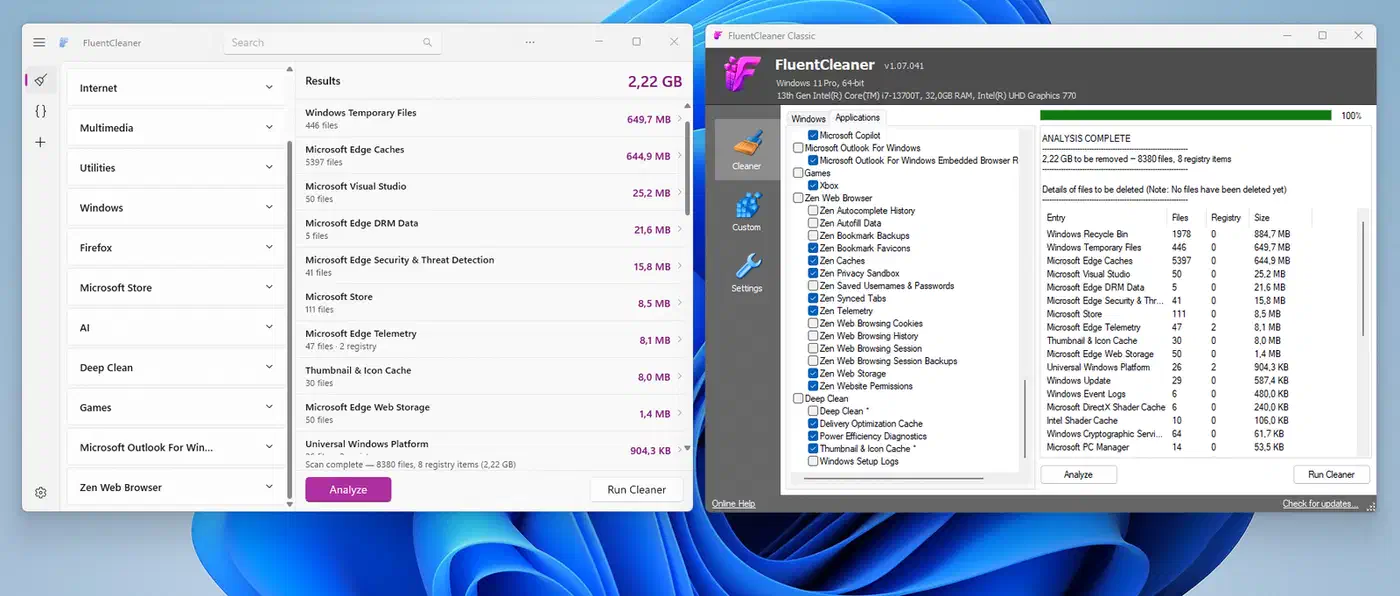
The developer behind FluentCleaner says in the project readme that he was too lazy to rebuild every cleaner by hand. So he wrote a reader for that file format instead. He reports it turned out surprisingly fast, quicker than he remembers the old Piriform version being, though he offers no theory for why the original was slow. Treat that as one developer’s impression, since nobody has published a like-for-like test.
Coverage for thousands of apps arrives on day one, maintained by the Winapp2 contributors. The rule file also updates on its own schedule, so new app coverage lands without a new release of the tool. FluentCleaner is not locked to the official database either. Point it at a modified flavour, or your own file, from Settings > Database > Custom.
| Tool | Rule source | Registry cleaner | Cost |
|---|---|---|---|
| FluentCleaner | winapp2.ini, 4,067 entries, swappable | none, by design | free, MIT |
| CCleaner | built in, winapp2.ini dropped at v7 | yes | free tier plus paid |
| Windows Disk Cleanup | fixed Windows-only list | none | built in |
| BleachBit | its own CleanerML rules | none | free, GPL |
The file has kept getting new builds since CCleaner dropped it.
What WinUI 3 costs, and the 3.5 MB edition that fixes it
WinUI 3 is Microsoft’s newer native interface framework for Windows. The author calls it the “beautiful but slow” one, then notes it still outruns the tool it replaces. A native app does beat a web page in a wrapper on one count: it behaves like the rest of the system. C# plus WinUI 3 is also a low bar for anyone who wants to contribute.
The cost shows up when you download it. The WinUI 3 build ships .NET 10 and the Windows App SDK inside the zip. That lands at roughly 140 MB unpacked across 243 files, and it still needs the exact Windows App SDK 2.0.1 runtime installed on its own. It runs on Windows 10 build 19041 and later, plus Windows 11, so older machines cannot run it.
The author reports that about 14% of all incoming feedback came from people who could not start the app at all. His answer was a second edition.
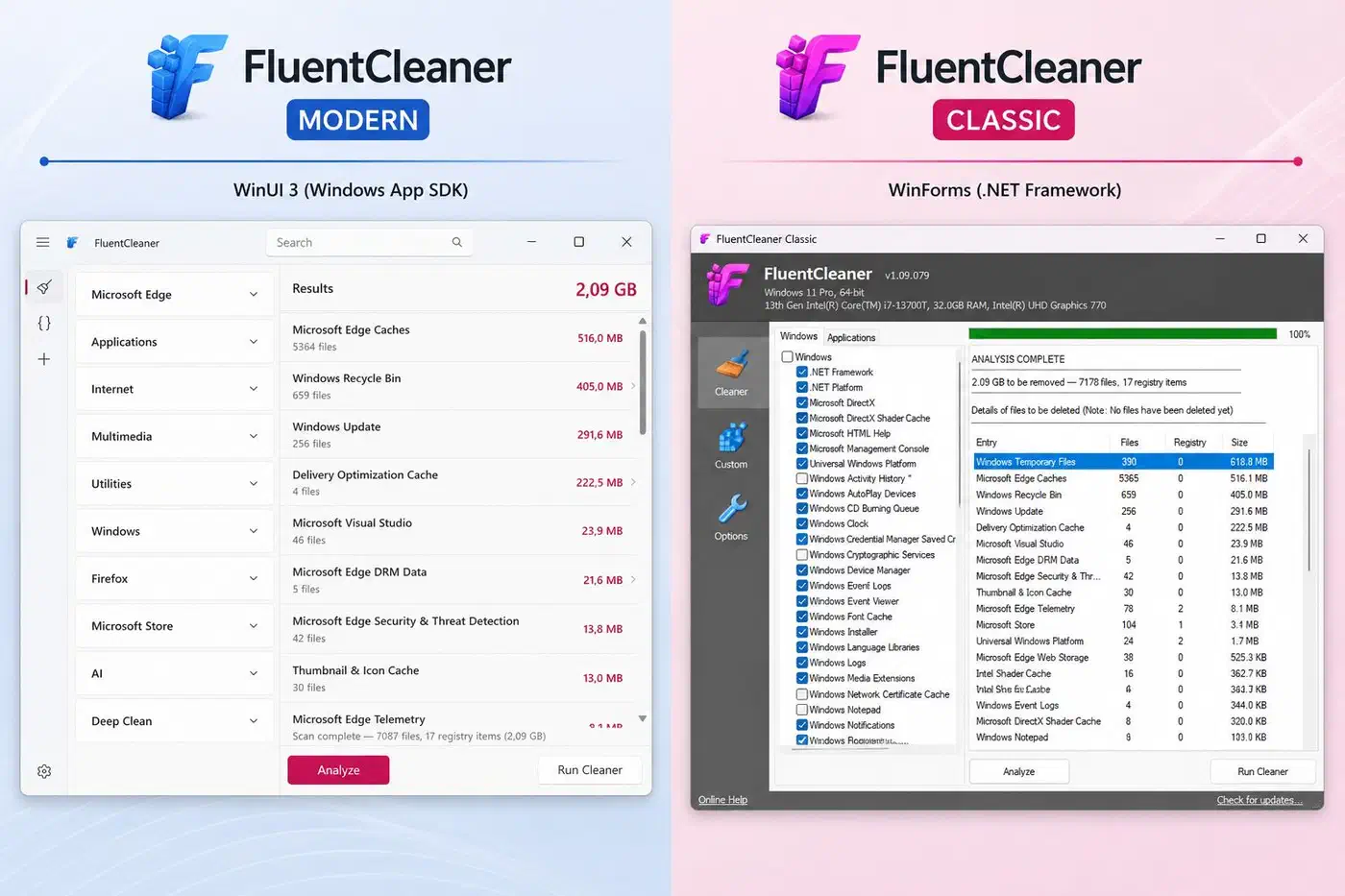
| FluentCleaner (WinUI 3) | FluentCleaner Classic | |
|---|---|---|
| Framework | .NET 10 plus Windows App SDK | .NET Framework 4.8, WinForms |
| Unpacked size | about 140 MB | about 3.57 MB |
| Files | 243 | 20 |
| Runs on | Windows 10 build 19041 and later | practically any Windows |
| Source code | open | UI closed for now |
Both editions take a /AUTO switch. It runs a silent clean from your saved selection and writes a log to %AppData%\FluentCleaner\auto.log. Task Scheduler can drive it, so the app needs no scheduler of its own.
Classic’s interface code stays private, though the shared core and the file reader are open. The author has written up his reasoning. He wants room to experiment without managing contributions, and he is wary of the code being repackaged under his name. Still, if you want a binary you can fully audit, grab the WinUI 3 build.
How to install FluentCleaner and clean safely
Go to the GitHub releases page
The releases page is the only official source. The author states plainly that lookalike websites using the FluentCleaner name are not his.
Pick the edition that fits your machine
Take the WinUI 3 zip if you want the modern look. It costs you one extra runtime install. Take Classic if you want a 3.5 MB portable app that runs on almost anything.
Run it and let it detect
The first scan reads which apps are installed on the machine, then matches them against the rule database. Nothing is deleted at this stage.
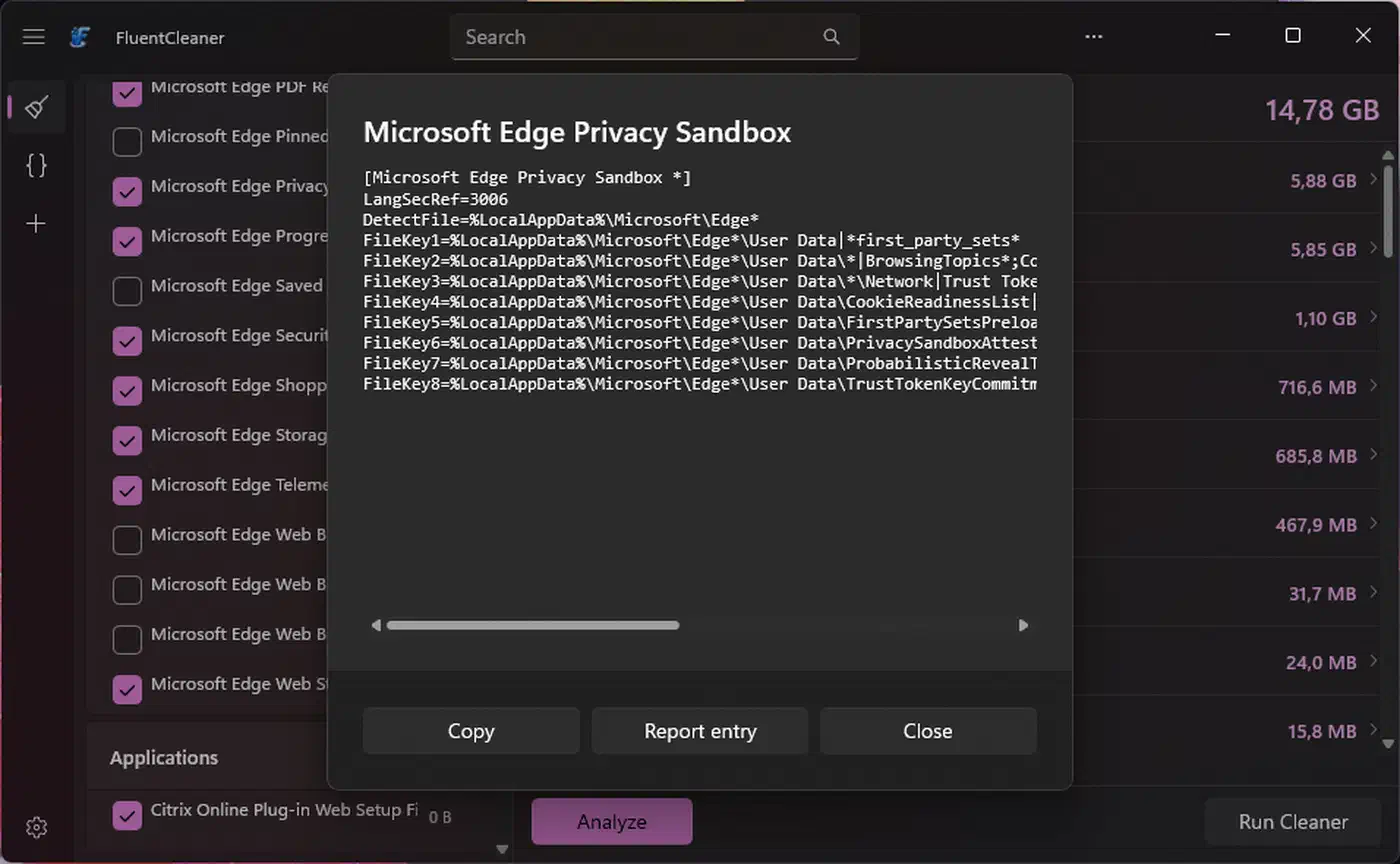
Look at the rule behind a cleaner
Right-click any cleaner and choose Show source to open Rule Lab. It puts the rule text on the left and the matched files and keys on the right. Dry Run then shows what would go, without touching a thing.
Review the list before you delete
Read through the candidates and untick anything you want to keep. The review is what separates a cleaner from a bulk delete.
Start with browser and application caches
These rebuild on their own, so a mistake costs you a slow first load rather than data. Leave anything you do not recognise unticked on the first pass.
Refresh the rule database periodically
Winapp2 ships new builds on its own schedule, separate from FluentCleaner. Pull a fresh file every so often. You can also point Settings > Database > Custom at one you maintain yourself.
Do not expect registry magic
FluentCleaner has no registry cleaner, and that gap is deliberate. Judge the run on space reclaimed, not on entries “repaired”.
A solo project, with everything that implies
The author is unusually candid about where the project stands. He writes in the readme that FluentCleaner was never meant to be public, and that nice people talked him into releasing it. He may well get bored, or it may turn into something else entirely. So do not build a routine around it that you would miss if it stopped.
The counterweight is the format choice. A solo project built on a public rule file is far less fragile than one with its own hidden logic. The rules outlive the tool that reads them, so worst case your winapp2.ini works in whatever reader comes next.
Sites using the FluentCleaner name have appeared at fluentcleaner[.]org and elsewhere, cloning the project page and serving something else. The author ties them to a wider wave of fake-repo infostealer sites documented on r/Windows11. It got worse when a tech publication recommended the tool while pointing readers at the fake domain.
We keep telling users to be careful what they download. That’s difficult to take seriously when tech publications don’t verify the software sources they recommend.
System cleaners are a favourite disguise for malware. Only the GitHub repository is real.
The project is MIT licensed, written in C#, past 4,600 stars with 153 forks and about a dozen open issues. Writing for MakeUseOf, Tashreef Shareef reported clearing 30 GB of cache and temp files on a first run.
FluentCleaner does the core job better than CCleaner does today, without the bloat, the upsells, or the telemetry.
Install it if you want CCleaner’s old coverage without CCleaner, and you are willing to read a list before you click clean. Skip it if you expect a cleaner to speed up a healthy machine, or if you need a tool with a support contract behind it.