 Botmonster Tech
Best 10 HTML to Markdown converters in 2026
The Go library html-to-markdown and Python’s markdownify are the best HTML to Markdown tools in 2026, tying at 96% across 273 hand-written probes. I ran all ten tools over the same ten scraped web pages. The Go binary is nine times faster. pandoc finished last at 76%. Reproducible tests are available in my benchmark repository.
Key Takeaways
- Two tools tie for first place, and the Go one runs nine times faster.
- Tables and code blocks are where these tools split apart.
- turndown without its plugin made zero code fences on a GitHub README.
- pandoc’s default setting costs it eleven points, so change one flag.
- Only one tool strips the site nav, and it loses headings doing it.
The ranking
The order comes from one number only: how many of the 273 probes a tool passed. Speed never adds to the score. When two tools pass the same number I fall back to how much article text they kept, and only then to the clock. That happened once here. turndown and markitdown both passed 246 and kept the same share of the text, so turndown takes fifth on 562 ms against markitdown’s 2,039 ms.
The gap at the top is one probe. html-to-markdown for Go passed 263 and markdownify passed 262, which is close enough that you should pick between those two on language and speed rather than on the ranking.
Total milliseconds is how long a tool took to convert all ten pages on my machine.
| # | Tool | Language | Probes passed | Text kept | Total ms | Why it landed here |
|---|---|---|---|---|---|---|
| 1 | html-to-markdown (Go) | Go | 96% | 94% | 189 | Best fidelity and nearly the fastest, only tables hold it back |
| 2 | markdownify | Python | 96% | 94% | 1,662 | Ties on fidelity, perfect on tables, never tags a code fence |
| 3 | html-to-markdown (Python) | Python | 93% | 94% | 82 | Fastest in the set by far, weakest on math |
| 4 | htmd | Rust | 92% | 94% | 108 | Fast and clean prose, flattens code blocks inside tables |
| 5 | turndown | JavaScript | 90% | 94% | 562 | The default choice, and it needs its GFM plugin badly |
| 6 | markitdown | Python | 90% | 94% | 2,039 | Perfect tables, but it keeps the site nav it should strip |
| 7 | node-html-markdown | JavaScript | 89% | 94% | 3,054 | Sold on speed, slowest tool here after pandoc |
| 8 | html2text | Python | 88% | 94% | 632 | Oldest of the bunch, and its tables are not GFM |
| 9 | trafilatura | Python | 81% | 88% | 1,008 | Only tool that strips all the chrome, and it drops headings doing it |
| 10 | pandoc | Haskell | 76% | 89% | 4,497 | Converts everything, then hands back a third of it as raw HTML |
What HTML to Markdown tools do, and how I tested them
These ten programs do two different jobs. A converter turns every element you hand it into Markdown. An extractor first works out which part of the page is the article, then converts only that part. Hand a whole saved page to a converter and the sidebar comes with it.
Two of the ten call themselves extractors: trafilatura and markitdown. My numbers back trafilatura’s claim and contradict markitdown’s.
I downloaded ten real web pages to use as test subjects, every one of them under a free licence so I could commit the HTML next to the code and let anyone re-run the same test. They vary on purpose: the smallest is a 39 KB chapter of the Rust Book, the largest an 800 KB Wikivoyage city guide. Some are thick with tables, some are almost all prose, and between them they cover MathML, definition lists, poetry, footnotes and code samples in six languages. The full list, with each page’s licence and the date I fetched it, is in the repo.
Each test page was picked to break something different: Wikipedia’s Markdown article for footnotes and infoboxes, MDN’s table element page for definition lists and angle brackets in the H1, the Python asyncio docs for 41 API signatures, a Phi-3 paper on arXiv for MathML, and Alice in Wonderland from Project Gutenberg for poems held together by br tags. The Rust Book, the Kubernetes docs, Wikibooks LaTeX, Wikivoyage Tokyo and a GitHub README round it out.
Every page was scraped whole, with nav, sidebar and footer left in place. Each one carries its own list of assertions tied to something you can point at on that page: a table that has to come out as a pipe table, a fence that has to carry the language rust, and a footnote anchor that has to survive.
That is what 273 means here: 273 named checks across thirteen feature groups, each written against the committed HTML, so every failure has a name and a page. The probe engine holds the assertion types.
The probes come with two extra measures. Text retention is how much of the article’s own wording survived, which catches a tool that passes the assertions and still drops a third of the body. Boilerplate leakage is how much of the nav and footer came along for the ride. A converter should score high there and an extractor should score zero. The scorer flips those assertions for extractors, so neither class loses points for doing its own job.
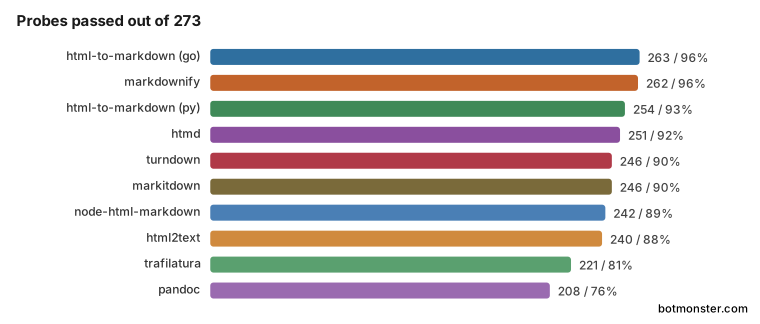
The top four finish within twelve probes of each other. trafilatura and pandoc are forty-two and fifty-five behind the leader.
I ran everything on one 24-core Linux box inside Docker, timing seven repetitions per conversion and keeping the median. Three tools run as subprocesses and carry about 0.4 ms of process start each, too small to change any ordering.
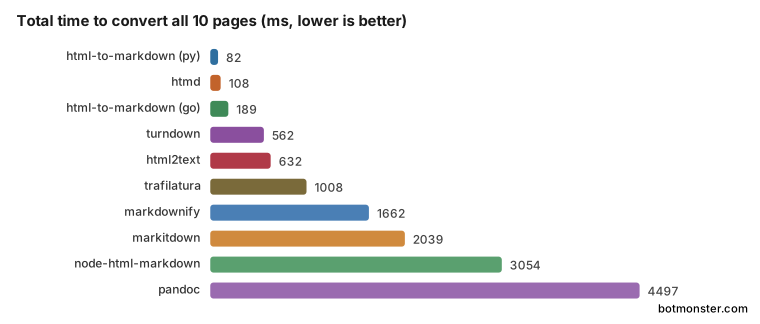
The speed order barely resembles the fidelity order.
html-to-markdown for Go
The winner, html-to-markdown, is a Go library with a CLI that reads HTML on stdin and writes Markdown on stdout, carrying about 4k GitHub stars. It is built as a CommonMark core with opt-in plugins, so I switched on tables and strikethrough to put it at the same GFM level as turndown and pandoc.
It passed 263 of 273 probes. Headings, lists, images, footnotes, entities and document structure all came back perfect, and its 98% on code blocks is the best score any tool posted. Tables scored 86%: it missed Wikipedia’s infobox and MDN’s technical summary table.
On the Wikipedia page it turned a code sample’s # Alternative heading line into a real heading instead of leaving it as sample text, the only escaping mistake in the set. Like eight of the ten tools, it prints arXiv’s MathML numbers twice.
On the 800 KB Wikivoyage page it took 36 ms, against 985 ms for node-html-markdown on the same file. The flag that turns relative links absolute is why this tool scores 96% on links where turndown scores 87%. Pick it for a scraping pipeline where you can ship a binary.
markdownify
markdownify is the Python answer, and it ties the Go tool on fidelity with 262 of 273 probes. It is a small library built on BeautifulSoup that walks the parsed tree with one converter method per tag, a design that makes it easy to subclass. It scored 100% on tables, lists, escaping, footnotes, entities and structure, the cleanest table handling of any tool here.
It never puts a language on a code fence. It failed the language check on all three pages that carry one: MDN, the Rust Book and the Kubernetes docs. Anything downstream that keys off the fence language gets nothing from it. It also missed the Wikipedia infobox image.
markdownify took 1,662 ms for all ten pages against the Go tool’s 189 ms, nine times longer for the same fidelity. Choose it for a Python project where you want to override one tag’s behaviour without forking anything.
html-to-markdown for Python
This one shares a name with the Go project and is a completely different codebase. html-to-markdown is a Python package with a Rust core behind a Python API, so the parsing and emitting both happen in compiled code.
It converted all ten pages in 82 ms, twice as fast as the Go binary and twenty times faster than markdownify. It passed 254 of 273 probes, with perfect scores on tables, images, escaping, footnotes, entities and structure. One of the Python docs API signatures went missing, and at 62% this is the weakest converter on math.
It passed only 53% of the boilerplate probes, so it drops parts of the nav and footer that the other converters keep. Leaking 47% of the chrome instead of 76% is undocumented behaviour, so do not build on it. Use this one for a high-volume Python pipeline where throughput is the constraint.
htmd
htmd is the Rust option, described by its author as turndown for Rust. It parses with html5ever and layers a turndown-shaped rule system on top. The project has under 500 GitHub stars against millions of crate downloads. It passed 251 of 273 probes and took 108 ms across the ten test pages, second fastest overall, with headings, lists, links, images, escaping, footnotes and entities all at 100%.
It scored 76% on tables and 73% on code, both from one behaviour. Every pre block on the Wikipedia and Wikibooks pages is inside a table cell, and htmd flattens those instead of keeping the block intact. The GitHub README cost it five more code probes for the same reason.
It also leaked Wikipedia’s inline template CSS into the output, the mw-parser-output blob that turndown and pandoc let through too. Reach for htmd when you want turndown’s behaviour without a Node runtime.
turndown
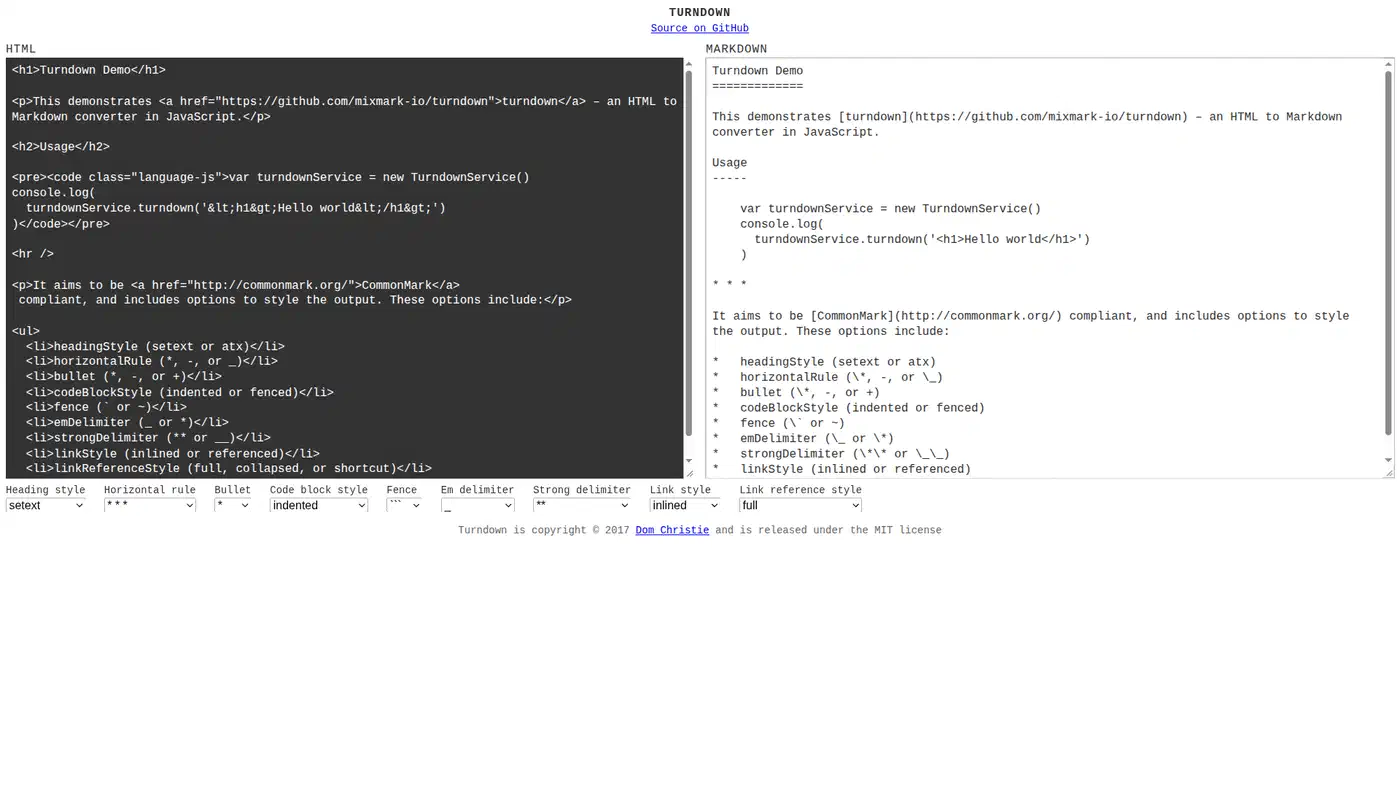
turndown is the most popular tool here by a wide margin, with roughly 11k stars and millions of npm downloads a week. It walks the DOM with one replacement rule per element and extends through plugins. The companion turndown-plugin-gfm adds tables, strikethrough and highlighted code blocks. With it on, turndown passed 246 of 273 probes and scored 100% on headings, lists, images and footnotes.
Running it with no plugins produced zero fenced code blocks on the GitHub README, against 54 with the plugin on. Its overall score barely moves, 245 against 246, because the plugin’s wins and losses cancel out across ten varied pages. On a single code-heavy page it changes the whole result, so install the plugin alongside turndown.
Elsewhere it reached 76% on tables and 50% on math, and it is the only tool that left in the output as a literal entity. It scored 87% on links because it drops some relative hrefs. It is still the right answer for a browser extension or any Node project.
markitdown
markitdown is Microsoft’s converter and the most starred project here by a wide margin, at over 180k stars. It turns files of many kinds into Markdown, aimed at feeding documents to language models. For HTML it strips scripts and styles and hands the body to markdownify, which is why its table and escaping scores match markdownify’s exactly. It passed 246 of 273 probes with perfect tables, lists, escaping, footnotes, entities and structure.
It is presented as a document extractor, but on HTML it keeps the site chrome: 68% of the nav and footer wording came through, against 0% for trafilatura. It passed 12% of the extractor probes. Point it at a saved web page expecting the article, and the cookie banner arrives too.
Like markdownify it never tags a code fence, and it is slow, at 2,039 ms for all ten pages. It earns its place on mixed document piles, PDF and docx and pptx, where HTML is one input among many. For HTML alone, markdownify does the same job faster.
node-html-markdown
node-html-markdown sells itself on throughput. It uses node-html-parser instead of a full DOM, with the stated goal of beating turndown on speed. It passed 242 of 273 probes.
In this run it was the slowest tool except pandoc, at 3,054 ms across the ten pages against turndown’s 562 ms. Both ran inside the same long-lived Node worker, so startup cost is not the explanation. The gap opens on big pages: 985 ms on the 800 KB Wikivoyage page, where turndown needed 105 ms. Its own README benchmarks measure a different workload, so take the ordering here as the finding.
It also scored 66% on code and 70% on inline formatting, the worst inline score in the set. On the MDN page it dropped the inline code around colspan and scope. Links came in at 78%. On these numbers it is hard to recommend over turndown.
html2text
html2text is the oldest tool here, with Aaron Swartz’s name on its lineage. It is a stateful HTMLParser subclass that emits text as it goes, with a long list of tunable attributes. It hard-wraps at 78 columns by default, which rewraps every paragraph and breaks tables, so I set the body width to zero and left the rest alone.
It is also the only copyleft library in the set, licensed GPL-3.0 where everything else here is MIT or Apache-2.0. The licence decides whether you can vendor it into a closed product. It passed 240 of 273 probes with perfect headings, images, escaping, entities and structure.
Tables came in at 43%, the worst score on any feature by any tool. It emits a pipe layout that is aligned for human eyes but is not GFM, so no parser will read it as a table. Footnotes scored 50% because it drops Wikipedia’s citation anchors, and it lost the Python docs API signatures entirely. It is excellent at what it was written for, which is readable plain text. For Markdown a parser will accept, pick something else.
trafilatura
trafilatura is the only tool in the set that works as an extractor. Hand the other nine a saved web page and you get the whole thing back as Markdown, menu bar and cookie notice included, because they convert every element you give them. trafilatura decides which part of the page is the article and throws the rest away before it converts anything. It runs a cascade of heuristics that score DOM nodes to find the article, then converts that subtree alone. It passed 221 of 273 probes, second lowest in the table, and posted 0% boilerplate leakage, the only tool that removed every trace of nav, header and footer across all ten pages.
Headings scored 72%. On the Kubernetes Pod Lifecycle page it emitted three heading lines for a 51 KB article carrying more than thirty. Images scored 54%, lists 68%, and its 88% text retention is the lowest here, meaning it discarded roughly one word in eight of the article body.
If a language model reads the output next, losing the nav is worth more than losing some headings. If you are archiving the page, that trade runs the wrong way. Use it for RAG and scraping pipelines where you want the article and nothing else.
pandoc
The most famous name on the list finished last, and one default flag explains most of it. pandoc is the universal document converter, twenty years old, around 46k stars, and the tool most readers already have installed. It parses into its own abstract document model and writes out from there.
Run with the stock GFM target, pandoc scores 65%, because anything it cannot express in GFM passes straight through as raw HTML. Whole tables and pre blocks come back as markup. Subtract that extension and it scores 76%, the setting I ranked it on:
pandoc -f html -t gfm-raw_html page.html -o page.mdEven on the better setting it scored 34% on code, the worst of the ten, and 48% on tables. It lost most of the Wikipedia code samples and every shell block on the GitHub README.
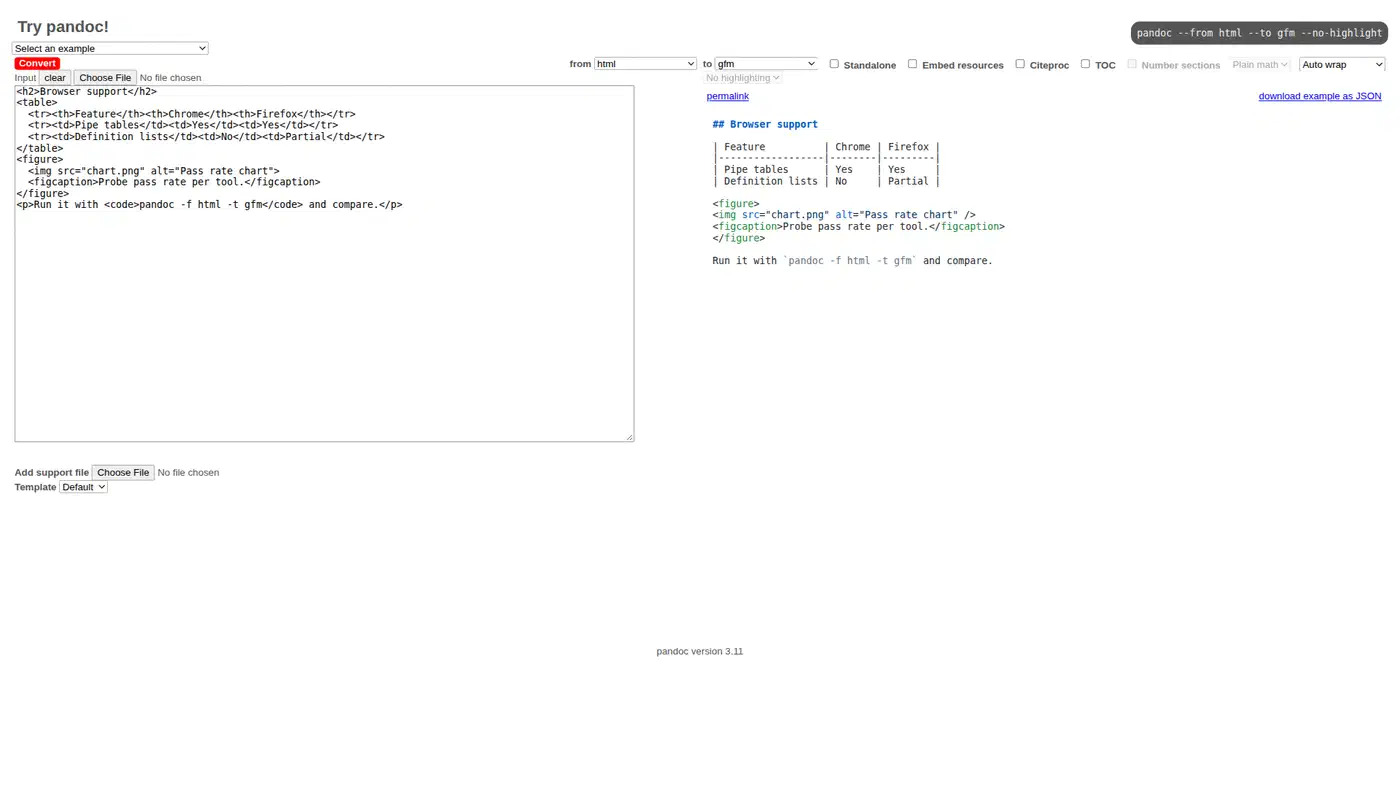
pandoc is the only tool of the ten that keeps a poem readable, preserving the br line breaks in the Alice in Wonderland verse where the other nine joined the lines into prose. It is also one of only three that dodged the arXiv double-printing bug. It is the slowest tool either way, at 4,497 ms ranked and 6,118 ms on the default. Use it when you already have it and you are converting one document rather than ten thousand.
Which HTML to Markdown tool should you pick?
- Feeding a language model or building RAG: trafilatura, for zero boilerplate at the cost of some headings.
- High volume in Python: html-to-markdown for Python, at 82 ms for ten large pages.
- Anything in Node or a browser extension: turndown, with the GFM plugin installed.
- Best all-round fidelity, and you can ship a binary: html-to-markdown for Go.
- Converting one document by hand: pandoc, with the raw-HTML passthrough switched off.
These are ten pages on one machine. The ordering held across repeated runs, and the per-feature grid is committed, so you can look up the specific failure that affects your own pages. Run it yourself:
git clone https://github.com/botmonster/benchmarks.git
cd benchmarks/html-to-markdown-converters
./run.sh --yes
If your pages are mostly prose, almost any tool on this list will do the job.