 Botmonster Tech
Fizzy is a kanban board you self-host in one container

You self-host Fizzy in a single Docker container. Pull ghcr.io/basecamp/fizzy:main, mount one volume, and the stack is complete. There is no database server to run, because 37signals’ kanban tracker defaults to SQLite on that volume. The one surprise is the licence, which is source-available rather than open source.
Key Takeaways
- One container and one volume is the whole stack, no database server needed.
- Cards you ignore for 30 days move themselves out of the way.
- Skip the email setup and your login code shows up in the container logs.
- The licence lets you run it free, just not resell it as a service.
- The API and webhooks are good, but nothing links Fizzy to Gitea.
What is Fizzy?
Fizzy is 37signals’ kanban tracker for bugs, issues and ideas, and it is a deliberately small answer to Trello, Jira and Asana. You get boards, cards, columns, webhooks and a rule that clears out stale work on its own. You do not get analytics dashboards or AI features.
The free hosted service at fizzy.do runs it for you, and work started there exports to your own install later. Or you run the same code yourself.
Under the hood it is a Rails app with Hotwire, pinned to Ruby 3.4.8, with Thruster sitting in front of the app inside the image. The basecamp/fizzy repo has picked up 8,064 stars and 1,170 forks, with 77 issues open.
As with so much other software, good ideas can grow cumbersome and unwieldy surprisingly quickly. Fizzy is a fresh reset of an old idea.
How does Fizzy work?
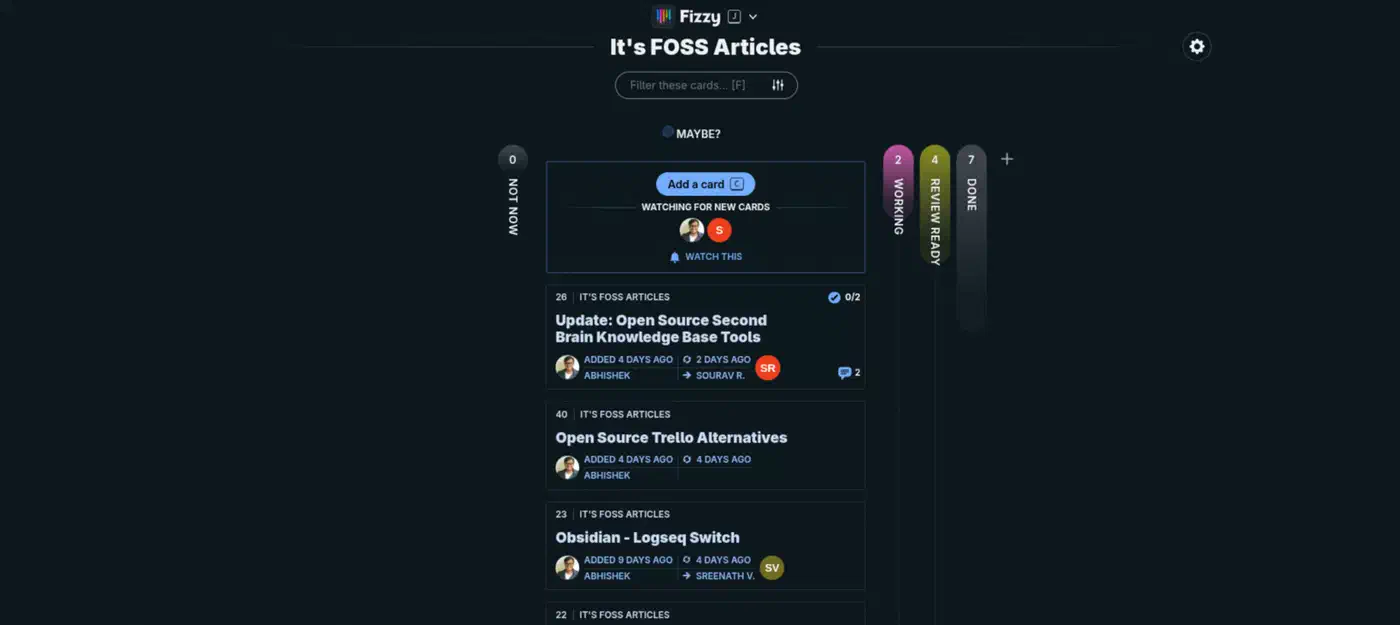
Every new board opens with three columns: “Not now” on the left, “Maybe” in the middle, and “Done” on the right. New cards always land in Maybe, and 37signals means that column to feel uncomfortable. Maybe means undecided, so everything sitting there has to be resolved sooner or later.
You add your own columns with a plus button, naming each one and picking a colour. Cards then take the colour of the column they sit in, so a board becomes readable at a glance once you learn the palette. 37signals’ own bug board runs investigating, in progress, on hold and QA to confirm alongside the three defaults.
Only two columns are ever open at once: Maybe plus one other. Open a third and the previous one closes, which is the deliberate opposite of a wall of open lanes. A zoom control blows one column up into a grid of just those cards, and Escape drops you back to the board.
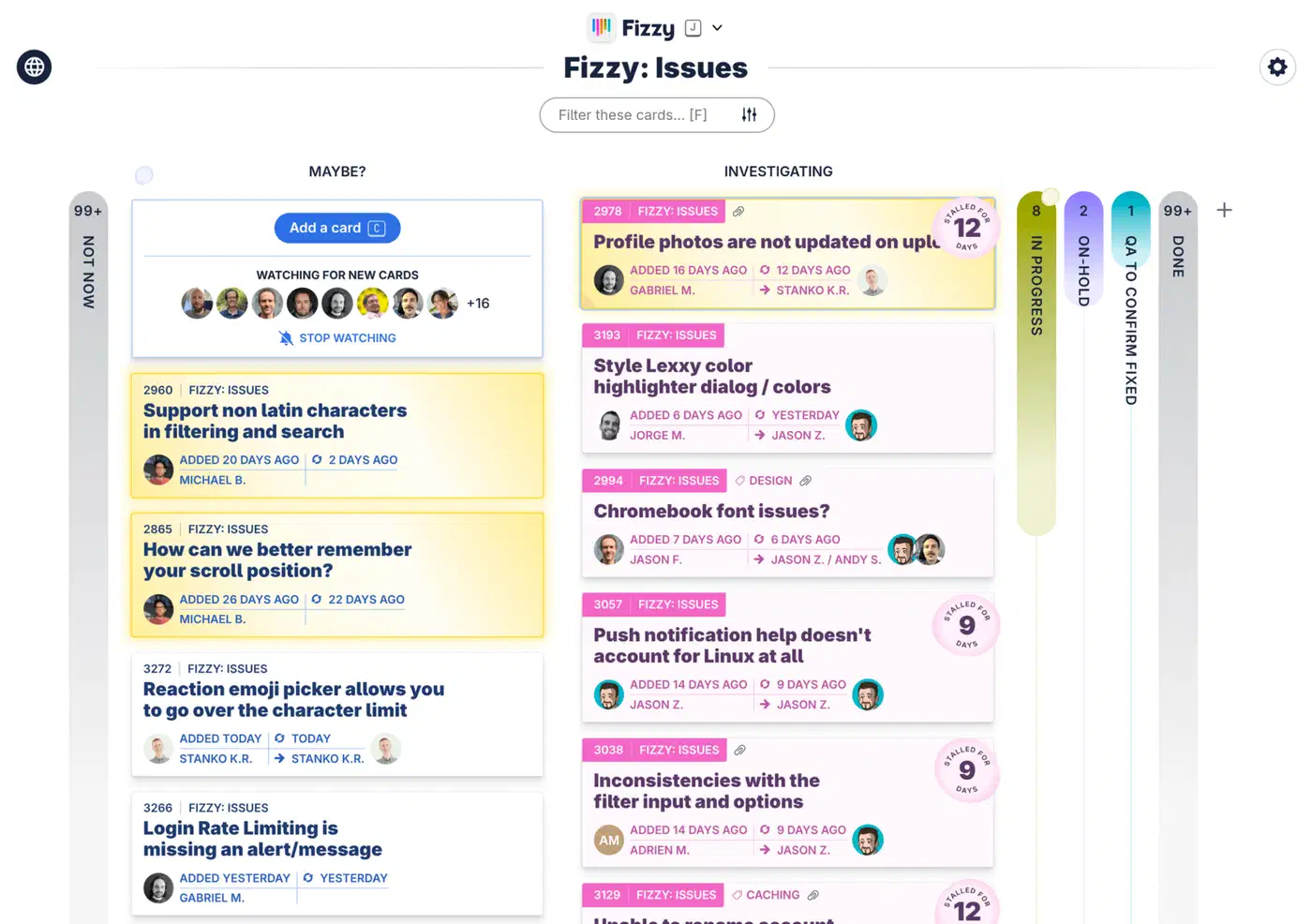
Each card shows an ID and its board name top-left, a paperclip when files are attached, the creator’s avatar on the left, and assignees on the right. Cards can have several assignees. Scanning down the right edge tells you what nobody has picked up yet. Column tabs also grow in length with card count, so relative load shows without reading a number.
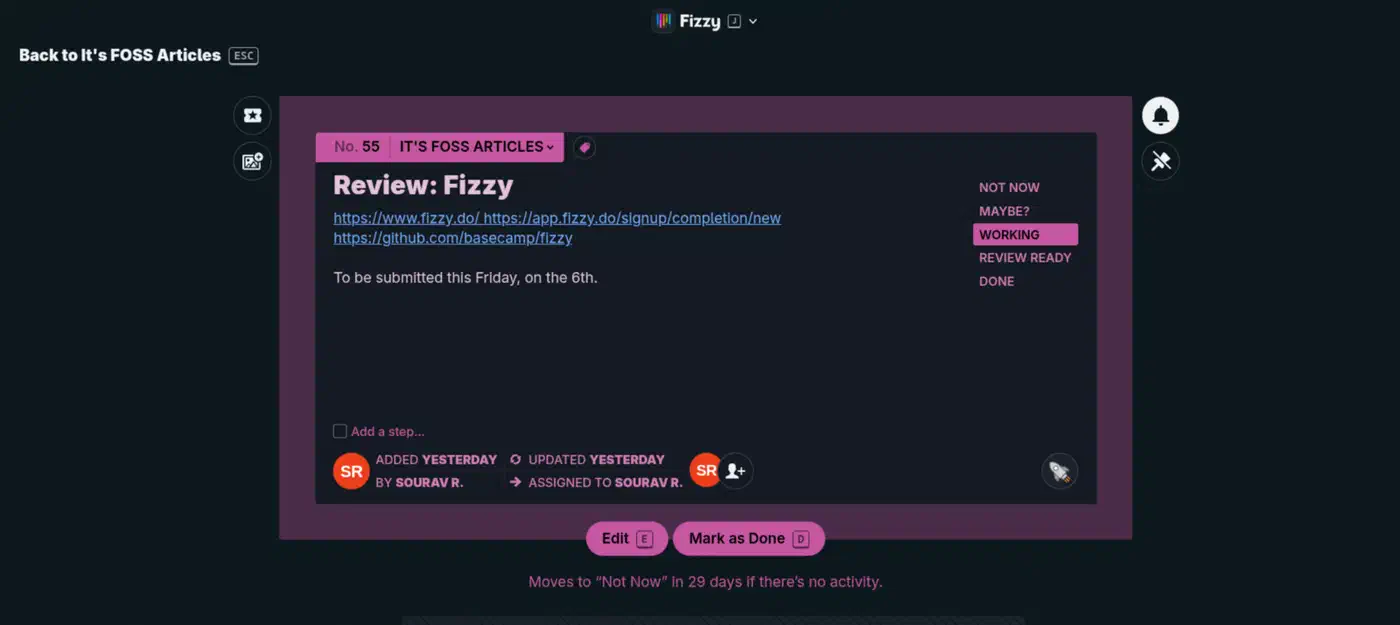
Any board can be flipped to a public read-only URL. That is how you publish a roadmap or a bug list without inviting anyone in.
The Fizzy features that are not in other kanban tools
These four behaviours come from 37signals’ own Fizzy tour and walkthrough video.
Cards sort themselves. There is no manual ordering. Fizzy ranks each column by activity, so cards picking up comments and tags rise while quiet ones sink. Golden cards are the manual override: flip a card golden and it floats to the top of whatever column it is in, and shows gold in notifications and pins too.
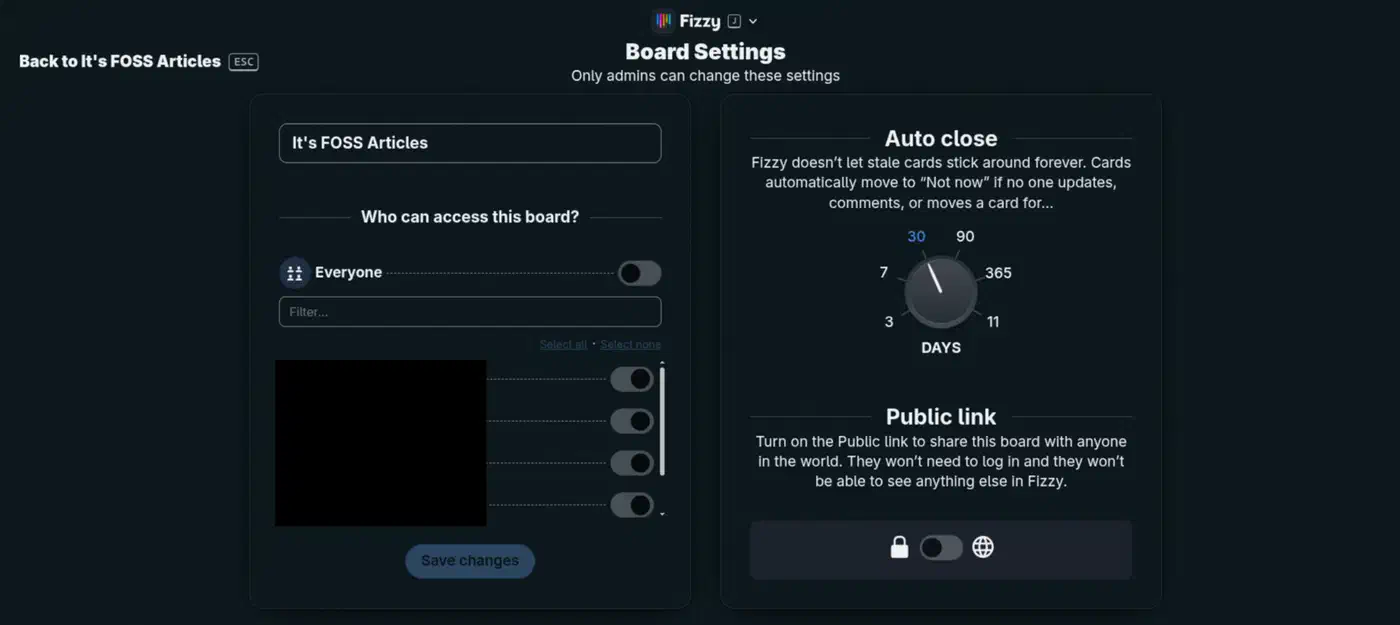
Stale cards get flagged, then evicted. Bubbles attach to cards that went quiet after being busy, labelled with the silence, for example “stalled for 10 days”. That is where the name comes from. Then the auto-close dial takes over: a card with no update, comment or move for 3, 7, 30, 90 or 365 days moves itself to “Not now” and is stamped “Not now by system”. Any activity resets the counter, and each board can override the account-wide setting.
Two corners of the screen follow you everywhere. Bottom right holds the notification stack: new cards on boards you watch, replies in your threads, mentions and assignments. Press N to fan it open or shut from anywhere. Bottom left holds pinned cards, which travel with you across every board and update live. A pinned card’s colour tab changes the moment somebody else moves it to done, which turns the stack into a cheap watch list.
The keyboard does the navigating. J opens the Fizzy menu for boards, tags, people and settings. K searches the whole account, 1 jumps to global activity, Escape backs out. Typing “golden” into the Fizzy menu lists every golden card in the account on one screen. Each board also has a live filter that matches text in card titles and descriptions as you type.
Person pages round it out. They show cards assigned to someone, cards they added, and a three-column timeline of what was added, updated and finished today. The timeline renders real gaps in time, and hovering an entry highlights every other entry for the same card.
Is Fizzy really open source?
No. Most coverage calls Fizzy open source, and the licence says otherwise. The O’Saasy License is MIT text with one extra clause. Clause 2 says no licensee may offer the software to third parties as a hosted, managed or SaaS product where the primary value of the service is the software’s own functionality.
So you can run it for yourself, run it for your company, modify it, redistribute it, and charge for work you build around it. What you cannot do is sell Fizzy-as-a-service. That right stays with 37signals, and DHH describes it as a carve-out reserving the commercialization rights to them.
In plain terms:
- Allowed: download it, read the code, run it on your laptop or your own server, fix bugs, and add features you want. Free, for yourself or for your company.
- Blocked: hosting or reselling Fizzy as a managed cloud service, or anything that competes with 37signals’ own hosted version.
The Open Source Definition is stricter than that. It bars any licence that discriminates against a field of endeavour, and running a SaaS business is a field of endeavour. A licence that blocks one use is source-available, however generous the rest of it reads.
The people writing these licences answer that argument with a question about who captures the value. A permissive licence lets a large cloud vendor package someone else’s work as a paid service and contribute nothing back. The SaaS carve-out keeps the code readable and forkable while protecting the hosting business that pays for the work.
Fizzy is not fully open source, more like source available. They use O’Saasy license that gives you all kinds of permission except offering the product as your own service.
What you need before you self-host Fizzy
There is no separate database server, no Redis and no external job runner to set up.
- A machine running Docker. Any small VPS works, since the app is one Rails container.
- A persistent volume mounted at
/rails/storage. The SQLite database and every uploaded file live there, so losing it loses everything. - A domain pointed at the box, plus ports 80 and 443 open, if you want Fizzy to handle TLS itself.
- An SMTP account with Postmark, Sendgrid or your own relay, for sign-in codes and summary emails.
- A
SECRET_KEY_BASEvalue, which is any long unguessable string. - Optional: a VAPID keypair for web push, and an S3 bucket if you would rather keep uploads off the volume.
Nothing in the docs states the database choice. DATABASE_ADAPTER defaults to sqlite for self-hosters and mysql for 37signals’ own SaaS build, which you can read in lib/fizzy.rb
. Both configs ship in the repo, so MySQL is reachable. SQLite is the path 37signals expects self-hosters to take.
Deploy Fizzy with Docker Compose on your own server
This gets you a working instance with HTTPS, persistent storage and working sign-in email in about ten minutes.
Generate a secret key
openssl rand -hex 64That output becomes SECRET_KEY_BASE. It has to stay the same across restarts, because changing it invalidates every secure link generated with the old one.
Point a domain at the server
Create an A record for fizzy.example.com aimed at the host’s public IP. Then open ports 80 and 443 in the firewall so the container can request and renew its own certificate.
Write the compose file
Save this as docker-compose.yml next to wherever you want to manage the stack.
services:
  web:
    image: ghcr.io/basecamp/fizzy:main
    restart: unless-stopped
    ports:
      - "80:80"
      - "443:443"
    environment:
      - SECRET_KEY_BASE=your-long-random-value
      - TLS_DOMAIN=fizzy.example.com
      - BASE_URL=https://fizzy.example.com
    volumes:
      - fizzy:/rails/storage

volumes:
  fizzy:
Add your SMTP settings
Append MAILER_FROM_ADDRESS, SMTP_ADDRESS, SMTP_USERNAME and SMTP_PASSWORD to the environment block, using the values your email provider gave you. Without them the six-character sign-in codes never reach anyone’s inbox.
Start the container
docker compose up -d
docker compose logs -f web
Wait for the Rails boot lines and the certificate request to finish before you load the site.
Create the first account
Open your domain in a browser, sign up, and enter the code that arrives by email. If no mail turns up, the same code is printed in the logs you are already tailing.
Confirm signups are now closed
Reload the signup page. New account creation should be disabled, which is the default single-tenant behaviour once the first account exists.
Verify persistence
docker compose down
docker compose up -d
If the board is empty, the volume mount is wrong and everything you do next will vanish on the next restart.
The environment variables that decide your setup
Each of these variables decides how the install is shaped, and changing one later means recreating the container.
| Variable | What it decides | Limit |
|---|---|---|
TLS_DOMAIN | Fizzy issues and renews its own certificate | Needs ports 80 and 443, and a real domain |
DISABLE_SSL=true | Plain HTTP for a laptop or LAN-only run | Never expose this to the internet |
BASE_URL | The address Fizzy writes into emails | Get it wrong and sign-in links point nowhere useful |
MULTI_TENANT=true | Keeps signups open for more accounts | Default closes them once the first account exists |
ACTIVE_STORAGE_SERVICE=s3 | Uploads go to a bucket instead of the volume | Needs five more S3 variables alongside it |
Leaving TLS_DOMAIN unset is the third TLS mode: publish only port 80 and let a reverse proxy in front terminate TLS, which is how a Traefik front door
already handles certificates for everything else on the box. For S3 you also set S3_BUCKET, S3_REGION, S3_ACCESS_KEY_ID, S3_SECRET_ACCESS_KEY and CSP_CONNECT_SRC. Non-AWS providers need S3_ENDPOINT and S3_FORCE_PATH_STYLE on top. If presigned URLs come back without CORS headers, inline images silently fail until you set SERVICE_WORKER_CORS_ENABLED=false. The full list lives in the Docker deployment guide
.
Docker image or Kamal, which path do you want?
37signals supports two deployment paths and they are not interchangeable. The prebuilt image is for people who want Fizzy as it comes: upgrades are a pull and a restart, and you never touch Ruby. Kamal builds from your fork, pushes your own image, and deploys over SSH, which is the path you want if you are patching the app. The Kamal deployment guide walks through it.
Versions are a problem on both paths. The published tag is main, and the repo’s releases are commit-tagged like fizzy@8112b3d. There is no semantic version to pin to, so every pull is a jump to whatever main happens to be that day. Snapshot the storage volume before each one.
Community packaging exists too, since Cloudron and Railway both list Fizzy. Those are third-party wrappers, not 37signals-supported paths.
Does Fizzy have an API or a Gitea integration?
It has an API, but no Gitea integration, and the same answer covers GitHub and GitLab.
The API docs
cover identity, account, boards, columns, cards, pins, steps, comments, reactions, tags, users, activities, notifications, rich text, exports and webhooks. Authentication
is a personal access token generated in your profile, scoped either Read or Read + Write and sent as a bearer token. Most endpoints return ETag and Cache-Control headers, so a polling script can send If-None-Match and get a 304 back instead of a payload.
Webhooks are outbound only, configured per board from the globe icon in a board’s top-left corner or through the API. Only account admins can manage them, and each webhook carries its own signing_secret. The subscribable events are card_assigned, card_closed, card_postponed, card_auto_postponed, card_board_changed, card_published, card_reopened, card_sent_back_to_triage, card_triaged, card_unassigned and comment_created, per the webhooks documentation
.
A GitHub code search across the repo returns zero hits for “gitea”. Nothing exists for plugins, importing, commit-to-card linking or inbound webhooks, so Gitea cannot push an event into Fizzy on its own.
Closing that gap takes a small bridge of your own, roughly a hundred lines in any language with an HTTP client. A webhook from your own Gitea server hits your script, and the script calls the Fizzy cards API to create or move a card. Going the other way, a Fizzy webhook hits the same script, which posts a comment back on the Gitea issue. Verify the signature on both ends before you act on a payload. Store the Gitea issue ID on the Fizzy card so repeated deliveries stay idempotent.
What breaks when you self-host Fizzy
No SMTP means nobody can sign in by email. The six-character verification code goes to the container logs instead, which works for a solo instance and falls apart for a team.
Account imports need headroom on disk. Fizzy checks for at least twice the export zip’s size before starting, and logs a line like import needs ~90 GB free, found 12 GB. The person uploading only sees a generic error, so check the logs when an import fails for no visible reason.
Large browser uploads die at Thruster’s read timeout with a 502 before the import even begins. Raise THRUSTER_HTTP_READ_TIMEOUT and recreate the container, or run the bundled script/import-account on the server against a zip already on disk.
Losing the storage volume loses everything, the database and every attachment. Fizzy ships no managed backup, so you have to schedule volume snapshots yourself.
Resource use is modest. The pulled image is 518 MB. A freshly started container idles at roughly 460 MB RSS on my machine, and one that has served a few page loads settles nearer 1 GB. Treat that as the range to budget for rather than a single figure.
How Fizzy compares to other self-hosted kanban boards
| Tool | Licence | Database | Containers |
|---|---|---|---|
| Fizzy | O’Saasy, source-available | SQLite on the volume | 1 |
| Vikunja | AGPL-3.0, open source | SQLite, Postgres or MySQL | 1 |
| Wekan | MIT, open source | MongoDB, required | 2 |
| Planka | Planka Community, source-available | PostgreSQL, required | 2 |
| Focalboard | MIT for compiled builds | SQLite | 1 |
Vikunja is the closest match for anyone who wants a genuine open source licence and one container. Focalboard is no longer actively developed by Mattermost, so check that before you build a workflow on it.
Where Fizzy still falls short
Cards have no due dates and no deadlines, which rules Fizzy out for anything schedule-driven. The interface also wastes screen space. And when you close a card from “Assigned to me”, Fizzy bounces you back to the source board instead of the filtered view.
There is also no import from Trello, Jira or Asana. Early coverage said Fizzy had no import feature at all, but account export and import between Fizzy instances now exists and is documented. It just does not read anyone else’s format.
Add the missing version pins to that list. Fizzy suits a small team that wants a fast board with strong opinions and does not need dates, migrations or a procurement-friendly licence.