 Botmonster Tech
sched_ext (SCX) is a Linux kernel framework that lets you implement CPU schedulers in eBPF and hot-swap them at runtime without rebooting or recompiling the kernel. It merged into mainline in Linux 6.12 and matured through 7.0, which tightened its interaction with the default EEVDF class. On any distro shipping a kernel with CONFIG_SCHED_CLASS_EXT=y, loading a new scheduler takes a single command, for example sudo scx_loader --start scx_lavd, and you confirm it is active by reading /sys/kernel/sched_ext/root/ops.
Gaming

Write your own Linux kernel scheduler in eBPF with sched_ext

Running Windows Apps on Linux: Proton, Bottles, and the Full Compatibility Stack
Use Proton for Windows games on Steam. Use Bottles for everything else: Office, Adobe apps, business tools, non-Steam games. Both run on Wine, which maps Windows API calls to Linux without a virtual machine. DXVK and VKD3D-Proton handle the DirectX side. Wine 11.0 closes most of the remaining gap to native Windows.
This guide covers the full stack in 2026: what each piece does, how to set up Proton and Bottles, how to tune DirectX translation, and what still breaks.

Raspberry Pi 5: N64 and Dreamcast finally run full speed
A Raspberry Pi 5 running RetroPie or Batocera turns a $80 single-board computer into a retro gaming console that handles everything from NES and SNES through PlayStation 1, N64, Dreamcast, and even some PSP titles. The Pi 5’s quad-core 2.4 GHz Cortex-A76 CPU and VideoCore VII GPU deliver roughly 3x the single-core performance and 2.8x the GPU throughput compared to the Pi 4, making previously choppy N64 and Dreamcast games run at full speed for the first time on Pi hardware. With Bluetooth controller support, CRT shaders, and a polished menu system, the result rivals commercial retro consoles like the Analogue Pocket or Retroid Pocket at a fraction of the cost.
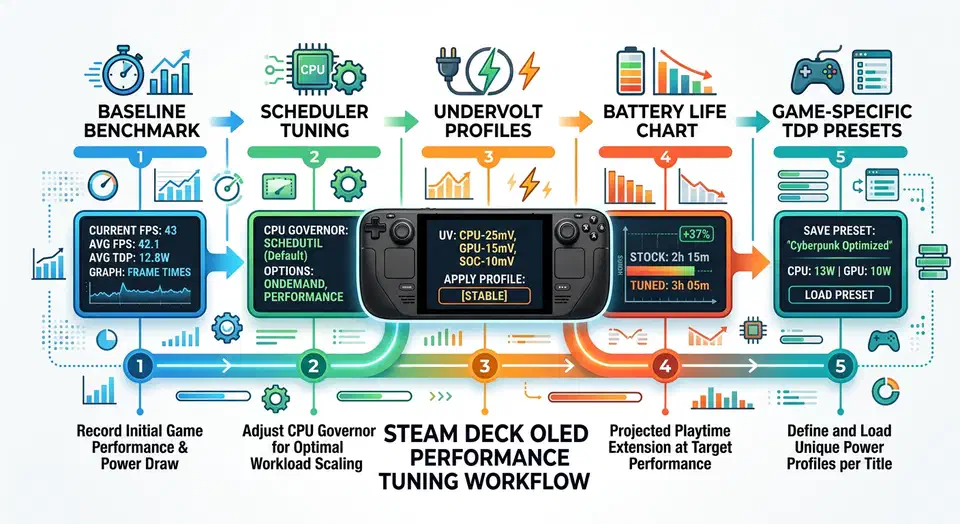
Tuning the Steam Deck OLED Kernel for Gaming Performance
Steam Deck OLED tuning is no longer just about pushing sliders and hoping for more FPS. The stack is layered. Valve’s kernel, your Proton version, the game engine, and power policy all interact. Tune one layer alone and you often trade smoothness for crashes, or frame rate for battery drain.
This guide chases one goal: steadier frame times and longer battery life, without turning your Deck into a fragile science project. You get a safe workflow, specific kernel options, and game profiles you can reuse.