 Botmonster Tech
Neon gives every pull request its own Postgres copy

This post is open for corrections. Highlight any line of text to challenge it or ask for a clearer explanation and leave a comment.
Neon brings Git-style branching to Postgres. Each branch is a full copy of your database, schema and data, and it spins up in under a second no matter the size. Push a feature branch, open a pull request, and your preview environment gets its own database that nobody else can touch. When the PR merges, the branch disappears. Nobody has to share a staging box or keep seed scripts in sync with the schema.
This works because Neon splits compute from storage. A new branch is just an O(1) metadata write. So database environments get as throwaway as Git branches.
The shared staging database problem
Most teams run three database environments: dev, staging, and production. Staging is supposed to catch issues before they hit prod. In practice it turns into a bottleneck that breeds its own class of bugs.
Two devs run rival schema changes against the same staging database. One adds a column, the other renames it. Whoever runs second hits a migration error that has nothing to do with their code. Bad test data is the other steady headache: one dev’s test fills the users table with junk that breaks another dev’s checks.
Then there are the seed scripts. Someone has to maintain the set that fills staging with realistic data, and update it after every schema change, which is nobody’s favorite job. The scripts drift out of date, and staging data looks nothing like production within weeks. The result is false confidence: “it works on staging” means very little when staging data has drifted from reality.
Git solved this for code decades ago. Branches are cheap and private. You make one in milliseconds, work alone, and merge when ready. Databases were the last holdout, stuck in the shared model. Neon brings the same copy-on-write trick to Postgres.
How Neon branching works under the hood
Old-school managed Postgres, like AWS RDS, keeps compute and storage on one machine. Neon splits them apart: the Postgres process runs as compute, and storage lives in its own layer, a spread-out page server. That split is what makes branching work.
When you create a branch, Neon doesn’t copy any data. It writes a metadata pointer to a spot in the parent branch’s WAL (Write-Ahead Log) history. This is a copy-on-write step: the branch shares all existing pages with its parent. Only when you change data on the branch does Neon write new pages to the branch’s own storage. Reads of unchanged data go straight to the shared pages.
A 500 GB production database branches in under one second. At first the branch uses zero extra storage. You only pay for the delta: the data you change on the branch.
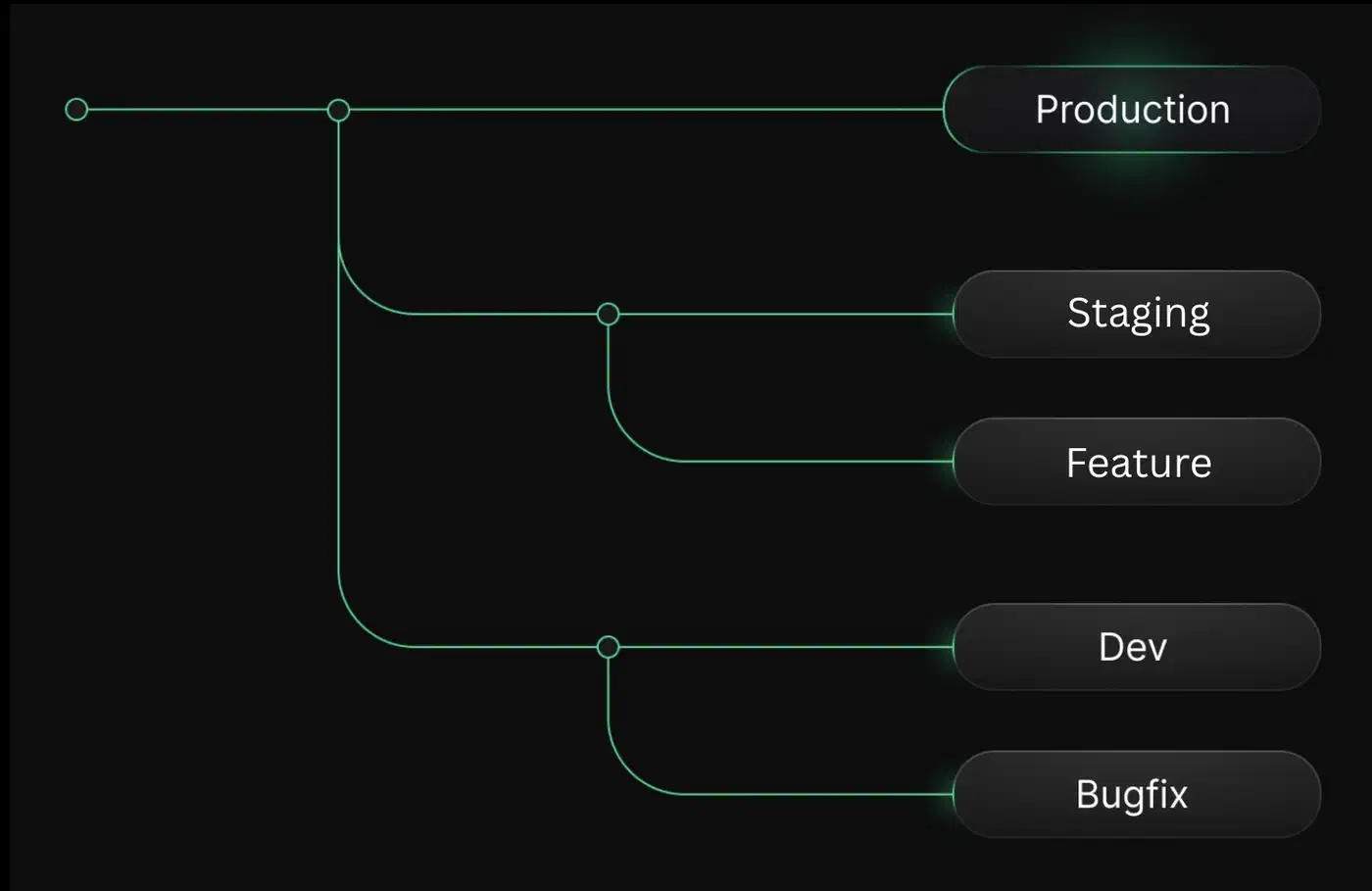
Each branch gets its own compute endpoint. That endpoint scales to zero after five minutes of idle time, and the window is yours to set. An idle branch costs nothing for compute. You’re billed for storage of the changed pages, plus compute time when someone queries the branch.
Databricks acquired Neon in May 2025. Since then, storage dropped from $1.75 to $0.35 per GB-month. Compute prices fell 15-25% across all tiers. The free tier also doubled its compute budget, from 50 to 100 CU-hours per month.
Setting up database branches for pull requests
The best use of Neon branching is a fresh database per PR. There are two ways to wire it up: through Vercel, or through GitHub Actions.
Vercel integration
If you deploy on Vercel, setup is close to hands-free. Install the Neon plugin from the Vercel marketplace and link your Neon project. From then on, every Vercel preview build gets its own Neon branch. The flow:
- Push to a feature branch
- Vercel builds a preview deployment
- Neon creates a database branch from your main branch
- The preview deployment connects to its isolated branch via environment variables
- When the PR closes, the branch is deleted
There is nothing else to set up: each preview deploy gets its own DATABASE_URL env var, filled in for you.
GitHub Actions
For other setups, Neon ships its own GitHub Actions. The neondatabase/create-branch-action makes the branch and cleans it up. You need two values: NEON_API_KEY as a repo secret, and NEON_PROJECT_ID as a repo variable. The Neon GitHub plugin can set both for you.
A basic workflow makes a branch when a PR opens and deletes it when the PR closes:
name: Neon Branch per PR

on:
  pull_request:
    types: [opened, synchronize, reopened, closed]

jobs:
  create-branch:
    if: github.event.action != 'closed'
    runs-on: ubuntu-latest
    steps:
      - uses: neondatabase/create-branch-action@v6
        id: create-branch
        with:
          project_id: ${{ vars.NEON_PROJECT_ID }}
          api_key: ${{ secrets.NEON_API_KEY }}
          branch_name: pr-${{ github.event.number }}
          suspend_timeout: 300
      - run: echo "DATABASE_URL=${{ steps.create-branch.outputs.db_url }}" >> $GITHUB_ENV

  delete-branch:
    if: github.event.action == 'closed'
    runs-on: ubuntu-latest
    steps:
      - uses: neondatabase/delete-branch-action@v3
        with:
          project_id: ${{ vars.NEON_PROJECT_ID }}
          api_key: ${{ secrets.NEON_API_KEY }}
          branch: pr-${{ github.event.number }}
The suspend_timeout: 300 line puts the branch compute to sleep after 5 idle minutes. The db_url output hands you the full connection string for your app and your migration tool.
Branch from any point in time
Beyond PR flows, you can make a branch from a specific LSN (Log Sequence Number) or timestamp. This is handy for chasing prod issues. You can branch from the moment before a bad migration ran, look at the data, and test your fix without touching prod.
Integrating with your ORM and migration tool
Database branching works with any tool that takes a Postgres connection string. The pattern is the same everywhere: point DATABASE_URL at the branch and run your migrations.
| ORM / Migration Tool | Command | Notes |
|---|---|---|
| Prisma | prisma migrate deploy | Set DATABASE_URL in .env or CI environment |
| SQLAlchemy + Alembic | alembic upgrade head | Pass branch URL via SQLALCHEMY_DATABASE_URI env var |
| Drizzle | drizzle-kit push or drizzle-kit migrate | Connection string via config or env |
| Django | python manage.py migrate | Set DATABASES['default'] from branch URL |
Branches carry real production data, or a clean snapshot of it. So you may not need seed scripts at all. Your branch already holds data with the right shape, real edge cases, and intact foreign keys. If you’re still picking a migration toolkit, our breakdown covers how both tools run migrations end to end.
To keep migrations safe, Neon’s schema diff action checks your branch schema against production. It then posts the diff as a PR comment. You see what your migrations will change before you merge.
Data anonymization for development branches
Branching from prod means PII lands in dev. Neon fixes this with anonymized branches. They use the PostgreSQL Anonymizer extension to mask private data.
The trick is static masking. Neon rewrites the data as the branch is built, not at query time. You set rules for private columns: emails, names, phone numbers, addresses. Neon applies them for you. Foreign keys, data types, and table links all stay intact. So the masked database has the same shape as prod, but it’s safe for dev work.
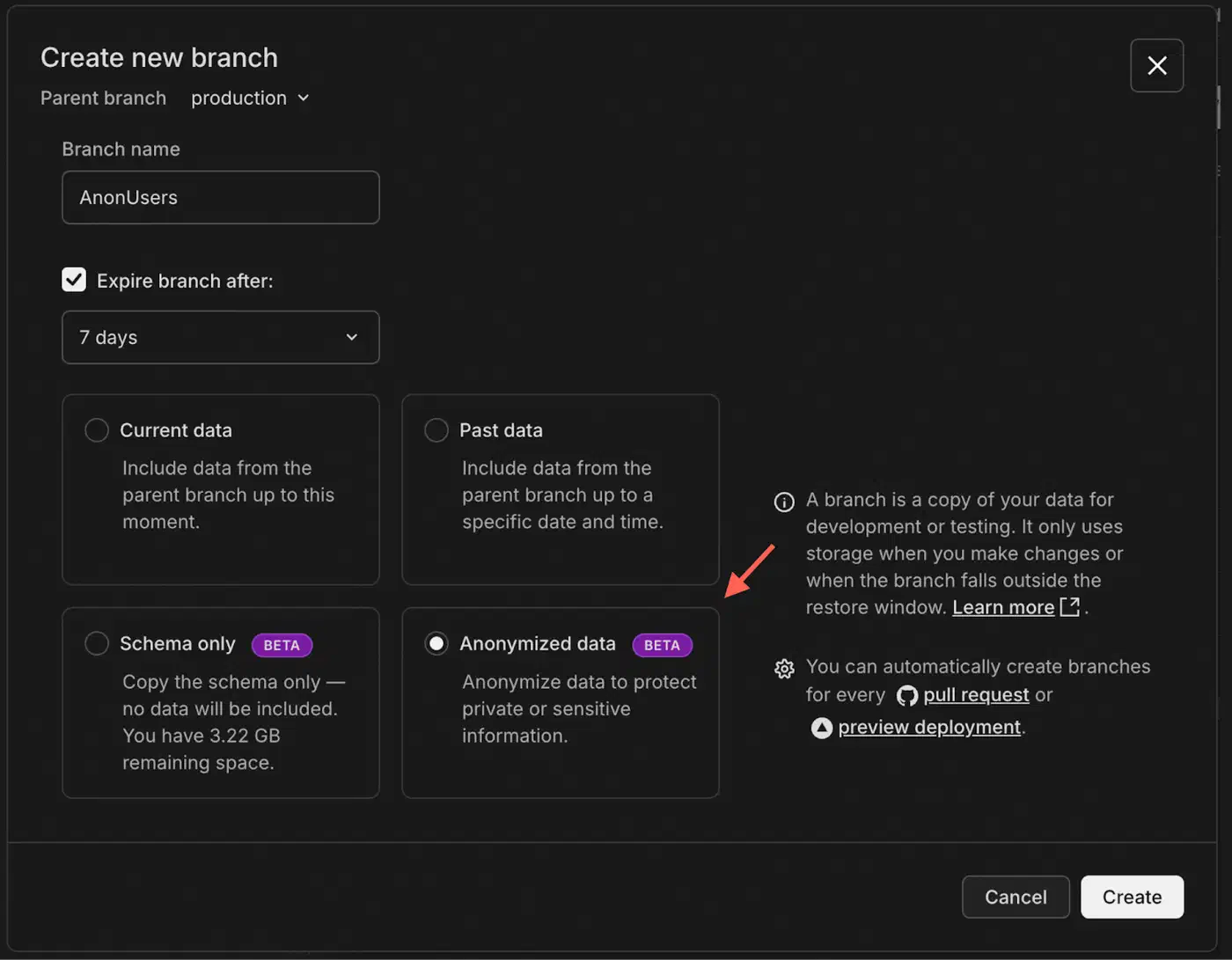
A simple setup: make one masked branch from prod, then base all dev branches on that clean parent. Devs get real-shape data and never see real customer info.
Cost, limits, and alternatives
Neon pricing tiers
| Feature | Free | Launch | Scale |
|---|---|---|---|
| Price | $0/month | Usage-based | Usage-based |
| Storage | 0.5 GB/project | $0.35/GB-month | $0.35/GB-month |
| Compute | 100 CU-hours/project | $0.106/CU-hour | $0.222/CU-hour |
| Branches | 10/project | 10/project (+$1.50/extra) | 25/project (+$1.50/extra) |
| Projects | 100 | 100 | 1,000 |
| Autoscaling | Up to 2 CU | Up to 16 CU | Up to 56 CU (fixed) |
| Compliance | - | - | SOC 2, HIPAA eligible |
Cost example: a team of 5 devs with a 10 GB database and 20 live branches on the Launch plan would spend about $15-25/month. Branch compute drops to zero when idle. So an idle branch bills only storage for the pages it changed.
Solo devs and small side projects fit inside the free tier. Growing teams get most of those limits lifted on Launch, while Scale adds compliance certs and a higher compute ceiling for production loads.
When Neon isn’t the right fit
Neon is a managed cloud service. If you need on-prem Postgres, it’s not a fit. Multi-region write replicas are out too. Neon gives you read replicas, but not multi-primary setups. If your RDS or Aurora setup works fine and branching isn’t a real pain, the move may not pay off.
Alternatives with branching
| Service | Database Engine | Branching Model | Key Difference |
|---|---|---|---|
| Neon | Postgres | Full CoW (schema + data) | Instant, zero-copy branches with real data |
| PlanetScale | MySQL (+ Postgres GA Sept 2025) | Schema-only by default, data branching available | Deploy request workflow for schema migration review |
| Supabase | Postgres | Git-integrated, runs migrations + seed | Full-stack platform with auth, storage, and realtime |
| Turso | SQLite (libSQL) | CoW branches | Edge-hosted, SQLite-compatible, currently in beta |
PlanetScale’s deploy request flow fits teams who mainly want to review schema changes before they hit prod. Supabase branching starts a fresh database and replays migrations plus seed data. It never copies real data, so you trade fidelity for zero PII risk. Turso does CoW branching for SQLite workloads running at the edge, though it’s still in beta.
Putting it together
The Neon branching workflow looks like this in practice:
- A developer pushes a feature branch and opens a PR
- GitHub Actions (or Vercel) creates a Neon branch from the main database
- CI runs migrations against the isolated branch
- The preview environment connects to the branch for manual testing
- Schema diff posts the migration changes as a PR comment
- On merge, the branch is automatically deleted
Every developer gets their own database. That ends the schema conflicts, the seed scripts, and the “who broke staging” chat. An idle branch costs almost nothing, and it’s gone when the PR closes. When a feature needs real provider callbacks during that manual test, you can forward webhooks to the local app. GitHub or Stripe then hits your branch, not a deployed staging box.
One limit to keep in mind: Neon branches share the project’s storage quota. Teams with very large databases (100+ GB) should watch that quota. It fills up fast when many branches build up changed data. Branch expiry rules and tight auto-suspend timers keep the bill in check.
If your team runs Postgres and burns real time nursing staging databases or chasing bugs that show up in one environment only, Neon branching is worth a try. Setup takes under an hour. The per-PR database pays for itself the first time it catches a migration bug that would have broken staging for the whole team.