 Botmonster Tech
Claude now moves your mouse, and asks permission first
This post is open for corrections. Highlight any line of text to challenge it or ask for a clearer explanation and leave a comment.
On March 23, 2026, Anthropic launched Computer Use as a research preview in Claude Cowork and Claude Code. Claude can now move your mouse, click buttons, open apps, browse the web, and fill out spreadsheets. A per-app permit system blocks sensitive categories like trading platforms and crypto exchanges by default. The X launch post hit 57 million views in 24 hours, one of Anthropic’s biggest viral moments. Still, the gap between a polished demo and daily use is wide, and Anthropic says the feature is “still early compared to Claude’s ability to code or interact with text.”
Computer Use is open to Pro ($20/month) and Max ($100-200/month) subscribers. It launched macOS-only, then expanded to Windows with full feature parity on April 3, 2026. On macOS, Cowork needs Apple Silicon (M1 or later). Your computer must be awake with the Claude Desktop app running.
The Connector-First Architecture
Computer Use is not Claude’s first choice for tasks. It runs on a connector-first fallback design. Claude always picks an existing link first: Slack, Google Workspace, calendar apps, whatever an MCP server wires in. It only drops to direct screen control when no connector covers your task.
When Claude does fall back to screen control, it takes a screenshot, reads the visual content, spots UI elements, moves the cursor, clicks, types, and then takes another screenshot to check the result. The loop repeats for every action. Ask Claude to send a Slack note with the Slack connector on, and it uses the connector: fast, solid, token-cheap. Ask it to touch a niche desktop app with no connector, and it falls back to the screen path.
The design reflects a hard truth: screen-based control is slower and more error-prone than direct API calls. Every action in the screenshot loop needs visual parsing, cursor moves, and click checks. For a simple task like sending a Slack note, the connector path burns a fraction of the time and tokens of the screen path.
The tech behind this screen smarts comes from Anthropic’s acquisition of Vercept AI, announced in February 2026. Vercept built AI that reads and drives human-designed screens from images, with no API needed. Their VyUI model reportedly hit 92% accuracy on a UI grounding test where a peer OpenAI model scored just 18.3%. Vercept co-founders Kiana Ehsani, Luca Weihs (a former AI2 research lead), and Ross Girshick (a computer vision pioneer formerly at Meta AI) all joined Anthropic in the deal. Ehsani noted the team “shipped its first product less than four weeks after joining Anthropic.” That same visual initiative shows up elsewhere: in Reddit’s Fable 5 vs Opus 4.8 testing, Fable pulled frames from a video its predecessor refused to touch.
Permission Model and Safety Guardrails
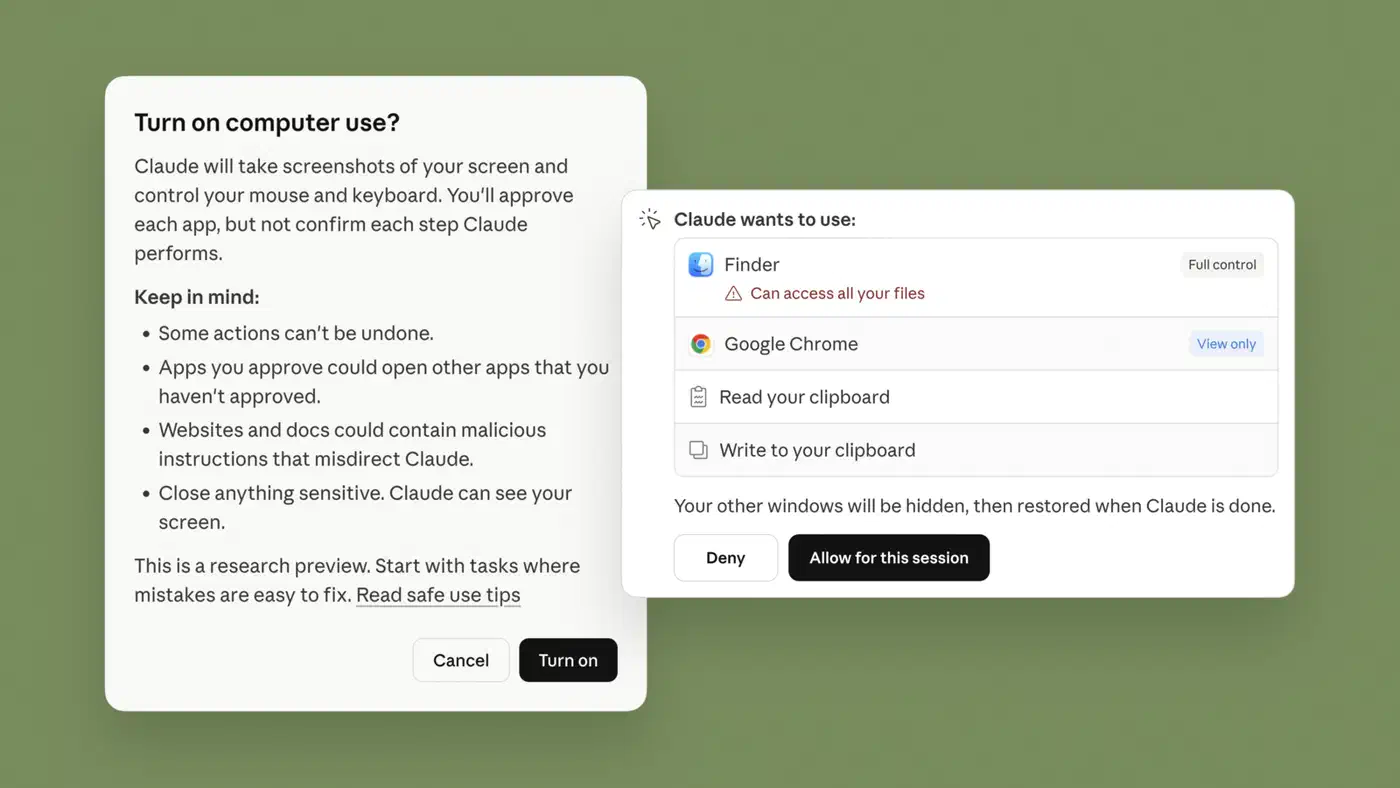
The three-layer permission system is what splits Computer Use from a “let AI do what it wants” free-for-all:
- Per-app approval: Claude must ask before touching any new app. You approve or deny each one on its own.
- Default-blocked groups: Trading platforms, crypto exchanges, banking apps, adult content, and pirated content are all blocked out of the box.
- Action plan review: Before it runs, Claude shows its planned steps. You can approve, change, or reject the plan.
You can also add apps to a custom blocklist. Any Claude request to use a blocked app gets denied.
Anthropic’s stance is worth quoting in full: “These guardrails are part of how Claude is trained and instructed, but they aren’t absolute. Don’t rely on them as a substitute for blocking access to sensitive apps.” They still warn against using Computer Use with sensitive data, even with the permission system on. The same caution applies to where you point an agent’s API, since pointing it at an unknown API host lets a stranger decide what your agent runs on your machine. CNBC reported that Anthropic warned the feature “is still early compared to Claude’s ability to code or interact with text,” a candid line from the company launching it.
On macOS, turning on Computer Use needs two system permissions: Accessibility (so Claude can click, type, and scroll) and Screen Recording (so Claude can see your screen). Both are standard macOS permission types, not custom Anthropic ones.
Dispatch: Remote Task Assignment from Your Phone
Dispatch, part of Anthropic’s broader suite of remote agent mechanisms, launched on March 17, 2026, six days before Computer Use. It turns the setup from a “watch Claude work on your screen” demo into an async workflow. It opens one steady thread between the Claude mobile app on your phone and the Claude Desktop app on your computer.
A practical case: you’re on the train and you text Claude to pull sales metrics from Salesforce into a spreadsheet. Your computer does the real work, reading files, running connectors, running tasks. Your phone is just the chat front-end. By the time you reach your desk, the file is ready.
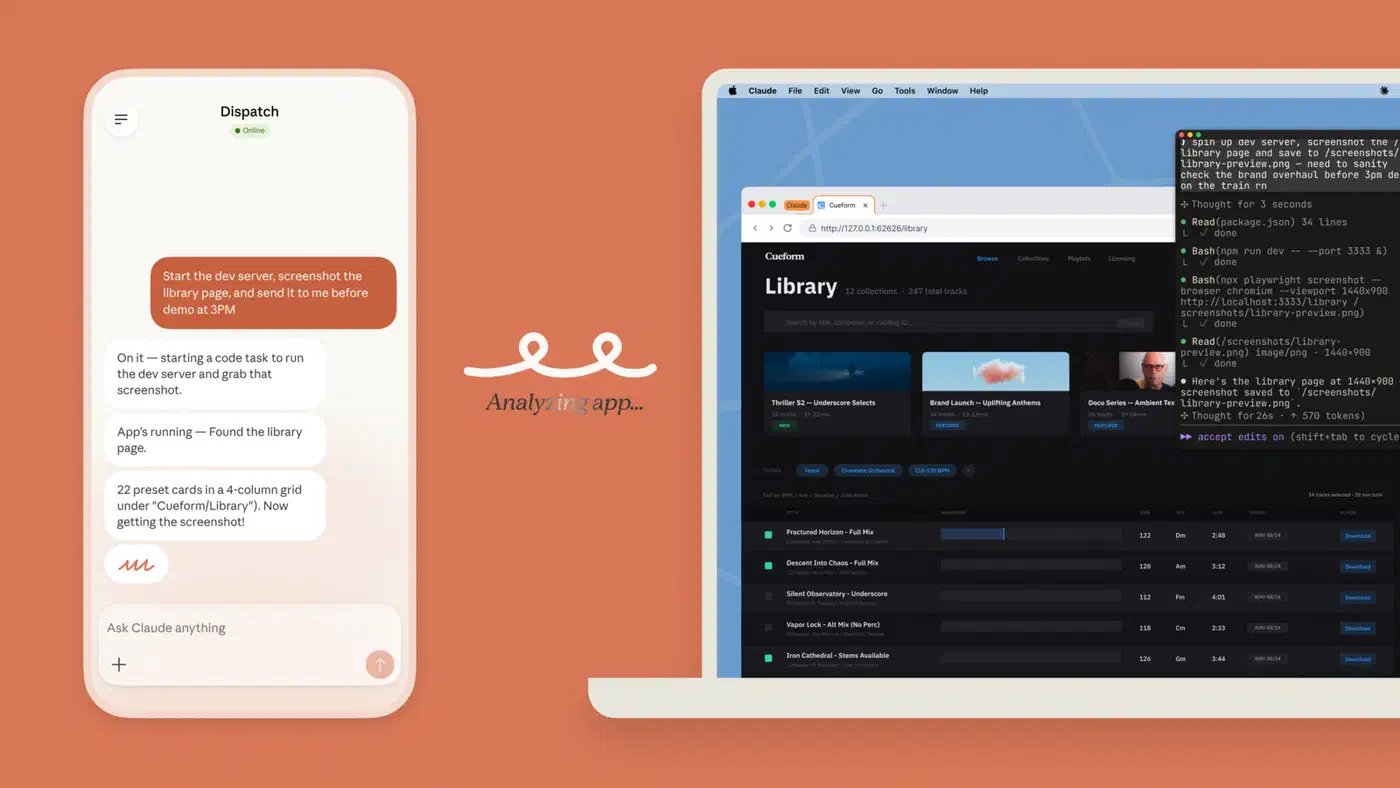
Dispatch inherits every Desktop MCP connector, including local files, Notion, Slack, and Google Drive if you’ve linked them. So phone-sent tasks can reach your full desktop. You need Claude Desktop running on your computer (macOS or Windows x64), the Claude mobile app on your phone, and a Pro or Max plan.
Dispatch plus Computer Use opens flows where you text Claude from anywhere and it drives your desktop on its own, chaining steps across many apps to finish multi-step jobs.
Where It Works and Where It Falls Apart
Computer Use shines most when no API or connector exists for the task at hand.
It works well for UI testing and visual QA, where Claude can poke at app screens and check the output. The result is a closed-loop check cycle: code, run, inspect the UI, fix, re-test. Latent Space called this “the missing piece for reliable app iteration.” It also handles data scrapes from sites with no API, work on legacy desktop apps that never got code-level hooks, and filling the same form data across many web apps.
Where it breaks down is speed, error build-up, and attack surface. Screen-based control is slow because each action needs a screenshot, visual parse, cursor move, and click check. When a connector exists for the same job, the screen path burns far more time and tokens. Errors stack up in multi-step flows. If Claude misclicks or misreads a UI element at step 3 of a 10-step chain, recovery is shaky and you often start over. The Decoder flagged open worries about data privacy risk, error rates, control issues, and what they called a “large attack surface” next to browser-only options. For a narrow job like changing a spreadsheet, a single Office-editing binary skips the screenshot loop, since the agent edits the file directly instead of clicking through it.
Claude Computer Use vs. ChatGPT Operator
The closest peer is OpenAI’s ChatGPT Operator, which takes a very different shape. Operator runs through a virtual browser, not your full desktop. It browses sites, fills forms, and clicks buttons. It does not touch your file system or native desktop apps. A third shape sits between them: a browser built for agents that borrows the sessions you are already signed into.
| Feature | Claude Computer Use | ChatGPT Operator |
|---|---|---|
| Scope | Full desktop control (apps, files, browser) | Web browser only |
| Approach | Screenshot-based screen perception | Virtual browser environment |
| Subscription | Pro $20/mo, Max $100-200/mo | Plus ~$20/mo, additional tiers |
| Platform | macOS (Apple Silicon), Windows | Browser-based |
| Desktop apps | Yes | No |
| File system access | Yes | No |
| MCP connector fallback | Yes (connector-first architecture) | No |
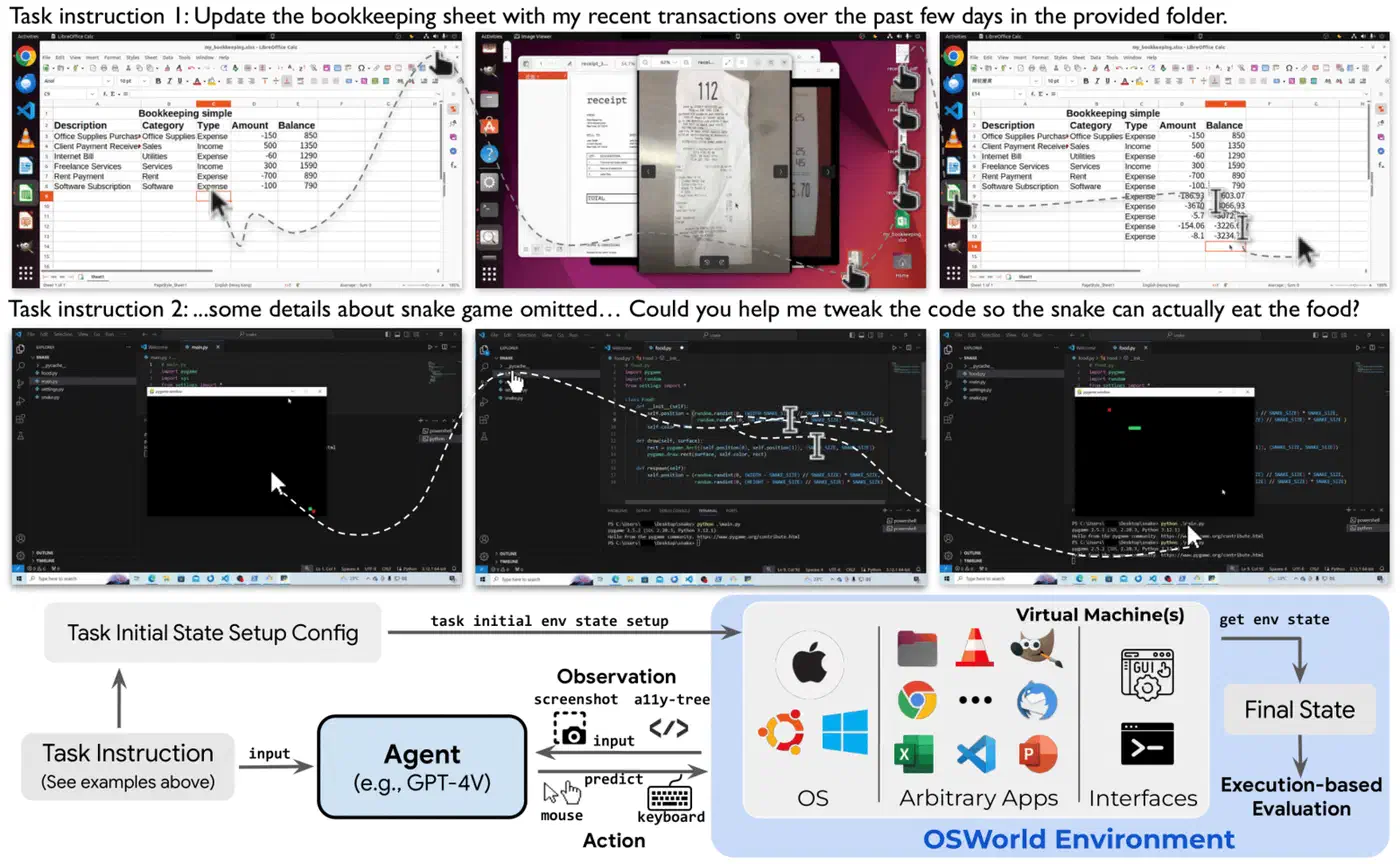
On the OSWorld benchmark for desktop tasks, GPT-5.4 scores 75%, past the human baseline of 72.4%. Claude scores 72.5%, just barely above the human line. The 2.5-point gap is real in racing terms, though both models sit near human level on general desktop tasks. Google measures agentic skill on a different axis, where Gemini’s 76% on the command-line Terminal-Bench tracks finishing real shell tasks end to end.
The Decoder noted a sobering past case: ChatGPT Operator reportedly “lost 75% of its users” after the launch hype, a hint that staying power, not launch-day buzz, is the real test for these features. A similar launch-week reception is playing out for Claude Opus 4.7 on X and Reddit, where viral demos sit next to early complaints. A split launch-week verdict greeted GPT-5.6-Sol on Reddit for the same reason, cheered as a cheaper coder yet judged the weaker designer.
Cost Considerations
Computer Use draws from the same token budget as regular Claude on subscription plans. Still, screen-based work burns far more tokens than text-only chat. Each action sends a screenshot image to the model and gets back a list of clicks to make.
On the API side, Claude pricing runs Opus 4.6 at $5/$25 per million tokens (input/output), Sonnet 4.6 at $3/$15, and Haiku 4.5 at $1/$5. A typical Computer Use session can use 10,000 to 100,000+ tokens based on task size and the number of screenshot-action cycles. For heavy API users, the Batch API gives a 50% cut for async jobs. Prompt caching can drop repeat input costs by up to 90%.
Average Claude Code costs (which cover Computer Use) run about $6 per developer per day, with daily costs below $12 for 90% of users. Monthly costs land near $100-200 per developer on Sonnet 4.6, with wide spread based on how many sessions run and whether tasks lean on automation.
What’s Still Missing
Computer Use is helping Anthropic’s growth. Paid subscriptions more than doubled in early 2026. Still, several open questions linger.
Linux support and headless mode are both missing, with no public timeline from Anthropic. Linux users who want automation today can instead wire up a local-first agent stack on their own hardware, where the model and the tool loop both run on the box you control. Enterprise rollout at scale has no public docs. The feature looks aimed at solo users and small teams for now. There is also an open accessibility angle. Computer Use could help users with motor disabilities run desktop work flows, but Anthropic has not framed it that way or shipped any docs on accommodations. The speed gap between screen-based control and connectors must close before Computer Use is practical for tasks where both paths exist.
Computer Use stakes new ground for a consumer AI product. Screen control itself is not novel, but shipping it with a real permission model as a mainstream feature is. Whether the 57 million viewers turn into steady daily users will hinge on how fast Anthropic can close the gap between what Computer Use can do on paper and how well it does it in real life.