 Botmonster Tech
dbx handles 70 databases in a 20 MB app with no Java

dbx is a lightweight database client that reaches more than 70 databases from one 20 MB download. There’s no Java runtime to install first, and no bundled browser engine. It also ships a separate Model Context Protocol server, so Claude Code or Cursor can query the connections you already saved.
Key Takeaways
- dbx reaches more than 70 databases from one 20 MB app.
- You skip the Java install that DBeaver still needs.
- Your coding agent can query the connections you already saved.
- The agent bridge is a separate install, so nothing opens by default.
- Oracle and a few others still need Java, so check yours first.
What a lightweight database client saves you
I pulled the download sizes from the dbx release assets. Release v0.5.72 runs from a 15.8 MB Windows ARM64 installer to a 25.3 MB Debian package. The 20 MB headline is honest, give or take five megabytes.
Two builds blow past it. The Linux AppImage weighs about 95 MB, and the Windows offline installer comes in at 193.8 MB, because that one carries the WebView2 runtime instead of borrowing the system copy.
The web view is where that gap comes from. dbx is written in Rust on top of Tauri 2. Tauri draws the interface with the web view your system already has. Bundle that web view yourself and you land in Electron territory. DBeaver Community Edition makes the other trade, and each of its installers drags a Java runtime along.
| Client | Download size | What’s inside |
|---|---|---|
| dbx desktop installer | 15.8 to 25.3 MB | Rust binary, system web view |
| dbx Linux AppImage | 94.9 to 97.4 MB | Rust binary plus a bundled web view |
| dbx Windows offline installer | 193.8 MB | Adds the WebView2 runtime |
| DBeaver CE 26.1.3 | 105 to 124 MB | Java runtime included |
One claim in the project’s own comparison has aged badly. Its “Why DBX” table calls TablePlus macOS-only. However, TablePlus has shipped Windows and Linux builds for years. The Java complaint still holds, but the TablePlus one is stale.
Still, be careful what you read into a download size. A smaller binary starts faster, idles on less memory, and clears corporate software review more easily. But it says nothing about how fast a million-row result set draws, and nobody has run that test in public.
The project is Apache 2.0 licensed, pulled about 11,700 downloads on the v0.5.72 release alone, and carries more than 1,100 open issues and pull requests. That backlog is normal for a project this young.
Which databases dbx actually reaches
“70+ databases” is a marketing number until you split it into the three tiers underneath. The tier decides whether your database works on day one.
The native tier runs on Rust drivers built into the app. It covers MySQL, PostgreSQL, SQLite, SQL Server, MariaDB, MongoDB, Redis, ClickHouse, DuckDB, Elasticsearch, CockroachDB, and Cloudflare D1. Vector stores sit here too. Qdrant, Milvus, and Weaviate all get first-class support. Hardly any rival client bothers with them.
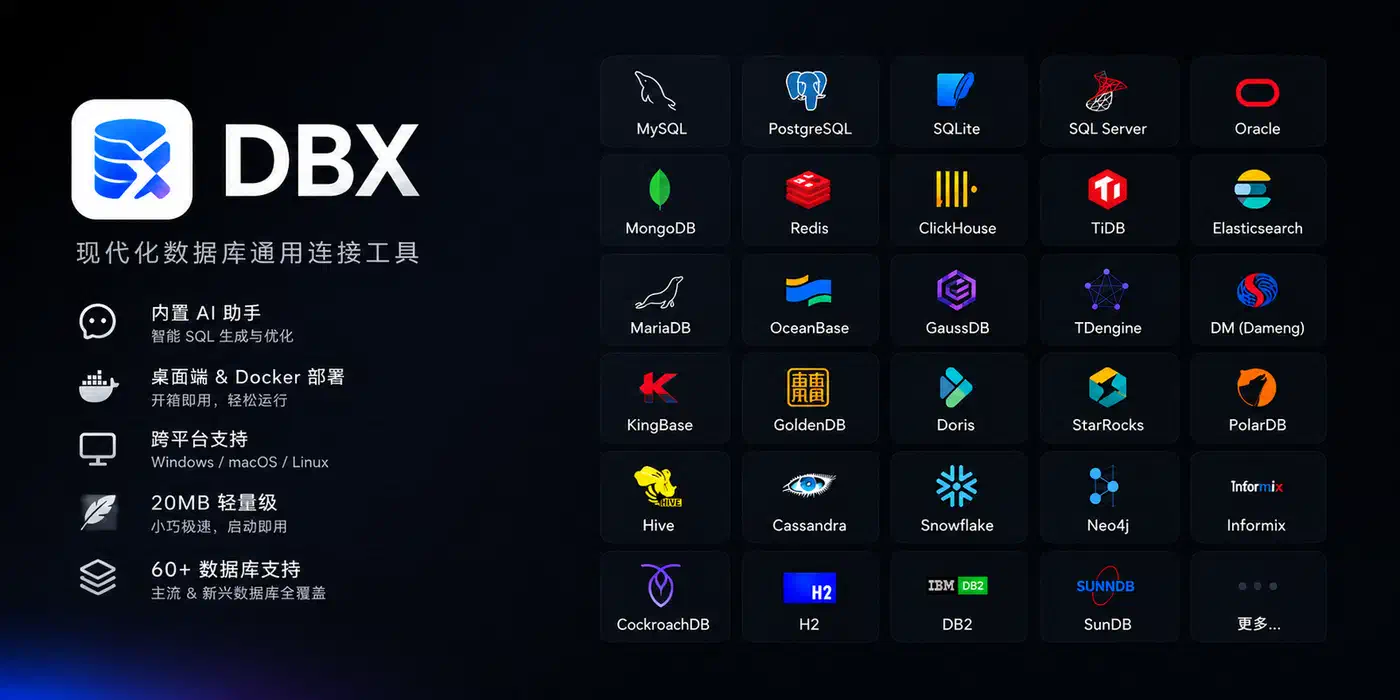
Chinese enterprise engines get unusually thorough coverage: DM, KingBase, openGauss, GaussDB, OceanBase, Vastbase, GoldenDB, TiDB, Doris, StarRocks, XuguDB, and HighGo. Most Western clients skip this whole category. If you work with any of them, dbx is one of the few tools that even tries.
The agent and JDBC tier reaches Snowflake, BigQuery, Redshift, Databricks, Trino, Hive, DB2, SAP HANA, Teradata, Neo4j, Cassandra, and custom JDBC connections. Queue admin rides along too, for Pulsar, Kafka, and RocketMQ.
The catch sits in that third tier. The “no Java” promise covers the native tier only. The MCP server docs are blunt about it. Dameng, KingBase, Oracle, DB2, Hive, Trino, Snowflake, and SAP HANA all run on the Java agent. Each needs its own agent, a JDBC driver, and a JRE, added through Driver Manager.
So the runtime you came to avoid returns for the exact databases that sent you looking. DuckDB has a similar wrinkle: its engine arrives as a separate driver install you add from Driver Manager.
Where a plain result grid would fall short, dbx builds a custom browser instead. Redis gets key pattern search, batch jobs, a command runner, TTL editing, and every data type, Stream included. MongoDB gets document editing with paging, plus Atlas and replica set strings.
The MCP server your coding agent talks to
dbx speaks the Model Context Protocol. That lets Claude Code, Cursor, Windsurf, and any other MCP client read your schemas and run queries.
The MCP server is a separate Rust package. Installing the desktop app doesn’t install it, which has a real security benefit: a fresh dbx install gives an agent no route to your live database until you add one yourself. Every tool you hand an agent makes it a bigger insider threat, and this one is off until you install it.
{
  "mcpServers": {
    "dbx": { "command": "npx", "args": ["-y", "@dbx-app/mcp-server"] }
  }
}
The @dbx-app/mcp-server package unpacks to about 36 KB, because it’s only a Node launcher. It then pulls the Rust binary for your platform, roughly 8 to 9 MB. Prebuilt native binaries ship on their own, so you can run it offline with no Node.js at all.
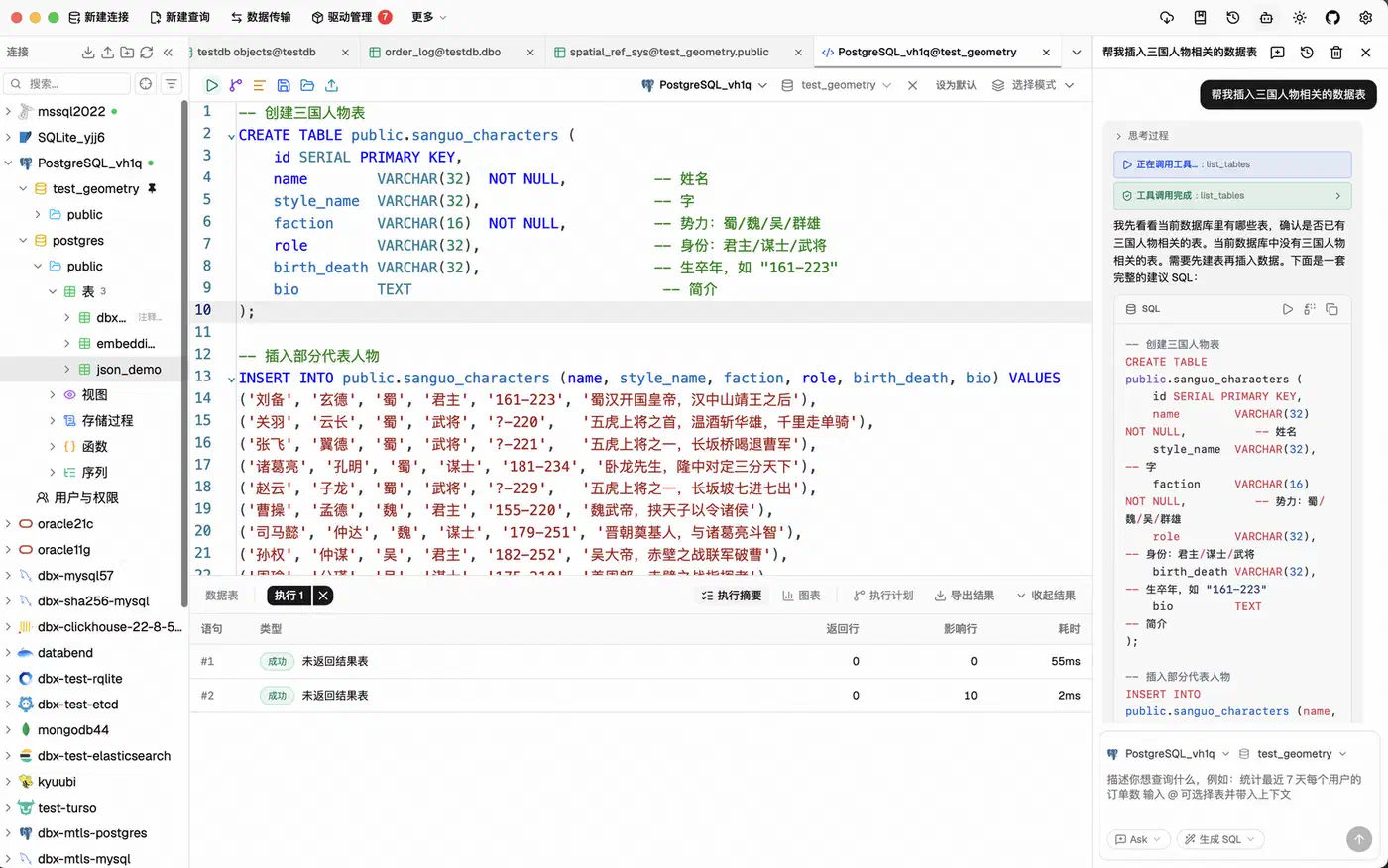
Connections come from dbx’s own store, so the agent never needs its own copy of your credentials. From there it gets ten tools. They list connections and tables, describe a table, build compact schema context for a model, run SQL or Redis commands, and open a table in the desktop app. If none of the ten fit your workflow, writing your own server is a short job.
How the permission modes work
The obvious worry is an agent running DELETE against production. It has happened: a coding agent already wiped a production database. dbx answers with one central policy, set under Settings then MCP. It reloads on every request:
| Permission mode | What the agent can do |
|---|---|
| Read only | Queries and metadata reads |
| Data read/write | Ordinary inserts, filtered updates and deletes, normal Redis writes |
| Full access | Broad updates and deletes, DDL, TRUNCATE, Redis FLUSH* |
That policy is an upper bound, and client config cannot widen it. The old DBX_MCP_ALLOW_WRITES variable can still narrow permissions, but it can never grant them. It also stops applying once you save a central policy.
Several risky shapes fail closed in every mode. Conditions like WHERE TRUE and WHERE 1 = 1 count as high risk. So do MongoDB filters the checker cannot verify, plus stages such as $out and $merge. Unknown Redis commands get rejected rather than passed through. Query results also cap at 100 rows, so an agent cannot pull your whole table by accident.
For a sensible setup, point the agent at Read only, use the connection allowlist to keep production out of scope, and hand it a replica when it needs write access. SQL text also stays out of normal logs by default, which is one less place for a query to leak.
What you get beyond a query box
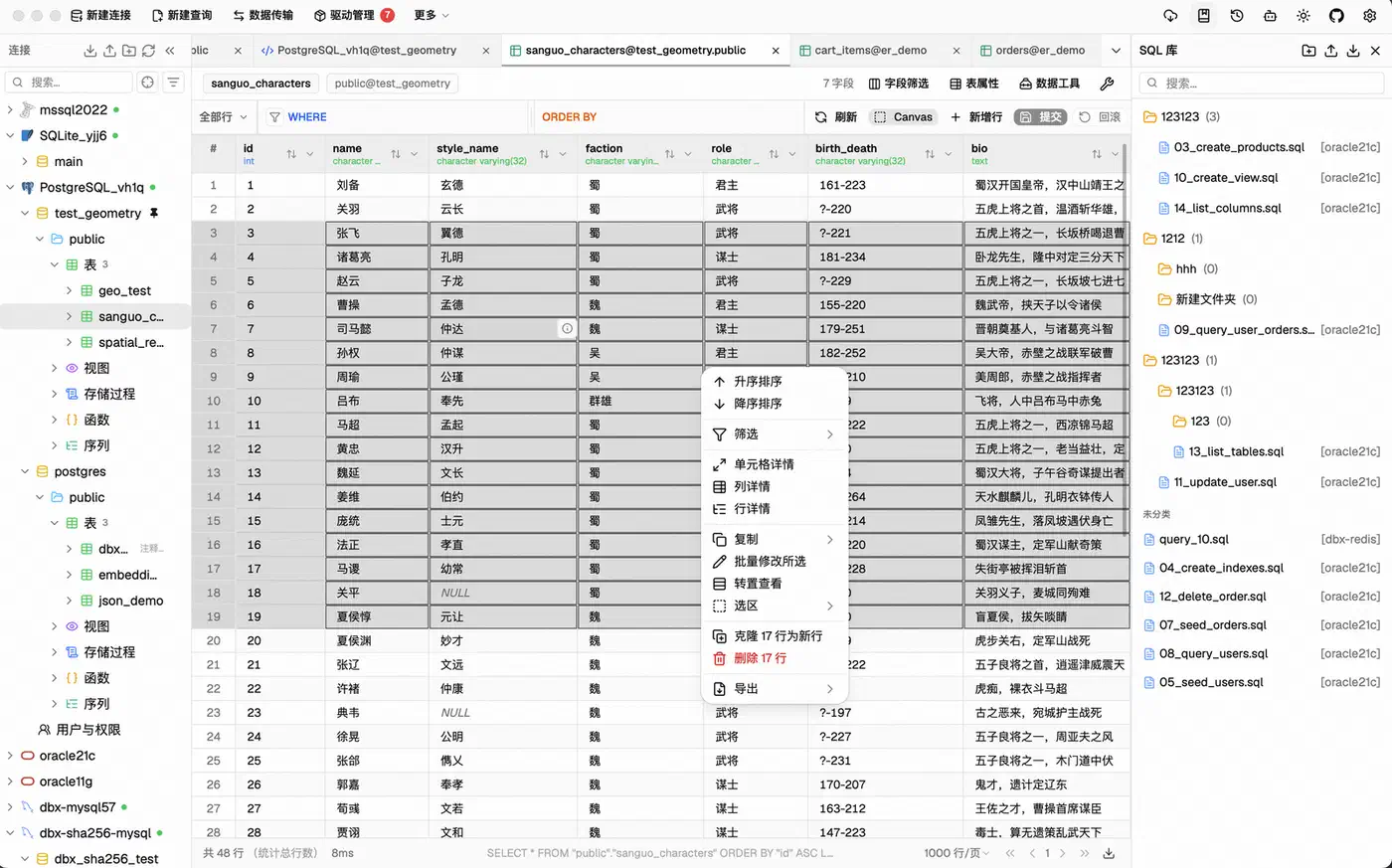
The editor is CodeMirror 6 with schema-aware autocomplete, SQL formatting, diagnostics, saved snippets, query history, and tab restore. The data grid uses virtual scrolling for large results. Inline editing shows you a SQL preview before you commit. Exports go out as CSV, JSON, Markdown, XLSX, or INSERT statements.
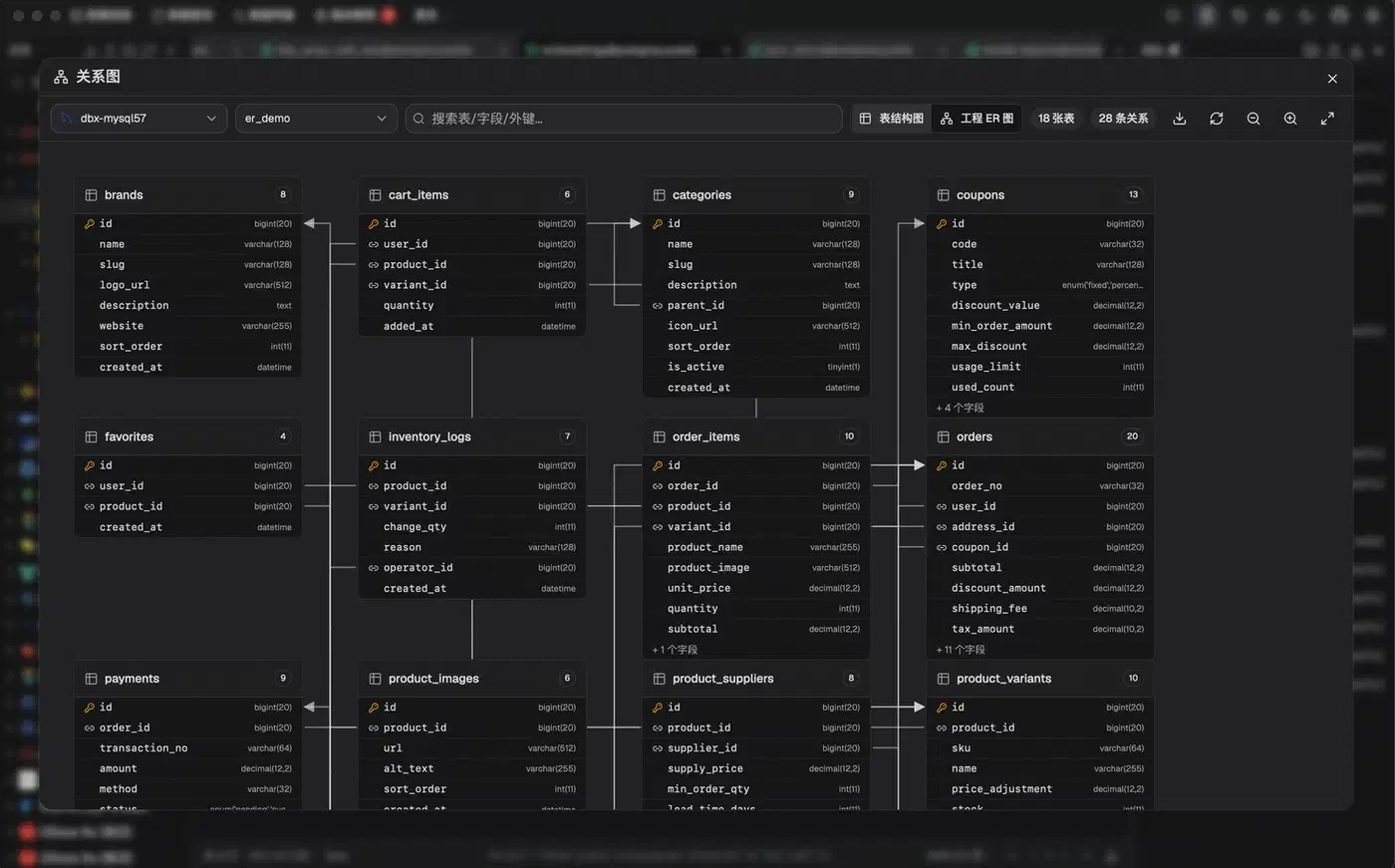
Schema work goes deeper than most small clients bother with. You get a table editor that shows changes before you apply them, ER diagrams, schema diff across two connections, visual explain plans, and column-level lineage. For moving data there is CSV and Excel import, database-to-database transfer, full dumps, table compare, and direct .sql file runs.
Drag a Parquet, CSV, or JSON file onto the window and DuckDB previews it at once, which turns the client into a quick file inspector. dbx also imports connection profiles straight from DBeaver and Navicat, which removes the usual reason people never switch.
The AI assistant is bring-your-own-model. It works with Claude, OpenAI, a local model through Ollama, or any OpenAI-compatible endpoint. Its SQL passes the same safety checks before it runs. You also get SSH tunnels with key or password auth, auto-reconnect, warning dialogs on risky writes, colour-coded connections, and encrypted config export. What that encryption guards against, and where the key lives, I couldn’t find documented.
Running it for a team
Beyond the desktop app, dbx runs as a Docker container serving a web version on port 4224:
docker run -d --pull=always --name dbx -p 4224:4224 -v dbx-data:/app/data t8y2/dbx:latestOne caveat before you hand that URL to your team. A single web login password gates access, the same DBX_WEB_PASSWORD the MCP server uses to reach the backend. There are no per-user accounts, so everyone who logs in sees every connection. Treat it as a shared box for a small trusted group rather than multi-tenant infrastructure.