 Botmonster Tech
Archify makes an architecture diagram you can click

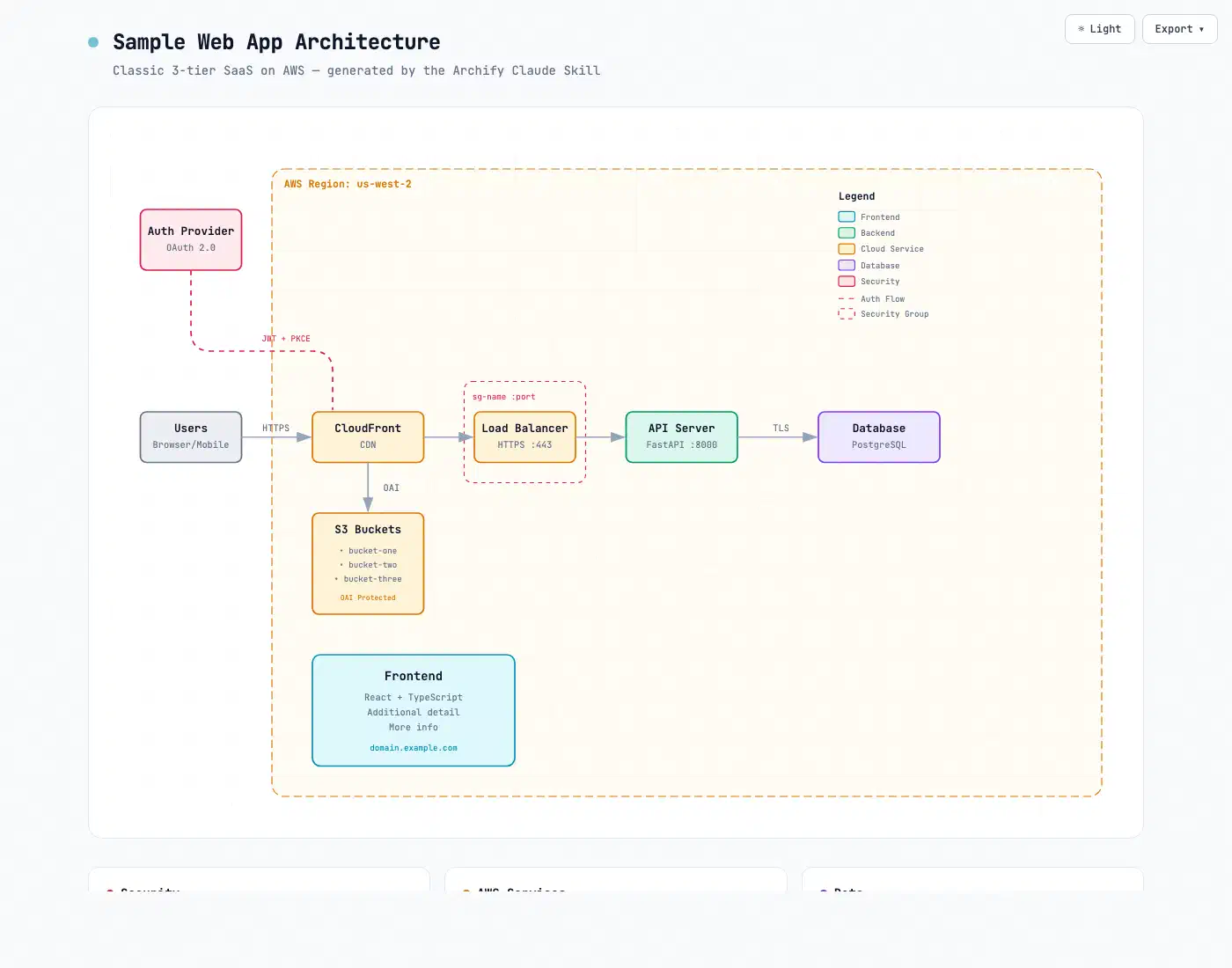
Archify is an architecture diagram agent skill that turns a repository into one clickable HTML file. Readers can search a node, trace the exact route between two components, and play a guided chapter. Every one of those moves reads typed JSON that passed nine layout checks before the file existed.
Key Takeaways
- Archify turns a repo or a description into one clickable HTML diagram.
- Readers can search a node, trace a route, and play a walkthrough.
- Nine layout checks run before any diagram file gets written.
- It diffs two snapshots, so a pull request shows what really changed.
- It draws five diagram kinds, and you can’t drag boxes around.
What is an architecture diagram agent skill?
An agent skill is a folder of instructions and helper scripts that a coding agent loads on demand. You ask for a diagram in chat instead of learning a drawing tool. Archify packages that folder for Claude Code, Cursor, Codex CLI, OpenCode, and Raven.
The agent has already read your repo, so it can name the real services and the real call paths. You skip the part where you type them in yourself.
The pipeline runs in four stages: generate, validate, deliver, iterate. The agent writes typed JSON and bundled validators check it. Only a passing candidate replaces the previous file, and then you refine in chat.
Compare that to asking a chatbot for a Mermaid block. Mermaid hands you text and your renderer decides where the boxes land. Archify’s agent chooses hierarchy, spacing, and routes itself, then checks the result before delivery. You give up a drawing canvas, but you gain an artifact you can regenerate when the code moves.
Install Archify and map a repository
Install the skill globally
Run npx skills add tt-a1i/archify -g. The project page carries an agent switcher covering cursor, codex, claude-code, and opencode. Raven is the exception and takes a manual ZIP drop into ~/.raven/workspace/skills.
Start a session in the target repo
Open a new agent session inside the repository you want to map. The skill then loads from your global skills directory.
Ask for one bounded view
Prompt for a high-level runtime architecture with 8 to 12 core components, one primary path, external dependencies, and trust boundaries. Ask for supporting detail in cards rather than more edges. Bounding the scope keeps the layout readable.
Let the validators run
The agent writes typed JSON, runs the bundled checks, then renders HTML. The nine named checks cover square arrow turns, label-to-route clearance, crossing lines, and legend spacing.
I tested the rejection path by pointing one edge in a bundled workflow example at a node that doesn’t exist. The validator returned rule code layout/constraint and named the ghost target. It also flagged the orphaned main-path step that the break created. So it catches knock-on damage as well as the edit itself. In that failure the supportedFixes array came back empty, so the repair receipt is thinner than the docs promise.
Open the single file
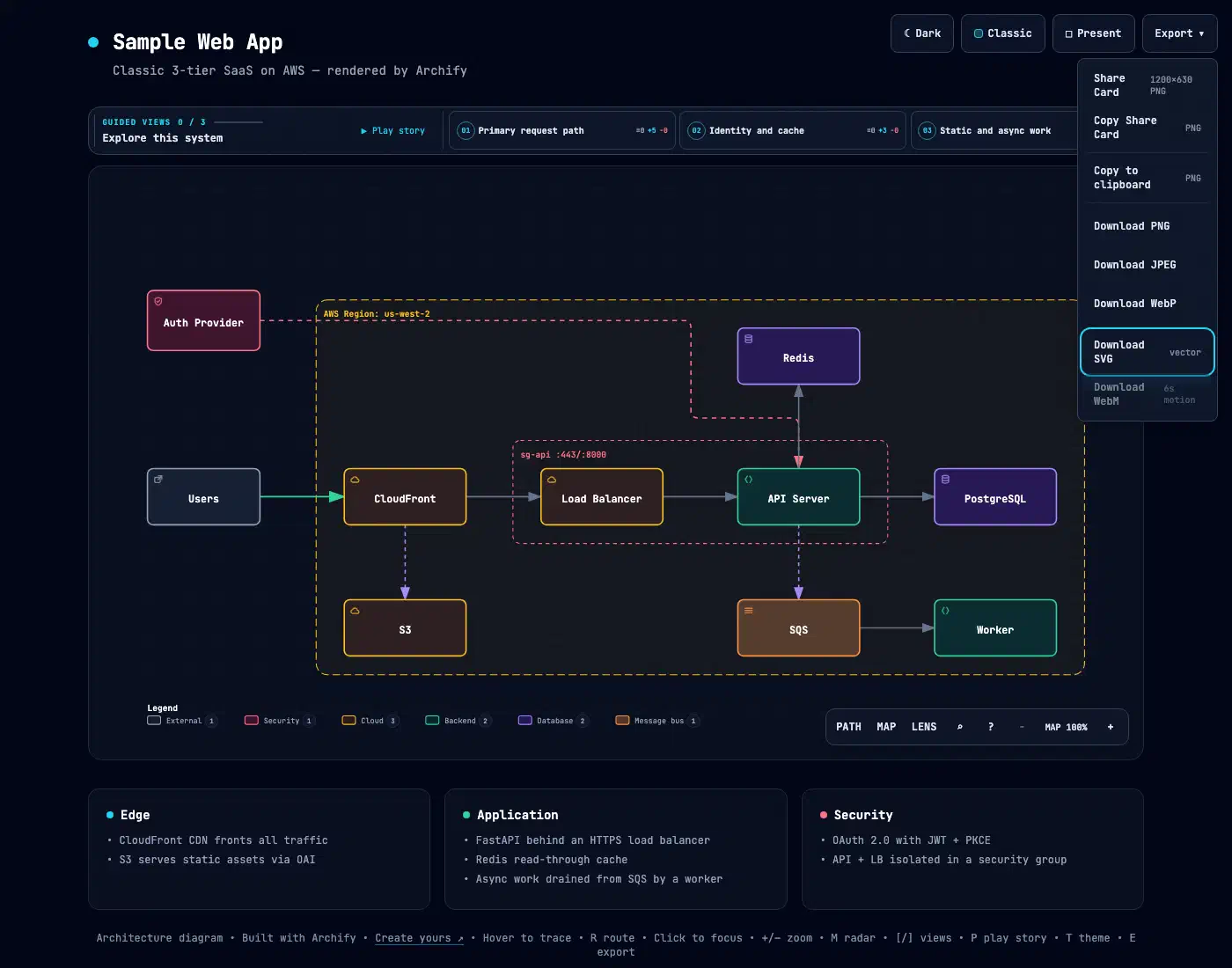
The result is one HTML file with no external assets. A 6.5 KB JSON source rendered into a 619 KB page in about 0.14 seconds. Going the other way, from a rendered page back to plain text, is its own problem: I put ten tools through 273 probes and the best two still miss a few structures. All 9 checks passed, and the run printed a SHA-256 digest for the source and the artifact. Open it in a browser and press ? for the diagram guide.
Refine in chat
Ask for a focused change, such as adding a cache, moving auth to the left, or highlighting the rollback path. The typed source stays available, so unrelated structure stays put between edits.
Export what you need
The export menu covers PNG, SVG, WebM recording, and a 1200x630 share card for a README or release note. After tracing a route, a route share card exports that path with the full diagram kept as context.
The five diagram types and when each one fits
Archify draws five kinds of diagram, each with its own job. The split keeps you from asking for one giant diagram that answers nothing.
| Type | Best for | Put in your prompt |
|---|---|---|
| Architecture | Components, services, storage, trust boundaries | Scope, core components, primary path |
| Workflow | CI/CD, approvals, tool calls, runbooks | Participants, order, branches, exceptions |
| Sequence | API calls, cache fallback, auth, async traces | Callers, callees, returns, timing |
| Data flow | Pipelines, lineage, personal data, consumers | Sources, transforms, stores, boundaries |
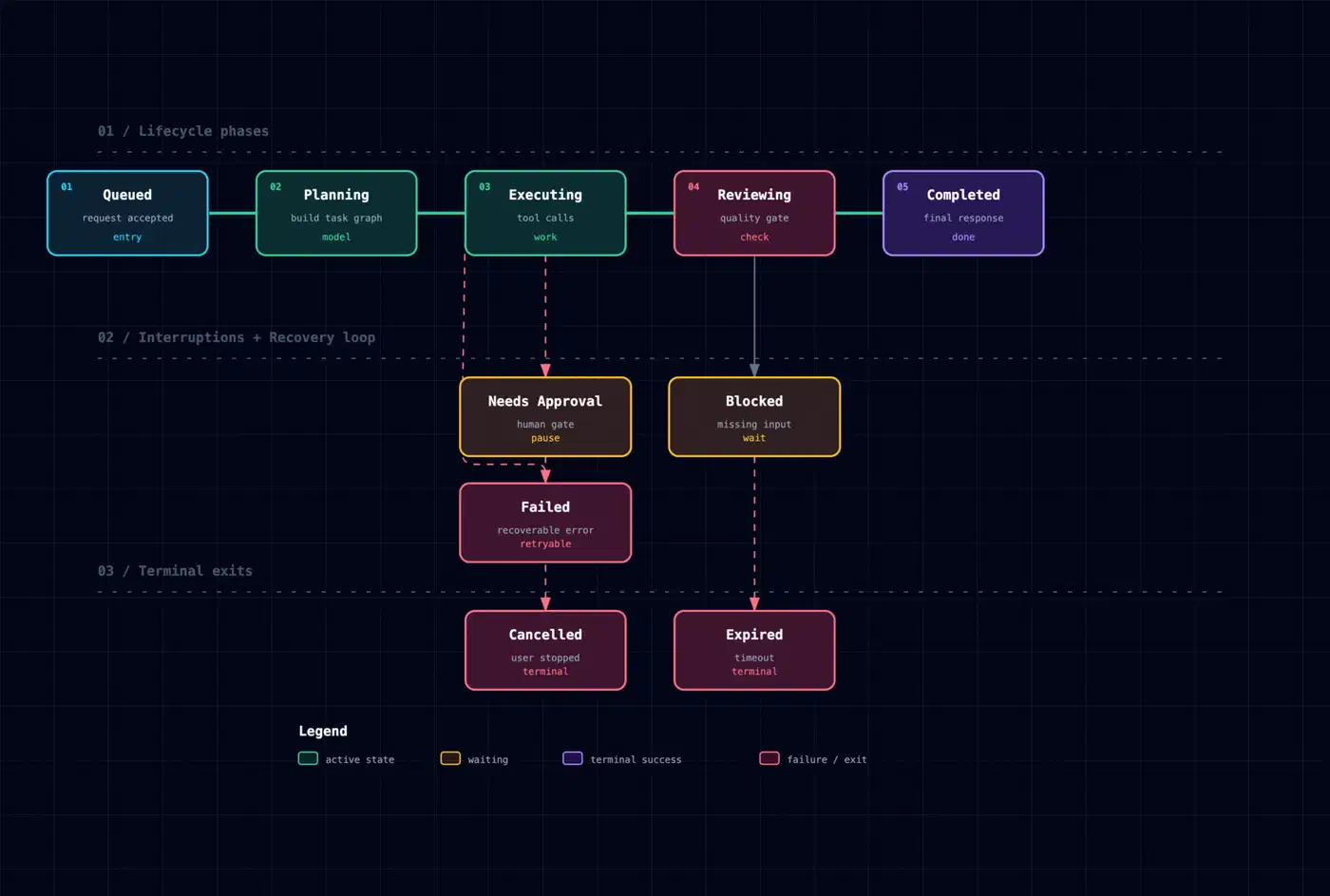
| Lifecycle | States, retries, waits, terminal outcomes | States, events, retry and cancel paths |
Lifecycle is the mode most teams skip. Incidents usually start in a retry loop or a terminal state nobody drew.
A small CLI helper picks for you. I ran node archify/bin/archify.mjs guide "Show an API request with Redis cache miss" and got back a sequence recommendation, flagged high confidence. It also named the question that mode answers, when to avoid it, and a copy-ready prompt. The whole thing took 35 milliseconds.
The interactions that make a static file feel like a tool
“Interactive diagram” reads as marketing until you see the controls.
| Control | What it does | Question it answers |
|---|---|---|
/ | Find and focus a node | Where is the thing I came here for? |
| Upstream / Downstream | Trace authored reach from the focused node | What breaks if I change this? |
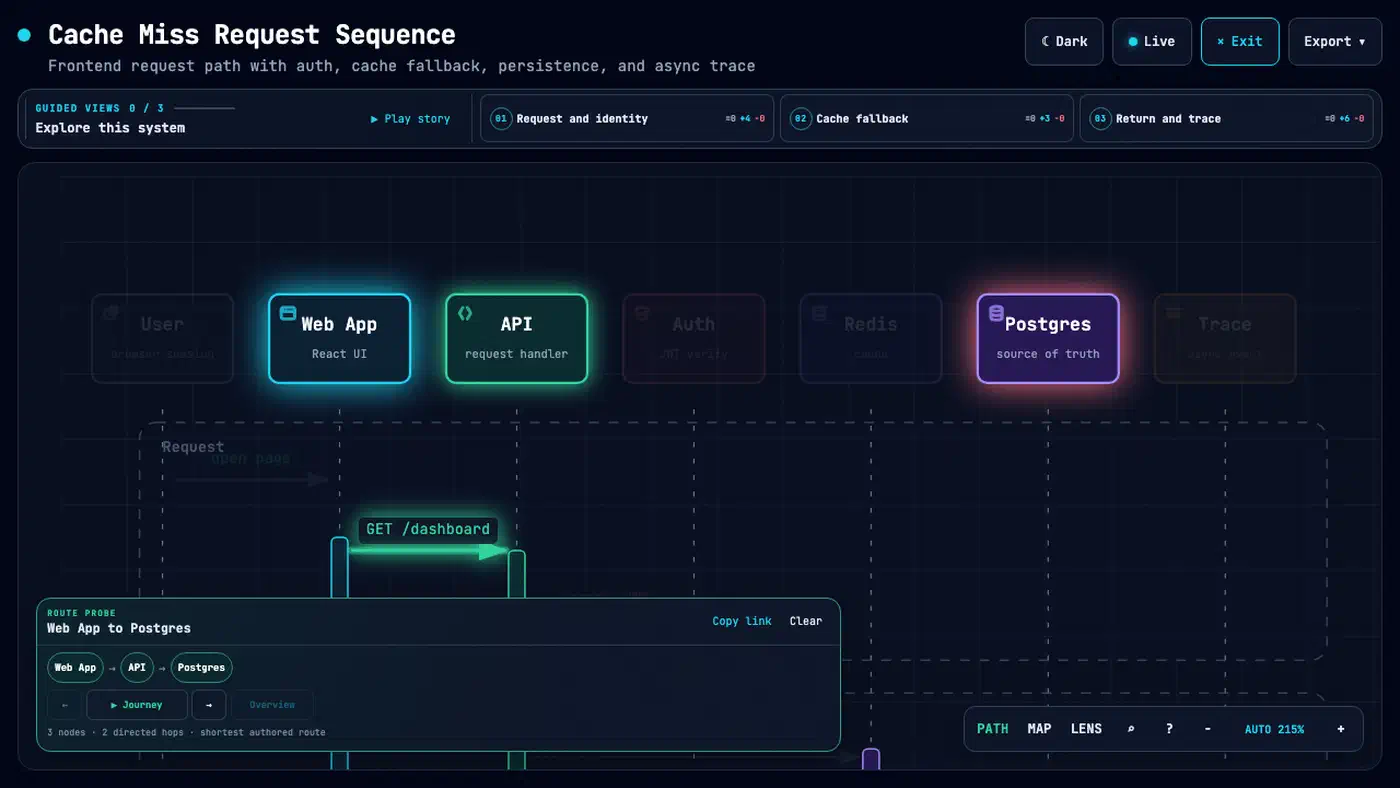
R | Probe a directed route between two nodes | How does a request get from here to there? |
L | Compare two semantic roles with the lens | How much traffic crosses backend to database? |
P | Play a guided story chapter | Can a newcomer follow this without a meeting? |
Deep links restore state, so #focus=, #route=, #lens=, and #view= all survive a paste into a pull request comment. Press M for a live overview radar and F for a presentation stage.
The Proof Lab hosts 11 checked-in scenarios, each with its JSON source, named views, node and edge counts, and a SHA-256 digest. Every artifact reports 9 of 9 structural checks passed.
One case comes from a real public repository. Archify traced mco-org/mco at a pinned commit. The map it produced holds 13 components, 12 connections, 2 trust boundaries, 3 detail cards, and 3 named views.
Every interaction reads authored relationships. Reach and routes describe the diagram rather than production, and nothing in the file watches live traffic.
Reviewing architecture changes before they merge
The delta mode turns a nice picture into part of a review workflow. The command compares two validated snapshots:
node archify/bin/archify.mjs compare architecture base.json head.json architecture-delta.html --jsonI ran it against the bundled checkout-platform pair. In half a second it produced a Before, Delta, and After view plus a machine receipt. The receipt counted one component added, one removed, one changed, and one moved. On the wiring side: one connection added, one removed, two changed, and one rerouted. Every entry carried the exact identifier.
Exact-identifier comparison beats eyeballing two images, because a moved box and a rerouted call look identical in a screenshot. A reviewer reading a delta file sees which one happened.
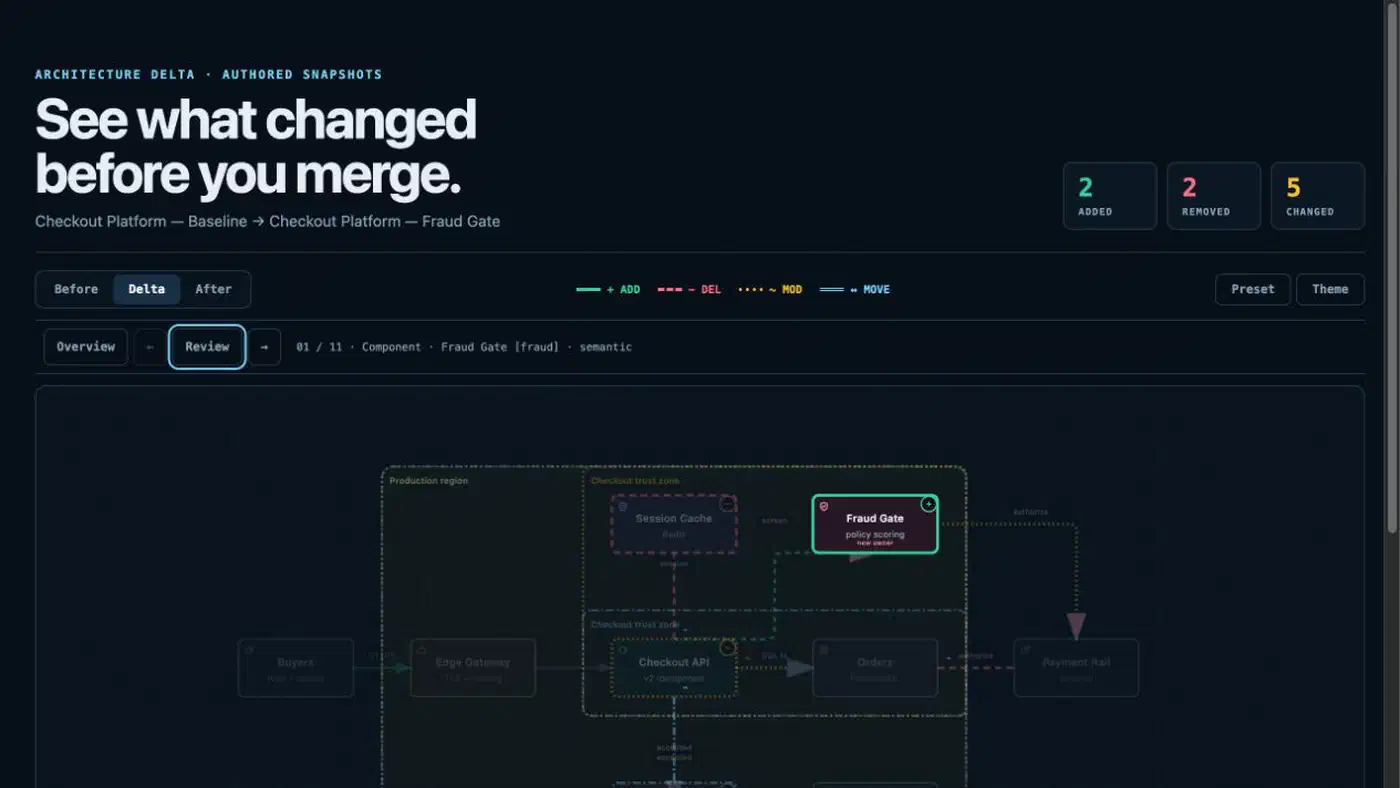
The delta view reports authored changes only. It makes no claim about risk, impact, or whether the change is safe to merge. Architecture mode can also turn on an opt-in deployment-ownership profile. That profile fails closed when owners, single-region placement, private database scope, or named boundary crossings are missing.
In practice, attach the delta file to the pull request that moves the wiring.
What Archify does not do, and who should skip it
The project publishes its own out-of-scope list, and it is more specific than most. Mermaid parsing, general-purpose auto-layout, hosted sharing, and WYSIWYG editing are all deliberately left out.
Read that list as a filter. If you want to drag boxes around a canvas, a drawing app is the right tool. Archify fits teams who regenerate a diagram whenever the code changes. They want the result to be one file they can attach anywhere.
Skip it if your diagrams show the system you want rather than the one you run. The gates assume the facts are real, so a wish list keeps failing them. Skip it too if you’d rather keep a model in the repo and edit it by hand. That is what a diagram-as-code language like LikeC4 is for.
On maturity, the numbers are healthy. Archify is MIT licensed, sits on a 2.x line, and carries roughly 11 open issues against 8,400 stars and 650 forks. The skill folder ships 72 test files. It began as a fork and rewrite of Cocoon-AI/architecture-diagram-generator v1.0, and the project credits the original visual language.
Scoping is worth testing yourself. “8 to 12 components” is only a prompt instruction. Nothing in the validator stack counts boxes for you, so a large repository can still come back as a wall.