 Botmonster Tech
Meet mucad, the OpenSCAD alternative with Rust-like syntax

µcad (or mucad) is an OpenSCAD alternative for designing 3D-printable parts as code. You write the shape first and then the steps that move or rotate it, so the code reads left to right. It runs in the browser with nothing to install, and in its online playground the Rust logo gear takes 17 lines of code and no for loops. It is still a work in progress.
Key Takeaways
- µcad lets you design printable parts in code: the shape first, then what to do with it.
- The Rust logo gear takes 17 lines and no loops.
- You can try it in a browser without installing anything.
- The same code always gives the same part. An AI prompt can’t promise that.
- It’s still a prototype, so many OpenSCAD features are missing.
Designing a part by writing code instead of drawing it is called code CAD or parametric CAD. Most 3D printing hobbyists who do this use OpenSCAD. µcad started as a Rust rewrite of OpenSCAD, so it helps to know OpenSCAD first.
What is OpenSCAD?
OpenSCAD is a free program for making 3D models by typing code instead of dragging shapes with a mouse. You place basic shapes like cubes, spheres, cylinders and circles, then move, rotate and combine them. Combining means adding shapes together, cutting one out of another, or keeping only the overlap. The technical name for this is constructive solid geometry, or CSG.
Change the hole size or the wall thickness in the code, and the model updates to match. 3D printing hobbyists use it for custom brackets, boxes and replacement parts. Many shared 3D models come as OpenSCAD files, so you can change the sizes before you print. Thingiverse was the first popular site to support this: its Customizer runs the OpenSCAD file and lets you set the sizes in the browser. MakerWorld does the same with its Parametric Model Maker.
OpenSCAD is a desktop app for Windows, macOS and Linux that you download and install. There’s no official web version. The project does publish openscad-wasm, a build of OpenSCAD that runs inside a browser through WebAssembly. It has no user interface: a web page sends it code and gets an STL file back. STL is the 3D file format that slicer software turns into instructions for the printer.
Here is a 60 x 40 mm plate with one hole in OpenSCAD:
difference() {
    cube([60, 40, 5]);
    translate([10, 10, -1]) cylinder(d = 5, h = 7);
}
difference() keeps the first shape and cuts the others out of it.
OpenSCAD has some quirks. Once you set a variable, you can’t change it. Repeating a shape needs a for loop. To move a cylinder, you write the move first and the cylinder last, which is not very intuitive: translate([10, 10, -1]) cylinder(d = 5, h = 7). On the plus side, OpenSCAD has lots of shared libraries and a detailed user manual on Wikibooks. The libraries are the main reason people stick with it.
What is µcad (mucad)?
µcad (also spelled mucad) is a programming language for designing parts for 3D printing and CNC milling, where a machine cuts the part out of a solid block. It saves 3D models as STL files and flat 2D drawings as SVG files. µcad itself is written in Rust, and its code looks a lot like Rust.
µcad was created by Michael Winkelmann, a former Qt engineer, who wrote it to learn Rust after years of OpenSCAD and 3D printing. The first plan was to rewrite OpenSCAD in Rust. Instead, it became a new language: it joins shapes with operators like | and -, lets you store shapes in variables, and has no for loops.
You only need a few keywords to get started:
- sketch is a 2D shape, such as the flat circle
Circle(r = 10mm). Add an extrude of 5 mm, andCircle(r = 10mm).extrude(5mm)becomes a 3D disc 5 mm thick. - part is a 3D shape.
- op creates your own operation.
- Units like
mmand°are written in the code, and so are percentages liker * 80%.
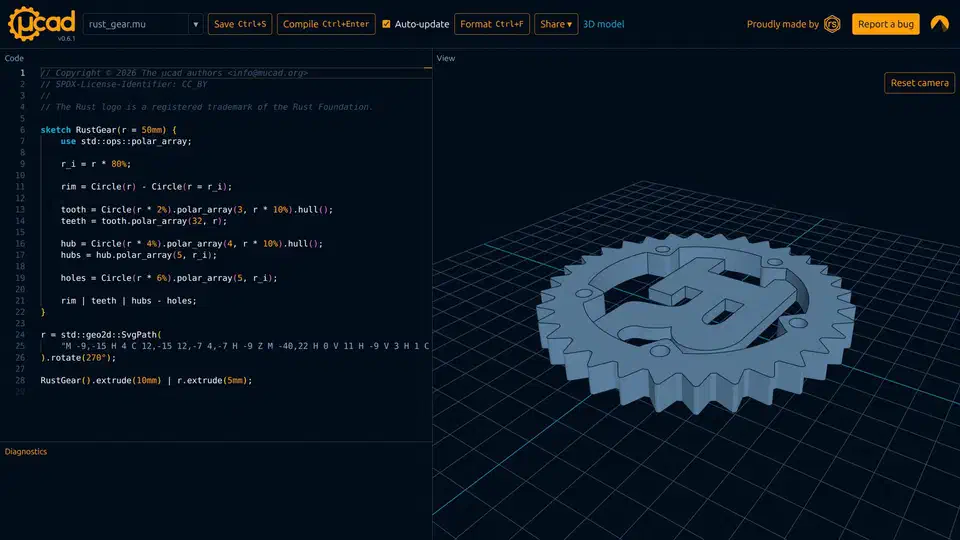
Here is the gear sketch from the playground’s rust_gear.mu example:
sketch RustGear(r = 50mm) {
    use std::ops::polar_array;

    r_i = r * 80%;

    rim = Circle(r) - Circle(r = r_i);

    tooth = Circle(r * 2%).polar_array(3, r * 10%).hull();
    teeth = tooth.polar_array(32, r);

    hub = Circle(r * 4%).polar_array(4, r * 10%).hull();
    hubs = hub.polar_array(5, r_i);

    holes = Circle(r * 6%).polar_array(5, r_i);

    rim | teeth | hubs - holes;
}
Each tooth is three small circles wrapped into one rounded shape with hull(). The tooth is then copied 32 times around the rim with polar_array(32, r), the same as in the Rust logo.
Two more lines below the sketch finish the logo. An SvgPath draws the letter R, and the last line makes both shapes 3D and joins them: RustGear().extrude(10mm) | r.extrude(5mm).
Why OpenSCAD code reads backwards
To place a gear tooth in OpenSCAD, you write rotate(a) translate([r, 0]) circle(1). The circle is written last, after the rotate and the move, so you have to read the line from right to left to see what happens first.
In µcad you write Circle(1mm).translate(...).rotate(...). The shape comes first, and the steps follow in the order they happen. Rust programmers will recognize this as the builder pattern. Winkelmann explained the change in the RustWeek talk on building µcad:
You imagine a circle. You apply a translation to it and then you rotate it… and OpenSCAD is always thinking the other way around. So, you rotate something and then you translate and then… okay, it was a circle you actually wanted to deal with. So, it doesn’t make any sense.
Combining shapes is different too. OpenSCAD puts them inside union() { ... } and difference() { ... } blocks. µcad uses | to join shapes and - to cut one out of another, like plus and minus in math. You can also store each piece in a named variable, such as rim, teeth, hubs and holes.
| Feature | OpenSCAD | µcad |
|---|---|---|
| Install needed | ✅ | optional |
| Runs in browser | third-party | ✅ |
| Reading order | inside out | left to right |
| Combining shapes | blocks | operators |
| Repeats | for loops | lists |
| Units in code | ✅ | |
| Typed parameters | ✅ | |
| Mature libraries | ✅ |
How µcad repeats shapes without for loops
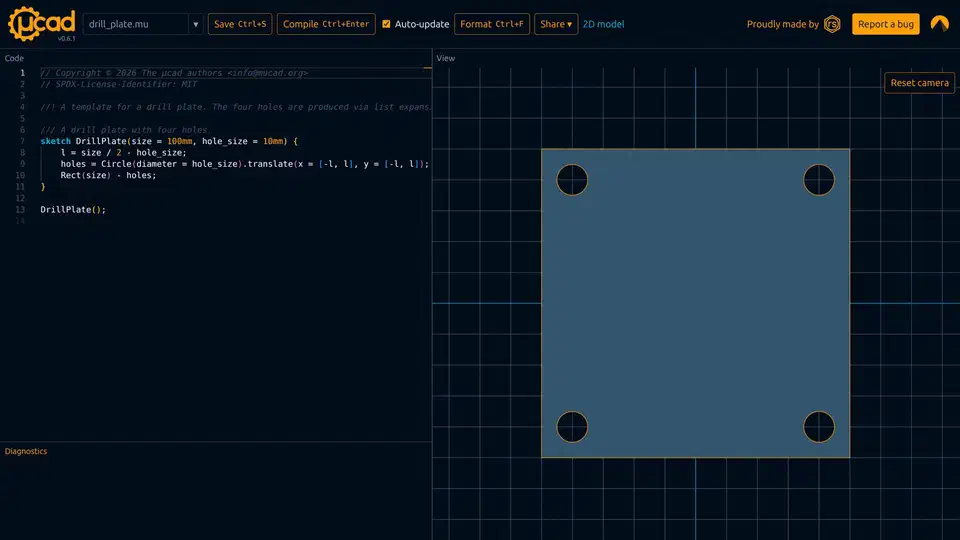
If you give µcad a list where it expects a single value, it makes one copy of the shape for each value in the list. Here is the playground’s drill_plate.mu:
sketch DrillPlate(size = 100mm, hole_size = 10mm) {
    l = size / 2 - hole_size;
    holes = Circle(diameter = hole_size).translate(x = [-l, l], y = [-l, l]);
    Rect(size) - holes;
}

DrillPlate();
x has two values and y has two values, so one line makes four holes. The get started guide does the same in its first example, a 60 x 40 mm plate with four 5 mm holes. In OpenSCAD, the same drill plate needs a for loop:
difference() {
    square(100, center = true);
    for (x = [-40, 40], y = [-40, 40])
        translate([x, y]) circle(d = 10);
}
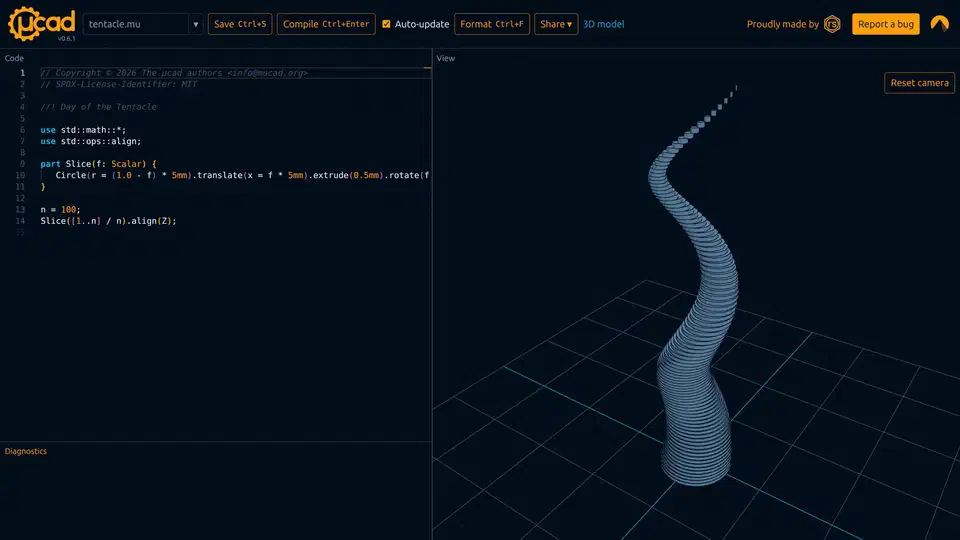
Ranges of numbers work the same way. In tentacle.mu, part Slice(f: Scalar) makes one thin disc. The bigger f is, the smaller the disc gets and the more it shifts and turns. Calling it with a range of 100 values, Slice([1..n] / n) with n = 100, stacks 100 of these discs into a twisted tentacle. Aligning it to the Z axis with .align(Z) stands it upright.
The downside is that there is no loop body, so you can’t put an if inside the repeat. If your OpenSCAD code has a loop with a condition inside, you’ll have to write it differently in µcad.
Typed parameters and your own operations
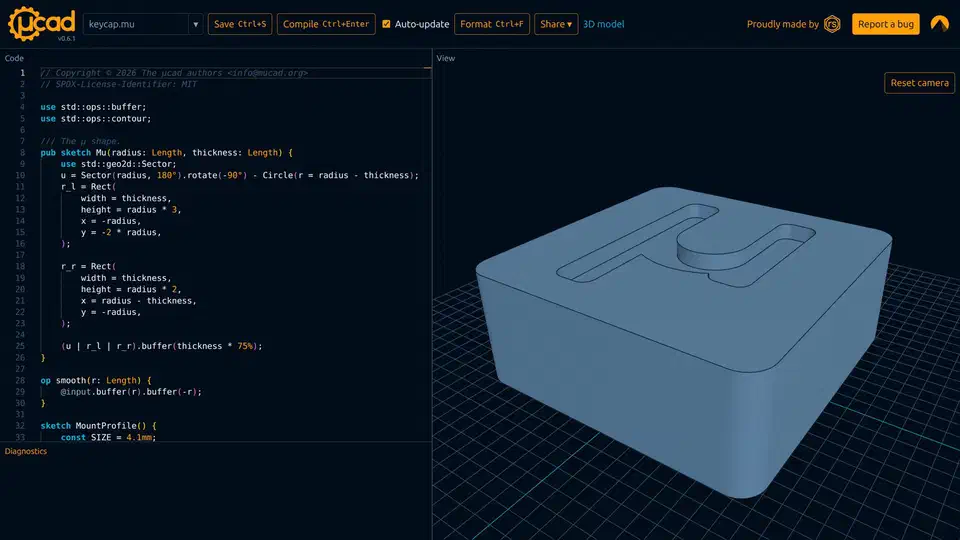
µcad checks types before it builds anything. A parameter can have a type such as Length, Scalar or an angle. The keycap.mu example declares pub sketch Mu(radius: Length, thickness: Length), so if you pass a plain number where a length is expected, you get an error.
You can also turn steps you use often into your own operation. The same keycap file defines one that rounds corners:
op smooth(r: Length) {
    @input.buffer(r).buffer(-r);
}
It makes the shape bigger by r and then smaller by r again, which rounds off the inner corners. In the talk, Winkelmann wrote one live, turning “translate by the radius, then rotate” into a polar_array operation.
µcad matches arguments by type, not only by position. polar_array takes a count and a length, so you can pass them in either order and µcad works out which is which.
How do I install µcad and export an STL?
There are no prebuilt programs to download yet. The easiest way to try µcad is the µcad playground, which runs in your browser and exports STL or SVG from its Share menu. It comes with 14 examples, including a brick, a torus and the keycap. Each one opened and showed its model right away with Auto-update turned on.
To install it on your computer, first install Rust with rustup. Then install the mucad crate, or build it from source to get the newest features:
cargo install mucad
git clone https://codeberg.org/mucad/mucad.git
cd mucad
cargo install --path crates/cli
mucad --version
The version on crates.io is 0.6.0, while the playground runs 0.6.1. The first time you run µcad, it downloads its standard library into your config folder (~/.config/mucad/lib on Linux).
A 2D sketch exports as SVG. To get an STL, extrude the sketch into 3D and put an export attribute above it, like in the guide’s box.mu:
#[export = "plate.stl"]
Plate(width = 60mm, height = 40mm, hole = 5mm).extrude(5mm);
mucad check box.mu
mucad export box.mu --dry-run
mucad export box.mu
mucad export box.mu plate_fine.stl --resolution 200%
mucad watch box.mu
mucad format box.muThe watch command exports the file again each time you save it. OpenSCAD users in the project’s Hacker News thread asked for this before they would switch, because they are used to saving the file and seeing the result.
There is also a separate viewer app that shows the model and reloads it when the file changes:
cargo install mucad-viewer
mucad-viewer box.mu
For code editors, the Zed extension adds syntax highlighting, error checking, autocomplete and formatting through the µcad language server. VS Code gets syntax highlighting and the same language server.
How µcad turns code into a part
Inside, µcad turns your code into four trees, one after another. First, the code is parsed into a syntax tree. Next, the tree is simplified: comments are removed and units are converted to millimetres. Then µcad looks up the names and builds a symbol tree, in which the standard library counts as one symbol. Last, it runs the code to build a model tree, similar to the DOM of an HTML page, and turns that tree into triangles.
Turning the model into triangles takes most of the time. To speed this up, µcad finds identical pieces by their hash. A circle used 32 times is rendered once and then copied, so the viewer can redraw quickly.
The first parser was built with pest. Later, a contributor spent about three weekends rewriting it with logos and chumsky. Tests use insta for snapshots, and error messages are made with miette.
For 2D shapes, the geo crate does the joining and cutting. 3D shapes go to Manifold through a Rust wrapper. Manifold is the only C++ library µcad depends on. The calculations use floating-point numbers. Commercial CAD engines use fixed-point numbers instead, and Winkelmann says µcad may switch to them.
Around the language, µcad has a command-line tool, a viewer built on the Bevy game engine, an inspector built with Slint, a language server, and mdBook docs whose code examples run as tests. The hardest part to write was the code formatter:
If you ever write your own code formatter, uh it’s it’s a task of hell.
It took three attempts. The first worked on raw tokens, the second used the pretty.rs crate, and the third used a full syntax tree that keeps spaces and comments. In total, that was about three weeks of full-time work.
Why not just ask an AI for the model?
AI tools can already turn a text prompt into a CAD file, as CAD Skills does with STEP files. Winkelmann thinks a language is still better because its output is predictable:
The problem is uh that LLMs are are fuzzy and uh domain specific languages they they do not hallucinate so you can actually you have a deterministic output.
Since the same code always makes the same part, you can compare two versions of a model, review the changes, keep it in git, and change one number without the rest of the design changing.
Winkelmann has applied for funding to build a µcad MCP server, a plug-in that lets AI assistants write µcad code.
Other OpenSCAD alternatives, in the browser and on desktop
µcad isn’t the only option if you don’t want to install OpenSCAD.
These tools run your existing .scad files:
- OpenSCAD Studio is a web app plus a macOS desktop app. The web version runs on openscad-wasm, so
.scadfiles work unchanged. It adds live 3D preview, error markers as you type, sliders built from your file’s settings, an SVG mode for laser cutting, and share links. An AI chat helper can use Claude, GPT or a local model, and the desktop app runs an MCP server for coding agents. It needs a recent Chrome, Edge or Firefox. - OpenSCAD Playground is a browser editor that renders to STL, with popular libraries like BOSL2 and MCAD preloaded.
These also let you design in code, but in a different language:
- CadQuery and build123d are Python libraries. They export STL and also STEP, the file format most engineering CAD programs use.
- JSCAD is code CAD in JavaScript that runs in the browser.
- ManifoldCAD is a browser playground for Manifold, the same engine µcad uses for 3D work, scripted in JavaScript.
| Tool | Language | Runs in browser | Runs .scad |
|---|---|---|---|
| OpenSCAD | OpenSCAD | ✅ | |
| OpenSCAD Studio | OpenSCAD | ✅ | ✅ |
| OpenSCAD Playground | OpenSCAD | ✅ | ✅ |
| CadQuery | Python | ||
| build123d | Python | ||
| JSCAD | JavaScript | ✅ | |
| ManifoldCAD | JavaScript | ✅ | |
| µcad | µcad | ✅ |
If you want to keep your OpenSCAD files but skip the install, use OpenSCAD Studio or the Playground. If you want to stop writing shapes inside out, try µcad or one of the other languages.
Where µcad stands today
µcad is funded by Germany’s Prototype Fund. After a post on Reddit’s r/openscad community, it reached the front page of Hacker News, and people started asking for many OpenSCAD features.
Winkelmann calls it a prototype and an experiment. The 2026 plan from the talk includes:
- A language spec, as a first draft.
- A compiler refactor that also covers the rest of the toolchain.
- Better tooling: IDE plugins, viewer interaction and the language server.
- Dependency management, so people can share CAD libraries.
- An MCP server, if the funding comes through.
The code is on Codeberg, and you can report issues there by following its contributing guide. The language reference is not finished yet.
For small parts like plates, keycaps and brackets, µcad is worth an afternoon in the playground. For anything that leans on OpenSCAD’s big libraries, OpenSCAD is still the safer pick, at least until µcad can share libraries.