 Botmonster Tech
Pi Web drops your terminal coding agent in a browser

Pi Web is a web UI for pi coding agent work, built on top of the session files pi already writes to your disk. That one design choice gives you browsable history, forking from any message, and a sidebar that switches Git worktrees. The password, though, is off until you set one.
Key Takeaways
- Pi Web reads the session files pi already writes, so there is nothing to import.
- You can jump back to any message and fork the chat from there.
- The sidebar switches Git worktrees, and new sessions follow along.
- One command starts it, and it listens on your own machine only.
- The password is off unless you set one, so never expose it as is.
What a web UI for pi coding agent work adds
Each feature in Pi Web answers a specific terminal annoyance.
Session browsing groups old pi conversations by project, so you stop scrolling terminal history or hunting for session file paths.
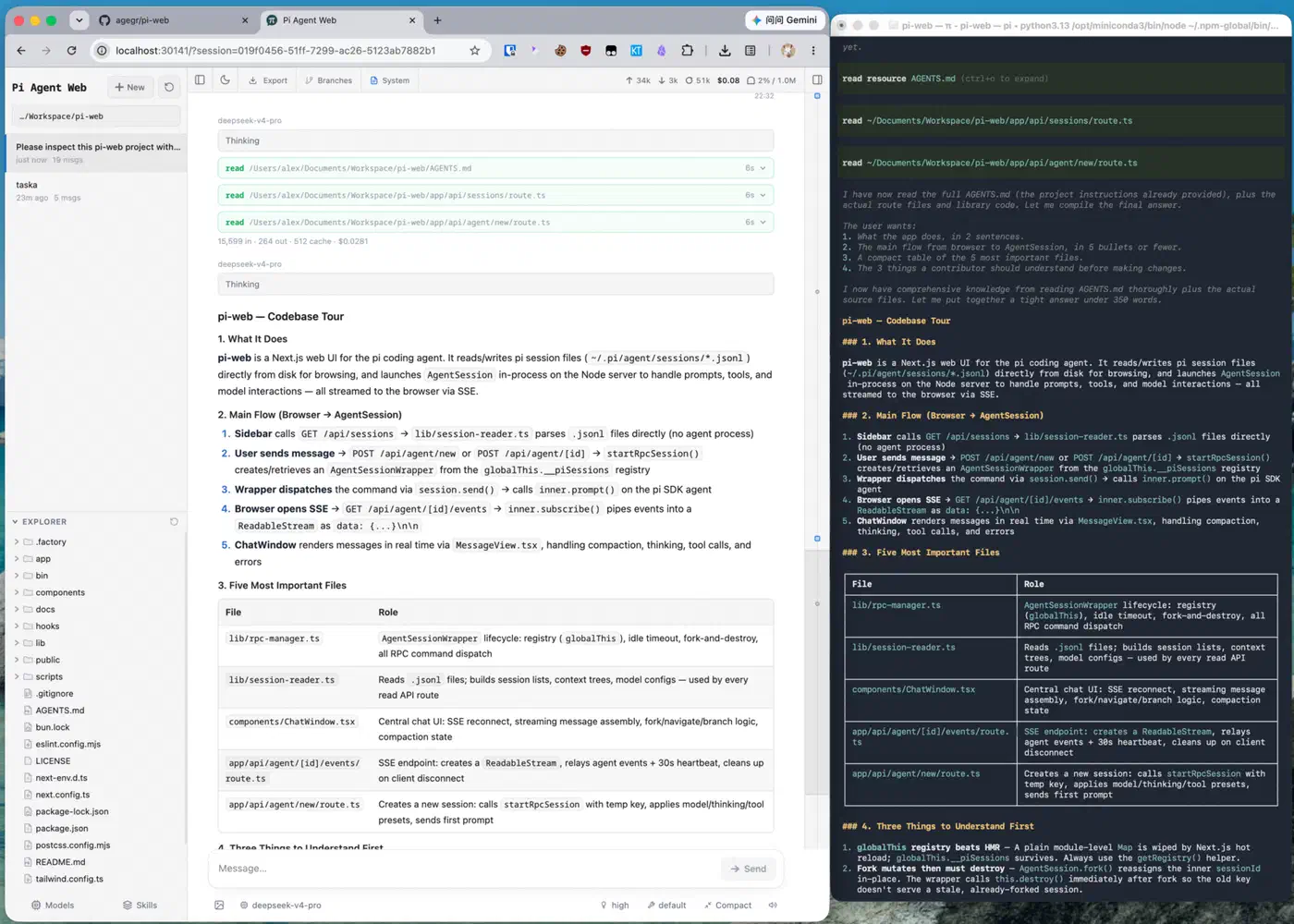
Forking lets you continue from an earlier message, or split a session into its own route. A wrong turn then costs you a branch instead of the whole thread.
Worktree switching sits in the sidebar. Pick a Git worktree, and new sessions plus the file explorer follow it. The worktree docs spell out the catch: the switcher only appears when the selected folder is a Git repository root.
| What you want to do | In the pi terminal | In Pi Web |
|---|---|---|
| Find last week’s session | Scroll back or hunt file paths | Pick it from a project tree |
| Undo a bad turn | Start the thread again | Fork from the message before it |
| Work on two branches | Juggle checkouts by hand | Switch worktrees in the sidebar |
| Check context use and cost | Run a command | Read the top bar |
| Change model or API key | Edit config files | Use the settings panel |
A file browser sits on the left and a preview pane on the right, showing source, docs, images, audio and PDFs while the agent works. Markdown renders cleanly here, which is the format you get when a saved web page goes through html-to-markdown or markdownify. The top bar also switches interface language, and the repository carries Chinese, Japanese and Russian documentation.
Pi Web brings no agent of its own. All the work still runs through pi underneath, so picking a different terminal agent means giving Pi Web up too.
Reading the session files instead of proxying the agent
Pi writes every session to disk as it works. Files land in ~/.pi/agent/sessions/ as one .jsonl per session, and PI_CODING_AGENT_DIR points the reader at a different agent folder. Pi Web opens those files directly.
Sessions you ran before installing Pi Web show up straight away, because the files never moved.
The terminal and the browser also become two views of the same state. You can start a session in one and pick it up in the other halfway through a task.
Forking is cheap for the same reason. A fork writes a new .jsonl file, so two branches then live as separate sessions and diverge freely. The “edit from here” action is the lighter version: it creates another branch inside the same file. Neither replays anything through the model, which is why jumping back to an old message is instant.
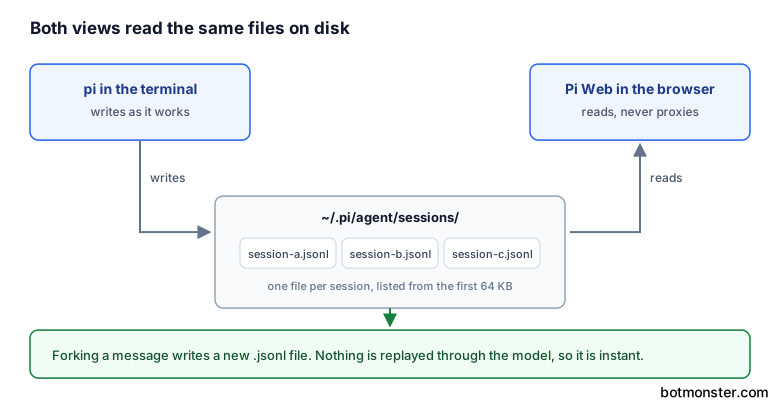
Reading the file directly also keeps the top bar numbers honest. Context usage, cost and compaction state are pulled straight from the session record.
Long sessions do not choke the sidebar either. To build the session list, Pi Web reads only the first line of each file and gives up after 64 KB.
The parsing comes from pi itself, through the SessionManager class in the @earendil-works/pi-coding-agent package, pinned to an exact version. A format change upstream therefore has to wait for a version bump in that package before Pi Web can read the files again.
The security question you have to answer first
The project is blunt about the risk in its README: Pi Web can invoke a high-privilege agent. Anyone who reaches an unprotected instance can drive an agent that edits files and runs commands on your machine.
Authentication is off unless you turn it on. Leaving PI_WEB_PASSWORD unset or empty means no login at all, on any page.
Set it, and you get HTTP Basic Auth with the fixed username pi. That covers the interface and every API endpoint.
Basic Auth does not encrypt the password in transit, though. On plain HTTP over a network you do not trust, the credential is readable by anyone watching. The project’s instruction is explicit: do not expose plain HTTP to the internet. Put HTTPS in front of it with a trusted reverse proxy, or reach it over a private network.
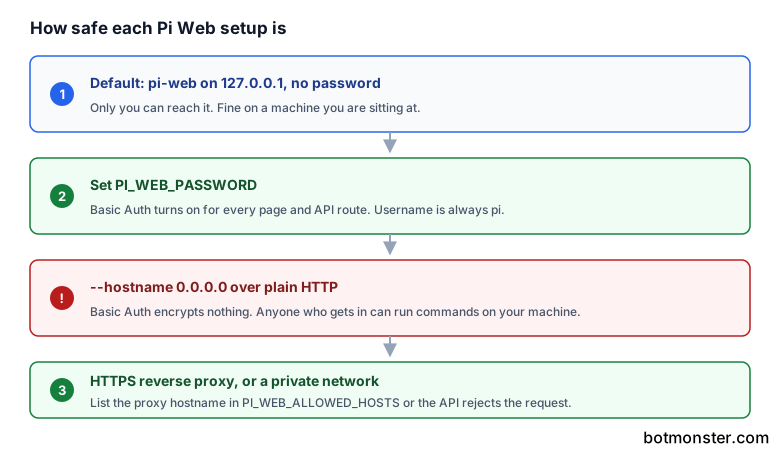
A host allowlist backs that up. API requests accept loopback names, IP literals and the bind hostname, plus any exact names you list in PI_WEB_ALLOWED_HOSTS. A reverse proxy with a different external name needs that variable set, or requests get rejected.
File reads have their own boundary. Pi Web only serves paths under the working directories in your sessions and their project roots. It also resolves symbolic links before deciding, so a symlink cannot walk out of the allowed set.
There is no rate limiting and no audit log, so an exposed instance leaves you no record of who ran what.
Server-side model and API calls honor the standard HTTP_PROXY, HTTPS_PROXY and NO_PROXY variables.
Run Pi Web on your machine with a password
Check your Node version
Pi Web needs Node.js 22.19.0 or newer. Run node --version before anything else, because an older runtime fails at startup.
Start it without installing
Run npx @agegr/pi-web@latest. It starts the server and opens your browser at http://127.0.0.1:30141.
Or install it for repeat use
Run npm install -g @agegr/pi-web, then start it any time with pi-web. The package is published on npm as @agegr/pi-web, so there is no clone and no build step.
Set a password before you go further
Start it as PI_WEB_PASSWORD='a-long-random-password' pi-web. The username is always pi, and every page and API endpoint is then protected.
Pick a port if the default clashes
Use pi-web --port 8080, or set PORT=8080 in the environment. The -p short flag does the same job.
Only then consider network access
pi-web --hostname 0.0.0.0 exposes the server to your network. Basic Auth encrypts nothing, so put HTTPS in front of it with a reverse proxy, or reach it over a private network instead.
Tell it about your proxy hostname
If a reverse proxy answers on a different external name, list that name in PI_WEB_ALLOWED_HOSTS. Otherwise API requests from the browser get rejected as unknown hosts.
How far along is it?
Pi Web is MIT licensed, written in TypeScript, and release v0.8.6 is still short of a version one. Around 32 issues and pull requests sit open.
The project pushed 86 npm releases inside its first five months. The v0.8.6 notes read as a normal mix of small features, Safari and iOS fixes, and session lifecycle bugs.
This is a community front end, and the agent it wraps is a separate project by a different author. That upstream has itself moved house, from badlogic/pi-mono to the earendil-works organization. So you are tracking two upstreams and a session format you do not control.
Set PI_WEB_NO_OPEN=1 and it starts without launching a browser, which is what a background service needs.
The best use today is a second window on the machine where you already run pi, with a password set. Expose it as a remote console on an open network, and you have handed a shell to whoever finds it. To reach the same box from your phone, a proper Android SSH client over a private tunnel is the safer route. If your agent is Claude Code or Codex instead, a phone remote for coding agents gives you a touch interface while the work stays on your machine.