 Botmonster Tech
Raven is a C GUI library that Rust and Python can drive

This post is open for corrections. Highlight any line of text to challenge it or ask for a clearer explanation and leave a comment.
Raven is a C GUI library for editors and tools, and Rust, Python, Go or C# can drive its windows from one XML file. Compared with Dear ImGui, it swaps per-frame UI code for a retained widget tree with docking, screen reader support, live reload and a visual designer. Its API still changes, so start with side projects.
Key Takeaways
- Raven builds your app’s window from an XML file, in almost any language.
- Save the XML while the app runs and the window updates on the spot.
- It ships docking panels, a code editor, a node graph and a visual designer.
- Pick Dear ImGui for in-game debug panels, Raven for full desktop tools.
- It is young and its API still changes, so try it on side projects first.
What is Raven?
Raven is a desktop UI toolkit for the software people build to make other software, such as level editors, shader tools, note apps and internal dashboards. It does not target phones or websites. The public API comes from one header, #include <Raven.h>. Each function follows the pattern R<object>_<action>, so you get names like Rwindow_create and Rbutton_set_text.
The build needs CMake and any C11 compiler. On Linux, the X11 development headers are the only extra package. Vulkan headers download during configuration, and no Vulkan library is linked at build time. On Debian or Ubuntu, a full build looks like this:
sudo apt install build-essential cmake git libx11-dev ninja-build
git clone https://github.com/oscar-soirey/Raven.git
cd Raven
cmake -S . -B build -G Ninja -DCMAKE_BUILD_TYPE=Release
cmake --build build --parallel
Raven runs on Windows, macOS and Linux. On Linux it opens native Wayland windows and falls back to X11 where Wayland is not available.
Your app owns the loop
Raven has no event loop of its own. Your program asks for each frame, using the call that fits the app:
while (Rdraw_frame()) {            /* a game or an engine: never waits      */
    update_and_render_my_scene();
}

while (Rwait_frame(-1.0)) {}       /* a tool: sleeps until something happens */
A window where nothing changed is not drawn again. A tool left open all day sleeps between events.
Layout, memory and threads
Layout copies the two-pass model of Slate, the UI framework inside Unreal Engine. Each widget first measures the size it wants, bottom-up. Then each panel hands out rectangles to its children, top-down. Only the part of the tree that changed gets measured again.
Raven never calls malloc: it takes 4 MB regions from the system and hands them out through its own TLSF heap. Apps that want control can plug in their own allocator with Rset_allocator. Each handle carries a generation counter, so a call on a deleted widget reports an error instead of crashing.
One UI thread owns the widgets, worker threads run your jobs through Rtask_run_async and Rparallel_for, and a render thread runs viewport draw callbacks. Background work touches the UI only by posting a task with Rtask_post.
Raven is licensed under Apache 2.0, so apps built with it can stay closed source.
One XML file drives the window from any language
Raven splits layout from logic. The interface lives in an XML file, and your program loads it, binds the actions it names and looks up widgets by name. Here is the smallest example:
<!-- main.xml -->
<Window Title="Hello" Width="400" Height="200">
    <VBox Spacing="12" Slot.Padding="24">
        <Label Name="status">Not clicked yet</Label>
        <Button Text="Click me" Style="Primary" OnClicked="hello.clicked"/>
    </VBox>
</Window>
The Rust side:
use raven::*;

fn main() {
    unsafe { Rinit(R_BACKEND_VULKAN) };
    let window = unsafe { Rwindow_create_from_xml_file(cstr("main.xml").as_ptr()) };
    let mut clicks = 0;
    action_bind("hello.clicked", move |_sender, _action| {
        clicks += 1;
        let text = cstr(&format!("{} clicks", clicks));
        unsafe { Rlabel_set_text(widget_find(window, "status"), text.as_ptr()) };
    });
    unsafe { while Rdraw_frame() != 0 {} Rshutdown() };
}
The Python version uses the same function names through a ctypes binding:
import raven as r
r.Rinit(r.R_BACKEND_VULKAN)
window = r.Rwindow_create_from_xml('<Window Title="Hi"><Button Text="Quit" OnClicked="quit"/></Window>')
r.Raction_bind("quit", lambda sender, action, user: r.Rquit(0))
while r.Rwait_frame(-1.0):
    pass
r.Rshutdown()
Bindings for ten languages
A script called tools/bindgen reads the C headers and writes the bindings. They cover C++, Python, Rust, Go, C#, Zig, LuaJIT, Java (through the Java 22 foreign function API), Odin and Bun. Each one exposes all 937 functions under the same names, and the test suite covers all of them except Odin.
Nothing gets generated inside your own project, though. A Rust app builds with Cargo, a Go app with go build, a C# app with dotnet, and Python runs the script as is. examples/languages/ holds the same program in eight languages, all loading one main.xml.
Prebuilt packages exist on PyPI, NuGet, crates.io, LuaRocks and Maven Central. The Python package installs with one command:
pip install raven-guiHowever, those packages trail the repository, which changes daily. Building from source gets you the features described here.
Live reload keeps your state
Save the XML while the program runs and the window follows. Widgets the edit didn’t touch keep their handles, callbacks, typed text and scroll position. Theme files and custom tag files are watched too, and RAVEN_LIVE_RELOAD=0 turns the feature off.
For shipping without loose files, an interface can be compiled into the binary as a string, with include_str! in Rust or a plain C string.
What this C GUI library ships for editor-style apps
Layout and windows:
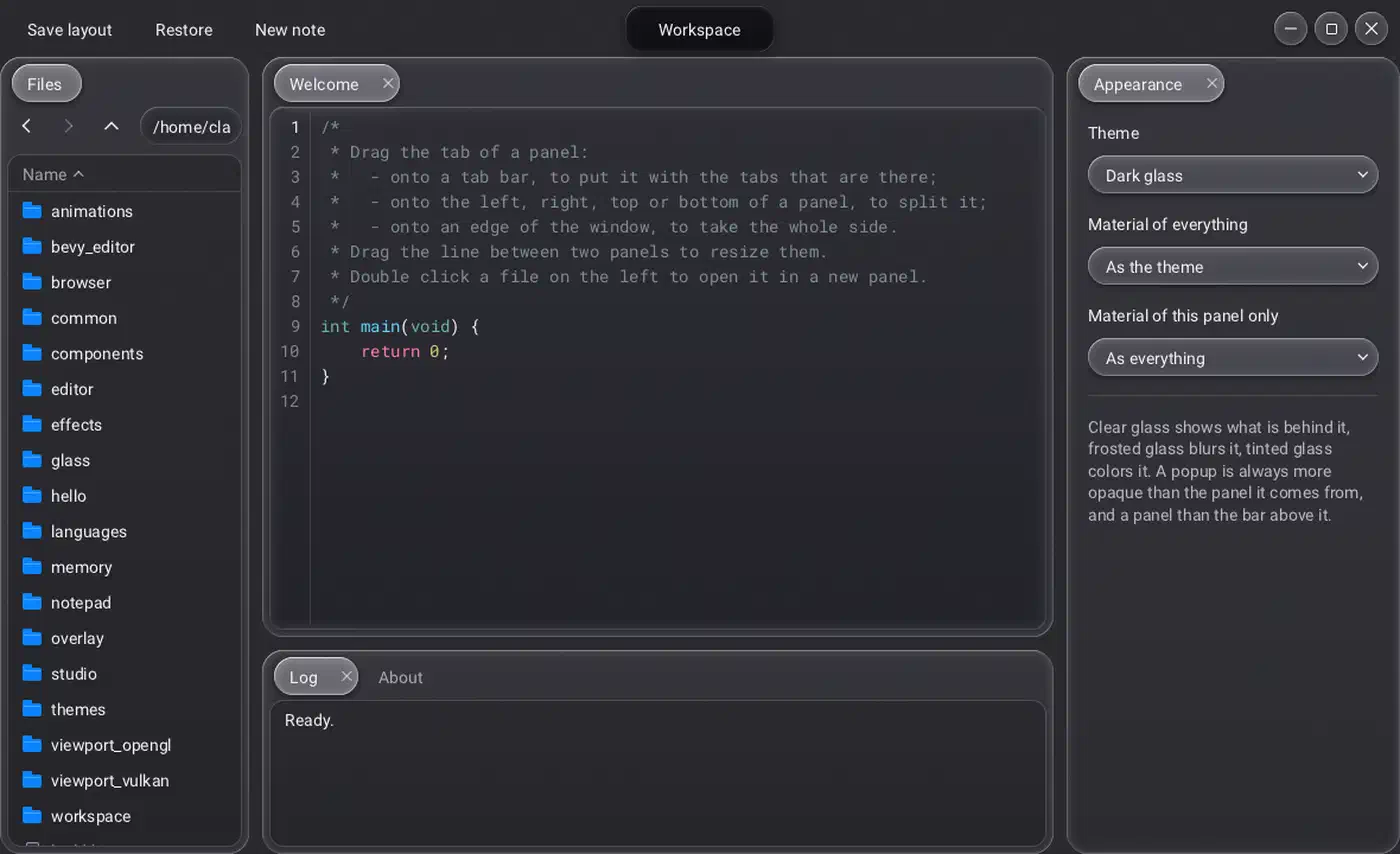
- Docking gives tabbed panels and tear-off windows, and saves the arrangement as a short text string.
- Custom header bar replaces the system title bar while keeping Windows snap working.
- Viewports host 3D scenes through zero-copy Vulkan image views, OpenGL via shared memory, or your own draw calls inside Raven’s render pass.
Editors and data widgets:
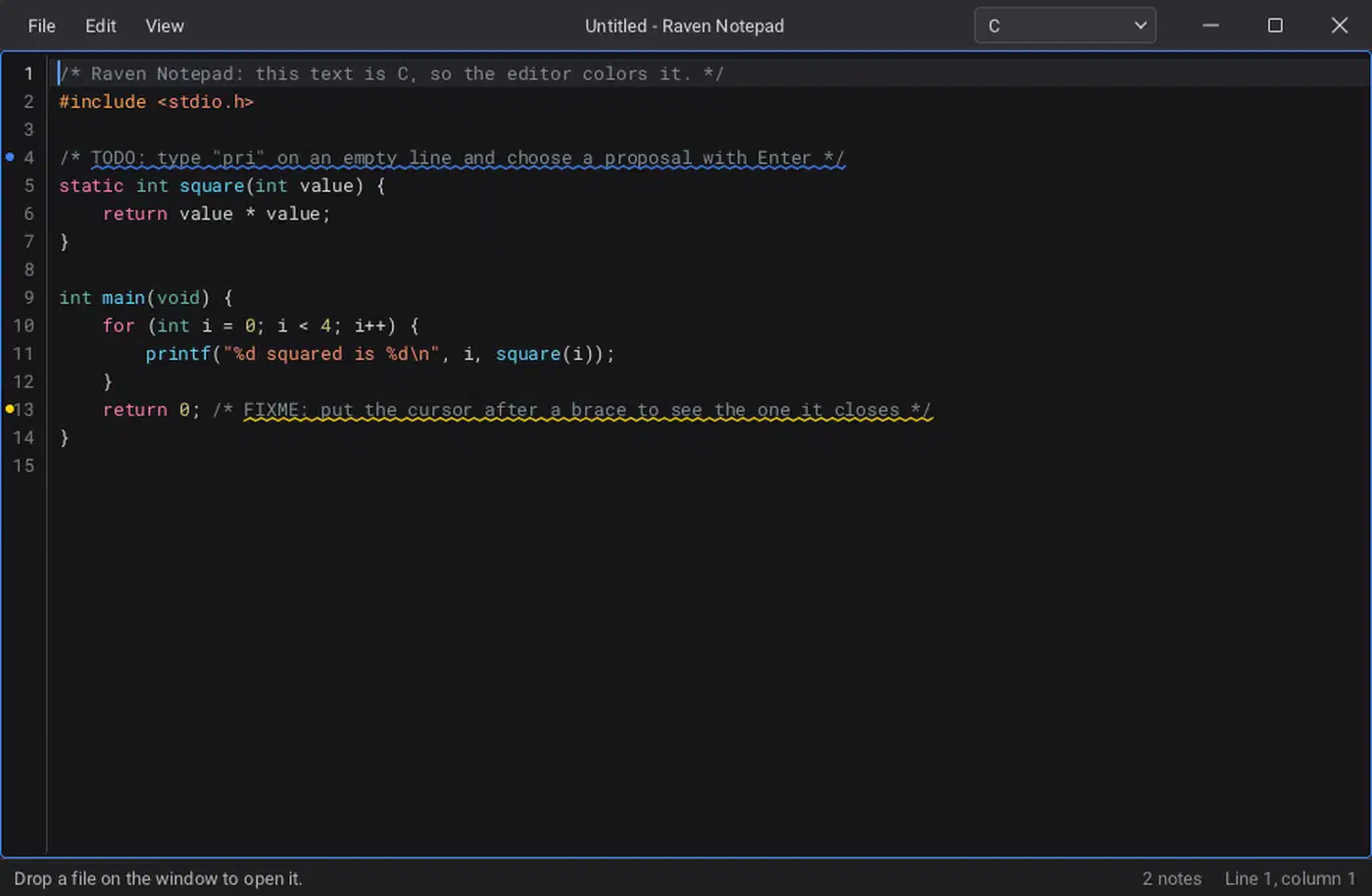
- Text editor colors 13 built-in languages, with completion, bracket matching and markers. It has no LSP client, but a completion callback and markers are where one would plug in.
- Node graph, timeline and color picker all appear together in
examples/studio. - Markdown renders inside labels and editors.
Looks, reach and debugging:
- Looks copy Windows 11, macOS (including the macOS 26 glass style) and GNOME, plus Raven’s own; themes layer on top.
- Glass materials come in clear, frosted and tinted, per widget or app-wide.
- Screen readers work out of the box through UI Automation on Windows, NSAccessibility on macOS and AT-SPI (Orca) on Linux. Text scaling, high contrast and color-blindness filters come with them.
- Translations load from CSV tables, with right-to-left text and emoji.
- raven_web shows web pages by driving an installed Chromium-family browser, Edge on Windows. It bundles no browser of its own (how it works).
- Inspector opens a window with the live widget tree and the layout, paint and render cost of each frame.
Touch, pen and trackpad input landed in version 0.2.1 across all four window systems. Taps click, fingers scroll with inertia and two fingers pinch to zoom, and apps get all of this without writing input code.
A 3D scene editor in one XML file
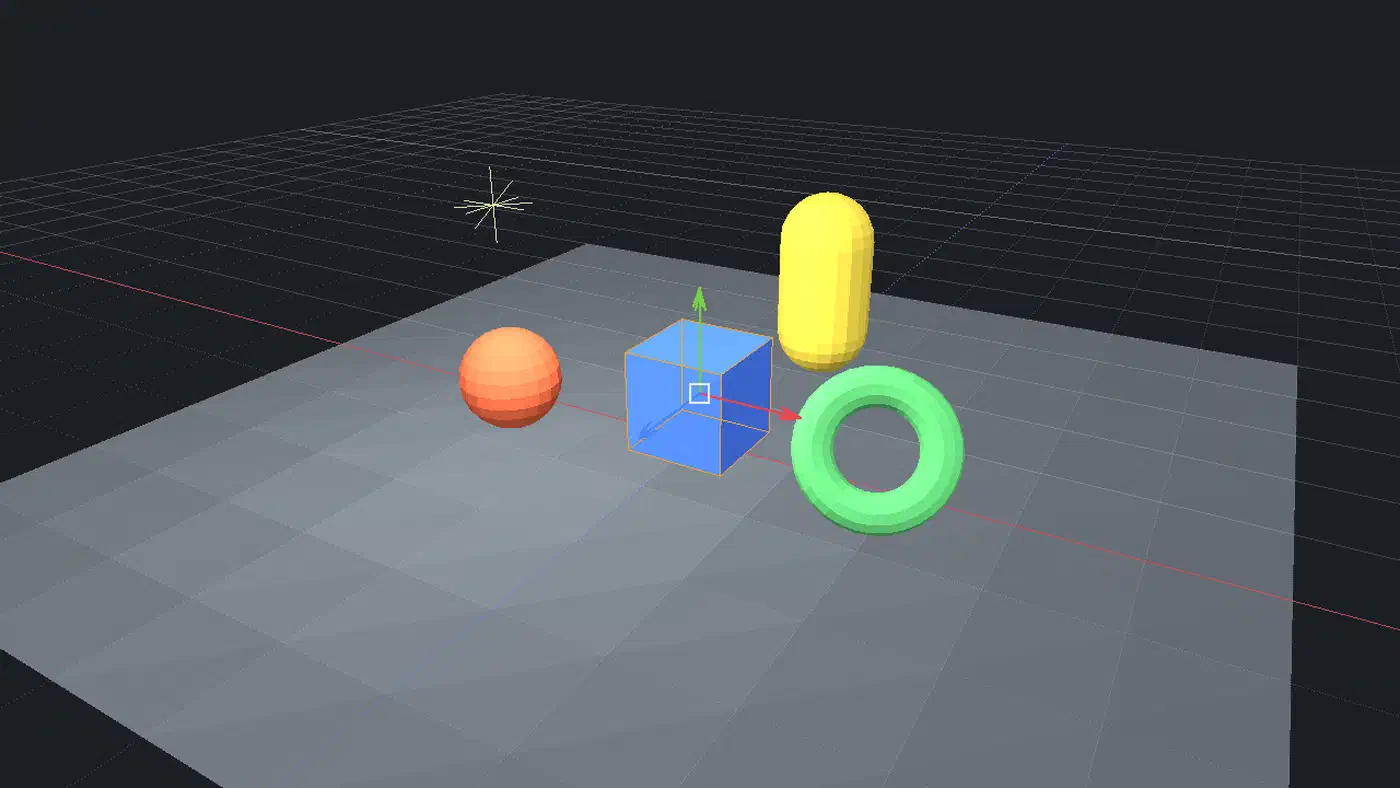
The flagship demo is bevy_editor, a 3D scene editor written in Rust. It has a hierarchy, an inspector, gizmos to move, rotate and scale, undo and scene files. Its interface is a single editor.xml, compiled into the program with include_str!. Bevy draws the scene into the viewport, and a software renderer takes over when Bevy is absent.
The designer and theme editor
Two companion tools make the XML approach practical for people who would rather not hand-write layout files. raven_designer is an editor for .xml interfaces in a folder. It compiles nothing, because your program lives elsewhere in its own language.
The designer has four tabs, switched with Ctrl+1 to Ctrl+4:
- Window edits interface files in the visual editor.
- Widget edits custom tag libraries.
- Theme embeds the theme editor.
- Translations shows CSV tables as a grid.
Inside the Window tab, five views stay in sync: a widget palette, a tree, a live preview, a property panel and the colored XML text. When the XML has an error, the designer lists it. The preview keeps showing the last good version while you type broken markup.
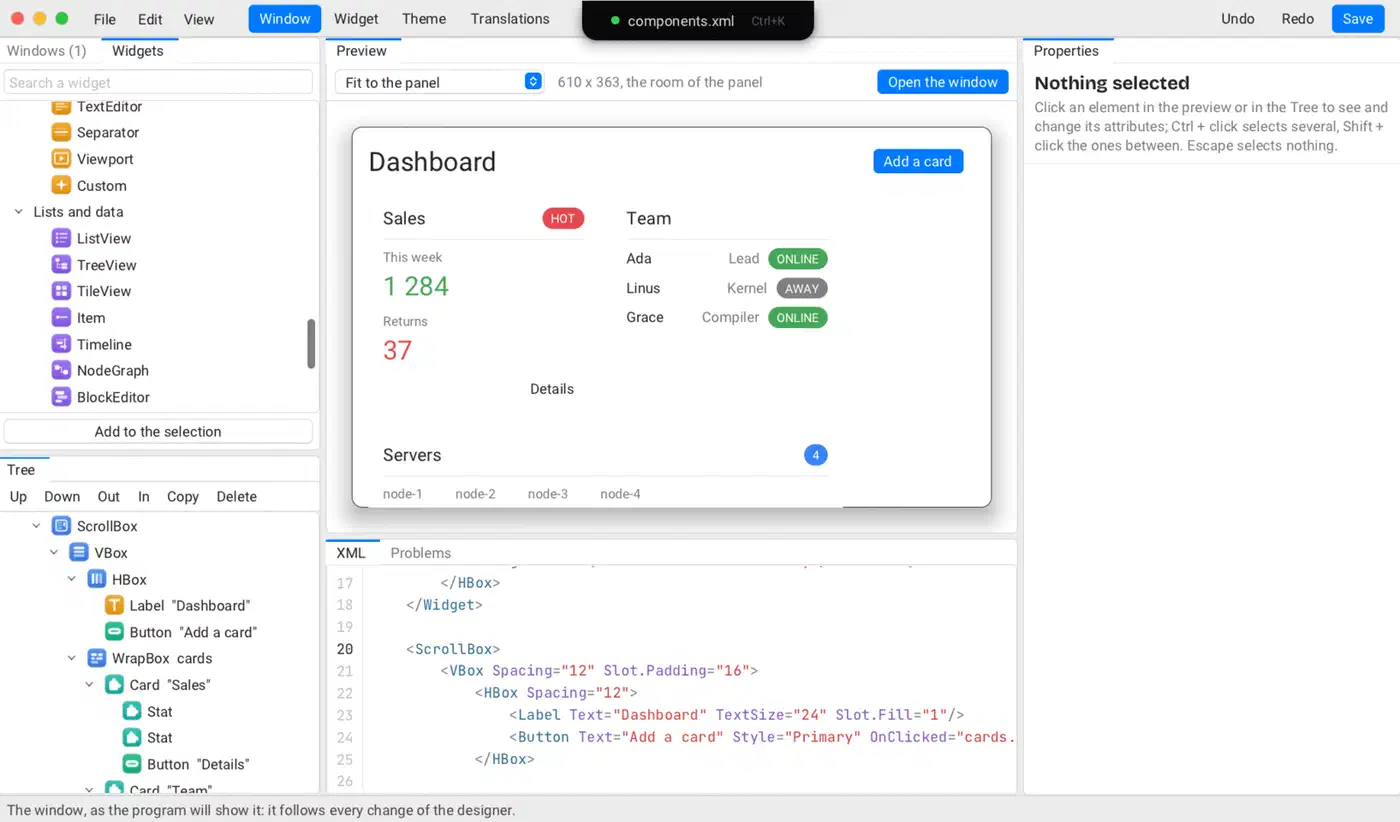
The preview renders at phone, tablet, laptop or desktop size, in any theme and any language, right-to-left included. F6 makes it respond to clicks, and F7 opens it in its own window. A Ctrl+K command bar searches widgets, files and commands such as add slider or wrap in a vbox.
The theme editor, raven_theme_editor, builds a full palette from one accent color. It checks text contrast against WCAG 2 and offers a one-click fix for each failing color pair. Both tools use only the public API, so they double as large worked examples.
Raven vs Dear ImGui: which one fits your tool?
Dear ImGui is the default answer for C and C++ tool UIs. It is immediate-mode: the UI is C++ code that runs every frame, with no layout file and no persistent widget tree. Game engines and debug overlays have used it for years.
Raven is retained-mode: the widget tree persists between frames. In Dear ImGui, the button exists because this code runs each frame:
if (ImGui::Button("Save"))
    MySaveFunction();
In Raven, the button lives in the XML file, and the code binds its action once at startup:
<Button Text="Save" OnClicked="file.save"/>Raction_bind("file.save", on_save, NULL);| Raven | Dear ImGui | |
|---|---|---|
| Written in | C | C++ |
| UI model | Retained | Immediate |
| Layout file | ✅ | |
| Visual designer | ✅ | |
| Live layout reload | ✅ | |
| Docking | ✅ | ✅ |
| Screen readers | ✅ | |
| Right-to-left text | ✅ | |
| Native OS looks | ✅ | |
| Maturity | New | Mature |
Dear ImGui ships docking in its docking branch, which tracks master closely. Dear ImGui also skips accessibility and full internationalization on purpose, because it targets programmer tools rather than end users.
When to pick each
Pick Dear ImGui for debug panels inside an existing engine or renderer. Per-frame code fits naturally there, and years of answered questions help when something breaks. Pick Raven for a standalone desktop tool that needs OS-native windows, screen readers, translations or a designer-friendly workflow. Raven also wins when the app is written in Python, Go or C#. A pure Rust team that also wants web and mobile builds should look at Dioxus, a cross-platform Rust app framework. A tool that can live in a terminal may only need a Textual TUI in Python.
Raven has a single maintainer, its API can still break, and far fewer of its questions have answers online.
How fast is it, and what is still missing?
The performance numbers come from raven_benchmark on a 2-core virtual machine, release build, with no GPU. The test tree holds 12,000 widgets and 27,800 primitives:
| Task | Time |
|---|---|
| First layout | 2-3 ms |
| Full repaint | 1.3-2.3 ms |
| One label change | 0.03-0.05 ms |
A full repaint goes out in one draw call. These are the developer’s own numbers, so run the benchmark on your hardware before you plan around them.
Glass materials have only been timed on SwiftShader, a software Vulkan driver, at about 250 ms per frame at 1100x720. That figure measures the CPU rasterizer, so the GPU cost of glass is still unknown.
What has been tested
The headless test suites run clean under AddressSanitizer, UBSan and ThreadSanitizer. The renderer has run on physical GPUs on Windows, macOS and X11. Native Wayland, however, has only been tested against a compositor written for the test suite. It has not run on GNOME, KDE or wlroots with a GPU yet.
What is not built yet
Several missing features could block a project, and the roadmap has not closed them yet:
- Input methods for Chinese, Japanese and Korean on Wayland.
- Window positioning on Wayland, which the protocol does not allow.
- OpenType shaping for Indic scripts.
- Editor features such as multiple cursors, search and replace, and code folding.
- Dragging out from a Raven window into another app.
Pin a commit when you depend on Raven. For a side project or an internal tool where you control every upgrade, Raven already does more out of the box than most C toolkits. For anything you must ship to customers next quarter, wait for the API to settle.