 Botmonster Tech
Portainer 3.0 is the push your homelab needed to switch

Portainer 3.0 is your cue to switch: it ships with no Community Edition, and the free 2.x line gets fixes but no new features. Skip the Kubernetes path Portainer is pushing. Move your compose stacks to a tool with no paid edition to protect, like Komodo or Arcane. A three-question exit test shows why Dockhand is riskier.
Key Takeaways
- Portainer 3.0 ships with no Community Edition, only a free three-node tier.
- Free Portainer stays on 2.x with fixes but no new features.
- Portainer wants Docker users on Kubernetes, which most homelabs never needed.
- Komodo and Arcane are fully free, with no paid tier to protect.
- Keep your compose files in git so the next tool swap takes minutes.
What is changing in Portainer 3.0?
Portainer CEO Neil Cresswell announced the new major version on the company blog. He wrote that one codebase could no longer stay fully featured across Docker, Podman, Swarm and Kubernetes. Every new feature had to be built three times, so 3.x is a Kubernetes-first codebase.
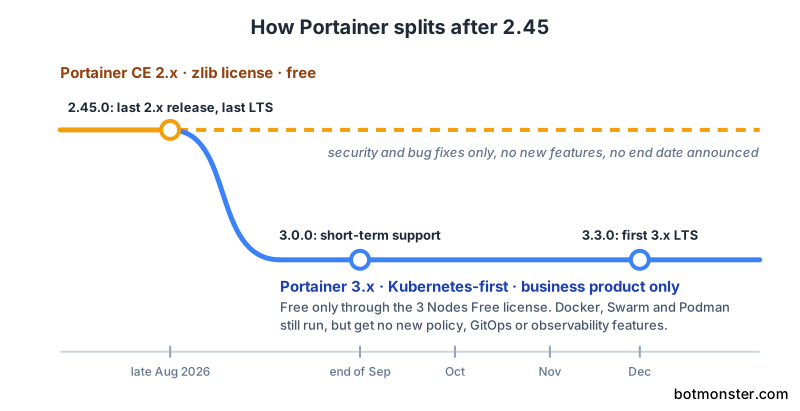
Portainer 2.45 is the last 2.x release and the last long-term-support (LTS) build on that line. Version 3.0.0 follows as a short-term release, and 3.3.0 in December becomes the first 3.x LTS.
There is no 3.x build of the Community Edition (CE):
CE has been the community edition for the last ten years. It will continue on the 2.x codebase. It will not receive the 3.x changes.
The only free way onto 3.x is the 3 Nodes Free program. It gives you up to three nodes of the business product at no cost. Portainer says that means nobody in the community loses access. However, that’s a free license key for a commercial product, and the code behind it is closed.
Docker, Swarm and Podman environments still work in 3.x, but they move down the list. They get no new policy, GitOps or observability features. Meanwhile, the five new single-purpose consoles (Portainer-Run, IDP, Command, Operations and AiGrid) are Kubernetes-only and aimed at enterprise teams.
For Docker users, Portainer offers two bridges:
- KubeSolo, a single-node Kubernetes build that runs in under 200 MB of RAM, small enough for a mini PC.
- Portainer-D2K, a translator that fakes a Docker host on top of Kubernetes, so
dockeranddocker composecommands still work.
The announcement also calls Docker’s future uncertain. As evidence, it links to the CEO’s own Substack rather than anything Docker has published.
Does Portainer CE still work for Docker homelabs?
Yes, and it will keep working for a while. Portainer promises security updates, bug fixes and some back-ported 3.x features for the 2.x line. The announcement even calls staying put “a supported decision.”
The announcement gives no end date for 2.x support, and a product line that only gets fixes is one the vendor has stopped designing for. u/_TheBull laid out the likely path in the r/homelab thread. In that view, 2.45 gets patched for a few years and slowly falls behind 3.0. Then it forces a choice between Kubernetes and a different Docker tool.
In the r/selfhosted thread, u/Vezajin2 said they never understood the Portainer hate but are moving anyway. They’d rather switch on their own schedule than scramble after a security flaw lands in an unsupported 2.x.
Swarm users have the most to lose. Portainer was one of the few friendly web interfaces for Docker Swarm, and 3.x demotes Swarm along with the rest of Docker. u/yanni99 called Swarm the middle ground between simple setup and high availability. Komodo added Swarm management in its v2 release, and Arcane can deploy Swarm stacks too, so both give Swarm users a place to land.
CE’s code sits under the permissive zlib license, so anyone can fork it. u/DDFoster96 already runs a fork that strips out the Business Edition ads. Even so, a fork only buys time, because someone still has to maintain it as Docker changes.
Why Kubernetes is the wrong fix for most homelabs
Portainer’s suggested path runs through Kubernetes. You either convert stacks to Kubernetes manifests with an upcoming migration add-on, or you run KubeSolo with D2K and keep typing docker.
For a homelab, D2K is the weaker half of that plan. A translation layer on top of Kubernetes means debugging two systems when something breaks. Portainer has also said Docker-style environments get no new features. D2K has 32 GitHub stars and KubeSolo about 560. That means very few people have run either one at home long enough to find the rough edges.
The apps homelabs run also tend to ship Docker Compose files first. u/lastdancerevolution named Plex, Frigate and Immich as apps they run on Docker and liked editing in Portainer. u/JL421 replied that Plex and Immich do have official Kubernetes charts, which is fair. Frigate is the stronger example, since its install docs lead with Docker Compose. Media stacks are the same: Plex or Jellyfin usually ships in one compose file next to helpers such as Sonarr for TV episodes.
u/_TheBull also noted that a fair few r/homelab users moved their setups to Kubernetes and came back 6 to 12 months later.
u/wirenutter made the case for Kubernetes: a single-node cluster is easy to set up once you run several stacks. You can then use only the parts of Kubernetes you need. That holds for people who want to learn Kubernetes. Those people are better off learning it directly on a standard distribution, because a vendor’s shim adds a layer they’d have to unlearn later. If you just want your containers to keep running, stay on compose.
Self-hosters had already left Portainer
The two Reddit threads went up within minutes of each other on announcement day. The r/selfhosted post drew 87 comments in its first few hours, and most of them named a tool the commenter had already moved to. The top comment summed up the mood:
Tldr; there is no money for us with you selfhosting guys
The next most popular reply came from someone who had left long before:
Switched to Komodo a long time ago anyway, I guess it’s time to officially pull the plug on the dusty Portainer container at this point
u/parker_fly took a calmer view in a reply that drew 76 votes. They called it a reasonable business decision that happens to be bad news for home users.
Counting tool names across 85 comments in the r/selfhosted thread shows where people went:
| Tool | Mentions |
|---|---|
| Dockhand | 16 |
| Komodo | 14 |
| Arcane | 13 |
| Dockge | 2 |
Dockge barely came up despite having the most GitHub stars of the four.
Some commenters argued that dropping CE will also cost Portainer paying customers. u/leoklaus pointed out that self-hosters who work in IT carry their tools into their jobs. u/dunklesToast said they would never have bought a company license without using CE at home first. The r/homelab poster compared the move to Netgate splitting pfSense into a free CE and a paid Plus edition.
Portainer alternatives compared: Komodo, Arcane, Dockhand and Dockge
| Tool | License | Paid tier | Multi-host | Swarm | Git deploys | Still shipping | Best for |
|---|---|---|---|---|---|---|---|
| Komodo | GPL-3.0 | None | Yes, unlimited servers via agents | Yes, since v2 | Yes | Yes | Many servers and GitOps habits |
| Arcane | BSD-3-Clause | None, sponsors only | Yes, via agents | Yes | Yes | Yes | A clean dashboard on one to a few hosts |
| Dockhand | BSL 1.1, Apache 2.0 in 2029 | $499 or $1,499 per host per year | Yes, via the Hawser agent | No | Yes | Yes | The most polish today |
| Dockge | MIT | None | Yes, agents since 1.4.0 | No | No, plain files on disk | No release since early 2025 | A thin editor over plain compose files |
Read the license column first, because it decides whether the rest of this table still holds in two years.
Komodo
Komodo runs a Core server plus a small Periphery agent on each host, with no limit on servers. Stacks can come straight from a git repo, and resource sync keeps the whole setup in git too. It came out ahead for git-driven homelabs in the earlier Komodo vs Portainer vs Dockge decision guide. That was back when Portainer CE was still a live product.
The interface has a learning curve. u/DrJubalHarshaw hated it after a week, while u/formless63 said it clicked once they did real deployments with it.
Arcane
Arcane pairs a Go backend with a SvelteKit web interface. It connects remote hosts through agents, scans images with Trivy and tracks image updates. It’s funded only through GitHub Sponsors, so there’s no paid edition waiting to take features away.
u/formless63 noted that Arcane renames things with its own vocabulary, so expect a short adjustment. u/ikschbloda270 asked whether Arcane can edit and redeploy standalone containers the way Portainer does. It can: Arcane 2.9.0 added standalone container editing, and 2.10.0 added an experimental Convert to Compose feature for running containers.
Dockhand
Dockhand has the most polish of the four, and its free edition has no host or user limits. Its Hawser agent manages remote hosts, and it can sync stacks from git. The pricing page also promises that the free edition stays free forever.
However, Dockhand runs the same business model as Portainer. The $499 SMB edition sells a commercial usage license, and the $1,499 Enterprise edition adds role-based access, LDAP and audit logs. The license terms allow internal business use on the free edition, so the two pages don’t quite agree. Read the terms before you run it at work. u/CosmicSeafarer was disappointed that scoped API keys sit behind the paywall. u/sha1checksum went further and predicted a license change or feature pull within two years.
Dockge
Dockge is the lightest option. It stores each stack as plain files under /opt/stacks, so docker compose can run them without Dockge at all. It has about 24,000 GitHub stars, but no release since 1.5.0 in early 2025. Treat it as a thin editor that may not get new features.
One more exit came up in the r/homelab thread: u/popeter45 expects some people to move their containers into Proxmox once it gets native compose support.
The exit test for your next Docker UI
Three questions tell you whether a tool could put you back in the same spot in two years:
- Is there a paid edition the free one competes with? A company with a paid tier eventually has to decide what the free tier loses.
- Is the license open source, or only source-available? GPL, BSD and MIT let the community fork and carry on. BSL blocks competing commercial offerings until its change date.
- Do your stacks live as plain files that
docker composecan run without the tool? If yes, the tool is disposable and switching takes minutes.
| Tool | No paid edition | Open source license | Plain compose files | Score |
|---|---|---|---|---|
| Portainer 3.x (3 Nodes Free) | No | No | No | 0/3 |
| Portainer CE 2.x | No | Yes, zlib | No | 1/3 |
| Dockhand | No | No, until 2029 | Yes, with git sync | 1/3 |
| Komodo | Yes | Yes | Yes | 3/3 |
| Arcane | Yes | Yes | Yes | 3/3 |
| Dockge | Yes | Yes | Yes | 3/3, but stale |
Komodo and Arcane are the only tools that pass all three and still ship regular releases. Two commenters reached the same rule on their own: u/captain_curt prefers community-driven projects over “the free version” of an enterprise product, and u/Fifthdread moved every stack to raw compose files and keeps Dockge and Komodo as optional helpers.
How to move your stacks out of Portainer
u/Hoshifuru set up everything through the Portainer web interface and now has to work out how to back it all up. None of the steps below touch your app data, and Portainer stays installed until the last step.
Back up the Portainer data volume:
docker stop portainer
docker run --rm -v portainer_data:/data -v "$PWD":/backup alpine \
  tar czf /backup/portainer_data.tar.gz -C /data .
docker start portainer
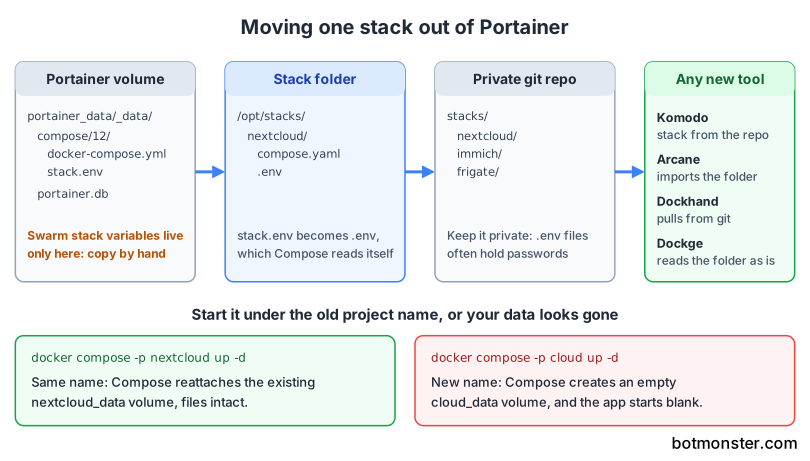
Find the compose files. Portainer keeps each stack in its data volume under
compose/<stack-id>/, sometimes inside av1orv2subfolder. The IDs are numbers, and each stack’s page URL in Portainer shows which number belongs to it. u/luiz127 pulled the files straight out of that folder, stopped the stacks in Portainer and brought them up in Arcane.sudo ls /var/lib/docker/volumes/portainer_data/_data/compose/Collect the environment variables. Variables typed into the Portainer UI are the part people forget, and u/DrJubalHarshaw’s advice is to take every one with you. For compose stacks, Portainer writes them to a
stack.envfile next to the compose file on every deploy, merged with any.envfile. For Swarm stacks, it passes them straight to the deploy command, so they exist only in Portainer’s database. Copy those by hand from the stack’s page.Give each app its own folder. Put the compose file in a path like
/opt/stacks/<name>/compose.yaml, and renamestack.envto.envbeside it. Docker Compose reads.envautomatically for variable substitution. If the compose file listsstack.envunderenv_file, update that line too. Then commit the folders to a private git repo, since.envfiles often hold passwords.Keep the old project name. Portainer uses the stack name as the compose project name, and named volumes and networks carry that name as a prefix. A new name means new, empty volumes. Stop the stack in Portainer, then start it from the new folder under the same name. Setting
name:at the top of the compose file does the same job. The volume list should show no new, empty copies:cd /opt/stacks/nextcloud docker compose -p nextcloud up -d docker volume lsConvert standalone containers. Containers created in Portainer without a stack need compose files first. Arcane’s Convert to Compose works on running containers, and Dockge can turn a
docker runcommand into a compose file.Hand the folders to the new tool. In Komodo, create a stack from the git repo or from files on the server. Arcane imports each folder as a project, Dockhand can pull from git, and Dockge reads the folder as it is. Once every container is healthy, remove Portainer, then the agent on each other host:
docker rm -f portainer
docker rm -f portainer_agent
Don’t delete the stacks inside Portainer after the move. Deleting a stack runs a compose down on that project name, which would stop the containers you just moved. Keep the backup file until you’re sure nothing is missing.
Portainer’s free edition lasted ten years and still runs fine today, so move now, while 2.x still gets patches and you get to pick the day. Once your stacks live as plain files in git, you can answer the next announcement like this one in an afternoon.