LogoBotmonster Tech
AI Smart Home Self-Hosting Coding Web Dev Hardware Bootpag Image2SVG Tags

Optimization

  • ◀︎
  • 1
  • 2
  • 3
  • 4
  • ▶︎
Tuning the Steam Deck OLED Kernel for Gaming Performance

Tuning the Steam Deck OLED Kernel for Gaming Performance

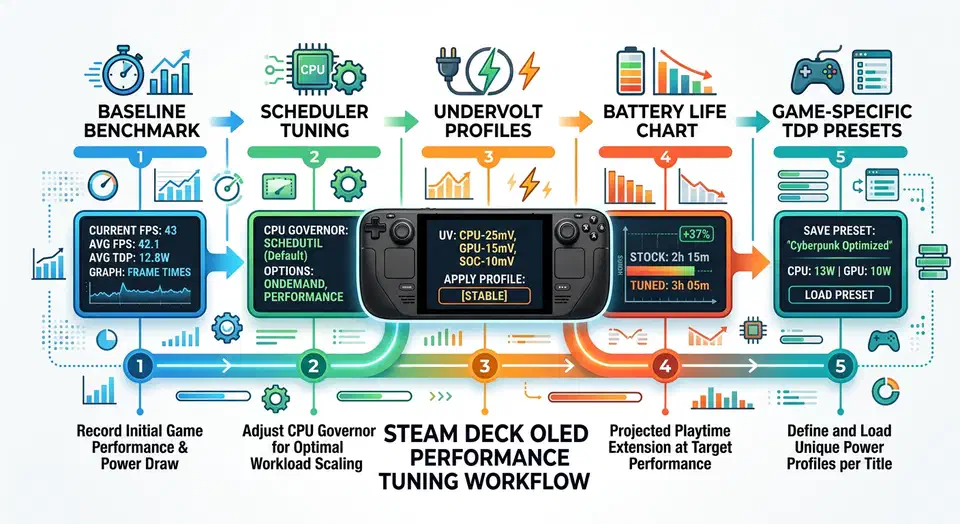
Steam Deck OLED tuning is no longer just about pushing sliders and hoping for more FPS. The stack is layered. Valve’s kernel, your Proton version, the game engine, and power policy all interact. Tune one layer alone and you often trade smoothness for crashes, or frame rate for battery drain.

This guide chases one goal: steadier frame times and longer battery life, without turning your Deck into a fragile science project. You get a safe workflow, specific kernel options, and game profiles you can reuse.

Solving Slow WiFi on Linux: Moving Beyond the 2.4GHz Bottleneck

Solving Slow WiFi on Linux: Moving Beyond the 2.4GHz Bottleneck

It’s a common frustration. You have a high-end Linux laptop with a cutting-edge WiFi card , yet your speeds are stuck in the single digits. Even on a fast fiber connection, the experience feels sluggish. Web pages hang, and file transfers take ages. Many users blame the drivers. But the cause is often more basic: the radio band you are connected to.

Modern WiFi hardware is very capable. But old networking setups often hold it back. Most routers today broadcast on two main bands: 2.4GHz and 5GHz, and more and more on 6GHz. The 2.4GHz band has better range and gets through walls well. It is also very crowded. Every neighbor’s router, your Bluetooth mouse, and even your microwave use this same space. That congestion leads to packet loss and big speed drops, no matter how fast your internet plan is.

Build Interactive Charts in Hugo without JavaScript

Build Interactive Charts in Hugo without JavaScript

Can you build interactive charts in Hugo without any JavaScript? Yes - by using Hugo shortcodes that transform CSV or JSON data into styled SVG graphics at build time. This “Zero-JS” approach produces charts that render instantly, work in every browser environment including RSS readers and print, and score significantly better on the page-speed metrics Google ranks on than anything built with Chart.js or D3.js .

The Problem with Client-Side Charting Libraries

Chart.js is excellent software. So is D3.js. But both carry a tax that static blog authors rarely think about until they run their first Lighthouse audit.

Hugo Builds: Parallel Rendering, Image Cache, Fingerprinting

Hugo Builds: Parallel Rendering, Image Cache, Fingerprinting

Hugo is one of the fastest static site generators ever built. That speed only holds when the project is set up well. A fresh Hugo site compiles in milliseconds. A production site with three hundred posts, SCSS pipelines, and hundreds of hero images can balloon past thirty seconds per build. Image caching, asset pipelines, and CI setup must be tuned with care.

This guide covers every layer of Hugo speed. It walks through the parallel render engine in recent versions, the image pipeline, CSS and JS bundling with fingerprints, WebAssembly modules for heavy client-side work, and CI/CD caching tricks. The goal is to make GitHub Actions and Cloudflare Pages builds as fast as local dev. Before you change any settings, run time hugo in the repo root to get a baseline. Measure each tweak against that number.

Core Web Vitals: Fix LCP, CLS, and INP

Core Web Vitals: Fix LCP, CLS, and INP

To pass all three Core Web Vitals, target three numbers. Get LCP under 2.5 seconds by preloading your hero image and cutting server response time. Get CLS under 0.1 by reserving explicit dimensions for all media. Get INP under 200ms by breaking long JavaScript tasks into smaller chunks. Diagnose all three with Chrome DevTools, Lighthouse, and the CrUX Dashboard for real-user field data.

Why Core Web Vitals Matter for SEO and User Experience

Google added Core Web Vitals to its ranking algorithm in 2021, and their weight has grown since. The March 2026 core update brought holistic CWV scoring. Google now aggregates performance data across your whole domain rather than judging it page by page. If 30% of your indexed pages fail LCP thresholds, that drags down the site-wide score even when your homepage is fast.

Fixing Wayland Screen Tearing on Linux Mint (2026)

Fixing Wayland Screen Tearing on Linux Mint (2026)

Screen tearing on Linux Mint in 2026 is rarer than in the X11 days. It still shows up on Wayland when the render pipeline is not in sync end to end. Most guides oversimplify and claim Wayland alone wipes out tearing forever. In practice, you need the right kernel, the right driver path, sane compositor settings, and monitor settings that match what your GPU can deliver.

This guide is for Linux Mint users on modern hardware, especially high refresh displays and mixed monitor setups. It walks through root causes, check commands, VRR setup, fractional scaling traps, NVIDIA steps, and a full troubleshooting matrix. By the end, you can tell whether tearing comes from compositor timing, GPU sync, display config, or a bad session choice for your hardware.

  • ◀︎
  • 1
  • 2
  • 3
  • 4
  • ▶︎

Most Popular

Gemma 4 vs Qwen 3.5 vs Llama 4: Which Open Model Should You Actually Use? (2026)

Gemma 4 vs Qwen 3.5 vs Llama 4: Which Open Model Should You Actually Use? (2026)

Gemma 4, Qwen 3.5, and Llama 4 compared on benchmarks, licensing, speed, and hardware so you can pick the right open model fast.

5 Open Source Repos That Make Claude Code Unstoppable

5 Open Source Repos That Make Claude Code Unstoppable

Five March 2026 repos extend Claude Code with autonomous ML, self-healing skills, GUI automation, multi-agent coordination, and Google Workspace access.

Cross-section of a translucent crystal brain threaded by red, gold, and teal attention ribbons resting on a doubly-stochastic matrix pedestal beside a guitar-tuning lab figure.

DeepSeek V4 Tech Report: 3 Tricks That Cut Compute 73%

DeepSeek V4 ships 1.6T parameters and 1M context using only 27% of V3.2's inference FLOPs. Inside the hybrid attention, mHC residuals, and Muon optimizer.

Cracked stone tablet engraved with a bulleted system prompt, four crossed-out goblin silhouettes repeated, a tiny goblin escaping with upvote-arrow sparks, a giant dollar-sign price tag, and figures refusing to step onto a glossier pedestal.

GPT 5.5 Reddit Reception: Goblins and the Cost Backlash

GPT-5.5 Reddit reception: viral goblin prompt leak, doubled pricing backlash, and 5.4 holdouts citing hallucination regressions in factual recall workflows.

What X and Reddit Users Are Saying about Claude Opus 4.7

What X and Reddit Users Are Saying about Claude Opus 4.7

How power users on X and Reddit reacted to Claude Opus 4.7: praise for agentic coding, token burn concerns, and teams' practical prompting habits.

Qwen3.6-35B-A3B: Alibaba's Open-Weight Coding MoE

Qwen3.6-35B-A3B: Alibaba's Open-Weight Coding MoE

Alibaba's sparse Mixture-of-Experts: 35B total parameters, 3B active per token. Q4 quantization runs on MacBook Pro M5, matches Claude Sonnet performance.

Alacritty vs. Kitty: Best High-Performance Linux Terminal

Alacritty vs. Kitty: Best High-Performance Linux Terminal

Alacritty vs Kitty in 2026: emoji and Unicode rendering, real benchmarks, latency, memory, maintainer reputation, and the right terminal for your workflow.

Like what you read?

Get new posts on Linux, AI, and self-hosting delivered to your inbox weekly.

Privacy Policy  ·  Terms of Service
2026 Botmonster